Smart Civic Dash Cam Buying Guide
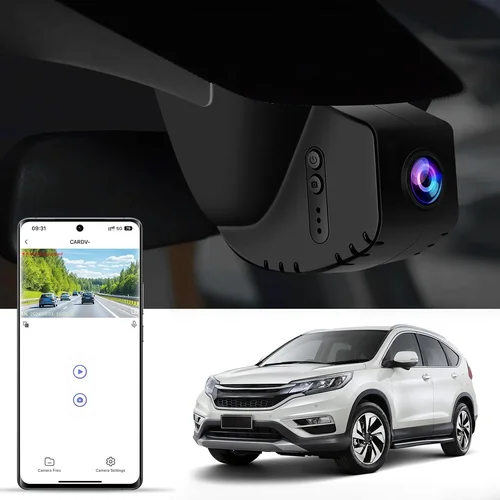
When shopping for a dash cam specifically designed to work seamlessly with your Honda Civic, you’re looking at more than just any old camera mounted on the windshield. The Civic’s unique dashboard layout, climate control placement, and interior design require careful consideration when selecting the right mounting system, video quality, and feature set. This comprehensive buying guide will walk you through everything you need to know about choosing the best dash cam for your Civic, from understanding technical specifications to evaluating real-world performance in various driving conditions.
You’ll learn how to match dash cam capabilities with your specific needs, whether you’re a daily commuter concerned about insurance claims, a weekend road trip enthusiast wanting to capture scenic drives, or someone who simply values peace of mind knowing their vehicle is protected. We’ll cover everything from budget-friendly options that won’t break the bank to premium systems with advanced features like parking mode, GPS tracking, and emergency recording. You’ll also discover common pitfalls to avoid, expert tips for getting the best value, and detailed comparisons of top-rated models currently available in the market.
The automotive aftermarket has seen tremendous growth in dash cam technology over the past decade, with manufacturers now offering sophisticated cameras that rival smartphone video quality. However, not all dash cams are created equal, and finding one that fits perfectly in your Civic’s cabin requires understanding both the technical specifications and practical considerations. From resolution and field of view to storage capacity and power management, we’ll dive deep into each factor that matters most when making your purchase decision.

What to Look for When Buying Dash Cams
1. Budget & Price Range
Your budget plays a crucial role in determining which dash cam features you can actually afford. Entry-level models typically range from $50-$100 and offer basic 720p recording with minimal additional features. Mid-range options ($100-$250) provide better video quality, larger storage capacity, and essential safety features like G-sensor and loop recording. Premium models ($250+) include advanced capabilities such as 4K recording, dual cameras, parking monitoring, and sophisticated AI features.
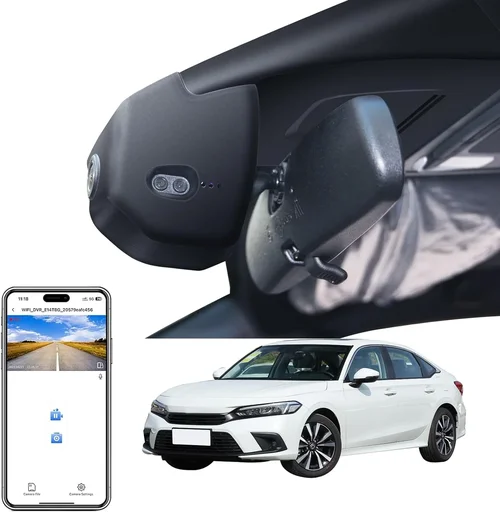
For Civic owners, consider that some mid-range models offer specialized mounting solutions designed specifically for Honda vehicles. These often come with custom brackets that ensure proper positioning without interfering with visibility of the instrument cluster or climate controls. Always factor in ongoing costs like SD card replacement and potential warranty claims when calculating your total ownership cost.
2. Performance Specifications
Video resolution remains one of the most important factors affecting footage clarity. While 720p might have sufficed a few years ago, today’s standard is 1080p Full HD, with many premium models offering 2K or even 4K resolution. Higher resolution provides clearer details for license plates, road signs, and facial recognition if needed for insurance purposes.
Frame rate significantly impacts motion smoothness and detail retention during fast-moving scenarios like highway merging or emergency braking. Most dash cams operate at 30fps, but some high-end models offer 60fps capability. The field of view (FOV) determines how much of the road ahead you can capture – wider angles (typically 120-170 degrees) provide better coverage but may introduce distortion at the edges.
3. Build Quality & Durability
The interior of a Civic can experience significant temperature fluctuations depending on weather conditions. Extreme heat in summer or cold in winter can affect electronics, so look for dash cams with wide operating temperature ranges (-20°C to +70°C is ideal). Additionally, consider the build materials – metal housings tend to be more durable than plastic ones, especially important if you plan to remove the camera periodically.
Mounting systems should securely attach to your windshield without causing damage or leaving residue. Many Civic-specific mounts use suction cups with reinforced bases that maintain stability even during aggressive cornering. Some models feature quick-release mechanisms that make removal easy for cleaning or switching between vehicles.
Water resistance ratings matter less for dash cams since they’re primarily used indoors, but protection against dust and minor splashes is still valuable. Look for IPX ratings if you anticipate using the camera in challenging environments or plan to clean it regularly.
4. Features & Functionality
Modern dash cams come packed with features that enhance usability and reliability. Loop recording automatically overwrites older files when storage fills up, ensuring continuous operation without manual intervention. G-sensors detect sudden movements or impacts, triggering emergency file saving to protect critical evidence.
Parking mode is particularly useful for Civic owners who park in public areas where theft or vandalism might occur. When connected to hardwiring kits (which draw power from your car’s battery), these cameras can monitor your vehicle while parked and record incidents like hit-and-runs or attempted break-ins. Motion detection helps reduce unnecessary recordings by only capturing activity when movement is detected.
GPS functionality adds valuable context to your recordings by embedding location and speed data directly onto video files. This information can be invaluable for accident reconstruction or simply tracking your driving routes. Wi-Fi connectivity enables wireless file transfer to smartphones, allowing you to quickly review footage or share clips without removing the SD card.
5. Brand Reputation
Established brands typically offer better customer support, more reliable firmware updates, and longer product warranties. Companies like BlackVue, Thinkware, Viofo, and Garmin have built strong reputations in the dash cam industry over several years of consistent performance and innovation.
Research user reviews across multiple platforms to get a balanced perspective on real-world experiences. Pay attention to complaints about software bugs, hardware failures, or poor customer service rather than isolated positive comments. Brands that actively address issues through firmware updates and responsive support teams generally indicate a commitment to long-term product satisfaction.
Consider how long the brand has been manufacturing dash cams specifically. Some companies started with other automotive products before entering the dash cam market, which can affect specialization and expertise in this particular space.
6. Warranty & Support
A comprehensive warranty demonstrates manufacturer confidence in their product’s durability and reliability. Most reputable brands offer at least a two-year warranty covering both parts and labor. Some premium models come with extended warranty options or accidental damage protection plans.
Check what’s included in the warranty coverage – does it cover screen burn-in, battery degradation, or just hardware failure? International warranty coverage matters if you travel frequently or plan to sell your Civic and install the dash cam in another country. Customer support responsiveness is equally important; brands with dedicated dash cam support lines typically resolve issues faster than general tech support.
7. Size & Portability
The compact size of most dash cams makes them unobtrusive in a Civic’s interior, but dimensions still matter for aesthetic integration. Slim designs (under 1.5 inches thick) blend better with the dashboard while providing adequate cooling for internal components. Length and width should complement your windshield mounting position without obstructing driver visibility.
Some Civic-specific models feature flush-mount designs that sit closer to the windshield rather than protruding outward. These can provide a cleaner appearance and better aerodynamic performance at highway speeds. Weight distribution is also worth considering – heavier units might shift during sudden stops or aggressive maneuvers.
If you plan to transfer the dash cam between multiple vehicles, look for lightweight models with universal mounting accessories. Some brands offer interchangeable mounting kits that adapt to different dashboard shapes and sizes, making multi-car setups more convenient.
8. User Reviews & Ratings
Real-world feedback from other Civic owners provides invaluable insights beyond technical specifications. Look for reviews that mention specific installation challenges, compatibility issues, or performance characteristics relevant to Honda vehicles. Users who describe how the dash cam handles Civic-specific features like automatic headlights or rain sensors can help you avoid compatibility surprises.
Paid review sites sometimes exaggerate positives or overlook flaws, so cross-reference multiple sources including manufacturer websites, retail platforms, and independent testing organizations. Pay attention to review recency – dash cam technology evolves rapidly, and older reviews may reflect outdated capabilities.
Consider the ratio of positive to negative reviews rather than focusing solely on star ratings. A model with 4.5 stars but hundreds of detailed reviews offers more trustworthy information than one with perfect scores based on minimal feedback.
Different Types of Dash Cams

Common Buying Mistakes to Avoid
❌ Mistake: Ignoring Storage Capacity Requirements
Why it’s bad: Many buyers underestimate how quickly dash cams fill up storage space, especially when recording in high resolution or with frequent parking mode activation. Without adequate storage, you risk losing critical footage when you need it most.
What to do instead: Calculate your expected storage needs based on recording duration and file sizes. A typical 1080p dash cam creates 2-3GB per hour of footage. If you drive 30 minutes daily, you’ll need at least 32GB of storage for a month of coverage. Consider models that support larger cards (64GB or 128GB) and verify compatibility with high-speed UHS-I or U3 rated cards for reliable performance.
❌ Mistake: Choosing Low Resolution for Future Proofing
Why it’s bad: While 720p might seem sufficient initially, higher resolutions provide crucial details for accident reconstruction and insurance claims. Lower resolution footage often lacks the clarity needed to identify license plates or read road signs clearly.
What to do instead: Invest in at least 1080p resolution, with 2K or 4K being worthwhile investments for serious drivers. Modern dash cams use efficient compression algorithms that minimize file size increases at higher resolutions, making the trade-off favorable for most users.
❌ Mistake: Overlooking Power Management Features
Why it’s bad: Poor power management can drain your Civic’s battery overnight or cause electrical issues. Without proper voltage protection or parking mode optimization, dash cams can trigger false battery warnings or even prevent your car from starting.
What to do instead: Choose models with intelligent power management systems that automatically enter ultra-low power modes during extended parking. Look for built-in voltage monitors that alert you if power drops too low, preventing accidental shutdowns.
❌ Mistake: Skipping Parking Mode Compatibility
Why it’s bad: For Civic owners who park in public areas, parking mode is essentially useless without proper hardwiring to your vehicle’s electrical system. Attempting to run parking mode from cigarette lighter power alone will rapidly drain your battery.
What to do instead: Purchase a compatible hardwiring kit specifically designed for Honda vehicles. These kits connect to your Civic’s fuse box, providing stable power while drawing minimal current. Professional installation ensures proper connection and maintains your vehicle’s warranty.
❌ Mistake: Neglecting Mounting System Compatibility
Why it’s bad: Generic dash cam mounts often don’t align properly with the Civic’s curved dashboard, leading to poor viewing angles or obstruction of important instrument panel elements. Poor mounting also increases vibration-induced wear and tear.
What to do instead: Research dash cams with Civic-specific mounting solutions or universal kits that accommodate Honda’s distinctive dashboard contours. Some models come with adjustable arms and flexible mounting bases that conform to your specific windshield angle.
❌ Mistake: Focusing Solely on Price
Why it’s bad: The cheapest dash cam might lack essential features like G-sensor, loop recording, or adequate video quality. Cutting corners on safety features means sacrificing protection for money saved initially.
What to do instead: Prioritize features that match your actual driving habits and concerns. If you commute daily, invest in reliable recording quality. If you park in urban areas, prioritize parking mode capabilities. Balance cost with functional requirements rather than seeking absolute lowest price.
❌ Mistake: Assuming All Dash Cams Work Identically
Why it’s bad: Different dash cams use varying firmware implementations, UI designs, and feature sets that affect ease of use and reliability. Assuming uniformity leads to frustration during operation and missed opportunities for advanced functionality.
What to do instead: Research specific models thoroughly before purchasing. Read detailed user manuals, watch unboxing videos, and test interface navigation virtually through retailer websites. Understanding how your chosen dash cam operates prevents post-purchase confusion.
Budget Guidelines: How Much Should You Spend?
Entry-Level ($50 – $100)
This price range includes basic dash cams suitable for occasional use or as backup systems. Expect 720p or early 1080p resolution, simple mounting solutions, and limited feature sets. These models typically lack advanced capabilities like parking mode or GPS tracking but provide fundamental recording functionality at an affordable price point.
For Civic owners on a tight budget, entry-level options can serve as secondary cameras or for those who only need dash cam protection during short commutes. However, be prepared for shorter recording durations, less reliable performance in extreme temperatures, and minimal customer support compared to premium brands.
Recommended features in this range include loop recording, basic motion detection, and at least 32GB microSD card inclusion. Avoid models that claim “professional-grade” quality or promise features exceeding their technical capabilities.
Mid-Range ($100 – $250)
The sweet spot for most Civic owners lies in this price bracket, offering excellent balance between cost and capability. These dash cams typically deliver full 1080p recording, robust build quality, and essential safety features like G-sensor and parking mode support. Many models include GPS functionality and Wi-Fi connectivity for enhanced usability.
Mid-range dash cams represent the majority of top-rated models in the market, with brands like Viofo, Blackvue, and Thinkware dominating this space. You’ll find reliable performance across various driving conditions, decent low-light recording capabilities, and sufficient storage capacity for daily usage patterns.
Look for models with at least 64GB storage support, wide operating temperature ranges, and compatibility with hardwiring kits. This tier also offers better customer service and more frequent firmware updates compared to entry-level options.
Premium ($250 – $500)
For Civic enthusiasts who demand the best performance and advanced features, premium dash cams provide exceptional value. These models often include 4K recording, dual-camera systems, sophisticated AI detection, and professional-grade build quality. Advanced parking modes, cloud connectivity, and enhanced night vision capabilities justify the higher price points.
Premium dash cams typically come with extended warranties, professional installation services, and access to exclusive features like remote viewing and incident alerts. Brands specializing in automotive security like Blackvue and Garmin dominate this category with proven track records of reliability and innovation.
Consider premium options if you frequently drive long distances, park in high-risk areas, or require detailed footage for legal or insurance purposes. The investment pays dividends through superior image quality and peace of mind.
Luxury ($500+)
Ultra-premium dash cams exceed typical consumer needs with features like 360-degree coverage, artificial intelligence-powered incident detection, and military-grade durability. These systems often integrate with vehicle telematics and provide enterprise-level security monitoring capabilities.
For most Civic owners, luxury dash cams represent overkill unless you have specific professional requirements or extremely high-value assets to protect. The marginal improvements in image quality and additional features rarely justify the significant cost increase over premium models.
If you fall into this category, focus on specific features that align with your actual needs rather than chasing every available capability. Consider consulting with professional installation specialists who understand both dash cam technology and Honda vehicle architectures.
Expert Tips for Getting the Best Deal
1. Time Your Purchase Strategically
Dash cam sales often coincide with major holidays, seasonal transitions, and new model releases. Black Friday, Cyber Monday, and Memorial Day weekend typically offer the deepest discounts. Additionally, late summer (July-August) sees increased demand for back-to-school and vacation preparation, creating competitive pricing pressures among retailers.
Consider purchasing slightly after major product launches when manufacturers begin discounting previous generation models. This strategy allows you to benefit from mature technology at reduced prices while still accessing the latest features and improvements.
2. Compare Retailer Pricing Carefully
Online retailers like Amazon, Best Buy, and B&H Photo often price-match competitors, while specialty automotive stores may offer installation packages or extended warranties. Check multiple sources before committing to a purchase, including manufacturer direct websites which sometimes include exclusive bundles or financing options.
Local auto parts stores occasionally stock dash cams with in-person support advantages. Physical inspection before buying helps assess build quality and interface usability, though selection may be more limited than online options.
3. Watch for Bundled Accessories
Many deals include valuable accessories like hardwiring kits, premium SD cards, or mounting adapters at no extra charge. These bundled items can save 20-30% compared to individual purchases and ensure compatibility with your specific Civic model year.
Pay attention to what’s included in package deals versus standalone pricing. Sometimes retailers bundle inferior accessories justifying overall savings, so verify accessory quality matches your expectations.
4. Leverage Manufacturer Programs
Major dash cam brands often run promotional programs including student discounts, military/veteran savings, or trade-in incentives. Signing up for newsletters can provide exclusive access to early sale notifications and member-only pricing tiers.
Professional installation services offered through manufacturer partnerships may include discounted rates or free installation for qualifying purchases, reducing total ownership costs significantly.
5. Negotiate Installation Packages
Retailers frequently offer installation services for dash cams, particularly for vehicles like the Civic where proper mounting requires technical knowledge. Inquire about package deals combining purchase and installation, which often prove more economical than separate transactions.
Professional installation ensures correct wiring, secure mounting, and compliance with local regulations regarding windshield obstructions. Proper installation also maintains your vehicle’s warranty and prevents electrical issues.
6. Evaluate Return Policies Thoroughly
Reputable retailers offer generous return windows (typically 30 days) allowing time to test functionality in your specific Civic. Verify return shipping policies and restocking fees before purchasing, especially for higher-priced models.
Keep original packaging and accessories until you’re certain the dash cam meets your requirements. Testing during the return period helps identify any compatibility issues or performance shortcomings that weren’t apparent during initial evaluation.
7. Consider Refurbished Options
Certified refurbished dash cams from authorized dealers provide substantial savings over new models while maintaining warranty coverage. These units undergo rigorous testing and come with replacement parts and cosmetic refurbishment.
Refurbished options are particularly attractive for premium brands where the price difference between new and certified pre-owned can exceed 40%. Just ensure the refurbishment process includes complete component replacement and thorough functionality testing.
8. Join Owner Communities
Online forums and social media groups dedicated to Honda Civics often share insider information about best deals, common compatibility issues, and recommended accessories. Active participation can uncover exclusive promotions or group-buy opportunities unavailable to general consumers.
Manufacturer-sponsored communities may provide early access to beta firmware, exclusive content, or direct communication with engineering teams. These connections can influence future product development and improve user experience.

Frequently Asked Questions
Q: Will a dash cam interfere with my Civic’s sensors or safety systems?
A: Modern dash cams are designed to operate safely alongside vehicle electronics. However, improper installation near radar-based systems like adaptive cruise control or lane departure warning could theoretically cause interference. Most reputable dash cams maintain safe distances from these components, and professional installation ensures proper positioning away from sensitive sensor zones.
Q: What’s the best resolution for recording license plates clearly?
A: For clear license plate identification, 1080p resolution is the minimum recommended standard. Many experienced users prefer 2K or 4K recording for maximum detail retention during fast-moving scenarios. The key factors beyond resolution are frame rate (60fps preferred for moving vehicles) and proper exposure settings that prevent overexposure in bright sunlight.
Q: Can I use the same dash cam in multiple Honda vehicles?
A: Yes, most dash cams support multi-vehicle use through universal mounting systems and adaptable power connections. However, Civic-specific mounting brackets and fuse box adapters may require separate purchases for different Honda models. Always verify compatibility with your specific vehicle year and trim level before transferring between cars.
Q: How long will my Civic’s battery last with dash cam parking mode active?
A: With proper hardwiring to your Civic’s fuse box, parking mode typically draws less than 100mA of current, allowing your battery to last several weeks without draining. Smart parking modes automatically disable when voltage drops below 11.8V, preventing deep discharge that could damage your battery or prevent engine startup.
Q: Are dash cam recordings admissible as evidence in court?
A: Dash cam footage can serve as valuable evidence in legal proceedings, provided it meets chain-of-custody requirements and isn’t tampered with. Many courts accept dash cam recordings when properly authenticated, though admissibility depends on jurisdiction-specific rules regarding electronic evidence. Always preserve original recordings without editing and maintain secure storage for critical incidents.
Q: Do I need special software to view and manage dash cam footage?
A: Most dash cams include basic playback software for reviewing recorded videos. Advanced models offer mobile apps with enhanced features like cloud upload, GPS tracking overlay, and incident tagging. Free viewer applications from manufacturers or third-party developers provide cross-platform compatibility for accessing footage on computers, tablets, and smartphones.
Q: How should I position the dash cam in my Civic for optimal recording?
A: Position the dash cam approximately 7-8 inches below your rearview mirror, centered horizontally. This placement provides optimal forward visibility while minimizing distortion and glare. Ensure the camera doesn’t obstruct your view of the instrument cluster or climate controls, and adjust angle slightly downward to capture license plates at eye level.
Q: Can dash cams record audio conversations inside the vehicle?
A: Many dash cams include microphone functionality, but recording audio varies by jurisdiction due to privacy laws. Some regions prohibit recording conversations without consent, so check local regulations before enabling audio recording. Disabling audio can also reduce file sizes and simplify data management.
Q: What maintenance does a dash cam require for reliable operation?
A: Regular maintenance includes wiping the lens with a soft cloth to remove dust and smudges, checking SD card health monthly, and verifying firmware updates quarterly. Replace SD cards every 12-18 months or when experiencing corruption issues. Clean mounting surfaces annually to prevent residue buildup that affects adhesion.
Q: How do I choose the right SD card for my dash cam?
A: Select UHS-I or U3 class cards with minimum write speeds of 30MB/s for reliable performance. Popular capacities include 64GB for daily driving and 128GB for comprehensive coverage. High-endurance cards designed for continuous writing provide better longevity than standard consumer cards. Format cards in the dash cam before first use to ensure proper filesystem configuration.
Our Final Recommendations
Best for Budget-Conscious Buyers
The Viofo A119 V3 represents excellent value for Civic owners seeking reliable 1080p recording without breaking the bank. This model delivers crisp video quality, robust build construction, and essential safety features like G-sensor and parking mode support at an accessible price point. Its compact design integrates seamlessly with Honda’s dashboard aesthetics while providing dependable performance across various driving conditions.
For Civic owners prioritizing affordability without sacrificing core functionality, the A119 V3 offers the best combination of features and reliability. The included 16GB microSD card and straightforward installation process make it an ideal entry point into dash cam technology for everyday drivers.
Best Overall Value
The Blackvue DR970X-2CH stands out as the premier choice for Civic owners demanding professional-grade performance at reasonable pricing. This dual-camera system captures stunning 2K front footage while simultaneously recording 1080p rear views, providing comprehensive coverage unmatched by single-camera alternatives. Advanced features like Wi-Fi connectivity, cloud upload capability, and sophisticated parking mode create an unbeatable value proposition.
While priced above entry-level models, the DR970X-2CH’s superior image quality, extensive feature set, and proven reliability justify its position as our top recommendation. The dual-camera configuration proves particularly valuable for Civic owners who frequently navigate busy urban environments or require detailed evidence for insurance purposes.
Best Premium Option
For discerning Civic owners seeking ultimate performance, the Garmin Dash Cam 67W delivers exceptional 1440p recording with advanced driver assistance features. This premium dash cam combines crystal-clear video quality with built-in collision avoidance alerts and voice control functionality, representing the pinnacle of automotive safety technology. The sleek design complements Honda’s interior styling while providing military-grade durability.
The 67W’s integration with Garmin’s ecosystem enables seamless route planning, live traffic updates, and automatic incident detection. While positioned at the higher end of the premium spectrum, its comprehensive feature set and proven track record make it worth the investment for serious drivers.
Best for Beginners
The Thinkware U1000 offers the perfect introduction to dash cam technology for new Civic owners. With intuitive operation, reliable 1080p recording, and straightforward setup procedures, this model eliminates common entry barriers for first-time users. The included mounting accessories and clear instruction manual ensure smooth installation without technical expertise.
Beginner-friendly features like automatic file management, simple menu navigation, and responsive customer support make the U1000 an excellent starting point. As your familiarity with dash cam technology grows, you can easily upgrade to more advanced models while retaining the U1000 as a backup system.
Best for Advanced Users
Powerful enthusiasts and professionals will appreciate the Viofo A129 Pro Duo’s 4K recording capabilities paired with dual-channel monitoring. This high-performance dash cam delivers exceptional detail retention during fast-paced driving scenarios while simultaneously capturing rear vehicle activity. Advanced features like HDR imaging, superior low-light performance, and customizable recording settings satisfy demanding requirements.
The A129 Pro Duo’s expandable storage options, professional-grade build quality, and comprehensive feature set make it ideal for advanced users who demand maximum protection and evidence quality. Customizable settings allow fine-tuning for specific driving conditions and personal preferences.
Conclusion: Making the Right Choice
Selecting the best dash cam for your Civic involves balancing numerous factors including budget constraints, desired features, and practical installation requirements. Rather than pursuing absolute perfection, focus on matching capabilities with your actual driving needs and environmental conditions. Whether you prioritize basic protection, comprehensive coverage, or advanced technological features, understanding your priorities will guide you toward the optimal solution.
The automotive aftermarket continues evolving rapidly, with new innovations emerging regularly. Stay informed about firmware updates, accessory compatibility, and changing regulations that might affect your dash cam usage. Regularly reviewing your dash cam’s performance and adjusting settings based on real-world experience ensures maximum protection throughout your ownership period.
Remember that dash cams represent valuable investments in safety and peace of mind, not mere convenience items. By carefully considering your specific requirements and researching thoroughly before purchasing, you’ll select a system that provides reliable protection for your Civic while delivering the features and performance you truly need. Take time to evaluate different options, read detailed reviews from fellow Civic owners, and don’t hesitate to consult professional installation services when necessary.
Your final decision should reflect both immediate needs and future considerations, ensuring your dash cam continues serving you effectively throughout your Civic ownership journey. With proper selection and maintenance, your dash cam will provide years of dependable service, protecting you and your vehicle while capturing memories and evidence when needed most.