Best Dash Cam Buying Guide for Car Security
In today’s increasingly complex automotive landscape, car security has evolved far beyond traditional locks and alarms. Modern vehicles face a growing array of threats—from opportunistic theft to sophisticated insurance fraud—and drivers are turning to technological solutions that offer real-time protection and evidence collection. Dash cameras have emerged as essential tools for vehicle security, providing not just peace of mind but concrete documentation that can protect against false claims, validate legitimate complaints, and even deter criminal activity.
This comprehensive buying guide is designed to help you navigate the vast market of dash cam options and make an informed decision that aligns with your specific security needs. Whether you’re a daily commuter concerned about liability protection, a rideshare driver protecting yourself against passenger disputes, or a parent ensuring their teen driver’s safety, understanding the critical features and capabilities of modern dash cams is crucial. We’ll explore everything from resolution requirements and storage solutions to advanced features like GPS tracking and parking mode, helping you identify which specifications truly matter for car security.
The dash cam market has expanded dramatically in recent years, offering everything from basic single-camera systems to sophisticated multi-camera setups with cloud connectivity. With so many options available across different price points, it’s easy to feel overwhelmed by technical specifications and marketing claims. This guide cuts through the noise by focusing on practical considerations that directly impact your vehicle’s security posture, including how well footage captures important details in various lighting conditions, whether the system can operate reliably during extended periods away from the driver, and how easily evidence can be accessed when needed.

What to Look for When Buying Dash Cams
1. Resolution & Video Quality
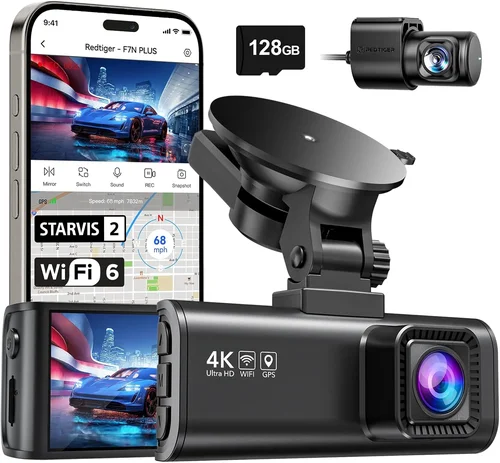
Video resolution remains one of the most critical factors when evaluating dash cam security capabilities. Higher resolution provides clearer detail, making it easier to identify license plates, facial features, and other important visual information that could be crucial in legal proceedings or insurance claims. For optimal security coverage, look for dash cams with at least 1080p resolution, though 2K and 4K models are becoming increasingly common and offer significant advantages.
When assessing video quality, consider both the front camera resolution and any rear-facing cameras if you need comprehensive coverage. Front cameras typically benefit from higher resolutions since they capture the primary driving scene, while rear cameras can often function adequately with slightly lower specifications. However, for complete vehicle security, maintaining consistent quality across all cameras ensures you won’t miss critical details from any angle.
Beyond raw resolution, pay attention to bitrate settings—higher bitrates mean better compression efficiency and superior image quality, especially in challenging lighting conditions. Many high-end dash cams offer adjustable bitrate settings that balance file size against quality, allowing you to optimize based on your storage capacity and retention needs. Additionally, look for cameras with good low-light performance, as nighttime incidents often require clear footage to be useful for security purposes.
2. Field of View (FOV)
The field of view determines how much of the road and surrounding environment your dash cam can capture simultaneously. A wider FOV provides more comprehensive coverage, reducing blind spots and ensuring that critical events aren’t missed due to limited perspective. For car security, a horizontal FOV between 120-150 degrees is generally recommended, as it captures enough detail without introducing excessive distortion at the edges.
When evaluating FOV, remember that manufacturers sometimes advertise exaggerated angles that don’t reflect real-world usability due to fish-eye lens distortion. Look for cameras with multiple FOV modes that allow you to adjust coverage based on driving conditions—narrower angles for highway driving where you need maximum detail, wider angles for city streets where you want broader context. Some advanced models also offer dynamic FOV adjustment that automatically optimizes based on speed and road conditions.
Consider your typical driving environment when selecting FOV width—urban drivers benefit from wider coverage to capture pedestrians, cyclists, and complex intersections, while highway commuters might prioritize longer-distance visibility over peripheral coverage. Whatever your situation, ensure the FOV adequately covers both the immediate driving path and relevant surrounding areas that could contribute to security incidents.
3. Storage Capacity & Loop Recording
Storage management is fundamental to effective dash cam operation, particularly for security applications where continuous recording is essential. Most dash cams use microSD cards ranging from 32GB to 256GB+, with larger capacities allowing longer recording sessions before requiring deletion of older files. For comprehensive security coverage, we recommend at least 64GB of storage, though 128GB or higher provides greater flexibility for extended recording periods.
Loop recording automatically overwrites the oldest footage when storage fills up, ensuring continuous coverage without manual intervention. However, this feature requires careful configuration to balance storage efficiency against security needs—shorter recording segments save space but increase the risk of missing critical moments during longer incidents. Many modern dash cams offer intelligent loop recording that preserves important clips while efficiently managing regular footage.
When selecting storage capacity, consider your average commute length, parking duration requirements, and whether you need extended recording capabilities for unusual circumstances. If you frequently encounter long traffic delays or park for extended periods in secure locations, larger storage allows you to maintain detailed records without constant card swapping. Additionally, verify compatibility with high-performance SD cards (typically Class 10 or UHS-I) to ensure reliable write speeds that prevent dropped frames during high-bitrate recording.
4. Night Vision & Low-Light Performance
Nighttime driving presents unique challenges for dash cam security, as reduced visibility and artificial lighting create difficult recording conditions. Effective night vision capabilities are crucial for capturing usable footage during evening commutes, overnight parking, or low-light urban environments where security incidents commonly occur. Modern dash cams achieve superior low-light performance through several key technologies: improved image sensors with better quantum efficiency, enhanced noise reduction algorithms, and specialized night vision processing.
Look for dash cams with large aperture lenses (typically f/1.8 or wider) that allow more light to reach the sensor, combined with backside illumination (BSI) technology that improves sensitivity to available light. Advanced models may include infrared LEDs or starlight-level sensors that capture visible details even in near-total darkness. However, be aware that true night vision capabilities vary significantly between models, and manufacturer claims should be verified through independent testing when possible.
For optimal nighttime security coverage, consider dash cams with automatic exposure adjustment that adapts to rapidly changing lighting conditions, such as entering tunnels or encountering sudden shadows from streetlights. Some premium models offer dual-sensor systems that combine visible light and thermal imaging for enhanced nighttime awareness, though these typically come at higher price points.
5. Parking Mode & Motion Detection
Parking mode represents one of the most valuable security features for dash cams, enabling continuous monitoring even when the vehicle isn’t running. This capability protects against hit-and-runs, vandalism, theft attempts, and damage during extended parking periods—common scenarios where traditional security systems might fail. When evaluating parking mode options, consider both passive monitoring (continuous recording) and active detection systems that trigger recording only when motion is detected.
Battery-powered parking mode requires either a dedicated hardwired connection or an external power source, as internal batteries rarely provide sufficient runtime for meaningful overnight protection. Hardwired installation ensures reliable power delivery but requires professional installation skills, while portable battery packs offer flexibility at the cost of additional bulk and potential theft risk. Some advanced dash cams support smart parking mode that intelligently manages power consumption based on ambient light levels and movement patterns.
Motion detection accuracy varies significantly between models, with sophisticated algorithms distinguishing between relevant vehicle movements and irrelevant environmental changes like passing wildlife or shifting shadows. Look for dash cams with customizable sensitivity settings that allow you to fine-tune detection thresholds based on your parking environment—garage parking versus street parking, for example, requires different sensitivity levels to avoid false triggers.
6. G-Sensor & Impact Detection
G-sensors (gravity acceleration sensors) serve as critical security components by automatically locking and preserving footage when sudden impacts or movements are detected. This feature prevents accidental deletion of potentially vital evidence during incidents like collisions, theft attempts, or aggressive maneuvers. When evaluating G-sensor capabilities, consider both sensitivity thresholds and response timing—faster detection with appropriate force thresholds ensures relevant footage isn’t overwritten before being secured.
Most dash cams offer adjustable G-sensor sensitivity levels that allow you to balance security coverage against false positive triggers. Higher sensitivity catches minor impacts that might indicate security concerns, while lower settings focus on significant events that likely warrant investigation. Some advanced models include multi-axis G-sensors that detect impacts from multiple directions, providing comprehensive coverage for various incident types.
The automatic file locking mechanism triggered by G-sensor activation typically creates protected folders that prevent overwriting until manually reviewed or deleted. This ensures that critical evidence remains accessible for later examination, whether for insurance claims, legal proceedings, or personal security assessment. Consider how easily locked files can be accessed and transferred from the dash cam, as some models require proprietary software or physical connections that might complicate evidence retrieval.
7. GPS Tracking & Location Services
GPS functionality enhances dash cam security by providing precise location data and speed information that supplements video evidence. This capability proves invaluable for reconstructing accident scenes, verifying alibis, and establishing timeline accuracy during security incidents. GPS-enabled dash cams record location coordinates alongside video timestamps, creating comprehensive records that include not just what happened but where and when it occurred.
When evaluating GPS features, consider both accuracy and update frequency—frequent position updates provide more granular location data, while high-precision GPS receivers minimize coordinate drift that could compromise evidence integrity. Some advanced models include GLONASS or Galileo satellite system support for improved positioning reliability, particularly in challenging urban environments with limited sky visibility.
GPS data integration with video creates powerful forensic tools for security analysis, allowing investigators to correlate vehicle position with traffic patterns, weather conditions, and other contextual factors. However, privacy considerations arise when location data is stored locally or transmitted remotely, so evaluate how GPS information is managed and whether encryption or anonymization options are available. Many dash cams offer configurable GPS logging intervals that balance detail level against storage requirements.
8. Wi-Fi & Mobile App Integration
Modern dash cams increasingly incorporate wireless connectivity that enhances both usability and security functionality. Wi-Fi capabilities enable seamless smartphone integration that simplifies file transfer, live viewing, remote control, and configuration adjustments—features particularly valuable for security applications requiring quick access to evidence. Mobile apps provide intuitive interfaces for managing dash cam operations while offering push notifications for important events like G-sensor activations or storage warnings.
When evaluating Wi-Fi integration, consider both connection stability and security protocols—reliable wireless links prevent dropped frames or interrupted recordings during critical events, while encrypted connections protect sensitive location and video data from unauthorized access. Some advanced dash cams support dual-band Wi-Fi (2.4GHz and 5GHz) for optimized performance in congested wireless environments, while others incorporate Bluetooth for low-power device pairing.
Mobile app ecosystems vary significantly between manufacturers, with some offering comprehensive feature sets while others provide basic functionality. Evaluate app reviews and user experiences to understand real-world performance, particularly regarding reliability during emergency situations when quick evidence access is paramount. Cloud storage integration through mobile apps can further enhance security by providing off-device backup of critical footage, though this typically requires subscription services and raises additional privacy considerations.
9. Build Quality & Weather Resistance
Robust construction ensures dash cam reliability under diverse driving conditions that test equipment durability and performance consistency. For car security applications, build quality directly impacts whether your investment will function reliably when needed most—during extreme temperatures, moisture exposure, or physical impacts associated with security incidents. Look for dash cams with IP-rated enclosures that resist dust ingress and moisture penetration, particularly important for exterior-mounted cameras.
Temperature tolerance represents another critical durability factor, as dash cams must operate reliably across seasonal extremes that range from freezing winter conditions to scorching summer heat. High-quality components with wide operating temperature ranges prevent performance degradation or hardware failure during prolonged exposure to adverse conditions. Shock resistance ratings also contribute to overall reliability, ensuring continued functionality after minor impacts that might accompany security-related incidents.
Installation quality affects long-term performance regardless of hardware specifications, so consider whether the dash cam design facilitates secure mounting without obstructing driver visibility or interfering with airbag deployment. Cable management solutions and flexible mounting options contribute to both aesthetic appeal and functional reliability, preventing loose wires that could become hazards or damaged connections that compromise security functionality.
10. Audio Recording Capabilities
Audio recording complements video evidence by capturing verbal interactions, environmental sounds, and mechanical noises that provide additional context for security incidents. While audio privacy laws vary by jurisdiction, many regions permit recording in public spaces where there’s no reasonable expectation of privacy, making audio capabilities valuable for comprehensive incident documentation. Modern dash cams typically offer adjustable audio settings that allow you to balance recording quality against storage efficiency.
When evaluating audio features, consider both microphone quality and directional capabilities—omnidirectional microphones capture ambient sounds effectively but may pick up unwanted noise, while directional mics focus on frontal sound sources for clearer voice capture. Some advanced models include noise suppression algorithms that filter out wind noise and engine rumble while preserving speech clarity, enhancing the usefulness of recorded conversations.
Legal compliance represents a crucial consideration for audio recording capabilities, as regulations regarding consent and privacy vary significantly by location. Always research local laws before enabling audio recording features, and consider implementing user controls that allow you to disable audio when necessary to comply with regional requirements. Metadata tagging that distinguishes between audio and video files helps maintain evidence integrity during legal proceedings.
11. Firmware Updates & Manufacturer Support
Ongoing firmware updates ensure dash cam functionality remains current with evolving security standards, compatibility improvements, and bug fixes that address emerging issues. Reliable manufacturer support provides critical assistance during installation, troubleshooting, and warranty service, particularly important for security applications where equipment failure could compromise evidence collection. Evaluate both update frequency and backward compatibility when assessing manufacturer commitment to product longevity.
Regular firmware updates typically address security vulnerabilities that could compromise footage integrity or expose personal data, while new features may enhance detection algorithms or improve user interface responsiveness. Automatic update capabilities simplify maintenance but require stable internet connectivity that might not always be available, so consider whether manual update options remain accessible for troubleshooting scenarios. Update logs and changelists help you understand what improvements each release brings, ensuring you can assess whether updates justify potential downtime.
Manufacturer reputation for customer support reflects their commitment to product reliability and user satisfaction, with responsive technical assistance proving invaluable during urgent security situations. Evaluate support channel availability—phone, email, chat—and response times to understand what help you can expect when issues arise. Community forums and user groups can supplement official support channels, providing peer-to-peer assistance for common problems and workarounds for compatibility issues.
12. Price vs. Value Assessment
Determining the appropriate price point for your dash cam security needs requires balancing budget constraints against actual security requirements rather than simply chasing the lowest or highest-priced options. Entry-level models offer basic functionality at affordable prices but may lack critical security features like parking mode or advanced G-sensor capabilities that prove essential during actual incidents. Mid-range options typically deliver the best value proposition, offering robust feature sets without premium pricing that doesn’t correspond to proportional security benefits.
When assessing value, consider both initial purchase cost and total ownership expenses—including potential professional installation fees, ongoing storage costs, and any subscription services required for cloud features. Compare feature sets across similar price points to identify which specifications genuinely enhance security versus those that represent unnecessary luxuries. User reviews and expert testing provide objective insights into real-world performance that marketing materials might overlook.
For security-focused buyers, certain features justify premium pricing despite higher costs—advanced night vision capabilities, comprehensive parking protection, and reliable evidence preservation mechanisms often outweigh savings from cheaper alternatives. However, avoid overspending on features that exceed your actual needs, particularly when budget constraints limit your ability to replace equipment after unexpected incidents. The goal is finding the right balance between adequate security coverage and sustainable long-term costs.
Different Types of Dash Cams

Common Buying Mistakes to Avoid
❌ Mistake: Prioritizing Price Over Essential Security Features
Why it’s bad: Choosing the cheapest option often means sacrificing critical security capabilities like reliable parking mode, adequate night vision, or durable construction that could make the difference during actual security incidents. Budget constraints shouldn’t compromise features that directly impact your vehicle’s protection.
What to do instead: Establish a minimum feature threshold based on your security priorities rather than starting with price. For example, if parking protection matters most, ensure your chosen model offers robust motion detection and sufficient battery life for overnight monitoring, even if it costs slightly more than basic models.
❌ Mistake: Ignoring Installation Requirements and Compatibility
Why it’s bad: Assuming all dash cams install identically leads to frustration and potential safety hazards. Different models require varying installation complexity, cable routing approaches, and electrical system modifications that affect both functionality and vehicle warranty status.
What to do instead: Research installation requirements thoroughly before purchasing, considering whether you’ll handle DIY installation or need professional assistance. Verify compatibility with your vehicle’s electrical system and existing electronics, particularly if you plan to integrate multiple security devices or add accessories like backup cameras.
❌ Mistake: Overlooking Storage Management and Retention Policies
Why it’s bad: Underestimating storage needs results in frequent overwrite cycles that delete potentially critical evidence before review. Without proper planning, your dash cam becomes a “set it and forget it” device that fails to preserve important footage when needed most.
What to do instead: Calculate your average daily recording volume and select storage capacity accordingly, leaving room for unexpected incidents. Implement regular maintenance routines for file management and consider cloud backup options for critical evidence that requires long-term preservation.
❌ Mistake: Neglecting Legal Compliance and Privacy Considerations
Why it’s bad: Using features like audio recording or cloud sharing without understanding local regulations can lead to legal complications, particularly regarding consent requirements and data protection laws. What seems like harmless evidence collection might violate privacy statutes in your jurisdiction.
What to do instead: Research applicable laws before activating sensitive features, implementing user controls that allow you to disable audio recording when necessary. Understand data handling practices for any cloud services used, ensuring compliance with regional privacy requirements.
❌ Mistake: Focusing Solely on Video Quality While Ignoring Other Critical Factors
Why it’s bad: High-resolution cameras with poor build quality or unreliable power management create false confidence in security capabilities while failing during actual incidents. Technical specifications alone don’t guarantee reliable performance when evidence matters most.
What to do instead: Evaluate products holistically, balancing video quality against durability, power management, and operational reliability. Read comprehensive reviews that test real-world performance rather than relying solely on manufacturer specifications or marketing claims.
❌ Mistake: Assuming All Dash Cams Offer Equal Evidence Preservation Capabilities
Why it’s bad: Basic loop recording without automatic event locking can accidentally overwrite critical footage during security incidents. Without proper safeguards, your dash cam might capture nothing useful when confronted with insurance disputes or criminal allegations.
What to do instead: Ensure your chosen model includes robust G-sensor functionality with automatic file protection, creating separate secure folders for important events. Test these features periodically to confirm they function correctly during simulated incidents.
Budget Guidelines: How Much Should You Spend?
Entry-Level ($40 – $100): Basic Security Foundation
This price range delivers fundamental dash cam functionality suitable for drivers with modest security requirements or budget constraints. Models in this tier typically offer 1080p recording, decent daytime performance, and basic loop recording capabilities. While adequate for casual use, entry-level dash cams often lack advanced features like reliable parking mode, sophisticated G-sensor implementations, or robust night vision capabilities that prove essential during actual security incidents.
For budget-conscious buyers who primarily need documentation for minor incidents or occasional insurance verification, entry-level options provide acceptable baseline protection. However, consider that investing slightly more upfront might deliver significantly better long-term value through enhanced reliability and feature completeness. These models suit occasional drivers, secondary vehicles, or those testing dash cam functionality before committing to more expensive systems.
Mid-Range ($100 – $250): Optimal Security Value
The mid-range segment represents the sweet spot for most car owners seeking comprehensive security coverage without premium pricing. Dash cams in this category typically deliver 2K or 4K resolution, reliable parking mode functionality, advanced G-sensor implementations, and improved low-light performance that maintains usability during evening hours. Many models in this range also include GPS tracking, Wi-Fi connectivity, and mobile app integration that enhance both functionality and convenience.
This price bracket balances cost-effectiveness with practical security requirements, offering features that directly address common incident scenarios like hit-and-runs, insurance disputes, and parking damage. For daily commuters, rideshare drivers, or families prioritizing security without extravagant spending, mid-range dash cams provide excellent value proposition through reliable performance and comprehensive feature sets.
When selecting mid-range options, focus on models with proven track records rather than cutting-edge specifications that haven’t undergone real-world testing. User reviews and professional testing provide valuable insights into actual performance that manufacturer claims might exaggerate. Consider your specific driving patterns and parking environments when evaluating feature importance—urban drivers might prioritize wider FOV and better low-light performance, while highway commuters could emphasize long-distance visibility.
Premium ($250 – $500): Enhanced Security Capabilities
Premium dash cam systems deliver enterprise-grade features designed for drivers with elevated security needs or those operating in high-risk environments. Models in this range typically include 4K resolution, superior night vision with specialized sensors, comprehensive parking protection with extended battery life, and advanced AI-powered detection capabilities that identify suspicious activities or traffic violations. Many premium systems offer dual-channel recording, 360-degree coverage, and cloud integration for remote monitoring and evidence management.
This tier suits professional drivers, fleet operators, or individuals with significant assets requiring maximum security coverage. Premium dash cams often include additional protective features like water-resistant housings, shock-resistant mounting systems, and redundant power management that ensures continuous operation during electrical disruptions or attempted tampering.
When evaluating premium options, consider total cost of ownership including potential professional installation fees, ongoing storage requirements, and any subscription services required for cloud features. While these systems offer exceptional capabilities, ensure the added expense aligns with your actual security requirements rather than representing unnecessary luxury for typical driving scenarios.
Luxury ($500+): Maximum Security Assurance
Luxury dash cam systems represent the pinnacle of automotive security technology, incorporating multiple cameras, advanced AI processing, thermal imaging, and professional-grade reliability designed for mission-critical applications. These systems typically feature military-spec components, redundant power supplies, enterprise-level data encryption, and comprehensive environmental protection that withstands extreme conditions while maintaining peak performance.
This category suits high-value asset protection, corporate fleets, government vehicles, or individuals with extraordinary security requirements where equipment failure could result in catastrophic consequences. Luxury dash cams often integrate with broader security ecosystems including alarm systems, access control, and centralized monitoring platforms that provide comprehensive threat assessment and rapid response capabilities.
Investment in luxury dash cam systems should align with substantial asset values or specialized operational requirements rather than general consumer needs. Consider whether the enhanced capabilities justify the significant price premium, particularly when mid-range alternatives might adequately address your security priorities at substantially lower costs.
Expert Tips for Getting the Best Deal
Time Your Purchase Strategically
Avoid purchasing dash cams during peak shopping seasons when retailers mark up prices to capitalize on increased demand. Instead, target sales events like Black Friday, Cyber Monday, or end-of-season clearance periods when manufacturers and retailers offer significant discounts. Many companies also refresh product lines annually, making previous-generation models excellent value propositions during launch transitions when new inventory arrives.
Consider seasonal timing relative to your driving needs—if you primarily drive in winter conditions, wait for post-winter sales when manufacturers discount winter-specific models in favor of summer-oriented equipment. Similarly, if you need immediate protection for upcoming travel plans, research whether manufacturers offer promotional bundles with extended warranties or accessory packages that enhance security functionality.
Compare Retailer Options Carefully
While big-box retailers offer convenience and immediate availability, specialized electronics stores and online marketplaces often provide better pricing and selection. Online platforms like Amazon, Newegg, or manufacturer-direct websites frequently offer competitive pricing with customer reviews that reveal real-world performance nuances manufacturers might omit from marketing materials. Local electronics stores may provide hands-on testing opportunities that help you evaluate build quality and usability firsthand.
Evaluate shipping costs, return policies, and warranty fulfillment processes when comparing retailers. Some online sellers offer free returns that facilitate testing before finalizing purchases, while local stores might provide immediate replacement options if equipment fails during installation. Consider whether bundled accessories like extra memory cards, protective cases, or professional installation services justify retailer selection decisions.
Identify Hidden Savings Opportunities
Many manufacturers offer educational discounts for students or professionals in related fields, while trade-in programs reward loyalty with credit toward future purchases. Subscription services for cloud storage or premium features sometimes include introductory periods that reduce initial costs, though carefully evaluate ongoing subscription requirements before committing to long-term expenses.
Group buying opportunities through online communities or workplace programs can unlock volume pricing unavailable to individual consumers. Some employers offer reimbursement programs for security equipment purchases, particularly for ride-sharing drivers or delivery personnel whose business use necessitates comprehensive protection. Always verify eligibility requirements and documentation procedures before assuming participation opportunities exist.
Assess Warranty and Support Quality
Comprehensive warranty coverage provides peace of mind beyond the initial purchase price, particularly for security equipment where failure during critical incidents could compromise protection. Look for warranties covering both parts and labor, with clear terms regarding coverage limitations and claim procedures. Extended warranty options from third-party providers might offer additional protection without manufacturer markup, though verify service network availability in your region.
Responsive customer support reflects manufacturer commitment to product reliability and user satisfaction. Evaluate support channel availability—phone, email, chat—and response times through independent testing or user community feedback. Community forums and user groups can supplement official support channels, providing peer-to-peer assistance for common problems and workarounds for compatibility issues.
Test Before Committing
Whenever possible, evaluate dash cam functionality through hands-on testing before finalizing purchases. Physical demonstration allows assessment of build quality, button placement, display readability, and overall usability that specifications alone cannot convey. Many electronics retailers permit limited testing periods that let you experience real-world performance under similar conditions to your typical driving environment.
If in-person testing isn’t feasible, leverage generous return policies to conduct thorough evaluation after purchase. Install the unit temporarily, test all features including night vision, parking mode, and G-sensor functionality, then assess whether performance meets expectations. Document any issues or limitations during testing to determine if equipment adequately addresses your security priorities before committing to long-term use.
Negotiate Accessory Packages
Retailers often bundle essential accessories like extra memory cards, protective cases, or installation hardware at little additional cost when purchased together. These packages eliminate the need for separate purchases and sometimes include items not immediately obvious as necessary—like high-quality cables or specialized mounting hardware that affects long-term reliability. Negotiating bundled pricing can reduce total ownership costs while ensuring you have everything needed for proper setup and operation.

Frequently Asked Questions
Q: Do I need professional installation for my dash cam?
A: Professional installation isn’t strictly necessary for most dash cam systems, as many models include adhesive mounts and wiring harnesses that allow DIY installation with basic tools and patience. However, hardwired power connections for parking mode or complex multi-camera setups benefit from professional expertise to ensure proper electrical integration and avoid voiding vehicle warranties. Consider your comfort level with automotive electrical systems and whether you need features like permanent power delivery that require routing wires through door panels or under carpets.
Q: How often should I clean my dash cam lens?
A: Clean your dash cam lens whenever you notice reduced image quality or visible smudges that obstruct view. In normal driving conditions, monthly cleaning suffices, but dusty, muddy, or frequently parked environments may require more frequent attention. Use microfiber cloths specifically designed for optical surfaces rather than paper towels or regular cloth that can scratch lenses. For stubborn grime, lightly dampen the cloth with water or specialized lens cleaner, avoiding direct liquid application that could seep into housing seals.
Q: Can dash cams record audio legally?
A: Audio recording legality depends heavily on local regulations, with some jurisdictions requiring two-party consent for recording conversations while others permit recording in public spaces where there’s no reasonable expectation of privacy. Many regions have specific laws regarding electronic surveillance and wiretapping that affect dash cam usage. Always research applicable laws before enabling audio recording features, and consider implementing user controls that allow you to disable audio when necessary to comply with regional requirements.
Q: How long will dash cam footage last before being overwritten?
A: Footage retention depends on storage capacity, recording resolution, and loop recording settings rather than fixed time periods. As a guideline, 64GB storage typically holds 2-4 hours of 1080p footage, while 128GB accommodates 4-8 hours depending on bitrate settings. Most dash cams allow configuration of recording segment lengths—shorter segments (1-3 minutes) maximize storage efficiency but increase the risk of missing critical moments during extended incidents. Intelligent loop recording that preserves important clips while managing regular footage offers the best balance for security applications.
Q: What happens during a collision with my dash cam?
A: During impact events, G-sensors automatically detect sudden deceleration and lock relevant footage in protected folders that prevent accidental deletion during loop recording cycles. This ensures critical evidence remains accessible for later review, whether for insurance claims, legal proceedings, or personal safety assessment. Most dash cams preserve footage from seconds before and during impact, providing comprehensive incident documentation that includes pre-collision context and post-impact conditions. Some advanced models also send alert notifications to connected smartphones when significant events occur.
Q: Can I use my dash cam while charging my phone?
A: Many modern dash cams include USB ports that power connected devices while simultaneously recording, though power draw from phone charging affects internal battery life during parking mode operation. Check your specific model’s power specifications to understand whether simultaneous operation is supported and how it impacts overall functionality. Dedicated phone mounts with independent power sources offer alternative solutions for drivers who regularly need device charging while maintaining dash cam functionality.
Q: How do I choose the right memory card for my dash cam?
A: Select memory cards with Class 10 or UHS-I ratings for reliable write speeds that prevent dropped frames during high-bitrate recording. Brand reliability matters—stick with reputable manufacturers like SanDisk, Samsung, or Kingston rather than generic or counterfeit products that might fail unexpectedly. Format cards specifically in the dash cam before first use to ensure filesystem compatibility, and consider purchasing cards with built-in wear leveling that extend lifespan through efficient block management. Keep spare cards on hand for extended recording periods or unexpected incidents.
Q: Will my dash cam work in extreme temperatures?
A: Most dash cams operate reliably within standard automotive temperature ranges (-20°F to 176°F/-29°C to 80°C), but extreme conditions can affect battery life, display responsiveness, and overall functionality. Winter conditions may cause faster battery drain during parking mode, while summer heat can trigger thermal shutdowns or reduce component longevity. Look for models with wide operating temperature specifications and thermal management features like heat dissipation designs or cold-weather battery optimization that maintain functionality during seasonal extremes.
Q: How do I back up important footage securely?
A: Regular backup procedures ensure critical evidence remains accessible even if the dash cam fails or gets damaged. Connect the device to a computer via USB cable and copy files to designated folders, using cloud storage services for off-device backup of sensitive footage. Some dash cams offer automatic cloud uploads for event-triggered clips, though this typically requires subscription services and raises privacy considerations. Create timestamped backup folders with descriptive naming conventions that facilitate organization and retrieval during investigations or insurance claims.
Q: Can multiple dash cams work together for comprehensive coverage?
A: While most dash cams operate independently, some advanced systems support multi-camera configurations through synchronized recording and centralized management. These setups typically require compatible hardware and software that coordinate timing, storage allocation, and remote control functions across multiple units. Professional-grade systems designed for fleet management or commercial security often include this capability, while consumer models usually operate as standalone devices. Consider whether multi-camera coordination provides sufficient benefit to justify additional complexity and cost.
Our Final Recommendations
Best for Budget-Conscious Buyers: Viofo A119 V3
The Viofo A119 V3 delivers exceptional value for drivers seeking reliable dash cam functionality without premium pricing. This compact single-lens system offers 2K resolution with impressive low-light performance, robust G-sensor implementation that reliably preserves incident footage, and straightforward operation that minimizes learning curve barriers. Its affordable price point makes it accessible to drivers who want essential security features without overspending on unnecessary capabilities.
While lacking some advanced features like GPS tracking or Wi-Fi connectivity, the A119 V3 excels at core security functions with dependable performance that justifies its position as the optimal choice for budget-minded buyers. The included suction cup mount provides flexible positioning options, while loop recording and automatic file management simplify maintenance requirements. For drivers who prioritize proven reliability over cutting-edge technology, this model represents outstanding value without compromising essential security capabilities.
Best Overall Value: Nextbase 622GW
The Nextbase 622GW strikes an exceptional balance between comprehensive features and practical usability, making it our top recommendation for most car owners seeking effective security protection. This dual-camera system delivers 1440p front recording and 1080p rear coverage with crisp detail that captures license plates and facial features clearly. Its built-in Alexa integration adds convenience beyond basic dash cam functionality, while the robust parking mode ensures protection during extended periods away from the vehicle.
Advanced features like emergency SOS alerts, cloud backup capabilities, and intuitive mobile app control enhance the overall user experience without overwhelming complexity. The 622GW’s solid build quality and reliable performance across diverse driving conditions make it suitable for both daily commuters and occasional drivers alike. While slightly pricier than entry-level options, its feature completeness and proven reliability justify the investment for drivers who want comprehensive security coverage without premium pricing.
Best Premium Option: Garmin Dashcam Mini
For drivers demanding maximum security assurance and advanced technological capabilities, the Garmin Dashcam Mini represents the pinnacle of consumer dash cam engineering. This compact powerhouse delivers 1440p recording with exceptional image stabilization that maintains clarity during high-speed maneuvers, while its sophisticated AI-powered features detect traffic sign recognition, lane departure warnings, and collision risk alerts. The integrated GPS provides precise location data that supplements video evidence, creating comprehensive records that include both visual and positional context.
Garmin’s ecosystem integration allows seamless synchronization with other navigation and safety devices, while the company’s established reputation for automotive technology ensures reliable performance and responsive customer support. Though positioned at the premium end of the market, the Dashcam Mini’s combination of advanced features, robust build quality, and brand reliability make it worth the investment for drivers with elevated security requirements or those who appreciate cutting-edge automotive technology.
Best for Beginners: Thinkware U1000
New dash cam users will find the Thinkware U1000 exceptionally approachable thanks to its intuitive interface and straightforward operation that minimizes initial setup complexity. This dual-camera system offers 2K front recording and 1080p rear coverage with clear detail that satisfies most security documentation needs. Its comprehensive feature set includes reliable parking mode, advanced G-sensor functionality, and flexible storage management options that accommodate various usage patterns without overwhelming customization requirements.
Thinkware’s reputation for quality manufacturing and dependable performance ensures beginners won’t encounter unexpected issues during initial operation, while the included mounting hardware and clear instructions facilitate smooth installation. The U1000’s balanced feature set addresses common security concerns without introducing unnecessary complexity, making it an ideal introduction to dash cam technology for drivers transitioning from basic vehicle security measures to comprehensive electronic protection systems.
Best for Advanced Users: BlackVue DR970X-2CH
Advanced dash cam enthusiasts and professionals seeking maximum functionality will appreciate the BlackVue DR970X-2CH’s enterprise-grade capabilities and extensive customization options. This dual-camera system delivers 4K front recording with exceptional dynamic range that captures details in challenging lighting conditions, while its sophisticated parking mode supports extended monitoring with intelligent power management. The comprehensive feature set includes cloud connectivity, AI-powered event detection, and professional-grade build quality designed for demanding security applications.
BlackVue’s robust ecosystem supports advanced workflows including automated cloud backup, remote live viewing, and centralized fleet management capabilities that scale with growing security needs. Though requiring more technical knowledge for optimal configuration, the DR970X-2CH’s flexibility and power make it suitable for drivers who want complete control over their security systems and are willing to invest time in mastering advanced features. The system’s professional orientation ensures reliable performance during critical incidents when maximum evidence quality matters most.
Conclusion: Making the Right Choice
Selecting the optimal dash cam for car security requires thoughtful consideration of your specific needs, driving patterns, and budget constraints rather than simply chasing the latest technology or lowest price point. Each security scenario presents unique requirements—whether protecting against hit-and-runs during overnight parking, documenting insurance claims after minor incidents, or safeguarding against passenger disputes during rideshare operations—that dictate which features genuinely matter versus those representing unnecessary luxuries.
Focus your evaluation on capabilities that directly address your actual security concerns rather than getting distracted by technical specifications that sound impressive but don’t translate to practical benefits. Reliable parking mode proves invaluable if you frequently leave vehicles unattended, while advanced night vision capabilities make the difference during evening commutes or poorly lit parking areas. G-sensor implementation quality determines whether your dash cam preserves critical evidence during actual incidents, and storage management features affect how easily you can retrieve footage when needed.
Remember that dash cam effectiveness depends not just on hardware capabilities but also on consistent operation and proper maintenance. Regular cleaning, timely storage management, and periodic testing ensure your security system functions when confronted with real-world challenges rather than failing during critical moments. The most expensive model won’t provide adequate protection if improperly installed or neglected through disuse, while budget-friendly options can deliver outstanding security coverage when selected with care and maintained diligently.
Ultimately, the right dash cam for your vehicle security needs represents the intersection of practical functionality, reliable performance, and sustainable value that aligns with your specific circumstances. Take time to research thoroughly, test when possible, and prioritize features that genuinely enhance your protection rather than chasing technological novelty. With careful selection and responsible use, your dash cam becomes more than just recording equipment—it transforms into an essential component of your comprehensive vehicle security strategy that provides peace of mind and tangible protection when you need it most.