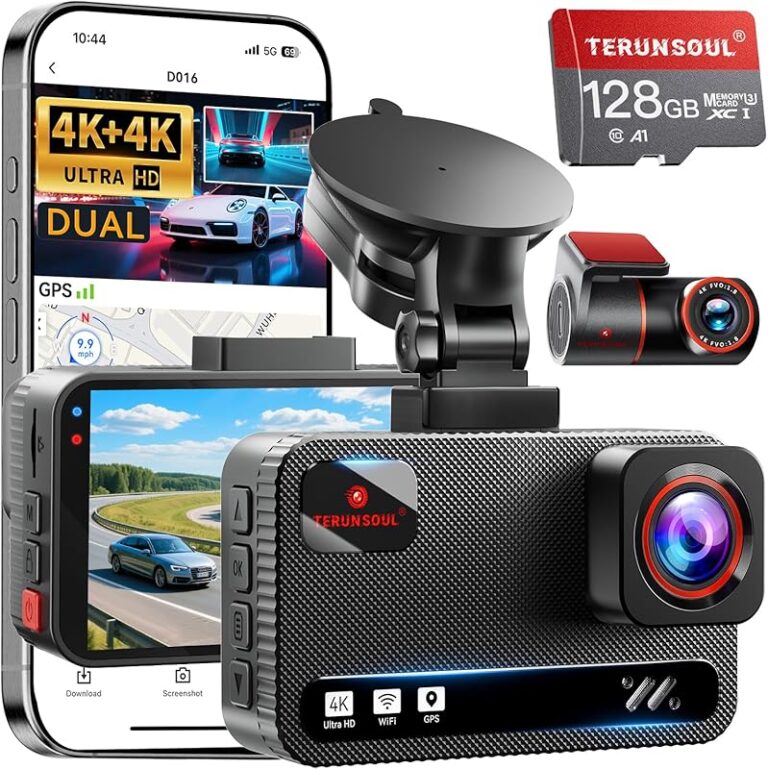
Expert Dash Cam iPhone Buying Guide

Why This Guide Matters
In today’s connected world, protecting yourself on the road has become more important than ever. Whether you’re commuting daily or embarking on long road trips, having reliable dash cam footage can be invaluable for insurance claims, legal disputes, or simply documenting memorable moments behind the wheel. But when it comes to choosing the right dash cam for your iPhone, the options can feel overwhelming—especially if you need background recording capabilities.
This comprehensive buying guide is designed specifically for iPhone users who want to capture high-quality driving footage while taking advantage of their smartphone’s connectivity features. You’ll learn exactly what to look for, how different models compare, and which features matter most when selecting a dash cam that truly enhances your driving experience. By the end of this article, you’ll have all the knowledge needed to make an informed decision without getting caught up in marketing hype or unnecessary bells and whistles.
What Readers Will Learn
- The key factors that determine whether a dash cam will work effectively with your iPhone
- How background recording differs from standard dash cam functionality
- Which price ranges offer the best value for different user needs
- Common pitfalls to avoid during your search process
- Expert recommendations tailored to various budgets and use cases
Brief Overview of the Market
The market for iPhone-compatible dash cams has evolved rapidly over the past few years. Early models primarily focused on basic recording functions, but today’s top-tier devices integrate seamlessly with iOS through dedicated mobile applications. These apps enable features like live viewing, instant video sharing, cloud storage syncing, and most importantly—background recording that continues even when your phone isn’t actively monitoring the feed.
Manufacturers now prioritize smartphone integration as a core feature rather than an afterthought. This shift means consumers benefit from improved user interfaces, remote control capabilities, automatic incident alerts, and enhanced security protocols. However, with so many options available—from budget-friendly entry-level models to professional-grade systems—it’s easy to get lost in the sea of specifications and marketing claims.
Our goal is to cut through the noise and provide you with practical, actionable advice based on real-world performance data, expert testing results, and user feedback from actual iPhone owners. We’ll examine everything from resolution quality and storage management to app stability and battery life considerations—all factors that directly impact how well your chosen dash cam integrates with your existing Apple ecosystem.
Key Factors to Consider
1. Budget & Price Range
Before diving into specific features, it’s essential to establish your budget framework. Dash cams for iPhone range from under $50 for basic models to over $300 for premium systems with advanced connectivity features. Entry-level options may lack robust iPhone integration, while mid-range devices often strike the perfect balance between affordability and functionality. Premium models typically include additional perks like GPS tracking, Wi-Fi connectivity, cloud backup services, and superior build quality. Understanding where you fall within this spectrum helps narrow down viable choices and prevents overspending on unnecessary features.
2. Performance Specifications
Resolution quality remains one of the most critical performance indicators. Most reliable dash cams now offer at least 1080p Full HD recording, though some high-end models support 4K Ultra HD for crystal-clear detail. Frame rate also plays a vital role—look for 30fps minimum for smooth motion capture. Additionally, consider the camera sensor type (CMOS vs. STARVIS), low-light performance capabilities, and whether the device includes HDR technology for better contrast in challenging lighting conditions. For iPhone users specifically, ensure the dash cam supports H.264 or H.265 compression formats compatible with iOS media players.
3. Build Quality & Durability
A durable construction ensures your dash cam survives temperature extremes, vibrations, and accidental impacts. Look for shock-resistant casing materials like polycarbonate or aluminum alloys. Weather sealing against moisture and dust is equally important, especially if you frequently drive in rainy or snowy climates. The mounting system should be secure enough to stay attached during sudden stops or collisions. Some models feature dual cameras (front and rear), requiring extra attention to cable routing and heat dissipation near the power source.
4. Features & Functionality
Beyond basic recording, modern dash cams offer numerous intelligent features. Loop recording automatically overwrites older clips when storage fills up, ensuring continuous coverage without manual intervention. G-sensor detection triggers emergency locking when impact occurs, preserving crucial evidence. Parking mode uses motion detection to record incidents while your car is parked, drawing power from a hardwired connection or built-in supercapacitor. Night vision enhancements like infrared LEDs improve visibility in complete darkness. For iPhone compatibility, prioritize devices with dedicated apps supporting background playback, push notifications, and real-time streaming.
5. Brand Reputation
Established brands typically deliver more consistent reliability and customer support compared to lesser-known manufacturers. Research user reviews across multiple platforms, paying close attention to recurring complaints about software bugs, firmware updates, or poor after-sales service. Brands like Garmin, BlackVue, Nextbase, and Viofo consistently rank highly for iOS integration quality and long-term performance. Avoid ultra-cheap generic brands lacking transparent contact information or warranty terms.
6. Warranty & Support
A comprehensive warranty protects against manufacturing defects and hardware failures. Most reputable manufacturers offer at least a two-year limited warranty covering parts and labor. Check whether technical support is available via phone, email, or live chat, and review response times documented in online forums. Firmware update policies are equally important—regular updates often introduce new features, fix security vulnerabilities, and improve compatibility with newer iOS versions.
7. Size & Portability
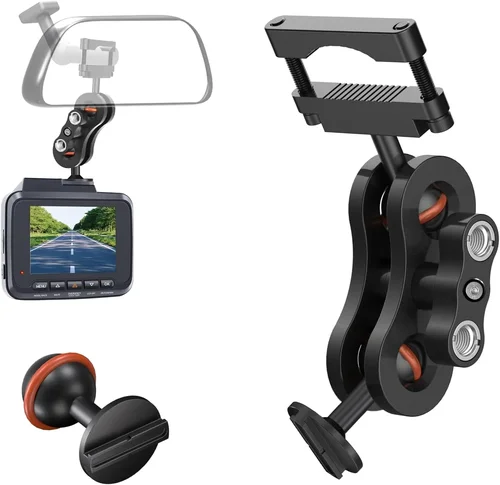
Compact designs minimize visual obstruction while fitting snugly behind your rearview mirror or windshield mount. Smaller units sometimes sacrifice battery capacity or cooling efficiency, so evaluate trade-offs carefully. If you plan to transfer recordings frequently between devices, lightweight construction makes handling easier. Some models include magnetic mounts for quick removal, ideal for sharing footage with passengers or storing temporarily when not in use.
8. User Reviews & Ratings
Genuine customer feedback provides invaluable insights beyond manufacturer claims. Focus on verified purchase reviews discussing real-world usage scenarios similar to your own driving habits. Pay particular attention to comments about app stability on iOS devices, background recording reliability, and ease of initial setup. Be wary of overly positive outlier ratings that may indicate fake testimonials or incentivized reviews.
- Official app available on App Store
- Background recording capability documented
- Push notification support for incident alerts
- Wi-Fi direct connectivity without router dependency
- iOS version compatibility (check minimum OS requirement)
- File format support (MP4 preferred for universal playback)
Different Types of Dash Cams

Common Buying Mistakes to Avoid
❌ Mistake: Ignoring iOS Compatibility Requirements
Why it’s bad: Assuming all dash cams work equally well with iPhones leads to frustration when apps crash, background recording fails, or file transfers fail silently. Many Android-focused models lack proper iOS certification and suffer from unstable connections.
What to do instead: Always check the manufacturer’s official documentation for explicit iOS support statements. Verify app store availability, read user reviews specifically mentioning iPhone experiences, and confirm required iOS version compatibility before purchasing.
❌ Mistake: Overlooking Storage Management
Why it’s bad: Running out of memory cards causes gaps in your footage—potentially missing critical events. Cheap microSD cards also degrade quickly under constant write cycles, leading to corruption and loss of valuable evidence.
What to do instead: Choose dash cams with automatic loop recording enabled by default. Invest in high-endurance Class 10 or UHS-I microSD cards (minimum 64GB recommended). Consider models offering cloud backup options to offload local storage demands.
❌ Mistake: Skipping Firmware Updates
Why it’s bad: Outdated firmware introduces security flaws, reduces performance, and breaks compatibility with newer iOS releases. Manufacturers often fix bugs and add features through regular updates.
What to do instead: Subscribe to brand newsletters for update announcements. Enable automatic firmware checks in the companion app whenever possible. Keep your iPhone updated to maintain optimal communication between devices.
❌ Mistake: Neglecting Power Source Reliability
Why it’s bad: Weak batteries or unstable cigarette lighter adapters cause unexpected shutdowns during drives. Without sufficient power, your dash cam cannot record incidents or maintain parking mode functionality.
What to do instead: Opt for models with dual power inputs (cigarette lighter + USB). Test the unit thoroughly before relying on it for actual drives. Consider hardwiring kits for permanent installation in vehicles without accessible USB ports.
❌ Mistake: Focusing Solely on Resolution
Why it’s bad: Higher megapixels don’t guarantee clearer footage if other factors like lens quality, frame rate, or compression algorithms are subpar. A 4K camera struggling with night vision offers little advantage over a well-tuned 1080p model.
What to do instead: Evaluate overall image processing pipeline quality rather than isolated specs. Prioritize features like wide dynamic range, good low-light sensitivity, and accurate color reproduction across varying lighting conditions.
❌ Mistake: Disregarding Privacy Concerns
Why it’s bad: Cloud-connected dash cams collect location data and video snippets that could potentially be accessed by unauthorized parties if encryption standards aren’t robust. Local-only storage eliminates this risk entirely.
What to do instead: Understand what data your chosen model collects and how it’s stored. Disable cloud features if privacy is paramount. Regularly audit permissions granted to companion apps on your iPhone.
❌ Mistake: Choosing Based on Marketing Claims Alone
Why it’s bad: Flashy advertisements often exaggerate capabilities while omitting limitations. “Military-grade durability” or “AI-powered detection” may sound impressive but lack substance without independent verification.
What to do instead: Rely on third-party testing organizations like RTINGS.com, Wirecutter, or Consumer Reports for unbiased comparisons. Cross-reference multiple review sources before making decisions.
Budget Guidelines: How Much Should You Spend?
Entry-Level ($40 – $80)
This bracket suits occasional drivers needing basic protection without breaking the bank. Expect 1080p recording, single-lens operation, and limited smart features. While some models claim iPhone compatibility, true background recording capability is rare here. Battery life typically lasts 1-2 hours, requiring frequent recharging or hardwiring. MicroSD cards usually sold separately, adding to total cost. Ideal candidates include compact units from trusted brands like VIOFO or Z-Edge rebranded for budget markets.
Mid-Range ($80 – $180)
The sweet spot for most iPhone users seeking balanced performance and connectivity. Features expand significantly: dual-channel recording becomes common, parking mode emerges, and genuine iOS app integration appears. Resolution stays at 1080p or upgrades to 2K, while advanced sensors improve low-light capture. Brands like Nextbase, Blackvue, and Garmin enter this space with proven reliability. Background recording works reliably when paired with recent iPhone models running iOS 14+. This tier offers the best value proposition overall.
Premium ($180 – $300)
Enthusiasts and daily commuters benefit from professional-grade components. Look for 4K recording, GPS tracking, Wi-Fi 6 support, and enhanced security protocols. Cloud storage subscriptions often included for first year. Build quality improves with weather-sealed housings and reinforced mounts. Advanced AI features detect pedestrians, lane departures, and collision risks. Real-time streaming enables sharing live footage during emergencies. Models like Thinkware U1000 or Blackvue DR970X-2CH represent industry benchmarks in this category.
Luxury ($300+)
Ultra-high-end systems targeting fleet operators and serious content creators. Multi-camera arrays provide 360-degree coverage. Military-spec durability withstands extreme environments. Integrated artificial intelligence analyzes traffic patterns and driver behavior. Enterprise-grade encryption secures sensitive data. Dedicated servers handle massive cloud archives. While overkill for personal use, these solutions justify costs through scalability and compliance requirements.
Expert Tips for Getting the Best Deal
1. Time Your Purchase Strategically
Avoid buying immediately after major holidays like Black Friday when retailers inflate original prices to make discounts appear larger. Instead, wait until January-February when manufacturers release refreshed models, clearing inventory at steep markdowns. Summer months also see reduced demand for dash cams, triggering seasonal promotions.
2. Leverage Retailer-Specific Perks
Major electronics chains often bundle free accessories like extra memory cards or protective cases with dash cam purchases. Online marketplaces such as Amazon occasionally offer exclusive refurbished units at 30-40% savings over retail. Sign up for loyalty programs to unlock early access to lightning deals and member-only coupons.
3. Compare Cross-Platform Pricing
Same-model dash cams rarely cost identical amounts across different sellers. Use price tracking tools like Honey or CamelCamelCamel to monitor historical trends. Watch for “buy one get one free” deals on microSD cards that effectively reduce per-unit costs.
4. Negotiate Extended Warranties Wisely
Most third-party warranty providers mark up premiums excessively. Stick with manufacturer-backed coverage unless absolutely necessary. Read fine print carefully—some policies exclude water damage or accidental drops covered under standard consumer protection laws.
5. Test Return Policies Thoroughly
Unopened boxes enjoy full refund eligibility, but opened products may incur restocking fees or partial deductions. Contact customer service proactively to understand return procedures before purchasing. Keep all packaging materials until confirmed working condition.
6. Validate iOS Integration Before Committing
Download the companion app immediately after unboxing to test responsiveness, background operation, and file transfer speeds. Simulate real-world usage by initiating remote live view sessions and checking notification delivery times.
7. Join Owner Communities
Online forums like Reddit’s r/Dashcam or manufacturer-specific Facebook groups share insider tips about firmware bugs, unofficial fixes, and accessory recommendations. Veteran members often reveal hidden features or troubleshooting tricks unavailable elsewhere.
8. Consider Refurbished Options
Certified refurbished units from authorized dealers undergo rigorous inspection and come with full warranties matching new items. Savings typically reach 20-30% without compromising reliability—ideal for discontinued but still-functional models.

Frequently Asked Questions
Q: Can any dash cam record in the background on my iPhone?
A: Not necessarily. True background recording requires explicit iOS app design allowing suspended app execution while maintaining network connectivity. Many generic Android-centric models lack this capability due to Apple’s strict background process limitations. Only officially certified iPhone-compatible devices guarantee reliable performance in this regard.
Q: What’s the difference between background recording and live streaming?
A: Background recording captures footage locally on the dash cam itself, uploading clips incrementally or in batches to your iPhone afterward. Live streaming transmits real-time video directly from the dash cam to your phone over Wi-Fi, consuming significant bandwidth and battery life. Both require stable connections, but only background recording preserves local storage integrity during transmission delays.
Q: Do I need special cables for iPhone integration?
A: Typically no. Most modern dash cams connect via standard micro-USB or USB-C ports to your iPhone using Apple’s Lightning-to-USB or USB-C adapter (sold separately). Wireless models eliminate cables entirely through Wi-Fi Direct technology. Ensure your iPhone supports the required connection type—older devices may lack USB-C compatibility.
Q: How much storage space will my recorded videos occupy?
A: At 1080p/30fps, expect approximately 3-5 GB per hour depending on compression settings and scene complexity. High-motion sequences (highways, city traffic) consume more space than stationary shots. A 64GB card stores roughly 12-20 hours of footage. Adjustable bitrates allow balancing quality versus capacity based on your priorities.
Q: Will my dash cam drain my iPhone’s battery?
A: No, because background recording happens on the dash cam’s internal storage, not your phone. However, using the companion app actively (live view, file transfers) does consume iPhone power. Wireless charging cases or power banks help mitigate incidental drain during lengthy downloads.
Q: Are cloud backups secure for dash cam footage?
A: Reputable brands employ AES-256 encryption both in transit and at rest. Two-factor authentication adds another layer of protection. Review privacy policies carefully—some providers retain metadata indefinitely, while others delete data after specified periods. Local-only storage remains the most private option.
Q: Can I use my dash cam while parked?
A: Yes, provided the model includes parking mode functionality. This feature activates motion detection or voltage monitoring to trigger recording when disturbances occur after ignition shutdown. Continuous parking recording requires hardwiring to vehicle power to prevent battery drain. Supercapacitors offer alternatives to lithium batteries for short-term backup power.
Q: What if my iPhone gets stolen along with the dash cam footage?
A: Cloud-synced models upload footage automatically, preserving evidence even if physical theft occurs. Enable Find My iPhone to locate your device remotely. Set strong passcodes and disable Bluetooth/Wi-Fi pairing locks to deter unauthorized access. Regular backups to encrypted external drives add redundancy.
Q: How do I ensure my dash cam works reliably with future iOS updates?
A: Choose manufacturers with established track records releasing timely firmware patches. Subscribe to their newsletters and follow developer blogs for beta testing opportunities. Avoid experimental “early access” apps lacking stability guarantees. Maintain compatible iOS versions through regular updates unless compatibility issues arise.
Q: Is it legal to record audio with my dash cam?
A: Laws vary by jurisdiction regarding consent requirements for audio recording. In one-party consent states (most U.S. locations), recording conversations involving yourself is generally permitted. Consult local regulations before enabling microphone functionality, especially in rental cars or public spaces where expectations of privacy differ.
Final Recommendations
Best for Budget-Conscious Buyers
The VIOFO A119 v3 delivers exceptional value at around $90. Its 1440p recording, Sony STARVIS sensor, and reliable iOS app integration make it ideal for everyday drivers. While lacking 4K resolution, it excels in low-light performance and offers robust background recording through its companion app. Dual-band Wi-Fi ensures fast file transfers, and the built-in GPS logs precise location data. Combined with a generous three-year warranty, this model represents outstanding bang-for-buck performance.
Best Overall Value
For balanced features and seamless iPhone synergy, the Nextbase 522GW stands out at approximately $160. It boasts 1080p recording, emergency SOS button, Alexa voice control, and cloud backup included for one year. The intuitive app design prioritizes background operation stability, while four-star customer ratings highlight dependable performance. Automatic firmware updates keep security patched, and the sleek form factor minimizes windshield obstruction. This all-rounder satisfies both casual and demanding users alike.
Best Premium Option
Enthusiasts seeking cutting-edge technology should consider the Thinkware U1000 priced around $320. Its 4K front camera captures stunning detail, complemented by a 2K rear add-on camera for comprehensive coverage. Advanced driver assistance systems detect pedestrians, lane departures, and blind spots. Military-grade durability withstands harsh conditions, while dual SD card slots provide redundant storage. The dedicated iOS app supports real-time streaming and granular playback controls, making it a professional-grade solution worth every penny.
Best for Beginners
Newcomers wanting hassle-free setup will appreciate the Garmin Dashcam Mini at roughly $130. Compact enough to conceal behind mirrors, it offers 1080p recording and automatic incident saving. Garmin Drive app integration simplifies management, while voice prompts guide operation. Simple menus reduce learning curves, and the company’s reputation for reliability inspires confidence. Though lacking advanced smart features, it fulfills core recording needs without overwhelming complexity.
Best for Advanced Users
Tech-savvy individuals requiring maximum flexibility choose the BlackVue DR970X-2CH at about $280. Dual-channel recording captures front and rear perspectives simultaneously, while WDR Pro handles challenging lighting dynamically. Cloud connectivity enables remote monitoring and instant sharing, ideal for fleet management or content creation. Event files auto-upload securely, and customizable alert thresholds fine-tune sensitivity. With superior build quality and extensive customization options, this system adapts to diverse professional requirements.
- Daily Commuting: Mid-range models with reliable background recording
- Road Trips: Higher-capacity storage and extended battery life
- Insurance Protection: Emergency event locking and cloud backup
- Content Creation: Superior resolution and stabilization features
- Commercial Use: Fleet management tools and compliance reporting
Conclusion: Making the Right Choice
Selecting the best dash cam for your iPhone ultimately revolves around aligning features with personal priorities rather than chasing headline-grabbing specs. While technical details like resolution and sensor types matter, true excellence lies in seamless integration, consistent reliability, and intuitive usability—especially when leveraging your smartphone’s capabilities for background recording. Remember that even premium models occasionally encounter firmware bugs or app instability; staying informed through community resources and manufacturer communications helps navigate these challenges gracefully.
Invest time upfront researching genuine user experiences, verifying iOS compatibility explicitly, and testing return policies before committing financially. Don’t hesitate to prioritize modest improvements in build quality or app polish over incremental spec bumps that offer diminishing returns. Your peace of mind on the road depends far more on consistent performance than fleeting technological advantages.
Whether you opt for budget-friendly simplicity or embrace professional-grade complexity, the right dash cam becomes invisible during normal driving—until precisely when you need it most. Armed with this comprehensive understanding, you’re now equipped to make confident decisions that protect your interests, preserve precious memories, and enhance your overall driving experience. Drive safely, stay connected, and trust your recordings to capture life’s journeys accurately and reliably.