Expert iPhone Dash Cam Buying Guide
When you’re behind the wheel, every second counts. Whether you’re commuting through rush hour traffic or embarking on a long road trip, having reliable documentation can make all the difference in insurance claims, legal disputes, or simply capturing those unforgettable moments on the road. An iPhone dash cam isn’t just about recording your journey—it’s about peace of mind, safety, and smart technology integration. But with so many options flooding the market, how do you choose the right one? This comprehensive guide cuts through the noise to help you find the perfect dash cam that works seamlessly with your iPhone.
You’ll learn exactly what features matter most, how to evaluate performance specs, and which models deliver the best value without compromising quality. We’ll walk you through everything from budget considerations to premium features, helping you understand not just what to look for, but why it matters. By the end, you’ll have a clear roadmap to making an informed decision that fits your lifestyle, driving habits, and technical comfort level.
The dash cam market has evolved dramatically in recent years, moving beyond basic black-and-white recordings to high-definition color video with advanced connectivity features. Modern dash cams now offer cloud storage, real-time GPS tracking, impact alerts, and—most importantly for iPhone users—seamless wireless integration. These advancements have transformed dash cams from simple security devices into sophisticated mobile companions that enhance both safety and convenience.

What to Look for When Buying Dash Cams
1. Budget & Price Range
Your budget should be the starting point for your search, not the final destination. Dash cams range from budget-friendly options under $50 to professional-grade systems exceeding $300. Entry-level models typically offer 720p recording with basic loop recording, while mid-range devices deliver 1080p or even 4K resolution with enhanced features like G-sensor alerts and parking mode. Premium dash cams include advanced capabilities such as night vision enhancement, AI-powered object detection, and sophisticated app integration.
Consider how frequently you drive and the value of protection you need. If you commute daily through urban areas with higher accident risks, investing in a mid-to-premium model makes sense. For occasional weekend drives, a solid entry-level device might suffice. Remember that cheaper doesn’t always mean worse—many budget models now offer surprisingly good performance, but be wary of extremely low-priced devices that may lack essential safety features or reliable build quality.
2. Performance Specifications
The heart of any dash cam lies in its video quality and recording capabilities. Resolution is the first thing to examine—720p HD offers decent clarity for basic needs, but 1080p Full HD provides much sharper images that capture license plates and road signs clearly. Some premium models now offer 4K recording, though this requires substantial storage space and may drain your iPhone’s battery faster during playback.
Frame rate matters too—standard 30fps recording works well for most situations, but 60fps captures smoother motion and better detail during rapid movements or high-speed incidents. Look for cameras with wide dynamic range (WDR) technology, which balances exposure between bright headlights and dark shadows for clearer nighttime footage.
Field of view (FOV) determines how much of the road you can see at once. Standard dash cams typically offer 120-140 degrees horizontal coverage, giving you a good balance between front visibility and minimal distortion. Ultra-wide lenses (160+ degrees) can capture more area but may introduce fisheye distortion at edges.
3. Build Quality & Durability
A dash cam must withstand extreme temperatures, constant vibration, and direct sunlight exposure. Look for devices with robust casing—polycarbonate or aluminum construction indicates better durability than plastic shells. The lens should be scratch-resistant with proper glass or high-quality polymer coating.
Temperature tolerance is crucial since dash cams operate year-round. Premium models maintain functionality from -4°F to 140°F (-20°C to 60°C), ensuring reliability in winter conditions and hot summer days. Water resistance ratings (IPX rating) help protect against rain and car washes, though complete waterproofing is less critical since the unit stays inside your vehicle.
Installation quality affects both performance and longevity. High-end models feature secure mounting systems that won’t detach during sudden stops or accidents. Check reviews specifically mentioning vibration resistance and whether the mount stays firm during bumpy roads or emergency braking.
4. Features & Functionality
Modern dash cams offer numerous features beyond basic recording. Parking mode uses built-in batteries or hardwired connections to monitor your vehicle when parked, triggering recording if motion or impacts are detected. Smart sensors automatically save important clips when sudden deceleration occurs, preventing overwriting of critical evidence.
GPS tracking adds valuable context to your recordings by embedding location and speed data directly into video files. This helps establish timeline accuracy during incidents and provides additional verification for insurance claims. Some models also include Wi-Fi connectivity for instant sharing of clips to social media or cloud storage services.
Night vision capabilities vary significantly between models. Look for devices with infrared LEDs or enhanced low-light sensors that maintain visibility in dark conditions. Some advanced units use starlight sensors that perform exceptionally well in near-total darkness, capturing clear details where conventional cameras fail.
5. Brand Reputation
Established brands generally offer better customer support, more reliable firmware updates, and longer product lifecycles. Companies like Garmin, BlackVue, and Thinkware have decades of experience in navigation and automotive electronics, giving them an edge in dash cam development. These manufacturers invest heavily in R&D and maintain dedicated support teams familiar with common issues and solutions.
Newer entrants to the market may offer innovative features at competitive prices, but they often lack the track record and infrastructure of established players. Before choosing a lesser-known brand, research their return policy, warranty terms, and availability of replacement parts. Read multiple user reviews focusing on long-term reliability rather than just initial impressions.
Brand consistency matters too—if you already own other devices from a manufacturer, consider sticking with their ecosystem for seamless integration. Some companies offer companion apps, cloud services, and accessory compatibility that work together across multiple products, creating a unified user experience.
6. Warranty & Support
A comprehensive warranty demonstrates manufacturer confidence in their product’s quality. Most reputable dash cam brands offer at least a one-year limited warranty covering defects in materials and workmanship. Premium devices may include two or three years of protection plus accidental damage coverage.
Check what’s included in the warranty terms carefully. Some policies exclude certain types of damage or require specific maintenance procedures to remain valid. Extended warranty options can provide additional peace of mind but ensure the cost doesn’t outweigh the potential benefits based on your usage patterns.
Customer support accessibility is equally important. Look for brands with responsive email support, detailed online documentation, and active community forums. Video tutorials, FAQ sections, and troubleshooting guides can save you time and frustration when setting up or maintaining your dash cam.
7. Size & Portability
Compact designs offer several advantages for iPhone users who value discretion and easy removal. Smaller dash cams are less noticeable to passengers and harder for potential thieves to spot, reducing theft risk. They also take up less space in your car and are easier to store when not in use.
However, size affects performance trade-offs. Very compact models sometimes sacrifice battery life, processing power, or cooling capacity. Larger units often house bigger batteries for extended parking mode operation and more powerful processors for better video encoding. Consider how frequently you’ll need to remove the device versus leaving it permanently installed.
Pocket-sized dash cams are particularly appealing for rental cars or shared vehicles since they’re easy to transfer between different cars. Some models include magnetic mounts or adhesive pads that allow quick installation and removal without leaving residue or damaging paint.
8. User Reviews & Ratings
Real-world experiences from actual users provide invaluable insights beyond marketing claims. Pay attention to review patterns rather than individual outliers. Multiple users reporting similar issues or praises indicates genuine product characteristics, while isolated complaints may stem from user error or unusual circumstances.
Look for detailed reviews that cover long-term use (6+ months) rather than just initial setup experiences. Questions about battery life degradation, software update stability, and build quality after heavy use reveal practical realities that short-term testing might miss. Video demonstrations showing actual recording quality under various lighting conditions are especially helpful.
Cross-reference reviews across multiple platforms including retailer websites, tech blogs, and independent testing sites. Different reviewers bring unique perspectives—some focus on technical specifications, others prioritize ease of use or aesthetic appeal. A balanced approach gives you the full picture before making your decision.
Different Types of Dash Cams

Common Buying Mistakes to Avoid
❌ Mistake: Ignoring Storage Requirements
Why it’s bad: Many users underestimate how quickly dash cam footage fills storage space. A single hour of 1080p video can consume 1-2GB of space depending on compression settings. Without adequate storage planning, important footage gets overwritten before you can review it, defeating the entire purpose of having a dash cam.
What to do instead: Calculate your monthly storage needs based on average driving hours and video quality. For example, if you drive 30 minutes daily at 1080p, you’ll generate approximately 15GB per month. Choose a card with at least 32GB capacity and consider upgrading to 64GB or larger for extended recording periods. Enable loop recording to automatically overwrite oldest files when storage fills up.
❌ Mistake: Skipping Night Vision Testing
Why it’s bad: Daytime performance looks impressive in lab tests, but nighttime recording reveals critical weaknesses. Poor low-light sensitivity means missing important details during evening commutes, parking lot incidents, or highway encounters with other vehicles’ headlights. Many dash cams appear functional in daylight but fail spectacularly in darkness.
What to do instead: Read detailed reviews specifically addressing night vision performance. Look for models with explicit mentions of low-light optimization, infrared capability, or starlight sensors. If possible, test the device yourself during twilight hours or ask friends who own the same model to share their nighttime experiences. Consider purchasing from retailers with generous return policies allowing you to verify performance before committing.
❌ Mistake: Overlooking Power Management
Why it’s bad: Improper power connections can drain your car battery overnight or cause electrical system conflicts. Some users connect dash cams directly to cigarette lighters without considering surge protection or power draw during engine startup. Others ignore parking mode requirements that need constant power even when the car is off, potentially killing your battery within days.
What to do instead: Invest in a quality hardwiring kit ($15-$30) that connects directly to your car’s fuse box using OBD-II port or dedicated circuit. This eliminates dependency on the ignition switch and prevents battery drain. Ensure your chosen model includes intelligent parking mode that only activates when significant motion or impact occurs, conserving energy while maintaining protection.
❌ Mistake: Neglecting Software Updates
Why it’s bad: Manufacturers regularly release firmware updates improving video quality, fixing bugs, or adding new features. Users who ignore these updates miss out on enhanced performance and may encounter compatibility issues with newer iOS versions or storage cards. Outdated software can also create security vulnerabilities or cause unexpected shutdowns during critical recording sessions.
What to do instead: Subscribe to manufacturer newsletters or enable automatic notifications for firmware releases. Schedule regular check-ins (every 2-3 months) to download and install updates through the official app or computer interface. Keep backup copies of previous firmware versions in case an update introduces problems requiring rollback.
❌ Mistake: Choosing Based Solely on Price
Why it’s bad: While affordability matters, extremely cheap dash cams often compromise on essential components like lens quality, sensor reliability, or build materials. You might save $20 initially but end up spending more replacing a defective unit or purchasing additional accessories due to poor integration with your iPhone ecosystem.
What to do instead: Create a weighted scoring system evaluating features according to your personal priorities. Assign higher importance scores to aspects like iOS compatibility, night vision, and build quality while deprioritizing less critical elements. Compare total weighted scores across different price points rather than focusing exclusively on lowest-cost options.
❌ Mistake: Failing to Test Installation
Why it’s bad: Even the best dash cam becomes useless if improperly mounted or positioned. Incorrect placement causes glare from dashboard lights, obstructs driver visibility, or creates distracting reflections during recording. Poor cable management leads to loose wires interfering with airbags or creating tripping hazards in your vehicle.
What to do instead: Practice installation away from your primary vehicle first using spare glass or mirrors. Focus on achieving optimal viewing angle (eye level or slightly below) while minimizing reflections. Use manufacturer-provided mounting hardware and follow their positioning guidelines precisely. Consider professional installation services if you’re uncomfortable with DIY approaches or dealing with complex wiring scenarios.
Budget Guidelines: How Much Should You Spend?
Entry-Level ($30 – $75): What to Expect
This price range delivers essential functionality for occasional drivers or those testing dash cam technology. You’ll find basic 720p or early 1080p models with simple loop recording, manual file deletion, and standard mounting systems. Entry-level devices rarely include advanced features like GPS tracking, parking mode, or smartphone connectivity, though some newer budget options surprise with unexpectedly capable performance.
Key limitations include shorter battery life, reduced low-light sensitivity, and plasticky construction that may feel flimsy compared to premium counterparts. Storage typically requires separate microSD cards (not included), and you’ll likely need to purchase additional accessories like extra cards or hardwiring kits. Despite these constraints, several reputable brands offer surprisingly reliable entry-level models that serve well for light-duty use.
Recommended allocation for entry-level purchases: $50 base unit + $25 for 64GB microSD card + $15 for basic hardwiring kit = $90 total investment. This configuration provides 2-3 weeks of continuous recording while staying within tight budgets. Remember that even affordable dash cams can provide valuable evidence in minor incidents, making them worthwhile investments for cautious drivers.
Mid-Range ($75 – $150): Sweet Spot for Most Buyers
This category represents the optimal balance between cost and capability for the majority of drivers. Mid-range dash cams typically offer 1080p Full HD recording with improved night vision, wider field of view, and enhanced build quality. You’ll find reliable loop recording, G-sensor impact detection, and often include microSD cards in packaging.
Features commonly found in this tier include parking mode (when hardwired), motion detection, and basic app connectivity for clip sharing. Some models incorporate GPS tracking for speed and location metadata, while others offer Wi-Fi for instant clip transfers to smartphones. Battery life improves significantly over entry-level units, supporting longer standalone operation or extended parking surveillance.
For mid-range purchases, allocate approximately $125 for the device itself, leaving room for accessories. Most manufacturers bundle 32GB or 64GB microSD cards, eliminating immediate accessory costs. Hardwiring kits remain optional unless you plan frequent use when parked. This price point attracts serious attention from established brands committed to delivering dependable performance without overwhelming feature sets.
Premium ($150 – $300): For Enthusiasts and Professionals
Premium dash cams target drivers who demand exceptional performance, reliability, and advanced features. You’ll encounter 4K recording capability, superior low-light imaging, military-grade durability certifications, and sophisticated app ecosystems. These devices often include multiple microphones for directional audio capture, enhanced temperature resilience, and professional-grade mounting systems.
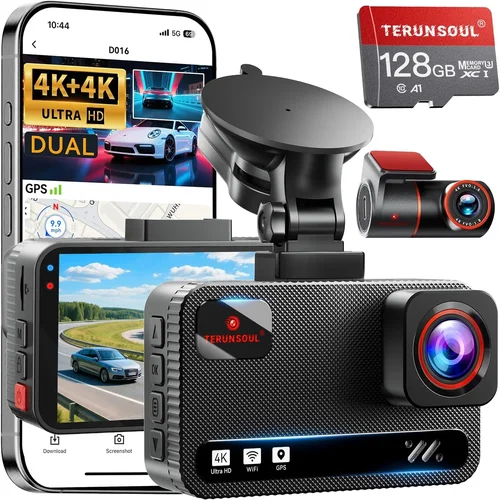
Advanced functionality expands dramatically in this category: AI-powered collision detection, cloud storage integration, real-time driver assistance alerts, and multi-camera synchronization. Some premium models support dual recording (front and rear) or offer specialized lenses for different lighting conditions. Battery technology advances include supercapacitors instead of lithium-ion cells for extended lifespan and better temperature handling.
Allocation for premium purchases should account for all necessary accessories upfront. Expect to spend $200-250 on the device plus $40-60 for quality microSD cards (128GB or larger), professional hardwiring kits, and protective cases. Cloud storage subscriptions add recurring costs ($5-15/month) for remote access and backup. However, the peace of mind and potential insurance benefits justify the investment for frequent travelers, delivery drivers, or anyone needing maximum protection.
Luxury ($300+): Top-Tier Features
Ultra-premium dash cams represent the cutting edge of automotive recording technology, incorporating features previously found only in industrial or aviation applications. These devices push boundaries with dual-lens systems, thermal imaging capabilities, and AI-driven analytics that detect pedestrians, cyclists, and potential hazards before they become incidents.
Luxury models often include redundant power systems, satellite connectivity for global coverage, and enterprise-grade security protocols protecting stored evidence from tampering. Some offer modular designs allowing customization for specific use cases like fleet management or racing applications. Advanced cooling systems prevent overheating during prolonged recording sessions, while proprietary image processing algorithms deliver stunning clarity in virtually any lighting condition.
Total ownership costs for luxury dash cams easily exceed $500 when accounting for specialized accessories, professional installation, and ongoing service contracts. However, for commercial operators, fleet managers, or individuals with exceptionally high-risk driving profiles, these investments provide unmatched levels of protection and operational intelligence. Always verify that luxury features match your actual needs—many advanced capabilities remain unused by typical consumers.
Expert Tips for Getting the Best Deal
1. Time Your Purchase Strategically
Avoid buying during peak shopping seasons like Black Friday or holiday weekends when retailers inflate prices before markdowns. Instead, target post-holiday clearance events (January-February) or back-to-school periods (July-August) when inventory turnover accelerates and manufacturers release updated models. Electronics retailers typically refresh product lines quarterly, creating opportunities for significant discounts on outgoing inventory.
Manufacturer sales events also offer excellent timing—BlackVue, Garmin, and Thinkware each host dedicated promotional periods throughout the year. Sign up for their newsletters to receive exclusive discount codes and early access to deals. Seasonal transitions (spring to summer, fall to winter) often trigger price adjustments as new models arrive, making these windows ideal for securing better values on current-generation devices.
2. Explore Multiple Retail Channels
Don’t limit yourself to major online retailers. Local electronics stores often carry dash cam inventory with knowledgeable staff who can demonstrate products hands-on. Physical inspection allows you to assess build quality, button responsiveness, and mounting system ease of use before committing. Many brick-and-mortar locations also offer installation services that guarantee proper setup and warranty compliance.
Specialized automotive shops represent another valuable resource, particularly for hardwiring installations and compatibility verification with your specific vehicle model. These professionals understand electrical systems and can recommend optimal power sources while avoiding common installation pitfalls. Their expertise often justifies slightly higher costs for installation services versus DIY approaches.
Online marketplaces diversify your options further. eBay frequently lists refurbished or open-box items at substantial discounts, though verify seller ratings and return policies carefully. International retailers occasionally ship dash cams worldwide, offering broader selection at lower prices—but factor in shipping costs, customs duties, and potential warranty complications when considering non-domestic purchases.
3. Leverage Bundle Deals and Accessory Packages
Many manufacturers package dash cams with complementary accessories at discounted rates. Look for “complete kit” offerings that include mounting brackets, cables, memory cards, and installation tools—often saving 15-30% compared to purchasing items separately. These bundles ensure compatibility between components and simplify setup processes.
Retailers occasionally run promotional packages combining dash cams with related products like tire pressure monitors, backup cameras, or car alarms. While not all bundled items may interest you, the overall savings can be substantial if you need multiple automotive electronics. Evaluate each component individually before accepting bundles containing unnecessary extras.
Subscription services represent another bundling opportunity for cloud storage plans or premium app features. Some providers offer discounted dash cam hardware when paired with annual subscription commitments. Assess whether these recurring costs align with your usage patterns before committing to long-term agreements.
4. Negotiate with Sellers and Manufacturers
Never assume posted prices represent absolute limits. Electronics retailers, especially local stores, often have flexibility to adjust pricing within reasonable ranges to secure sales. Politely inquire about available discounts, loyalty program benefits, or competitor matching policies. Mentioning alternative options you’re considering can encourage sellers to offer better terms to win your business.
Direct manufacturer contact opens additional negotiation avenues. Companies like BlackVue and Garmin sometimes provide dealer incentives or educational discounts for certified technicians or educators. Professional affiliations or bulk purchase intentions may qualify for special pricing unavailable to general consumers. Even if ineligible for formal programs, expressing genuine interest in their products often yields helpful information about unadvertised deals.
Trade-in programs offered by some retailers or manufacturers allow you to exchange older dash cams toward new purchases. While credit amounts vary widely based on device condition, this approach can reduce effective costs while responsibly disposing of outdated equipment. Environmental considerations combined with financial benefits make trade-ins particularly attractive for eco-conscious buyers.
5. Prioritize Warranty and Return Policies
Thorough warranty coverage protects against manufacturing defects and performance issues beyond your control. Look for minimum 1-year limited warranties covering materials and workmanship, with clear definitions of covered versus excluded damages. Extended warranty options should specify what additional protections they provide and whether accidental damage is included.
Generous return policies offer crucial flexibility for testing products in real-world conditions. Aim for retailers offering at least 30-day returns, preferably with restocking fee waivers for unopened items. Some manufacturers provide direct return channels bypassing retailers entirely, simplifying the process and reducing potential conflicts during exchanges or repairs.
International warranty validity matters if traveling frequently with your dash cam. Verify whether coverage extends globally or applies only within specific regions. Dual-voltage compatibility ensures your device functions properly across different countries’ electrical standards without requiring voltage converters or adapters.
6. Test Before Committing Long-Term
Whenever possible, request loaner units or demonstration models to evaluate performance under your typical driving conditions. Short-term testing reveals practical shortcomings invisible during laboratory evaluations—glare issues, microphone sensitivity, touchscreen responsiveness, and app integration quality all require real-world validation.
Extended trial periods (3-7 days) provide deeper insight into battery life, storage consumption rates, and overall usability patterns. Document any challenges encountered during testing, including installation difficulties, software glitches, or compatibility issues with your iPhone version or operating system updates. Share these observations with sales representatives to ensure you select the most suitable model for your specific needs.
Video demonstrations created by other users offer additional verification beyond manufacturer claims. Search YouTube for unboxing and review videos showing actual recording samples, particularly during challenging lighting conditions or emergency scenarios. Authentic footage reveals true performance capabilities more effectively than staged promotional content.

Frequently Asked Questions
Q: Can I use my existing microSD card with any dash cam?
A: While many dash cams accept standard microSD cards, compatibility varies based on capacity, speed class, and file system formatting. Most manufacturers recommend specific cards listed in their compatibility charts to ensure optimal performance and avoid recording interruptions. Cards larger than 128GB may require exFAT formatting instead of FAT32, which some older models don’t support. Always verify your card meets minimum speed requirements (typically Class 10 or UHS-I) for smooth video writing without dropped frames.
Q: How does parking mode work and does it drain my car battery?
A: Parking mode uses built-in batteries or hardwired connections to monitor your vehicle when parked. Motion-activated recording triggers when sensors detect vibrations or movement, while impact-sensitive models activate during collisions. Intelligent parking systems minimize battery drain by using low-power standby modes and sophisticated algorithms distinguishing between normal environmental disturbances and genuine threats. Proper hardwiring eliminates battery concerns entirely by drawing power directly from your vehicle’s electrical system.
Q: Will a dash cam affect my car insurance premiums?
A: Some insurance companies offer discounts for vehicles equipped with dash cams, recognizing their role in incident documentation and fraud prevention. However, policies vary widely by provider and jurisdiction. Contact your insurer directly to inquire about potential savings and required documentation procedures. In many cases, providing timestamped footage demonstrating responsible driving behavior can positively influence claim outcomes and premium calculations.
Q: Do I need to remove my dash cam when driving rental cars?
A: Rental agreements typically prohibit permanent modifications like hardwiring, but removable dash cams with suction cup mounts offer convenient alternatives. Pocket-sized models designed for temporary installation leave no trace and comply with most rental terms. Always check specific rental policies regarding electronic devices and consult with rental agents if uncertain about permitted usage. Some companies even provide complimentary dash cams for guest vehicles during peak travel seasons.
Q: How do I know if my dash cam is recording properly?
A: Most dash cams indicate recording status through LED lights or audible beeps when activated. Visual confirmation involves checking the display screen or reviewing saved files after trips. Regularly inspect recorded footage for consistent timestamps, clear audio, and stable image quality across various lighting conditions. Unexpected shutdowns, distorted audio, or corrupted files signal potential hardware or software issues requiring investigation or replacement.
Q: Can dash cam footage be used as legal evidence?
A: Yes, dash cam recordings serve as admissible evidence in many jurisdictions when properly maintained and authenticated. Timestamps, GPS coordinates, and uninterrupted recording sequences strengthen evidentiary value. However, chain-of-custody protocols apply—secure storage prevents tampering, and original files should never be edited or compressed beyond necessary backups. Consult local laws regarding privacy regulations and consent requirements for recording others’ vehicles or pedestrians.
Q: Why does my dash cam stop recording after a few minutes?
A: Several factors cause premature stopping: insufficient storage space (overwrite protection prevents overfilling), overheating from direct sunlight exposure, or power supply instability. Ensure your microSD card has available space, park in shaded areas when possible, and verify proper voltage regulation if hardwired. Some models automatically reduce resolution or frame rate under thermal stress to prevent damage, returning to full capability once cooled.
Q: Are there privacy concerns with dash cam recordings?
A: Privacy considerations extend beyond your vehicle to include pedestrians, cyclists, and other drivers captured in footage. Many regions restrict recording individuals without consent, particularly in residential areas or private property. Review local ordinances regarding public vs. private recording rights and implement responsible archiving practices—delete irrelevant clips promptly and secure sensitive footage against unauthorized access.
Q: How often should I clean my dash cam lens?
A: Regular cleaning maintains optimal image quality by removing dust, fingerprints, and smudges that degrade visibility. Wipe the lens weekly using microfiber cloths and appropriate cleaning solutions—never abrasive materials that scratch glass coatings. Address stubborn grime immediately before it accumulates into permanent stains. External environments like dusty highways or rainy conditions may necessitate more frequent attention than urban driving scenarios.
Q: What’s the difference between loop recording and event recording?
A: Loop recording continuously overwrites oldest files when storage fills, providing endless coverage but risking loss of critical incidents. Event recording uses built-in sensors (G-force, motion, impact) to automatically save important clips while overwriting routine footage during regular driving. Hybrid systems combine both approaches, preserving key moments while maintaining efficient storage management. Understanding these modes helps configure appropriate settings for your usage patterns and risk tolerance.
Our Final Recommendations
Best for Budget-Conscious Buyers
The Viofo A119 V3 stands out as exceptional value for money, delivering reliable 1080p recording with surprisingly robust features at accessible price points. Its compact design minimizes visual intrusion while housing sufficient processing power for clear day and night footage. The built-in suction mount proves remarkably secure, and loop recording operates smoothly without frustrating limitations. While lacking advanced smartphone integration, the A119 V3 compensates with rock-solid performance and straightforward operation that appeals to drivers prioritizing functionality over flashy extras.
This model particularly shines for occasional drivers seeking dependable evidence preservation without overwhelming complexity. Its modest feature set avoids unnecessary complications while maintaining core dash cam essentials: crisp recording, impact detection, and hassle-free installation. Combined with competitive pricing and positive user feedback regarding longevity, the A119 V3 represents an outstanding entry point into dash cam ownership for cost-aware consumers.
Best Overall Value
The Garmin Dashcam Mini redefines what mid-range dash cams can achieve by seamlessly integrating with iPhone ecosystems through intuitive app controls and automatic cloud backup. Its compact dimensions conceal powerful hardware capable of 1440p recording with enhanced night vision performance surpassing competitors in its class. GPS tracking embeds precise location data directly into videos, while voice commands offer hands-free operation during challenging driving conditions.
What elevates the Dashcam Mini beyond mere recording capability is its thoughtful software implementation. The companion app provides effortless clip organization, instant sharing options, and seamless firmware updates—all contributing to an experience that feels polished and professional. Build quality reflects Garmin’s reputation for reliability, with temperature-resistant components ensuring consistent operation across diverse climates. For iPhone owners valuing integration, convenience, and proven performance, this model strikes an ideal balance between capability and usability.
Best Premium Option
BlackVue DR970X-2CH represents the pinnacle of dash cam engineering with dual-channel recording capturing both front and rear perspectives simultaneously. Its 4K front camera delivers stunning detail resolution, while the 1080p rear unit provides comprehensive coverage for parking scenarios and multi-vehicle incidents. Advanced features include cloud connectivity enabling remote live viewing, impact-triggered recording with pre-event buffering, and sophisticated parking mode utilizing intelligent motion detection.
Build quality reaches professional standards with magnesium alloy housing protecting internal components from vibration and temperature extremes. The accompanying Drive app offers extensive customization options, including adjustable sensitivity thresholds and specialized recording profiles for different driving environments. While priced above typical consumer budgets, the DR970X-2CH justifies its premium position through unmatched reliability, feature richness, and enterprise-grade security protecting stored evidence against tampering or unauthorized access.
Best for Beginners
The Rexing V1P Pro offers an inviting introduction to dash cam technology with plug-and-play simplicity and comprehensive starter kit contents eliminating immediate accessory costs. Its 1080p recording handles everyday driving scenarios admirably, while built-in Wi-Fi facilitates effortless clip transfers to smartphones without cumbersome cable connections. The compact form factor ensures unobtrusive placement, and the intuitive interface minimizes learning curves for first-time users.
Beginner-friendly features include automatic night vision switching, gesture-based controls, and clear status indicators communicating recording states and storage availability. The included 64GB microSD card provides substantial recording capacity, and the sturdy suction mount secures firmly without complicated installation procedures. For drivers new to dash cam ownership seeking confidence-building technology without overwhelming complexity, the V1P Pro delivers trustworthy performance wrapped in approachable design.
Best for Advanced Users
The Thinkware U1000 pushes technological boundaries with 4K recording capability married to sophisticated AI-powered analytics detecting pedestrians, cyclists, and potential collision risks before incidents occur. Its supercapacitor-based power system ensures reliable operation across extreme temperatures while eliminating battery degradation concerns associated with traditional lithium-ion cells. Advanced audio features include three-microphone arrays capturing directional soundscapes and wind noise reduction algorithms maintaining clarity during high-speed travel.
Professional-grade mounting hardware and military-specification durability prepare the U1000 for demanding usage environments including fleet operations and commercial transportation. Customizable recording profiles adapt to specific driving conditions, while encrypted cloud storage safeguards sensitive footage against unauthorized access. For technologically adept drivers requiring maximum protection and analytical intelligence, this model represents the ultimate expression of current dash cam innovation.
Conclusion: Making the Right Choice
Choosing the best dash cam for iPhone requires balancing your specific needs against available features and budget constraints. No single device satisfies every driver perfectly, but understanding core requirements helps narrow possibilities dramatically. Prioritize aspects most relevant to your driving habits: frequent commuters benefit from advanced connectivity and parking mode, while occasional travelers might prefer compact, removable designs.
Remember that dash cams serve multiple purposes beyond accident documentation—they preserve memories, deter theft, and provide peace of mind during daily journeys. Invest time researching models aligning with your priorities rather than rushing decisions based solely on price or trending features. The ideal dash cam integrates seamlessly into your lifestyle without introducing unnecessary complexity or recurring costs.
As automotive technology continues evolving, future dash cams will likely incorporate even more sophisticated AI capabilities, enhanced connectivity options, and improved power management solutions. However, fundamental principles remain unchanged: reliable recording, intuitive operation, and robust build quality define successful implementations regardless of generation. Stay informed about emerging developments while remaining grounded in proven technologies meeting current needs.
Ultimately, the best dash cam empowers you with confidence behind the wheel while respecting your time, budget, and preferences. Whether selecting budget-conscious basics or premium systems packed with cutting-edge features, trust your instincts after thorough evaluation. Your chosen device should complement your driving experience rather than complicate it—enabling safer journeys today while preparing for tomorrow’s technological advances.