Complete Dash Cam Buying Guide
As the number of vehicles on our roads continues to climb and traffic incidents become increasingly common, dash cams have transformed from a niche automotive accessory into an essential safety tool for drivers worldwide. Whether you’re a daily commuter, a long-distance traveler, or someone who simply wants peace of mind behind the wheel, understanding what makes a dash cam truly effective is crucial. This comprehensive buying guide will walk you through everything you need to know about selecting the perfect dash cam for your specific needs, helping you make an informed decision that could potentially save your vehicle, your wallet, and even your freedom.
In this detailed guide, you’ll learn about the critical features that separate average dash cams from exceptional ones, discover how different types of cameras serve various driving scenarios, and understand why certain specifications matter more than others depending on your usage patterns. You’ll also find expert advice on avoiding common pitfalls, smart budgeting strategies, and practical tips for getting the best value for your money. By the end of this article, you’ll have all the knowledge necessary to confidently choose a dash cam that meets your requirements while staying within your budget constraints.
The modern dash cam market offers an overwhelming array of options ranging from basic single-lens models under $50 to sophisticated multi-camera systems exceeding $1,000. With new technologies emerging regularly and manufacturers constantly updating their features, it’s easy to feel overwhelmed by the choices available. This guide cuts through the marketing noise to provide you with objective, expert-level insights into what truly matters when evaluating dash cam performance and reliability. We’ll examine everything from video resolution and recording capabilities to build quality and user experience considerations, ensuring you have the complete picture before making your purchase.

What to Look for When Buying Dash Cams
When shopping for a dash cam, several key factors determine its effectiveness and longevity. Understanding these elements will help you navigate the complex marketplace and select a device that delivers reliable performance when you need it most.
1. Video Resolution & Image Quality
Video resolution represents one of the most important considerations when selecting a dash cam. The quality of footage directly impacts your ability to capture clear evidence in case of accidents or disputes. Most reputable dash cams offer at least 1080p Full HD resolution, but higher-end models now feature 4K Ultra HD capability that provides exceptional detail and clarity.
Look for cameras that support at minimum 1920 x 1080 resolution at 30 frames per second (fps), though some premium models can record at 60 fps for smoother motion capture. Higher frame rates are particularly valuable for capturing fast-moving vehicles and sudden maneuvers. Additionally, consider cameras with wide dynamic range (WDR) technology, which helps balance exposure between bright headlights and dark road conditions, resulting in clearer images throughout the day.
When evaluating image quality, pay attention to the camera’s sensor size and aperture. Larger sensors typically perform better in low-light conditions, while wider apertures allow more light in for improved nighttime visibility. Many experts recommend looking for cameras with at least a 1/2.7-inch CMOS sensor and an f/2.0 or lower aperture for optimal performance.
2. Field of View (FOV)
The field of view determines how much of the road ahead and surrounding area your dash cam can capture. A wider FOV is generally preferable as it reduces blind spots and provides more comprehensive coverage of your driving environment. However, extremely wide angles can introduce distortion at the edges of the frame, making objects appear stretched or unnatural.
Most dash cams offer between 110° and 170° horizontal field of view, with 140° being a sweet spot that balances coverage with minimal distortion. Some advanced models feature adjustable FOV settings that allow you to narrow the view when parking mode is active or widen it during normal driving. Consider your typical driving conditions—urban environments with frequent intersections may benefit from slightly wider angles, while highway driving might prioritize center-focused clarity.
Some manufacturers implement multiple lenses or special lens designs to achieve very wide fields of view without significant distortion. For example, fisheye lenses can provide up to 180° coverage but require software correction to minimize warping effects.
3. Recording Capabilities & Storage Solutions
Recording duration and storage management are critical aspects that directly impact how effectively your dash cam captures events. Modern dash cams typically use microSD cards for local storage, with capacity ranging from 32GB to 256GB or more depending on the model.
Loop recording allows the dash cam to automatically overwrite older footage when storage reaches capacity, ensuring continuous operation without manual intervention. Most devices support loop recording intervals ranging from 1 to 10 minutes, with shorter intervals providing more granular event capture but requiring more frequent file management.
G-sensor technology detects sudden movements or impacts and marks those recordings for protection against automatic deletion during loop recording cycles. This feature is particularly valuable for capturing accident footage while preserving important evidence. Some advanced models offer dual-trigger recording, where the g-sensor activates additional backup cameras or extended recording time after detecting significant impact.
Cloud connectivity has become increasingly popular, allowing dash cams to upload selected clips automatically to secure online storage. This eliminates concerns about losing critical footage due to card failures or accidental overwrites. Cloud-enabled devices typically include subscription services that vary in cost and data limits.
4. Night Vision Performance
Night vision capabilities significantly affect your dash cam’s usefulness during evening commutes or overnight parking. Poor low-light performance can render a dash cam nearly useless when most needed—during nighttime driving or incidents occurring after dark.
Effective night vision depends on several interrelated factors including sensor sensitivity, aperture size, image processing algorithms, and infrared illumination. Many dash cams incorporate near-infrared LEDs that activate in darkness to illuminate the road ahead, improving visibility without creating glare that might interfere with other drivers.
Look for cameras specifically marketed for excellent night performance, often featuring larger sensors optimized for low-light capture and specialized noise reduction algorithms. Some models include starlight or super night vision modes that enhance sensitivity to dim light conditions.
Consider testing night vision capabilities if possible, either by reviewing sample footage from the manufacturer or reading detailed user reviews focused specifically on low-light performance. Keep in mind that even the best dash cams struggle with extremely dark conditions or situations involving heavy fog or precipitation.
5. Parking Mode Functionality
Parking mode transforms your dash cam from a driving recorder into a security surveillance system that monitors your vehicle while unattended. This feature is invaluable for protecting against hit-and-runs, vandalism, or unauthorized entry into parked vehicles.
Most parking modes operate using one of two approaches: time-lapse recording or motion-activated monitoring. Time-lapse records brief video segments at regular intervals while the car is off, consuming minimal power but potentially missing short-duration events. Motion-activated systems use built-in accelerometers and cameras to detect movement around the vehicle and trigger full-resolution recording only when necessary.
Power management is crucial for parking mode functionality since the dash cam must draw electricity from your vehicle’s battery. Built-in capacitors or supercapacitors can maintain short-term recording during voltage fluctuations, while hardwired installations provide continuous power through the fuse box.
Some advanced dash cams include impact detection that triggers immediate recording upon sensing significant vibration or collision forces, even when parked. These systems often combine g-sensors with camera-based motion detection for comprehensive coverage.
6. Build Quality & Durability
A dash cam faces harsh operating conditions including extreme temperatures, direct sunlight exposure, vibration from rough roads, and potential impacts during incidents. Robust construction ensures reliable operation throughout its lifespan.
Look for cameras with sturdy housing materials such as aluminum alloy or high-grade polycarbonate that resist cracking and deformation. Sealed designs prevent moisture ingress from condensation or rain exposure, which can cause internal damage or corrosion over time.
Heat resistance is particularly important given that dash cams often mount directly to windshields exposed to intense sunlight. Models rated for operation in temperatures ranging from -4°F to 140°F demonstrate superior durability in diverse climates. Some manufacturers test their products extensively in extreme conditions to validate performance claims.
Mounting hardware should also receive attention—adhesive mounts must maintain strong bonds through temperature cycling and humidity changes, while suction cup alternatives require reliable vacuum seals. Quick-release mechanisms allow convenient removal for cleaning or storage without compromising mounting integrity.
7. Connectivity Options
Modern dash cams increasingly offer various connectivity features that enhance usability and integration with other devices. Wi-Fi capability enables wireless transfer of files to smartphones or tablets using companion apps, eliminating the need to physically remove memory cards.
Bluetooth support facilitates hands-free calling or audio streaming in compatible vehicles, though this feature varies significantly across models and may not be relevant for all users. GPS tracking records location data alongside video footage, providing context for events and supporting speed limit monitoring alerts.
Some dash cams include built-in cellular modems that enable real-time incident reporting and live viewing capabilities, though these typically require separate data plans and subscriptions. Smartphone integration allows remote control of recording functions, notification of events, and cloud storage synchronization.
Consider how you plan to interact with your dash cam—if you frequently share clips with insurance companies or law enforcement, look for models with straightforward file transfer methods and compatible formats. USB-C ports offer faster data transfer speeds compared to older USB-A connections, while HDMI outputs enable direct connection to displays for playback review.
8. Audio Capabilities
While primarily designed for visual recording, many dash cams include microphone functionality that captures cabin sounds along with video footage. This audio component can provide valuable context during incidents, capturing conversations, emergency sirens, or mechanical noises that might explain circumstances surrounding events.
Built-in microphones vary in quality and sensitivity, with some models featuring noise cancellation algorithms that filter out background engine rumble while preserving important vocal communications. External microphone inputs allow connection of higher-quality audio equipment for professional applications or enhanced recording fidelity.
Keep in mind that privacy considerations apply when recording audio—laws regarding two-party consent for recording conversations vary by jurisdiction, so ensure compliance with local regulations before enabling audio recording features. Some users prefer muting audio entirely to avoid legal complications or reduce file sizes.
9. User Interface & Ease of Use
Intuitive operation ensures you can quickly access features and review footage without distracting yourself or other drivers. Clear menus, responsive buttons, and helpful status indicators contribute significantly to overall user satisfaction.
Touchscreen interfaces offer visual feedback and simplified navigation but may prove difficult to operate with gloves on in cold weather or when wearing wet hands. Physical buttons provide tactile confirmation and remain functional regardless of screen condition, though they require more precise finger placement.
Menu structures should logically organize settings according to function categories like recording preferences, display options, and system maintenance. On-screen prompts guide users through setup processes and alert them to important events such as low battery warnings or storage capacity thresholds.
Playback functionality deserves particular attention—easy-to-use controls for navigating recorded files, adjusting playback speed, and exporting clips streamline post-incident analysis. Some dash cams include thumbnail previews that help locate relevant footage quickly among numerous files.
10. Brand Reputation & Support
Established brands often deliver greater reliability and customer service quality compared to lesser-known manufacturers. Research company backgrounds, read independent reviews, and check warranty terms before committing to any particular model.
Reputable companies typically invest more resources into product development, quality control testing, and ongoing firmware updates that improve performance and add new features. Customer support responsiveness and technical documentation availability also reflect manufacturer commitment to customer satisfaction.
Warranty coverage varies widely—basic models may offer only 1-year limited warranties, while premium systems often include 2-3 year comprehensive protection covering both parts and labor. Extended warranty programs allow additional years of coverage for an extra fee.
Community forums and user groups can provide valuable insights into real-world performance issues and troubleshooting solutions not covered in official documentation. Brands with active online communities tend to respond quickly to reported problems and release timely fixes.
11. Price vs Value Analysis
Determining appropriate pricing requires balancing feature requirements against available budget while considering total cost of ownership rather than just initial purchase price. Entry-level dash cams under $100 may suffice for basic needs but often lack advanced features and robust construction found in mid-range models.
Mid-tier options between $100-$300 typically offer the best combination of performance, reliability, and affordability for most drivers. These cameras usually include essential features like Full HD recording, g-sensor protection, and decent night vision without breaking the bank.
Premium dash cams exceeding $300 cater to enthusiasts and professionals seeking cutting-edge technology such as 4K recording, superior low-light performance, and sophisticated parking modes. While offering maximum capabilities, these systems may include unnecessary features that inflate costs without corresponding benefits for average users.
Consider ancillary expenses beyond the initial purchase including microSD cards (which vary dramatically in price and quality), installation kits for hardwiring, and potential subscription fees for cloud services. Bundled accessories like rearview cameras or additional mounting hardware can add convenience but increase overall investment.
12. Software & Firmware Updates
Regular software updates can significantly enhance dash cam performance by introducing bug fixes, improving stability, and adding new functionalities over time. Manufacturers committed to long-term support typically release periodic firmware upgrades accessible through USB connections or over-the-air downloads.
Compatibility with computer operating systems ensures you can easily transfer and manage recorded files across different platforms. Some dash cams require proprietary software for file organization and playback, while others export standard video formats readable by common media players.
Automatic update notifications keep you informed about available improvements without requiring manual checking. Rollback capabilities allow reverting to previous versions if new updates introduce unexpected issues or compatibility problems with your vehicle.
13. Mounting Options & Flexibility
Versatile mounting solutions accommodate various windshield shapes, sun visor placements, and vehicle configurations. Adhesive mounts provide permanent installation but make future relocation challenging, while suction cup alternatives offer temporary positioning flexibility at the expense of potential loosening during aggressive driving.
Quick-release mechanisms simplify removal for cleaning or storage without damaging mounting surfaces. Adjustable arms and ball joints enable precise angle positioning to optimize field of view while minimizing glare from dashboard reflections.
Consider your vehicle’s interior design—some dash cams feature discreet designs that blend seamlessly with factory aesthetics, while others sport bold styling statements that may attract unwanted attention. Low-profile models reduce wind noise and improve aerodynamics compared to bulkier alternatives.
14. Battery Life & Power Management
For portable or temporary installations, built-in batteries provide temporary power during emergencies or short periods away from your vehicle. However, most dash cams rely on constant power sources through cigarette lighter adapters or hardwired fuse box connections.
Battery life specifications rarely apply to standard dash cams since they’re designed for continuous operation rather than standalone use. Portable power banks can supplement vehicle power during extended trips or power outages, though compatibility issues may arise with certain charging protocols.
Power consumption efficiency affects how long your car’s battery remains charged when the ignition is off—excessive drain could leave your vehicle stranded. Energy-saving modes temporarily reduce recording frequency or disable nonessential functions during low-power conditions.
15. Legal Compliance & Privacy Considerations
Legal regulations governing dash cam usage vary significantly by country and region, affecting both recording permissions and data handling practices. Understanding local laws prevents unintended violations and ensures your evidence remains admissible in court proceedings.
Two-party consent laws in some jurisdictions require permission before recording conversations, making audio features problematic unless explicitly permitted. Data protection regulations such as GDPR in Europe impose strict requirements on how personal information captured by dash cams must be stored and processed.
Manufacturer policies regarding data retention and sharing practices deserve scrutiny, especially for cloud-connected models that automatically upload footage to external servers. Opting for locally stored recordings on removable media provides greater control over data privacy compared to always-on cloud synchronization.
Different Types of Dash Cams

Each category serves distinct purposes based on user requirements and budget constraints. Single-lens models offer the most economical solution for basic protection, while multi-camera systems provide comprehensive coverage ideal for families or commercial operations. Smart dash cams bridge the gap between consumer convenience and professional functionality through advanced connectivity options and intelligent features.
Common Buying Mistakes to Avoid
❌ Mistake: Prioritizing Price Over Quality
Why it’s bad: Choosing the cheapest available option often leads to disappointment when the dash cam fails to deliver reliable performance or breaks after just a few months of use. Budget models frequently compromise on critical components like sensor quality, build materials, and firmware stability, resulting in poor video output and limited functionality.
What to do instead: Focus on value rather than absolute lowest price. Allocate sufficient budget for reputable brands that invest in proper engineering and quality control. Read independent reviews and compare specifications objectively rather than reacting to promotional pricing alone.
❌ Mistake: Ignoring Storage Requirements
Why it’s bad: Underestimating storage needs can result in lost footage when the microSD card fills up too quickly. Without adequate capacity or proper loop recording configuration, important events may be overwritten before you have time to review them or share them with authorities.
What to do instead: Calculate required storage based on expected usage patterns and recording quality settings. Purchase high-quality Class 10 or UHS-I microSD cards from trusted manufacturers to ensure reliability and sustained write speeds. Consider models with cloud connectivity or expandable storage options for added flexibility.
❌ Mistake: Neglecting Installation Methodology
Why it’s bad: Improper installation compromises both functionality and aesthetics. Poorly mounted units may detach during driving, obstruct driver visibility, or create electrical hazards. Incorrect wiring can drain your car battery or trigger warning lights unnecessarily.
What to do instead: Follow manufacturer instructions carefully and consider professional installation for hardwiring solutions. Test all functions thoroughly after setup and verify that mounting hardware securely attaches to your specific windshield type. Leave sufficient cable length for adjustments without creating loose hanging wires.
❌ Mistake: Overlooking Night Vision Capabilities
Why it’s bad: Assuming all dash cams perform equally well at night leads to inadequate evidence capture during low-light incidents. Many affordable models struggle with true darkness, producing grainy or unusable footage that fails to provide meaningful context during nighttime accidents or suspicious activities.
What to do instead: Research night vision performance specifically rather than relying solely on resolution specifications. Look for cameras marketed as “night vision capable” or featuring specialized low-light optimization. Review sample footage demonstrating nighttime recording quality before purchasing.
❌ Mistake: Focusing Exclusively on Features
Why it’s bad: Chasing every available feature without considering actual utility results in paying for capabilities you’ll never use. Complex interfaces, excessive connectivity options, or niche functionalities add cost without delivering proportional benefits for everyday driving scenarios.
What to do instead: Identify your primary use cases first—do you need parking mode for overnight security? Is GPS tracking important for route documentation? Make decisions based on genuine requirements rather than perceived technological advancements. Simplify your selection process by eliminating models that don’t meet core needs.
❌ Mistake: Disregarding Compatibility Issues
Why it’s bad: Assuming universal compatibility ignores vehicle-specific challenges that affect performance and installation feasibility. Certain dash cams may not fit properly in particular car models, interfere with existing electronics, or fail to integrate seamlessly with onboard systems.
What to do instead: Verify compatibility with your specific vehicle make, model, and year before purchasing. Check dimensions, mounting requirements, and power source options against your car’s specifications. Consult owner forums or manufacturer support channels for confirmed compatibility information.
❌ Mistake: Skipping Warranty Evaluation
Why it’s bad: Overlooking warranty terms risks facing unexpected repair costs or replacement expenses if the device malfunctions prematurely. Limited or unclear warranty coverage leaves you vulnerable to financial losses when dealing with manufacturing defects or normal wear and tear.
What to do instead: Compare warranty durations, coverage details, and claim procedures across competing models. Choose products with comprehensive protection that includes both parts and labor for reasonable timeframes. Register your purchase promptly and retain proof of warranty eligibility.
Budget Guidelines: How Much Should You Spend?
Entry-Level ($50 – $100): Essential Protection for Casual Drivers
This price range suits drivers seeking basic functionality without advanced features. Expect Full HD recording, reliable loop recording, and decent daytime performance. Models in this category typically lack sophisticated night vision, premium build quality, or extensive connectivity options. While adequate for occasional use or secondary vehicles, these dash cams may disappoint those requiring robust evidence capture or frequent long-term reliability.
Recommended for: Students, occasional drivers, backup vehicles, or temporary installations where maximum protection isn’t critical.
Key features to expect: 1080p recording, basic g-sensor, microSD card slot, adhesive mount, simple menu interface.
Limitations: Limited storage capacity, average night performance, basic construction materials, minimal software updates.
Mid-Range ($100 – $300): Best Balance of Features and Value
Representing the sweet spot for most drivers, mid-range dash cams deliver excellent performance across all critical areas. These models typically include Full HD or 4K recording, superior low-light capabilities, robust parking modes, and durable construction. Enhanced build quality and thoughtful design elements justify the higher investment while remaining accessible to mainstream buyers.
Recommended for: Daily commuters, families, rideshare drivers, and anyone wanting dependable evidence capture without premium pricing.
Key features to expect: 1080p-4K recording, WDR technology, advanced parking mode, GPS tracking, Wi-Fi connectivity, reliable night vision, sturdy housing.
Advantages: Comprehensive feature set, good resale value, manufacturer support, regular firmware updates.
Premium ($300 – $600): Professional-Grade Performance
Targeted toward enthusiasts and professionals requiring maximum capabilities, premium dash cams offer cutting-edge technology and uncompromising reliability. These systems often include multiple cameras, superior sensors, sophisticated AI features, and enterprise-grade management tools. While significantly more expensive, the enhanced performance and durability justify the investment for demanding applications.
Recommended for: Delivery drivers, commercial operators, serious hobbyists, and users needing courtroom-admissible evidence.
Key features to expect: 4K recording, multiple camera setups, advanced AI recognition, cloud connectivity, professional mounting hardware, extensive warranty coverage.
Benefits: Maximum detail capture, comprehensive coverage, intelligent automation, superior build quality, dedicated customer support.
Luxury ($600+): Ultimate Protection and Integration
Ultra-premium dash cams represent the pinnacle of automotive recording technology, integrating seamlessly with luxury vehicles and offering unparalleled functionality. These systems frequently include artificial intelligence, facial recognition, biometric monitoring, and complete ecosystem integration. Targeted at wealthy consumers and professional operations, luxury dash cams deliver exceptional performance regardless of cost considerations.
Recommended for: High-value vehicles, executive transportation, specialized security applications, and collectors seeking ultimate protection.
Key features to expect: 8K recording capabilities, AI-powered analytics, biometric identification, complete vehicle integration, custom installation options, lifetime warranty programs.
Considerations: Substantial investment required, complex installation demands, potential overkill for typical driving needs, exclusive distribution channels.
Expert Tips for Getting the Best Deal
1. Time Your Purchase Strategically
Major shopping seasons offer substantial savings opportunities that savvy buyers should leverage. Black Friday and Cyber Monday sales consistently feature dash cam discounts reaching 30-50% off retail prices. End-of-year clearance events in January often provide additional markdowns as retailers make room for new inventory. Spring and summer months typically see reduced demand for winter-related automotive accessories, leading to competitive pricing throughout Q2.
Avoid peak holiday periods when supply chain constraints may limit stock availability. Early summer represents the optimal window for securing deals before back-to-school season drives up demand. Monitor price history websites to identify seasonal patterns and wait for legitimate discounts rather than chasing artificial “sale” pricing.
2. Compare Multiple Retailers
Don’t assume online stores offer the best prices simply because they operate with lower overhead costs. Traditional brick-and-mortar retailers frequently match or beat online pricing while providing immediate availability and in-person assistance. Major electronics chains like Best Buy and Walmart typically maintain competitive dash cam sections with knowledgeable staff who can answer questions and facilitate returns.
Consider specialty automotive retailers that focus exclusively on vehicle accessories and have deeper product expertise. These stores often carry professional-grade equipment not found in general merchandise outlets. Local auto parts stores may offer installation services at discounted rates when purchasing compatible dash cams.
3. Leverage Price Matching Policies
Many retailers honor manufacturer price matching guarantees that protect customers from competitors’ lower advertised prices. Contact customer service representatives directly to request price adjustments rather than assuming automatic eligibility. Bring printed evidence of the lower price from authorized dealers or online listings to strengthen your case.
Understand each retailer’s specific price matching criteria—some exclude closeout items, refurbished products, or third-party sellers. Seasonal promotions may also disqualify otherwise valid comparisons. Document all communication regarding price matching decisions for future reference.
4. Evaluate Bundle Offers Carefully
Retailers frequently package dash cams with complementary accessories at seemingly attractive combined prices. However, these bundles sometimes include unnecessary add-ons or inferior-quality components that inflate the effective cost per unit. Assess each bundled item individually to determine whether it adds genuine value or represents wasted expenditure.
Prioritize bundles containing essential accessories like high-capacity microSD cards, professional installation kits, or extended warranties. Discard offerings featuring low-quality mounting hardware, generic cables, or unrelated products that distract from your core purchase goals.
5. Consider Refurbished or Open-Box Options
Certified refurbished dash cams from reputable manufacturers provide substantial savings over new equivalents while maintaining reliability standards. These devices undergo rigorous testing, cosmetic refurbishment, and quality assurance checks before resale. Open-box items represent previously returned merchandise that retailers restock after inspection.
Verify refurbishment credentials and return policies before purchasing used equipment. Request detailed descriptions of any cosmetic imperfections and confirm functional guarantees match those offered for new products. Major electronics retailers typically sell certified refurbished dash cams with manufacturer warranties comparable to new units.
6. Negotiate with Sales Representatives
Don’t hesitate to engage sales associates about pricing flexibility, especially for higher-ticket items. Many store managers authorize discretionary discounts to close sales or meet quotas. Approach negotiations respectfully while demonstrating product knowledge and comparison shopping awareness.
Ask about upcoming promotions, inventory clearance opportunities, or loyalty program benefits that could reduce your out-of-pocket expense. Even small concessions like free installation or extended trial periods enhance overall value without requiring major price reductions.
7. Factor in Long-Term Ownership Costs
Beyond the initial purchase price, calculate total cost of ownership including recurring expenses like cloud storage subscriptions, replacement microSD cards, and potential professional installation fees. Some manufacturers charge annual subscription fees for advanced features like GPS logging or cloud backup services.
Compare lifetime costs across competing models to identify true value propositions. Premium dash cams may justify higher upfront investments through reduced maintenance requirements and longer operational lifespans. Consider energy efficiency ratings and power consumption characteristics that affect battery drain during parking mode operation.
8. Take Advantage of Loyalty Programs
Membership rewards programs offered by major retailers provide ongoing savings opportunities that compound over time. Accumulated points, cashback incentives, and exclusive member pricing translate directly into dash cam discounts. Sign up for email newsletters to receive early access to sales events and personalized coupon codes tailored to your purchase history.
Loyalty benefits often extend beyond immediate purchases—some programs offer free shipping, priority customer service, or complimentary accessory upgrades. Maximize accumulated rewards before expiration dates to offset future dash cam investments.
9. Test Before Committing
Whenever possible, evaluate dash cam performance in person before making irreversible purchase decisions. Visit demonstration units at electronics stores or request loaner devices from rental companies specializing in automotive technology. Hands-on testing reveals nuances invisible in product photographs or video reviews.
Pay particular attention to menu navigation intuitiveness, button responsiveness, and overall build quality during physical interaction. Verify that mounting hardware securely attaches to your specific windshield type and that cable routing doesn’t create safety hazards or aesthetic compromises.
10. Review Return Policies Thoroughly
Understand each retailer’s return window duration, restocking fee percentages, and acceptable condition requirements before finalizing transactions. Most manufacturers guarantee 30-day return privileges, but some restrict returns for opened software packages or customized configurations.
Choose retailers offering hassle-free return experiences with prepaid return labels and minimal documentation requirements. Confirm that returned dash cams can be reinstalled in your vehicle during the evaluation period without leaving residue or damaging mounting surfaces.

Frequently Asked Questions
Q: Do I really need a dash cam, or is it just a gimmick?
A: While not legally required in most jurisdictions, dash cams provide substantial practical benefits that extend far beyond novelty status. They offer documented evidence during traffic incidents, protect against false insurance claims, deter criminal activity targeting your vehicle, and provide peace of mind regarding daily driving experiences. Studies show dash cam owners report feeling safer and more confident behind the wheel knowing they have objective recording capabilities available if needed.
Q: What’s the difference between 1080p and 4K dash cams, and should I care?
A: The primary distinction lies in video resolution and detail capture capability. 1080p Full HD provides adequate clarity for most situations, while 4K Ultra HD quadruples pixel density for exceptional detail reproduction. Higher resolutions enable clearer identification of license plates, facial features, and fine text details crucial during investigations. However, 4K recording demands significantly more storage space and processing power, potentially reducing recording duration or compromising other features like parking mode functionality.
Q: Can dash cams really help with insurance claims?
A: Absolutely. Insurance companies recognize dash cam footage as highly credible evidence that can accelerate claims processing and prevent fraudulent assertions. Video documentation establishes factual accounts of incidents, clarifies liability determinations, and supports legitimate compensation requests. Many insurers offer premium discounts to policyholders equipped with dash cams, recognizing their role in reducing claim frequency and severity.
Q: How much storage space do I actually need for my dash cam?
A: Required storage depends on recording quality, compression efficiency, and usage patterns. At 1080p resolution, approximately 1GB of storage accommodates one hour of footage, though actual requirements vary by manufacturer. Conservative estimates suggest 32GB cards provide 8-12 hours of recording, while 64GB cards offer 16-24 hours. Consider your daily commute length and parking exposure when selecting capacity. Higher resolutions like 4K require substantially more storage—expect half-hour increments per gigabyte rather than hourly equivalents.
Q: Will installing a dash cam void my vehicle warranty?
A: Federal regulations in the United States prohibit manufacturers from voiding warranties solely due to aftermarket dash cam installation, provided the device doesn’t cause damage. However, improper installation techniques that affect electrical systems or structural components could theoretically invalidate specific coverage provisions. Always disconnect negative battery terminals before wiring modifications and consult your dealer about compatible installation methods that preserve warranty validity.
Q: Are dash cams legal everywhere, or do some places ban them?
A: Dash cams enjoy legal protection in most countries, though regulations regarding audio recording vary significantly. Two-party consent laws in certain U.S. states and European nations require permission before capturing conversations, making audio features problematic unless explicitly permitted. Data protection regulations like GDPR impose strict requirements on how personal information collected by dash cams must be handled. Always research local laws before activating recording capabilities and adjust settings accordingly.
Q: How long do dash cam batteries last, and can they drain my car battery?
A: Standard dash cams don’t contain replaceable batteries since they rely on continuous vehicle power through cigarette lighters or hardwired connections. Built-in capacitors maintain short-term recording during voltage fluctuations, but true battery backup is uncommon. Parking mode operation consumes minimal current, typically less than 0.5 amps, which shouldn’t noticeably impact battery health over short periods. However, prolonged parking mode activation during extended vehicle storage could gradually drain batteries requiring jump-starts.
Q: What happens if my dash cam runs out of storage space?
A: Modern dash cams automatically overwrite oldest footage when storage reaches capacity through loop recording functionality. This ensures continuous operation without manual intervention, though important recent events may be lost if overwritten before review. G-sensor-protected files marked during incidents resist automatic deletion until manually cleared. Cloud-connected models upload selected clips before local storage fills completely, preserving critical evidence regardless of card capacity limitations.
Q: Can I install multiple dash cams in one vehicle?
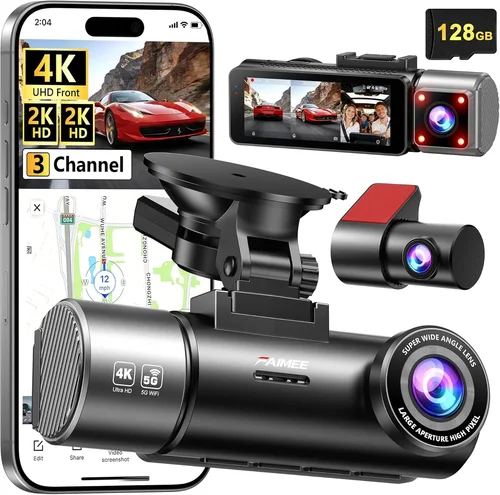
A: Yes, multi-camera systems provide comprehensive coverage including front, rear, and cabin monitoring perspectives. Dual-lens setups capture both forward progress and reverse maneuvers, while three-way configurations add interior observation capabilities. Ensure adequate power distribution and storage allocation when installing multiple devices simultaneously. Professional installation recommended for complex wiring arrangements involving fuse boxes, amplifiers, or existing electronic systems.
Q: How do I choose between Wi-Fi enabled and non-Wi-Fi dash cams?
A: Wi-Fi connectivity offers wireless file transfer convenience and remote control capabilities via smartphone apps, eliminating physical card removal requirements. Non-Wi-Fi models rely on direct computer connections for data management, providing potentially better reliability and simpler operation. Consider your technical comfort level and preferred workflow—Wi-Fi suits frequent clip sharing and cloud backup users, while traditional connections appeal to those prioritizing straightforward file organization without app dependencies.
Our Final Recommendations
Best for Budget-Conscious Buyers: Viofo A119 V3
The Viofo A119 V3 strikes an impressive balance between affordability and performance, delivering reliable Full HD recording with solid night vision capabilities. This compact dash cam includes essential features like loop recording, g-sensor protection, and flexible mounting options without breaking the bank. Its straightforward interface and durable construction make it suitable for casual drivers seeking dependable evidence capture at an accessible price point. While lacking advanced connectivity options, the A119 V3 excels at core functionality that matters most during everyday driving scenarios.
Best Overall Value: Garmin Dash Cam 67W
Garmin’s Dash Cam 67W represents the ideal blend of reliability, user-friendliness, and feature-rich performance for the majority of drivers. Boasting premium build quality, intuitive operation, and excellent low-light capabilities, this model stands out for its seamless integration with Garmin ecosystem products. The included voice commands, GPS tracking, and automatic incident detection provide valuable context during events while simplifying post-drive review processes. Competitive pricing positions this dash cam as the undisputed champion for balanced value proposition across all critical performance categories.
Best Premium Option: Nextbase 522GW
Nextbase elevates dash cam technology with the 522GW, incorporating cutting-edge features like Alexa voice assistant integration, emergency SOS functionality, and superior 4K recording capabilities. This comprehensive system delivers exceptional image quality, robust parking mode operation, and cloud connectivity options that streamline evidence management. Professional-grade construction and thoughtful design elements justify the premium investment for drivers seeking maximum protection and convenience without compromise. The inclusion of free cloud storage for three years enhances long-term value considerably.
Best for Beginners: Rexing V1P Pro
Designed specifically with new users in mind, the Rexing V1P Pro offers approachable operation and dependable performance without overwhelming complexity. Its compact form factor, clear menu structure, and reliable recording quality make it an excellent introduction to dash cam technology for first-time buyers. Basic but effective parking mode, decent night vision, and straightforward installation procedures ensure positive initial experiences that encourage continued use and eventual upgrades. Affordable pricing removes financial barriers while delivering core functionality expected from modern dash cams.
Best for Advanced Users: Thinkware U1000
Thinkware caters to experienced dash cam enthusiasts with the U1000, featuring professional-grade 4K recording, advanced driver assistance systems (ADAS), and sophisticated parking surveillance capabilities. This powerhouse combines exceptional image stabilization, customizable recording zones, and comprehensive management software for demanding applications. Hardwired installation options, multiple camera compatibility, and enterprise-focused features position this model as the definitive choice for rideshare drivers, delivery operators, and serious hobbyists requiring maximum functionality and reliability regardless of cost considerations.
Conclusion: Making the Right Choice
Selecting the ideal dash cam requires careful consideration of multiple interconnected factors that collectively determine performance, reliability, and overall value. Rather than focusing exclusively on isolated specifications or promotional claims, successful buyers approach the decision-making process systematically by identifying their primary use cases, evaluating essential features against budget constraints, and researching real-world performance data from reputable sources.
Remember that no single dash cam perfectly matches every possible requirement, so prioritize capabilities that align with your specific driving habits, vehicle characteristics, and security concerns. A modest investment in a quality mid-range model often outperforms expensive premium units when those devices lack features genuinely relevant to your situation.
Take advantage of available resources including manufacturer specifications, independent reviews, hands-on demonstrations, and community discussions to inform your selection. Don’t hesitate to consult professionals for installation guidance or seek clarification from customer support representatives when uncertain about compatibility issues or technical limitations.
Ultimately, the most effective dash cam serves as both a protective measure and a confidence booster, providing documented evidence when disputes arise while offering peace of mind during daily commutes. By applying the comprehensive insights shared throughout this guide, you’ll be well-equipped to navigate the complex marketplace and select a solution that delivers lasting value, reliable performance, and genuine reassurance behind the wheel.