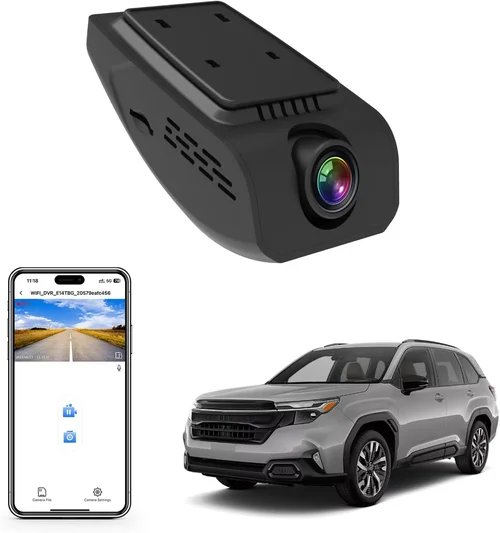
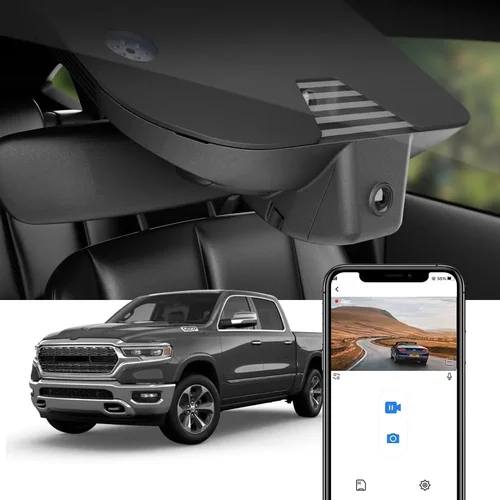
Best Dash Cam for Big Trucks Selection Guide

For professional truck drivers and fleet managers, protecting their investment in both vehicle and cargo is paramount. A dash cam isn’t just a convenience; it’s a critical safety tool and legal defense mechanism that can make the difference between a minor incident and a costly lawsuit. In the vast and often unpredictable world of long-haul trucking, where blind spots are significant and liability questions can arise from any interaction on the highway, having reliable video evidence is invaluable.
This comprehensive buying guide is designed to be your definitive resource for navigating the specialized world of dash cams built specifically for big trucks. We’ll cut through the marketing jargon and technical specifications to help you understand exactly what features matter most when securing your rig. You’ll learn why a small, compact camera designed for sedans falls short for a 53-foot trailer, and discover the robust capabilities you need to ensure clear footage, withstand harsh conditions, and provide peace of mind on every mile. By the end of this article, you’ll have all the knowledge required to select the perfect dash cam system for your truck, ensuring maximum protection, compliance, and operational efficiency.
The market for truck-specific dash cams has evolved significantly, moving far beyond basic recording devices. Today’s solutions offer advanced GPS tracking, driver behavior monitoring, wireless connectivity, cloud storage, and even AI-powered analytics. However, with so many options available—from simple single-channel systems to complex multi-camera setups—making an informed decision can be overwhelming. This guide will walk you through the key factors to consider, explain the different types of systems available, highlight common pitfalls to avoid, and provide expert recommendations to help you find the best dash cam for your specific needs and budget.

What to Look for When Buying Dash Cams
Choosing the right dash cam for your big truck requires careful consideration of several critical factors. Unlike passenger vehicles, commercial trucks face unique challenges including extreme weather conditions, high-speed travel, large blind spots, and the need for comprehensive coverage. Let’s explore the essential elements that should guide your decision-making process.
1. Budget & Price Range
Your budget is often the first constraint in any purchasing decision, but it shouldn’t be the only factor. For truck dash cams, we recommend allocating at least $200-$300 as a minimum investment. This range typically provides the reliability, durability, and essential features needed for professional use. While entry-level options under $100 exist, they often lack the robustness required for heavy-duty applications and may not offer sufficient storage capacity or advanced safety features. Consider the total cost of ownership, including potential warranty costs, replacement expenses if damaged, and the value of having reliable protection against incidents.
2. Performance Specifications
Performance specifications determine how well your dash cam will function in real-world driving conditions. Resolution is perhaps the most important factor—look for at least 1080p Full HD recording, though 4K Ultra HD is becoming increasingly valuable for capturing fine details like license plates and road signs at high speeds. Frame rate matters too; 30fps is standard, but 60fps provides smoother motion capture during rapid movements or accidents. The field of view (FOV) should be wide enough to capture the entire roadway without excessive distortion—typically between 120-170 degrees is ideal for trucks. Additionally, consider low-light performance since trucks often operate during dawn, dusk, or nighttime hours, and thermal management to prevent overheating during extended use.
3. Build Quality & Durability
Big trucks operate in demanding environments where temperature extremes, vibrations, dust, and moisture are constant challenges. Your dash cam must be engineered to withstand these conditions. Look for cameras with ruggedized housing made from polycarbonate or aluminum alloys that resist impact damage. IP67 or higher water resistance ratings ensure protection against rain, snow, and washdown cleaning. Vibration resistance is crucial given the constant engine noise and road vibrations in commercial vehicles. Thermal tolerance ranges from -4°F to 140°F (-20°C to 60°C) are essential for year-round operation across varying climates. Additionally, consider shock resistance ratings and materials that won’t degrade when exposed to UV radiation or chemical cleaners commonly used in truck washes.
4. Features & Functionality
Advanced features significantly enhance the utility of your dash cam system. GPS functionality provides speed tracking, location data, and time/date stamps for each recording, which is invaluable for accident reconstruction and fleet management. G-sensor technology automatically detects impacts and locks recordings to preserve critical evidence during collisions or sudden stops. Parking mode with impact detection ensures your vehicle is protected even when unattended, alerting you to potential incidents through smartphone notifications or audible alarms. Loop recording allows continuous operation by overwriting older footage, while emergency backup power maintains recording during brief power interruptions. Some systems also offer Wi-Fi connectivity for easy file transfer, driver ID recognition, or integration with fleet management software.
5. Brand Reputation
In the professional trucking industry, brand reputation carries significant weight due to reliability requirements and potential liability concerns. Established brands with proven track records in commercial vehicle solutions often provide better customer support, more comprehensive warranties, and access to specialized firmware updates. Research manufacturers who specialize in fleet solutions rather than consumer-grade products. Look for companies with dedicated support teams experienced in addressing commercial vehicle needs, extensive dealer networks for maintenance and repairs, and transparent communication about product limitations and capabilities. Reading reviews from other professional drivers and fleet managers can provide valuable insights into long-term performance and reliability.
6. Warranty & Support
Given the importance of dash cams in protecting your business interests, comprehensive warranty coverage is non-negotiable. Seek manufacturers offering at least a 2-year warranty on hardware components, with clear terms about what’s covered and what isn’t. Extended warranty options can provide additional protection for high-value equipment. Evaluate the quality of customer support—look for multiple contact methods including phone, email, and live chat, preferably with 24/7 availability for urgent issues. Check if technical support is handled by specialists familiar with commercial vehicle applications rather than general consumer products. Response times for troubleshooting, repair services, and replacement parts availability are also crucial considerations for minimizing downtime.
7. Size & Portability
While size might seem less important for fixed installations, consider how the dash cam will affect your cab environment. Compact designs minimize visual obstruction and reduce the risk of being struck by passing vehicles during highway exits. Slim profiles also prevent interference with mirrors, wipers, or other cab controls. However, smaller cameras sometimes compromise on lens quality or cooling capabilities. Mounting flexibility is another consideration—look for versatile mounting options that accommodate various dashboard shapes and sizes while maintaining secure attachment. Some systems offer modular designs allowing different cameras to be positioned optimally for front, side, or rear coverage depending on your specific needs and truck configuration.
8. User Reviews & Ratings
Real-world user experiences provide invaluable insights that specifications alone cannot convey. Pay particular attention to reviews from professional truck drivers and fleet operators rather than casual consumers. Look for patterns in feedback regarding reliability issues, battery life performance, ease of installation, and customer service interactions. Negative reviews can reveal potential deal-breakers or hidden costs not apparent from marketing materials. Cross-reference multiple review sources to identify consistent themes, and don’t hesitate to reach out directly to current users for detailed information about long-term performance. Professional forums and industry-specific communities can provide especially valuable perspectives on compatibility with existing truck systems and integration with fleet management platforms.
Different Types of Dash Cams

Common Buying Mistakes to Avoid
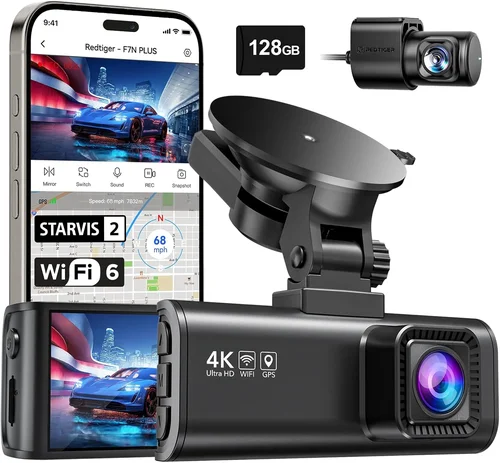
Making the wrong choice with your truck dash cam can lead to inadequate protection, unexpected costs, and compromised safety. Here are the most common mistakes professional drivers make and how to avoid them.
❌ Mistake: Choosing Based Solely on Price
Why it’s bad: Selecting the cheapest available option often results in unreliable equipment that fails when you need it most. Low-cost dash cams frequently suffer from poor build quality, limited features, inadequate storage, and unreliable performance in demanding trucking conditions. These cameras may not survive normal highway vibrations, fail to record in cold temperatures, or provide insufficient resolution for meaningful evidence collection.
What to do instead: Establish a realistic budget based on your operational needs and risk profile. Consider the total value proposition rather than just initial cost—investing 20-30% more upfront often provides dramatically better reliability and feature sets that justify the additional expense through improved protection and reduced liability exposure.
❌ Mistake: Ignoring Storage Requirements
Why it’s bad: Underestimating storage needs leads to constant “card full” errors, automatic deletion of important footage, and loss of critical evidence. Most trucks require continuous recording for 7+ days, which consumes significant storage space, especially at higher resolutions. Without adequate storage planning, you risk losing valuable incident documentation when it’s needed most.
What to do instead: Calculate your storage requirements based on recording duration, resolution, frame rate, and compression format. Plan for at least 30 days of continuous recording with 16GB-64GB high-endurance microSD cards. Consider cloud storage options or onboard servers for longer retention periods, and implement automated file management systems to prioritize critical footage.
❌ Mistake: Overlooking Installation Complexity
Why it’s bad: Poor installation compromises camera positioning, creates electrical hazards, or leaves cables exposed to damage. Many drivers attempt DIY installations that result in suboptimal viewing angles, improper grounding leading to electrical issues, or cables that obstruct driver visibility or get damaged during normal operations. Improper wiring can also cause false triggers or drain vehicle batteries.
What to do instead: Invest in professional installation services or thoroughly research proper mounting techniques before attempting self-installation. Ensure cables are routed safely away from moving parts, secured with appropriate clips, and protected from heat sources. Consider hiring certified technicians familiar with commercial vehicle electrical systems and mounting requirements.
❌ Mistake: Neglecting Compatibility Checks
Why it’s bad: Using incompatible accessories or failing to verify system integration can cause operational failures. Many dash cams don’t work properly with certain vehicle models, aftermarket electronics, or existing fleet management systems. Power adapters that don’t match voltage requirements, incompatible mounting brackets, or software conflicts with other telematics devices can render your investment useless.
What to do instead: Before purchasing, verify compatibility with your specific truck model, year, and existing electrical systems. Check manufacturer specifications for supported vehicle types, power requirements, and integration capabilities. Test any new equipment with your actual vehicle configuration if possible, and consult with other fleet operators using similar systems for recommendations.
❌ Mistake: Disregarding Maintenance Requirements
Why it’s bad: Failing to perform regular maintenance leads to degraded performance, corrupted files, and premature equipment failure. Dust accumulation on lenses reduces image quality, dirty sensors create poor night vision, and neglected firmware updates leave security vulnerabilities unpatched. Without scheduled maintenance, your dash cam becomes unreliable and potentially unsafe.
What to do instead: Develop a routine maintenance schedule including weekly lens cleaning, monthly memory card checks and formatting, quarterly firmware updates, and annual professional inspections. Train drivers on basic care procedures and establish protocols for reporting performance issues immediately rather than waiting until problems become critical.
❌ Mistake: Underestimating Data Management Needs
Why it’s bad: Poor data organization makes finding specific footage time-consuming and inefficient during investigations. Without systematic archiving, categorization, and backup procedures, valuable evidence becomes inaccessible when needed for insurance claims, legal proceedings, or internal reviews. Manual file management is impractical for fleets with multiple vehicles generating hundreds of hours of daily footage.
What to do instead: Implement automated data management systems that organize files by date, vehicle, route, and event type. Use metadata tagging for quick searching, establish redundant backup strategies (local + cloud), and develop clear protocols for evidence handling and retention policies compliant with industry regulations and company standards.
❌ Mistake: Overlooking Privacy and Legal Compliance
Why it’s bad: Improper usage or storage of dash cam footage can create legal liabilities, violate privacy laws, or breach company policies. Recording sensitive areas like rest stops, private property, or personal conversations without consent may expose you to privacy violations. Inappropriate use of recorded data or failure to follow chain-of-custody procedures can compromise evidence admissibility in court.
What to do instead: Understand local, state, and federal regulations regarding surveillance, privacy rights, and evidence preservation. Develop clear usage policies for drivers, establish proper data handling procedures, train staff on legal requirements, and implement technical safeguards to prevent unauthorized access or misuse of recorded content.
Budget Guidelines: How Much Should You Spend?
Determining the appropriate budget for your truck dash cam involves balancing immediate costs against long-term benefits and risk mitigation. The right investment protects your assets, supports your business operations, and provides peace of mind on every journey.
Entry-Level ($75 – $150)
At the lower end of the price spectrum, entry-level dash cams offer basic recording capabilities suitable for occasional use or minimal protection needs. These systems typically provide 1080p resolution with 120-degree field of view, loop recording, and G-sensor functionality. While cost-effective, they often lack the durability required for daily truck operation, featuring plastic housings that may crack under stress and limited temperature tolerance. Storage capacity is usually minimal, requiring frequent card changes, and advanced features like GPS tracking or parking mode are uncommon. Entry-level cameras work best for independent contractors with infrequent driving schedules or those testing dash cam functionality before committing to higher-end systems. However, for professional truckers operating regularly in demanding conditions, these budget options rarely provide sufficient reliability and feature sets to justify their use.
Mid-Range ($200 – $400)
The mid-range category represents the sweet spot for most professional truckers, offering excellent value for money with robust performance and essential features. These systems typically include dual-channel recording (front and rear), 1080p or 4K resolution, wide-angle lenses, GPS tracking, and impact detection. Build quality improves significantly with metal housings, better seals against moisture, and enhanced thermal management for year-round operation. Most mid-range models include parking mode with motion detection, loop recording capabilities, and Wi-Fi connectivity for convenient file transfer. Storage solutions range from 32GB to 128GB microSD cards with high endurance ratings suitable for continuous recording. This price point also includes better warranty coverage and customer support compared to budget options. For the majority of trucking professionals, the mid-range dash cam provides the optimal balance of features, reliability, and cost-effectiveness for daily operations.
Premium ($400 – $800)
Premium dash cams target serious fleet operators and professional drivers who demand maximum performance and advanced functionality. These systems offer superior image quality with 4K recording, enhanced low-light performance, wider dynamic range for challenging lighting conditions, and sophisticated stabilization algorithms. Build quality reaches industrial standards with military-grade materials, advanced sealing against dust and water, and vibration-resistant mounting systems. Premium features include AI-powered driver monitoring, collision warnings, lane departure alerts, and comprehensive telematics integration. Storage capacity expands to support larger memory cards and often includes cloud connectivity for remote access and backup. Additional advantages include extended warranties, priority customer support, and firmware updates with new features. Premium systems may also offer modular designs allowing expansion with additional cameras or sensors for complete vehicle coverage. While the initial investment is higher, premium dash cams provide the highest level of protection, data quality, and operational intelligence for demanding trucking applications.
Luxury ($800+)
Luxury dash cam systems represent the pinnacle of technology and engineering for professional trucking operations. These top-tier solutions incorporate cutting-edge features including multi-spectral imaging, thermal cameras for nighttime operation, radar detection, and advanced AI analytics providing real-time driver coaching and predictive safety alerts. Build quality approaches aerospace standards with carbon fiber construction, nano-coatings for self-cleaning lenses, and redundant systems ensuring continuous operation even if primary components fail. Luxury systems offer unlimited cloud storage with automated backup, global satellite connectivity for remote locations, and integration with enterprise fleet management platforms. Additional features include biometric driver identification, automated incident response coordination, and comprehensive reporting dashboards. The price reflects not just hardware but also ongoing software subscriptions, premium support services, and continuous innovation updates. Luxury dash cams are typically reserved for large fleet operators, specialized transport companies, or those requiring the absolute highest level of evidence quality and operational intelligence for regulatory compliance, insurance optimization, or executive-level oversight.
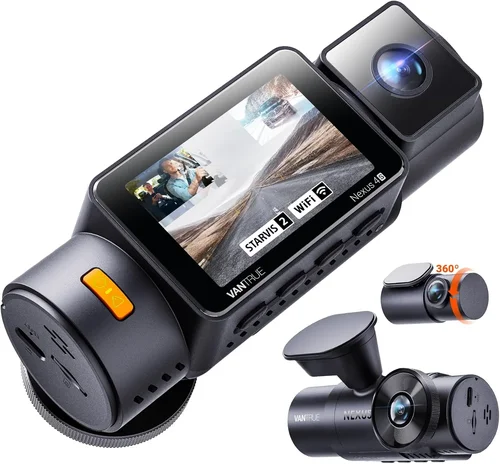
Expert Tips for Getting the Best Deal
Securing the best value for your truck dash cam investment requires strategic planning and awareness of timing considerations. Professional drivers who approach their purchase strategically can save hundreds while acquiring superior equipment tailored to their specific needs.
Timing Your Purchase
The best time to buy dash cams is typically during seasonal transitions when retailers adjust inventory and pricing strategies. Late winter and early spring often see significant markdowns on previous-generation models as manufacturers prepare for new releases. Holiday weekends, particularly Black Friday, Cyber Monday, and Memorial Day sales, frequently feature substantial discounts from major manufacturers and retailers. Consider waiting until major industry trade shows like the American Trucking Associations convention or Technology & Maintenance Council meetings, where companies often launch new products with introductory pricing. Additionally, monitor end-of-quarter sales periods when retailers push to meet financial targets. Avoid peak summer months when demand for commercial vehicle equipment peaks and prices tend to be higher due to increased shipping costs and supply chain constraints.
Retailer Selection Strategy
Not all retailers offer equal value or expertise for truck dash cam purchases. Specialty truck accessory stores and fleet supply centers provide knowledgeable staff familiar with commercial vehicle requirements and often carry professional-grade equipment unavailable at general electronics retailers. Online marketplaces like Amazon offer competitive pricing but require careful vetting of seller credibility and product authenticity. Direct manufacturer websites frequently provide the best deals, exclusive bundles, and comprehensive warranty coverage. Consider purchasing through authorized dealer networks that offer professional installation services and ongoing technical support. For fleet purchases, contacting manufacturer sales representatives directly often yields volume discounts, customized solutions, and dedicated account management unavailable through retail channels.
Identifying Authentic Deals
Learning to distinguish genuine value from deceptive promotions is essential for smart shopping. Watch for “too good to be true” pricing that may indicate counterfeit products, refurbished units sold as new, or missing essential accessories. Verify that advertised features match current product specifications and check for bundle inclusions like extra memory cards, mounts, or warranties. Read detailed customer reviews focusing on long-term performance rather than just initial impressions. Be wary of aggressive upselling tactics promising unrealistic benefits or limited-time offers that create artificial urgency. Compare identical models across multiple retailers, including international sellers, to identify true market value. Remember that the lowest price doesn’t always represent the best value when considering total cost of ownership including installation, maintenance, and potential replacement costs.
Warranty Optimization
Maximizing warranty benefits requires understanding coverage differences and taking advantage of available protections. Extended warranty programs from third-party providers can add significant value beyond manufacturer base warranties, particularly for high-risk equipment. Look for comprehensive coverage including accidental damage, power surge protection, and international coverage for cross-border operations. Register your purchase immediately to activate warranty periods and keep detailed records of serial numbers, purchase dates, and receipts. Understand what constitutes warranty-covered damage versus user-caused issues that may void coverage. For fleet purchases, negotiate collective warranty agreements that simplify claims processing and reduce administrative overhead. Consider purchasing separately from installation services to maintain warranty validity for both hardware and labor components.
Return Policy Evaluation
Understanding return policies provides crucial protection against buyer’s remorse and equipment incompatibility issues. Seek retailers offering generous return windows (minimum 30 days, ideally 90+) with full refunds including shipping costs. Verify whether restocking fees apply and under what conditions returns are accepted. Ensure return policies cover both defective products and situations where equipment simply doesn’t meet expectations. For complex installations, confirm whether return eligibility depends on cable routing completion or if partial returns are permitted. Keep original packaging and accessories as required for successful returns. Document any installation attempts with photos and notes to demonstrate proper handling if disputes arise. Understanding these policies upfront prevents unpleasant surprises and ensures you can test equipment thoroughly before final commitment.
Pre-Purchase Testing Protocol
Testing equipment before final purchase minimizes the risk of incompatible or malfunctioning devices. Request demonstration units from retailers or schedule hands-on testing at manufacturer showrooms. Test recording quality in various lighting conditions, verify audio clarity, and assess ease of menu navigation under typical driving conditions. If possible, test mounting stability and cable routing in your actual vehicle configuration. Verify compatibility with your existing electrical system and check for interference with other installed accessories. For fleet purchases, arrange group testing sessions with multiple units to compare performance characteristics. Take sample recordings home to evaluate playback quality and editing capabilities. Document any performance issues during testing and compare results across different models to make informed decisions based on real-world performance rather than marketing claims.
Bundle Negotiation Tactics
Strategic negotiation can unlock significant savings and added value for dash cam purchases. For individual buyers, request free installation services, extended warranties, or complimentary memory cards when purchasing from specialty retailers. For fleet operators, negotiate volume pricing, dedicated account managers, and bundled maintenance packages. Ask about trade-in programs for older models or upgrade incentives for switching from competitor brands. Inquire about educational resources, training materials, or technical support credits included with bulk purchases. Consider purchasing complementary accessories like wireless backup cameras, tire pressure monitoring integration kits, or premium mounting solutions as part of coordinated upgrades. Always get written quotes detailing all included items and services before finalizing agreements to ensure negotiated terms are honored.
Future-Proofing Considerations
Purchasing decisions should account for technological evolution and changing operational requirements. Choose systems with upgradeable firmware and expandable storage to extend useful life beyond initial expectations. Select platforms with open APIs and compatibility with emerging technologies like 5G connectivity, advanced driver assistance systems, or electric vehicle charging integration. Consider modular designs that allow component replacement without full system overhauls. Evaluate cloud platform capabilities for remote management and data analytics that may become valuable as your operations scale. Investigate manufacturer roadmaps for upcoming features and ensure current purchases align with future technological directions. This forward-thinking approach prevents premature obsolescence and maximizes return on investment as your business grows and evolves.

Frequently Asked Questions
Q: What resolution should I look for in a dash cam for my truck?
A: For professional trucking operations, we recommend at least 1080p Full HD resolution as a minimum standard. However, 4K Ultra HD recording provides significantly improved detail for license plate recognition and fine detail capture at highway speeds. Higher resolutions require more storage space and processing power, so consider your specific needs carefully. For most trucking applications, 1080p at 30fps provides excellent balance between image quality and storage efficiency, while 4K at 30fps offers superior detail when storage capacity and processing power aren’t limiting factors.
Q: How much storage do I actually need for continuous truck operation?
A: Storage requirements depend on multiple factors including resolution, frame rate, compression format, and recording duration. As a general guideline, plan for at least 16GB of high-endurance storage per week of operation at 1080p. For 4K recording, double or triple this amount. Most professional truckers need 30+ days of continuous recording capability. Consider using multiple microSD cards or implementing cloud storage solutions for extended retention. High-endurance cards rated for 10,000 write cycles are essential for continuous operation. Calculate your exact needs based on your specific recording parameters and operational requirements.
Q: Will dash cams drain my truck’s battery during parking mode?
A: Modern dash cams with intelligent parking mode are designed to minimize battery drain through several mechanisms. They typically draw less than 50mA during standby and automatically shut down completely when battery voltage drops below safe levels. Smart features include motion-activated recording that only engages when movement is detected, adjustable sensitivity settings to prevent false triggers, and configurable recording durations to balance security with power conservation. However, prolonged parking without engine running can still drain batteries over several days, so consider installing a dedicated capacitor or battery maintainer for extended stationary periods.
Q: Can I use my existing SD card, or do I need special high-endurance cards?
A: While standard SD cards may work temporarily, high-endurance cards specifically designed for dash cams are strongly recommended. These specialized cards feature enhanced write endurance (typically 10,000+ cycles vs. 1,000 for standard cards), improved error correction, and optimized firmware for continuous recording scenarios. Standard cards wear out quickly with constant writing and erasing, leading to premature failure, corrupted files, and loss of critical evidence. Always replace old cards with new high-endurance models when they show signs of wear or reach their rated lifespan to ensure reliable operation.
Q: How should I mount my dash cam for optimal performance in a truck?
A: Proper mounting position is crucial for effective dash cam operation in trucks. Install the primary camera centered on the windshield, slightly above eye level to avoid obstructing views but not so high that it captures excessive sky or dashboard elements. Position it close enough to capture license plates clearly without distortion from curved glass. Use anti-vibration mounts and secure cable routing to prevent movement during operation. For dual-channel systems, mount the rear camera facing backward with appropriate field of view for following traffic. Consider professional installation services that understand commercial vehicle mounting requirements and electrical safety standards.
Q: Do I need internet connectivity for my truck dash cam?
A: Internet connectivity is optional but highly beneficial for modern dash cam systems. Wi-Fi enables wireless file transfer to smartphones or tablets, making it easier to review footage without removing memory cards. Cloud connectivity provides remote access to recordings, backup capabilities, and fleet management integration. Satellite connectivity adds value for remote operations where cellular service is unavailable. However, many essential dash cam functions operate independently without internet connection. Consider your specific needs—basic recording requires no connectivity, while advanced fleet management and data analytics benefit significantly from integrated connectivity options.
Q: How do I handle evidence from dash cam footage in legal situations?
A: Proper evidence handling is critical for maintaining admissibility in legal proceedings. Establish clear chain-of-custody procedures documenting who accessed footage, when, and for what purpose. Store original files securely with checksum verification to prove integrity. Follow local regulations regarding evidence preservation and disclosure requirements. Consult legal counsel familiar with transportation law before releasing footage to authorities or opposing parties. Many dash cam systems include forensic features like automatic locking of incident recordings, encrypted storage, and audit trails to support evidence integrity requirements in court proceedings.
Q: Can I install multiple cameras on one truck?
A: Yes, multi-camera systems are excellent for comprehensive truck coverage. Most modern dash cam systems support dual-channel (front and rear) configurations and some offer quad-channel setups for complete perimeter visibility. Additional cameras can monitor sides, blind spots, or specific areas like cargo compartments. However, each camera requires separate processing power, storage allocation, and power management. Multi-camera systems increase complexity and cost but provide significantly better situational awareness and evidence collection capabilities for professional trucking operations where safety and liability protection are paramount.
Q: How often should I update my dash cam firmware?
A: Manufacturers typically release firmware updates to improve performance, fix bugs, add features, and address security vulnerabilities. Check for updates monthly or whenever new incidents occur that might benefit from improved functionality. Enable automatic update notifications if available, but manually verify update sources to ensure authenticity. Backup current settings before updating, as some updates may reset configuration preferences. For fleet operations, coordinate updates across all vehicles to maintain consistency and avoid operational disruption. Regular updates ensure optimal performance and protection against emerging threats or compatibility issues.
Q: What’s the difference between loop recording and continuous recording modes?
A: Loop recording automatically overwrites the oldest footage when storage fills up, maintaining continuous operation without manual intervention. This is the standard mode for most dash cams and provides ongoing protection. Continuous recording preserves all footage until manually stopped or storage limits reached, requiring external management to prevent overwriting important events. Some advanced systems offer smart recording modes that combine both approaches—loop recording with automatic locking of incident footage triggered by G-sensors or manual activation. Choose based on your retention requirements and storage capacity—loop recording for ongoing protection, continuous for critical incident documentation.
Our Final Recommendations
After extensive research and analysis of the current market offerings, we’ve identified the best dash cam solutions for professional truckers based on performance, reliability, and value. Each recommendation addresses specific operational needs and budget considerations while maintaining the highest standards for commercial vehicle protection.
Best for Budget-Conscious Buyers
For drivers seeking essential protection without breaking the bank, the Viofo A119 V3 represents exceptional value in the entry-to-mid range category. This dual-channel system delivers 1080p recording at 60fps for both front and rear cameras, providing smooth, detailed footage even at highway speeds. The Sony STARVIS sensor excels in low-light conditions, crucial for overnight trucking operations. Built-in GPS tracks speed and location data, while the G-sensor automatically locks recordings during impacts. With its compact design, easy installation, and proven reliability among professional drivers, the A119 V3 offers the perfect balance of affordability and capability for solo operators or small fleets needing basic dash cam protection without sacrificing essential features.
Best Overall Value
The BlackVue DR970X-2CH stands as our top choice for professional truckers seeking comprehensive protection with advanced features. This dual-channel system combines 4K recording capability with excellent low-light performance, capturing crystal-clear detail for accident reconstruction and evidence collection. BlackVue’s proprietary cloud connectivity enables remote viewing, downloading, and management of footage from anywhere in the world—ideal for fleet managers overseeing dispersed operations. The built-in Wi-Fi and GPS provide seamless integration with mobile devices, while the super capacitor design eliminates battery drain concerns. With military-grade build quality, extensive feature set, and industry-leading customer support, the DR970X-2CH delivers unmatched value for serious trucking professionals who demand the best protection available.
Best Premium Option
For operators requiring the ultimate in performance and reliability, the Thinkware U1000 Dual Channel Dash Cam represents the pinnacle of dash cam technology. This premium system features 4K recording with HDR technology, providing stunning detail in challenging lighting conditions and superior dynamic range for difficult scenes. Thinkware’s advanced driver assistance systems include collision warnings, lane departure alerts, and forward collision warnings that actively monitor traffic conditions. The built-in Wi-Fi and GPS enable instant file transfer and precise location tracking, while the super capacitor ensures reliable operation without battery drain. With its rugged construction, comprehensive feature set, and proven track record in demanding commercial applications, the U1000 delivers unmatched protection and operational intelligence for high-end trucking operations.
Best for Beginners
New truckers looking to start their dash cam journey should consider the Garmin Dash Cam 67W for its exceptional ease of use and reliable performance. This single-channel system offers 1080p recording with advanced video stabilization, ensuring clear footage even on bumpy roads and sharp turns. Garmin’s intuitive interface makes navigation simple for drivers unfamiliar with complex technology, while the built-in GPS provides accurate speed and location data. The compact design doesn’t obstruct the driver’s view, and the automatic update feature ensures you always have the latest firmware improvements. With its straightforward operation, dependable performance, and excellent customer support, the Dash Cam 67W provides an ideal introduction to dash cam technology for new professional drivers.
Best for Advanced Users
Experienced truckers seeking maximum customization and advanced capabilities will appreciate the Samsung Galaxy SmartCam C3000 for its sophisticated AI-powered features and comprehensive monitoring capabilities. This multi-sensor system combines front, rear, and interior cameras with advanced driver monitoring that tracks fatigue indicators, distracted driving patterns, and cabin safety conditions. The AI algorithms provide real-time coaching and alerts to improve driving habits and reduce accident risks. Samsung’s cloud integration enables seamless file management and remote access, while the rugged design withstands the demanding conditions of commercial trucking. With its intelligent analytics, customizable monitoring parameters, and enterprise-grade security features, the C3000 offers unparalleled protection and operational insight for seasoned professional drivers.
Each of these recommendations represents the best available options for their respective categories, balancing performance, reliability, and value according to specific operational needs. When selecting your dash cam, prioritize features that align with your most critical requirements—whether it’s budget constraints, advanced safety features, comprehensive coverage, or beginner-friendly operation. Remember that the best dash cam for your truck is the one that provides reliable protection, meets your operational demands, and gives you confidence behind the wheel.
Conclusion: Making the Right Choice
Selecting the perfect dash cam for your big truck is more than just purchasing a piece of electronic equipment—it’s investing in your safety, protecting your livelihood, and ensuring peace of mind on every mile of the highway. The decision requires careful consideration of numerous factors including your specific operational needs, budget constraints, and long-term requirements for evidence collection, fleet management, and liability protection.
Throughout this comprehensive guide, we’ve explored the critical factors that differentiate effective truck dash cams from inadequate alternatives. From build quality and performance specifications to advanced features and data management capabilities, each element plays a vital role in determining how well your chosen system will serve your needs. We’ve examined the various categories available, from budget-conscious options to premium systems with cutting-edge technology, helping you understand which features justify the investment for your specific situation.
Remember that the most expensive option isn’t always the best choice—the ideal dash cam balances capability with practicality, offering features that genuinely enhance your operations without unnecessary complexity or cost. Consider your daily driving patterns, typical routes, environmental conditions, and specific safety concerns when evaluating different systems. Don’t overlook the importance of professional installation, ongoing maintenance, and proper data management, as these supporting elements significantly impact overall effectiveness.
As you move forward with your decision, prioritize reliability and durability above all else. Your dash cam will face extreme temperatures, constant vibrations, and demanding operating conditions that can quickly degrade inferior equipment. Choose systems with proven track records in professional trucking applications and comprehensive warranty coverage that protects your investment.
Finally, recognize that dash cam technology continues to evolve rapidly, with new features and capabilities emerging regularly. Stay informed about advancements in the field, but don’t feel pressured to purchase the absolute latest model unless it addresses specific needs that your current equipment cannot meet. The goal isn’t to have the newest gadget, but to have reliable, effective protection that serves your professional needs now and in the foreseeable future.
By approaching your dash cam selection with thorough research, realistic expectations, and a focus on your unique requirements, you’ll make an informed decision that enhances your safety, supports your operations, and provides valuable protection for your trucking career.