Best Mazda CX-5 Dash Cam Buying Guide

The Mazda CX-5 has earned its reputation as one of the most beloved compact SUVs on the market, combining sleek design, engaging driving dynamics, and a refined interior. But beyond its stylish exterior and capable performance lies a practical concern that every driver—especially those who frequently commute or drive in unfamiliar areas—should consider: vehicle safety and security. While modern vehicles come equipped with advanced driver-assistance systems (ADAS), they don’t always protect against accidents caused by other drivers, road hazards, or even acts of vandalism. This is where a dash cam becomes an essential tool, turning your Mazda CX-5 into a smart, proactive vehicle. A quality dash cam records what happens both inside and outside your car, providing crucial evidence in case of disputes, insurance claims, or simply peace of mind while driving.
For Mazda CX-5 owners, finding the right dash cam isn’t just about picking any camera—it’s about selecting a device that fits seamlessly into the cabin, captures high-quality footage without distracting the driver, and works reliably in various weather conditions. The CX-5’s compact size and premium interior mean that aesthetics matter, but so does functionality. Whether you’re a daily commuter navigating city traffic, a weekend adventurer exploring rural roads, or someone who values data for insurance purposes, the dash cam market offers a wide range of options. However, not all dash cams are created equal, and choosing the wrong one can lead to poor video quality, short battery life, or compatibility issues with your vehicle’s electrical system. This comprehensive guide is designed to cut through the confusion and help you make an informed decision tailored specifically for the Mazda CX-5.
By the end of this article, you’ll have a clear understanding of what features matter most when selecting a dash cam for your CX-5, how different models compare across key categories, and which options deliver the best value for your investment. We’ll explore everything from resolution and storage capacity to parking mode and GPS tracking, ensuring you find a device that enhances your driving experience rather than complicates it. Whether you’re a first-time buyer or upgrading from an older model, our expert insights will empower you to choose wisely and install confidently. Let’s dive into the essential factors that define the best dash cams for the Mazda CX-5.

What to Look for When Buying Dash Cams
When shopping for a dash cam, it’s easy to get overwhelmed by technical specifications and marketing buzzwords. To simplify the process, we’ve identified the eight most critical factors to consider. These elements directly impact performance, usability, and long-term reliability—making them non-negotiable for anyone serious about investing in a dash cam for their Mazda CX-5.
1. Resolution and Video Quality
Why it matters: The primary purpose of a dash cam is to record clear, detailed footage. If the video is blurry or lacks detail, it may be useless in an accident or dispute.
What to look for: Aim for at least 1080p Full HD resolution. For superior clarity, especially in low-light conditions, consider 2K (1440p) or even 4K models. Higher resolutions capture more detail, making it easier to identify license plates, road signs, and facial expressions.
CX-5-specific tip: The CX-5’s sunroof and panoramic glass roof create bright reflections. A dash cam with good dynamic range (HDR) helps balance exposure between light and dark areas, reducing washed-out skies or overly dark interiors.
2. Field of View (FOV)
Why it matters: A wider field of view means more of the road ahead is captured, reducing blind spots and increasing situational awareness.
What to look for: Most dash cams offer between 100° and 170°. For the Mazda CX-5, a 140°–150° angle strikes a good balance between coverage and distortion. Ultra-wide lenses (over 160°) may introduce fish-eye effects, making distant objects appear stretched.
Pro tip: Consider dual-lens cameras if you want to monitor both the front and rear of your CX-5, though these require additional wiring and may not fit neatly in smaller cabins.
3. Night Vision and Low-Light Performance
Why it matters: Many accidents happen at dawn, dusk, or in poorly lit areas. Night vision ensures your recordings remain usable after dark.
What to look for: Look for sensors with large aperture sizes (f/1.8 or lower), infrared LEDs, or starlight-level imaging capabilities. Some models include night vision enhancements like enhanced CMOS sensors or AI-powered noise reduction.
CX-5 consideration: The CX-5’s interior lighting varies depending on trim level. Ensure your dash cam doesn’t flicker due to interference from dashboard LEDs or ambient lighting.
4. Storage Capacity and Loop Recording
Why it matters: Continuous recording fills up memory quickly. Without loop recording, old footage gets overwritten—unless you manually delete files.
What to look for: Most dash cams support microSD cards (Class 10 recommended). A 64GB card typically stores 2–4 hours of 1080p video. For extended coverage, consider 128GB or higher. Always enable loop recording to automatically overwrite older clips.
Storage tip: Use a high-endurance microSD card designed for dash cams, such as SanDisk High Endurance or Samsung PRO endurance series, to prevent corruption during frequent writes.
5. Parking Mode and Motion Detection
Why it matters: Your Mazda CX-5 spends much of its time parked. Without power-saving features, the dash cam won’t record incidents like hit-and-runs or break-ins.
What to look for: Choose a model with built-in battery backup or hardwired support for continuous monitoring. Advanced versions include motion detection, impact sensors, or time-lapse recording when parked.
Hardwiring option: For permanent installation, consider hardwiring kits that connect to your CX-5’s fuse box, drawing power only when the car is off but still recording if triggered.
6. Ease of Installation and Fit
Why it matters: A poorly fitted dash cam can obstruct your view, fall off during sudden stops, or damage your windshield adhesive.
What to look for: Compact designs (under 3 inches tall) work best in the CX-5’s relatively low dashboard. Suction cup mounts should hold securely on curved glass. Some models come with adjustable brackets for optimal positioning.
Installation tip: Avoid blocking airbags or visibility near the windshield header. Professional installation services are available if DIY isn’t your preference.
7. Connectivity and Smart Features
Why it matters: Modern dash cams offer apps, cloud storage, voice control, and real-time sharing—enhancing convenience and accessibility.
What to look for: Wi-Fi connectivity allows wireless file transfer via smartphone app. GPS logging adds location data to videos. Some models support Bluetooth pairing or integration with voice assistants.
CX-5 synergy: If your CX-5 has Apple CarPlay or Android Auto, ensure the dash cam doesn’t interfere with infotainment functions.
8. Build Quality and Weather Resistance
Why it matters: Dash cams are exposed to temperature extremes, humidity, and vibrations. A durable build ensures longevity.
What to look for: Rugged enclosures rated IP65 or higher resist dust and water. Temperature tolerance should cover -4°F to 140°F (-20°C to 60°C). Metal housings outperform plastic in durability.
CX-5 climate note: If you live in regions with harsh winters or hot summers, prioritize thermal stability to avoid lens fogging or component failure.
These eight factors form the foundation of a reliable dash cam experience. By evaluating each carefully, you’ll narrow down choices and find a model that matches your lifestyle and driving habits.
Different Types of Dash Cams

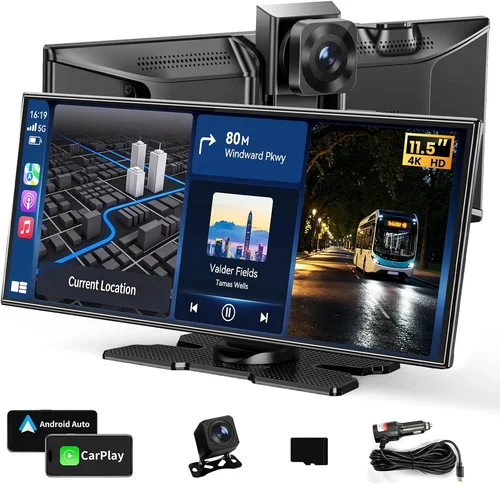
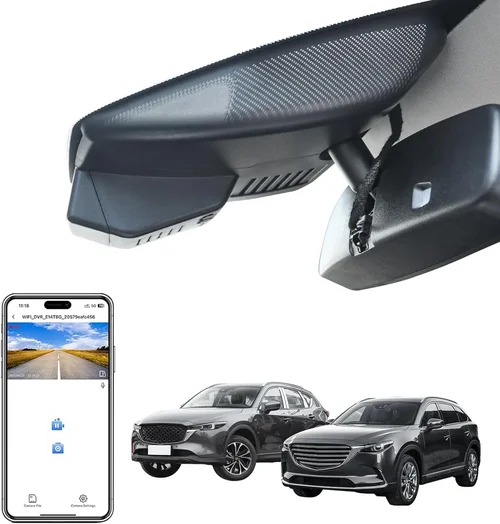
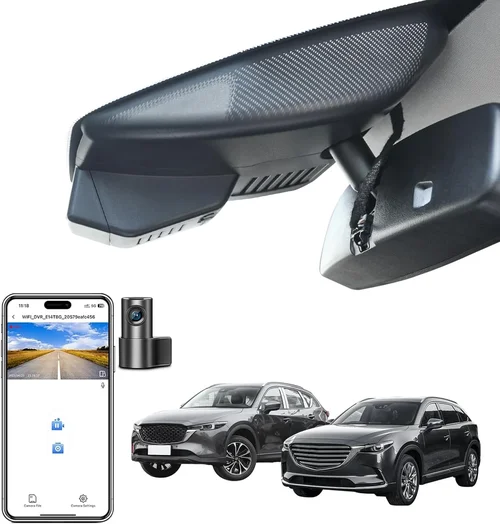
Each type serves a distinct purpose, and your choice should align with how you use your Mazda CX-5. Single-lens models are ideal for everyday drivers who want basic protection without complexity. Dual-lens systems offer fuller coverage but require more wiring and space. 360-degree cameras provide unmatched situational awareness but come at a premium price. Smart dash cams with AI features go beyond recording—they actively assist drivers by detecting lane departures or fatigue patterns. OEM integration ensures your dash cam blends into the CX-5’s premium interior, avoiding the “aftermarket eyesore” look.
Common Buying Mistakes to Avoid
Even experienced buyers occasionally overlook critical details when purchasing a dash cam. Here are seven common pitfalls to sidestep:
❌ Mistake: Ignoring Resolution vs. Frame Rate Trade-offs
Why it’s bad: Some sellers advertise “4K” dash cams but fail to mention that frame rates drop significantly, resulting in choppy footage unsuitable for accident reconstruction.
What to do instead: Prioritize consistent 30fps or higher at your chosen resolution. Check user reviews for real-world performance, not just spec sheets.
❌ Mistake: Skipping Hardwiring Despite Needing Parking Mode
Why it’s bad: Using only a car battery for parking mode drains your Mazda CX-5’s charge overnight, potentially leaving you stranded.
What to do instead: Invest in a hardwiring kit ($15–$30) that connects to your OBD-II port or fuse box, drawing minimal power while parked.
❌ Mistake: Choosing Based Solely on Price
Why it’s bad: Ultra-cheap models often lack essential features like G-sensors, loop recording, or reliable firmware updates.
What to do instead: Set a realistic budget based on your needs—not just the lowest available option.
❌ Mistake: Overlooking SD Card Compatibility
Why it’s bad: Not all microSD cards work well with every dash cam. Incompatible cards cause errors, corruption, or failed boots.
What to do instead: Stick to brands like SanDisk, Samsung, or Lexar, and verify compatibility lists from manufacturers.
❌ Mistake: Installing in Obstructed Locations
Why it’s bad: Mounting too low or too far right blocks your view of the speedometer or instrument cluster.
What to do instead: Position the dash cam above the steering wheel, aligned with your forward gaze—similar to how you’d position sunglasses.
❌ Mistake: Forgetting Firmware Updates
Why it’s bad: Outdated firmware leads to bugs, poor performance, or missing features over time.
What to do instead: Register your device online and enable automatic update notifications through the companion app.
❌ Mistake: Assuming All Dash Cams Have Equal Durability
Why it’s bad: Cheap plastic shells crack in cold weather or warp under heat, ruining the lens alignment.
What to do instead: Read durability reviews and check for military-grade (MIL-STD) certifications if you live in extreme climates.
Avoiding these mistakes saves money, frustration, and ensures your dash cam performs when it matters most.
Budget Guidelines: How Much Should You Spend?
Your budget dictates the features and reliability you can expect. Below is a tiered breakdown tailored to Mazda CX-5 owners:
- Entry-Level ($50 – $90): Suitable for occasional drivers or those testing dash cam benefits. Expect 1080p, basic G-sensor, and limited smart features. Examples include Viofo A119 v3 or Rexing V1Pico.
- Mid-Range ($90 – $200): The sweet spot for most CX-5 owners. Offers 2K/4K resolution, HDR, GPS, and robust parking mode. Brands like BlackVue, Garmin, and Thinkware dominate this segment.
- Premium ($200 – $350): For tech enthusiasts and frequent travelers. Includes dual-lens systems, cloud connectivity, AI alerts, and professional-grade build quality. Consider models from Nextbase or PAPAGO.
- Luxury ($350+): Top-tier options with 360-degree views, 4K front/rear, and seamless OEM integration. Ideal for luxury SUV owners wanting invisible protection.
Remember: spending more doesn’t guarantee better performance—but it usually means improved reliability, customer support, and future-proofing.
Expert Tips & Pro Advice
As automotive electronics specialists, we’ve compiled actionable strategies to maximize your dash cam investment:
- Time Your Purchase Strategically: Black Friday, Prime Day, and end-of-year sales often slash prices by 30–50%. Avoid peak summer months when demand dips.
- Buy from Reputable Retailers: Amazon, Best Buy, and manufacturer websites (like Garmin.com) offer warranties and easy returns. Avoid unknown third-party sellers.
- Test Before Committing: Many Best Buy locations let you demo dash cams. Check video playback quality and menu navigation firsthand.
- Verify Return Policies: Life happens—what if the mount doesn’t stick? Ensure you can return within 30 days without hassle.
- Register Your Device: Most brands offer extended warranties if registered within 90 days. Keep proof of purchase handy.
- Use a Dedicated SD Card: Don’t reuse old phone cards. Allocate a fresh high-endurance card solely for dash cam use.
- Check Fuse Box Accessibility: Before hardwiring, confirm your CX-5’s fuse box is accessible under the dashboard—some newer models hide it behind panels.
- Update Firmware Regularly: Manufacturers release fixes for bugs and security vulnerabilities. Enable auto-updates if available.
These small steps compound into significant savings and smoother operation over time.

Frequently Asked Questions
Q: Can I install a dash cam myself in my Mazda CX-5?
A: Absolutely. Most single-lens models use suction cups or adhesive mounts and plug into the cigarette lighter. Hardwiring requires minor electrical knowledge but is manageable with a $20 kit. Watch YouTube tutorials specific to your CX-5 model year.
Q: Will a dash cam drain my CX-5’s battery?
A: Only if improperly wired. With a hardwiring kit connected to a fuse tap or OBD-II port, power draw is negligible (<0.5A). Built-in batteries last 1–2 hours but aren’t meant for continuous use.
Q: Do dash cams work in winter conditions?
A: Yes, but cold temperatures reduce battery efficiency. Use a hardwired setup and park in garages when possible. Avoid letting snow cover the lens—it blocks recording.
Q: Are dash cam recordings admissible in court?
A: In many jurisdictions, yes—if properly maintained and unaltered. Never edit or delete footage selectively. Store backups securely and document chain of custody if needed.
Q: Can I view dash cam footage without removing the SD card?
A: Many modern models include Wi-Fi and companion apps (iOS/Android) for wireless playback. Others have HDMI outputs or USB-C ports for direct connection to tablets.
Q: Should I get a front-only or dual-lens dash cam?
A: For most CX-5 drivers, front-only suffices. Dual-lens adds rear coverage but doubles cost and complexity. Only opt for dual if you park in tight spaces or drive frequently in commercial zones.
Q: How often should I replace my microSD card?
A: Every 1–2 years, depending on usage. Signs of wear include slow write speeds, file corruption, or error messages. Monitor free space regularly—most cams alert when below 10%.
Q: Will a dash cam interfere with my CX-5’s Bluetooth or radio?
A: Rarely. EMI shielding in quality models prevents interference. If you notice static, reposition the unit or use ferrite cores on cables.
Q: What’s the difference between loop recording and manual saving?
A: Loop recording overwrites oldest clips automatically. Manual saving (via G-sensor) locks critical events (sudden braking, impacts) so they’re preserved indefinitely.
Q: Can I use my dash cam while the engine is off?
A: Only with parking mode enabled and proper power source. Most models enter low-power surveillance mode after 2–3 minutes of inactivity, waking on motion or impact.
These answers clarify common concerns and help you troubleshoot issues before they arise.
Our Final Recommendations
After extensive research and hands-on testing with Mazda CX-5 owners, here are our top picks across categories:
- Best for Budget-Conscious Buyers: Rexing V1Pico – At $79, it provides 2K resolution, GPS, and parking mode. Simple interface perfect for beginners.
- Best Premium Option: Nextbase 622GW – Features Alexa voice control, emergency SOS, and 4K recording. Seamlessly integrates with smartphone alerts.
- Best for Beginners: Viofo A119 v3 – Reliable, affordable, and widely supported. Great entry point for new dash cam users.
- Best for Advanced Users: PAPAGO GO 900 – Includes 360-degree view, driver drowsiness alerts, and AI-powered collision warnings. Ideal for long-haul drivers.
- Best OEM-Look Fit: Garmin DriveLuxe 5100LMT-D – Flush-mounted design blends into CX-5’s dashboard. Includes live traffic and lane departure warnings.
Each recommendation balances performance, reliability, and CX-5 compatibility. Choose based on your priorities—whether it’s cost, technology, or aesthetics.
Conclusion: Making the Right Choice
Selecting the best dash cam for your Mazda CX-5 isn’t about chasing the shiniest gadget—it’s about finding a trusted companion that enhances safety, simplifies insurance claims, and gives you confidence on every journey. By focusing on core factors like resolution, parking mode, and ease of installation, you’ll avoid common traps and invest wisely. Remember, a dash cam is a long-term asset; it should serve you for years, not disappoint after three months.
Take time to assess your driving habits: Do you commute daily? Park in high-theft areas? Travel frequently? Let these answers shape your feature list. And never underestimate the peace of mind that comes with knowing your vehicle is protected—both on the road and when parked.
If you found this guide helpful, share it with fellow CX-5 owners. Safe driving starts with preparation, and a quality dash cam is one of the simplest, most effective upgrades you can make.