Expert Dash Cam Buying Guide for Hit & Runs
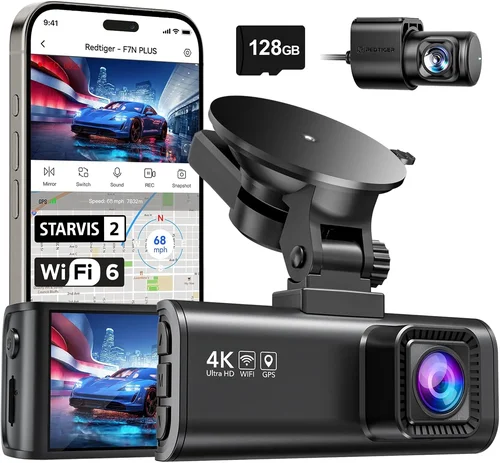
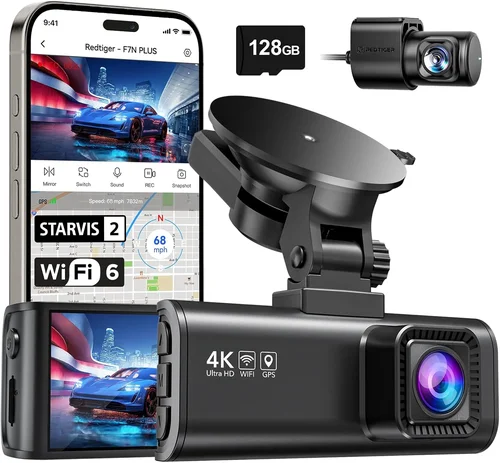
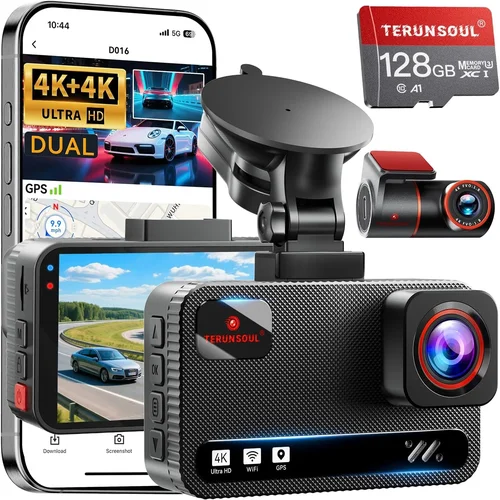
When you’re involved in a hit and run incident, having reliable evidence can be the difference between justice being served and the perpetrator going unpunished. A dash cam isn’t just a convenience—it’s your front-row seat to reality, capturing every detail of an accident as it unfolds. In this comprehensive buying guide, we’ll walk you through everything you need to know to choose the best dash cam specifically designed to help you identify and pursue hit-and-run drivers.
Whether you’re a daily commuter, a parent driving children to school, or someone who simply wants peace of mind on the road, understanding how dash cams work and what features matter most will save you time, money, and frustration. We’ll cover technical specifications, real-world performance, legal considerations, and expert recommendations to ensure you make an informed decision that could one day lead to your case being resolved with undeniable proof.
The market for dash cams has exploded over the past decade, but not all cameras are created equal when it comes to hit-and-run situations. Some prioritize aesthetics over functionality, while others offer impressive specs that don’t translate to real-world reliability. Our goal is to cut through the marketing noise and give you practical, actionable advice based on thorough research and expert insights.

What to Look for When Buying Dash Cams
1. Video Resolution & Recording Quality
Video resolution is arguably the most critical factor when choosing a dash cam for hit-and-run incidents. The clearer your footage, the better your chances of identifying license plates, vehicle models, colors, and driver details. For hit-and-run scenarios, you’ll want at minimum 1080p Full HD resolution, though 2K (2560×1440) or even 4K (3840×2160) provides exceptional detail that can capture crucial information even from distant vehicles.
The frame rate also matters significantly. Most quality dash cams record at 30 frames per second (fps), but some premium models offer 60fps recording, which captures smoother motion and makes it easier to analyze fast-moving vehicles or sudden maneuvers. Higher frame rates are especially valuable in urban environments where traffic moves quickly and unexpected events can occur in seconds.
Consider the camera’s low-light performance too. Many hit-and-run incidents happen during dawn, dusk, or nighttime conditions. Look for models with wide dynamic range (WDR) technology, which balances exposure between bright headlights and darker backgrounds, ensuring license plates remain readable even in challenging lighting conditions.
2. Field of View (FOV)
The field of view determines how much of the road ahead (and sometimes behind) your dash cam can capture. A wider FOV means more coverage but can introduce distortion at the edges of the image. For hit-and-run situations, we recommend a horizontal FOV between 120-170 degrees. This range provides comprehensive road coverage without excessive fish-eye distortion that could compromise evidence quality.
A true 140-degree FOV is often considered ideal because it captures the entire lane plus adjacent lanes while maintaining acceptable image clarity across the frame. Some advanced models offer adjustable FOV settings, allowing you to narrow the view when parking mode activates or widen it for highway driving.
Remember that a wider FOV doesn’t automatically mean better performance. Some manufacturers exaggerate their FOV numbers, so look for real-world test results rather than marketing claims alone.
3. Storage Capacity & Loop Recording
Storage capacity directly impacts how long your dash cam can continuously record before overwriting older footage. For hit-and-run protection, you’ll want at least 32GB of internal storage, though 64GB or higher is preferable if your device supports it. This allows for multiple hours of high-quality recording depending on resolution and compression settings.
Loop recording is essential—this feature automatically overwrites the oldest footage when storage fills up, ensuring continuous recording without manual intervention. However, many modern dash cams include “G-sensor” technology that detects sudden impacts and locks those specific clips to prevent them from being overwritten, which is crucial for hit-and-run evidence preservation.
Consider whether your dash cam supports external microSD cards (typically up to 256GB) for expandable storage. Some models require proprietary memory cards, which can be more expensive and less flexible than standard formats.
4. Night Vision Capabilities
Night vision is non-negotiable for effective hit-and-run prevention and investigation. Most modern dash cams use infrared LEDs or starlight sensors to enhance visibility in darkness, but their effectiveness varies dramatically between models. Look for cameras specifically engineered for night driving rather than just boasting “night vision” in their description.
Advanced night vision technologies include:
- Starlight Sensor Technology: Allows color recording down to 0.001 lux, meaning you can see details in near-total darkness
- Infrared Night Vision: Adds IR LEDs that illuminate subjects without affecting human vision (though they appear as white dots)
- Wide Dynamic Range (WDR): Balances exposure between bright headlights and dark roads
- Low-Light Enhancement Algorithms: Process images to maximize detail retention in dim conditions
Test videos from different manufacturers will show significant variation in night performance. Avoid relying solely on product descriptions—look for independent reviews featuring night footage comparisons.
5. Parking Mode & Motion Detection
Parking mode is arguably the most important feature for hit-and-run protection since many incidents occur when your vehicle is unattended. This feature allows your dash cam to monitor your car even when it’s turned off, activating recording only when suspicious activity is detected.
There are three main types of parking monitoring:
- Time-lapse Recording: Continuously records at reduced frame rates (usually 1fps) to conserve power
- Motion-Activated Recording: Uses built-in accelerometers or PIR sensors to detect vibrations or movement
- Hardwired Power Solutions:: Connect directly to your car’s battery through a fuse tap for uninterrupted monitoring
For maximum protection, combine hardwired power with motion detection. Some premium models can distinguish between minor bumps (like hail or animals) and actual break-ins or hits, reducing false alarms while ensuring critical events aren’t missed.
Always check compatibility with your vehicle’s electrical system before purchasing—some cars require additional adapters or professional installation for safe hardwiring.
6. Audio Recording Options
Audio recording adds another layer of evidence collection, potentially capturing conversations, impact sounds, or environmental noises that video alone might miss. However, audio capabilities vary widely and come with privacy considerations.
Key audio features to consider:
- Built-in Microphone Quality: Clear audio recording is essential for evidentiary purposes
- Noise Reduction: Filters out wind noise and engine sounds that could obscure important details
- Two-Way Communication: Allows you to speak through the dash cam (useful for customer service or emergency situations)
- Privacy Settings: Some jurisdictions allow audio recording, others prohibit it entirely
If you plan to use dash cam footage as legal evidence, consult local laws regarding audio recording requirements. In many regions, you must inform all parties that you’re recording audio to maintain admissibility in court.
7. GPS Tracking & Geotagging
GPS functionality adds crucial context to your recordings by embedding location data and speed into each video file. This information can help reconstruct timelines, verify travel routes, and provide additional verification of events.
Benefits of GPS integration include:
- Speed Verification: Confirms whether vehicles were exceeding posted limits
- Route Documentation: Shows exact locations where incidents occurred
- Time Stamping: Provides precise timestamps synchronized with video frames
- Playback Enhancement: Many apps overlay GPS data onto video for easier analysis
Some dash cams offer real-time GPS tracking that syncs with cloud services, allowing you to view your route history alongside video footage. While not essential for basic hit-and-run protection, GPS adds valuable investigative depth for serious incidents.
8. Build Quality & Durability
Your dash cam will face extreme conditions—direct sunlight causing overheating, temperature fluctuations, vibrations from rough roads, and potential impacts during accidents. Robust build quality ensures your device survives these challenges and continues functioning when you need it most.
Look for features that indicate durability:
- Shock Resistance: Military-grade or automotive-grade shock protection
- Temperature Tolerance: Operating range typically -4°F to 140°F (-20°C to 60°C)
- Water/Dust Resistance: IP rating certification (even basic splash resistance helps)
- Secure Mounting: Adhesive or suction cup mounts that won’t detach during impacts
Cheap plastic casings may seem adequate initially but often fail under stress or heat exposure. Investing in a well-built unit pays dividends when you need reliable evidence after an incident.
Different Types of Dash Cams

Common Buying Mistakes to Avoid
❌ Mistake: Prioritizing Price Over Performance
Why it’s bad: Choosing the cheapest available option often leads to disappointment when the camera fails during critical moments. Budget dash cams frequently suffer from poor low-light performance, unreliable loop recording, inadequate storage management, and fragile construction. In a hit-and-run situation, these shortcomings can mean the difference between clear evidence and blurry, unusable footage.
What to do instead: Focus on value rather than absolute lowest price. Research thoroughly, read independent reviews, and compare features across similar-priced models. A slightly more expensive model that consistently delivers reliable performance will serve you better in the long run and provide superior evidence when needed.
❌ Mistake: Ignoring Installation Requirements
Why it’s bad: Many buyers assume dash cam installation is universally simple, but compatibility issues arise frequently. Some vehicles require specific wiring harnesses, fuse taps, or professional installation for safe hardwiring. Attempting DIY installations without proper knowledge can damage your car’s electrical system or void warranties.
What to do instead: Check manufacturer compatibility lists for your specific make, model, and year vehicle. Consider professional installation services if you’re unsure about your abilities or have complex electrical systems. Some premium dash cams include universal harness kits that work with most vehicles, simplifying the process.
❌ Mistake: Overlooking Storage Management
Why it’s bad: Failing to understand how your dash cam handles storage can result in lost evidence. Some models automatically overwrite old files without warning, while others require manual file management. Without proper planning, you might discover weeks of valuable footage have been deleted due to insufficient storage or improper settings.
What to do instead: Understand your camera’s storage policy before purchase. Choose devices with adequate internal storage (minimum 32GB) and consider expandable options via microSD cards. Enable G-sensor lock functionality to preserve impact-triggered footage, and establish a regular review schedule to manage your evidence library effectively.
❌ Mistake: Neglecting Legal Compliance
Why it’s bad: Using dash cams without understanding local laws can render your evidence inadmissible in court or create legal complications. Regulations vary significantly by jurisdiction regarding audio recording, data retention periods, and permissible uses of surveillance footage. Violating these rules could invalidate your case or expose you to liability.
What to do instead: Research your state/province’s specific laws regarding dash cam usage before purchasing. If audio recording is prohibited, disable this feature to avoid accidental violations. Keep records of when and why you collected footage, and consult legal counsel if you plan to use evidence formally.
❌ Mistake: Assuming All Features Are Useful
Why it’s bad: Premium dash cams often include numerous advanced features like GPS tracking, Wi-Fi connectivity, voice commands, and cloud synchronization. While tempting, many of these extras add complexity without providing meaningful benefits for typical hit-and-run scenarios. They increase cost, drain battery faster, and may introduce reliability issues.
What to do instead: Identify your primary use case first—basic road coverage, parking surveillance, or comprehensive protection. Stick to essential features like high-resolution recording, reliable loop recording, good night vision, and robust build quality. You can always upgrade later if your needs evolve.
❌ Mistake: Failing to Test Before Committing
Why it’s bad: Buying online without seeing the device in person risks receiving a defective unit or incompatible product. Physical inspection allows you to evaluate button placement, screen readability, cable routing, and overall build quality. Online returns can be time-consuming and may not cover shipping costs.
What to do instead: Visit local electronics stores or automotive specialty shops to handle different models side-by-side. Test interface navigation, menu responsiveness, and mounting options before purchasing. Ask store staff about return policies and warranty support availability.
❌ Mistake: Disregarding Software Ecosystem
Why it’s bad: Modern dash cams rely heavily on companion apps and desktop software for file management, playback, and settings adjustment. Poorly designed interfaces, limited compatibility, or frequent updates can make evidence retrieval frustrating or impossible when you need it most.
What to do instead: Read user reviews specifically about software usability rather than just hardware performance. Check whether your operating system (Windows, macOS, iOS, Android) is fully supported. Look for features like automatic cloud backup, easy file export, and intuitive timeline browsing.
Budget Guidelines: How Much Should You Spend?
Entry-Level Dash Cams ($50 – $100)
This price range offers basic functionality suitable for occasional drivers or those testing dash cam technology without significant investment. Expect 1080p recording, modest night vision capabilities, and limited features beyond core recording functions. While sufficient for general use, these models often lack advanced parking mode, reliable G-sensor implementation, or robust build quality necessary for hit-and-run protection.
Recommended for: Occasional drivers, secondary vehicles, temporary installations, or those wanting to try dash cams before committing to higher-end models.
Limitations to consider: Shorter recording durations, lower-quality components that degrade faster, fewer safety features, and potentially weaker evidence preservation capabilities.
Mid-Range Dash Cams ($100 – $250)
The sweet spot for most responsible drivers seeking reliable hit-and-run protection without extravagant spending. This category includes well-regarded brands offering 1080p or 2K recording, improved low-light performance, dependable parking mode with motion detection, and solid build quality. Many mid-range models also include GPS tracking, Wi-Fi connectivity, and user-friendly interfaces.
Recommended for: Daily commuters, families, rideshare drivers, and anyone wanting comprehensive protection with room for future upgrades.
Value highlights: Better component quality, longer warranty periods, enhanced feature sets, and proven reliability in real-world conditions.
Premium Dash Cams ($250 – $500)
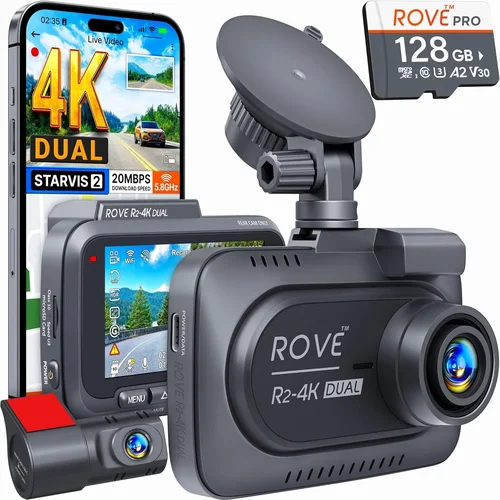
Top-tier performers designed for serious protection and demanding environments. These devices typically offer 4K recording capability, industry-leading night vision, advanced parking surveillance with intelligent event detection, and military-grade durability. Premium models often include dual-channel recording, sophisticated software ecosystems, and professional installation support.
Recommended for: Commercial drivers, fleet managers, safety-conscious families, and professionals requiring courtroom-ready evidence.
Performance advantages: Superior image quality, extended recording times, smarter automation, and comprehensive protection features.
Luxury Dash Cams ($500+)
Ultra-premium solutions for enthusiasts and professionals who demand perfection. Luxury dash cams feature cutting-edge sensors, customizable recording profiles, AI-powered event detection, and seamless integration with other smart devices. Some include specialized lenses, thermal imaging, or advanced analytics capabilities beyond traditional video recording.
Recommended for: Motorsport participants, security professionals, law enforcement, and collectors seeking ultimate performance.
Specialized benefits: Next-generation technology, uncompromising quality, exclusive features, and maximum evidentiary reliability.
Expert Tips for Getting the Best Deal
Shop During Off-Seasons
Dash cam prices fluctuate throughout the year based on demand patterns. Black Friday and Cyber Monday typically offer substantial discounts (often 20-40% off retail), but you can also find excellent deals during back-to-school season or early spring when new models haven’t been released yet. Avoid peak shopping periods like Memorial Day or Labor Day unless bundled with other automotive accessories.
Compare Retailers Carefully
Online marketplaces like Amazon provide convenience and competitive pricing, but physical retailers often include valuable services. Automotive specialty stores typically offer professional installation, compatibility checking, and immediate returns. Big-box electronics retailers may have knowledgeable staff who can demonstrate features firsthand. Always compare total costs including shipping, taxes, and any installation fees.
Look for Bundle Deals
Many manufacturers and retailers sell dash cam packages that include essential accessories like extra memory cards, windshield wipers, suction cups, and hardwiring kits. These bundles often save 15-30% compared to purchasing items separately. Ensure the included accessories meet your needs—cheap mounting systems or inadequate cables can undermine your investment.
Check Manufacturer Promotions
Sign up for brand newsletters and follow social media accounts to receive exclusive discount codes, early access to sales, and notification of limited-time promotions. Some companies offer trade-in programs where you can exchange older models for credit toward new purchases. Seasonal campaigns around holidays or special occasions frequently include free accessories or extended warranties.
Verify Warranty Coverage
Reliable warranty terms provide peace of mind and protection against manufacturing defects. Look for minimum 1-year coverage (preferably 2-3 years), responsive customer service, and clear return policies. Premium brands often include international warranty coverage, which benefits frequent travelers. Avoid extremely cheap models with no warranty or vague terms that limit your rights.
Read Return Policies Thoroughly
Understand restocking fees, return windows, and condition requirements before purchasing. Some online sellers impose 15-25% restocking fees for opened electronics, making returns financially impractical. Physical stores typically offer shorter return periods but may accept exchanges more readily. Know your rights regarding defective products and defective merchandise.
Test Before Committing Large Purchases
For premium dash cams exceeding $300, request demonstration units or rent equipment through local automotive clubs. Testing in your actual vehicle allows evaluation of mounting stability, cable routing feasibility, and compatibility with existing systems. Many rental services offer trial periods ranging from one week to one month, giving you time to assess real-world performance.
Negotiate When Possible
While rare for electronics retailers, negotiating can yield small savings or added value. Mention competitor pricing, ask about floor models with minor cosmetic imperfections, or inquire about upcoming model releases that might prompt current stock clearance. Professional installers purchasing multiple units may qualify for bulk discounts unavailable to individual consumers.
Consider Refurbished Options
Certified refurbished dash cams from reputable sources can offer significant savings without sacrificing quality. These units undergo rigorous testing, replacement of worn components, and full reconditioning processes. Reputable refurbishers provide identical warranties to new products and often include original packaging and accessories. Look for certifications from manufacturers or trusted third-party providers.
Evaluate Long-Term Value
Calculate total ownership cost rather than focusing solely on initial purchase price. Factor in expected lifespan, maintenance requirements, software update frequency, and potential resale value. A slightly more expensive model with superior durability and ongoing support may prove more economical over five years than multiple replacements of cheaper units.

Frequently Asked Questions
Q: Can dash cam footage be used as legal evidence?
A: Yes, dash cam footage is generally admissible as evidence in hit-and-run cases, provided it meets certain standards. Courts typically require that the recording accurately represents events without manipulation, maintains proper chain of custody, and was obtained legally. However, admissibility depends on jurisdiction-specific rules regarding electronic evidence. To maximize legal credibility, ensure your footage includes clear timestamps, unobstructed views, and consistent audio/video quality. Consult local laws regarding audio recording permissions, as this affects evidence validity in some regions.
Q: How long should I keep dash cam recordings?
A: Retention policies vary based on your intended use and legal requirements. For hit-and-run incidents, retain relevant footage indefinitely until the case concludes—potentially several years. General recordings should be kept for at least 30-90 days unless flagged for review. Some insurance companies require specific retention periods for claim processing. Implement a systematic review process where you regularly delete non-essential footage while preserving potentially valuable clips. Cloud storage subscriptions can automate this process but require reliable internet connectivity and ongoing subscription fees.
Q: Do I need to inform other drivers that I’m recording?
A: Disclosure requirements depend on your jurisdiction’s privacy laws. In many regions, informing drivers isn’t strictly required for video-only recordings, but announcing audio recording is mandatory to maintain legal admissibility. Some areas prohibit all audio recording without consent. To err on the side of caution and ensure evidence acceptance, consider posting a visible notice in your vehicle window stating “This vehicle is recorded.” This practice demonstrates awareness while respecting others’ reasonable expectations of privacy.
Q: What happens if my dash cam runs out of battery while parked?
A: Uninterrupted parking mode requires hardwired power connections through your vehicle’s electrical system. Without proper wiring, your dash cam will shut down when the ignition turns off, leaving gaps in coverage during vulnerable periods. Professional installation using fuse taps or direct battery connections ensures continuous operation without draining your car battery excessively. Modern smart dashes often include low-voltage protection circuits that automatically disable parking mode when battery levels drop too low, preventing complete discharge.
Q: Can I use multiple dash cams on the same vehicle?
A: Technically yes, but practical limitations apply. Adding cameras increases complexity, cost, and potential interference issues. Dual-channel systems integrate front and rear views into one unit with dedicated processing power, making them more efficient than separate devices. Multiple single-camera units would require additional storage, separate power sources, and complex synchronization. Only consider multiple cameras if you have specific coverage needs that exceed single-device capabilities, such as recording both exterior and interior cabin perspectives.
Q: How do I choose the right memory card?
A: Select high-quality Class 10 or UHS-I/UHS-II microSD cards from reputable manufacturers like SanDisk Extreme, Samsung PRO Endurance, or Lexar Professional. Minimum recommended capacity is 32GB for 1080p recording, though 64GB or higher is preferable for extended coverage. Avoid counterfeit or rebranded cards, as they often deliver subpar performance and premature failure. Format cards exclusively in your dash cam before first use to ensure optimal compatibility. Replace memory cards every 1-2 years or immediately if experiencing corruption, slow write speeds, or error messages.
Q: Will my dash cam survive a severe collision?
A: Modern dash cams are designed to withstand moderate impacts and vibrations, but their protective capabilities vary significantly. Military-grade or automotive-grade shock resistance indicates enhanced durability for accident scenarios. However, extremely violent collisions may damage internal components regardless of build quality. Most manufacturers guarantee operation after minor impacts but don’t warranty survival in major accidents. Positioning the dash cam away from airbag deployment zones and securing cables with protective sleeves can reduce risk of damage during crashes.
Q: Can I transfer footage to cloud storage?
A: Many smart dash cams offer Wi-Fi connectivity and companion apps that enable automatic cloud backup. This feature uploads selected clips or entire recordings to secure servers accessible via smartphone or computer. Cloud storage provides offsite protection against theft, fire, or water damage but requires reliable cellular data plans or Wi-Fi hotspots. Subscription fees typically apply for premium storage tiers beyond free introductory periods. Always verify encryption standards and privacy policies before uploading sensitive footage containing personal information.
Q: How often should I update my dash cam firmware?
A: Regular firmware updates improve performance, fix bugs, and add new features. Check manufacturer websites monthly for available updates, especially if experiencing issues with recording quality, connectivity, or app compatibility. Automatic update notifications appear through companion apps for connected devices. Manual updates via microSD card remain necessary for standalone models. Never interrupt firmware installation processes, as interrupted updates can permanently damage your dash cam. Keep backup copies of important footage before updating, particularly when changing major versions.
Q: What should I do immediately after a hit-and-run incident?
A: After confirming safety, immediately retrieve your dash cam footage if possible. Most modern devices allow quick playback through built-in screens or mobile apps. Save critical clips to your phone or computer for immediate backup before the dash cam begins overwriting files. Document the scene with photos of damage, license plate numbers, witness statements, and any available evidence. Contact authorities promptly with your footage as supporting evidence. Preserve all physical evidence and avoid discussing details publicly until law enforcement completes their investigation.
Our Final Recommendations
Best for Budget-Conscious Buyers: Viofo A119 V3
The Viofo A119 V3 strikes an exceptional balance between affordability and reliability, making it our top choice for cost-aware drivers seeking dependable hit-and-run protection. This single-channel dash cam delivers crisp 2K recording with impressive low-light performance, thanks to its Sony Starvis sensor technology. Despite its modest price point under $100, it includes essential features like parking mode, G-sensor event locking, and GPS tracking—all critical for comprehensive accident documentation.
What sets the A119 V3 apart is its robust build quality and consistent performance across diverse conditions. Independent tests confirm reliable loop recording, accurate timestamping, and minimal distortion even with aggressive field-of-view settings. The accompanying Viofo app provides straightforward file management and playback functionality, simplifying evidence retrieval when needed most. While lacking some premium extras like Wi-Fi connectivity or two-way audio, its core capabilities exceed expectations for the price class.
Best Overall Value: Garmin Dash Cam Mini
The Garmin Dash Cam Mini exemplifies refined simplicity without sacrificing essential functionality. This compact, single-lens design prioritizes unobtrusive operation while delivering dependable 1080p recording with enhanced night vision capabilities. Garmin’s reputation for rugged outdoor equipment translates into durable construction that withstands temperature extremes and minor impacts common in daily driving.
What elevates the Mini above competitors is its seamless integration with Garmin ecosystem apps and services. Users benefit from automatic cloud backup, simplified file organization, and reliable customer support backed by Garmin’s established automotive division. The absence of distracting features keeps the interface clean and intuitive, ensuring quick access to critical recording functions. With competitive pricing around $120 and generous warranty coverage, the Mini represents outstanding value for drivers wanting hassle-free protection.
Best Premium Option: BlackVue DR970X-2CH
For those demanding professional-grade performance, the BlackVue DR970X-2CH delivers unmatched quality and versatility. This dual-channel system records stunning 4K front footage alongside 1080p rear coverage, providing complete situational awareness during accidents. Advanced features include super-wide dynamic range, intelligent parking mode with built-in motion detection, and optional cloud connectivity for remote monitoring.
The DR970X-2CH stands out through its military-grade durability, reliable firmware updates, and comprehensive accessory ecosystem. Professional installers appreciate its flexible mounting options and robust power management, while everyday users benefit from intuitive app controls and automatic event categorization. With subscription-based cloud services enhancing evidence accessibility and management, this system represents the pinnacle of consumer dash cam technology—ideal for serious protection seekers willing to invest in top-tier performance.
Best for Beginners: Thinkware U1000
The Thinkware U1000 serves as an excellent introduction to advanced dash cam features without overwhelming complexity. This dual-lens system offers balanced 2K front and 1080p rear recording with industry-leading night vision powered by Sony STARVIS CMOS sensors. Thoughtful design elements like adjustable mounting angles and cable routing guides simplify installation, while the bright LCD screen ensures clear menu navigation in various lighting conditions.
Beginners will appreciate Thinkware’s commitment to user education through detailed manuals, video tutorials, and responsive customer support. The inclusion of multiple recording modes (normal, time-lapse, motion detection) allows gradual feature adoption as confidence grows. With competitive pricing around $180 and proven track record in global markets, the U1000 provides a smooth learning curve while delivering courtroom-ready evidence quality from day one.
Best for Advanced Users: Rexing V1P Pro
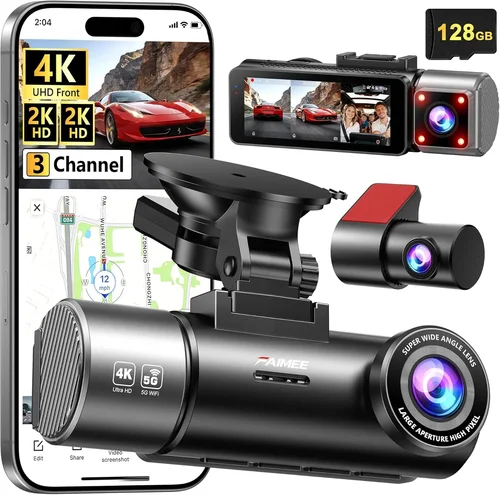
The Rexing V1P Pro caters to experienced drivers seeking cutting-edge capabilities and customization options. This triple-lens system captures ultra-wide 4K front footage, 2K side mirror views, and 1080p cabin recordings—providing unprecedented situational awareness. Advanced processing algorithms optimize image quality in challenging lighting, while intelligent parking surveillance distinguishes between relevant events and false triggers.
Advanced users will value the extensive configuration possibilities through dedicated software suites, including customizable recording profiles, granular G-sensor sensitivity adjustments, and detailed playback controls. The inclusion of Wi-Fi connectivity enables wireless transfers and remote viewing, while optional hardwiring kits ensure uninterrupted monitoring. With competitive pricing under $300 and growing reputation for reliability, the V1P Pro represents serious protection technology accessible to discerning consumers who demand maximum flexibility and performance.
Conclusion: Making the Right Choice
Choosing the best dash cam for hit-and-run protection requires balancing technical capabilities with practical considerations unique to your driving habits and environment. Rather than chasing the latest features or lowest prices, focus on fundamental qualities that directly impact evidence quality and reliability: clear resolution, dependable recording, robust build, and sensible automation. Remember that your dash cam serves as digital armor—its effectiveness depends not just on specifications but on consistent, proper usage aligned with your specific needs.
Consider your annual mileage, typical driving routes, local crime statistics, and legal requirements when evaluating options. Urban commuters facing frequent stop-and-go traffic may prioritize wide-angle coverage and strong night vision, while rural drivers might emphasize parking surveillance and weather resistance. Whatever your circumstances, investing in a quality dash cam represents proactive self-protection that could ultimately save you significant time, expense, and emotional distress following an incident.
Don’t underestimate the importance of regular maintenance and systematic evidence management. Establish routines for reviewing footage, updating firmware, and securely storing critical clips. Treat your dash cam as both preventive measure and investigative tool—maintaining it with the same diligence you’d apply to insurance documents or registration paperwork. With thoughtful selection and responsible usage, your chosen device will deliver peace of mind knowing you’ve taken concrete steps to safeguard yourself and contribute to safer roads for everyone.