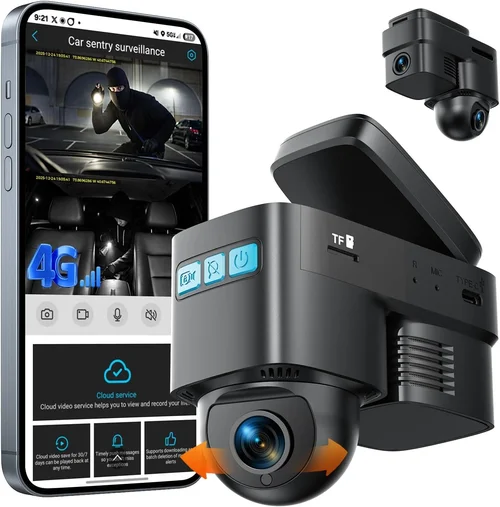
4G LTE Dash Cam with Live Stre
|

Best Fleet Dash Cam Shopping Guide
Best Fleet Dash Cam Shopping Guide

When managing a fleet of commercial vehicles, safety, efficiency, and accountability are paramount. One of the most impactful investments a fleet manager can make is equipping their vehicles with high-quality dash cams. These devices provide critical evidence in the event of accidents, help monitor driver behavior, reduce insurance costs, and improve overall operational transparency. However, selecting the right dash cam for a fleet—especially one that serves multiple vehicles across various conditions—is far more complex than simply buying a single unit for personal use. Fleet dash cams must meet strict performance, reliability, and management standards.

This comprehensive shopping guide is designed to help fleet managers, operations directors, and transportation executives navigate the vast array of options available today. We’ll walk you through the essential features to prioritize, compare different types of dash cam systems, avoid common pitfalls, and break down budget expectations. Whether you’re outfitting 10 trucks or 200 delivery vans, understanding how to choose dash cams that deliver consistent performance, easy integration, and long-term value will save time, money, and headaches down the road. By the end of this guide, you’ll have the knowledge to make an informed decision that enhances safety, reduces liability, and supports your fleet’s bottom line.

The market for fleet dash cams has expanded dramatically in recent years, driven by advances in video resolution, storage technology, wireless connectivity, and AI-powered analytics. From entry-level models with basic recording capabilities to enterprise-grade solutions offering real-time GPS tracking, cloud-based monitoring, and driver scoring, there’s a system for nearly every operational need. But not all dash cams are created equal—especially when deployed at scale. A device that works flawlessly in a sedan may fail under the harsh conditions of a long-haul truck. Similarly, a system that lacks centralized management software becomes a logistical nightmare for large fleets. This guide cuts through the marketing noise and delivers expert insights grounded in real-world fleet deployment scenarios.

What to Look for When Buying Dash Cams

1. Budget & Price Range

Determining your budget is the first and most crucial step when purchasing dash cams for a fleet. Unlike consumer-grade dash cams, fleet systems involve recurring costs beyond the initial hardware investment, including cloud storage fees, maintenance, and potential upgrades. Entry-level dash cams typically cost between $50 and $150 per unit, but these often lack durability, advanced features, and scalability. Mid-range models, priced from $150 to $300, offer better build quality, improved sensors, and basic fleet management tools. Premium systems, ranging from $300 to $600+, come equipped with GPS tracking, real-time alerts, and integration with telematics platforms.

For fleets larger than 50 vehicles, it’s wise to consider total cost of ownership (TCO) rather than just the upfront price. While a cheaper model might seem attractive initially, frequent failures, data loss, or inadequate support can lead to higher long-term expenses. Additionally, many reputable manufacturers offer volume discounts for bulk purchases, so don’t hesitate to negotiate pricing based on the number of units required. Always request detailed quotes that include installation, software licenses, and multi-year service plans.

2. Performance Specifications

Performance is non-negotiable when it comes to fleet dash cams. The primary function of any dash cam is to capture clear, accurate footage under diverse driving conditions—from bright daylight to pitch-black nights, heavy rain, snow, or tunnel transitions. Key performance indicators include video resolution, low-light sensitivity, frame rate, and dynamic range.

Resolution: For fleets, 1080p Full HD is the minimum acceptable standard; however, 2K or even 4K resolution is increasingly recommended for enhanced detail, especially in accident reconstruction. Higher resolution also improves license plate recognition and facial identification.

Low-Light Performance: Many dash cams struggle with night vision due to insufficient light sensitivity and poor infrared (IR) illumination. Look for models with wide aperture lenses (f/1.6 or lower), Sony STARVIS sensors, or built-in night vision LEDs. Some advanced systems use dual cameras—one for front view and another for cabin monitoring—to ensure visibility inside the vehicle during nighttime operations.

Frame Rate & Dynamic Range: A frame rate of at least 30 fps ensures smooth motion capture without motion blur. HDR (High Dynamic Range) technology helps balance exposure between bright headlights and dark shadows, reducing washed-out or overly dark footage.

💡 Pro Tip: Test dash cam samples under actual operating conditions if possible. Request loaner units or trial periods from vendors to evaluate real-world performance before full deployment.

3. Build Quality & Durability

Commercial vehicles operate in demanding environments—extreme temperatures, vibrations, dust, moisture, and constant movement. Consumer-grade dash cams, designed for sedans and compact cars, rarely withstand such rigors. Fleet dash cams must be ruggedized to meet industrial standards.

Look for devices rated for operation in temperatures ranging from -20°C to 70°C (-4°F to 158°F). Shock-resistant casings, IP67 or higher ingress protection ratings against water and dust, and vibration dampening mounts are essential features. Internal components should be secured with anti-vibration gaskets and shock-absorbing materials. Some manufacturers use military-grade enclosures (MIL-STD-810G compliant) specifically engineered for heavy-duty applications like construction trucks, buses, or refrigerated trailers.

Additionally, consider the mounting mechanism. Adhesive-backed mounts may loosen over time due to heat expansion or road debris. Magnetic or screw-mounted brackets offer greater stability but require professional installation. Ensure compatibility with your vehicle’s dashboard curvature and sun visor placement to avoid obstructing the driver’s view.

4. Features & Functionality

Modern fleet dash cams go far beyond simple loop recording. Advanced functionality enables proactive risk management, compliance reporting, and driver coaching. Here are the most valuable features to prioritize:

  • GPS Tracking & Speed Monitoring: Integrated GPS modules log location, speed, and route history. This data is invaluable for verifying claims, optimizing routes, and identifying speeding incidents.
  • G-Sensor & Event Recording: Built-in accelerometers detect sudden impacts, hard braking, sharp turns, or rollovers. Upon detecting an event, the camera locks the footage to prevent accidental deletion, ensuring critical evidence is preserved.
  • Parking Mode with Motion Detection: When parked, dash cams enter low-power standby mode. If motion or impact is detected, they automatically record and upload footage to the cloud—protecting against hit-and-runs or vandalism.
  • Driver Behavior Monitoring: Cabin-facing cameras track distracted driving, drowsiness, cell phone use, or unauthorized passengers. AI algorithms analyze behaviors and generate alerts or reports for supervisors.
  • Cloud Connectivity & Remote Access: Real-time streaming allows managers to view live footage from any location via mobile apps or web portals. Cloud storage eliminates reliance on physical SD cards and simplifies data retrieval.
  • Two-Way Audio: Enables communication between drivers and dispatchers without interrupting radio traffic. Useful for emergency situations or instructions while en route.
  • Automatic Firmware Updates: Ensures all units stay current with security patches and feature enhancements without manual intervention—critical for large-scale deployments.

5. Brand Reputation

Not all brands are created equal. Established companies with decades of experience in automotive electronics tend to offer superior reliability, customer support, and innovation. Research manufacturer backgrounds, read independent lab tests, and check third-party certifications like ISO 9001 or FCC compliance.

Leading names in the fleet dash cam space include Garmin, BlackVue, Thinkware, Viofo, and Nextbase. These brands invest heavily in R&D, maintain dedicated support teams, and provide regular firmware updates. Smaller or lesser-known brands may cut corners on materials or omit essential safety features, leading to premature failure or legal vulnerabilities.

Also, verify whether the brand offers dedicated fleet management software. Generic apps may lack scalability, user permissions, or integration with existing fleet systems like ELD (Electronic Logging Device) platforms or ERP software.

6. Warranty & Support

A strong warranty reflects confidence in product quality. Most reliable dash cam manufacturers offer at least a two-year warranty covering defects and hardware malfunctions. Some extend coverage to three or five years, particularly for commercial use.

Support responsiveness is equally important. During a crisis—such as an accident requiring immediate footage access—delayed technical assistance can compound stress and delay investigations. Prioritize vendors with 24/7 customer service, multilingual support, and local service centers if operating internationally.

Ask about repair timelines: Can broken units be replaced within 48 hours? Is loaner equipment available during repairs? What documentation and training do they provide for your team?

7. Size & Portability

While size isn’t always a concern for fixed-installation dash cams, compact designs offer advantages in crowded cockpits or when retrofitting older vehicles. Ultra-slim models reduce glare and distraction while maintaining wide field-of-view angles.

However, smaller form factors sometimes compromise cooling, battery life, or internal component capacity. Avoid excessively tiny devices that lack sufficient space for robust processors or large memory buffers—this can result in dropped frames or failed recordings during critical moments.

Consider dual-camera systems where the cabin-facing unit is slightly larger but still unobtrusive. Modular designs allow swapping components without replacing entire units, reducing downtime and costs.

8. User Reviews & Ratings

Online reviews offer real-world insights beyond manufacturer claims. Pay attention to recurring complaints about poor night vision, short battery life, software glitches, or unreliable cloud sync. Positive feedback about ease of installation, durability, and responsive support is equally telling.

Beware of fake reviews or overly polished testimonials. Focus on verified purchasers who mention specific use cases relevant to your fleet—e.g., “Used this in my delivery trucks for 18 months with no issues” or “Night footage is crystal clear even on poorly lit highways.”

Different Types of Dash Cams

Type Best For Price Range Key Advantage
Single-Facing Dash Cam Small fleets, local deliveries, passenger shuttles $50 – $200 Simple setup, low power consumption
Dual-Camera System (Front + Interior) School buses, ride-shares, courier services $200 – $500 Monitors both road and driver behavior
360° Multi-Lens Camera Construction sites, large trucks, parking lots $400 – $800+ Complete situational awareness from all angles
Wireless / Cloud-Based Fleet System Large fleets, logistics companies, remote operations $300 – $1,000+ Centralized management, real-time alerts, scalable storage
Hardwired with Battery Backup Long-haul trucks, emergency vehicles, areas with spotty ignition wiring $250 – $600
⭐ Editor’s Choice

Common Buying Mistakes to Avoid

Best Fleet Dash Cam Shopping Guide

❌ Mistake: Choosing Based Solely on Lowest Price

Why it’s bad: The cheapest dash cam may lack essential features like GPS, cloud sync, or shock resistance. Over time, frequent failures or data loss can negate any initial savings and increase liability risks.

What to do instead: Calculate total cost of ownership. Include installation, software subscriptions, replacement parts, and potential fines from missing evidence. Opt for mid-tier models with proven reliability over budget hacks.

❌ Mistake: Ignoring Integration with Existing Systems

Why it’s bad: Standalone dash cams create data silos. Without integration with ELDs, telematics, or HR platforms, you miss opportunities for holistic fleet optimization and driver performance analysis.

What to do instead: Verify API compatibility or pre-built integrations with your current tech stack. Ask vendors for demo accounts showing unified dashboards.

❌ Mistake: Overlooking Storage Management

Why it’s bad: Relying solely on onboard SD cards leads to rapid depletion, overwritten footage, and difficulty retrieving critical clips during investigations.

What to do instead: Choose systems with automatic cloud uploads, remote playback, and intelligent retention policies. Set rules to keep incident footage for 90–365 days while archiving routine drives.

❌ Mistake: Skipping Driver Training

Why it’s bad: Even the best dash cam fails if drivers disable it, block the lens, or misuse features. Poor adoption undermines ROI and creates mistrust.

What to do instead: Conduct mandatory training sessions. Demonstrate how dash cams protect drivers, explain privacy policies, and highlight benefits like faster claim processing or reduced false accusations.

❌ Mistake: Neglecting Legal Compliance

Why it’s bad: In some jurisdictions, recording audio without consent violates wiretapping laws. Improper handling of footage can lead to regulatory penalties or lawsuits.

What to do instead: Consult legal counsel before deployment. Use audio-disabled models unless explicitly permitted. Establish clear data governance protocols for access, retention, and deletion.

❌ Mistake: Assuming All Units Are Identical

Why it’s bad: Mixing models from different manufacturers complicates firmware updates, troubleshooting, and software licensing. Compatibility issues may arise.

What to do instead: Standardize on one platform across your entire fleet. Uniformity simplifies IT management and reduces support overhead.

Budget Guidelines: How Much Should You Spend?

Entry-Level ($50 – $150): Basic Protection for Small Fleets

This tier suits startups, small delivery businesses, or contractors with minimal budgets. Expect 1080p recording, loop mode, G-sensor, and microSD storage. Limited to 1–2 cameras per vehicle. Ideal for basic incident logging but lacking advanced analytics or remote access. Brands like Rexing, Jusper, or Apeman fall here. While affordable, these models often skimp on durability and night vision—critical flaws for professional use.

Mid-Range ($150 – $400): Sweet Spot for Growing Fleets

The majority of successful fleet operators land here. These systems balance cost and capability. Features include 2K resolution, dual-lens setups, GPS, Wi-Fi, and app connectivity. Cloud integration begins appearing in this range (e.g., BlackVue DR-M series). Build quality improves with shockproof housings and wider operating temperature ranges. Perfect for medium-sized logistics companies, municipal transport, or ride-sharing fleets prioritizing safety and accountability.

Premium ($400 – $800): Enterprise-Grade Solutions

Designed for large corporations, long-haul carriers, or high-risk industries. Top-tier specs: 4K recording, HDR, thermal imaging (select models), AI-powered driver scoring, encrypted cloud storage, and seamless integration with third-party telematics. Brands like Garmin ForeTrak, Samsara, or Bosch Auto receive praise for reliability and scalability. Often include dedicated fleet management portals with customizable dashboards, automated reporting, and predictive maintenance alerts.

Luxury ($800+): Cutting-Edge Innovation

Reserved for specialized applications—emergency response vehicles, autonomous test fleets, or extreme off-road operations. May feature LiDAR fusion, satellite connectivity, or machine learning-based hazard detection. Cost justifies itself through unparalleled accuracy, compliance assurance, and competitive advantage. Rarely purchased individually; usually bundled with full-service contracts.

💡 Pro Tip: Negotiate bulk pricing. Most vendors offer tiered discounts—e.g., 5% off 50 units, 10% off 100+. Factor in free shipping, waived setup fees, or complimentary training sessions.
Best Fleet Dash Cam Shopping Guide

Expert Tips for Getting the Best Deal

  • Time Your Purchase Strategically: Major sales occur during Black Friday, Cyber Monday, and end-of-year clearance events. Manufacturers also launch new models quarterly, prompting discounts on previous-gen units.
  • Buy Direct or Through Authorized Resellers: Avoid gray-market sellers offering suspiciously low prices. Authorized dealers guarantee genuine products, full warranties, and access to OEM accessories.
  • Request a Pilot Program: Test 5–10 units across different vehicle types before committing. Monitor performance over 2–4 weeks to assess real-world reliability.
  • Compare Total Subscription Costs: Cloud storage isn’t free. Monthly fees add up quickly. Some vendors charge per GB, others flat rates capped at certain limits. Choose scalable plans aligned with your data volume.
  • Review Return Policies: Ensure you can return defective units within 30 days. Some brands require original packaging and proof of purchase.
  • Inspect Installation Services: Professional wiring prevents battery drain and fire hazards. Ask if installers are certified and insured. DIY kits save money but risk improper setup.
  • Check Software Update Frequency: Frequent updates indicate active development. Abandoned software leaves security gaps and feature stagnation.
  • Leverage Government or Industry Rebates: Some DOT programs or insurance providers offer incentives for adopting collision mitigation technologies like dash cams.

Frequently Asked Questions

Q: How many dash cams do I need per vehicle?

A: Typically, one primary dash cam facing forward is sufficient for most fleet vehicles. However, dual-camera systems (front + interior) are recommended for school buses, taxis, or delivery services where driver behavior monitoring is crucial. For articulated vehicles like trailers or semi-trucks, consider adding a rear-facing camera to the trailer hitch area.

Q: Do dash cams record when the engine is off?

A: Yes, but only if the unit supports parking mode. This feature draws minimal power from the car battery and activates upon detecting motion or impact. Hardwired models avoid battery drain by tapping into constant power. Always confirm compatibility with your vehicle’s electrical system to prevent unexpected shutdowns.

Q: Can I access dash cam footage remotely?

A: Absolutely. Modern cloud-connected dash cams allow supervisors to stream live or replay recorded clips via smartphone apps or web browsers. Search functionality lets you filter by date, time, location, or event type. Ensure your internet plan supports concurrent streams across your fleet size.

Q: Are dash cam recordings admissible in court?

A: In most U.S. states and many countries, dash cam footage is considered reliable evidence if properly maintained. To preserve admissibility, store clips securely, log metadata (timestamp, GPS coordinates), and follow chain-of-custody procedures. Never edit or alter original recordings.

Q: How much storage do I need?

A: It depends on usage. For basic recording, a 64GB microSD card lasts ~2 hours at 1080p. With cloud backup, you can reduce local storage needs. Plan for at least 30 days of incident footage retention. Larger fleets benefit from automated archival and deletion policies to manage growth.

Q: Will dash cams interfere with my existing GPS or radio systems?

A: High-quality dash cams use shielded cables and EMI filtering to minimize interference. If installing multiple electronics, maintain proper cable routing and avoid running power wires parallel to audio lines. Consult an automotive electrician for complex setups.

Q: What happens if the dash cam loses internet connectivity?

A: Most systems buffer footage locally until connection resumes. Once reconnected, data syncs automatically. Some models offer offline maps or cellular fallback (via built-in SIM cards) for remote areas. Confirm fail-safe mechanisms with your vendor.

Q: How do I handle driver privacy concerns?

A: Transparency is key. Notify drivers about recording scope, data usage policies, and access controls. Disable cabin-facing cameras in jurisdictions with strict privacy laws. Provide opt-out alternatives where feasible without compromising safety.

Our Final Recommendations

Best for Budget-Conscious Buyers

The Viofo A119 V3 offers exceptional value with 2K resolution, Sony sensor, GPS, and reliable performance at around $180. Its compact design fits most interiors, and the accompanying app provides solid remote viewing. While lacking premium features like cloud storage, it excels in core functionality and durability—making it ideal for small to mid-sized fleets seeking dependable protection without overspending.

Best Overall Value

The BlackVue DR970X-2CH stands out as the gold standard for fleet operators. Priced around $450, it delivers 4K front + 2K interior recording, built-in Wi-Fi, GPS, and robust cloud integration via BlackVue Cloud. Known for military-grade durability and seamless firmware updates, it integrates effortlessly with telematics platforms. Widely adopted by logistics giants and public transit agencies, it balances cost, performance, and manageability perfectly.

Best Premium Option

For enterprises needing maximum scalability and intelligence, the Samsara DriveCam represents the pinnacle. Starting at $700 per unit plus subscription fees, it combines 1080p recording with AI-driven driver coaching, fatigue detection, and predictive risk analytics. Seamlessly connects to Samsara’s ecosystem of IoT sensors, fuel monitors, and compliance tools. Trusted by Fortune 500 companies, it transforms raw footage into actionable safety insights.

Best for Beginners

New fleet managers should start with the Garmin Dash Cam 67W. At $200, it’s intuitive, easy to install, and pairs reliably with smartphones. Offers 1440p recording, voice control, and automatic incident detection. Though limited to single-lens operation, its reputation for simplicity and customer support makes it a stress-free entry point.

Best for Advanced Users

Power users demanding granular control will appreciate the Thinkware U1000 Dual Camera. Featuring 4K front and 2K interior views, HDR+, parking assist, and customizable settings, it appeals to tech-savvy operators. The Thinkware Cloud portal offers advanced filtering, export tools, and integration with third-party apps—ideal for custom workflows and compliance reporting.

Conclusion: Making the Right Choice

Selecting the best dash cam for your fleet isn’t about chasing the shiniest gadget—it’s about aligning technology with operational realities. Every decision should serve a purpose: enhancing safety, reducing costs, ensuring compliance, or improving driver performance. By prioritizing durability, scalability, and integration over marginal price differences, you set your fleet up for long-term success.

Remember, the most expensive option isn’t always best, nor is the cheapest. The optimal choice emerges from careful evaluation of your specific needs, supported by pilot testing, vendor consultation, and ongoing performance monitoring. As your fleet grows, revisit your dash cam strategy annually—technology evolves rapidly, and what’s cutting-edge today may be outdated tomorrow.

Invest wisely. Equip confidently. Protect proactively. Your drivers, your assets, and your business depend on it.

You May also Like