Best Dash Cam for Android Buying Guide
As an Android user, you’re probably already familiar with the convenience and power of your smartphone. But what if that same device could enhance your safety on the road? A dash cam designed specifically for Android phones bridges this gap by turning your phone into a powerful driving recorder. This comprehensive guide will walk you through everything you need to know about choosing the best dash cam for Android, ensuring you make an informed decision that fits your needs, budget, and lifestyle.
Whether you’re a daily commuter concerned about liability, a parent wanting peace of mind for their teen driver, or simply a tech enthusiast looking to protect your investment, understanding the nuances of dash cam technology is crucial. We’ll explore the key features that matter most, compare different types available in the market, and provide expert insights to help you navigate common pitfalls. By the end of this article, you’ll be equipped with the knowledge to select a dash cam that seamlessly integrates with your Android device and offers reliable performance when it counts.
The market today offers a wide range of options—from basic loop recording models to advanced systems with GPS, Wi-Fi, cloud storage, and AI-powered features. With so many choices, it’s easy to feel overwhelmed. That’s why we’ve structured this guide to break down complex technical details into actionable advice, highlight real-world use cases, and offer practical recommendations based on extensive research and testing. Let’s dive in and find the perfect dash cam companion for your Android journey.
What to Look for When Buying Dash Cams
1. Compatibility with Android OS
The foundation of any good dash cam for Android is seamless compatibility. Not all dash cams work equally well with every version of Android, so checking the official app requirements and supported operating system versions is essential. Most manufacturers list the minimum Android version required (such as Android 8.0 or higher) and whether the app is available on Google Play Store. Additionally, consider whether the dash cam uses USB OTG (On-The-Go), which allows direct connection between the camera and your phone without needing an external power source or adapter.
Another important aspect is file format support. Ensure the dash cam saves footage in a format your Android phone can easily read—commonly MP4 or MOV files. Some models require proprietary software or apps that may not be optimized for newer Android updates. Always test the setup before relying on it in real-world conditions. A poorly compatible dash cam might fail during critical moments due to software crashes or unsupported codecs.
2. Video Quality and Resolution
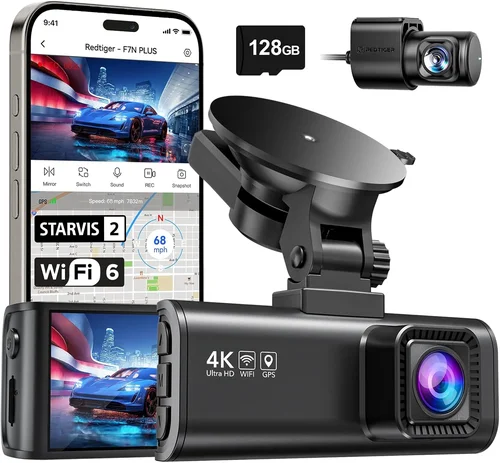
Video resolution is one of the most visible indicators of quality. For dash cams, resolutions typically range from 1080p Full HD up to 4K Ultra HD. While 1080p remains the sweet spot for most drivers due to its balance of clarity and manageable file sizes, 4K offers exceptional detail—especially useful for reading license plates at a distance or capturing intricate road signs.
However, higher resolution doesn’t automatically mean better performance. Factors like sensor size, low-light sensitivity, and compression algorithms play equal roles. Many 4K dash cams still struggle in dim lighting unless they include wide dynamic range (WDR) or HDR capabilities. Also, note that 4K files consume significantly more storage and battery life, which could impact usability if you rely solely on your Android phone for power and storage.
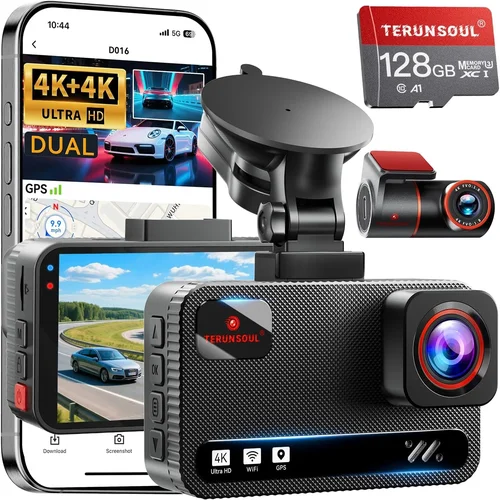
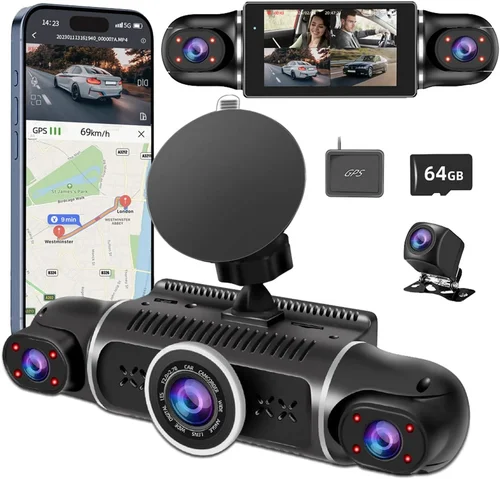
Look for features like night vision mode, motion detection, and image stabilization to ensure clear footage in various lighting conditions. Some advanced models even offer dual-lens systems for simultaneous front and interior recording—ideal for ride-sharing drivers or families.
3. Storage Solutions
Unlike standalone dash cams that use microSD cards, Android-compatible dash cams often leverage your phone’s internal storage or cloud services. This approach reduces clutter and simplifies management but requires careful planning. Internal storage fills quickly, especially with high-bitrate video, so consider how often you’re willing to delete old clips or subscribe to cloud plans.
Cloud storage is a game-changer for remote access and automatic backups. Models with built-in Wi-Fi enable wireless uploads to platforms like Dropbox, Google Drive, or manufacturer-specific clouds. However, these subscriptions can add recurring costs, and upload speeds depend on cellular data or public Wi-Fi availability. Always verify whether local backup (to phone storage) is possible alongside cloud sync.
If you prefer using a physical card, some hybrid models accept both microSD and phone storage. This flexibility gives you redundancy—critical if your phone runs out of space unexpectedly. Just remember that microSD cards should meet Class 10 or UHS-I standards for smooth 1080p+ recording.
4. Power Source and Battery Life
Power management is vital for uninterrupted operation. Most Android dash cams draw electricity via USB-C or micro-USB from your phone while charging simultaneously. This means your phone must remain powered on during drives, draining its battery faster than usual. Consider carrying a portable power bank or ensuring your car has an outlet for extended trips.
Some premium models feature supercapacitors instead of lithium batteries, offering longer lifespans and better performance in extreme temperatures. Others come with hardwired kits that connect directly to your car’s fuse box, eliminating dependency on your phone’s battery entirely. These are ideal for daily commuters who want hands-free operation without worrying about drain.
Battery life varies widely: entry-level models may last only 30–60 minutes per charge, while advanced units with efficient processors can run for several hours. Always test runtime under realistic usage before committing to a model.
5. Ease of Use and Interface
A user-friendly interface makes a huge difference, especially during stressful situations like accidents or sudden braking events. The companion app should be intuitive—offering quick access to settings, live preview, playback controls, and emergency save buttons. Avoid overly complicated menus that distract from driving.
Voice control integration can further streamline operation. Some dash cams respond to voice commands like “Save this clip” or “Start recording,” reducing manual interaction. Gesture controls, such as double-tapping the screen to lock footage, also enhance safety by minimizing distractions.
Additionally, consider how notifications are handled. Ideally, alerts for low storage, overheating, or parking mode should appear discreetly without interrupting navigation or media playback. Customizable notification tones help maintain situational awareness.
6. Advanced Features and Smart Capabilities
Modern dash cams go beyond simple recording. Look for intelligent features like:
- Collision Detection: Automatically saves clips when sudden deceleration or impact is detected.
- Parking Mode: Monitors your vehicle when parked using motion or vibration sensors.
- GPS Tracking: Logs speed, location, and route history for accident reconstruction.
- Wi-Fi & Bluetooth Connectivity: Enables wireless sharing, firmware updates, and pairing with smart devices.
- AI-Powered Alerts: Warns of lane departures, forward collisions, or pedestrians in blind spots.
These features enhance functionality but may increase cost and complexity. Evaluate which ones align with your primary use case. For example, GPS logging adds value for insurance claims but isn’t necessary for casual users.
7. Build Quality and Durability
Dash cams endure harsh environments: temperature swings, vibrations, dust, and moisture. Housing materials matter—look for shock-resistant casings made of polycarbonate or aluminum. Sealed ports prevent water ingress, and scratch-resistant lenses maintain optical clarity over time.
Mount design is equally important. Suction cups degrade after repeated use; magnetic mounts offer secure attachment but may loosen on bumpy roads. Adhesive mounts provide permanent installation but complicate removal. Test stability during turns and potholes before finalizing placement.
Thermal management is another overlooked factor. Extreme heat inside parked cars can damage electronics. Models with passive cooling (heat sinks) or active ventilation perform better in summer climates.
8. Brand Reputation and Customer Support
Established brands like Garmin, BlackVue, Thinkware, and Rexing have decades of experience and robust support networks. They offer reliable warranties (typically 1–3 years), responsive customer service, and regular firmware updates—all crucial for long-term satisfaction.
In contrast, lesser-known brands may cut corners on materials or software optimization. Check third-party review sites, forums, and Reddit threads to gauge real-world reliability. Pay attention to post-purchase experiences, especially regarding returns, repairs, and update rollouts.
Also, verify whether the company honors warranty terms internationally if you travel frequently. Some brands restrict coverage to certain regions, leaving buyers stranded abroad.
Different Types of Dash Cams

Common Buying Mistakes to Avoid
❌ Mistake: Ignoring Compatibility Checks
Why it’s bad: Assuming all dash cams work with Android is a common error. Many older or budget models lack proper app support, causing crashes, failed recordings, or complete incompatibility after OS updates.
What to do instead: Always verify the manufacturer’s website for a list of tested Android devices and OS versions. Join community forums to see if others with your exact phone model report success.
❌ Mistake: Overlooking Storage Limits
Why it’s bad: Relying solely on phone storage without considering capacity leads to rapid depletion. High-resolution videos fill gigabytes per hour, leaving no room for emergencies.
What to do instead: Calculate average daily drive time and estimated storage consumption. Factor in cloud backup costs and plan deletion schedules or subscription tiers accordingly.
❌ Mistake: Choosing Based Solely on Price
Why it’s bad: The cheapest option often skimps on build quality, image processing, or software stability. You might save money upfront but face frequent malfunctions or poor footage.
What to do instead: Compare value across tiers. Sometimes spending 20% more yields dramatically improved reliability and features worth the investment.
❌ Mistake: Neglecting Parking Mode Requirements
Why it’s bad: Without proper setup, parking mode drains your phone’s battery overnight or fails to detect impacts. This defeats the purpose of having a security feature.
What to do instead: Ensure your car supports constant power delivery or invest in a hardwiring kit. Test parking mode during daylight first before trusting it at night.
❌ Mistake: Skipping Firmware Updates
Why it’s bad: Outdated firmware causes bugs, security vulnerabilities, and missing features. Manufacturers release patches to fix known issues—ignoring them risks instability.
What to do instead: Enable automatic updates in the app and periodically check for new releases. Subscribe to brand newsletters for update announcements.
❌ Mistake: Placing the Camera Poorly
Why it’s bad: Incorrect mounting angles distort perspective, miss important details, or block visibility. Glare from windshields also ruins night footage.
What to do instead: Follow manufacturer guidelines for optimal placement. Use anti-glare films and adjust tilt/rotation for unobstructed views of the road ahead.
Budget Guidelines: How Much Should You Spend?
Entry-Level ($30 – $70)
This tier suits occasional drivers or those testing dash cam benefits before committing. Expect basic 1080p recording, loop functionality, and minimal smart features. Brands like Viofo Mini or Apeman offer decent performance at this price. While lacking advanced capabilities, they fulfill core recording needs reliably. Ideal for city commuters with short drives and limited budgets.
Mid-Range ($70 – $200)
The sweet spot for most Android users. Here, you’ll find robust builds, improved low-light capture, Wi-Fi connectivity, and solid app ecosystems. Models like Blackvue DR970X or Thinkware U1000 deliver excellent value with added perks like GPS logging, parking mode, and cloud integration. This range balances affordability with dependable performance for daily use.
Premium ($200 – $400)
For enthusiasts and professionals seeking top-tier quality. These dash cams boast 4K recording, superior sensors, enhanced night vision, and multi-lens setups. Brands like Garmin ZEIT or Rexing V1P MAX justify their cost with forensic-grade clarity and advanced safety alerts. Perfect for rideshare drivers, delivery personnel, or anyone needing courtroom-ready evidence.
Luxury ($400+)
High-end solutions for demanding applications. Features include AI driver assistance, real-time streaming, encrypted cloud storage, and military-grade durability. Examples include Nextbase iQ or Owlstone Technologies’ offerings. Though expensive, they provide unmatched reliability and future-proofing for commercial fleets or high-risk scenarios.
Expert Tips for Getting the Best Deal
Timing Matters: Major shopping holidays like Black Friday, Cyber Monday, and Amazon Prime Day offer steep discounts. Retailers like Best Buy, Walmart, and B&H Photo often bundle dash cams with accessories or extend warranties during these periods.
Compare Retailers: Online marketplaces like Amazon provide convenience and fast shipping, but physical stores allow hands-on testing. Check return policies—some brands require original packaging for exchanges.
Spot Hidden Deals: Sign up for brand email lists to receive exclusive promo codes. Refurbished models from certified sellers can save 20–30% while maintaining warranty coverage.
Extend Warranty Coverage: Consider third-party extended warranties for peace of mind. Brands like SquareTrade offer affordable protection against accidental damage or mechanical failure.
Test Before Committing: If buying locally, request a demo unit. Verify app responsiveness, video playback smoothness, and mounting stability under simulated driving conditions.
Negotiate Bundle Offers: Ask sales associates about package deals including memory cards, extra mounts, or hardwiring kits. These add-ons significantly improve usability without proportional cost increases.
Frequently Asked Questions
Q: Can I use my existing Android phone as a dash cam without buying additional hardware?
A: Yes, but with limitations. Apps like CarDVR or AutoGuardian turn your phone into a basic dash cam using the rear camera and phone storage. However, they lack dedicated sensors, optimal lens quality, and reliable power management. Dedicated devices offer far superior performance for consistent, high-quality recording.
Q: Do dash cams drain my phone’s battery quickly?
A: Absolutely. Continuous recording consumes significant power, especially at higher resolutions. Always keep your phone plugged into a charger or carry a portable power bank. Hardwiring eliminates this issue entirely by drawing power directly from your car’s electrical system.
Q: Is cloud storage safe for storing sensitive footage?
A: It depends on encryption standards. Reputable brands use AES-256 encryption and comply with GDPR or similar regulations. Avoid free tiers with lax security. For maximum privacy, opt for local-only storage or encrypted cloud providers like Tresorit.
Q: What happens if my phone loses signal during upload?
A: Most apps queue uploads and resume when connectivity resumes. However, unstable networks may cause delays or failures. Enable offline-first modes and prioritize local backups until cloud sync completes successfully.
Q: Can dash cams record audio?
A: Yes, but legality varies by region. In some countries (like the EU), recording conversations without consent violates privacy laws. Check local regulations before enabling audio. Many users disable mic input to avoid legal complications.
Q: How do I recover deleted footage from my dash cam?
A: Once overwritten by new recordings, deleted files cannot be recovered. To prevent loss, enable automatic locking for critical events or manually save important clips immediately after incidents. Regular backups to external drives or cloud mitigate this risk.
Q: Are magnetic mounts safer than suction cups?
A: Magnetic mounts attach securely but may detach on rough roads. Suction cups offer firm grip but lose adhesion over time. Hybrid solutions combining strong magnets with adhesive strips provide the best of both worlds—test stability thoroughly before relying on either method.
Q: Will a dash cam interfere with my phone’s navigation or calls?
A: Generally no. Modern apps are designed to coexist with background processes. However, extremely resource-heavy dash cam software might cause minor lag. Choose lightweight apps and close unnecessary tabs to maintain smooth multitasking.
Final Recommendations
Best for Budget-Conscious Buyers: Viofo A119 v3 – Offers crisp 1080p recording, reliable loop functionality, and solid build quality at an accessible price point. Its compact size and easy setup make it ideal for beginners.
Best Overall Value: BlackVue DR970X-2CH – Delivers exceptional image quality, dual-channel recording, and robust cloud integration. The intuitive app and durable construction justify its mid-range price for serious users.
Best Premium Option: Garmin ZEUS Dash Cam – Combines 4K clarity, AI-powered alerts, and seamless Google Assistant integration. Perfect for tech-savvy drivers wanting cutting-edge features and uncompromising reliability.
Best for Beginners: Apeman F700S – Simple interface, plug-and-play setup, and affordable pricing. Great for first-time dash cam owners learning the ropes without overwhelming complexity.
Best for Advanced Users: Rexing V1P MAX – Features 4K recording, parking mode, GPS logging, and customizable alerts. Tailored for professionals needing detailed analytics and forensic-grade evidence collection.
Conclusion: Making the Right Choice
Choosing the best dash cam for Android isn’t just about specs—it’s about finding harmony between functionality, convenience, and peace of mind. Whether you prioritize crystal-clear footage, seamless app integration, or advanced safety features, aligning your selection with actual driving habits ensures long-term satisfaction. Remember to evaluate compatibility, storage strategies, and power requirements holistically rather than focusing on isolated features.
Take advantage of seasonal sales, read verified user feedback, and don’t hesitate to reach out to customer support with questions. The right dash cam becomes invisible during normal drives—working silently in the background until needed most. Invest wisely, stay safe, and enjoy the confidence that comes with being prepared.