Complete Dash Cam Buying Guide
When shopping for a dash cam, you’re not just buying another electronic gadget—you’re investing in your vehicle’s safety, security, and peace of mind. With thousands of models flooding the market, choosing the right one can feel overwhelming. Whether you’re looking to protect yourself from insurance fraud, document road incidents, or simply want to monitor your driving habits, the dash cam market offers solutions tailored to every need and budget.
This comprehensive guide will walk you through everything you need to know about selecting the best dash cam with motion detecting parking monitor functionality. You’ll learn about critical features like video resolution, storage capacity, parking mode capabilities, build quality, and smart connectivity options. We’ll also explore different types of dash cams, common pitfalls to avoid, budget considerations, and expert recommendations to help you make an informed decision that matches your specific requirements.
The dash cam industry has evolved dramatically over the past decade. What started as simple single-lens cameras has transformed into sophisticated multi-camera systems with advanced AI features, cloud connectivity, and intelligent event detection. Today’s top models offer 4K recording, GPS tracking, emergency backup power, and sophisticated parking surveillance modes that can detect even minor impacts or suspicious activity while your car is parked. Understanding these advancements and how they apply to your driving lifestyle is crucial for making the right purchase.

What to Look for When Buying Dash Cams
1. Resolution and Video Quality
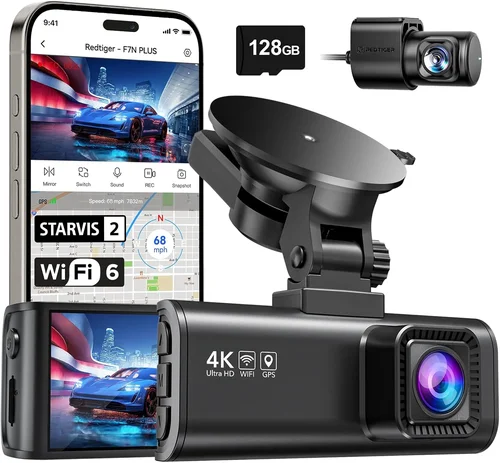
Video resolution is arguably the most important specification when evaluating dash cams, especially if you want clear footage for insurance claims or evidence collection. The standard has moved well beyond the old 720p benchmarks. Today’s leading dash cams offer at least 1080p Full HD resolution, with many premium models delivering 2K (1440p) or even 4K Ultra HD recording capabilities.
Higher resolution means more detailed footage, which is particularly valuable in low-light conditions or when capturing license plates from a distance. However, it’s important to understand that resolution isn’t everything—frame rate, bitrate, and sensor quality all contribute to overall video performance. A 4K camera with poor low-light performance may produce grainy footage that’s difficult to analyze later.
When comparing resolutions, look for cameras that offer at least 1920×1080 pixels (Full HD). For serious protection, consider models offering 2560×1440 (2K) or 3840×2160 (4K) resolution. Keep in mind that higher resolution typically requires more storage space and can impact battery life during parking mode monitoring.
2. Field of View and Lens Quality
The field of view (FOV) determines how much of the road and surrounding area your dash cam can capture. A wider FOV provides better coverage but may introduce distortion at the edges of the frame—a phenomenon known as “fish-eye” effect. Most quality dash cams use advanced lens technology to minimize this distortion while maintaining a wide viewing angle.
For city driving and urban environments, a horizontal FOV of 130-140 degrees is generally ideal. This range captures enough of the road ahead while still showing relevant lane markings and traffic signs. In highway driving scenarios, you might prefer a slightly narrower FOV around 110-120 degrees, which provides more detail on the immediate road surface and reduces edge distortion.
Consider dual-lens systems if you want comprehensive coverage. Front-facing cameras typically offer 130-140° FOV, while rear cameras usually provide 120-130° coverage. Some advanced models feature three-lens systems that include interior monitoring for added security.
3. Parking Mode and Motion Detection Capabilities
This is where the specific requirement for motion detecting parking monitor functionality comes into play. Parking mode allows your dash cam to continue recording even when your vehicle is turned off, using your car’s parking battery to monitor for potential incidents.
Modern dash cams with advanced motion detection use multiple technologies to minimize false alarms while ensuring critical events aren’t missed. Advanced models employ PIR (Passive Infrared) sensors that detect heat signatures from approaching vehicles or people, combined with intelligent video analysis algorithms that distinguish between relevant movement and irrelevant changes like passing shadows or tree branches swaying in the wind.
Look for dash cams that offer both hardwired installation (direct connection to your car’s electrical system) and flexible voltage protection settings. This ensures your parking mode won’t drain your battery completely while still providing adequate protection during extended periods away from your vehicle.
4. Storage Solutions and Loop Recording
Storage management is crucial for reliable dash cam operation. Most dash cams use microSD cards ranging from 32GB to 128GB or more. Higher capacity cards can store more footage but cost more and may not be compatible with all devices.
Loop recording is a fundamental feature that automatically overwrites older footage when your card is full, ensuring continuous recording without manual intervention. Most modern dash cams support this functionality out of the box. However, some advanced models offer additional storage options including cloud backup, USB connections for direct computer access, or even built-in solid-state storage.
When selecting a microSD card, choose one with UHS-I Class 3 (U3) rating or higher for optimal performance. Brands like SanDisk Extreme, Samsung EVO Plus, and Lexar Professional are reliable choices that work well with most dash cam models. Always format your card in the dash cam itself rather than your computer to ensure proper file system compatibility.
5. Build Quality and Durability
A dash cam is essentially mounted in a high-exposure location—directly facing potential impacts, extreme temperatures, and weather conditions. Quality construction materials and robust design elements are essential for long-term reliability.
Look for dash cams made from high-grade plastics or metal housings that resist cracking or warping under temperature extremes. The lens should be protected by durable glass or polycarbonate material resistant to scratches and UV damage. Water and dust resistance ratings (IP ratings) are becoming increasingly important, especially for vehicles frequently parked outdoors.
Installation quality also contributes significantly to durability. High-end models feature adjustable mounting brackets that accommodate various windshield angles and sizes. Some offer magnetic mounts for easy removal and repositioning, while others provide suction cups with enhanced adhesion properties.
6. Night Vision and Low-Light Performance
Night driving presents unique challenges for dash cams due to reduced lighting conditions and increased glare from headlights. Advanced night vision capabilities are essential for capturing clear footage during evening commutes or nighttime incidents.
CMOS image sensors with larger pixel sizes generally perform better in low light conditions. Many premium dash cams incorporate specialized night vision technologies including:
– Starvis or STARVIS 2 image sensors for superior low-light sensitivity
– Wide dynamic range (WDR) processing to handle bright headlight glare
– Enhanced noise reduction algorithms that preserve detail while eliminating grain
– Infrared LEDs for true night vision (though these may be limited by privacy regulations)
Test any dash cam in low-light conditions if possible, or read reviews specifically addressing night performance. Some models perform remarkably well at night, while others struggle significantly with visibility after dark.
7. Power Management and Battery Life
Proper power management is critical for both active driving and parking mode operation. During normal use, dash cams draw power from your vehicle’s cigarette lighter socket or directly from the electrical system via hardwiring.
For parking mode functionality, understanding your car’s battery drainage is essential. Most dash cams with parking mode include voltage protection circuits that automatically shut down recording if battery levels drop below safe thresholds (typically 11.5V for 12V systems).
Hardwired installation provides the most reliable power source and eliminates concerns about cigarette lighter availability or port compatibility. Professional installation typically costs $30-$70 but ensures proper fuse placement and secure connections that won’t affect your warranty.
8. Smart Features and Connectivity
Modern dash cams increasingly incorporate smartphone connectivity and smart features that enhance usability and functionality. These capabilities vary significantly between models and price points.
Essential connectivity features include:
– Wi-Fi and mobile app integration for easy file transfer and settings adjustment
– GPS tracking for speed and location data overlay
– Built-in cellular connectivity for real-time alerts and live streaming (premium feature)
– Cloud storage options for automatic backup and remote access
– Voice control and hands-free operation
Smartphone apps typically allow you to view live footage remotely, download clips, adjust settings, and even receive notifications about detected events. While convenient, these features often require subscription services for full functionality and may impact battery life during parking mode.
9. Audio Capabilities
Audio recording can be valuable for capturing conversations, emergency sirens, or environmental sounds that complement video evidence. However, audio capabilities vary significantly between models and may raise privacy considerations.
Some dash cams offer stereo recording with directional microphones that focus on sounds in front of the vehicle while reducing cabin noise. Others include noise cancellation features to improve speech clarity. Be aware that audio recording laws vary by region, so check local regulations before enabling this feature.
Many users prefer to disable audio recording entirely due to privacy concerns or to extend recording time during parking mode, as audio files tend to be larger than video-only recordings.
10. Brand Reputation and Customer Support
The dash cam market includes numerous brands with varying levels of quality control and customer service. Established manufacturers typically offer better warranty terms, more reliable firmware updates, and responsive technical support.
Leading brands in the dash cam industry include:
– BlackVue: Known for professional-grade hardware and cloud services
– Thinkware: Offers excellent build quality and innovative features
– Garmin: Provides user-friendly interfaces and reliable performance
– Viofo: Balanced approach with good value proposition
– Rexing: Budget-friendly options with decent features
– Nextbase: Strong UK presence with innovative designs
When evaluating brands, consider factors like warranty length (typically 1-3 years), update frequency for firmware improvements, community support forums, and availability of replacement parts. Reading recent owner experiences can reveal potential long-term issues that spec sheets might not disclose.
11. Installation Complexity and Maintenance
Installation complexity varies significantly between dash cam models. Simple suction cup mounts can be installed in minutes without tools, while hardwired systems require professional installation or substantial DIY skills.
Consider your comfort level with automotive electrical systems when selecting installation type. Hardwired systems eliminate the need for constant plugging/unplugging and provide cleaner aesthetics, but require routing wires through your dashboard and connecting to fuse boxes—potentially voiding warranties if done incorrectly.
Maintenance requirements include periodic cleaning of lenses, checking storage capacity, and occasionally formatting memory cards. Some advanced models offer automatic maintenance features like scheduled cleanings or self-diagnostic checks.
12. Price vs. Value Analysis
Dash cam pricing spans from under $50 for basic models to over $500 for professional-grade systems. Understanding what features justify higher price points helps identify true value propositions.
Budget models ($50-$100) typically offer basic 1080p recording with simple parking mode functionality. Mid-range options ($100-$250) usually include improved video quality, better build materials, and more sophisticated parking detection. Premium systems ($250-$500+) provide 4K recording, advanced parking features, superior night vision, and enhanced connectivity.
When analyzing value, don’t just compare absolute prices—consider cost per year of ownership and the relative importance of specific features to your driving needs. A $300 dash cam with features you’ll actually use may represent better value than a $200 model with unnecessary extras.
13. Warranty and After-Sales Support
Reliable warranty coverage and responsive customer service can save significant headaches if issues arise. Most reputable brands offer at least one year of warranty coverage, with premium manufacturers extending this to three years.
Check warranty terms carefully—some exclude certain failure modes like water damage or unauthorized modifications. International warranty coverage is particularly important if you travel extensively or live in regions where local service centers are limited.
Customer support responsiveness often reflects a brand’s overall quality commitment. Brands with dedicated dash cam support teams typically resolve issues more quickly than those relying on generic tech support.
14. Size and Mounting Options
Dash cam size affects both visibility and potential obstruction of driver views. Compact designs around 2-3 inches tall are popular for their subtle appearance, while larger models may offer better cooling and component placement.
Mounting flexibility is equally important. Consider whether you need:
– Adjustable angle brackets for optimal viewing position
– Magnetic mounts for easy removal
– Suction cups with enhanced grip
– Dashboard mounts that don’t interfere with airbags
– Rear-view mirror integration
Some dash cams offer multiple mounting options within the same package, providing versatility for different vehicle configurations or personal preferences.
15. Firmware Updates and Feature Evolution
Technology evolves rapidly in the dash cam market, with manufacturers regularly releasing firmware updates that add new features or improve existing functionality. Models that support regular updates tend to have longer effective lifespans.
Check update frequency and ease of installation when evaluating potential purchases. Some brands release major updates quarterly, while others may go months between updates. Automatic update capabilities reduce maintenance effort but require stable internet connectivity.
Consider future-proofing your investment by choosing models that have demonstrated commitment to ongoing software development and feature enhancements.
16. Legal and Privacy Considerations
Before purchasing and using any dash cam, familiarize yourself with local laws regarding video recording, audio capture, and data storage. Regulations vary significantly between jurisdictions regarding:
– Whether audio recording is permitted
– Where footage can be stored and for how long
– Requirements for disclosing recording capabilities to other drivers
– Data privacy laws affecting cloud storage and transmission
Some regions have strict rules about recording inside vehicles or capturing images of other people without consent. Always err on the side of caution and consult legal resources specific to your area.
Different Types of Dash Cams

Common Buying Mistakes to Avoid
❌ Mistake: Choosing Based Solely on Price
Why it’s bad: Selecting the cheapest available option often leads to disappointment with poor video quality, unreliable performance, or short product lifespan. Low-cost dash cams may lack essential features like proper parking mode functionality, adequate night vision, or durable construction.
What to do instead: Focus on value rather than absolute price. Compare feature sets across different price tiers and prioritize specifications that matter most for your use case. A slightly more expensive model with better parking detection and reliable hardwired operation may save you money in the long run by providing better protection and requiring fewer replacements.
❌ Mistake: Ignoring Storage Requirements
Why it’s bad: Underestimating storage needs results in frequent memory card replacements, lost footage during emergencies, or unexpected downtime when cards fill up. Many users discover too late that their dash cam requires more storage than anticipated, especially with higher-resolution recording or extended parking mode monitoring.
What to do instead: Calculate your storage requirements based on expected usage patterns. Factor in resolution, frame rate, recording duration, and parking mode activation frequency. Choose a card with sufficient capacity (minimum 64GB recommended) and establish a routine for monitoring storage levels. Consider models with multiple storage options or cloud backup capabilities for redundancy.
❌ Mistake: Overlooking Installation Complexity
Why it’s bad: Attempting complex installations without proper knowledge can lead to electrical issues, voided warranties, or improperly secured units that fall during driving. Hardwiring requires understanding of automotive electrical systems, proper fuse selection, and secure wire routing—tasks best left to professionals for most users.
What to do instead: Assess your comfort level with automotive systems honestly. For complex installations, invest in professional installation services or choose simpler suction mount options. If proceeding with DIY installation, thoroughly research your specific vehicle model, watch detailed tutorials, and have proper tools available before beginning.
❌ Mistake: Neglecting Parking Mode Setup
Why it’s bad: Failing to properly configure parking mode settings defeats the primary benefit of purchasing a dash cam with motion detection capabilities. Incorrect voltage protection settings can drain your battery completely, while inadequate sensitivity levels may miss important events or create excessive false positives.
What to do instead: Read the manufacturer’s instructions carefully before initial setup. Configure voltage protection appropriately for your vehicle’s electrical system. Test parking mode functionality in a controlled environment before relying on it for actual protection. Regularly check settings and adjust sensitivity levels based on experience and changing circumstances.
❌ Mistake: Expecting Perfect Performance in All Conditions
Why it’s bad: Setting unrealistic expectations about video quality, especially in challenging conditions like heavy rain, snow, or extreme darkness, leads to frustration and disappointment. No consumer-grade dash cam can match professional broadcast equipment performance, particularly when dealing with adverse weather or extremely low light.
What to do instead: Understand the limitations of consumer electronics and manage expectations accordingly. Focus on choosing models specifically rated for good performance in typical driving conditions rather than seeking perfection. Read reviews that address real-world performance under various conditions, and consider purchasing from brands with proven track records in challenging environments.
❌ Mistake: Skipping Research on Local Laws
Why it’s bad: Using dash cams in ways that violate local regulations can result in fines, evidence being dismissed in court, or privacy violations. Different regions have varying rules about audio recording, where footage can be stored, and how long it can be retained—particularly important for models with cloud storage capabilities.
What to do instead: Research local laws before purchasing and using any dash cam. Check requirements for audio recording permissions, data retention limits, and disclosure obligations to other drivers. Adjust settings and usage patterns to remain compliant, and consider consulting legal resources or local authorities for clarification on ambiguous regulations.
❌ Mistake: Forgetting About Maintenance Requirements
Why it’s bad: Neglecting routine maintenance tasks like lens cleaning, storage management, or firmware updates compromises the effectiveness and longevity of your dash cam. Dust accumulation on lenses, outdated firmware, or poorly formatted storage cards can all degrade performance over time.
What to do instead: Establish a simple maintenance routine including weekly lens cleaning, monthly storage checks, and quarterly firmware updates. Set calendar reminders for important maintenance tasks and keep spare storage media available. Automated features like loop recording help reduce manual intervention, but don’t eliminate the need for periodic attention.
Budget Guidelines: How Much Should You Spend?
Entry-Level Dash Cams ($50 – $100)
These budget-friendly options provide basic dash cam functionality suitable for occasional use or secondary vehicles. Models in this range typically offer:
- 1080p Full HD recording capability
- Basic loop recording functionality
- Suction cup mounting with simple installation
- Standard parking mode with motion detection
- MicroSD card storage (typically 32-64GB included)
- Limited smart features or connectivity
Recommended for: Occasional drivers, rental cars, secondary vehicles, or those testing dash cam benefits before committing to higher-end models. While these devices deliver acceptable performance for basic documentation needs, they often sacrifice build quality, advanced features, and reliability compared to more expensive alternatives.
Mid-Range Dash Cams ($100 – $250)
This sweet spot represents the majority of serious dash cam buyers and offers the best balance of features, performance, and value. Mid-range models typically include:
- 2K (1440p) or high-quality 1080p recording
- Enhanced night vision capabilities
- Improved build quality and durable construction
- Advanced parking mode with intelligent motion detection
- Wi-Fi connectivity and smartphone app integration
- GPS tracking and speed logging
- Optional hardwired installation kits
- Better low-light performance and WDR processing
Recommended for: Daily drivers, commuters, families needing comprehensive protection, and anyone wanting reliable performance without premium pricing. This category includes most recommended models and represents the optimal choice for the average buyer seeking maximum value.
Premium Dash Cams ($250 – $500)
Professional-grade dash cams targeting enthusiasts, commercial users, and those demanding maximum protection. Premium models feature:
- 4K Ultra HD recording capability
- Industry-leading image sensors (Starvis/STARVIS 2)
- Advanced parking surveillance with multiple detection methods
- Dual-band Wi-Fi and robust app ecosystems
- Cloud storage integration and remote access
- Enhanced build quality and weather resistance
- Professional installation support and accessories
- Extended warranty coverage (often 2-3 years)
Recommended for: Commercial fleets, rideshare drivers, delivery services, and serious enthusiasts who demand the highest quality footage and features. While significantly more expensive, premium models often justify their cost through superior performance, reliability, and advanced functionality.
Luxury Dash Cams ($500+)
Top-tier systems representing the pinnacle of consumer dash cam technology, typically featuring:
- Multi-camera systems with interior monitoring
- Cellular connectivity for real-time monitoring
- Artificial intelligence-powered event detection
- Military-grade build quality and extreme weather resistance
- Professional cloud infrastructure and enterprise-level security
- Customizable firmware and developer APIs
- Lifetime warranty options and concierge support
- Integration with vehicle telematics and safety systems
Recommended for: Commercial operations requiring fleet management, security professionals, government agencies, and ultra-high-end consumers willing to pay for absolute best-in-class performance and features. These systems often blur the line between consumer electronics and professional security equipment.
Expert Tips for Getting the Best Deal

Frequently Asked Questions
Q: Can dash cams really prevent insurance fraud and theft?
A: Yes, dash cams serve as powerful deterrents against insurance fraud and vehicle theft. The presence of recording equipment makes it significantly harder for dishonest claimants to fabricate accidents or staging incidents. For theft prevention, advanced parking mode with motion detection can capture evidence of attempted break-ins or vandalism while your vehicle is unattended. Many insurance companies offer premium discounts for policyholders with dash cams, recognizing their role in reducing fraudulent claims and improving road safety.
Q: How long does a dash cam battery last during parking mode?
A: Parking mode battery consumption depends on multiple factors including the dash cam model, sensitivity settings, recording resolution, and ambient temperature. Most modern dash cams consume approximately 10-30 milliamps during parking surveillance, which translates to roughly 0.5-2% battery drain per hour. With proper voltage protection settings (typically shutting off below 11.5V), your car’s battery should remain adequately charged for several days of parking mode operation. Always verify your specific model’s specifications and adjust settings based on your vehicle’s electrical system.
Q: What’s the difference between loop recording and event-triggered recording?
A: Loop recording continuously overwrites the oldest footage when storage fills, ensuring uninterrupted recording without manual intervention. Event-triggered recording uses built-in G-sensors to detect impacts or sudden movements, saving footage before and after the incident to separate “event” folders. Most dash cams combine both approaches—using loop recording as the base system while automatically protecting event-triggered footage from being overwritten. This hybrid approach ensures you never lose critical incident footage while maintaining continuous background recording.
Q: Do I need professional installation for hardwiring my dash cam?
A: While DIY installation is possible, professional installation offers significant advantages including proper fuse placement, secure wiring routes, warranty preservation, and guaranteed functionality. Professional installers understand automotive electrical systems and can route wires safely without damaging interior components. Most installers charge $30-$70 and complete the job in under an hour. If you’re uncomfortable working with vehicle electrical systems, professional installation is strongly recommended to avoid potential issues.
Q: Can dash cams record audio, and should I enable this feature?
A: Yes, most dash cams include microphone capability for audio recording, though this feature is often disabled by default. Audio can provide valuable context during incidents but raises privacy concerns and may violate local laws in some regions. Consider disabling audio recording if you’re concerned about privacy or operating in areas with strict recording regulations. Many users prefer video-only recording to maximize storage efficiency and minimize legal complications.
Q: How do I choose the right memory card for my dash cam?
A: Select a microSD card with UHS-I Class 3 (U3) rating or higher for optimal performance. Minimum recommended capacity is 64GB, though 128GB cards provide more storage for extended recording sessions. Popular reliable brands include SanDisk Extreme, Samsung EVO Plus, and Lexar Professional. Always format cards in the dash cam itself rather than your computer to ensure proper file system compatibility. Replace cards every 2-3 years or when experiencing write errors or corrupted files.
Q: What resolution should I choose for my dash cam?
A: At minimum, choose 1080p Full HD resolution for clear license plate capture and general documentation. For optimal performance, select 2K (1440p) or 4K Ultra HD if your budget allows. Higher resolutions provide better detail but require more storage space and processing power. Consider your primary use case—urban driving benefits more from higher resolution for close-up details, while highway driving may prioritize wider field of view over extreme detail.
Q: How do I clean and maintain my dash cam effectively?
A: Clean lenses weekly using lens-specific cleaning solutions and microfiber cloths designed for optical surfaces. Avoid household cleaners that may damage coatings. Check storage capacity monthly and format memory cards quarterly to maintain optimal performance. Update firmware according to manufacturer recommendations and inspect mounting hardware periodically to ensure secure attachment. Store spare memory cards in protective cases and keep them formatted and ready for replacement.
Q: Can multiple dash cams record simultaneously in my vehicle?
A: Yes, many vehicles successfully run multiple dash cams including front, rear, and interior monitoring systems. Ensure your vehicle’s electrical system can handle the additional load and consider using separate power sources if needed. When installing multiple units, plan cable routing carefully to avoid interference and maintain clean aesthetics. Most importantly, verify that local laws permit the specific configuration you intend to use.
Q: How long should I keep dash cam footage?
A: Retention period depends on local laws, insurance requirements, and personal preference. For insurance purposes, keep footage until claims are resolved (typically 3-5 years). Legally, many jurisdictions require retaining dash cam footage for 30-90 days. Personally, consider keeping event-triggered footage indefinitely as valuable evidence. Organize files systematically using date/time stamps and event markers to simplify retrieval when needed for legal or insurance matters.
Our Final Recommendations
Best for Budget-Conscious Buyers
The Rexing D1P Pro represents exceptional value for those seeking reliable dash cam functionality without breaking the bank. Priced around $80, this model delivers 1080p recording with impressive night vision capabilities, basic parking mode with motion detection, and surprisingly durable construction. While it lacks advanced smart features, the D1P Pro excels at its core function—capturing clear footage in everyday driving conditions. Its compact design fits discreetly on most windshields, and the included suction mount provides secure installation without complex setup. Users praise its straightforward operation and consistent performance, making it an ideal first dash cam purchase for cost-sensitive buyers who still want dependable protection.
Best Overall Value
The Viofo A119 v3 strikes an outstanding balance between price, performance, and features that appeals to the majority of serious dash cam users. Priced around $180, this model offers 2K recording quality, superior night vision using Sony STARVIS sensors, robust parking mode functionality, and reliable Wi-Fi connectivity for smartphone integration. Its hardwired kit enables clean installation with proper voltage protection, while the included GPS module adds valuable speed and location data to recordings. Reviewers consistently highlight its intuitive interface, stable firmware, and excellent build quality. The A119 v3 handles challenging lighting conditions gracefully and provides dependable parking surveillance that activates reliably when motion is detected, making it our top recommendation for most buyers seeking maximum value.
Best Premium Option
For those demanding the absolute best performance and features, the BlackVue DR970X-2CH Cloud sets the industry standard with its professional-grade capabilities. Priced around $450 for the dual-lens system, this model delivers 4K front recording and 2K rear capture, along with cutting-edge cloud connectivity for remote monitoring and automatic event uploads. Its advanced parking mode uses both PIR sensors and intelligent video analysis to minimize false alarms while ensuring critical events aren’t missed. The DR970X-2CH includes military-grade build quality, extreme temperature resistance, and comprehensive warranty coverage. Fleet managers and security professionals particularly appreciate its robust app ecosystem and enterprise-level security features. While expensive, this system justifies its cost through unmatched reliability, advanced functionality, and proven track record in demanding environments.
Best for Beginners
The Nextbase 522GW stands out as the most user-friendly dash cam for first-time buyers. With its sleek design, crystal-clear 1080p recording, and remarkably intuitive interface, this model eliminates the learning curve often associated with dash cam technology. It includes advanced parking mode with intelligent motion detection, emergency video protection, and surprisingly effective night vision. The built-in Alexa voice control adds a touch of modern convenience, while the rear camera (sold separately) enables comprehensive coverage. Nextbase’s excellent customer support and straightforward app integration make troubleshooting simple, even for technically inexperienced users. Its combination of ease of use, reliable performance, and reasonable price point makes it our top choice for those new to dash cam technology.
Best for Advanced Users
The Thinkware F800 Pro caters to experienced users who demand maximum customization and professional features. Priced around $220, this model offers exceptional image quality, highly configurable parking mode settings, and advanced connectivity options including dual-band Wi-Fi and cloud storage integration. Its sophisticated app allows granular control over sensitivity levels, recording parameters, and event detection thresholds—perfect for users who want precise control over their dash cam’s behavior. The F800 Pro includes impressive build quality, reliable firmware updates, and comprehensive documentation that satisfies technical enthusiasts. Advanced users particularly appreciate its flexible mounting options, detailed logging capabilities, and the ability to fine-tune every aspect of operation to match specific driving patterns and environmental conditions.
Best for Commercial Use
The BlackVue DR970X-1CH single-lens version serves commercial fleets and rideshare operators needing reliable, scalable protection without the complexity of multi-camera systems. Priced around $350, this model combines 4K recording quality with robust cloud management features that simplify fleet oversight. Its advanced parking surveillance operates reliably 24/7, while the built-in GPS and accelerometer provide comprehensive trip data. Fleet managers benefit from centralized control through BlackVue’s cloud platform, which enables remote playback, automatic backup, and streamlined maintenance scheduling. The DR970X-1CH’s military-grade construction withstands daily commercial use, and its comprehensive warranty supports business continuity. For organizations prioritizing scalability, remote management, and proven reliability, this system offers unmatched value despite its premium positioning.
Best for Extreme Weather Protection
The Viofo A129 Pro Duo excels in challenging weather conditions thanks to its enhanced thermal management and ruggedized construction. Priced around $280 for the dual-lens system, this model maintains reliable operation in temperatures ranging from -4°F to 140°F (-20°C to 60°C). Its advanced cooling system prevents overheating during extended parking mode in hot climates, while the sealed housing resists moisture intrusion during rain or snow. The A129 Pro Duo includes impressive 2K recording quality, intelligent parking mode with dual detection methods, and reliable Wi-Fi connectivity. Users in regions with extreme temperatures particularly appreciate its consistent performance during winter cold snaps and summer heat waves. The included hardwired kit simplifies installation while ensuring stable power delivery regardless of environmental conditions.
Best for Minimalist Installations
The Garmin Dashcam Mini offers the most discreet dash cam solution with its ultra-compact 1.3-inch form factor. Priced around $120, this model delivers 1440p recording quality in a package barely visible behind your rearview mirror. Its magnetic mount provides tool-free installation and easy removal, while the included suction cup offers additional mounting flexibility. Despite its small size, the Mini includes reliable parking mode functionality, surprisingly effective night vision, and solid Wi-Fi connectivity for smartphone integration. The integrated GPS module adds valuable trip data, and Garmin’s reputation for reliability ensures dependable performance. Urban drivers and those concerned about visual impact will appreciate this model’s ability to provide comprehensive protection while remaining virtually invisible during normal driving.
Conclusion: Making the Right Choice
Selecting the best dash cam with motion detecting parking monitor functionality ultimately depends on aligning your specific needs with the right combination of features, performance, and value. Rather than pursuing the absolute highest specifications or lowest price point, successful buyers focus on identifying the sweet spot where essential capabilities meet their budget constraints and usage patterns.
Consider your primary motivation for purchasing a dash cam—whether it’s insurance protection, theft prevention, peace of mind, or professional documentation—and prioritize features accordingly. If parking surveillance is your main concern, ensure the motion detection system offers reliable activation without excessive false alarms. For daily commuting, focus on video quality during daylight hours and night vision capabilities. Those needing comprehensive fleet management should prioritize cloud connectivity and remote access features.
Remember that no dash cam performs perfectly in every condition, but today’s mid-range models deliver remarkable reliability and performance for the vast majority of driving scenarios. The key is matching your expectations to realistic capabilities while ensuring essential functions like parking mode operation work dependably when you need them most.
Take advantage of generous return policies to test your chosen model thoroughly, and don’t hesitate to seek professional installation if you’re uncomfortable with electrical work. Proper setup and regular maintenance will ensure your dash cam serves you reliably for years to come, providing valuable protection and documentation whenever unexpected situations arise.
Ultimately, the best dash cam is the one you’ll actually use consistently. Choose a model that integrates seamlessly into your driving routine, provides features you genuinely value, and offers dependable performance under real-world conditions. With careful consideration of your specific needs and thoughtful comparison of available options, you’ll find the perfect dash cam to enhance your driving safety and provide valuable peace of mind on every journey.