Ultimate Dash Cam Buying Guide
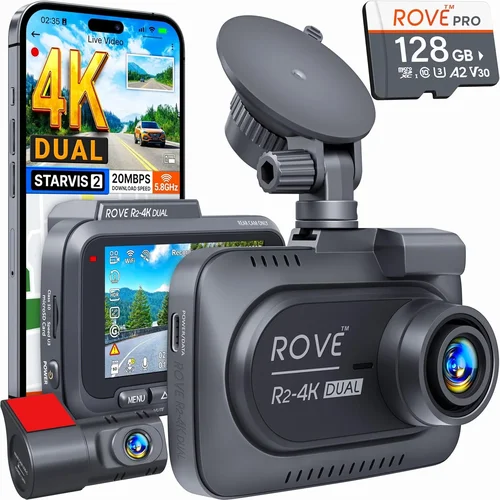
When you’re behind the wheel, every second counts. Whether it’s a fender bender on a quiet suburban street or an unexpected hazard on the highway, having reliable video evidence can make all the difference in insurance claims, legal disputes, or simply protecting yourself from false accusations. A quality dash cam acts as your 24/7 witness, recording what happens both ahead of you and behind you with crystal clarity.
This comprehensive buying guide is designed to help you navigate the overwhelming world of dash cams and find the perfect front and rear camera system for your vehicle. We’ll break down the key features to consider, explain different types of systems available, highlight common pitfalls to avoid, and provide expert recommendations tailored to various budgets and needs. By the end of this article, you’ll have all the knowledge you need to make an informed decision that keeps you protected and gives you peace of mind on every journey.
The market for dash cams has exploded in recent years, with manufacturers offering everything from basic single-camera units to advanced dual-sensor systems with parking mode, GPS tracking, and cloud connectivity. While this variety might seem exciting, it also means sifting through countless options can be confusing and time-consuming. Our goal is to cut through the noise by focusing on real-world performance, durability, reliability, and value—not just flashy specs that don’t translate into better protection.

What to Look for When Buying Dash Cams
1. Resolution & Video Quality
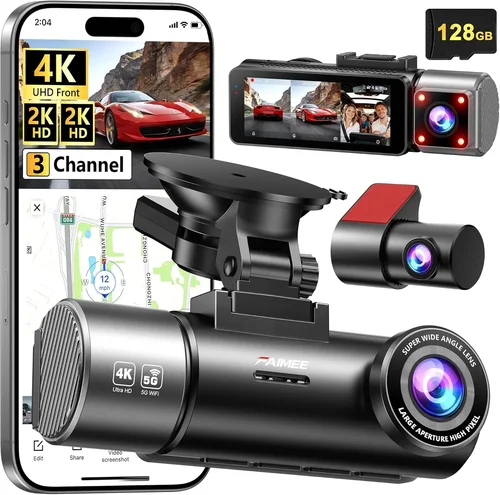
The most critical factor in any dash cam purchase is image quality. You want sharp, clear footage that captures license plates, road signs, and facial details when needed. For front-facing cameras, aim for at least 1080p Full HD resolution—this is the industry standard for reliable evidence capture. Many modern systems now offer 2K (1440p) or even 4K resolution, which provides noticeably crisper detail but may require more storage space and processing power.
When evaluating video quality, consider several aspects beyond just resolution: frame rate matters too. Look for cameras that record at 30 frames per second (fps); anything lower than this can result in choppy motion during fast-moving scenes. Additionally, check whether the camera uses H.265 compression technology, which maintains excellent quality while reducing file sizes by up to 50% compared to older H.264 codecs.
Don’t forget about low-light performance—especially important since many incidents occur during dawn, dusk, or nighttime driving. Cameras with good dynamic range (HDR), wide aperture lenses, and built-in infrared LEDs will perform much better in challenging lighting conditions.
2. Field of View (FOV)
Field of view determines how much of the road and surrounding environment your dash cam can capture. A wider angle covers more territory but often comes at the cost of reduced detail near the edges due to distortion. Most reputable manufacturers specify the horizontal FOV, typically ranging from 110° to 170°. For general daily driving, a 130°–150° field of view strikes a good balance between coverage and image clarity.
For rear cameras specifically, consider whether you need a narrow angle (around 100°) focused on the immediate area behind your vehicle, or a broader perspective that includes adjacent lanes and intersections. Some dual-camera systems allow you to adjust the FOV dynamically via software settings.
3. Storage Capacity & Loop Recording
Dash cams rely on microSD cards for storage, and choosing the right capacity is crucial. Most entry-level models work well with 32GB cards, but if you plan to record in higher resolutions or enable parking mode (which constantly records while your car is off), you’ll want at least a 64GB card—ideally 128GB or more. Keep in mind that loop recording automatically overwrites old footage once the card fills up, so you never run out of space unless you manually delete files.
Look for dash cams that support UHS-I/UHS-II SD cards and have built-in G-sensor functionality to auto-lock important clips when sudden impacts are detected. This ensures critical evidence isn’t accidentally overwritten during regular loop recording cycles.
4. Parking Mode & Motion Detection
One of the biggest advantages of modern dash cams is their ability to monitor your parked vehicle. When enabled, parking mode activates either continuously (drawing minimal power from your car’s battery) or only when motion or vibration is detected. This feature is invaluable for capturing hit-and-runs, vandalism, or weather-related damage while you’re away from your car.
However, enabling continuous parking mode requires a stable power source—usually through a hardwired installation kit—or frequent charging, which defeats the purpose. Motion detection helps conserve battery life by only recording when something actually moves near your vehicle. Make sure your chosen model supports low-power consumption modes and includes surge protection to prevent electrical issues.
5. Night Vision Capabilities
Nighttime driving presents unique challenges for dash cams. Poorly lit streets, glare from headlights, and dark interiors can all degrade image quality. High-end cameras address this with multiple technologies: wide-aperture lenses let in more light, HDR balances bright and dark areas, and starlight sensors enhance visibility in near-darkness. Some models even include red LED illumination (instead of white) to avoid blinding pedestrians or other drivers.
If you frequently drive after sunset, prioritize cameras tested under real-world nighttime conditions rather than relying solely on manufacturer claims. User reviews often reveal whether night vision performs consistently across different scenarios.
6. Build Quality & Weather Resistance
Your dash cam must withstand extreme temperatures, vibrations, humidity, and direct sunlight without failing. Look for ruggedized housings made from polycarbonate or aluminum alloy, along with IP65 or higher ingress protection ratings against dust and water splashes. Internal components should also be shock-resistant to survive rough roads or accidental drops.
Additionally, consider lens quality: sapphire glass resists scratches better than plastic, while multi-coated optics reduce reflections and improve contrast. These seemingly small details significantly impact longevity and reliability over time.
7. Software Features & App Integration
Modern dash cams come packed with smart features that enhance usability. Built-in GPS logs your location and speed, allowing you to overlay route data onto videos for context during playback. Wi-Fi connectivity enables wireless transfer of clips to your smartphone via companion apps, making it easier to share evidence instantly. Cloud storage options (though usually paid subscriptions) offer remote access and backup protection against theft or loss.
Other useful features include voice commands, driver behavior monitoring (speeding, harsh braking), and customizable alert notifications. Evaluate which functions align with your priorities—more features aren’t always better if they complicate setup or drain battery life unnecessarily.
8. Ease of Installation & Mounting Options
A poorly installed dash cam can obstruct your view, fall off, or fail prematurely. Most systems use suction cup mounts compatible with windshields, but some offer adhesive alternatives for permanent placement. Check compatibility with curved or tinted windows, as these can affect suction strength.
Installation complexity varies widely—some models plug directly into your cigarette lighter socket, while others require professional wiring for hardwired operation. If you’re not comfortable handling electrical connections, look for kits that simplify the process or consider hiring an installer.
9. Audio Recording & Privacy Considerations
While audio adds valuable context to your recordings, it also raises privacy concerns. In many regions, laws restrict who can record conversations without consent. Before enabling audio capture, research local regulations to ensure compliance. Some dash cams let you toggle audio on/off depending on jurisdiction.
If audio is important to you, verify that microphones are positioned to focus on external sounds (like traffic or collisions) rather than interior cabin conversations. Noise reduction algorithms help minimize wind and engine noise without sacrificing clarity.
10. Brand Reputation & Customer Support
Not all brands deliver equal reliability. Established companies like BlackVue, Garmin, Thinkware, and Nextbase have built strong reputations through consistent product quality and responsive customer service. Read user forums, professional tech reviews, and warranty terms before committing.
Avoid unknown budget brands that lack transparent contact information or offer unusually short warranties (<6 months). A solid 1–2 year warranty reflects confidence in product durability and indicates the manufacturer stands behind their work.
Different Types of Dash Cams

Common Buying Mistakes to Avoid
❌ Mistake: Ignoring Night Performance
Why it’s bad: Many buyers assume higher megapixels equal better quality, but without proper low-light optimization, those extra pixels produce grainy, unusable footage at night. Insurance claims often hinge on nighttime evidence, so poor night vision renders the entire investment pointless.
What to do instead: Prioritize cameras tested under real nighttime conditions. Look for HDR, wide apertures, and starlight sensors. Watch sample videos from actual users—not just marketing demos—to assess true performance.
❌ Mistake: Overlooking Storage Management
Why it’s bad: Assuming a large SD card solves all problems leads to frustration when critical clips get overwritten unexpectedly. Without a functioning G-sensor or manual locking mechanism, important evidence disappears without warning.
What to do instead: Choose models with reliable impact detection and ensure you understand how loop recording works. Regularly back up locked files to external drives or cloud storage to preserve irreplaceable moments.
❌ Mistake: Skipping Warranty & Support Research
Why it’s bad: Budget brands may offer tempting prices but vanish after six months, leaving you stranded with a broken unit. No warranty means no recourse when hardware fails due to manufacturing defects.
What to do instead: Stick with reputable brands offering at least a one-year warranty. Check third-party review sites for post-purchase satisfaction rates and response times from customer service teams.
❌ Mistake: Choosing Based Solely on Price
Why it’s bad:
What to do instead: Treat dash cams as safety investments rather than discretionary purchases. Allocate budget based on your risk tolerance and usage frequency. A slightly pricier model that lasts five years outperforms a cheap one replaced twice annually. Why it’s bad: Recording audio without consent violates wiretapping laws in many states. Even if technically legal where you live, sharing unedited audio publicly can create liability issues unrelated to traffic incidents. What to do instead: Disable audio recording unless explicitly permitted by local statutes. Use text-based incident reports alongside video when detailed conversation analysis isn’t essential. Why it’s bad: Mounting dash cams improperly causes obstructed views, unstable attachments, or electrical hazards. Loose wires can spark or drain batteries overnight, especially problematic with parking mode enabled. What to do instead: Follow manufacturer guidelines precisely. Test stability by gently tugging on cables and verifying unobstructed visibility before finalizing installation. Consider professional help for hardwiring tasks. At this price point, you’ll find functional single-camera units with decent daytime recording and essential features like loop recording and G-sensors. Brands like Viofo, Rexing, and JEMTEX offer reliable performers within this range. Expect 1080p resolution, limited night vision, and basic mounting solutions. Ideal for occasional drivers or those testing dash cam benefits before upgrading. This tier delivers significant improvements across the board: better low-light performance, enhanced build quality, dual-camera systems, and smarter features like GPS logging and Wi-Fi connectivity. Models from Thinkware, BlackVue, and Garmin dominate here, offering 2K resolution, robust parking mode, and intuitive mobile apps. Nearly all serious dash cam users fall into this category—it represents the best balance between capability and affordability. Top-tier systems include advanced AI-driven alerts (lane departure warnings, collision avoidance), superior image stabilization, cloud integration, and military-grade durability. These cater to rideshare drivers, delivery services, or individuals who demand maximum reliability. Look for features like 4K recording, thermal management, and redundant power supplies. While expensive upfront, they reduce long-term replacement costs and offer peace of mind during high-risk scenarios. Ultra-premium dash cams blur the line between automotive electronics and industrial surveillance gear. Examples include fleet management platforms with real-time telematics, dual-SIM cellular connectivity for instant incident reporting, and modular designs supporting multiple sensor arrays. Targeted at commercial operators and security-conscious consumers, these justify their cost through unmatched functionality and enterprise support. Always compare prices across multiple retailers—Amazon, Best Buy, B&H Photo, and specialized auto accessory stores often have different inventory and promotions. Sign up for brand newsletters to receive exclusive coupons and early access to deals. Read return policies carefully before buying online. Some sellers impose restocking fees or limit returns for opened electronics. Physical stores typically allow in-person testing, letting you verify fit, function, and ease of use firsthand. Before committing, watch hands-on YouTube reviews from trusted tech channels. Seeing real-world installation, playback quality, and feature demonstrations builds confidence far more effectively than glossy ads. Prioritize extended warranties if offered. Most manufacturers include one year standard coverage; adding another year doubles your protection window without proportional cost increases. This becomes vital when dealing with complex electronics prone to component failure. Test your chosen model thoroughly after installation. Verify video clarity, audio sync, GPS accuracy, and app connectivity under various driving conditions. Immediately report any defects to expedite warranty claims. Finally, invest in quality accessories: tempered glass screen protectors prevent scratches, premium SD cards ensure smooth recording, and professional installation kits eliminate DIY risks. These small additions significantly extend system lifespan and reliability. A: While not mandatory, a rear camera dramatically improves your protection profile. It documents blind spots, following distances, and rear-end collisions—common accident scenarios where you’re not at fault but lack visual proof. Dual-camera systems are now standard among serious drivers because they provide complete situational awareness. A: Yes, if improperly configured. Continuous parking mode draws power even when the engine is off, potentially draining your battery overnight. However, modern dash cams include intelligent power management: they shut off after detecting prolonged inactivity or connect to a dedicated fuse tap that cuts power when ignition turns off. Always install using a hardwired kit or verify your model has low-power standby modes. A: Minimum 64GB for dual-camera systems recording in 1080p. For higher resolutions (2K/4K) or extended parking mode use, upgrade to 128GB or 256GB. Class 10 or UHS-I cards ensure consistent write speeds without dropping frames. Avoid counterfeit cards—they cause corruption and loss of evidence. A: Generally yes, provided they meet evidentiary standards for authenticity and relevance. Courts accept dash cam footage as objective records, but chain-of-custody protocols matter. Never alter timestamps or edit clips outside approved software. Keep original files intact and backed up securely. A: Simple suction-mount models are DIY-friendly. Hardwired installations require connecting to your vehicle’s electrical system—best left to professionals unless you’re experienced with automotive wiring. Improper connections risk damaging your car’s electronics or voiding warranties. A: Built-in rechargeable batteries typically last 1–3 years before needing replacement. External batteries (for parking mode) vary by capacity—most support 2–8 hours of recording. Plan to replace internal batteries every few years, especially in extreme climates where lithium cells degrade faster. A: Most consumer dash cams operate reliably between -4°F to 140°F (-20°C to 60°C). Extreme cold reduces battery efficiency temporarily, but modern units automatically warm up internal components. Avoid leaving parked cars exposed to sub-zero temperatures for extended periods without supplemental heating. A: Technically possible, but not recommended. Multiple units create conflicting footage, increase complexity, and raise legal concerns about audio recording. Manufacturers design dual-camera systems as integrated packages for optimal synchronization and performance—using separate units undermines these benefits. A: Absolutely—if you park in risky areas (urban zones, construction sites, or poorly lit lots). Just ensure proper power setup and monitor battery levels initially. Combine with motion detection to minimize unnecessary recording and preserve battery life. A: Wireless models offer convenience but sacrifice reliability—Wi-Fi interference, signal drops, and shorter transmission ranges plague many units. Wired systems provide stable, uninterrupted data flow ideal for critical evidence capture. Unless you prioritize portability over performance, opt for hardwired solutions. For budget-conscious buyers, the Viofo A11 Pro offers exceptional value at under $150. It delivers crisp 1080p front recording, reliable parking mode, and robust build quality—all backed by responsive customer support. If you seek overall value, the Thinkware F800 Pro stands out with its impressive 2K resolution, seamless app integration, and durable construction. Its intelligent features strike the perfect balance between sophistication and usability. For those willing to invest in premium performance, the BlackVue DR970X-2CH is unbeatable. This dual-camera system boasts 4K front recording, super-wide 150° FOV, and cloud connectivity—ideal for demanding drivers who refuse compromises. Beginners should start with the Nextbase 522GW. Its intuitive interface, Alexa compatibility, and reliable night vision make it accessible for first-time users while offering room to grow as needs evolve. Advanced users and professionals will appreciate the Garmin Dashcam Mini. Though compact, it packs powerful features like voice control, automatic update downloads, and military-grade shock resistance into a sleek package. Choosing the best dash cam for cars front and rear isn’t just about specs—it’s about finding the right match for your lifestyle, budget, and risk tolerance. Whether you’re a daily commuter, rideshare driver, or weekend explorer, investing in quality footage pays dividends every time you need it most. Remember to prioritize proven reliability over flashy extras, validate performance claims with real-world tests, and never underestimate the importance of proper installation and maintenance. With the insights shared here, you’re equipped to navigate the market confidently and select a system that truly serves as your vigilant co-pilot. Start by identifying your core requirements: Do you need parking surveillance? Nighttime clarity? Seamless app connectivity? Once you clarify these priorities, cross-referencing our recommendations and buyer tips will lead you straight to the ideal solution. After all, peace of mind behind the wheel begins with making an informed choice today.❌ Mistake: Neglecting Legal Compliance
❌ Mistake: Installing Without Testing
Budget Guidelines: How Much Should You Spend?
Entry-Level ($50 – $100): Basic Protection
Mid-Range ($100 – $250): Sweet Spot for Most Buyers
Premium ($250 – $400): For Enthusiasts and Professionals
Luxury ($400+): Top-Tier Everything
Expert Tips for Getting the Best Deal
Frequently Asked Questions
Q: Do I really need a rear-facing dash cam?
Q: Can dash cams drain my car battery?
Q: What size microSD card should I buy?
Q: Are dash cam recordings admissible in court?
Q: Can I install a dash cam myself?
Q: How long do dash cam batteries last?
Q: Will a dash cam work in cold weather?
Q: Can I use multiple dash cams in one car?
Q: Should I enable parking mode?
Q: How do I choose between wired and wireless dash cams?
Our Final Recommendations
Conclusion: Making the Right Choice