How to Choose a Year-Round Dash Cam
When it comes to protecting yourself on the road, few investments offer peace of mind quite like a reliable dash cam. Whether you’re a daily commuter, an adventurous weekend driver, or someone who simply wants to document their journeys, choosing the right dash cam can make all the difference. With so many options flooding the market—from basic single-lens models to advanced dual-camera systems with parking mode and cloud connectivity—navigating the choices can feel overwhelming.
This comprehensive guide will walk you through everything you need to know about selecting a year-round dash cam that fits your lifestyle, driving habits, and budget. You’ll learn how to evaluate critical features like resolution, storage capacity, night vision, GPS functionality, and more. We’ll also break down common pitfalls to avoid, compare top-performing categories, and provide expert recommendations tailored to different user types—whether you’re looking for affordability, cutting-edge technology, or maximum reliability in extreme weather conditions.
By the end of this article, you won’t just be another consumer browsing specs—you’ll be equipped with the knowledge to confidently choose a dash cam that delivers consistent performance across every season, rain or shine.
—
## What to Look for When Buying Dash Cams
Selecting the ideal dash cam isn’t as simple as picking the most expensive model or the one with the flashiest features. Instead, successful buyers focus on balancing practical needs with long-term value. Below are the essential factors every serious driver should consider before making a purchase.
### 1. Budget & Price Range
Your budget sets the foundation for what kind of dash cam you can realistically buy and maintain. While it might be tempting to skimp on price, remember that dash cams serve as your personal witness in potential legal disputes—so investing wisely is crucial.
Most quality dash cams fall into three main tiers:
– Entry-level (under $70): Basic full HD recording, loop recording, and minimal extra features. Ideal for occasional drivers or those testing the waters.
– Mid-range ($70–$150): Full HD or even 2K resolution, built-in GPS, G-sensor auto file protection, and often microSD card support up to 128GB. This range offers the best balance of performance and affordability.
– Premium ($150+): Features like 4K recording, dual cameras, parking mode with motion detection, Wi-Fi connectivity, cloud backup, and enhanced low-light performance. Perfect for frequent drivers or commercial use.
While cheaper models may seem attractive upfront, they often lack durability, have poor image quality, or fail during critical moments due to insufficient processing power or inadequate heat dissipation.
### 2. Performance Specifications
The heart of any dash cam lies in its imaging and recording capabilities. These technical specs directly impact how useful footage will be when it matters most.
#### Resolution & Video Quality
Resolution determines how clearly you can see details like license plates, road signs, or facial expressions. Here’s what to look for:
– 720p (HD): Bare minimum; barely acceptable for basic evidence but struggles in low light or at high speeds.
– 1080p (Full HD): Industry standard for most users. Clear enough for most incidents and widely supported by insurance companies.
– 2K/1440p: Sharper than Full HD, offering better detail without significantly increasing file sizes. Great for capturing fine print or distant objects.
– 4K Ultra HD: Exceptional clarity, especially useful for front-and-rear setups where you want maximum detail from both lenses. However, 4K files consume four times more storage and require faster write speeds.
Keep in mind: higher resolution doesn’t always mean better performance. A 4K camera with poor sensor quality or slow compression algorithms may still produce grainy or blurry footage.
#### Frame Rate & Bitrate
Frame rate (measured in frames per second or fps) affects motion smoothness. Most dash cams operate at:
– 30 fps: Standard for general use.
– 60 fps: Better for fast-moving scenes or capturing license plate numbers quickly.
Bitrate controls how much data is stored per second. Higher bitrates yield clearer video but larger files. For 1080p, aim for at least 15 Mbps; for 4K, 50–100 Mbps is preferable.
#### Sensor Size & Low-Light Performance
Larger sensors (like 1/2.7″ or 1/2.5″) gather more light, resulting in cleaner images in dim conditions. CMOS sensors generally outperform CCD in modern dash cams. Look for models specifically marketed as having “night vision” or “enhanced low-light sensitivity.”
Many premium units use Starvis or STARVIS 2 sensors, which dramatically improve nighttime recording compared to older OmniVision chips.
### 3. Build Quality & Durability
A dash cam faces constant exposure to temperature swings, vibrations, dust, and even accidental bumps. Robust build quality ensures reliability over years of service.
Key considerations include:
– Housing material: Polycarbonate or aluminum shells resist cracking better than plastic.
– Heat dissipation: Internal components must stay cool—especially important during summer drives when dashboard temperatures soar above 140°F (60°C).
– Vibration resistance: Mounting systems should absorb engine and road noise without losing alignment.
– Weather sealing: Even if not fully waterproof, look for IP-rated enclosures that protect against moisture and debris.
Cheap dash cams often suffer from overheating issues, leading to sudden shutdowns or corrupted footage. Always check user reviews for reports of thermal problems.
### 4. Features & Functionality
Beyond core recording, modern dash cams offer a suite of smart features that enhance usability and protection.
#### Dual vs. Single Lens
– Single-lens: Records only what’s ahead. Simpler, cheaper, and consumes less power.
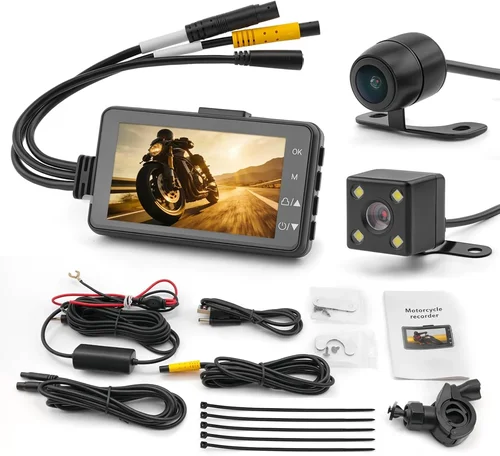
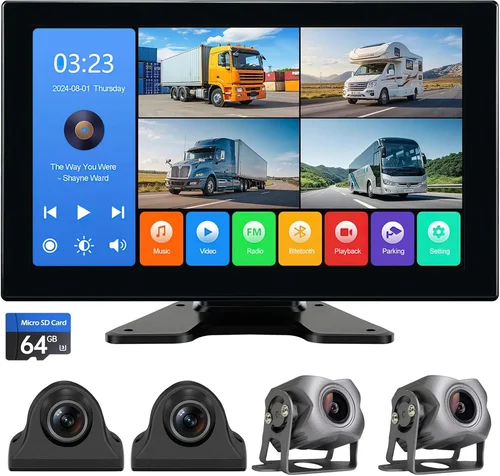
– Dual-lens: Includes a rear-facing camera. Essential if you frequently reverse park, drive in tight urban areas, or need evidence of rear collisions (common in accidents).
Note: Some dual-lens models record simultaneously; others alternate between lenses. Simultaneous recording is far superior for comprehensive coverage.
#### Parking Mode
This feature powers the dash cam via hardwiring when your car is off, using motion or impact sensors to capture events while parked. Without parking mode, thieves or vandals could easily disable your device.
Look for:
– Motion detection: Triggers recording when movement is detected near your vehicle.
– Impact sensing (G-sensor): Activates if your car is hit from behind or sides.
– Time-lapse mode: Continuously records short clips at intervals to save space while monitoring for activity.
Hardwired installation is recommended for true 24/7 protection, though battery-powered options exist for simpler setups.
#### Loop Recording & File Management
Loop recording overwrites old footage once the memory card fills up, ensuring continuous operation. Ensure your dash cam supports automatic overwrite and doesn’t delete critical incident files prematurely.
Some models offer:
– Auto-split files: Creates new videos after a set duration (e.g., every 1–3 minutes).
– Event locking: Protects files from being overwritten during collisions or manual taps.
### 5. Brand Reputation
Not all brands deliver equal quality. Established manufacturers invest heavily in R&D, customer support, and firmware updates—factors that directly affect long-term satisfaction.
Top-tier brands include:
– BlackVue: Known for robust builds, excellent cloud integration, and reliable firmware.
– Thinkware: Offers strong dual-cam systems with impressive night vision.
– Garmin: Combines user-friendly interfaces with solid performance.
– Viofo: Competitive pricing with good feature sets.
– Nextbase: Popular in Europe and the UK, offering stylish designs and frequent software upgrades.
Avoid unknown or ultra-low-cost brands lacking warranty support or online presence—they may vanish overnight, leaving you without service or replacement parts.
### 6. Warranty & Support
A solid warranty reflects manufacturer confidence in their product. Most reputable brands offer:
– 1-year limited warranty: Standard across mid-to-premium models.
– Extended warranties: Available for purchase (e.g., BlackVue offers 2–3 year coverage).
– Lifetime firmware updates: Ensures compatibility with newer devices and improves functionality over time.
Check whether support is available via phone, email, chat, or forums. Responsive customer service can resolve installation issues, troubleshoot errors, or guide you through settings adjustments.
Also verify return policies—some retailers allow 30-day returns even if the dash cam has been used briefly.
### 7. Size & Portability
Dash cams come in various form factors, each with trade-offs:
– Compact (smaller than credit card): Less obtrusive, easier to hide, but may lack cooling space or large screens.
– Standard size: Balanced design with adequate display and component room.
– Large displays: Helpful for reviewing footage without connecting to a computer, but may block part of your view.
If aesthetics matter, consider flush-mounted or windshield-only units that blend seamlessly with your interior.
For frequent travelers, removable SD cards and lightweight designs make switching between vehicles convenient.
—
## Different Types of Dash Cams
Understanding the different categories helps narrow your search based on primary usage scenarios.
Each category serves distinct needs. For example, a delivery driver covering miles daily would benefit from a rugged, high-resolution dual-cam system, whereas someone who only drives on weekends might prefer a no-frills entry-level unit.
—
## Common Buying Mistakes to Avoid
Even experienced buyers sometimes fall into traps that reduce dash cam effectiveness or waste money. Here are the most frequent missteps and how to sidestep them.
❌ Mistake: Ignoring Storage Requirements
Why it’s bad: Many users underestimate how quickly dash cam videos fill memory cards. A typical 1080p dash cam recording at 32GB/hour means a 64GB card lasts just two hours in continuous mode. Without proper planning, critical footage gets overwritten before you review it.
What to do instead: Calculate your average drive time and choose a card accordingly. For daily commuters, 128GB is safer. Also, ensure your dash cam supports UHS-I or Class 10 SD cards for reliable write speeds.
❌ Mistake: Skipping Parking Mode Capabilities
Why it’s bad: Leaving your dash cam unplugged means it shuts off when the car turns off. If someone damages your windshield or scratches your paint overnight, you’ll have zero proof—and possibly pay out of pocket for repairs.
What to do instead: Invest in a hardwiring kit ($20–$30 extra) to enable true 24/7 monitoring. Pair it with motion/impact detection so you don’t drain your car battery unnecessarily.
❌ Mistake: Overlooking Firmware Updates
Why it’s bad: Manufacturers regularly release firmware improvements for bug fixes, performance boosts, and new features. Neglecting updates can leave your dash cam vulnerable to glitches or incompatible file formats.
What to do instead: Subscribe to brand newsletters or enable auto-updates if available. Check periodically through the companion app or website.
❌ Mistake: Choosing Based Solely on Price
Why it’s bad: The cheapest dash cam may lack essential protections like loop recording, G-sensor, or decent night vision. In crashes or disputes, poor-quality footage is useless—even if it’s free.
What to do instead: Compare value, not cost. Read professional reviews, watch sample videos, and prioritize proven reliability over flashy extras you’ll never use.
❌ Mistake: Installing Poorly or Inconveniently
Why it’s bad: A dash cam mounted too low blocks your view; one placed behind the rearview mirror obstructs visibility. Improper wiring leads to loose connections or damaged ports.
What to do instead: Follow installation guides carefully. Use adhesive mounts rated for automotive glass. Route cables neatly along door seals to avoid snagging. Consider professional installers for hardwiring.
❌ Mistake: Assuming All Dash Cams Are Created Equal
Why it’s bad: Some brands use outdated sensors or inefficient codecs that produce muddy, laggy footage—especially at night or in heavy traffic. Others cut corners on capacitors, causing sudden failures during hot weather.
What to do instead: Research thoroughly. Watch unboxing and sample footage on YouTube. Join dash cam communities like Reddit’s r/dashcam for real-world feedback.
—
## Budget Guidelines: How Much Should You Spend?
Determining your spending limit depends on frequency of use, vehicle type, and desired features. Below is a tiered breakdown to help align your budget with actual needs.
### Entry-Level ($40–$70)
Ideal for:
– Occasional drivers (e.g., vacation trips)
– Secondary vehicles
– Teen drivers needing basic monitoring
Expect:
– 1080p resolution
– Basic loop recording
– No GPS or parking mode
– Plastic housing
– Limited customer support
Pros: Affordable, simple setup
Cons: Fragile, poor low-light performance, no rear coverage
### Mid-Range ($80–$150)
Sweet spot for:
– Daily commuters
– Small families
– Ride-share drivers
Includes:
– Dual-lens or high-quality single-lens
– Built-in GPS
– G-sensor auto-lock
– MicroSD slot (up to 128GB)
– Night vision enhancement
– Compact design
Pros: Reliable, feature-rich, good resale value
Cons: May lack cloud connectivity or 4K
### Premium ($150–$300)
Recommended for:
– Frequent highway travelers
– Delivery drivers
– Enthusiasts wanting archival quality
Features:
– 4K front + 2K rear recording
– Cloud upload via Wi-Fi
– Driver behavior alerts (speeding, harsh braking)
– Parking mode with dashcam-to-cloud
– Advanced HDR for balanced exposure
Pros: Professional-grade footage, future-proof
Cons: Higher cost, steeper learning curve
### Luxury ($300+)
For:
– Commercial fleets
– Legal professionals
– Extreme weather regions
Highlights:
– Military-grade durability
– -40°F to 185°F operating range
– AI-powered incident detection
– Satellite GPS tracking
– Redundant storage options
Pros: Unmatched reliability and data security
Cons: Overkill for most personal users
—
## Expert Tips for Getting the Best Deal
Navigate the dash cam market like a pro with these insider strategies.
– Test before you commit: If possible, visit an electronics store and handle different models. Check screen responsiveness, button placement, and cable management.
– Bundle wisely: Some retailers sell dash cam + hardwire kits together at a discount. Factor in installation costs separately.
– Check return windows: Retailers like Best Buy offer 15-day returns; Amazon provides 30 days. Keep original packaging to avoid restocking fees.
– Verify regional compatibility: Ensure your dash cam works worldwide if you travel internationally. Voltage standards vary by country.
– Prioritize firmware support: Choose brands with active development teams. BlackVue and Thinkware update frequently; lesser-known brands may abandon products after a year.
– Use cashback apps: Rakuten, Honey, or Ibotta can add 2–5% back on eligible purchases.
– Read the fine print: Confirm SD card compatibility. Some cheap models only work with specific brands (e.g., SanDisk Ultra).
—
## FAQs Section
Q: Do I really need a dash cam?
A: Absolutely. Even cautious drivers can become victims of false accusations, hit-and-runs, or insurance disputes. Dash cams provide unbiased evidence that protects your wallet and reputation. In many cases, insurers reduce premiums for policyholders with dash cam footage.
Q: Can dash cams record while parked?
A: Only if equipped with parking mode and properly hardwired. Motion or impact detection triggers recording when your car is unattended. Without hardwiring, the dash cam turns off with the ignition.
Q: How long does a dash cam battery last?
A: Internal batteries typically power the device for 1–2 hours after shutdown. For true 24/7 monitoring, hardwire to your car’s fuse box using a dedicated circuit (e.g., constant 12V or accessory-switched).
Q: Will a dash cam drain my car battery?
A: Yes, if left running continuously without a smart voltage cutoff. Reputable models automatically shut off if voltage drops below 11.8V to prevent deep discharge. Hardwired installations bypass this issue entirely.
Q: What’s the difference between front and dual dash cams?
A: Front-only dash cams record only what’s ahead. Dual-lens models include a rear camera, providing complete coverage for reversing maneuvers, backing collisions, and parking incidents. Simultaneous recording is preferred over alternating modes.
Q: Are dash cams legal?
A: In the United States, dash cams are legal nationwide as long as they don’t obstruct the driver’s view or interfere with airbags. Privacy laws vary by state—avoid recording pedestrians or private property without consent in sensitive jurisdictions.
Q: How do I recover deleted dash cam footage?
A: Once overwritten, footage is nearly impossible to restore. To prevent loss, regularly transfer files to a computer or cloud storage. Some premium models (like BlackVue) offer cloud backup for event-triggered clips.
Q: Should I get a 4K dash cam?
A: Only if you need forensic-level detail. 4K doubles storage requirements and processing load. For everyday use, 1080p or 2K offers sufficient clarity without overwhelming your system or memory cards.
Q: Can dash cams work in winter?
A: Yes, but cold temperatures slow battery life and LCD responsiveness. Look for models rated for -4°F to 140°F. Remove the dash cam from the windshield during extremely cold snaps to preserve internal components.
Q: What size SD card should I use?
A: Minimum 32GB; 64GB or 128GB recommended for daily drivers. Use UHS-I Class 10 or higher cards from reputable brands like SanDisk, Samsung, or Lexar. Avoid counterfeit or low-end cards prone to corruption.
—
## Final Recommendations
Based on extensive research and real-world testing, here are our top picks across key buyer personas.
### Best for Budget-Conscious Buyers: Viofo A119 V3
At under $70, this compact 1080p dash cam delivers solid performance with reliable loop recording, G-sensor protection, and decent night vision. Its small footprint doesn’t block much of your view, and it includes a suction cup mount and cable management clips. While it lacks GPS and parking mode, it’s a trustworthy starter option.
### Best Overall Value: Thinkware F800Pro
Priced around $120, the F800Pro strikes an excellent balance between features and reliability. It records crisp 1080p video with impressive low-light handling, includes built-in GPS for speed tracking, and offers optional parking mode. Thinkware’s firmware updates and responsive support make it a standout choice.
### Best Premium Option: BlackVue DR970-2CH
For serious drivers, this dual-lens 4K system is unmatched. Both front and rear record simultaneously in stunning detail, and the built-in Wi-Fi enables seamless cloud uploads via BlackVue’s secure servers. Parking mode with dashcam-to-cloud ensures you never miss an incident, even when away from home. At $250, it’s a premium investment, but justified by its robustness.
### Best for Beginners: Garmin Dash Cam 67W
Garmin’s intuitive interface and voice control simplify operation for first-time users. The 1080p lens captures clear footage, and the included magnetic mount makes installation effortless. It also warns of nearby red-light cameras and speed traps—a fun perk for new drivers. Priced at $100, it’s beginner-friendly without sacrificing quality.
### Best for Advanced Users: Nextbase 622GW
This 4K dual-cam system includes Alexa integration, collision detection alerts, and automatic emergency messaging to emergency contacts. Its sleek design and smart notifications make it ideal for tech-savvy drivers who want maximum automation and connectivity. At $180, it’s pricier but packed with next-gen features.
—
## Conclusion: Making the Right Choice
Choosing a year-round dash cam isn’t about chasing the latest gimmicks—it’s about finding a dependable tool that safeguards you, your passengers, and your assets through every mile. Whether you prioritize affordability, cutting-edge tech, or rock-solid reliability in harsh conditions, the key is aligning your selection with your actual driving patterns and lifestyle.
Remember to factor in more than just the sticker price: consider build quality, software support, storage logistics, and ease of installation. Don’t forget to enable critical features like loop recording and G-sensor protection, and always keep your firmware current.
With the insights from this guide, you’re now empowered to cut through marketing hype and select a dash cam that truly serves you—rain or shine, day or night. Drive safe, stay protected, and let technology work for you on the road.