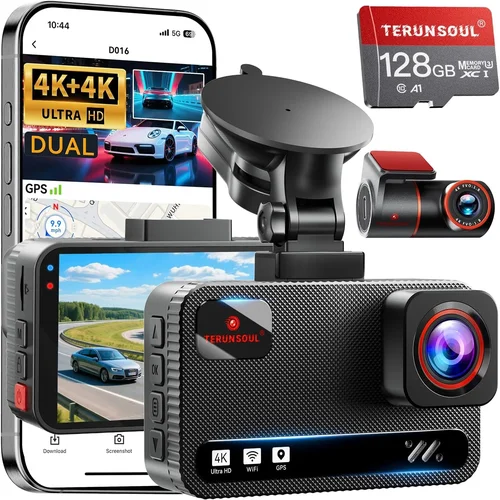
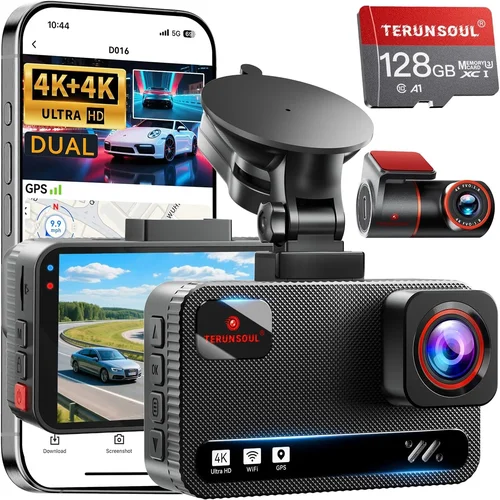
Complete Android Dash Cam Buying Guide
When it comes to protecting yourself on the road, a dash cam isn’t just about recording incidents—it’s about peace of mind. With so many options flooding the market, choosing the right dash cam for Android can feel overwhelming. This comprehensive guide cuts through the noise to help you make an informed decision that matches your specific needs and budget.
Whether you’re a daily commuter, a weekend road trip enthusiast, or someone who simply wants extra security while driving, understanding what makes an Android-compatible dash cam truly effective is crucial. We’ll explore everything from essential features like video resolution and storage capacity to advanced capabilities such as GPS tracking and parking mode. By the end of this guide, you’ll have all the knowledge needed to select a device that not only works seamlessly with your Android smartphone but also delivers reliable performance when you need it most.
The market today offers dash cams ranging from basic entry-level models to sophisticated systems packed with smart features. However, compatibility with Android devices adds another layer of complexity since manufacturers must ensure their hardware integrates smoothly with your phone’s operating system. This guide will walk you through each aspect of selection, helping you navigate technical specifications, user reviews, and real-world performance data to find the perfect match for your vehicle and lifestyle.
What to Look for When Buying Dash Cams
1. Compatibility & Connectivity
The foundation of any good Android dash cam lies in its ability to connect seamlessly with your smartphone. Look for models that support either Wi-Fi direct connection or Bluetooth pairing, allowing you to view footage directly on your phone without needing cables. Many modern dash cams use dedicated mobile apps that offer intuitive controls, live preview, and easy file management.
Ensure the app supports your specific Android version and has positive reviews regarding stability and functionality. Some manufacturers provide universal apps compatible with multiple models, while others require separate downloads. Check whether cloud backup options are available, as these can be invaluable for storing important clips securely away from your device.
2. Video Resolution & Image Quality
Video quality determines how clear and useful your recordings will be during critical moments. Most reputable dash cams offer at least 1080p Full HD resolution, but newer models now feature 2K or even 4K Ultra HD capabilities. Higher resolutions capture finer details, which can be crucial for identifying license plates or facial features.
Look beyond resolution alone—consider frame rate (measured in frames per second), dynamic range, and low-light performance. A 30fps recording ensures smooth motion, while higher frame rates like 60fps provide even better clarity during fast-moving scenes. Wide dynamic range (WDR) technology helps balance bright headlights with darker road surfaces, reducing overexposure issues common at night.
For urban drivers dealing with heavy traffic and variable lighting conditions, WDR becomes especially important. Testimonials from users often highlight how certain brands handle challenging scenarios better than others, so pay attention to real-world performance rather than just spec sheets.
3. Storage Capacity & Loop Recording
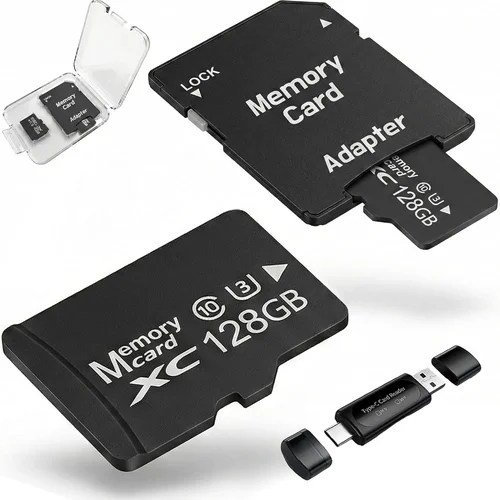
Dash cams rely on microSD cards for storage, typically ranging from 32GB up to 512GB or more. Choose a card size based on your expected usage patterns: shorter trips may require smaller capacities, while long-distance travelers might benefit from larger cards capable of holding weeks of continuous footage.
Loop recording automatically overwrites older files once the storage fills up, ensuring uninterrupted operation without manual intervention. However, some models allow you to lock specific clips manually—an essential feature if you want to preserve evidence of accidents or near-misses. Always pair your dash cam with a high-quality, Class 10 microSD card rated for continuous write operations.
4. Field of View (FOV)
The field of view dictates how much of the road ahead your dash cam captures. Standard FOVs range between 100° to 170°, with ultra-wide angles offering broader perspectives but potentially introducing distortion near edges. A wider FOV reduces blind spots but may compress distant objects, making them appear closer together.
Consider your typical driving environment: city streets benefit from moderate FOVs around 140°, while highway driving might justify slightly narrower lenses to maintain detail at greater distances. Some advanced models feature adjustable FOV settings or dual-lens systems capturing front and rear simultaneously.
5. Night Vision & Low-Light Performance
Driving at night presents unique challenges due to reduced visibility and harsh lighting conditions. Modern dash cams employ various technologies to enhance nighttime recording, including infrared LEDs, starlight sensors, and enhanced image processing algorithms.
Look for specs mentioning “night vision,” “low-light sensitivity,” or similar terms. Real-world tests show significant differences between brands—some struggle with glare from streetlights, while others produce grainy footage despite high megapixel counts. Reading independent review comparisons can reveal which models consistently deliver usable nighttime images.
6. Power Source & Installation Options
Most dash cams draw power from your vehicle’s cigarette lighter socket, though hardwiring kits are increasingly popular for permanent installations. Hardwired systems offer cleaner aesthetics and automatic startup/shutdown tied to ignition cycles, eliminating the need to manually turn devices on and off.
Consider whether the included mounting bracket suits your windshield angle and whether suction cups or adhesive pads provide secure attachment without damaging paintwork. Quick-release mounts simplify removal for cleaning or switching vehicles, adding convenience for multi-car owners.
7. Additional Features & Smart Capabilities
Beyond core recording functions, many Android dash cams include bonus features worth considering:
- GPS Tracking: Records speed, location, and route data overlay on videos for accident reconstruction.
- Parking Mode: Monitors your vehicle while parked using motion detection or impact sensors.
- Emergency Button: Instantly locks current footage to prevent accidental deletion during loop recording.
- Voice Commands: Allows hands-free operation via Android Wear or Google Assistant integration.
- Wi-Fi Hotspot: Creates local networks for wireless streaming without cellular data charges.
While not essential, these extras can significantly enhance usability depending on your priorities. Evaluate which features align best with your driving habits and technical comfort level.
8. Build Quality & Weather Resistance
Dash cams face extreme temperatures, humidity, and potential impacts from debris or weather events. Robust construction materials like reinforced plastic housings and scratch-resistant glass lenses contribute to longevity. IP rating certifications indicate dust/water resistance levels, though few consumer models meet industrial-grade standards.
Check customer feedback regarding durability concerns—some users report lens fogging after rapid temperature changes, while others experience button malfunctions following minor collisions. Warranty coverage length and repair policies also reflect manufacturer confidence in product reliability.
Different Types of Dash Cams
Common Buying Mistakes to Avoid
❌ Mistake: Ignoring Android App Stability
Why it’s bad: Assuming all dash cams work equally well with Android devices is a dangerous assumption. Poorly optimized apps frequently crash, fail to connect reliably, or lack essential features like live preview or file export. These issues render expensive hardware nearly useless when you need quick access to footage.
What to do instead: Research app reviews specifically mentioning Android compatibility. Look for consistent praise about responsiveness, battery efficiency during streaming, and absence of permission conflicts. Download demo versions if available to test functionality before committing financially.
❌ Mistake: Overlooking Storage Requirements
Why it’s bad: Underestimating how much storage you’ll need leads to frustrating situations where important clips get overwritten prematurely. A single hour of 1080p video consumes roughly 3GB of space; longer commutes or frequent short trips quickly accumulate data demands.
What to do instead: Calculate your estimated monthly storage needs based on driving frequency and clip duration preferences. Purchase extra microSD cards or consider models supporting dual-card slots for redundancy. Regularly review playback logs to identify trends and adjust retention settings accordingly.
❌ Mistake: Choosing Based Solely on Price
Why it’s bad: The cheapest dash cams often cut corners on critical components like image sensors, lens coatings, or firmware updates. While initial savings seem appealing, poor video quality, unreliable connectivity, or short lifespans ultimately cost more through replacements or lost evidence.
What to do instead: Compare value propositions across price tiers rather than focusing exclusively on lowest-cost options. Read detailed professional reviews evaluating real-world performance metrics like dynamic range, color accuracy, and compression artifacts under varied lighting.
❌ Mistake: Neglecting Installation Logistics
Why it’s bad: Complex wiring requirements or fragile mounting mechanisms complicate DIY installation, increasing chances of improper setup or damage to interior trim. Improper placement affects viewing angles and may violate local laws regarding obstructing driver visibility.
What to do instead: Verify compatibility with your vehicle model year and dashboard layout. Watch unboxing/installation videos beforehand to anticipate challenges. Consider professional installation services if unsure about electrical connections or cable routing.
❌ Mistake: Forgetting About Legal Compliance
Why it’s bad: Some jurisdictions restrict dash cam usage regarding audio recording, data retention periods, or privacy rights. Using non-compliant devices could result in fines, evidence being dismissed in court, or civil liability disputes.
What to do instead: Research local regulations before purchasing. Avoid models claiming “secret listening” capabilities unless explicitly permitted. Disable microphone input if required by law and consult legal resources for clarification on evidentiary admissibility rules.
Budget Guidelines: How Much Should You Spend?
Entry-Level ($50 – $100)
This tier covers basic functionality with decent video quality suitable for everyday use. Expect 1080p recording, standard FOVs around 120°, and limited smart features. Brands like Viofo, BlackVue, and Rexing offer reliable entry points into dash cam ownership without breaking the bank. Ideal for occasional drivers seeking simple protection against fender benders or insurance fraud claims.
Limitations include shorter warranties, less robust build materials, and occasional software glitches. However, recent improvements in chipset efficiency mean even budget models now deliver acceptable nighttime performance compared to older generations.
Mid-Range ($100 – $200)
The sweet spot for most buyers balances affordability with meaningful upgrades. You’ll find improved image processing, enhanced low-light handling, and expanded connectivity options like dual-band Wi-Fi or built-in LTE modules. Popular choices include Garmin, Nextbase, and Thinkware models featuring GPS logging, emergency SOS buttons, and cloud backup subscriptions.
This category excels in versatility—offering enough horsepower for demanding environments while maintaining user-friendly interfaces accessible to beginners. Many mid-range units also support accessory ecosystems like tire pressure monitors or dash cam cameras for trailers.
Premium ($200 – $400)
Enthusiasts and professionals gravitate toward premium segments boasting cutting-edge tech like 4K recording, HDR imaging, and AI-powered object detection. Advanced features such as lane departure warnings, forward collision alerts, and driver fatigue monitoring transform dash cams into holistic safety platforms. Notable examples include Sony’s IMX series sensors and Ambarella’s H2 processors delivering exceptional clarity even in challenging conditions.
Expect extended warranty periods, priority firmware updates, and concierge support channels. While pricier upfront, these investments pay dividends through superior reliability and forensic-grade evidence preservation capabilities.
Luxury ($400+)
Ultra-premium dash cams cater to specialized needs requiring maximum redundancy and customization. Multi-camera rigs with synchronized recording, encrypted data vaults, and military-grade shock absorption represent the pinnacle of consumer automotive electronics. Applications span luxury fleet management, racing event documentation, and high-net-worth personal protection schemes.
Costs escalate rapidly due to bespoke engineering, but marginal utility diminishes quickly once core requirements are met. Most mainstream drivers won’t benefit meaningfully beyond premium-tier offerings unless operating under strict regulatory mandates or extreme operational hazards.
Expert Tips for Getting the Best Deal
Timing your purchase strategically maximizes savings opportunities throughout the year:
- Holiday Sales Cycles: Black Friday and Cyber Monday traditionally yield the deepest discounts, though Amazon Prime Day and Memorial Day promotions also attract aggressive pricing from major retailers.
- New Model Launches: Manufacturers often reduce prices on existing inventory when unveiling refreshed designs, creating ideal clearance windows for last-gen hardware.
- Back-to-School Periods: August sees increased demand for car accessories among students preparing for semester commutes, prompting competitive retailer markups that reverse in September.
Where you shop influences availability, return flexibility, and post-purchase support:
- Specialty Electronics Stores: Best for comparing physical products and receiving immediate troubleshooting assistance, albeit at slightly higher markup versus online channels.
- Direct-to-Consumer Platforms: Official brand websites frequently bundle free accessories or extend warranty periods exclusive to their ecosystem, enhancing perceived value.
- Marketplace Aggregators: Amazon, eBay, and Walmart offer broad selection but require vigilance against counterfeit listings—verify seller ratings and product authenticity seals carefully.
Understanding warranty terms prevents unexpected expenses down the line:
- Length Matters: Aim for minimum 2-year coverage; premium brands sometimes offer lifetime guarantees on critical components like image sensors.
- Transferability: Some policies transfer ownership when reselling devices, adding residual value for future upgrades.
- Service Networks: Regional service centers accelerate repairs versus mail-in programs, particularly valuable for time-sensitive evidence retrieval.
Return policies safeguard against buyer’s remorse:
- Restocking Fees: Many electronics retailers charge 15-25% fees for opened items, negating initial savings.
- Time Limits: Most accept returns within 30 days, though some extend windows during peak shopping seasons.
- Condition Requirements: Unused packaging and intact serial numbers are typically mandatory for full refund eligibility.
Testing before committing reduces risk significantly:
- In-Store Demos: Visit Best Buy or Micro Center locations equipped with demonstration units to evaluate touchscreen responsiveness and menu navigation firsthand.
- User Review Videos: YouTube channels specializing in automotive tech dissect real-world performance nuances invisible in static product shots.
- Community Forums: Reddit threads and manufacturer forums host veteran users sharing battle-tested configurations and troubleshooting tips.
Frequently Asked Questions
Q: Do I need a special Android phone to use a dash cam?
A: No, but your Android device should run OS version 6.0 (Marshmallow) or later for optimal compatibility with modern dash cam apps. Older phones may struggle with resource-intensive features like live preview or 4K streaming. Ensure sufficient RAM (at least 3GB recommended) and available internal storage for caching temporary files during transfers.
Q: Can I record both front and rear simultaneously with an Android dash cam?
A: Yes, dual-lens systems exist specifically for this purpose, though they consume double the storage bandwidth and power compared to single-lens counterparts. Most models synchronize timestamps precisely to reconstruct complete incident sequences accurately. Be aware that some jurisdictions prohibit rear-facing cameras due to privacy concerns—always verify local laws before installation.
Q: What happens if my Android phone dies while transferring footage?
A: Interruptions during large file transfers can corrupt data or leave partial copies stranded in temporary folders. To mitigate risks, avoid initiating mass exports while charging or performing other background tasks. Alternatively, use wired USB connections instead of wireless methods whenever possible for greater stability. Regularly back up critical clips to external drives or cloud services as insurance against technical failures.
Q: Are dash cams legal everywhere?
A: General legality varies by region—many countries permit visible dash cams for evidentiary purposes, but restrictions apply in places like Germany (which bans any recording device capturing non-drivers), France (requiring visible disclosure), and parts of Asia where audio recording faces stricter controls. Consult local statutes or legal counsel before deploying devices in sensitive territories.
Q: How long do dash cam batteries last during parking mode?
A: Parking mode drain depends heavily on hardware design and environmental factors. Entry-level models typically survive 1-3 hours without external power, while hardwired systems operate indefinitely. Advanced energy-saving modes reduce consumption by pausing recording during quiet periods, extending runtime significantly. Always carry jumper cables or portable chargers for emergencies.
Q: Can I use my dash cam while driving without connecting my phone?
A: Absolutely—your dash cam operates independently regardless of phone linkage. The primary advantage of Android integration lies in post-drive analysis and convenient file management, not real-time monitoring. During actual driving, focus solely on safe operation; reserve phone interactions for stationary moments like traffic lights or rest stops.
Q: Will my dash cam work in cold climates?
A: Extreme cold impacts battery chemistry and LCD visibility, potentially causing shutdowns below freezing thresholds. Most manufacturers specify operating ranges between -4°F to 140°F (-20°C to 60°C). In sub-zero regions, prioritize hardwired installations avoiding reliance on internal batteries. Keep devices shaded from direct sunlight exposure during summer months to prevent thermal runaway scenarios.
Q: How do I delete unwanted footage safely?
A: Use the dash cam’s native interface or companion app to selectively erase clips rather than formatting entire microSD cards blindly. Formatting wipes all data irrevocably, defeating the purpose of preserving potentially vital evidence. Implement automated deletion rules based on age or file size limits to streamline maintenance routines efficiently.
Our Final Recommendations
For Budget-Conscious Buyers, the Viofo A119 V3 delivers exceptional value with crisp 1440p resolution, reliable Wi-Fi connectivity, and robust build quality at under $90. Its compact footprint fits discreetly behind rearview mirrors without obstructing views, while loop recording and G-sensor-equipped impact locking provide essential safeguards against tampering.
The Best Overall Value crown goes to the Nextbase 522GW, blending 1440p clarity, Alexa voice control, and emergency SOS capabilities into a polished package around $150. Cloud backup integration and predictive collision warnings elevate it beyond basic recording duties, making it ideal for drivers seeking proactive safety enhancements alongside traditional documentation benefits.
For those desiring Premium Performance, the Garmin Dash Cam 67W sets industry benchmarks with 1080p stabilization, bird’s-eye view parking assistance, and lifetime map updates included free. Its sleek design integrates flawlessly with Garmin Drive navigation systems, offering unified route planning and real-time traffic alerts through seamless smartphone mirroring.
Beginners should start with the intuitive Rexing V1P Pro, featuring one-touch voice commands, intuitive LED indicators, and hassle-free app pairing. At approximately $85, it eliminates learning curves while delivering dependable 1080p recording and generous 128GB microSD support out of the box.
Advanced users craving maximum flexibility will appreciate the Thinkware U1000‘s dual-channel recording, super steady 4K front camera, and customizable parking surveillance modes. Priced near $300, its professional-grade sensor and ruggedized housing justify the investment for frequent road warriors or commercial operators requiring forensic-grade evidence preservation.
Conclusion: Making the Right Choice
Selecting the best dash cam for Android involves balancing technical specifications with practical considerations tailored to your lifestyle and driving patterns. Rather than chasing every advertised feature, focus on fundamentals like image fidelity, storage scalability, and app ecosystem reliability—these elements determine long-term satisfaction far more than incremental hardware upgrades.
Remember that no single model fits all scenarios perfectly. Evaluate your priorities honestly: Is legal protection your top concern? Do you travel extensively overnight requiring robust parking surveillance? Are you comfortable managing complex settings, or do you prefer plug-and-play simplicity? Answering these questions guides you toward solutions maximizing utility while minimizing frustration.
Finally, invest time researching real-world experiences through trusted review sources and community discussions. Technical specs lie flat on paper until tested against unpredictable road conditions, weather extremes, and human error variables. Armed with this comprehensive understanding, you’re now prepared to choose confidently—not just any dash cam, but the precise tool empowering safer journeys ahead.