Expert Dash Cam Buying Guide for Accidents
When it comes to protecting yourself on the road, few investments are as crucial as a high-quality dash cam. In the unfortunate event of an accident, having reliable footage can make all the difference between a fair insurance claim and a legal battle. This comprehensive buying guide will walk you through everything you need to know about selecting the best dash cam for accidents, helping you make an informed decision that could save you thousands in the long run.
Whether you’re a daily commuter, a rideshare driver, or someone who simply wants peace of mind behind the wheel, understanding the key features that matter most during collision events is essential. We’ll cover performance specifications, build quality considerations, and real-world scenarios where your dash cam might be called upon to serve as your primary evidence.
The market today offers everything from basic entry-level models to sophisticated multi-camera systems with advanced AI capabilities. With so many options available, it’s easy to feel overwhelmed by technical jargon and marketing claims. That’s why we’ve created this detailed resource—to cut through the noise and provide practical, expert guidance tailored specifically for accident scenarios.
## What to Look for When Buying Dash Cams
### 1. Video Resolution and Recording Quality
Video resolution is arguably the single most important factor when choosing a dash cam for accident documentation. The clearer and more detailed your footage, the better chance you have of capturing critical evidence during collisions.
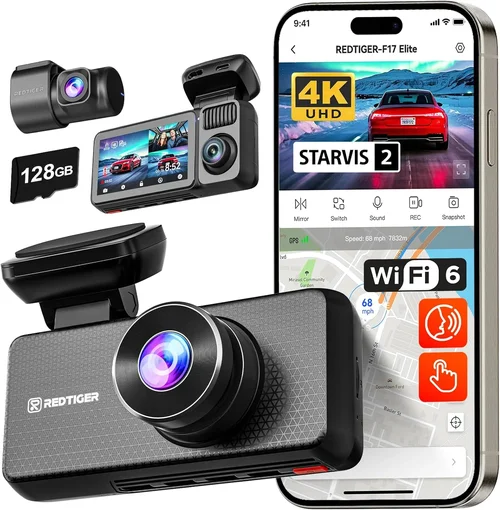
For optimal accident recording, look for cameras that offer at least 1080p Full HD resolution. However, modern standards now demand 2K or even 4K recording capabilities. While 4K provides exceptional detail, it also requires significantly more storage space and processing power.
The frame rate matters just as much as resolution. A higher frame rate (30fps minimum, preferably 60fps) ensures smoother motion capture during fast-moving incidents like side impacts or sudden braking situations. Lower frame rates can result in blurry or distorted footage when vehicles are in motion.
Don’t overlook the importance of low-light performance. Many accidents occur during dawn, dusk, or nighttime driving when lighting conditions are poor. Cameras with excellent night vision capabilities using technologies like Sony Starvis sensors, wide dynamic range (WDR), or infrared illumination will maintain clarity when other cameras struggle.
### 2. Storage Capacity and Loop Recording
Storage management is crucial for continuous dash cam operation. Most dash cams use microSD cards ranging from 32GB to 256GB capacity. For accident-focused usage, we recommend starting with at least 64GB cards.
Loop recording automatically overwrites the oldest files when storage is full, ensuring continuous coverage without manual intervention. This feature is non-negotiable for comprehensive accident documentation.
Consider how often you’ll need to review footage versus how much storage you want to dedicate to recent recordings. Some dash cams allow you to set specific time windows for file retention, such as keeping the last hour of footage in high priority while older files get overwritten first.
Built-in cloud storage is becoming increasingly valuable. While not essential for everyone, cloud backup services can provide additional protection against physical damage to your device or SD card. Always verify whether cloud storage is included or requires separate subscription fees.
### 3. Field of View and Lens Quality
A wide field of view captures more of the road ahead and surrounding environment, which can be critical during accidents involving multiple vehicles or pedestrians. Optimal FOV ranges from 130° to 170°, depending on your needs.
However, wider angles aren’t always better. Extremely wide lenses can cause distortion at the edges, making it difficult to accurately judge distances and vehicle positions. Look for cameras that balance wide coverage with minimal fisheye distortion.
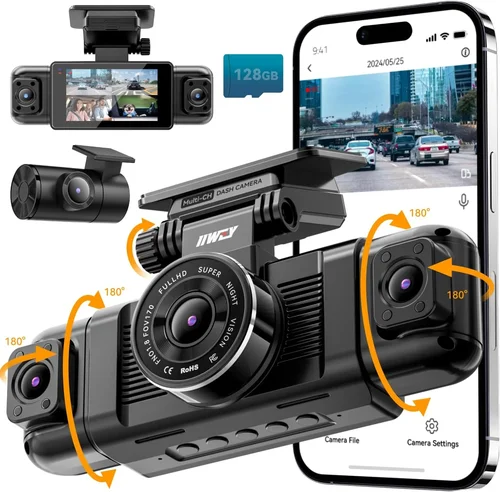
Dual-lens systems offer front and rear coverage, providing complete documentation of both the road ahead and what happens behind your vehicle. These are particularly valuable for fleet operators or anyone concerned about hit-and-run incidents.
Lens quality directly impacts image sharpness and color accuracy. Premium lenses made from high-grade glass with proper coatings deliver superior optical performance compared to plastic alternatives.
### 4. G-Sensor and Impact Detection
The G-sensor (gravity sensor) is perhaps the most critical safety feature for accident documentation. It automatically detects sudden deceleration, impact forces, or aggressive maneuvers and locks the current video segment to prevent overwriting.
Most dash cams trigger recording based on G-force thresholds that you can customize. We recommend setting sensitivity levels appropriate for your typical driving conditions—higher sensitivity catches minor incidents but may create false positives during normal driving.
Some advanced models include multiple G-sensor zones, allowing different sensitivity settings for front, rear, or interior monitoring. This prevents unnecessary file locking during routine driving while still capturing significant events.
Always test your G-sensor settings after installation to ensure they’re working correctly. A malfunctioning sensor could mean missing crucial evidence when you need it most.
### 5. Parking Mode and Motion Detection
Parking mode provides surveillance when your vehicle is unattended, which is invaluable for documenting hit-and-run incidents or vandalism. However, this feature significantly affects battery life and storage usage.
Motion detection triggers recording only when movement is detected, conserving resources while still providing security coverage. Advanced systems can distinguish between relevant objects (vehicles, people) and irrelevant stimuli (birds, shadows).
Battery-powered parking modes require external power connections since your car’s battery would drain quickly otherwise. Hardwiring kits are essential for reliable 24/7 operation.
Consider your parking frequency and duration when evaluating parking mode capabilities. If you regularly leave your vehicle parked for extended periods, invest in a model with robust parking features.
### 6. Build Quality and Durability
Accident-prone environments demand rugged construction. Your dash cam should withstand temperature extremes, vibrations, moisture exposure, and potential impacts during collisions.
Look for models with IP rating certifications indicating dust and water resistance. Even if your camera isn’t submerged, moisture from rain or condensation can damage sensitive electronics.
Heat resistance is particularly important given dashboard temperatures can exceed 150°F (65°C) in direct sunlight. Premium models use heat-dissipating materials and strategic placement away from direct sun exposure.
Mounting hardware should be secure and vibration-resistant. Poor mounting can lead to camera displacement during accidents, potentially compromising evidence quality.
### 7. Audio Recording Capabilities
While video is primary evidence, audio can provide crucial context during accidents. Clear audio recordings of conversations, emergency sirens, or impact sounds can strengthen your case.
Check local laws regarding audio recording before enabling this feature. Some jurisdictions require consent from all parties being recorded.
Audio quality varies significantly between models. Built-in microphones should capture clear dialogue without excessive background noise or distortion.
Some dash cams offer separate microphone inputs for professional audio recording, though these are typically found in premium models.
### 8. Ease of Use and Interface Design
During stressful situations like accidents, you won’t have time to navigate complex menus. Intuitive controls and clear displays are essential for quick operation.
Touchscreen interfaces offer convenience but may be difficult to operate while driving. Physical buttons provide tactile feedback and easier operation when wearing gloves.
Menu navigation should be straightforward with clearly labeled options. Avoid models requiring multiple steps to access frequently used functions.
Voice commands and smartphone app integration can enhance usability, though reliability varies between manufacturers.
## Different Types of Dash Cams
## Common Buying Mistakes to Avoid
❌ Mistake: Prioritizing Price Over Performance
Why it’s bad: Choosing the cheapest option often means compromising on critical features like video quality, G-sensor sensitivity, or build durability. Low-cost dash cams frequently fail during actual accident scenarios due to poor impact resistance or inadequate recording capabilities.
What to do instead: Allocate budget toward proven brands with strong track records for accident documentation. Consider the total cost of ownership including storage requirements and potential replacement costs rather than focusing solely on initial purchase price.
❌ Mistake: Ignoring Local Legal Requirements
Why it’s bad: Audio recording laws vary significantly by state and country. Using a dash cam with audio recording in locations where it’s illegal can result in fines or legal complications. Additionally, some regions have specific requirements for dash cam installation or data handling.
What to do instead: Research your local regulations before purchasing. Disable audio recording if necessary, and ensure your chosen model complies with regional requirements for both hardware and software functionality.
❌ Mistake: Skipping Professional Installation
Why it’s bad: DIY installation often leads to improper mounting, wiring issues, or suboptimal positioning. Poor installation can compromise evidence quality, void warranties, or create safety hazards during driving.
What to do instead: Invest in professional installation services, especially for hardwiring, dual-camera setups, or complex parking mode configurations. Many retailers offer installation packages that include warranty protection.
❌ Mistake: Underestimating Storage Needs
Why it’s bad: Insufficient storage leads to premature file overwriting, potentially losing critical evidence during accident investigations. Smaller SD cards also wear out faster under continuous write cycles.
What to do instead: Calculate your storage requirements based on average drive time and desired retention period. Plan for 64GB-128GB cards initially, and consider models supporting larger capacities up to 256GB for extended recording needs.
❌ Mistake: Overlooking Night Vision Capabilities
Why it’s bad: Many accidents occur at night when visibility is poor. Cameras without adequate night vision produce grainy, unusable footage that fails to capture essential details during collision events.
What to do instead: Prioritize models featuring Sony Starvis sensors, WDR technology, or dedicated night vision modes. Test night performance reviews before purchasing to ensure acceptable low-light recording quality.
❌ Mistake: Neglecting Regular Maintenance
Why it’s bad: Dust accumulation, lens scratches, or failing batteries can degrade performance over time. Without regular maintenance, your dash cam may not function properly when needed most.
What to do instead: Establish a monthly maintenance routine including cleaning the lens, checking SD card health, verifying battery performance, and updating firmware. Keep spare parts like batteries and SD cards readily available.
## Budget Guidelines: How Much Should You Spend?
### Entry-Level ($50 – $100)
This tier offers basic functionality suitable for occasional drivers or those seeking simple protection. Models in this range typically provide 1080p recording, loop recording, and fundamental G-sensor capabilities.
Expect limitations in areas like field of view (often 120° or less), lower build quality, and fewer advanced features. Storage capacity usually maxes out at 64GB, requiring frequent card changes.
While these models can document basic incidents, they may lack the robustness needed for serious accident scenarios. Consider this tier only if you have minimal driving exposure or extremely limited budget constraints.
### Mid-Range ($100 – $300)
The sweet spot for most drivers seeking reliable accident documentation. This category includes well-reviewed models offering 2K or 4K recording, wider fields of view (140°+), improved build quality, and enhanced night vision.
Features commonly found here include dual-lens systems, parking mode with motion detection, cloud connectivity, and professional installation support. G-sensor sensitivity is typically adjustable and reliable.
Investment in this tier provides substantial value for daily commuters, rideshare drivers, or anyone requiring dependable evidence collection without breaking the bank.
### Premium ($300 – $600)
Top-tier performers designed for demanding applications and professional use. These systems deliver exceptional video quality, military-grade durability, and cutting-edge features like AI collision warnings, 360-degree monitoring, and advanced analytics.
Expect superior lens quality, multiple camera arrays, enhanced audio recording, and robust cloud integration. Build materials often include aerospace-grade components with extensive weather resistance.
This investment pays off for commercial drivers, fleet operators, or anyone requiring maximum protection and evidence quality regardless of cost.
### Luxury ($600+)
Ultra-premium solutions representing the pinnacle of dash cam technology. These systems feature proprietary sensors, custom algorithms, and unparalleled reliability standards.
Typical offerings include multiple high-resolution cameras, advanced driver assistance systems, satellite connectivity, and enterprise-grade support infrastructure. Some models approach automotive-grade certification standards.
Only justified for specialized applications like commercial transportation companies, government fleets, or extreme enthusiasts willing to pay premium prices for ultimate performance guarantees.
## Expert Tips for Getting the Best Deal
Timing Your Purchase: Major shopping seasons like Black Friday, Cyber Monday, and back-to-school periods offer substantial discounts. Manufacturers often release new models mid-year, creating opportunities to purchase previous-generation equipment at reduced prices.
Comparing Retail Channels: Online retailers typically offer broader selection and competitive pricing, while local stores provide immediate availability and hands-on testing. Consider checking multiple channels before committing to ensure you’re getting the best combination of price, service, and convenience.
Reading Professional Reviews: Consumer review sites often emphasize user experience over technical specifications. Look for detailed reviews from automotive technology publications that test performance under controlled conditions and evaluate real-world reliability.
Evaluating Warranty Coverage: Comprehensive warranties covering both hardware defects and accidental damage indicate manufacturer confidence in product quality. Extended warranty programs can provide peace of mind beyond standard coverage periods.
Testing Before Committing: Whenever possible, test dash cams in-store or through rental programs. Verify video quality in various lighting conditions, check menu navigation intuitiveness, and confirm mounting system stability.
Negotiating Bundle Deals: Many retailers offer installation packages, extra memory cards, or accessory bundles at discounted rates. These combined packages often provide better overall value than purchasing components separately.
Considering Certified Refurbished: Reputable manufacturers’ refurbished units undergo thorough testing and come with renewed warranties. These can offer significant savings while maintaining quality assurance standards.
Monitoring Return Policies: Ensure adequate return windows for testing and comparison. Some retailers offer 30-day satisfaction guarantees, while others may charge restocking fees for opened items.
Checking Compatibility: Verify your vehicle’s electrical system compatibility before purchasing hardwiring solutions. Some newer vehicles have complex CAN bus systems that may interfere with dash cam operation.
Joining Owner Communities: Online forums and social media groups provide real-time insights into product reliability, common issues, and best practices. Experienced users often share valuable tips about maintenance, troubleshooting, and optimal settings.
## Frequently Asked Questions
Q: Will my dash cam survive a serious accident?
A: High-quality dash cams are designed with impact resistance in mind, but survival depends on numerous factors including crash severity, mounting position, and camera quality. Military-grade models with reinforced housings and strategic placement offer the best protection. However, no consumer device is guaranteed to survive catastrophic collisions intact.
Q: Can I use any SD card with my dash cam?
A: Not all SD cards are created equal. Dash cams require high-endurance cards capable of continuous write operations. Look for Class 10 or UHS-I/UHS-II rated cards with A1 or A2 application performance class. Brand consistency helps prevent compatibility issues—stick with reputable manufacturers like SanDisk, Samsung, or Lexar.
Q: How long should I keep dash cam footage?
A: Retention policies vary by jurisdiction, but generally keep footage for at least 30 days after any incident. For potential insurance claims or legal proceedings, maintain recordings until the matter is resolved. Cloud backup services can help manage storage while preserving critical evidence.
Q: Do I need both front and rear cameras?
A: Dual-lens systems provide complete documentation but require more storage and power. Front-only cameras suffice for most personal use unless you frequently park in high-risk areas or need protection against rear-end collisions. Consider your specific risk profile when deciding.
Q: Can dash cams record while parked?
A: Yes, but parking mode requires either a connected power source or external battery. Hardwiring to your vehicle’s electrical system provides continuous operation, while battery packs offer temporary surveillance. Be aware that extended parking mode use can drain your car battery over time.
Q: Are there privacy concerns with dash cams?
A: Privacy regulations vary widely. In the United States, dash cam footage generally falls under “reasonable expectation of privacy” protections, but laws differ by state. Avoid recording areas where individuals expect privacy (private property, bedrooms) and consult local regulations regarding data storage and sharing.
Q: How do I choose between 1080p, 2K, and 4K recording?
A: Consider your primary use case. 1080p provides adequate detail for most situations, while 2K offers noticeable improvements in clarity without overwhelming storage requirements. Reserve 4K for professional applications where maximum detail is essential. Balance resolution against storage costs and processing demands.
Q: What’s the difference between WDR and HDR?
A: Wide Dynamic Range (WDR) balances exposure across scenes with mixed lighting, while High Dynamic Range (HDR) combines multiple exposures for optimal detail. WDR is more common in dash cams and sufficient for most accident documentation scenarios. Both technologies significantly improve visibility in challenging lighting conditions.
Q: Can I install multiple dash cams in one vehicle?
A: Yes, but each camera requires its own power source and processing unit. Multi-camera systems increase complexity, cost, and potential failure points. Professional installation is strongly recommended for anything beyond simple front-rear configurations.
Q: How often should I update my dash cam firmware?
A: Check manufacturer recommendations, but generally update whenever new versions are released. Firmware updates often include bug fixes, performance improvements, and new features that can enhance accident documentation capabilities.
## Our Final Recommendations
Best for Budget-Conscious Buyers: The Thinkware U1000 delivers exceptional value with 2K recording, reliable G-sensor, and solid build quality at accessible price points. Its balanced feature set makes it ideal for everyday drivers seeking dependable accident protection without premium pricing.
Best Overall Value: The BlackVue DR970X-2CH stands out with superior video quality, robust cloud integration, and professional-grade reliability. This dual-lens system provides comprehensive coverage while offering enterprise-level features typically reserved for expensive commercial installations.
Best Premium Option: The Garmin Dashcam Pro offers cutting-edge AI features including collision warnings and lane departure alerts, combined with Garmin’s renowned GPS accuracy and user-friendly interface. Its advanced capabilities justify the premium investment for tech-savvy drivers.
Best for Beginners: The Viofo A119 V3 provides straightforward operation with excellent 2K recording and reliable performance. Its intuitive design and affordable price make it perfect for first-time dash cam owners who want hassle-free accident documentation.
Best for Advanced Users: The Nextbase 522GW delivers outstanding 4K recording with built-in Alexa voice control and emergency SOS features. Its sophisticated yet user-friendly interface satisfies experienced users wanting maximum functionality and convenience.
Each recommendation represents carefully vetted options based on real-world performance, reliability ratings, and accident documentation effectiveness. Your final choice should align with your specific driving patterns, budget constraints, and desired feature priorities.
## Conclusion: Making the Right Choice
Selecting the best dash cam for accidents involves balancing multiple competing priorities—resolution versus storage costs, advanced features versus ease of use, and build quality versus budget constraints. There is no universally perfect solution, only the right choice for your specific circumstances.
Remember that your dash cam serves as digital eyewitness testimony. Prioritize features that directly impact evidence quality: clear video resolution, reliable impact detection, wide field of view, and robust build durability. Secondary considerations like smartphone apps and parking mode enhance convenience but shouldn’t compromise core functionality.
Take time to research thoroughly, compare options systematically, and don’t hesitate to invest in professional installation or premium accessories. Your peace of mind and potential financial protection deserve thoughtful consideration rather than rushed decisions based solely on lowest price points.
Ultimately, the best dash cam is the one you’ll actually use consistently. Choose a model that fits seamlessly into your driving routine, maintains reliable operation over time, and provides genuine confidence that you’re prepared for whatever road challenges may arise.