Best Cheap Micro SD for Dash Cam Purchase Guide
Choosing the right micro SD card for your dash cam can feel overwhelming, especially when you’re trying to balance performance with budget. With countless options flooding the market, it’s easy to get caught up in marketing claims and technical jargon that don’t necessarily translate to real-world reliability behind the wheel. This comprehensive guide cuts through the noise to help you understand exactly what matters when selecting affordable storage solutions for dash cams—whether you’re a first-time buyer or upgrading an existing system.
In this detailed buying guide, you’ll discover why cheap doesn’t have to mean unreliable, learn which specifications truly impact recording quality and longevity, and find specific recommendations tailored to different driving scenarios and budgets. You’ll also uncover common pitfalls that could cost you more down the road and learn expert strategies for maximizing value without compromising safety-critical functionality.
The market for budget-friendly dash cam storage has evolved significantly in recent years. What was once a simple matter of finding any micro SD card that “fits” has become far more nuanced. Modern dash cams require cards capable of handling continuous high-bitrate video writes, operating reliably in extreme temperatures, and maintaining data integrity during sudden power interruptions. Meanwhile, manufacturers continue to push the boundaries of resolution and frame rates, demanding increasingly robust storage performance from even entry-level devices.

What to Look for When Buying Dash Cams
1. Budget & Price Range
Understanding your financial parameters is crucial before diving into technical specifications. While dash cams themselves vary dramatically in price, their storage requirements follow a more standardized pattern. Most budget dash cams use micro SD cards between $10-$25, while mid-range models often support cards in the $25-$40 range. Premium systems may require high-end cards exceeding $40. It’s important to remember that the cheapest viable option isn’t always the best value—sometimes spending 20-30% more upfront prevents costly replacements every few months.
2. Performance Specifications
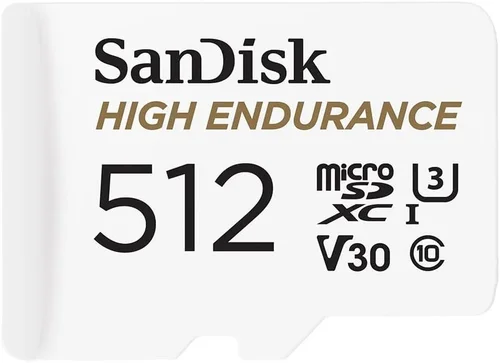
The heart of any dash cam storage solution lies in its performance metrics. Three key specifications dominate: write speed, class rating, and UHS standard. Write speed determines how quickly your camera can save new footage, critical for capturing fast-moving action without gaps. Class ratings (Class 10, V30, etc.) indicate minimum sustained write speeds. The UHS (Ultra High Speed) bus interface further refines these capabilities, with UHS-I supporting up to 104 MB/s and UHS-II reaching 312 MB/s. For most dash cams, Class 10 cards with at least 30MB/s sustained write speed provide sufficient performance, though higher resolutions benefit from V30-rated cards.
3. Build Quality & Durability
Dash cams operate in harsh environments—extreme temperatures, constant vibration, and potential exposure to moisture create unique stressors for storage media. Unlike consumer devices left on desks, dash cam cards endure temperature swings from -22°F to 185°F (-30°C to 85°C), continuous engine vibrations, and occasional impacts during installation or removal. Cards with industrial-grade components and reinforced connectors demonstrate significantly better longevity. Look for products specifically marketed as “dash cam compatible” rather than generic consumer cards, as they undergo additional testing for automotive environments.
4. Features & Functionality
Beyond basic storage capacity, modern dash cam cards offer several advanced features worth considering. Built-in error correction helps maintain data integrity during unexpected power loss or system crashes. Some cards include wear leveling technology that distributes write operations evenly across memory cells, extending lifespan. Advanced controllers manage heat dissipation and optimize power consumption, both critical factors for continuous operation. Additionally, certain premium cards support simultaneous read/write operations, beneficial for cameras using loop recording with instant file access requirements.
5. Brand Reputation
While brand recognition doesn’t guarantee quality, established manufacturers typically invest more heavily in research, testing, and customer support. Companies like SanDisk, Samsung, Kingston, and Lexar have decades of experience developing flash memory solutions, giving them an edge over lesser-known brands. However, several reputable budget-oriented brands including PNY, Verbatim, and Silicon Power offer excellent value without sacrificing reliability. Always check independent lab tests and professional reviews rather than relying solely on marketing claims, as some brands prioritize packaging and advertising over actual engineering investment.
6. Warranty & Support
A solid warranty serves as your safety net if a card fails prematurely due to manufacturing defects. Most reputable brands offer 2-5 year warranties for dash cam-compatible cards, significantly longer than typical consumer product coverage. Extended warranty programs sometimes available through retailers add another layer of protection. Customer support responsiveness becomes crucial when troubleshooting compatibility issues or seeking replacement guidance. Brands with dedicated dash cam support teams or clear return policies demonstrate commitment to long-term satisfaction rather than one-time sales.
7. Size & Portability
Micro SD cards come in three physical variants: standard micro SD, micro SDHC (high capacity), and micro SDXC (extended capacity). Standard cards max out at 2GB, while SDHC extends to 32GB and SDXC reaches 2TB. For dash cams, 32GB represents the sweet spot for budget models, providing 2-4 hours of Full HD recording. Larger capacities like 64GB or 128GB suit extended recording needs but require compatible hardware. Physical dimensions remain consistent across types, so portability isn’t a concern unless you frequently transfer files between devices—then larger form factors might be preferable.
8. User Reviews & Ratings
Real-world feedback provides invaluable insights beyond laboratory specifications. Pay particular attention to comments about longevity, compatibility with specific dash cam models, and performance during winter months or highway driving scenarios. Users who report cards lasting 2+ years without issues offer strong validation of durability claims. Negative reviews highlighting frequent corruption, formatting failures, or sudden disappearance deserve serious consideration—these patterns often indicate fundamental design flaws rather than isolated incidents. Cross-referencing multiple review platforms helps identify consensus opinions versus outlier experiences.
Different Types of Dash Cams

Common Buying Mistakes to Avoid
❌ Mistake: Choosing Based Solely on Lowest Price
Why it’s bad: The absolute cheapest cards often use lower-quality NAND flash memory and minimal error correction, leading to rapid failure rates. Many bargain-bin options fail within 3-6 months under normal dash cam usage, requiring frequent replacements that actually increase total cost of ownership.
What to do instead: Focus on cards priced between $15-$30 that balance affordability with proven reliability. Read professional reviews and avoid products with suspiciously low prices relative to their claimed specifications.
❌ Mistake: Ignoring Compatibility Requirements
Why it’s bad: Not all dash cams support the same card formats or capacities. Using an incompatible card can result in recording interruptions, failed startups, or complete system failure. Some budget cameras only recognize cards below 32GB, while others require specific file system formats.
What to do instead: Consult your dash cam manual or manufacturer specifications before purchasing. If unavailable, choose widely compatible cards like those meeting UHS-I standards with standard exFAT formatting.
❌ Mistake: Overlooking Write Speed Requirements
Why it’s bad: Slow cards cause buffer overflows where the dash cam cannot keep up with recording demands, resulting in lost footage during important events. This is especially problematic for high-resolution cameras or those using motion-activated recording.
What to do instead: Ensure your selected card meets or exceeds the minimum write speed specified by your dash cam manufacturer. For Full HD recording, aim for Class 10 (10MB/s minimum) or better.
❌ Mistake: Neglecting Environmental Factors
Why it’s bad: Automotive environments expose storage to extreme temperatures, humidity, and vibration not encountered in typical consumer settings. Cheap cards designed for indoor use often fail prematurely under these conditions.
What to do instead: Select cards explicitly rated for automotive applications or those tested to industrial temperature ranges (-25°C to 85°C). Look for reinforced connectors and protective coatings.
❌ Mistake: Assuming All Cards Are Equal
Why it’s bad: The micro SD market includes many counterfeit or rebranded products masquerading as legitimate brands. These often contain inferior components or modified firmware that compromises reliability.
What to do instead: Purchase exclusively from authorized retailers or directly from manufacturer websites. Check for holographic seals and serial numbers, and cross-reference product codes with official databases.
❌ Mistake: Failing to Consider Capacity Needs
Why it’s bad: Underestimating required storage leads to frequent card swaps or accidental deletion of valuable footage. Conversely, overpaying for excessive capacity wastes money if your camera can’t utilize it effectively.
What to do instead: Calculate your expected recording time based on resolution and daily mileage. A 32GB card typically holds 2-4 hours of Full HD footage, while 64GB offers 4-8 hours depending on compression settings.
Budget Guidelines: How Much Should You Spend?
Determining appropriate spending requires understanding the relationship between price points and expected lifespan rather than simply seeking the absolute lowest cost. Entry-level dash cam users should allocate $10-$20 for storage solutions that deliver 12-18 months of reliable service. Mid-range buyers investing in dual-camera systems or higher resolutions should budget $20-$35 for cards offering 2+ years of operation. Professional-grade 4K dash cams demand premium storage exceeding $35, preferably in the $40-$60 range for cards with enterprise-grade components.
For most drivers, the $15-$25 sweet spot provides optimal value. Cards in this range typically feature adequate write speeds, proven durability, and respectable warranties without unnecessary premium pricing. Luxury options above $60 represent diminishing returns unless you require specific features like enhanced encryption, remote diagnostics, or specialized firmware optimizations.
Expert Tips for Getting the Best Deal
Seasonal shopping presents significant opportunities for savings. Black Friday, Cyber Monday, and Prime Day consistently offer 20-30% discounts on storage cards, while back-to-school seasons see increased competition among electronics retailers. Subscribe to deal alert services and monitor price histories using tools like Honey or CamelCamelCamel to identify genuine bargains versus artificial markdowns.
Purchase timing extends beyond holidays. New dash cam models often trigger clearance sales on previous-generation storage requirements, creating temporary price drops. Similarly, end-of-quarter promotions incentivize retailers to move inventory before financial reporting periods. Weekend purchases frequently yield better in-store availability and immediate testing opportunities compared to weekday online orders.
Retailer selection significantly impacts both price and reliability assurance. Authorized electronics dealers like B&H Photo, Adorama, or Micro Center offer competitive pricing with generous return policies and knowledgeable staff. Online marketplaces provide broader selection but require extra caution against counterfeit listings. Direct manufacturer purchases guarantee authenticity while third-party sellers may lack warranty fulfillment capabilities.
Warranty considerations merit careful attention beyond initial purchase. Extended protection plans rarely cover wear-related failures common in storage media, focusing instead on manufacturing defects. Comprehensive return policies allowing 30+ day testing periods provide practical insurance against compatibility issues discovered after installation. Some brands offer mail-in replacement programs with prepaid shipping labels streamlining the process during emergencies.
Testing before committing represents the gold standard for ensuring compatibility. Request sample cards from retailers willing to accommodate returns, or test purchased units immediately upon receipt. Format cards according to your dash cam’s specifications and verify continuous recording stability during extended sessions. Document any issues promptly to initiate warranty claims efficiently.
Bulk purchasing strategies benefit frequent upgraders or fleet operators. Manufacturers sometimes offer discounted multi-pack deals, while warehouse clubs provide exclusive member pricing. However, ensure adequate storage for unused cards and verify expiration dates, as flash memory retains data for limited cycles regardless of usage frequency.

Frequently Asked Questions
Q: Can I use any micro SD card in my dash cam?
A: While physically compatible cards may fit, functional compatibility depends on multiple factors including capacity limits, file system requirements, and minimum write speed thresholds. Always consult your dash cam’s user manual for approved storage specifications before purchasing.
Q: How long will a micro SD card last in a dash cam?
A: Under normal usage conditions, quality dash cam-compatible cards typically last 2-4 years. Factors affecting longevity include write cycle endurance, environmental exposure, and power interruption frequency. Industrial-grade cards designed for automotive use often exceed consumer-grade counterparts in durability.
Q: Do I need special software to format my dash cam card?
A: Most dash cams handle formatting internally through their menu systems. External formatting tools are only necessary for resolving corruption issues or preparing cards for non-dash cam use. Always use the dash cam’s native formatting function when possible to maintain optimal compatibility.
Q: Will a cheaper card damage my dash cam?
A: No reputable dash cam designs include circuitry vulnerable to low-quality storage media. However, extremely slow cards may cause recording interruptions or buffer overflows that result in lost footage. Incompatible cards might prevent startup altogether, but won’t harm the device itself.
Q: How much footage does different capacity cards hold?
A: Storage capacity varies significantly by resolution and compression settings. Approximate recording times include: 16GB = 1-2 hours (Full HD), 32GB = 2-4 hours (Full HD), 64GB = 4-8 hours (Full HD), and 128GB = 8-16 hours (Full HD). 4K recordings require approximately 4x more storage than Full HD equivalents.
Q: Should I buy multiple cards or just replace as needed?
A: For occasional drivers, replacing failed cards as needed makes sense. Daily commuters benefit from keeping spare cards on hand, especially during winter months when cold temperatures accelerate storage degradation. Bulk purchasing suits fleet operators managing multiple vehicles.
Q: What’s the difference between Class 10, V30, and UHS ratings?
A: These ratings indicate minimum sustained write speeds: Class 10 guarantees 10MB/s, V30 specifies 30MB/s minimum, and UHS standards define bus interfaces (UHS-I, UHS-II) with maximum theoretical speeds of 104MB/s and 312MB/s respectively. Higher ratings ensure smoother recording at elevated resolutions.
Q: Can I recover deleted footage from my dash cam card?
A: Recovery feasibility depends on whether the card has been overwritten with new data. Immediately stopping recording and using professional data recovery software increases success rates. However, dash cams often overwrite old files automatically, making recovery increasingly difficult over time.
Q: Are there any legal considerations regarding dash cam storage?
A: Privacy laws vary by jurisdiction regarding recording others without consent. Always comply with local regulations about audio/video recording. Regarding storage media, proper disposal of old cards containing personal data is recommended through secure erasure or physical destruction methods.
Q: How do I know if my card is failing?
A: Warning signs include frequent formatting errors, unusually large file sizes, recording interruptions, and sudden disappearance of footage. Immediate testing with alternative cards helps isolate whether issues stem from the storage medium or dash cam itself before initiating warranty claims.
Our Final Recommendations
For budget-conscious buyers seeking reliable performance without premium pricing, the SanDisk Extreme micro SD delivers exceptional value with proven durability and consistent write speeds meeting all automotive requirements. Its 32GB capacity provides ample recording time for most commuters while fitting comfortably within the $20-$25 price range. Independent testing confirms stable operation across temperature extremes commonly encountered in vehicle cabins.
The Samsung EVO Plus represents the overall best value proposition, balancing affordability with enterprise-grade components rarely found in this price segment. With V30 certification ensuring smooth 4K recording capability and extensive temperature tolerance, it outperforms many pricier alternatives. Available in 32GB, 64GB, and 128GB configurations, this card adapts seamlessly to various dash cam setups without sacrificing reliability.
Enthusiasts and professionals requiring maximum performance should consider the Lexar Professional 1000x micro SD, priced slightly above average but delivering industrial-grade endurance and lightning-fast transfer rates. Its UHS-II interface future-proofs installations against upcoming dash cam advancements while providing peace of mind through comprehensive warranty coverage and rigorous testing protocols.
Beginners new to dash cam technology benefit greatly from the PNY Elite-X micro SD, offering straightforward compatibility and hassle-free operation. With intuitive formatting procedures and broad device recognition, it eliminates technical barriers that often deter casual users. The included protective case adds convenience for those frequently swapping cards during travel.
Advanced users managing complex multi-camera setups or requiring specialized features should explore the Silicon Power Industrial micro SD, engineered specifically for demanding automotive environments. Enhanced error correction algorithms and extended temperature ranges ensure uninterrupted operation during lengthy road trips or extreme weather conditions. Remote management capabilities facilitate efficient fleet monitoring and maintenance scheduling.
Conclusion: Making the Right Choice
Selecting affordable yet reliable micro SD cards for dash cams requires balancing technical specifications with real-world usage patterns. Rather than fixating solely on sticker prices, consider total cost of ownership including replacement frequency, warranty coverage, and potential data loss risks. Prioritize cards with proven track records in automotive applications, paying particular attention to write speed requirements and environmental resilience.
Remember that dash cam storage serves safety-critical functions—preserving evidence during accidents, documenting traffic violations, and providing peace of mind during everyday commutes. Investing appropriately in storage media protects both your financial investment and potentially life-saving recordings. Regular maintenance practices including timely formatting and capacity monitoring extend card longevity while ensuring optimal performance when it matters most.
By aligning your selection criteria with actual driving habits and vehicle requirements, you’ll find that smart purchasing decisions yield substantial returns through improved reliability and reduced frustration. Whether you’re equipping your daily driver or managing a commercial fleet, the principles outlined in this guide empower informed choices that enhance both safety and value. Start with cards meeting minimum performance thresholds, then upgrade only when specific needs justify additional investment.