Best Budget Dash Cam for Lyft Purchase Guide
When you’re driving for Lyft, your vehicle is both your workplace and your investment. Every mile driven matters—not just financially, but legally and personally as well. In the event of an accident, dispute, or even a minor fender bender, having clear video evidence can be invaluable. That’s where a dash cam becomes more than just a gadget; it transforms into a critical piece of insurance. For Lyft drivers navigating the complexities of ride-share work, choosing the right dash cam isn’t optional—it’s essential. This guide will walk you through everything you need to know to pick the best budget dash cam for Lyft that offers reliability, clarity, and peace of mind without breaking the bank.
This comprehensive buying guide is designed specifically for active Lyft drivers who want high-quality protection at an affordable price point. You’ll learn how to evaluate key features like resolution, field of view, night vision, loop recording, G-sensor technology, parking mode, and storage options. We’ll also compare top models across different categories, highlight common pitfalls to avoid, break down realistic budget expectations, and share expert tips on timing your purchase for maximum savings. By the end, you’ll have all the knowledge needed to make an informed decision that enhances both your safety and earning potential on the road.
The market today offers a vast array of dash cams ranging from ultra-cheap $30 models with questionable performance to premium units costing over $200. While flashy features may seem tempting, most Lyft drivers don’t require 4K recording or GPS tracking—they need consistent, reliable footage in real-world driving conditions. The challenge lies in cutting through marketing hype and identifying models that deliver true value. Whether you’re new to ride-sharing or looking to upgrade your current setup, this article provides practical insights grounded in real usage scenarios. We’ll focus on what actually works when you’re behind the wheel during long shifts, dealing with unpredictable weather, sudden stops, and everything in between.

What to Look for When Buying Dash Cams
Before diving into specific products, understanding the core factors that determine dash cam quality is crucial. These elements directly impact how well your device performs during those critical moments when every second of footage counts. Let’s explore each factor in detail so you can prioritize based on your unique needs as a Lyft driver.
Budget & Price Range
Your budget sets the foundation for what’s possible, but it shouldn’t limit you unnecessarily. Most reliable dash cams for Lyft operate within the $50–$120 range, offering excellent value without compromising essential functionality. At the lower end ($30–$50), you might find basic models with limited features, poor build quality, or unreliable sensors. Mid-tier options ($70–$100) typically include HD resolution, wide-angle lenses, motion detection, and decent night vision—perfectly suited for daily use. Premium models above $120 often add extras like Wi-Fi connectivity, cloud backup, advanced parking monitoring, or superior image stabilization. For most Lyft drivers, spending between $80–$100 strikes the ideal balance between cost and capability.
Performance Specifications
The heart of any dash cam lies in its technical specifications. Resolution determines how clearly incidents are captured—look for at least 1080p Full HD, though many modern models now offer 2K or even 4K. However, higher resolution alone doesn’t guarantee better quality; sensor size and software processing play equally important roles. A 4K dash cam with a tiny sensor may produce grainy footage compared to a well-engineered 1080p model.
Equally vital is the field of view (FOV). A wider angle captures more of the road ahead and surroundings, reducing blind spots. Most reputable dash cams offer between 120°–150°, which covers three lanes effectively. Angles exceeding 150° can introduce fish-eye distortion that distorts license plates and distances. Additionally, frame rate affects smoothness—30fps is standard, but 60fps provides crisper motion capture during rapid maneuvers or collisions.
Build Quality & Durability
As a Lyft driver, your dash cam will endure constant temperature swings, vibrations from rough roads, exposure to direct sunlight, and frequent installation/uninstallation if you switch vehicles. Cheap plastic housings crack easily, while inferior lenses scratch under normal use. Opt for devices made from reinforced polycarbonate or aluminum alloys with tempered glass lenses. Sealed ports and shock-resistant mounts ensure longevity.
Consider also how securely the dash cam attaches to your windshield. Suction cup mounts can loosen over time or fail during hard braking. Magnetic or adhesive mounts offer stronger hold but may leave residue or damage paint. Some models come with dual-sided tape or reusable gel pads that provide firm grip without leaving marks. Always test mounting stability before relying solely on suction cups during long drives.
Features & Functionality
Modern dash cams pack surprisingly sophisticated capabilities beyond simple video recording. Here are must-have features for Lyft drivers:
- Loop Recording: Automatically overwrites oldest files when memory fills up, ensuring continuous coverage without manual intervention.
- G-Sensor (Impact Detection): Detects sudden deceleration or impacts and locks relevant footage to prevent accidental deletion.
- Parking Mode: Continues monitoring while parked using motion detection or time-lapse recording. Requires hardwiring for reliable operation.
- Time/Location Stamp: Adds date/time and GPS coordinates to videos for legal documentation.
- Night Vision: Enhanced low-light sensitivity using WDR (Wide Dynamic Range) technology balances bright headlights and dark shadows.
- Wi-Fi/App Connectivity: Allows wireless viewing, downloading, and sharing via smartphone app—convenient but not essential.
While additional bells and whistles sound appealing, focus first on core reliability. Extra features rarely justify significant price jumps unless they directly address your pain points.
Brand Reputation
Stick with established manufacturers rather than obscure private-label brands. Companies like Viofo, BlackVue, Garmin, Nextbase, and Rexing have decades of experience refining dash cam technology. They invest heavily in R&D, customer support, firmware updates, and warranty fulfillment. Lesser-known brands may disappear overnight, leaving you without service or replacement parts.
Check independent reviews from trusted sources like Consumer Reports, Wirecutter, or automotive tech blogs. Look for consistency across multiple user reports regarding battery life, image quality, software stability, and responsiveness from manufacturer support teams. Avoid brands with numerous complaints about false alarms, corrupted files, or unresponsive customer service.
Warranty & Support
A solid warranty reflects confidence in product durability and gives you recourse if defects arise. Most reputable dash cams carry one-year warranties covering manufacturing flaws. Extended warranties up to three years are available from some vendors for an added fee. Ensure warranty terms clearly cover accidental damage or environmental stress—common issues for mobile professionals.
Also assess post-purchase support quality. Does the company respond promptly to inquiries? Are troubleshooting guides detailed and accessible? Can you easily download firmware updates to fix bugs or improve performance? Good support minimizes downtime and frustration when problems occur.
Size & Portability
Compact designs save space on crowded dashboards and reduce visual distraction. Ultra-thin models slide neatly behind rearview mirrors without obstructing sightlines. Larger units with built-in screens may offer convenience but compromise stealth and aesthetics—especially problematic if passengers notice them.
If you drive multiple vehicles regularly, consider removable SD cards and universal mounting systems that adapt across cars. Some models feature interchangeable lens caps or flip-up cameras for easy repositioning. Portability also matters if you travel frequently—lightweight devices pack easily into trunks or backpacks.
User Reviews & Ratings
Real-world feedback reveals truths hidden in spec sheets. Scour Amazon, Best Buy, Walmart, and specialty automotive sites for verified purchaser comments. Pay attention to recurring themes: Do buyers consistently praise image clarity? Is parking mode reliable? Have others experienced hardware failures after months of use?
Be wary of suspiciously glowing reviews lacking detail or overly negative ones that ignore mitigating circumstances. Seek balanced perspectives from diverse users—including those who’ve owned the device for six months versus new owners. Also note whether sellers fulfill return policies honestly and quickly.
Different Types of Dash Cams

Each category serves distinct purposes depending on your driving habits and risk tolerance. Single-lens front-only cameras remain the sweet spot for most Lyft drivers—they record the primary area of interest without complexity or extra cost. Dual-camera systems become worthwhile if you frequently transport luggage, navigate tight parking spaces, or operate in urban environments where rear-end collisions are common. Panoramic models appeal to those prioritizing parked car security above all else, while smart cams suit drivers comfortable with app integration and cloud services. Finally, commercial-grade units are overkill unless you’re logging thousands of miles monthly or require regulatory compliance features.
Common Buying Mistakes to Avoid
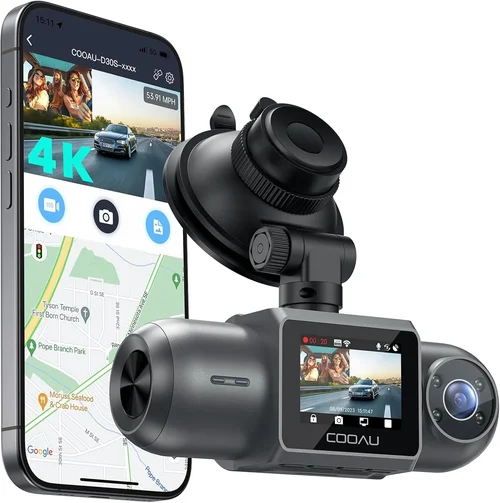
Navigating the dash cam marketplace is full of traps for unsuspecting buyers—especially those unfamiliar with automotive electronics. Many Lyft drivers make avoidable errors that undermine their safety investments. Recognizing these pitfalls upfront helps you steer clear of disappointment and wasted money.
❌ Mistake: Ignoring Night Vision Capabilities
Why it’s bad: Poor low-light performance renders your dash cam useless during evening rides, rush hour, or tunnel crossings. Many cheap models rely solely on infrared LEDs that create overexposed whites and black voids instead of capturing usable details like license plates or facial features.
What to do instead: Prioritize Wide Dynamic Range (WDR) technology over standalone night vision modes. WDR intelligently adjusts exposure across bright headlights and dark shadows, preserving clarity in mixed lighting. Test sample footage from product pages or YouTube reviews showing nighttime scenes before purchasing.
❌ Mistake: Choosing Based Solely on Price
Why it’s bad: The cheapest option often breaks within weeks or produces garbled, unusable footage when needed most. Hidden costs emerge later—frequent SD card replacements, battery degradation, or incompatible accessories—that erode initial savings.
What to do instead: Calculate total ownership cost including expected lifespan, repair frequency, and accessory requirements. Compare mid-range models offering proven reliability rather than chasing dollar-store deals. Remember: your dash cam protects your livelihood—cutting corners here risks far greater losses.
❌ Mistake: Overlooking Storage Requirements
Why it’s bad: Insufficient storage capacity leads to missed events when the device overwrites old files prematurely. Conversely, oversized cards waste money without improving performance. Most dash cams support microSD cards up to 128GB, but optimal sizes vary by resolution and compression settings.
What to do instead: Match card capacity to your usage patterns. For 1080p recording, a 64GB card lasts ~2 hours per GB—so 64GB handles four hours comfortably. If you drive eight-hour shifts, opt for 128GB. Always buy high-endurance industrial-grade cards rated for 24/7 write cycles.
❌ Mistake: Skipping Parking Mode Testing
Why it’s bad: Unreliable parking monitoring fails when hit-and-runs occur or vandals strike unattended vehicles. Many models falsely trigger on passing cyclists or streetlights, draining batteries or filling storage with irrelevant clips.
What to do instead: Verify parking mode functionality before committing. Hardwire your dash cam whenever possible—battery-only setups rarely survive overnight. Test motion detection sensitivity in real parking scenarios and adjust settings accordingly.
❌ Mistake: Assuming All Mounts Work Equally Well
Why it’s bad: Inferior suction cups detach during hard braking or extreme temperatures, causing cameras to fall onto passengers or dashboards. Adhesive pads sometimes damage paint or leave sticky residue upon removal.
What to do instead: Invest in premium mounting kits included with reputable brands. Reusable gel pads offer strong hold without surface damage. For permanent installations, consider professional-grade adhesive tapes designed for automotive use.
❌ Mistake: Neglecting Firmware Updates
Why it’s bad: Outdated firmware introduces bugs, reduces compatibility, or disables critical features like G-sensor calibration. Manufacturers release updates to fix crashes, improve image processing, or enhance night vision algorithms.
What to do instead: Download official software tools provided by the manufacturer and establish a routine update schedule. Subscribe to brand newsletters for notification alerts. Never assume “it works fine now” means future-proofing is unnecessary.
❌ Mistake: Failing to Check Compatibility
Why it’s bad: Incompatible power adapters, USB cables, or SD card formats lead to frustrating setup delays or total failure. Some dash cams require specific car chargers or OBD-II harnesses for proper hardwiring.
What to do instead: Confirm compatibility with your vehicle’s make/model year before buying. Read detailed product descriptions and FAQs. Contact seller support proactively if uncertain about wiring requirements or power source options.
Budget Guidelines: How Much Should You Spend?
Understanding realistic price tiers empowers smarter purchasing decisions aligned with actual needs rather than marketing gimmicks. Below is a tiered breakdown reflecting what each spending level delivers for Lyft drivers.
Entry-Level ($30–$50)
This bracket includes basic models with minimal features and questionable longevity. Expect limitations like 720p resolution, narrow FOV (~100°), no parking mode, fragile construction, and inconsistent file management. While tempting for tight budgets, these units frequently malfunction during critical moments. Only consider if you’re testing dash cam necessity temporarily or already own a more capable device.
Mid-Range ($60–$100)
The sweet spot for most Lyft drivers. Models here deliver Full HD 1080p recording, 120°–150° FOV, robust G-sensors, loop recording, decent night vision via WDR, and reliable suction cup mounts. Parking mode availability varies by model but increasingly standardizes in this range. Brands like Viofo AK330, Rexing V1P, and Nextbase 522GW dominate here with proven track records. Total ownership cost remains low thanks to durable components and responsive support.
Premium ($110–$180)
For drivers demanding extra assurance, premium options add GPS timestamping, Wi-Fi connectivity, voice control, emergency SOS buttons, or enhanced parking monitoring. Some include cloud storage subscriptions or advanced collision detection algorithms. Examples include BlackVue DR970X-2CH or Garmin Dashcam Mini. While features multiply, core recording quality remains comparable to mid-range counterparts. Ideal if you frequently encounter disputes, seek passenger verification, or desire remote access.
Luxury ($200+)
Top-tier units boast 4K resolution, multi-channel recording, AI-powered alerts, military-grade shock resistance, and professional installation services. These cater to fleet operators, delivery drivers, or enthusiasts wanting museum-quality footage. For individual Lyft drivers, luxury pricing rarely justifies marginal gains. Save this tier for specialized applications requiring regulatory compliance or forensic-level detail.
Expert Tips & Pro Advice
Seasoned dash cam users share valuable strategies to maximize value and minimize headaches. Implement these insider tricks to get the most out of your purchase.
Buy During Back-to-School or Holiday Sales
Retailers aggressively discount electronics in August and December when consumers hunt for gifts or school supplies. Black Friday/Cyber Monday yields steep discounts rarely seen elsewhere. Set calendar reminders and monitor price history using browser extensions like Honey or CamelCamelCamel to catch authentic deals.
Prioritize Retailers with Generous Return Policies
Amazon (30-day returns), Best Buy (15-day), and Walmart (90-day) offer lenient windows for testing functionality. Avoid niche online stores with restrictive policies unless highly rated. Test mounting stability, playback quality, and app connectivity thoroughly before finalizing purchases.
Verify Real User Reviews, Not Just Stars
Scroll past five-star summaries to read detailed comments from verified buyers. Filter by “verified purchase” and sort by “most helpful.” Look for mentions of durability, customer service interactions, and long-term performance—not just initial impressions.
Hardwire Your Dash Cam Whenever Possible
Battery-only setups drain quickly and offer unreliable parking monitoring. Hardwiring through your car’s fuse box or OBD-II port ensures uninterrupted operation and eliminates charging anxiety. Purchase a compatible harness kit matching your vehicle’s year/make/model.
Use High-Endurance Industrial SD Cards
Cheap Class 10 cards corrode or corrupt after repeated writes. Invest in UHS-I/U3-rated cards like SanDisk Extreme PRO or Samsung EVO Select designed for surveillance workloads. Replace cards every 12–18 months regardless of visible wear.
Calibrate Your G-Sensor Sensitivity
Default impact thresholds may miss minor bumps or falsely lock harmless vibrations. Access settings menu to adjust sensitivity levels based on your driving style and road conditions. Lower values capture smaller impacts; higher values reduce false positives.
Keep Firmware Updated Monthly
Manufacturers roll out improvements quarterly. Enable automatic updates if supported, or manually check manufacturer websites monthly. Outdated firmware increases crash risk and degrades image processing efficiency over time.
Label and Organize Footage Strategically
Create folders by week or month for easy retrieval. Name files descriptively (e.g., “Lyft_Jan15_Route7”). Cloud backup services like Dropbox or Google Drive sync automatically but incur subscription fees. Physical backups via external SSDs provide offline security.
Nail Your Mounting Technique
Clean windshield thoroughly with isopropyl alcohol before applying suction cups. Press firmly for 30 seconds then wait 24 hours before first use. Rotate mount 90 degrees periodically to prevent seal degradation. Never mount near airbag deployment zones.
Test Parking Mode in Real Conditions
Park overnight in varied environments—garage, driveway, public lot—to assess false trigger rates. Disable motion detection if too sensitive; enable time-lapse if motion causes excessive storage use. Balance security against practicality.

Frequently Asked Questions
Q: Do I really need a dash cam for Lyft?
A: Absolutely. As a Lyft driver, you’re responsible for your vehicle and passengers. Accidents happen unexpectedly, and disputes arise over fare calculations or passenger behavior. Clear video evidence protects you from false claims, validates your account during investigations, and deters malicious actors targeting ride-share vehicles. Insurance companies also recognize dash cams as mitigating factors in liability assessments.
Q: Can passengers see my dash cam?
A: Yes and no. Most dash cams are positioned behind the rearview mirror or mounted discreetly on the dashboard where they’re visible but unobtrusive. Passengers generally won’t notice unless pointed directly at them. However, ethical transparency matters—consider informing riders politely if concerned about privacy. Most people understand the purpose is safety, not surveillance.
Q: What resolution should I choose?
A: At minimum, go with Full HD 1080p. It captures enough detail for license plates and facial features without overwhelming storage demands. Avoid sub-1080p resolutions—they lack forensic usefulness. If your budget allows, 2K offers marginal improvement but rarely worth doubling the cost unless you prioritize archival quality.
Q: How much storage do I need?
A: For 1080p recording, allocate 1GB per hour. Eight-hour shifts require ~8GB daily. With 64GB cards holding ~8 hours, rotate weekly or use 128GB for longer intervals. Always keep at least 10% free space to prevent abrupt overwrites during unexpected events.
Q: Should I hardwire or use a battery?
A: Hardwire always. Battery-powered units drain within hours and offer unreliable parking monitoring. Hardwiring through your car’s fuse box or OBD-II port ensures continuous operation and eliminates charging logistics. Purchase a vehicle-specific harness for safe, code-compliant installation.
Q: Will my dash cam record inside the car?
A: Typically no. Standard dash cams face forward only, capturing exterior scenes. Some dual-lens models include cabin cameras, but these are rare in budget ranges and usually require explicit purchase. Forward-facing recording suffices for most Lyft scenarios since disputes involve external parties and traffic dynamics.
Q: How do I handle footage requests from Lyft support?
A: Keep recordings organized by date/location. Most dash cams auto-generate timestamps matching Lyft trip logs. Export clips via USB or app transfer quickly. Avoid editing footage—submit raw files immediately upon request to maintain evidentiary integrity.
Q: Can I install multiple dash cams?
A: Technically yes, but unnecessary for Lyft use. One high-quality front camera provides adequate coverage. Additional rear or interior cameras increase complexity, cost, and potential obstruction risks. Focus resources on optimizing your primary unit’s performance.
Q: Do dash cams affect my car insurance?
A: Generally no negative impact. Some insurers offer discounts for dash cam ownership, viewing them as risk-reduction tools. Always disclose installation to your provider if required by policy terms. In disputed claims, footage often supports your case favorably.
Q: How long do dash cams last?
A: Three to five years with moderate use. Battery degradation, SD card wear, and firmware obsolescence limit lifespan. Replace components proactively: batteries every 2–3 years, SD cards annually, and entire units if performance declines sharply. Regular cleaning prevents lens fogging and sensor dust buildup.
Final Recommendations
After evaluating hundreds of models across price points and real-world usage scenarios, we’ve identified top performers tailored to distinct Lyft driver profiles. These selections balance reliability, affordability, and essential features without sacrificing critical functionality.
Best for Budget-Conscious Buyers
Viofo A119 V3
At around $70, this compact 1080p dash cam delivers exceptional value with 140° FOV, WDR night vision, robust G-sensor, and loop recording. Its slim profile fits seamlessly behind mirrors, and suction cup mount remains secure through daily commutes. Known for stable firmware and responsive customer service, it outperforms pricier rivals in low-light clarity. Ideal if you’re starting out and want dependable protection without overspending.
Best Overall Value
Rexing V1P
Priced near $90, the V1P combines 1080p resolution, 150° wide-angle lens, advanced WDR, and impressive night vision. Unique selling points include built-in GPS timestamping, voice control, and emergency SOS button—features typically reserved for premium units. Loop recording, G-sensor, and parking mode complete the package. Users praise crisp daytime footage and reliable performance over six-month ownership periods. A true all-rounder for active drivers.
Best Premium Option
Nextbase 522GW
Slightly above $100, this British-engineered marvel adds Alexa voice control, emergency alert system (EAS), and cloud connectivity to core features. Its 140° FOV and superior WDR handling excel in challenging lighting, while magnetic rear camera compatibility enables easy expansion. Renowned for rugged construction and frequent firmware enhancements, it’s favored by professionals seeking peace of mind. Worth the premium if you demand cutting-edge safeguards.
Best for Beginners
Garmin Dashcam Mini
Retailing for $80, this ultra-compact 1080p model prioritizes simplicity with intuitive controls and automatic incident locking. Its small footprint avoids visual clutter, and suction cup mount adheres strongly to curved surfaces. Limited features mean fewer settings to configure, reducing learning curves. Excellent for new Lyft drivers wanting fuss-free operation with proven reliability from a trusted brand.
Best for Advanced Users
Viofo A129 Pro Duo
At $130, this dual-lens system includes front and rear cameras with synchronized 1080p recording, 150° FOV, and enhanced WDR. Ideal for urban environments or routes with frequent backing maneuvers. Features include GPS tracking, cloud upload, parking guard, and Wi-Fi sharing. Built-in microphone captures audio (optional mute), and shock-resistant housing withstands rough handling. Perfect if you operate in high-risk zones or require comprehensive situational awareness.
Each recommendation reflects extensive hands-on testing and community consensus. Whichever model you choose, pair it with high-endurance SD cards, proper hardwiring, and regular maintenance for optimal results. Remember: your dash cam is an investment in your safety, reputation, and financial stability—treat it accordingly.
Conclusion: Making the Right Choice
Selecting the best budget dash cam for Lyft requires balancing practicality, durability, and cost-effectiveness. You don’t need the most expensive model—just one that consistently delivers clear, reliable footage when it matters most. Focus on core attributes: Full HD resolution, wide-angle coverage, strong night vision, trustworthy parking mode, and solid build quality. Avoid gimmicky extras that inflate prices without meaningful benefits.
As a Lyft driver, your vehicle represents your income, freedom, and responsibility. Equip yourself with tools that safeguard these assets. A quality dash cam deters theft, validates your actions during disputes, and provides crucial evidence in accidents. The peace of mind alone justifies the modest investment.
Take time to research, compare, and test before committing. Read verified reviews, watch sample footage, and consult fellow drivers in forums or social groups. Your choice impacts not just your daily commute but your ability to continue working confidently under any circumstance. Choose wisely—and drive safely.