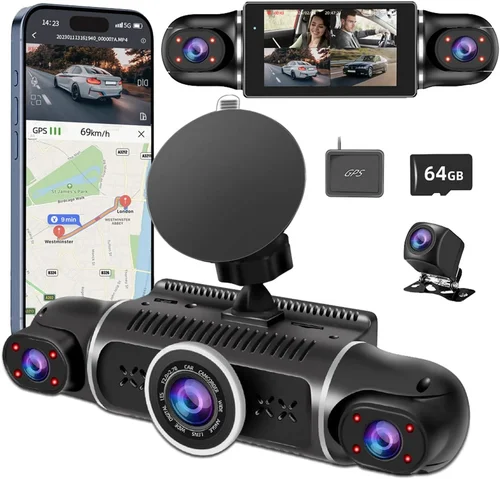
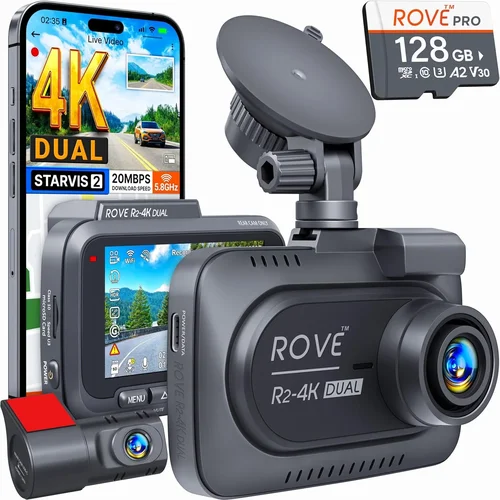
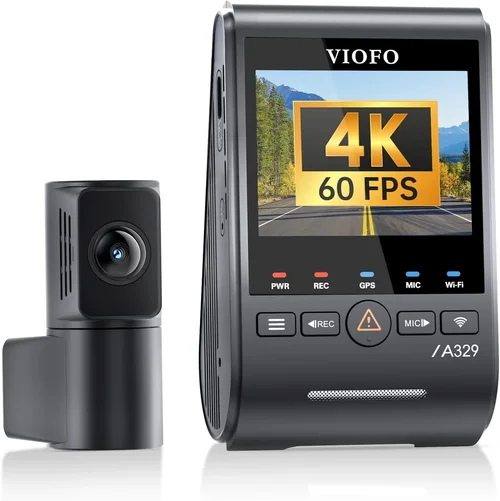
Best Dash Cam for New Drivers Buying Guide
As a new driver, you’re likely thinking about safety, confidence behind the wheel, and how to protect yourself in case of an accident. One tool that can significantly enhance your driving experience is a dash cam. But with so many options on the market, it’s hard to know which one is right for you. This comprehensive buying guide will help you navigate the world of dash cams and find the best one for your needs as a new driver.
In this guide, we’ll cover everything you need to know about choosing the right dash cam, from understanding the key features to comparing different types and models. By the end of this article, you’ll have a clear understanding of what to look for and how to make an informed decision that fits your budget and driving habits.
The dash cam market has exploded in recent years, offering everything from basic single-camera setups to advanced systems with multiple cameras, GPS tracking, and cloud connectivity. While this variety can be overwhelming, it also means there’s a perfect option for every driver. Whether you’re looking for something simple and affordable or a more feature-rich system, this guide will help you find the right fit.

What to Look for When Buying Dash Cams
1. Budget & Price Range
Your budget should be the first consideration when shopping for a dash cam. Prices range from under $50 for basic models to over $400 for premium systems with advanced features. As a new driver, you might want to balance cost with essential safety features rather than investing in every possible capability. Entry-level dash cams typically offer solid 1080p recording quality, while mid-range models often include additional features like parking mode, wider viewing angles, and better low-light performance.
Consider how long you plan to keep the car and whether the additional features in more expensive models justify the higher price. Many experts recommend spending at least $100-$150 for a reliable dash cam that offers good video quality and essential safety features. If you’re on a tight budget, look for sales during holidays or special promotions, but avoid the cheapest options as they often lack durability and reliable customer support.
2. Performance Specifications
The technical specifications of a dash cam directly impact its effectiveness as a safety tool. The most important specs include resolution, field of view, frame rate, and low-light performance. For new drivers, 1080p (Full HD) resolution is generally sufficient to capture clear details, while 4K recording offers exceptional clarity for license plates and road signs but requires more storage space.
A wider field of view (typically 120-150 degrees) provides better coverage of the road ahead and surroundings, reducing blind spots. Frame rate should be at least 30fps for smooth video playback. Low-light performance is crucial since most accidents occur in dim conditions. Look for models with f/1.8 or lower aperture values and night vision capabilities to ensure clear recordings during evening commutes or poorly lit areas.
3. Build Quality & Durability
As a new driver, you’ll want a dash cam that can withstand daily use and potential impacts. The build quality should include a sturdy housing, reliable mounting system, and quality components that won’t fail after months of use. Look for dash cams with metal construction rather than plastic, as they tend to be more durable.
The mounting system is equally important—ensure it provides a secure grip that won’t come loose during sudden braking or turns. Some models use suction cups, while others attach directly to the windshield with adhesive. Suction mounts are easier to remove but may lose grip over time, especially in hot weather. Adhesive mounts provide a permanent, secure installation but require careful removal if you sell the car.
Additionally, consider the operating temperature range of the device. Dash cams should function reliably in extreme temperatures, from sub-zero winter conditions to scorching summer heat. Check reviews for real-world durability reports and look for models specifically designed for automotive environments.
4. Features & Functionality
Modern dash cams offer numerous features that can enhance your driving experience and provide valuable evidence in case of accidents. Essential features for new drivers include:
- G-Sensor: Automatically detects collisions and saves footage to prevent overwriting
- Loop Recording: Continuously records over old footage when storage is full
- Parking Mode: Monitors your vehicle when parked and records if movement is detected
- GPS Tracking: Records location, speed, and direction for added context in incidents
- Wi-Fi Connectivity: Allows easy file transfer to smartphones for quick sharing
- Voice Control: Hands-free operation while driving
- Emergency Lock: Manually save important clips without affecting loop recording
While these features add value, prioritize based on your specific needs. Parking mode and G-sensor are particularly useful for new drivers concerned about theft or hit-and-runs when vehicles are unattended.
5. Brand Reputation
Choosing a reputable brand ensures reliability, quality control, and responsive customer service. Established manufacturers like BlackVue, Garmin, Thinkware, and Nextbase have proven track records in the dash cam industry. These brands typically offer better warranty terms, regular firmware updates, and more comprehensive customer support.
When evaluating brands, consider their market presence, user reviews, and years of operation. Newer companies might offer innovative features at competitive prices, but established brands provide greater peace of mind regarding long-term reliability and support. Look for brands that offer at least a two-year warranty and have positive feedback regarding product durability and customer service responsiveness.
6. Warranty & Support
A robust warranty and accessible customer support are crucial, especially for new drivers who may need guidance with installation or troubleshooting. Most quality dash cams come with at least a one-year warranty, but premium models often offer two or three years of coverage.
Check what the warranty covers—some exclude damage from drops or water exposure, while others provide comprehensive protection. Consider the availability of customer support channels: phone support, email, live chat, and detailed online resources all contribute to a positive ownership experience. Brands with international support are beneficial if you travel across borders, as some countries recognize dash cam footage differently.
7. Size & Portability
Dash cam size affects both aesthetics and functionality. Smaller models (about the size of a deck of cards) are less obtrusive and easier to conceal, making them harder for thieves to notice. However, larger models often have better sensors and lenses that capture more detail.
Consider where you’ll mount the device—some prefer discreet placement behind the rearview mirror, while others don’t mind visible units. Compact designs also make it easier to transfer between vehicles if you lease or frequently switch cars. Some models come with detachable batteries, allowing you to carry spare power sources for extended recording sessions.
8. User Reviews & Ratings
Real user experiences provide invaluable insights that specifications alone cannot convey. When reading reviews, focus on detailed feedback about long-term reliability, ease of use, and performance in various conditions. Pay attention to recurring issues mentioned by multiple users, as these patterns often indicate systemic problems.
Check review platforms beyond the product page itself—Amazon, Best Buy, and specialized automotive forums offer diverse perspectives. Be cautious of overly negative reviews that seem exaggerated or positive reviews that sound scripted. Look for balanced assessments that mention both strengths and weaknesses. Also consider the recency of reviews, as technology improves rapidly and older reviews might reference outdated models.
Different Types of Dash Cams

Common Buying Mistakes to Avoid
❌ Mistake: Choosing Based Solely on Price
Why it’s bad: While budget is important, selecting the cheapest available option often leads to disappointment. Ultra-low-priced dash cams frequently suffer from poor video quality, unreliable performance, short lifespans, and lack of customer support. These devices may fail when you need them most or produce footage too blurry for insurance claims.
What to do instead: Set a realistic budget based on your needs and stick to reputable brands within that range. Consider the total cost of ownership, including potential replacement costs and the value of reliable protection. A slightly more expensive model from a trusted manufacturer often proves more cost-effective in the long run due to durability and reliability.
❌ Mistake: Ignoring Storage Requirements
Why it’s bad: Many buyers overlook the importance of adequate storage capacity and compatible memory cards. Insufficient storage means critical footage gets overwritten before you can access it, defeating the purpose of having a dash cam. Additionally, not all microSD cards work well with dash cams—some lack the write speed or endurance needed for continuous recording.
What to do instead: Calculate your storage needs based on recording length and card capacity. For example, a 128GB card typically stores about 8 hours of 1080p footage. Choose cards with Class 10 rating or higher and UHS-I or U3 specification for optimal performance. Consider purchasing high-quality cards from recognized brands like SanDisk, Samsung, or Lexar, as cheaper alternatives may fail prematurely.
❌ Mistake: Overlooking Installation Complexity
Why it’s bad: Assuming all dash cams install easily can lead to frustration, incorrect mounting, or improper wiring. Some models require professional installation for proper power connection, especially those with parking mode features that draw continuous power from the battery. Poor installation can result in the device falling off, wires being damaged, or draining your car battery when parked.
What to do instead: Read installation guides thoroughly before purchasing. Simple USB-powered models are plug-and-play, while advanced features like parking mode often require hardwiring to your car’s fuse box. Consider your comfort level with automotive electrical work or factor in professional installation costs ($50-$150). Some retailers offer free installation services with purchase.
❌ Mistake: Neglecting to Test Before Committing
Why it’s bad: Buying without testing or researching extensively increases the risk of receiving a defective unit or incompatible product. Online descriptions and images don’t always reflect real-world performance, and shipping policies may limit returns for opened electronics.
What to do instead: Whenever possible, test dash cams in-store before buying. Visit local electronics retailers or automotive stores that carry these products. If purchasing online, choose sellers with generous return policies (at least 30 days) and read return instructions carefully. Watch unboxing and hands-on videos from multiple reviewers to understand actual performance and usability.
❌ Mistake: Focusing Only on Camera Features
Why it’s bad: While camera quality is important, overlooking other aspects like software interface, mobile app functionality, and cloud integration can create usability issues. A camera with excellent specs might have confusing menus, slow processing, or incompatible smartphone apps that make accessing footage unnecessarily difficult.
What to do instead: Evaluate the complete user experience, including software navigation and mobile connectivity. Test the companion app if available, checking ease of file transfer, playback controls, and settings adjustment. Consider how quickly you can retrieve and share footage in an emergency situation—this practical aspect often matters more than technical specifications alone.
❌ Mistake: Not Considering Legal Requirements
Why it’s bad: Different regions have varying laws regarding dash cam usage, recording permissions, and data privacy. In some areas, recording audio without consent may be illegal, while others require specific disclosure about surveillance equipment. Using a dash cam in violation of local laws could result in fines or evidence being inadmissible in court.
What to do instead: Research your local regulations before purchasing or using a dash cam. Check municipal ordinances, state laws, and insurance requirements. Some jurisdictions prohibit recording inside vehicles entirely, while others restrict where cameras can be placed or what information can be captured. When in doubt, consult legal resources or speak with law enforcement to ensure compliance.
Budget Guidelines: How Much Should You Spend?
Entry-Level ($50 – $100)
This price range offers basic dash cams suitable for occasional use or as backup protection. At this tier, you’ll find reliable 1080p recording with decent daytime performance, though low-light capabilities may be limited. These models typically include essential features like loop recording and G-sensor, but often lack advanced functionalities like WiFi connectivity or GPS tracking.
Recommended uses include city commuting, occasional highway driving, or as secondary protection in addition to a more advanced system. While build quality may not match higher-end models, reputable brands in this range still offer dependable performance for basic recording needs. Look for models from established manufacturers even at lower price points to ensure reasonable reliability.
Mid-Range ($100 – $250)
The sweet spot for most new drivers, this category balances performance, features, and value. Mid-range dash cams typically deliver superior video quality with improved low-light sensitivity, wider fields of view, and more durable construction. You’ll find advanced features like WiFi connectivity, GPS tracking, and enhanced parking mode capabilities at these price points.
This range includes many recommended models from respected brands, offering reliable performance for daily commuting and longer trips. The included accessories are usually more comprehensive, and customer support tends to be more responsive compared to budget options. For new drivers building confidence behind the wheel, this tier provides excellent protection without overwhelming complexity.
Premium ($250 – $400)
For drivers seeking top-tier performance and comprehensive protection, premium dash cams offer exceptional video quality, advanced features, and robust build quality. These systems typically include dual-lens setups, superior sensors, professional-grade software, and extensive connectivity options. Many premium models feature cloud storage, AI detection, and sophisticated parking monitoring.
This category suits frequent travelers, rideshare drivers, or those requiring maximum evidence quality for insurance or legal purposes. While the initial investment is higher, premium dash cams often last longer and provide more valuable features that justify the cost. For new drivers planning to keep their vehicle long-term, this investment pays dividends through enhanced security and peace of mind.
Luxury ($400+)
The luxury segment represents the pinnacle of dash cam technology, featuring cutting-edge innovations like 4K+ recording, multiple camera arrays, AI-powered incident detection, and seamless cloud integration. These systems often include professional-grade accessories, extended warranties, and concierge-level customer support.
While overkill for most new drivers, luxury dash cams benefit commercial operators, delivery services, or enthusiasts seeking the absolute best performance. Some models offer unique capabilities like interior cabin monitoring, advanced driver assistance warnings, or integration with smart home systems. For typical personal use, these features represent unnecessary expense unless specific requirements demand their capabilities.
Expert Tips for Getting the Best Deal
Timing Your Purchase Right
Strategic timing can significantly reduce dash cam costs without sacrificing quality. Major shopping events like Black Friday, Cyber Monday, and Prime Day offer substantial discounts on electronics, often matching or beating previous year’s deals. Additionally, back-to-school seasons and end-of-year clearance periods frequently feature reduced prices as retailers make room for new inventory.
Consider seasonal factors—dash cams see increased demand in spring and summer as people prepare for longer driving seasons, leading to temporary price increases. Shopping in late fall or winter may yield better deals as demand naturally decreases. Also, monitor price history websites that track fluctuations for specific models, helping you identify optimal purchase windows.
Where to Shop Smart
Comparing retailers is essential for finding the best value. Online marketplaces like Amazon offer competitive pricing and convenient delivery, while specialty automotive stores provide hands-on testing and expert advice. Electronics retailers like Best Buy often include installation services or extended warranties with purchase.
Local dealerships sometimes bundle dash cams with vehicle purchases, potentially saving money compared to standalone retail prices. However, these deals may include limited features or inferior models. Always compare complete package contents before committing to bundled offers. For the best selection and lowest prices, consider checking multiple retailer types and comparing shipping costs against in-store pickup options.
Spotting Hidden Deals
Beyond obvious sales, several strategies reveal hidden savings on dash cams. Manufacturer rebates and mail-in offers can reduce effective prices by $20-$50, especially during promotional periods. Signing up for retailer newsletters often provides exclusive discount codes unavailable to general shoppers.
Refurbished or open-box items from authorized dealers offer significant savings while maintaining warranty coverage. These units undergo thorough inspection and repair if needed, providing factory-refurbished quality at discounted prices. Additionally, consider manufacturer direct purchases, which sometimes include free accessories or extended warranties not available through third-party retailers.
Warranty Considerations
Thorough warranty evaluation prevents unexpected expenses and ensures reliable support. Beyond standard manufacturer warranties, some retailers offer extended protection plans covering accidental damage or mechanical failures beyond the original term. These additional warranties typically cost 15-25% of the product’s value but provide peace of mind for valuable investments.
When comparing warranties, pay attention to coverage specifics—some exclude certain types of damage while others provide comprehensive protection. Check claim processes and response times, as efficient warranty service significantly enhances ownership experience. For international travelers, verify warranty validity across different regions, as some brands limit coverage to specific countries.
Return Policies Matter
Flexible return policies mitigate purchase risks, especially when buying electronics online. Look for retailers offering at least 30-day return windows with original packaging included. Some stores provide in-store returns for online purchases, eliminating shipping hassles if the product doesn’t meet expectations.
Understanding restocking fees is crucial—some retailers charge 10-15% for opened electronics, reducing refund amounts. Free return shipping options significantly simplify exchanges or returns without financial penalties. For international customers, verify customs and import considerations that might affect return eligibility or costs.
Testing Before Buying
Whenever possible, evaluate dash cams in person before purchasing. Visit local electronics stores or automotive specialty shops that display these products. Physical examination allows assessment of build quality, button placement, screen visibility, and overall ergonomics that specifications alone cannot convey.
If in-person testing isn’t feasible, leverage online resources extensively. Watch comprehensive hands-on videos demonstrating real-world use, check sample footage quality, and read detailed user reviews focusing on long-term performance rather than initial impressions. Contact manufacturers directly with specific questions about features, compatibility, or performance characteristics relevant to your driving needs.
Accessory Investments
Essential accessories often represent overlooked costs that impact overall dash cam effectiveness. High-quality microSD cards with appropriate speed ratings are non-negotiable for reliable recording, while additional cables or mounting brackets may be necessary for proper installation. Parking mode functionality typically requires professional wiring kits that add $20-$50 to the total investment.
Consider future expansion needs—dual-camera systems require extra batteries or power adapters, while cloud-enabled models often involve monthly subscription fees. Budgeting for these ancillary items upfront prevents unpleasant surprises and ensures complete functionality from day one. Some retailers bundle essential accessories with core dash cams, providing better value than purchasing components separately.

Frequently Asked Questions
Q: Do I really need a dash cam as a new driver?
A: While not strictly mandatory, dash cams offer significant benefits for new drivers. They provide objective evidence in case of accidents, protect against false accusations, and can actually reduce insurance premiums in some cases. For new drivers building confidence and facing potential liability concerns, a dash cam serves as both a safety net and educational tool by recording driving scenarios for later review.
Q: What’s the difference between 1080p and 4K dash cams?
A: Resolution differences directly impact recording detail. 1080p (Full HD) captures sufficient detail for most situations, including license plates and road signs clearly enough for insurance claims. 4K recording provides exceptional clarity that reveals finer details but requires substantially more storage space—approximately four times the data of 1080p. For new drivers, 1080p generally offers the best balance of quality and practicality, while 4K becomes valuable only if you frequently encounter complex traffic situations requiring minute detail verification.
Q: How much storage do I need for my dash cam?
A: Storage requirements depend primarily on recording length and video quality. A 128GB microSD card typically stores about 8 hours of 1080p footage with standard compression. For daily use, allocate approximately 1 hour of recording per day—most new drivers won’t need more than 256GB unless recording extended periods or using higher resolutions. Consider your commute length, recording settings, and whether you’ll access footage frequently when determining capacity needs. Loop recording automatically manages storage by overwriting oldest files when full, preventing manual intervention.
Q: Should I hardwire my dash cam or use a cigarette lighter adapter?
A: Hardwiring is recommended for dash cams with parking mode functionality, as it draws minimal power from your car’s battery while parked. Cigarette lighter adapters work well for basic models but may drain your battery over time when the car is off. Professional hardwiring connects to your car’s fuse box, providing automatic power based on ignition status. While requiring installation expertise, hardwired systems eliminate battery drain concerns and ensure consistent operation regardless of adapter quality or cigarette lighter socket availability.
Q: Can dash cam footage be used as evidence in court?
A: Yes, properly recorded dash cam footage can serve as valuable evidence in legal proceedings. However, admissibility depends on several factors including recording quality, authenticity verification, and local evidence rules. Footage must be unaltered, clearly show relevant events, and demonstrate proper recording conditions. Some jurisdictions require specific formatting or metadata standards for digital evidence. To maximize evidentiary value, ensure your dash cam captures clear, timestamped footage and store backups securely. Consult legal professionals familiar with local evidence requirements for specific guidance.
Q: How do I prevent my dash cam from draining my car battery?
A: Battery drain prevention requires proper installation and feature management. For parking mode functionality, professional hardwiring with a low-power consumption setting minimizes drain while maintaining security monitoring. Many modern dash cams include intelligent parking modes that activate only when motion or impact is detected rather than running continuously. Adjust sensitivity settings to balance security needs with power conservation. If using cigarette lighter adapters, disconnect when parked for extended periods or use smart switches that cut power when the car is off. Regular maintenance checks ensure no parasitic loads develop from faulty installations.
Q: Are there any legal restrictions on where I can place my dash cam?
A: Legal restrictions vary significantly by jurisdiction but generally allow dash cam placement anywhere inside your vehicle as long as it doesn’t obstruct the driver’s view. Some areas prohibit recording audio without consent, while others require specific disclosure about surveillance equipment. Never place cameras facing into other vehicles’ interiors or public spaces where privacy expectations exist. In rental vehicles, check lease agreements about modifications and recording capabilities. Always comply with local laws regarding evidence collection and privacy rights to avoid legal complications.
Q: How often should I clean my dash cam lens?
A: Lens cleaning frequency depends on environmental conditions and usage patterns. Daily commuters in dusty or polluted areas may need weekly cleaning, while urban drivers might manage with biweekly maintenance. Use only microfiber cloths and lens-safe cleaning solutions—avoid paper towels, tissues, or household cleaners that can scratch surfaces or leave residues. Wipe gently in circular motions rather than rubbing aggressively. Check the lens periodically for smudges, fingerprints, or dirt accumulation that could degrade video quality. Proper maintenance preserves image clarity and extends component life.
Q: Can I use multiple dash cams simultaneously?
A: Multiple dash cams are technically possible but require careful consideration of power requirements, recording synchronization, and legal implications. Dual-front setups (one primary, one backup) are common for redundancy, but simultaneous operation demands sufficient power supply and storage capacity. Most importantly, ensure compliance with local laws regarding multiple recording devices and data collection practices. Some jurisdictions restrict multiple cameras to prevent privacy violations or evidence tampering. Professional installation becomes essential for complex multi-camera systems to ensure proper operation and legal admissibility of footage.
Q: What should I do if my dash cam stops working after installation?
A: Troubleshooting steps depend on the specific failure but begin with basic checks. Verify power connections, ensure the microSD card is properly inserted, and confirm the device isn’t in sleep mode. Try removing and reinserting the memory card, as improper seating often causes startup failures. If using parking mode, check fuse box connections and ensure proper voltage levels. Reset the device according to manufacturer instructions—many models have physical reset buttons or software resets through menu systems. Document error messages or unusual behavior to share with customer support, providing serial numbers and purchase dates for warranty validation.
Our Final Recommendations
Best for Budget-Conscious Buyers
The Viofo A119 v3 represents exceptional value for new drivers prioritizing reliability over advanced features. Priced around $120, this single-lens dash cam delivers reliable 1080p recording with impressive low-light performance and essential safety features like G-sensor and loop recording. Its compact design sits discreetly behind the rearview mirror, minimizing visual obstruction while providing clear evidence capture.
This model stands out for its straightforward operation, durable construction, and consistent performance across various lighting conditions. While lacking WiFi connectivity or GPS tracking, the A119 v3’s simplicity reduces complexity-related issues while delivering dependable protection. For new drivers on a tight budget seeking trustworthy basic coverage, this dash cam provides an excellent foundation for building driving confidence without unnecessary complications.
Best Overall Value
The Thinkware Q2000 Pro strikes an ideal balance between features, performance, and price for new drivers ready to invest in comprehensive protection. Priced at approximately $250, this premium single-lens model delivers stunning 4K recording with superior sensor technology that captures exceptional detail in challenging light conditions. Advanced features include built-in GPS tracking, WiFi connectivity for easy file sharing, and sophisticated parking mode with impact detection.
What makes the Q2000 Pro exceptional is its professional-grade software interface that simplifies complex operations while providing powerful editing tools for footage management. The included Super Night Vision technology dramatically improves low-light recording quality, addressing one of the biggest challenges for urban drivers. For new drivers willing to invest in a system that grows with their driving experience, this dash cam offers outstanding value through its combination of cutting-edge technology and user-friendly operation.
Best Premium Option
The BlackVue DR970X-2CH represents the gold standard for serious drivers seeking maximum protection and evidence quality. At around $350, this dual-lens system includes front and rear cameras with 2K resolution each, providing comprehensive coverage of all vehicle movements. Industry-leading features include cloud connectivity, advanced parking mode, and exceptional build quality that withstands demanding conditions.
The BlackVue app ecosystem sets this system apart, offering intuitive remote viewing, automatic cloud backups, and detailed trip analytics. Professional installation ensures optimal performance, though the system works adequately with DIY installation for basic functionality. For new drivers planning to keep their vehicle long-term or frequently encountering complex traffic situations, the DR970X-2CH’s comprehensive capabilities justify its premium positioning through unmatched reliability and feature richness.
Best for Beginners
The Garmin Dashcam Mini excels as an entry point for new drivers intimidated by complex dash cam interfaces. With its streamlined design and straightforward operation, this compact device focuses on essential functionality without overwhelming users. Priced competitively around $150, it delivers reliable 1080p recording with automatic incident detection and loop recording.
Garmin’s reputation for user-friendly electronics shines through in this model’s simple controls and clear on-screen menus. The accompanying smartphone app provides basic file management without complicated settings adjustments. Its discreet profile and reliable performance make it perfect for new drivers who want protection without technical complexity. While lacking advanced features like GPS or WiFi, the Dashcam Mini’s reliability and ease of use establish it as the ideal starting point for drivers transitioning to dash cam ownership.
Best for Advanced Users
The Nextbase 622GW caters to experienced drivers who demand professional-grade features and connectivity. Positioned at approximately $200, this single-lens model packs surprising capabilities including 1440p recording, built-in WiFi, GPS tracking, and Alexa voice control. Its innovative SOS button instantly shares location and emergency contacts with pre-selected contacts—a valuable feature for new drivers building confidence on unfamiliar routes.
The Nextbase app ecosystem offers sophisticated features like live streaming, cloud storage options, and advanced video editing tools. The inclusion of emergency alert functionality addresses legitimate safety concerns for drivers navigating uncertain situations. While slightly more complex than beginner models, the 622GW’s intuitive interface and comprehensive feature set make it accessible to motivated new drivers ready to explore dash cam capabilities beyond basic recording. Its blend of practical safety features and advanced technology positions it perfectly for drivers transitioning from entry-level to intermediate usage.
Conclusion: Making the Right Choice
Selecting the best dash cam for new drivers requires balancing immediate needs with long-term goals. Rather than chasing every technological advancement, focus on core capabilities that provide meaningful protection: reliable recording quality, essential safety features, and durable construction. Your choice should reflect your driving patterns, budget constraints, and willingness to handle technical complexities.
Remember that a dash cam serves primarily as evidence protection rather than active safety enhancement—it documents events rather than preventing them. Therefore, prioritize models that consistently capture clear, timestamped footage that would hold up in real-world scenarios. Don’t overlook practical considerations like installation complexity, storage management, and battery conservation when evaluating options.
As a new driver, your investment in quality dash cam protection pays dividends through enhanced confidence, reduced insurance concerns, and objective evidence in challenging situations. Start with a model matching your current needs, knowing that technology evolves rapidly and upgrading becomes easier once you understand your preferences. Whatever you choose, the peace of mind that comes with documented protection makes this investment worthwhile for any responsible driver committed to safety and accountability.