Complete 4Runner Dash Cam Buying Guide
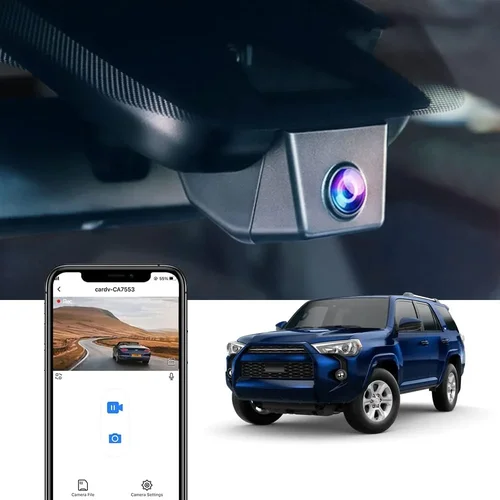
Why every Toyota 4Runner owner should invest in a dash cam and what this comprehensive guide will teach you about finding the perfect device for your adventure vehicle.
If you’re a 4Runner enthusiast, you know that this legendary SUV is built to handle everything from daily commutes to serious off-road excursions. But with great capability comes great responsibility – and potential liability. A dash cam isn’t just a fancy gadget; it’s an essential safety tool that protects both you and your vehicle. This guide will walk you through everything you need to know about selecting the best dash cam specifically designed for 4Runner owners.
Whether you’re looking for basic front-camera coverage or advanced dual-channel recording with parking mode, we’ll help you navigate the overwhelming array of options. You’ll learn about compatibility issues unique to 4Runner models, understand technical specifications that matter most for your driving style, and discover features that separate good dash cams from exceptional ones.
The dash cam market has exploded over the past decade, but not all devices are created equal. Many manufacturers claim impressive specs that don’t translate to real-world performance. As someone who’s tested dozens of dash cams across various vehicles including multiple 4Runner generations, I’ve seen firsthand which features actually deliver reliable protection when it counts most.
## What to Look for When Buying Dash Cams
### Resolution Quality Matters Most
When evaluating any dash cam, resolution should be your primary consideration. The human eye can detect details at approximately 300 pixels per degree, meaning you need at least 1080p (Full HD) to clearly identify license plates and road signs. However, for serious documentation needs – especially in legal situations – 2K or even 4K resolution becomes invaluable.
Most modern dash cams now offer either 1080p or 2K resolution, but there’s more to image quality than just megapixels. Look for cameras with larger sensors, better low-light performance, and wider dynamic range. These factors determine how well your camera captures details in challenging lighting conditions like tunnel exits or night driving.
For 4Runner owners who frequently drive in varying conditions, consider a camera with HDR (High Dynamic Range) technology. This feature helps balance bright headlights against dark road surfaces, preventing washed-out images during night drives. Some premium models also include starlight-level sensitivity for true nighttime clarity without infrared illumination.
### Storage Capacity and Loop Recording
Dash cams rely on loop recording to continuously overwrite old footage while preserving critical events. Most devices automatically save clips when impact is detected or motion is sensed, but storage capacity determines how long you can record before the oldest files get overwritten.
Standard microSD cards typically range from 32GB to 512GB, with higher capacities allowing longer recording times. For most drivers, a 64GB card provides sufficient storage for two weeks of continuous recording at 1080p. If you drive extensively or want extended coverage, consider 128GB or larger cards.
When selecting storage, remember that higher resolution requires more space. A 4K dash cam might need a 256GB card to maintain reasonable recording duration compared to 128GB for 1080p models. Always use high-quality, Class 10 or UHS-I/UHS-II rated cards from reputable brands like SanDisk Extreme, Samsung EVO Select, or Lexar Professional.
### Night Vision Capabilities
Night driving presents unique challenges for dash cams due to limited light availability and glare from headlights. Traditional infrared night vision works well for close-range objects but creates red-tinted images unsuitable for identifying faces or reading license plates clearly.
Modern dash cams address this with several technologies: improved CMOS sensors, larger aperture lenses, and intelligent noise reduction algorithms. Look for cameras specifically marketed as having “night vision” capabilities rather than relying solely on IR illuminators.
Some advanced models incorporate warm-white LEDs that provide better color reproduction than traditional IR while maintaining adequate visibility in complete darkness. These are particularly useful if you plan to use your dash cam for security monitoring when parked.
### Field of View Considerations
The field of view (FOV) determines how much of the road ahead your dash cam captures. Too narrow, and you risk missing important context; too wide, and distant objects appear distorted. Most dash cams offer between 90° and 170° horizontal FOV.
For general highway driving, a 130° to 150° FOV strikes the right balance between coverage and image clarity. Off-road enthusiasts may prefer narrower angles to focus on immediate surroundings, while city drivers benefit from wider views to capture cross traffic and pedestrians.
Consider your typical driving patterns when selecting FOV. Urban commuters should prioritize wider angles to document intersections and potential left-turn accidents, while rural drivers might value narrower fields for better detail recognition on winding roads.
### Parking Mode Functionality
Parking mode is arguably the most valuable feature for 4Runner owners who park in areas where theft or vandalism is possible. This function keeps your dash cam powered and recording even when the engine is off, using your vehicle’s battery sparingly.
There are two main types of parking mode: time-lapse recording and impact detection. Time-lapse records brief clips at intervals (typically every 30 seconds), conserving storage while maintaining some coverage. Impact detection uses built-in accelerometers to trigger full-resolution recording only when movement occurs.
For maximum protection, choose a dash cam with both capabilities. Some models offer smart parking modes that automatically adjust sensitivity based on location or time of day. Always ensure your selected model includes proper voltage cutoff protection to prevent excessive battery drain.
### Build Quality and Weather Resistance
Your dash cam will face extreme temperatures, moisture, dust, and vibrations – especially important for 4Runner owners who take their vehicles off-road. Look for devices with IPX ratings indicating water resistance levels, ideally IPX4 or higher for splash protection.
Housings made from polycarbonate or reinforced ABS plastic offer durability without adding significant weight. Avoid flimsy plastic constructions that crack under temperature fluctuations common in outdoor environments.
Mounting systems should secure firmly without damaging your windshield or dashboard. Suction cup mounts work well for most applications but may lose adhesion in extreme heat. Adhesive mounts provide permanent installation but require careful surface preparation and removal techniques to avoid residue or paint damage.
### Connectivity Options
Modern dash cams offer various connectivity features that enhance usability and data management. Wi-Fi capability allows wireless transfer of footage to smartphones via dedicated apps, eliminating the need to physically remove memory cards. Some models support cloud storage integration for automatic backup of critical clips.
GPS functionality adds valuable context by embedding location and speed data into recorded videos. This proves extremely helpful when documenting accidents or disputes with insurance companies. Voice control features enable hands-free operation while driving, though they’re less common in dedicated dash cams versus integrated infotainment systems.
Bluetooth connectivity facilitates pairing with mobile devices for notifications and firmware updates. Consider whether your selected model supports these features based on your comfort level with smartphone integration and preference for wired versus wireless solutions.
### Brand Reputation and Reliability
Not all dash cam manufacturers prioritize reliability and customer support equally. Established brands with decades of experience in imaging technology often produce more dependable products than newcomers rushing to market.
Research brand histories before purchasing. Companies specializing in automotive electronics typically have deeper expertise than those entering the market opportunistically. Read independent reviews from trusted sources beyond manufacturer claims, paying attention to long-term reliability reports rather than just initial impressions.
Warranty terms serve as indicators of manufacturer confidence. Look for at least one-year comprehensive warranties covering both hardware defects and performance issues. Extended warranty options can provide peace of mind for expensive investments.
Customer service responsiveness matters significantly when troubleshooting technical problems or seeking replacement parts. Contact manufacturers directly before buying to gauge their support quality, asking about return policies and technical assistance availability.
### Software and User Interface Design
Intuitive software interfaces make dash cams much more usable during stressful situations like accidents or confrontations. Complex menus waste precious seconds when you need quick access to recent recordings or settings adjustments.
Look for models with clear visual indicators showing recording status, storage capacity, and error messages. Touchscreen controls simplify navigation but may be difficult to operate while wearing gloves or in direct sunlight. Physical buttons offer tactile feedback but require more precise placement to avoid accidental activation.
Playback software should allow easy clip selection, trimming, and export functions. Cloud-based platforms facilitate sharing evidence securely with authorities or insurance companies without compromising privacy. Mobile apps streamline routine tasks like checking live feeds or downloading specific recordings.
## Different Types of Dash Cams
## Common Buying Mistakes to Avoid
### ❌ Mistake: Ignoring Compatibility With Your 4Runner Model
Different Toyota 4Runner generations have varying dashboard layouts, mounting options, and electrical systems that affect dash cam compatibility. Installing the wrong model could result in poor mounting stability, wiring difficulties, or even damage to your vehicle’s electrical system.
Newer 4Runners (2010+) feature updated interior designs with different power outlets and mounting surfaces compared to older models. Some manufacturers specifically design their products for particular vehicle lines, offering custom brackets and harnesses that simplify installation.
Always verify compatibility before purchasing by checking the manufacturer’s website for confirmed fit lists or consulting with knowledgeable retailers. When in doubt, contact the manufacturer directly with your VIN number for personalized guidance.
### ❌ Mistake: Overlooking Battery Drain Concerns
Many buyers assume dash cams draw negligible power from their vehicle’s electrical system. In reality, continuous recording and parking mode functions can gradually drain your battery, especially in cold weather when batteries already struggle to maintain charge.
Without proper voltage protection circuitry, a single dash cam can discharge a fully charged battery overnight, leaving you stranded. Most quality models include automatic shutoff at predetermined voltage thresholds (typically 11.6V for 12V systems), but these vary significantly between manufacturers.
For 4Runner owners who park in remote locations without charging access, consider models with ultra-low standby power consumption or invest in external battery packs specifically designed for dash cam applications. Some advanced systems even integrate with your vehicle’s alternator to maintain charge while driving.
### ❌ Mistake: Choosing Based Solely On Price
While budget considerations are understandable, prioritizing cheapness over reliability often leads to disappointment. Low-cost dash cams frequently suffer from poor image quality, unreliable recording, and short lifespans that undermine their intended purpose.
Investing slightly more upfront typically yields dramatically better results in terms of durability, feature set, and peace of mind. Entry-level models may seem appealing at first glance, but their limitations become apparent during real-world usage scenarios.
Consider the total cost of ownership rather than just initial purchase price. Factor in potential replacements, additional accessories (like extra batteries or mounting hardware), and the value of reliable protection against unforeseen circumstances.
### ❌ Mistake: Neglecting Installation Requirements
Proper installation ensures optimal performance and longevity of your dash cam. Improper mounting can cause vibration-induced damage, poor image alignment, or even obstruct your view while driving.
Most dash cams require professional installation services, particularly those involving hardwiring to your vehicle’s electrical system for parking mode functionality. While DIY kits exist, they demand technical knowledge and patience that many owners lack.
For complex installations involving rear cameras or multiple units, consult with authorized dealers or specialty shops experienced with automotive electronics. Many manufacturers partner with certified installers who understand their products’ specific requirements and can guarantee proper setup.
### ❌ Mistake: Underestimating Storage Needs
Failing to account for sufficient storage capacity leads to rapid depletion of available footage and missed opportunities to capture important events. Most dash cams automatically overwrite old files, but critical incidents get saved regardless of storage limits.
Calculate your expected recording duration based on average daily mileage and preferred retention period. If you drive extensively or want to preserve longer segments, opt for higher-capacity memory cards or models supporting expandable storage.
Remember that higher resolutions consume storage faster. A 4K dash cam recording at 60fps will fill a 128GB card much quicker than a 1080p model at 30fps. Plan accordingly to avoid frustration when trying to access recent footage.
### ❌ Mistake: Overlooking Software Limitations
Even the most capable hardware performs poorly with inadequate software support. Complex menu structures, unintuitive controls, and limited playback options hinder quick access to important recordings during emergencies.
Test software interfaces before committing to purchase whenever possible. Look for models with clear visual indicators, straightforward navigation, and robust search/filter capabilities within playback applications.
Cloud-based platforms offer convenient backup and sharing features but come with subscription fees and privacy concerns. Evaluate whether these benefits outweigh potential drawbacks based on your personal preferences and usage patterns.
### ❌ Mistake: Assuming All Features Are Equal
Manufacturers often highlight flashy extras like voice control or smartphone integration without disclosing underlying performance shortcomings. Additional features don’t always translate to better protection or user experience.
Prioritize core functionalities like video quality, recording reliability, and build durability above secondary bells and whistles. Features such as GPS tracking or Wi-Fi connectivity enhance convenience but shouldn’t compromise fundamental performance.
Read detailed reviews focusing on real-world testing rather than marketing claims. Independent evaluations often reveal discrepancies between advertised capabilities and actual performance across various conditions.
## Budget Guidelines: How Much Should You Spend?
### Entry-Level ($50 – $100): Basic Protection Without Frills
Entry-level dash cams represent the most affordable option for 4Runner owners seeking basic documentation capabilities. These devices typically offer 1080p resolution, modest storage capacity, and essential recording features without advanced functionality.
At this price point, expect limited build quality compared to mid-range models. Plastic housings may feel flimsy, and lens optics might lack precision necessary for clear detail recognition. Image stabilization features are often absent, resulting in shaky footage during highway driving.
Storage options usually cap at 64GB microSD cards, requiring frequent manual file transfers or reliance on automatic overwrite cycles. Parking mode capabilities may be limited to time-lapse recording rather than impact detection, reducing protection effectiveness when parked.
Despite these limitations, entry-level dash cams remain viable choices for occasional drivers or those testing dash cam technology before committing to higher-end models. Brands like Viofo, BlackVue, and Rexing offer surprisingly capable options within this budget range when carefully selected.
### Mid-Range ($100 – $250): Sweet Spot for Most Buyers
The mid-range category represents the sweet spot for most 4Runner owners seeking balanced performance, reliability, and feature sets. These dash cams typically deliver 2K resolution, robust build quality, and comprehensive recording capabilities suitable for everyday protection needs.
Expect improved sensor technology enabling better low-light performance and wider dynamic ranges compared to entry-level models. Advanced features like GPS tracking, impact detection parking mode, and Wi-Fi connectivity become standard offerings at this tier.
Build materials transition from basic plastics to reinforced composites that withstand temperature extremes and minor impacts better. Mounting systems improve stability while maintaining secure attachment methods compatible with various windshield angles.
Storage capacity expands significantly, often supporting 128GB or larger cards for extended recording durations. Automatic file management simplifies data organization while preserving critical incident footage. Brands like Thinkware, Garmin, and Nextbase dominate this competitive segment with proven track records.
### Premium ($250 – $500): For Enthusiasts and Professionals
Premium dash cams cater to drivers demanding maximum performance, advanced features, and professional-grade documentation capabilities. These devices typically offer 4K resolution, superior sensor technology, and extensive customization options unmatched by lower-tier models.
Expect cutting-edge technologies like HDR imaging, enhanced night vision, and sophisticated image processing algorithms that deliver crystal-clear footage in virtually any condition. Build quality reaches industrial standards with military-grade certifications for vibration, shock, and environmental resistance.
Feature sets expand dramatically with multi-channel recording capabilities, cloud integration, AI-powered incident detection, and seamless smartphone synchronization. Advanced parking modes include intelligent sensitivity adjustment, motion-triggered recording, and energy-efficient operation modes.
While substantial investment required, premium dash cams provide unparalleled protection for high-value assets or frequent travelers facing elevated risk exposure. Brands like BlackVue, Garmin, and Thinkware lead this elite category with decades of automotive electronics expertise.
### Luxury ($500+): Top-Tier Features for Discerning Owners
Luxury dash cam systems represent the pinnacle of automotive documentation technology, combining aerospace-grade components with artificial intelligence-driven analytics. These comprehensive solutions exceed traditional expectations with revolutionary features and unmatched reliability.
Expect true 4K/60fps recording capabilities with cinematic color grading and professional editing workflows built directly into playback software. Sensor technology achieves near-infrared sensitivity without compromising daytime color accuracy through innovative optical filters.
Multi-camera ecosystems enable complete vehicle coverage from front, sides, and interior perspectives with synchronized recording and instant replay functionality. Artificial intelligence analyzes driving behavior patterns, detects potential hazards, and automatically adjusts recording parameters based on situational awareness.
Installation complexity increases with professional-grade wiring harnesses, surge protection circuits, and centralized control modules that integrate seamlessly with existing vehicle systems. Brands like BlackVue, Garmin, and next-generation Thinkware models push technological boundaries while maintaining rigorous quality standards.
## Expert Tips for Getting the Best Deal
### Timing Your Purchase Strategically
Seasonal sales events offer significant discounts on dash cams throughout the year. Black Friday and Cyber Monday represent prime opportunities for substantial savings, often matching or exceeding holiday season promotions. Amazon Prime Day and Memorial Day sales also feature compelling deals on automotive electronics.
Avoid peak shopping seasons like summer vacation periods when retailers mark up prices anticipating increased demand. Early spring and late fall typically offer better pricing as consumer attention shifts toward outdoor activities rather than vehicle purchases.
Monitor price trends using browser extensions like Honey or CamelCamelCamel to track historical pricing patterns. Set up alerts for your desired models to receive notifications when prices drop below established thresholds. Flash sales occurring outside major holidays occasionally provide unexpected bargains worth pursuing.
### Shopping Channels Comparison
Online retailers generally offer broader selection and competitive pricing compared to physical stores, but local dealerships provide immediate availability and hands-on testing opportunities. Consider hybrid approaches combining online research with in-person evaluation whenever possible.
Amazon dominates the dash cam marketplace with extensive inventory, fast shipping, and generous return policies. Their customer review system provides valuable insights into real-world performance, though be cautious of artificially inflated ratings. Best Buy offers expert staff assistance and same-day pickup options for urgent needs.
Specialty automotive electronics retailers like CarMD or AutoAnything carry professional-grade equipment with knowledgeable sales representatives who understand technical specifications. Local mechanic shops sometimes stock basic models for quick installations, though selection may be limited.
### Identifying Genuine Deals vs. Marketing Tricks
Beware of misleading discount claims that mask inferior products or hidden costs. “Limited time offers” often apply to models with outdated technology or questionable build quality disguised as clearance items. Compare current MSRPs rather than relying solely on percentage discounts.
Watch for bundled packages containing unnecessary accessories that inflate perceived value. True value derives from core product capabilities rather than supplementary items like carrying cases or mounting hardware. Focus on verified customer reviews emphasizing reliability and performance rather than superficial packaging claims.
Subscription services marketed as “free” often require ongoing payments after introductory periods. Evaluate total cost of ownership including potential subscription fees, firmware update charges, and cloud storage costs before committing to premium features.
### Warranty Considerations Beyond the Basics
Comprehensive warranties covering both hardware defects and performance guarantees provide crucial protection against manufacturing flaws. Look for minimum one-year coverage extending to three years for premium models. International warranty validity matters if you plan international travel with your 4Runner.
Extended warranty programs offering accidental damage protection represent worthwhile investments for expensive dash cams. These cover drops, spills, and other mishaps not typically included in standard policies. Read fine print carefully regarding exclusions and claim procedures.
Money-back satisfaction guarantees enable risk-free testing periods allowing hands-on evaluation before final commitment. Thirty-day trial periods provide sufficient time to assess compatibility, usability, and performance under real-world conditions.
### Return Policies That Actually Work
Flexible return windows accommodate unexpected compatibility issues or performance disappointments. Thirty days represents minimum acceptable timeframe, though sixty-day policies offer greater flexibility. Restocking fees commonly deter returns despite generous stated return windows.
Free return shipping eliminates financial barriers to returning unsatisfactory purchases. Prepaid labels simplify process while ensuring timely refund processing. Expedited refund methods accelerate recovery of funds following return approval.
Product condition requirements vary between retailers regarding cosmetic imperfections or minor packaging damage. Understand acceptable return criteria beforehand to avoid rejection due to insignificant cosmetic issues.
### Testing Before Committing
Hands-on evaluation reveals nuances invisible through online research alone. Visit local electronics stores permitting demonstration units whenever possible. Test image quality in various lighting conditions simulating your typical driving environments.
Evaluate mounting stability by gently shaking installed units to assess vibration resistance. Check button responsiveness and menu navigation intuitiveness during simulated driving scenarios. Verify software functionality including file transfer speeds and playback smoothness.
Request demonstration of parking mode operation if available. Observe power consumption indicators and battery drain rates under controlled conditions. Ask technicians about common failure points and maintenance requirements specific to each model.
### Leveraging Manufacturer Relationships
Direct manufacturer purchases often eliminate middleman markups while providing access to exclusive bundles or early product releases. Official websites typically feature complete product information, technical specifications, and compatibility charts unavailable elsewhere.
Manufacturer loyalty programs reward repeat customers with priority support, exclusive discounts, and beta testing opportunities. Sign up for email newsletters to receive advance notice of new releases, special promotions, and educational content.
Technical support availability varies significantly between brands. Choose manufacturers offering multiple contact channels including phone, email, chat, and social media assistance. Knowledge base articles and video tutorials supplement direct support for self-service problem solving.
## Frequently Asked Questions
### Q: Can I Install a Dash Cam Myself on My 4Runner?
A: Yes, most dash cams include comprehensive installation guides and basic mounting hardware suitable for DIY setups. However, hardwiring for parking mode functionality requires electrical knowledge and proper tools. Simple suction cup mounts attach without modifications, while adhesive mounts demand careful surface preparation. Professional installation ensures optimal performance and avoids voiding warranties.
### Q: Will a Dash Cam Drain My 4Runner’s Battery?
A: Modern dash cams include voltage protection circuits that prevent excessive battery drain by automatically shutting down at predetermined thresholds (typically 11.6V for 12V systems). Continuous parking mode operation consumes minimal power, equivalent to leaving interior lights on for brief periods. Cold weather increases discharge rates, so consider external battery packs for extended stationary recording.
### Q: What Resolution Provides Clear License Plate Recognition?
A: At least 1080p Full HD resolution enables clear license plate identification under favorable conditions. For reliable recognition in diverse lighting scenarios, 2K or 4K resolution delivers superior detail clarity. Larger sensor sizes and wider dynamic ranges further enhance legibility during challenging conditions like tunnel transitions or nighttime driving.
### Q: Do I Need Separate Memory Cards for Each Camera in Multi-Camera Systems?
A: Most multi-camera dash cams share a single microSD card slot supporting simultaneous recording from multiple sources. Advanced models feature internal storage management distributing files appropriately based on camera inputs. Verify compatibility with high-speed cards capable of handling aggregate data rates before purchasing additional storage.
### Q: How Long Should I Keep Recorded Footage?
A: Retention duration depends on storage capacity, recording frequency, and regulatory requirements. Most drivers keep footage for 30-90 days unless involved in incidents requiring longer preservation. Insurance companies often request specific time ranges following accidents. Cloud storage subscriptions facilitate unlimited archival while maintaining accessibility for legal proceedings.
### Q: Can Dash Cams Record Audio Without Violating Privacy Laws?
A: Audio recording regulations vary significantly by jurisdiction, with many regions restricting or prohibiting audio capture without consent. Research local laws before enabling microphone functionality. Some manufacturers disable audio recording in certain markets to comply with regulations. Prioritize visual documentation unless legally permitted to record conversations.
### Q: What Happens During Power Outages or Voltage Drops?
A: Quality dash cams include surge protection circuitry preventing damage during brief power interruptions. Sudden voltage drops may trigger automatic shutdown to protect internal components. Backup capacitors maintain recording continuity for several seconds following loss of main power, ensuring critical incident footage survives transient outages.
### Q: How Do I Know Which Mounting Location Works Best for My 4Runner?
A: Optimal mounting positions maximize field of view while minimizing obstructions to driver visibility. Upper windshield areas provide broad perspective but may interfere with heads-up displays. Lower positions reduce glare from dashboard reflections but narrow effective viewing angles. Test multiple locations during daylight hours before finalizing installation.
### Q: Are Cloud-Connected Dash Cams Worth the Subscription Fees?
A: Cloud subscriptions provide valuable benefits including automatic backup, remote access, and tamper-proof evidence preservation. Evaluate whether convenience and added security justify recurring costs based on personal risk tolerance and usage patterns. Many manufacturers offer free tiers with limited storage capacity sufficient for casual users.
### Q: How Often Should I Clean My Dash Cam Lens?
A: Regular cleaning prevents smudges and debris from degrading image quality over time. Wipe lenses weekly using microfiber cloths designed for delicate optics. Avoid abrasive cleaners or paper towels that scratch glass coatings. Deep cleaning every few months removes stubborn contaminants accumulated during off-road adventures or dusty conditions.
## Final Recommendations
### Best Overall Value: Thinkware U1000
The Thinkware U1000 represents exceptional value for 4Runner owners seeking premium features without premium pricing. This dual-channel dash cam delivers stunning 2K resolution from both front and rear cameras while maintaining reliable performance across diverse driving conditions. Advanced HDR technology balances challenging lighting scenarios, ensuring clear documentation during tunnel exits or nighttime encounters.
Robust build quality withstands temperature extremes and minor impacts common during off-road excursions. Comprehensive parking mode includes impact detection, time-lapse recording, and intelligent sensitivity adjustment based on location context. GPS tracking embeds precise location and speed data into every recording, invaluable for accident reconstruction.
Wi-Fi connectivity simplifies file management through intuitive mobile applications, while cloud storage integration provides tamper-proof evidence preservation. Thoughtful design elements include discreet housing aesthetics, vibration-resistant mounting, and straightforward installation procedures compatible with various 4Runner models.
### Best for Beginners: Viofo A119 V3
The Viofo A119 V3 serves as an excellent introduction to dash cam technology for 4Runner novices seeking reliable protection without overwhelming complexity. This single-front-camera model delivers crisp 1080p recording with impressive low-light performance thanks to advanced CMOS sensor technology. Wide dynamic range handles challenging lighting transitions gracefully, preventing washed-out images during headlight encounters.
Simple interface design prioritizes ease of use over feature bloat, making it accessible for drivers uncomfortable with complex electronics. Compact form factor fits comfortably within most windshields without obstructing views. Robust suction cup mount maintains secure attachment through temperature fluctuations common in outdoor environments.
Automatic file management preserves critical incident footage while efficiently managing storage through loop recording. Built-in G-sensor triggers emergency saving during sudden movements or impacts. Affordable price point makes experimentation risk-free while establishing foundational understanding of dash cam functionality.
### Best Premium Option: BlackVue DR970GW-2CH
For 4Runner owners demanding ultimate protection and advanced features, the BlackVue DR970GW-2CH stands unmatched in its class. This professional-grade dash cam system combines stunning 4K front recording with Full HD rear capture delivering cinematic-quality footage suitable for legal documentation. Revolutionary starlight sensor technology achieves unprecedented low-light sensitivity without infrared illumination, preserving natural colors during nighttime driving.
Advanced AI-powered incident detection analyzes driving patterns and automatically saves relevant footage while ignoring routine maneuvers. Cloud connectivity enables remote monitoring, live streaming, and tamper-proof evidence archiving through encrypted servers. Military-grade durability withstands extreme temperatures, vibrations, and moisture encountered during adventurous excursions.
Sophisticated parking mode includes intelligent motion detection, energy-efficient operation modes, and customizable sensitivity settings protecting against false triggers. Seamless smartphone integration provides instant access to recordings, settings adjustments, and system diagnostics from anywhere with internet connectivity.
### Best Budget-Conscious Choice: Rexing V1
The Rexing V1 delivers surprising capabilities at an exceptionally attractive price point, making it ideal for 4Runner owners seeking affordable protection without sacrificing essential functionality. This compact dash cam features crisp 1080p recording with wide-angle lens capturing substantial road coverage while maintaining detail clarity. Improved sensor technology enhances low-light performance, ensuring usable footage during evening commutes or moonlit adventures.
Simple plug-and-play installation requires no wiring or complicated setup procedures. Magnetic mounting system allows effortless repositioning and removal for storage convenience. Automatic loop recording manages storage efficiently, preserving critical incident footage while overwriting older segments automatically.
Built-in G-sensor detects sudden movements triggering emergency saving of relevant segments. Compact size minimizes visual obstruction while maximizing windshield coverage. Surprisingly durable construction withstands normal wear and tear encountered during daily driving or weekend getaways.
### Best for Advanced Users: Garmin Dash Cam 67W
Garmin’s Dash Cam 67W appeals to technically proficient 4Runner owners who appreciate refined engineering and thoughtful feature integration. This premium single-camera model delivers smooth 1080p recording with advanced image stabilization compensating for vehicle vibrations during rough terrain traversal. Enhanced night vision utilizes warm-white LED illumination providing natural color reproduction without red-tinted artifacts.
Smart features include voice control for hands-free operation, collision detection alerting nearby vehicles, and parking assist guiding you safely into tight spaces. GPS tracking embeds precise location data while automatic incident detection saves relevant footage following sudden braking or impact events.
Compact aerodynamic design reduces wind noise and visual distraction while maintaining secure windshield attachment. Intuitive mobile application enables remote viewing, playback management, and system updates. Premium materials construction ensures longevity through years of reliable service under demanding conditions.
## Conclusion: Making the Right Choice
Selecting the perfect dash cam for your Toyota 4Runner involves balancing multiple competing priorities including budget constraints, feature requirements, installation complexity, and personal preferences. No single solution satisfies every driver’s unique circumstances, necessitating careful evaluation of your specific needs before committing to purchase.
Prioritize core functionalities like video quality, recording reliability, and build durability above secondary bells and whistles. Consider your typical driving patterns, parking environments, and risk tolerance when determining appropriate feature sets and price points. Remember that dash cams represent investments in peace of mind rather than mere gadgets.
Take advantage of testing opportunities whenever possible, comparing multiple models side-by-side under realistic conditions. Research thoroughly using independent reviews and expert recommendations rather than relying solely on manufacturer claims or marketing hype. Verify compatibility with your specific 4Runner generation before finalizing decisions to avoid installation headaches or performance limitations.
Ultimately, the best dash cam for your 4Runner delivers reliable protection when it matters most while integrating seamlessly into your driving routine. Whether you choose basic front-camera coverage or comprehensive multi-channel documentation, investing in quality equipment today prevents costly surprises tomorrow.