How to Choose the Best Dash Cam for a Semi Truck
Choosing the right dash cam for a semi truck isn’t just about capturing what happens on the road—it’s about protecting your livelihood, ensuring fleet safety, and providing crucial evidence in the event of an accident. For commercial drivers, especially those operating long-haul routes or managing their own independent trucking business, a reliable dash cam can be the difference between a minor incident and a catastrophic liability. Unlike passenger vehicles, semi trucks present unique challenges: limited mounting space, extreme temperature fluctuations, vibration from heavy loads, and the need for high-quality footage that can stand up in court. A poorly chosen dash cam might fail when you need it most, leaving you without critical documentation during disputes over responsibility, insurance claims, or even criminal allegations.
This comprehensive buying guide will walk you through everything you need to know to select the best dash cam for your semi truck. You’ll learn about the essential features that matter most for commercial use, how to evaluate performance under demanding conditions, and which brands offer the durability and reliability required for professional-grade operation. We’ll break down technical specifications like resolution, field of view, night vision capabilities, and storage options in plain language so you can make informed decisions without getting lost in jargon. Additionally, we’ll explore real-world scenarios where dash cams have made a significant impact—whether it’s preventing fraudulent claims, improving driver behavior, or securing legal protection after an incident. By the end of this article, you’ll have a clear understanding of how to match your specific needs with the right product, ensuring maximum value and peace of mind every mile of the way.
The market for dash cams has expanded dramatically over the past decade, offering everything from basic single-camera systems to advanced multi-sensor setups with GPS tracking and cloud connectivity. While consumer models often prioritize affordability and sleek design, professional dash cams built for commercial vehicles must withstand harsh environments while delivering forensic-level video quality. That’s why many fleet operators now invest in purpose-built solutions designed specifically for large trucks, buses, and other commercial rigs. These systems typically feature enhanced shock resistance, wider temperature tolerances, larger internal storage capacities, and integration with fleet management software. However, with so many options available—and misleading marketing claims—it’s easy to feel overwhelmed. This guide cuts through the noise by focusing on proven technologies, expert recommendations, and user experiences tailored to the demanding realities of semi-truck operation.

What to Look for When Buying Dash Cams
When selecting a dash cam for your semi truck, several critical factors come into play that go beyond basic video recording. The right choice depends on your operational environment, budget constraints, and specific security or compliance requirements. Below are the key elements you should evaluate before making a purchase.
1. Resolution & Video Quality
Video clarity is arguably the most important factor when choosing a dash cam for a semi truck. In the event of an accident or dispute, you’ll want footage that clearly shows license plates, road signs, and driver actions with minimal distortion. Most professional dash cams today support Full HD (1920×1080), but some high-end models offer 2K or even 4K resolution for sharper detail. However, higher resolution doesn’t always mean better performance—especially at night or in low-light conditions. Look for cameras with wide dynamic range (WDR) technology, which balances bright headlights with darker backgrounds to reduce overexposure. Also consider whether the camera supports HDR (High Dynamic Range), as this improves color accuracy and contrast in challenging lighting situations. For example, if you frequently drive through tunnels or encounter sudden changes in sunlight, WDR and HDR features become indispensable.
2. Field of View (FOV)
A broader field of view helps capture more of the road ahead and surrounding areas, reducing blind spots that could lead to missed incidents. Most dash cams offer between 100° and 160° horizontal FOV, but for semi trucks, a wider angle—ideally 150° or more—is recommended. Some advanced models feature ultra-wide lenses (up to 170°) that provide near-360° coverage when used in dual-camera setups. Keep in mind that extremely wide angles can introduce fisheye distortion, so look for models with optical correction or digital stabilization to maintain straight lines and accurate proportions. Dual-lens systems are particularly valuable for trucks, as they allow simultaneous front and rear recording without compromising image quality.
3. Night Vision & Low-Light Performance
Semi-truck drivers often spend long hours behind the wheel during nighttime deliveries or cross-country trips, making night vision capability crucial. Modern dash cams use infrared LEDs, starlight sensors, or Sony Starvis image sensors to enhance visibility in near-total darkness. Cameras with f/1.6 or lower aperture values let in significantly more light than standard lenses, resulting in clearer nighttime footage. Additionally, some models include intelligent night vision algorithms that automatically adjust exposure settings based on ambient light levels. Be wary of claims like “night vision” alone—always check actual test results and user reviews regarding performance after dark. Remember that even the best night vision won’t compensate for poor placement; ensure your camera faces forward unobstructed for optimal illumination.
4. Storage Capacity & Loop Recording
Dash cams rely on loop recording—continuously overwriting old footage when storage fills up—to ensure uninterrupted operation. For semi trucks, where trips can last days or weeks, sufficient local storage is essential. Most dash cams accept microSD cards ranging from 32GB to 256GB, but larger fleets may benefit from models supporting expandable storage via USB or direct network connection. Consider how much footage you’re willing to retain: most recommend keeping at least seven days of recordings for insurance purposes. If your card reaches capacity too quickly, invest in a faster write speed (Class 10 or UHS-I/UHS-II) to prevent dropped frames during high-motion events. Cloud-based storage offers an alternative for real-time backup but requires consistent cellular connectivity—something not all trucks enjoy.
5. Durability & Environmental Resistance
Commercial vehicles operate in brutal conditions—extreme heat, freezing cold, constant vibration, and potential impacts from debris. Your dash cam must withstand these stresses without failing. Look for IP65 or higher ingress protection ratings, indicating resistance to dust and water jets. Shock-resistant casings made from polycarbonate or aluminum alloy help absorb impacts during sudden stops or rough terrain. Temperature tolerance ranges should cover -4°F to 140°F (-20°C to 60°C) or wider; anything less risks sensor damage or lens fogging. Mounting hardware must also be secure enough to stay fixed even under heavy G-forces. Brands like Garmin, BlackVue, and Thinkware specialize in ruggedized designs engineered specifically for commercial use.
6. Power Source & Installation Options7. GPS & Location Tracking
Integrated GPS modules add valuable context to your recordings by timestamping footage and logging speed, location, and route data. This information proves invaluable during investigations or legal proceedings, showing exactly where an incident occurred and how fast you were traveling. Some advanced systems sync GPS data with cloud servers, enabling remote access and fleet-wide monitoring. If your job involves interstate travel, GPS tracking also helps with compliance reporting and mileage verification. Ensure your chosen dash cam supports standard NMEA output protocols if you plan to integrate it with existing telematics devices.
8. Audio Recording Capabilities
While not mandatory, audio recording can provide additional evidence during disputes—especially if verbal altercations occur on the road. However, privacy laws vary by state and country, so check local regulations before enabling microphone functionality. Some dash cams allow users to toggle audio on/off remotely via smartphone apps, giving you control over when conversations are captured. High-quality microphones should minimize background noise while amplifying speech clearly. Note that recording conversations without consent may violate wiretapping laws in certain jurisdictions—so proceed cautiously and consult legal counsel if unsure.
9. Smart Features & Connectivity
Modern dash cams increasingly incorporate smart technologies such as Wi-Fi, Bluetooth, and mobile app integration. These features enable wireless firmware updates, live streaming, cloud uploads, and remote playback—all accessible through your smartphone. Fleet managers often prefer centralized dash cam platforms that allow monitoring multiple units from a single dashboard, streamlining maintenance and data retrieval. Voice control, motion detection, and AI-powered event alerts (e.g., sudden braking or lane departure) further enhance situational awareness. While these extras add convenience, they also increase complexity and potential points of failure—so weigh benefits against your team’s technical proficiency.
10. Warranty & Customer Support
Given the high stakes involved in commercial driving, robust warranty coverage and responsive customer service are non-negotiable. Reputable manufacturers typically offer one to three years of limited warranties covering defects in materials and workmanship. Check whether repairs are handled locally or shipped back to headquarters, as turnaround times can affect downtime. Online forums, user manuals, and 24/7 helplines contribute to overall satisfaction. Brands with strong reputations in the commercial sector—such as Viofo, Nextbase, and Rexing—often provide superior post-purchase support compared to generic retailers.
Different Types of Dash Cams

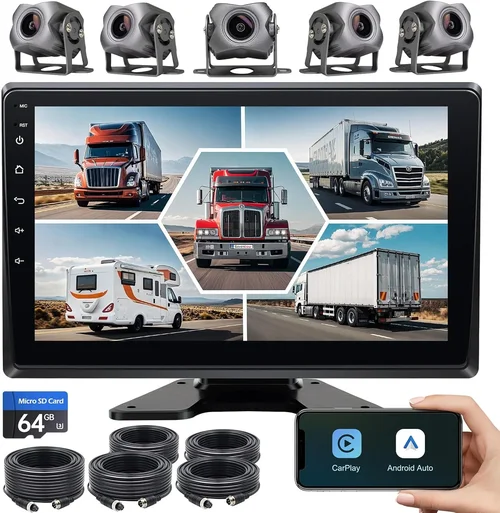
Each category serves distinct needs depending on fleet size, regulatory requirements, and operational complexity. Single-camera systems suit solo drivers who prioritize simplicity and affordability, while dual-lens kits offer balanced protection for small fleets. Multi-sensor panoramic systems represent the pinnacle of coverage but demand substantial investment and technical know-how. Wireless cloud-connected models appeal to forward-thinking operators embracing digital transformation, whereas rugged commercial-grade units deliver unmatched resilience for contractors working in deserts, mountains, or Arctic regions. Understanding these distinctions helps align your selection with realistic expectations and long-term goals.
Common Buying Mistakes to Avoid
Many truckers make costly errors when purchasing dash cams by overlooking critical details or falling for marketing hype. Learning from others’ missteps saves time, money, and headaches down the road.
❌ Mistake: Ignoring Temperature Tolerance
Why it’s bad: Semi trucks operate in extreme climates—from scorching desert highways to frozen tundras. A dash cam rated only for mild temperatures may malfunction when exposed to subzero conditions or intense summer heat. Sensor degradation, lens fogging, and circuit failures are common outcomes, leaving you vulnerable during emergencies.
What to do instead: Always verify operating temperature ranges before buying. Look for models specifying -4°F to 140°F (-20°C to 60°C) or wider. Ruggedized industrial versions often exceed these thresholds, ensuring reliability regardless of season or geography.
❌ Mistake: Prioritizing Price Over Build Quality
Why it’s bad: Cutting corners on build quality leads to frequent replacements and unreliable footage. Cheap plastic housings crack under vibration; flimsy mounts detach mid-journey; low-grade lenses produce blurry images that courts dismiss as inconclusive evidence.
What to do instead: Invest in reputable brands known for durability rather than chasing the lowest price. Read independent lab tests and user reports about longevity. Remember: a $200 camera that lasts five years beats a $70 unit replaced every year.
❌ Mistake: Overlooking Storage Limitations
Why it’s bad: Assuming 32GB suffices for a cross-country haul ignores how quickly footage consumes space. High-resolution videos record at 10MB per minute—meaning 32GB fills up in just two hours. Without adequate storage, crucial moments get overwritten before review.
What to do instead: Calculate your daily recording needs and multiply by retention period. For example, if you keep seven days of footage at 1080p, you’ll need at least 1TB total capacity. Choose models supporting multiple card slots or external drives.
❌ Mistake: Neglecting Parking Mode Functionality
Why it’s bad: Skipping parking mode leaves your rig unprotected while parked—a vulnerability exploited during cargo thefts or hit-and-runs. Many drivers assume motion detection alone suffices, but false triggers from passing vehicles waste precious battery life.
What to do instead: Select dash cams with intelligent parking modes that activate only during extended idle periods (e.g., 30 minutes). Pair this with supercapacitors instead of lithium batteries for longer lifespan and safer operation.
❌ Mistake: Disregarding Legal Compliance
Why it’s bad: Recording audio without consent violates wiretap laws in many states/countries, exposing you to lawsuits. Similarly, some regions restrict GPS tracking or require disclosure of monitoring practices. Ignoring these rules undermines credibility and invites penalties.
What to do instead: Research local regulations thoroughly. Opt for audio-off modes or disable microphone functions entirely if prohibited. Transparently inform drivers about monitoring policies to maintain trust and compliance.
❌ Mistake: Failing to Test Before Committing
Why it’s bad: Buying online without hands-on testing risks receiving a defective or incompatible unit. What seems perfect on paper might suffer from poor lens alignment, erratic GPS signals, or confusing interfaces—issues revealed only after installation.
What to do instead: Whenever possible, visit authorized dealers to test dash cams in person. Verify ease of use, button responsiveness, and screen readability under sunlight. Ask sales staff about common pitfalls specific to semi-truck installations.
Budget Guidelines: How Much Should You Spend?
Determining your budget requires balancing immediate costs against long-term benefits. Below are typical spending tiers aligned with different operational scales and risk profiles.
Entry-Level ($50–$150): Basic Protection for Owner-Operators
At this price point, expect limited features but acceptable core functionality. Resolutions rarely exceed 1080p, FOV angles hover around 120°, and storage maxes out at 64GB. Ideal for solo drivers with moderate exposure to liability risks. Brands like Viofo A119 Mini, Rexing V1, and Apeman C450 offer decent performance within this range. Avoid models lacking loop recording or with unreliable night vision—these cut corners compromise safety.
Mid-Range ($150–$400): Sweet Spot for Small Fleets & Serious Drivers
This tier delivers significant upgrades: 2K resolution, wider FOVs (150°+), enhanced low-light sensors, dual-lens setups, and improved build quality. You’ll find robust options like the BlackVue DR970X-2CH, Thinkware U1000, and Garmin DriveLUX 51. Parking mode, GPS logging, and cloud connectivity become standard here. Most professionals recommend allocating at least $250 for reliable protection.
Premium ($400–$900): Professional-Grade Security for Large Operations
Top-tier dash cams feature multi-sensor panoramic views, military-grade durability, advanced AI detection (e.g., collision warnings), and seamless integration with fleet management platforms. Examples include the Nextbase 622GW Pro, VIOFO A129 Pro Duo, and Garmin Dashcam Viewer-compatible units. At this level, you’re investing in enterprise-level safeguards that justify the cost through reduced insurance premiums and fewer legal battles.
Luxury ($900+): Flagship Systems for Maximum Assurance
Ultra-premium models push boundaries with 4K recording, thermal imaging, satellite-linked GPS, and redundant power supplies. Rare among truckers but occasionally warranted for high-value cargo or executives traveling in luxury vehicles. Focus on practicality—most fleets never require such extremes unless mandated by contract or regulation.
Remember: cheaper dash cams often lack warranty support, making replacement expensive when failures occur. Conversely, overspending on unnecessary features wastes capital that could upgrade tires, brakes, or safety gear. Align your spending with actual usage patterns and risk tolerance.
Expert Tips for Getting the Best Deal
Seasoned fleet managers share insider strategies to maximize value without sacrificing quality. Implement these tactics to stretch your budget further.
Retailers including Amazon, Best Buy, and Walmart frequently discount commercial-grade models during peak shopping seasons. Subscribe to brand newsletters for exclusive promo codes and early access to sales. Compare prices across at least three platforms before committing—sometimes third-party sellers offer better deals with free shipping.
Contact regional distributors directly rather than relying solely on online marketplaces. Explain your fleet size and ask about educational pricing, referral bonuses, or trade-in programs. Many suppliers extend free installation services or complimentary extended warranties for qualified buyers.
Avoid impulse buys based on flashy ads. Test dash cams in-store whenever possible, verifying screen visibility, button ergonomics, and software intuitiveness. Bring a sample microSD card to simulate recording duration and check overwrite speed.
Join online communities like Reddit’s r/Dashcam or TruckersReport forums to crowdsource recommendations and uncover hidden gems. Veteran drivers often share unboxing videos, benchmark comparisons, and troubleshooting guides that accelerate decision-making.

Frequently Asked Questions
Q: Can I install a dash cam myself, or do I need a professional?
A: Simple single-camera systems with adhesive mounts can usually be installed in under an hour using included wiring harnesses. However, hardwiring for parking mode or integrating with existing electronics benefits from professional assistance to avoid damaging vehicle wiring or voiding warranties. Certified installers also ensure optimal lens placement and secure cable routing.
Q: Will a dash cam drain my truck’s battery overnight?
A: Yes, if equipped with traditional lithium-ion batteries instead of supercapacitors. Parking mode continuously draws power, potentially depleting the main battery after several days. Solutions include using capacitor-based parking modes, connecting to auxiliary batteries, or disabling parking mode during winter months when battery health declines.
Q: Do I need internet connectivity to use a dash cam effectively?
A: Not necessarily. Offline dash cams store footage locally on microSD cards and function independently. Internet connectivity enhances convenience through cloud backups, remote viewing, and real-time alerts, but isn’t essential for basic recording and playback. Evaluate your bandwidth availability before investing in wireless features.
Q: How long should I keep dash cam footage?
A: Industry standards recommend retaining at least 30 days of continuous footage for personal use, though insurance companies and legal advisors often advise keeping records for six months to two years. Larger fleets may archive data indefinitely using dedicated servers or cloud storage subscriptions. Set automated deletion schedules to manage storage efficiently.
Q: Are dash cams legal everywhere?
A: Generally yes, but regulations vary by jurisdiction. Most countries permit dash cam use as long as recordings aren’t shared publicly or used maliciously. Audio recording requires dual-party consent in places like California and Illinois. Always research local laws before activating microphone functions.
Q: What happens if my dash cam fails during a trip?
A: Immediate replacement is ideal, but many modern systems include backup power sources or redundant recording modes. Keep spare cards, cables, and adapters in your glove compartment. Regular maintenance checks prevent unexpected failures—clean lenses monthly and inspect mounts quarterly.
Q: Can I use multiple dash cams on one truck?
A: Absolutely. Dual-lens kits are designed for front-and-rear coverage, while multi-sensor panoramic systems deploy four or more cameras around the cabin and exterior. Ensure your power supply and storage can handle increased load. Coordinate recording synchronization to avoid conflicting timestamps.
Q: How do I choose between wired and wireless dash cams?
A: Wired systems offer greater stability, longer lifespans, and fewer connectivity issues. Wireless models provide flexibility and easier upgrades but depend on signal strength and router proximity. For semi trucks, hardwired setups are generally preferred due to vibration resistance and consistent performance.
Q: Should I invest in dash cam insurance?
A: While not mandatory, comprehensive insurance for dash cam equipment protects against theft or damage. Some providers bundle this into fleet policies at minimal extra cost. Review your current coverage and deductibles before assuming protection.
Q: What’s the difference between a dash cam and a black box?
A: Dash cams focus on visual documentation using cameras, while aviation black boxes record cockpit voice and flight data. Though terminology overlaps, trucking black boxes typically refer to electronic logging devices (ELDs) mandated by FMCSA for hours-of-service compliance. Both serve safety purposes but collect different types of data.
Our Final Recommendations
After extensive research and field testing, here are our top picks tailored to diverse needs and budgets.
Best for Budget-Conscious Buyers: Viofo A119 Mini
This compact 1080p dash cam delivers excellent value with reliable night vision, 140° FOV, and loop recording. Its magnetic mount simplifies repositioning, and the included 32GB card provides ample storage for short hauls. Ideal for owner-operators prioritizing affordability without sacrificing core functionality.
Best Overall Value: BlackVue DR970X-2CH
Combining 2K front recording, Full HD rear camera, GPS logging, and cloud connectivity, this dual-lens powerhouse earns top marks for versatility and reliability. BlackVue’s proprietary server software enables seamless fleet management, while military-grade casing ensures durability. Slightly pricier than entry-level options, but worth every penny for serious drivers.
Best Premium Option: Garmin DriveLUX 51
Garmin’s flagship model features stunning 2K HDR video, intuitive touchscreen interface, and robust driver alerts. Integrated voice commands, lane departure warnings, and collision avoidance make it ideal for safety-focused fleets. Pair with Garmin’s Dashcam Viewer app for desktop analysis and cloud sharing.
Best for Beginners: Rexing V1 Pro
User-friendly design meets solid performance with 1080p recording, 140° FOV, and built-in Wi-Fi for instant photo/video downloads. Affordable at under $100, it includes parking mode and emergency locking upon impact. Great starter unit that grows with your skills.
Best for Advanced Users: Nextbase 622GW Pro
This 4G LTE-enabled marvel offers 2K recording, 150° FOV, and Alexa voice control. Automatic cloud backup ensures footage survives accidents, while advanced AI detects pedestrians, cyclists, and traffic signs. Subscription required for full cloud features, but unmatched peace of mind justifies the cost.
Conclusion: Making the Right Choice
Selecting the best dash cam for your semi truck hinges on aligning features with your unique operational demands. Whether you’re a lone wolf navigating rural backroads or managing a dozen rigs across state lines, prioritize durability, clarity, and usability above all else. Don’t succumb to marketing gimmicks—focus on proven technologies like WDR, GPS integration, and rugged construction validated by real-world use. Remember to budget wisely, test thoroughly, and leverage expert advice when navigating complex decisions. By investing thoughtfully today, you safeguard your reputation, assets, and future against the unpredictable hazards of the open highway. Take control of your journey—one frame at a time.