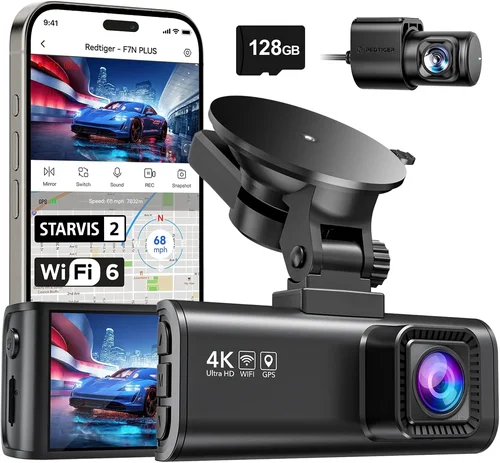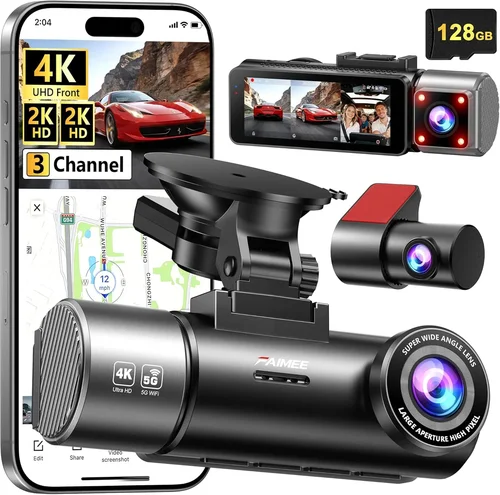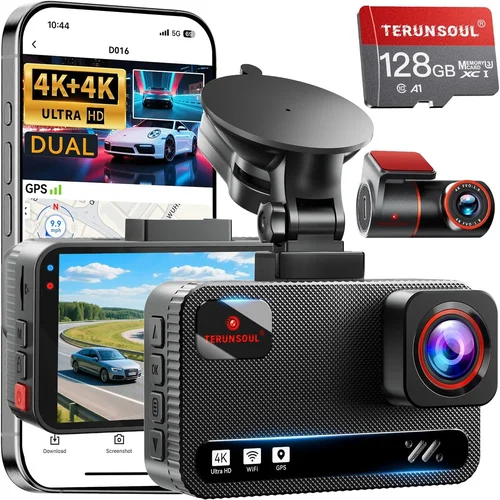
2026 Best Dash Cam Purchase Guide
Why this guide matters
Choosing the right dash cam can feel overwhelming with so many options on the market. With new technology emerging every year, it’s crucial to understand what truly matters in 2026. This comprehensive guide cuts through the marketing hype to give you practical, expert advice that will help you make an informed decision. Whether you’re a first-time buyer or upgrading from an older model, understanding the key differences between dash cams will save you money and frustration.
What readers will learn
By the end of this guide, you’ll have a clear understanding of how to evaluate dash cams based on your specific needs. We’ll cover everything from essential features like resolution and storage to advanced capabilities such as AI-powered incident detection and cloud connectivity. You’ll also learn about common pitfalls to avoid and get insider tips on where to find the best deals. Most importantly, you’ll discover how to match your budget with the right level of functionality for your driving situation.
Brief overview of the market
The dash cam market has evolved dramatically over the past few years. What started as simple rear-view cameras has transformed into sophisticated surveillance systems with GPS tracking, parking monitoring, and even driver assistance features. In 2026, we’re seeing significant advancements in AI processing power, improved low-light performance, and enhanced cloud integration. The competition has driven innovation while keeping prices competitive, making this an excellent time to invest in a quality dash cam. However, with more features comes more complexity, which is why this guide is essential for navigating today’s options.
What to Look for When Buying Dash Cams
Budget & Price Range
Your budget should be the starting point rather than the endpoint of your research. While it’s tempting to go for the cheapest option, remember that dash cams are investments that could potentially save you thousands in insurance claims or legal disputes. Entry-level models typically start around $50-75 and offer basic 1080p recording with loop recording. Mid-range options ($100-200) usually include better sensors, wider viewing angles, and additional features like G-sensor auto-save. Premium models ($200+) often feature 4K recording, superior night vision, built-in Wi-Fi, and professional-grade stabilization. Consider how long you plan to keep your vehicle and how frequently you drive—frequent highway drivers might benefit from higher-end features that justify the extra cost.
Performance Specifications
The heart of any dash cam lies in its video quality and technical specifications. Resolution is the most obvious factor—1080p Full HD is the minimum for decent clarity, but 2K and 4K models now offer significantly improved detail, especially for license plate recognition. Look for cameras with at least 1920×1080 resolution at 30fps for smooth motion capture. Frame rate matters too; 30fps captures enough detail for most situations, while 60fps provides smoother slow-motion playback when reviewing incidents. The lens is equally important—larger sensors (like 1/2.7″ or better) perform much better in low light conditions. A wide-angle lens (typically 130-170 degrees) ensures you capture more of the road ahead, but extremely wide angles can cause distortion at the edges. Also consider the field of view—most dash cams offer dual-lens setups with front and rear cameras, so ensure compatibility if you want both.
Build Quality & Durability
A dash cam sits directly in front of your windshield, exposed to extreme temperatures, direct sunlight, and potential impacts. Build quality makes a huge difference in reliability and longevity. Look for models with metal housings rather than plastic, as they dissipate heat better and resist warping. Temperature tolerance is critical—high-quality dash cams can operate from -4°F to 140°F (-20°C to 60°C). Mounting systems should be secure and adjustable without damaging your windshield. Some premium models use suction cups designed to release cleanly after removal, while others employ adhesive mounts that provide stronger hold but require more careful installation. Water resistance ratings (IPX rating) matter for protection against rain and moisture buildup. Additionally, consider whether the camera has vibration resistance—important for rough roads or off-road driving.
Features & Functionality
Modern dash cams come packed with features that enhance their utility beyond just recording footage. Emergency recording triggered by sudden deceleration or impact (G-sensor) ensures critical events aren’t overwritten. Loop recording automatically deletes old footage to make room for new recordings, but some models allow you to protect specific clips manually. Parking mode uses motion detection or time-lapse recording to monitor your vehicle when parked, though this drains battery unless connected to your car’s electrical system via hardwire kit. GPS tracking adds location data and speed information to your recordings, helpful for accident reconstruction. Built-in Wi-Fi allows easy transfer of footage to smartphones for quick sharing or backup. Advanced models may include voice commands, driver fatigue alerts, or even integration with your smartphone for remote viewing. Cloud connectivity lets you access your footage from anywhere, though this requires a subscription service and constant internet connection.
Brand Reputation
Not all brands are created equal when it comes to dash cams. Established manufacturers like Garmin, BlackVue, Thinkware, and Nextbase have spent years refining their products and building customer trust. These companies typically offer better customer support, longer warranty periods, and more reliable firmware updates. Newer brands may offer flashy features at lower prices, but they often lack the track record of reliability and service that comes with established names. Check independent reviews and user forums before purchasing unfamiliar brands. Pay attention to how quickly issues are resolved and whether replacement parts are readily available. Also consider the company’s history with similar products—companies that make other automotive electronics tend to understand the demands of car environments better.
Warranty & Support
A good warranty tells you something about the manufacturer’s confidence in their product. Most reputable dash cam brands offer at least a one-year warranty, with some providing two or three years. Extended warranties are available but rarely worth the cost for dash cams since failures are usually obvious and repair costs are minimal. More important than the length of warranty is the type of coverage—does it cover manufacturing defects only, or does it include accidental damage? Customer support responsiveness varies widely between brands. Some have 24/7 phone support, while others rely solely on email tickets that can take days to resolve. Online resources like FAQ sections, troubleshooting guides, and community forums can be incredibly valuable. Before buying, check what support channels the company offers and read recent customer experiences with their service team.
Size & Portability
While dash cams are designed to stay in your car, size does matter depending on your usage patterns. Compact models (around 2.5 inches tall) are less obtrusive and easier to conceal if you’re concerned about theft, but they may sacrifice some features due to space constraints. Larger units can accommodate bigger batteries, better cooling systems, and more advanced processors. If you frequently switch vehicles or lend your dash cam to others, portability becomes important. Some models come with magnetic mounts or universal brackets that work across different car models. Weight is another consideration—lighter units reduce strain on your windshield mount and minimize the risk of damage during installation. Also think about cable management; smaller dash cams often require shorter cables, which might limit placement options in larger vehicles.
User Reviews & Ratings
Online reviews are invaluable but require critical evaluation. Look for patterns in feedback rather than individual opinions. Multiple users reporting the same issue (like poor night vision or software glitches) is more concerning than isolated complaints. Check review sites that specialize in automotive electronics rather than general retail sites, as they tend to be more knowledgeable and thorough. Pay attention to when reviews were posted—technology changes quickly, and a dash cam rated five stars last year might have received disappointing firmware updates this year. Video reviews can show you exactly what the camera looks like in action, which written descriptions alone cannot convey. Be wary of overly positive reviews that seem generic or paid endorsements disguised as honest opinions. The most useful reviews typically mention both strengths and weaknesses and explain real-world performance scenarios.
Different Types of Dash Cams
Common Buying Mistakes to Avoid
❌ Mistake: Choosing Based Solely on Price
Why it’s bad: The cheapest dash cam might save you money upfront but could fail when you need it most. Low-cost models often have poor sensors that produce grainy footage, unreliable recording, and short lifespans. You might end up spending more replacing it frequently or dealing with inadequate evidence in case of an accident.
What to do instead: Set a realistic budget based on your driving needs and prioritize reliability over initial cost. Read multiple reviews focusing on long-term performance rather than just price comparisons. Remember that a quality dash cam is an investment in your peace of mind and potential legal protection.
❌ Mistake: Ignoring Storage Requirements
Why it’s bad: Most dash cams use microSD cards, and not all cards are created equal. Using a low-quality card can result in corrupted files, failed recordings, or complete data loss. Additionally, failing to understand how long your recordings will last leads to either running out of space or wasting storage capacity.
What to do instead: Invest in a high-endurance microSD card (at least Class 10, UHS-I, U3 rating) specifically designed for continuous video recording. Calculate your storage needs based on resolution and desired retention period—higher resolutions require more space. Consider models with cloud storage options if you frequently need to access footage remotely.
❌ Mistake: Overlooking Night Vision Capabilities
Why it’s bad: Many buyers assume all dash cams perform similarly in low light, but this couldn’t be further from the truth. Poor night vision means missing crucial details during nighttime accidents or incidents, potentially weakening your position if challenged legally.
What to do instead: Research specific low-light performance metrics before purchasing. Look for cameras with large aperture lenses (f/1.8 or wider), starlight sensors, or infrared capabilities. Test videos showing nighttime recording quality are more valuable than theoretical specifications alone.
❌ Mistake: Skipping the Warranty and Support Research
Why it’s bad: Without proper warranty coverage, a malfunctioning dash cam could leave you without protection during critical times. Similarly, poor customer support means extended downtime while waiting for assistance or replacement parts.
What to do instead: Always check the warranty terms before purchasing and verify what’s covered versus excluded. Contact customer support directly with questions to gauge their responsiveness. Choose brands with proven track records of good service rather than those offering flashy marketing claims.
❌ Mistake: Not Considering Installation Complexity
Why it’s bad: Some dash cams require complex wiring or professional installation, which adds significant cost and inconvenience. Others have mounting systems that damage your windshield upon removal or leave residue behind.
What to do instead: Evaluate whether you’re comfortable with DIY installation or need professional help. Look for models with easy-to-use mounting systems that don’t compromise your windshield integrity. Consider hardwiring options if you plan to keep the dash cam permanently installed, as this provides cleaner aesthetics and reliable power.
❌ Mistake: Assuming All Features Are Useful
Why it’s bad: Modern dash cams come with numerous bells and whistles that may never get used. Features like voice control, driver drowsiness alerts, or elaborate mobile apps add complexity without necessarily improving core functionality.
What to do instead: Make a list of your actual needs before shopping. Prioritize essential features like emergency recording, GPS tracking, and reliable video quality over gimmicky extras. Focus on what will genuinely enhance your driving experience or provide tangible benefits in emergencies.
❌ Mistake: Failing to Update Firmware Regularly
Why it’s bad: Manufacturers release firmware updates to fix bugs, improve performance, and add features. Neglecting these updates can leave your dash cam vulnerable to known issues or missing out on critical improvements that affect reliability and functionality.
What to do instead: Enable automatic update notifications when available and schedule regular checks for manual updates. Subscribe to brand newsletters or follow their social media accounts to stay informed about new releases. Keeping your firmware current ensures optimal performance and compatibility with other devices.
Budget Guidelines: How Much Should You Spend?
Entry-Level ($50 – $100)
If you’re looking for basic protection without breaking the bank, entry-level dash cams offer surprisingly capable performance. These models typically deliver 1080p recording with essential features like loop recording and G-sensor protection. While image quality won’t match premium units, many entry-level dash cams from reputable brands provide adequate detail for most situations. Look for models with at least 140-degree field of view and decent low-light performance. This tier is ideal for occasional drivers, students on a budget, or those testing dash cam ownership before committing to higher-end features. Just be aware that build quality and reliability may vary significantly between manufacturers at this price point.
Mid-Range ($100 – $200)
This sweet spot represents the best value for most drivers seeking balanced performance and features. Mid-range dash cams typically offer 2K recording capability, superior sensors for better low-light performance, and expanded functionality including GPS tracking, Wi-Fi connectivity, and sometimes dual-lens setups. Brands like Thinkware, Nextbase, and Viofo dominate this category with reliable hardware and responsive software. You’ll find robust build quality, intuitive interfaces, and generally excellent customer support here. This range covers the majority of driving scenarios—from daily commutes to weekend road trips—and provides enough features to satisfy both casual users and more demanding drivers who want peace of mind without excessive complexity.
Premium ($200 – $400)
For drivers who demand the absolute best performance and want advanced features, premium dash cams deliver professional-grade quality. These models often feature 4K recording, exceptional low-light sensitivity, sophisticated stabilization algorithms, and extensive smart features. You’ll find dual-channel recording standard in this tier, plus options for parking surveillance with impact detection. Premium units typically include cloud connectivity, advanced driver assistance features, and superior build materials that withstand harsh environments. Brands like BlackVue, Garmin, and Owlstone lead this category with cutting-edge technology and robust ecosystems. If you’re a frequent traveler, rideshare driver, or simply want maximum protection for your vehicle and peace of mind, investing in a premium dash cam pays dividends through superior reliability and functionality.
Luxury ($400+)
At the top end of the market, luxury dash cams represent the pinnacle of automotive surveillance technology. These systems often incorporate multiple cameras with 360-degree coverage, AI-powered incident classification, thermal imaging capabilities, and seamless integration with vehicle networks. Professional-grade models designed for fleet operations or commercial vehicles may include centralized management systems, real-time telematics, and enterprise-level security features. While overkill for most personal drivers, luxury dash cams appeal to serious enthusiasts, security-conscious individuals, or professionals who require absolute reliability and advanced analytics. Even among luxury options, priorities differ—some focus on ultra-high-resolution recording while others emphasize comprehensive vehicle monitoring and driver behavior analysis.
Expert Tips for Getting the Best Deal
When to Buy (Seasonal Sales)
Timing your purchase can yield significant savings on dash cams. Major shopping holidays like Black Friday, Cyber Monday, and Amazon Prime Day consistently feature deep discounts on electronic accessories including dash cams. Early summer and late winter often see clearance sales as retailers make room for new inventory. Keep an eye on back-to-school seasons too, as many brands offer student discounts or bundle deals. Sign up for retailer newsletters to receive exclusive promo codes and early access to sales. Avoid purchasing immediately after major product launches—brands typically reduce prices on existing models once new versions arrive.
Where to Buy (Retailers, Online vs In-Store)
Online retailers like Amazon, Best Buy, and B&H Photo offer the widest selection and competitive pricing, but physical stores provide immediate gratification and hands-on testing opportunities. Amazon frequently has the best prices but shipping delays can be problematic if you need the dash cam urgently. Local electronics stores allow you to examine build quality and ask knowledgeable staff questions, though their selection is usually limited. For specialized dash cam brands, manufacturer websites often provide direct-to-consumer pricing with bundled accessories or extended warranties. Consider checking multiple channels—sometimes online-only deals beat in-store prices, while physical stores offer better return policies for immediate replacements.
How to Spot Deals
Learning to identify genuine deals versus marketing gimmicks saves money and prevents buyer’s remorse. Compare prices across at least three retailers using price tracking tools like CamelCamelCamel for Amazon or Honey browser extensions. Watch for percentage-based discounts rather than flat dollar amounts—the former often provide better value. Bundle deals that include extra accessories (microSD cards, hardwire kits) frequently offer greater total savings than standalone purchases. Be wary of “limited time” offers that appear repeatedly; legitimate sales don’t need to feel urgent to be worthwhile. Read the fine print regarding return policies and warranty transfers before completing any purchase.
Warranty Considerations
Extended warranties rarely justify their cost for dash cams since failures are usually obvious and repair costs are minimal. Focus instead on manufacturer reputation and standard warranty coverage. Two-year warranties from reputable brands often provide better value than paying for expensive extended coverage. Verify whether the warranty covers accidental damage or only manufacturing defects—the latter is more typical and reasonable. Keep all purchase documentation and serial numbers in case you need to file a claim later. Register your product with the manufacturer whenever possible to activate warranty coverage and receive update notifications.
Return Policies
Flexible return windows are crucial for dash cam purchases since installation can be time-consuming and irreversible. Aim for retailers with 30-day or longer return policies, ideally with free return shipping. Some manufacturers offer in-home trial periods where you can test the device in your actual vehicle before committing fully. During returns, document any issues thoroughly with photos and notes—this helps both your refund process and future reference if problems persist. Remember that mounting hardware and wiring modifications can complicate returns, so choose retailers with generous policies specifically for automotive electronics.
Testing Before Buying
Whenever feasible, test dash cams in person before purchasing. Visit local electronics stores that allow hands-on demonstrations or borrow friends’ models temporarily. Pay attention to button placement, menu navigation, and overall build quality during testing. Request sample footage showing various lighting conditions and compare image quality side-by-side. Ask staff about firmware update procedures and warranty processes. If testing isn’t possible, watch multiple video reviews that demonstrate real-world performance rather than relying solely on static product images and specifications.
Additional Pro Tips
Consider your primary use case—city driving requires different features than highway commuting. Think about climate extremes in your region when evaluating temperature tolerance ratings. Plan for future upgrades by choosing models compatible with larger storage cards or newer technologies. Join online communities dedicated to dash cam enthusiasts to learn about emerging trends and receive personalized recommendations based on your specific needs.
Frequently Asked Questions
Q: What resolution should I look for in a dash cam?
A: For most drivers, 1080p Full HD is sufficient for clear license plate recognition and general incident documentation. However, 2K resolution provides noticeably sharper detail and is becoming the new standard in mid-range models. If you frequently drive at high speeds or in complex urban environments, consider 2K or even 4K for maximum clarity. Remember that higher resolutions require more storage space and processing power, so balance your needs with practical considerations.
Q: How much storage do I need for my dash cam?
A: Storage requirements depend on your resolution, frame rate, and desired retention period. A 128GB microSD card typically holds 1080p footage for 10-15 hours or 2K footage for 5-7 hours. Most dash cams use loop recording to overwrite old files automatically, but having adequate storage ensures you don’t miss important events. High-endurance cards (U3, V30 rating) are essential for continuous writing. Consider cloud storage options if you frequently need to access footage remotely or have limited physical storage space.
Q: Do I really need a dual-lens dash cam?
A: Dual-lens systems (front and rear cameras) provide complete coverage of your vehicle and eliminate blind spots. They’re particularly valuable for city driving where reversing accidents are common, or for parents dropping off/picking up children. However, single-lens dash cams remain perfectly adequate for basic protection and highway driving. If you park frequently in tight spaces or want comprehensive documentation of rear-end collisions, a dual-lens system justifies its additional cost and complexity.
Q: What’s the difference between parking mode and motion detection?
A: Parking mode activates when your car is turned off and monitors your vehicle using various methods. Motion detection responds to movement near your car, triggering recording only when activity is detected. Impact detection (often called “car accident detection”) uses built-in accelerometers to sense sudden jolts or impacts. True parking mode requires hardwiring to your car’s electrical system to maintain operation without draining your battery. Some advanced models combine multiple detection methods for comprehensive protection while minimizing false triggers.
Q: How do I install a dash cam without damaging my windshield?
A: Use high-quality mounting hardware designed specifically for dash cams. Suction cup mounts with strong adhesion but clean removal properties work well for temporary installations. Adhesive mounts provide stronger hold but require careful application and permanent commitment. Avoid cheap mounts that leave sticky residue or crack glass during removal. Professional installation services are available for hardwired setups and complex multi-camera systems. Always follow manufacturer instructions precisely and allow proper curing time for adhesives.
Q: Can dash cams record audio, and is it legal?
A: Many dash cams include audio recording capabilities, but legality varies significantly by jurisdiction. Some states prohibit recording conversations without consent, while others allow it under certain conditions. Check your local laws before enabling audio recording, especially when recording public areas or other vehicles’ interiors. Privacy concerns also arise from recording passengers or pedestrians. Many users choose to disable audio recording to avoid legal complications and respect others’ privacy.
Q: How long will a dash cam battery last during parking mode?
A: Battery life during parking mode depends entirely on whether you’ve hardwired the dash cam to your car’s electrical system. Without hardwiring, built-in batteries typically last 1-3 hours—insufficient for overnight parking protection. Hardwired installations draw power directly from your car’s battery and can operate continuously until your car starts. To prevent draining your car battery, most quality dash cams include voltage protection circuits that shut down recording when your car battery drops below a safe threshold (usually 11.5V).
Q: Should I choose a dash cam with GPS tracking?
A: GPS tracking adds valuable context to your recordings by embedding location and speed data. This proves especially useful for accident reconstruction, insurance claims, and verifying route discrepancies. GPS-enabled dash cams help establish timeline accuracy and prevent disputes about where incidents occurred. The downside is slightly reduced video quality due to processing overhead, though modern chips handle this efficiently. If you frequently travel long distances or want maximum evidentiary value, GPS tracking is worth the trade-off.
Q: How often should I update my dash cam firmware?
A: Check for firmware updates at least twice yearly or whenever you notice performance issues. Manufacturers release updates to fix bugs, improve stability, enhance features, and sometimes address security vulnerabilities. Enable automatic update notifications when available and schedule manual checks during routine maintenance. Keep detailed records of update dates and changes—this helps troubleshoot issues and ensures optimal performance throughout your dash cam’s lifespan.
Q: What’s the best way to protect my dash cam footage legally?
A: Maintain chain-of-custody documentation by timestamping all footage and keeping metadata intact. Store original recordings safely rather than relying solely on cloud backups which may be contested in court. Understand that dash cam footage alone may not prove fault in accidents—corroborating evidence from witnesses, police reports, and other sources strengthens your position. Consult with legal professionals familiar with traffic law if you anticipate using dash cam footage in disputes or litigation.
Final Recommendations
Best for Budget-Conscious Buyers
For those watching their spending without sacrificing essential functionality, the Viofo A119 V3 strikes an impressive balance between price and performance. Priced under $100, this single-lens dash cam delivers reliable 1080p recording with excellent low-light sensitivity thanks to its Sony STARVIS sensor. It includes all critical features like loop recording, G-sensor protection, and built-in GPS—all in a compact design that doesn’t obstruct your view. The intuitive interface makes installation straightforward, and the included accessories eliminate the need for additional purchases. While it lacks some premium features like Wi-Fi connectivity, the A119 V3 provides outstanding value for drivers seeking dependable protection without overspending.
Best Overall Value
The Thinkware U1000 represents the sweet spot where features, performance, and reliability converge. Priced around $200, this dual-lens system offers 4K front recording paired with 1080p rear monitoring—unusual for this price range. Its advanced image stabilization, superior night vision, and comprehensive parking mode make it ideal for diverse driving conditions. The built-in Wi-Fi simplifies file transfers, while the robust build quality ensures longevity. Thinkware’s reputation for excellent customer service and frequent firmware updates adds peace of mind. Whether you’re a daily commuter, rideshare driver, or weekend adventurer, the U1000 delivers professional-grade performance without the premium price tag.
Best Premium Option
BlackVue Drive Pro C100 Plus sets the standard for high-end dash cam functionality. Starting at $350, this model features 4K recording with HDR capability, exceptional low-light performance, and cloud connectivity that lets you access footage from anywhere. Its intelligent parking mode uses both motion and impact detection while preventing battery drain through intelligent voltage cutoff. The dual-SIM capability ensures connectivity even without home Wi-Fi, and the comprehensive mobile app provides remote live viewing and management. For drivers who demand absolute reliability and maximum protection, the BlackVue ecosystem offers unmatched sophistication and peace of mind.
Best for Beginners
Garmin Dashcam Mini stands out for its simplicity and ease of use. At approximately $120, it provides 1080p recording with automatic exposure adjustment that works well in varying lighting conditions. The compact size minimizes obstruction, and the straightforward interface eliminates confusion for first-time users. While it lacks some advanced features found in competitors, its rock-solid reliability and Garmin’s trusted brand reputation make it perfect for drivers new to dash cams. The included magnetic mount cleans up nicely when removed, and the companion app provides basic playback functionality without overwhelming complexity.
Best for Advanced Users
The Owlstone Dash Cam Pro represents the bleeding edge of automotive surveillance technology. Priced above $500, it incorporates AI-powered incident classification, thermal imaging for enhanced low-light visibility, and multi-camera integration capabilities. Its sophisticated driver assistance features include lane departure warnings and collision anticipation alerts. The comprehensive management system supports fleet operations with real-time monitoring and analytics. For tech enthusiasts, professional drivers, or anyone requiring maximum situational awareness and evidentiary detail, the Owlstone system delivers unprecedented capabilities and future-proof flexibility.
Conclusion: Making the Right Choice
Selecting the perfect dash cam in 2026 requires balancing your specific needs against technological capabilities and budget constraints. Rather than chasing every latest feature, focus on core requirements like reliable video quality, adequate storage management, and durable construction. Remember that a dash cam’s true value emerges during stressful situations when you need clear, trustworthy evidence most. Take time to research thoroughly, compare real-world performance across multiple sources, and don’t hesitate to consult with experienced users in online communities.
Your driving habits and environment should guide your decision more than marketing claims or price points. City dwellers benefit from wider fields of view and robust parking protection, while highway drivers might prioritize high-resolution recording and GPS accuracy. Consider how long you plan to own your current vehicle and how frequently you’ll use the dash cam. The best dash cam is the one you’ll actually use regularly and maintain properly.
Invest in quality components like high-endurance microSD cards and proper mounting hardware—these small expenses prevent headaches later. Stay current with firmware updates and understand your model’s limitations honestly. Most importantly, choose a brand with reliable customer support so you’re covered when issues inevitably arise. With thoughtful consideration and this comprehensive guidance, you’ll find a dash cam that provides lasting value and genuine peace of mind on every journey.