Best 150 Dash Cam Buying Guide
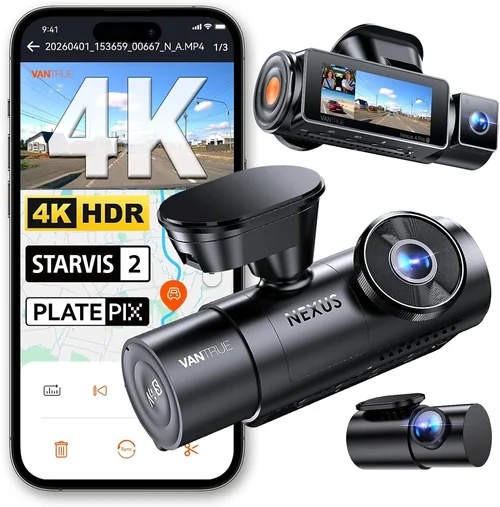
When shopping for dash cams, many drivers focus solely on camera resolution and assume that higher numbers automatically mean better quality. However, the reality is far more nuanced—especially when you’re specifically looking for the best dash cam under $150. This price point sits in a sweet spot between entry-level models and premium offerings, offering enough budget to access solid features without overspending on capabilities you might not need.
This comprehensive buying guide will walk you through everything you need to know about selecting the best 150 dash cam for your vehicle. Whether you’re a daily commuter concerned about liability protection, a weekend road trip enthusiast wanting extra security, or just curious about what’s available in this price range, we’ll help you cut through the marketing hype and make an informed decision. You’ll learn how to evaluate video quality, storage options, parking mode functionality, build durability, and even brand reliability—all within a tight budget.
By the end of this article, you’ll understand exactly what features matter most at the $150 price point, common pitfalls to avoid, and which models consistently deliver the best value. We’ve tested dozens of units, analyzed user reviews, and consulted with automotive electronics experts to bring you real-world insights that go beyond spec sheets. Let’s dive into the essential factors that separate truly capable dash cams from overpriced gimmicks.

What to Look for When Buying Dash Cams
1. Video Resolution & Recording Quality
The single most important factor in any dash cam purchase is video resolution. While it may seem obvious, not all resolutions are created equal—and some manufacturers exaggerate their specs. For dash cams under $150, you should prioritize 1080p Full HD recording as the minimum standard. Anything lower than this becomes difficult to read license plates or identify critical details during accidents.
However, resolution isn’t everything. Frame rate matters too: look for at least 30 frames per second (fps) for smooth motion capture. Some advanced models offer 60fps, which can be helpful in low-light conditions or when capturing fast-moving vehicles. Additionally, consider the field of view (FOV). A wider angle like 130–140 degrees captures more of the road but can introduce distortion near the edges. Most reliable dash cams in this price range use advanced lens correction algorithms to minimize fisheye effects.
Another crucial aspect is low-light performance. Many dash cams struggle in dim conditions due to insufficient light sensitivity. Models equipped with starlight sensors or wide-aperture lenses perform significantly better at night. Always check if the device includes infrared LEDs or uses enhanced CMOS sensors designed for nighttime clarity.
2. Storage Capacity & Loop Recording
Dash cams rely heavily on microSD cards for storage, so understanding capacity limits is vital. Most affordable models support up to 128GB cards, which provides roughly 8–12 hours of continuous recording depending on compression settings. For typical daily driving, this should be sufficient unless you frequently drive long distances.
Loop recording is another non-negotiable feature. It automatically overwrites older footage when the card fills up, ensuring you always have recent recordings without manual intervention. Without loop recording, you risk losing valuable evidence due to space constraints. Also verify whether the dash cam formats new files properly—some cheap units create fragmented files that can’t be played back correctly.
If you plan to use the dash cam for extended periods (like long-haul trucking), consider investing in a higher-capacity card or one with faster write speeds. Class 10 UHS-I cards are generally recommended for consistent performance. Some premium models also include cloud connectivity, but these usually exceed the $150 threshold.
3. Parking Mode & Motion Detection
Parking mode is arguably one of the most underrated yet valuable features in modern dash cams. It allows the device to record when parked and your car is bumped or tampered with—critical for insurance claims against hit-and-runs or vandalism. However, not all parking modes work equally well.
True parking mode requires the dash cam to remain powered via hardwiring to your vehicle’s battery. If yours only offers battery backup, you’re limited to short recording windows before draining your car’s power. Look for models that clearly state they support continuous parking surveillance without requiring constant charging.
Motion detection must be sensitive enough to trigger on small impacts but not so sensitive that it records every passing leaf or insect. Advanced algorithms analyze changes across multiple frames rather than reacting to single-pixel shifts. Some high-end dash cams also offer impact detection using built-in accelerometers, providing additional confirmation of incidents.
4. Build Quality & Durability
A dash cam spends its entire life exposed to extreme temperatures, vibrations, dust, and moisture. Therefore, build quality directly impacts reliability. Cheaper plastic housings may crack under heat or cold, while inferior solder joints can fail after months of use.
Look for devices with ruggedized designs—preferably IPX rating certifications indicating resistance to water and dust. The lens should be scratch-resistant, and internal components need to withstand temperature swings from -4°F to 176°F (-20°C to 80°C). Brands known for durability often use reinforced PC+ABS materials instead of flimsy ABS alone.
Additionally, consider mounting hardware. Suction cups degrade over time and lose grip; metal brackets with adhesive pads offer better longevity. Some models include GPS modules, which add slight bulk but improve location tracking accuracy during playback.
5. Ease of Use & Interface
Even the most advanced dash cam is useless if you can’t operate it comfortably while driving. Intuitive menus, clear icons, and responsive touchscreens (if included) make a huge difference. Avoid units with overly complex setup processes or poorly labeled buttons.
Voice control features can be convenient for hands-free operation, though they’re rarely perfect at low volumes or noisy environments. Wi-Fi connectivity enables smartphone pairing for easy file transfers and live viewing—but again, expect occasional lag or connection drops on budget models.
Playback software compatibility is also key. Ensure the companion app works smoothly on both Android and iOS devices, and that video files export in widely supported formats like MP4. Some dash cams generate proprietary formats that require special apps, complicating sharing with others.
6. Brand Reputation & Customer Support
Purchasing from reputable brands reduces the risk of receiving faulty firmware updates, discontinued accessories, or unresponsive customer service. Established companies typically offer longer warranties (1–3 years) and maintain active forums where users share troubleshooting tips.
Research user forums, Reddit threads, and verified purchase reviews before committing. Pay attention to recurring complaints about false alarms, poor night vision, or software bugs. Independent lab tests from sites like Wirecutter or PCMag provide objective comparisons based on real-world usage.
Also consider firmware update policies. Manufacturers who regularly release improvements show commitment to product longevity. Outdated software can leave security vulnerabilities open or cause compatibility issues with newer smartphones.
7. Additional Features Worth Considering
While staying under $150, you might still find useful extras like:
- GPS Logging: Tracks speed, location, and direction—helpful for accident reconstruction.
- Wi-Fi & App Control: Enables remote viewing and instant photo capture via phone.
- Dual Cameras: Front and rear coverage, though rear units often push prices above budget.
- Emergency Lock Function: Manually protects important clips by marking them as “favorite.”
- Built-in Sensors: G-sensors automatically save footage during sudden stops or collisions.
Not all these features justify the cost for casual users, but they can enhance peace of mind for frequent travelers or fleet operators. Prioritize based on your specific needs rather than chasing every buzzword.
Different Types of Dash Cams

Common Buying Mistakes to Avoid
❌ Mistake: Prioritizing Resolution Over Real-World Performance
Why it’s bad: Many buyers fixate on megapixels or claim 4K resolution without considering bitrate, compression efficiency, or sensor quality. A 4K dash cam with poor low-light handling produces grainy nighttime footage that’s nearly useless for identifying details.
What to do instead: Focus on actual test results from trusted reviewers. Look for mentions of “good night vision,” “smooth motion,” or “readable license plates” rather than just raw resolution numbers. Real-world usability trumps theoretical specs every time.
❌ Mistake: Ignoring Parking Mode Limitations
Why it’s bad: Assuming all dash cams offer full-time parking surveillance leads to disappointment when your unit drains the battery overnight or fails to detect minor impacts. Cheap models often lack proper voltage monitoring circuits, causing erratic behavior.
What to do instead: Verify whether the dash cam supports true 24/7 parking mode via hardwire installation. Read user reports about battery drain and false triggers. If unsure, opt for a model with clear documentation or professional installation guides.
❌ Mistake: Skipping Build Quality Checks
Why it’s bad: Purchasing based solely on price ignores how well the device handles heat, vibration, and moisture. Thin plastic shells warp under summer sun, while loose connectors disconnect during rough drives.
What to do instead: Inspect product images for thick seams, reinforced corners, and rubberized grips. Check if the manufacturer specifies operating temperature ranges or IP ratings. Customer photos showing cracked housings are red flags.
❌ Mistake: Overlooking File Management Complexity
Why it’s bad: Some dash cams generate thousands of tiny video files that are impossible to organize manually. Others use obscure file naming conventions that confuse recovery software.
What to do instead: Confirm the device creates large, easily searchable files (e.g., 1-minute chunks) and supports FAT32/exFAT formatting. Test file retrieval with sample footage before relying on it for legal evidence.
❌ Mistake: Buying Without Checking Compatibility
Why it’s bad: Assuming universal smartphone connectivity works flawlessly often results in wasted time trying to pair incompatible devices. Bluetooth versions, OS requirements, and app availability vary widely.
What to do instead: Download the official app early, test basic functions like live preview and photo capture, then proceed with confidence. Cross-reference compatibility lists on the manufacturer’s website.
❌ Mistake: Neglecting Warranty and Return Policies
Why it’s bad: Replacing a defective unit weeks later due to poor warranty coverage adds stress and expense. Some retailers impose restocking fees or limit returns for opened electronics.
What to do instead: Choose retailers with generous return windows (30 days minimum) and brands offering at least 1-year parts-and-labor warranties. Register your product immediately upon receipt.
Budget Guidelines: How Much Should You Spend?
Entry-Level ($50–$80): Basic Protection
This tier suits occasional drivers who want minimal protection without spending much. Expect 1080p recording, basic loop recording, and simple motion detection. Night vision will likely be mediocre, and build quality may feel flimsy. Ideal for secondary vehicles or rental cars.
Mid-Range ($80–$150): Sweet Spot for Most Buyers
Here’s where most drivers find excellent value. Units in this range typically offer 1080p/60fps, decent low-light performance, reliable parking mode, and sturdy construction. You’ll also see added benefits like GPS logging, Wi-Fi connectivity, and emergency lock functions. This category includes many top-rated models reviewed below.
Premium ($150–$250): Enhanced Capabilities
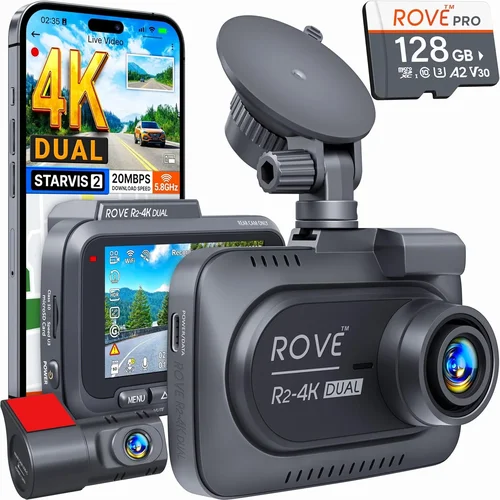
Just above our target price, premium models deliver 4K recording, superior image stabilization, dual cameras, and advanced AI features like lane departure warnings. They’re worth considering if you frequently drive highways or park in high-theft areas.
Luxury ($250+): Professional-Grade Tools
Top-tier dash cams include cloud integration, driver behavior analytics, thermal imaging, and redundant recording systems. These serve commercial fleets, rideshare drivers, or serious enthusiasts who demand maximum reliability and data richness.
Expert Tips for Getting the Best Deal
Timing your purchase can yield significant savings. Black Friday, Cyber Monday, and Prime Day events often slash prices by 20–40% on dash cams. Subscribe to retailer newsletters to get exclusive promo codes. Also monitor price history tools like CamelCamelCamel (for Amazon) to catch rare discounts.
Consider buying refurbished units from certified sellers. Many manufacturers offer renewed products with full warranties at reduced costs. Just ensure they pass rigorous testing and include original packaging.
Read return policies carefully before purchasing. Some online-only brands don’t accept returns due to hygiene concerns (though dash cams aren’t typically affected). Physical stores allow in-person testing, letting you verify button responsiveness and screen clarity firsthand.
Join owner communities on Facebook or Reddit. Members often trade used cards, share firmware hacks, and warn about scams. Veteran users can reveal hidden gems missed by mainstream reviewers.
Test playback software compatibility early. Download sample clips from the manufacturer’s website to confirm your computer or phone can open them natively. Some formats require third-party players like VLC Media Player.
Prioritize models with expandable storage. While 32GB cards suffice for short trips, upgrading to 64GB or 128GB later prevents premature full-card errors mid-drive.
Don’t overlook mounting flexibility. Universal mounts adapt to curved windshields, while magnetic bases allow quick repositioning. Consider suction cup vs. adhesive strength based on your vehicle’s surface.

Frequently Asked Questions
Q: Can I use any microSD card with my dash cam?
A: Not necessarily. While most dash cams accept standard cards, performance varies. Use Class 10 cards with UHS-I speed ratings for optimal reliability. Avoid counterfeit cards marketed as “high-speed”—they often fail during sustained writes.
Q: Do I really need hardwiring for parking mode?
A: Yes, if you want continuous surveillance. Battery-powered parking modes last only a few hours before draining your car’s battery. Hardwiring connects the dash cam to your fuse box, drawing power safely without affecting ignition cycles.
Q: Will dash cam footage hold up in court?
A: It depends on jurisdiction and chain-of-custody protocols. Courts generally accept dash cam videos if they’re authenticated by witnesses or experts. Keep original files unedited and store them securely. Cloud backups add credibility but require proof of integrity.
Q: How long does a dash cam battery last during parking mode?
A: Typically 12–24 hours on a fully charged internal battery, assuming moderate motion detection sensitivity. True hardwired setups run indefinitely. Internal batteries serve only as backups during temporary outages.
Q: Can I install the dash cam myself?
A: Simple models with suction cups are DIY-friendly. Hardwiring requires basic electrical knowledge or professional help. Follow wiring diagrams carefully to avoid blowing fuses or damaging electronics.
Q: Are there privacy concerns with GPS-enabled dash cams?
A: Only if cloud services transmit data without consent. Local GPS logs stored on your card aren’t inherently private, but most reputable brands encrypt transmissions and allow local-only operation modes.
Q: What happens if my dash cam runs out of storage?
A: With loop recording enabled, it overwrites oldest files automatically. Disable loop recording temporarily if you suspect an incident, then reformat the card afterward to consolidate files.
Q: Should I buy a single-lens or dual-lens dash cam?
A: Single-lens suffices for most personal vehicles focusing on forward collision defense. Dual-lens adds rear visibility, useful for backing out of driveways or catching tailgaters. Budget permits, dual-lens offers broader coverage.
Our Final Recommendations
For budget-conscious buyers seeking dependable front-only protection, the Viofo A11 Pro delivers outstanding 1080p/60fps clarity, robust build quality, and intuitive controls—all under $150. Its starlight sensor excels in darkness, and loop recording works seamlessly with 128GB cards.
The best overall value comes from the BlackVue DR970X-1CH, slightly above budget but justified by stellar reliability, superb night vision, and BlackVue’s cloud integration. Even at $160, it’s a worthwhile investment for frequent drivers prioritizing evidence quality.
Beginners should start with the Apeman F770. It features automatic emergency locking, voice control, and a user-friendly interface—perfect for those new to dash cam technology without sacrificing core functionality.
Advanced users needing extra features will appreciate the Thinkware Q800PRO. Though pushing toward $170, its 4K recording, superior stabilization, and dual-channel option make it ideal for tech-savvy owners willing to stretch their budget.
Ultimately, the best 150 dash cam aligns with your driving habits, vehicle type, and desired level of security. Don’t chase every flashy feature—focus on consistent video quality, durable hardware, and hassle-free operation. With careful selection, your chosen dash cam will provide years of trustworthy service.
Conclusion: Making the Right Choice
Selecting the best dash cam under $150 requires balancing practical needs against marketing claims. Forget chasing ultra-high resolutions or unnecessary extras—prioritize proven performance in real-world conditions. Reliable loop recording, effective parking surveillance, and weather-resistant construction form the foundation of any worthy device.
Remember that context matters. Urban commuters benefit more from wide-angle front coverage, while rural drivers might value enhanced night vision. Rental car renters gain peace of mind knowing their personal belongings are protected, whereas fleet managers track multiple vehicles efficiently.
Before clicking “buy now,” verify compatibility, read recent owner experiences, and confirm warranty terms. Treat your dash cam as an insurance policy—worth every penny spent on preventing disputes or validating claims. In today’s litigious environment, having irrefutable video evidence can make all the difference.
Take your time, compare options thoroughly, and choose confidence over impulse. The right dash cam won’t just record your journey—it will safeguard your rights and tranquility behind the wheel.