Expert Dash Cam App Buying Guide
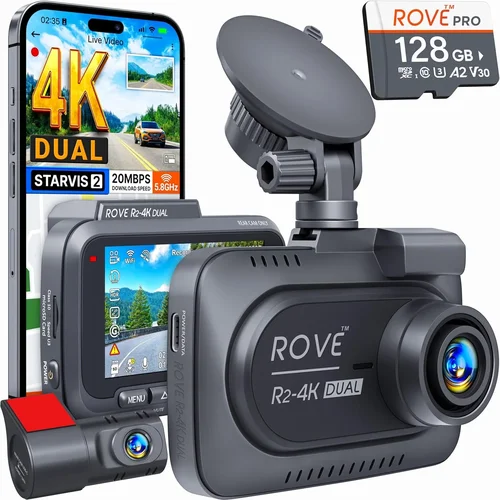
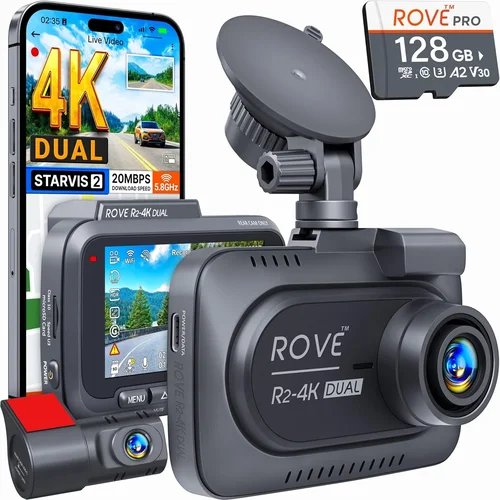
When it comes to protecting yourself on the road, having a reliable dash cam system isn’t just about convenience—it’s about peace of mind. In today’s connected world, the best dash cam apps for iOS transform your smartphone into a powerful monitoring hub that works seamlessly with your vehicle’s recording system. These applications serve as the command center for your dash cam, offering remote viewing, video management, real-time alerts, and cloud storage capabilities that go far beyond what traditional standalone devices can provide.
This comprehensive buying guide will walk you through everything you need to know about selecting the right dash cam app for your iPhone or iPad. Whether you’re a daily commuter looking for basic event detection, a rideshare driver needing constant monitoring, or a safety-conscious family wanting to protect your loved ones behind the wheel, we’ll help you navigate the features, compatibility requirements, and pricing structures that matter most. You’ll learn how to evaluate different connectivity options, understand subscription models versus one-time purchases, and discover which apps offer the best integration with popular dash cam brands like Garmin, Blackvue, Thinkware, and more.
The market for dash cam apps has evolved dramatically in recent years, with many solutions now offering advanced features like GPS tracking, speed monitoring, impact detection, and even AI-powered incident recognition. However, this rapid innovation means the landscape can be confusing for newcomers. That’s why we’ve created this detailed resource to cut through the marketing noise and give you practical, actionable advice based on real-world performance and user experiences.

What to Look for When Buying Dash Cam Apps
1. Compatibility & System Requirements
Before downloading any dash cam app, verify it’s compatible with your specific iOS device and operating system version. Most reputable apps require at least iOS 12.0 or later, though newer features may demand iOS 14.0+ or even iOS 15.0+. Check whether you need an iPhone 6s or newer, as older devices might lack the processing power for real-time video streaming. Some apps also require Bluetooth 4.0+ or Wi-Fi capabilities, so ensure your device meets these technical specifications. Always download from the official App Store to avoid security risks and get automatic updates.
2. Connectivity Options
Modern dash cam apps offer multiple ways to connect your phone to your camera: Wi-Fi direct connection (most common), Bluetooth pairing, cellular data (for cloud-connected models), or even Ethernet through specialized adapters. Wi-Fi direct is typically fastest for initial setup and local playback but consumes more battery. Bluetooth offers better range and lower power consumption but may have slower data transfer rates. Cellular connectivity enables remote access anywhere but requires a data plan and may incur usage charges. Consider your typical driving patterns and whether you’ll need access when away from Wi-Fi networks.
3. Video Quality & Resolution Support
While your dash cam handles the actual recording, the app determines how well you can view and manage those files. Look for apps that support high-resolution playback (1080p, 2K, or 4K depending on your camera) with smooth scrubbing and frame-accurate seeking. Some apps offer HDR support or enhanced color reproduction for better nighttime footage clarity. Advanced apps include features like motion-activated zoom, multi-angle views, or synchronized audio playback that helps reconstruct events accurately.
4. Cloud Storage & Backup Features
Cloud integration separates professional-grade dash cam apps from consumer-focused alternatives. Premium apps offer encrypted cloud storage with automatic backup of critical events, allowing you to access footage from anywhere without carrying SD cards. Look for features like geo-fencing (automatic backup when entering designated areas), incident-triggered uploads, and selective sync options to manage data usage. Free tiers usually offer limited storage, while paid plans often provide longer retention periods, higher resolution backups, and priority customer support.
5. Battery Life & Power Management
Since your phone becomes part of the dash cam system, battery consumption becomes crucial. Many apps include power-saving modes that reduce background processes during long drives, while others offer optimized charging protocols to prevent overheating. Some advanced models support wireless charging integration or even reverse-polarity protection if connected to a car’s electrical system. Consider whether the app includes features like automatic sleep mode after parking or smart wake-up triggers based on motion detection.
6. User Interface & Navigation
A poorly designed interface can make even the most capable app frustrating to use while driving. The best dash cam apps prioritize intuitive design with large touch targets, clear visual indicators, and voice-guided navigation where appropriate. Look for apps that offer customizable dashboards, quick-access buttons for common functions, and consistent layout across different screen orientations. Dark mode support is essential for nighttime usability, while gesture-based controls can help minimize distraction while maintaining functionality.
7. Security & Privacy Features
Given that dash cam apps handle sensitive location data and potentially private footage, security should be non-negotiable. Reputable apps use end-to-end encryption for all data transfers, offer two-factor authentication for account access, and allow you to control exactly who can view your recordings. Some include automatic deletion policies for old footage, while others let you set geographic boundaries that trigger alerts or restrictions. Always review privacy policies carefully and understand what data is collected, how it’s stored, and whether third parties have access to your information.
8. Customer Support & Updates
Dash cam technology evolves quickly, with new camera releases, iOS updates, and feature enhancements appearing frequently. Choose apps from developers committed to regular updates and responsive customer service. Look for companies that offer multiple support channels—email, live chat, phone support—and maintain detailed knowledge bases with troubleshooting guides. Community forums can also be valuable resources for learning tips and solving common issues before they escalate.
Different Types of Dash Cams

Common Buying Mistakes to Avoid
❌ Mistake: Ignoring Compatibility Requirements
Why it’s bad: Many users download dash cam apps without verifying if their specific iPhone model or iOS version supports all the promised features. An app might appear functional initially but fail to deliver critical capabilities like real-time streaming or cloud backup once you start using it regularly.
What to do instead: Always check both the minimum and recommended system requirements before purchasing. Visit the developer’s website for detailed compatibility charts that list supported devices by generation and iOS version. If possible, borrow a friend’s similar device to test the app firsthand.
❌ Mistake: Overlooking Subscription Costs
Why it’s bad: While some apps offer free basic functionality, premium features like cloud storage, remote access, and advanced analytics typically require monthly subscriptions. Users often underestimate the long-term costs, finding themselves paying $20-50 monthly without realizing how quickly expenses accumulate year after year.
❌ Mistake: Neglecting Battery Impact
Why it’s bad: Running dash cam apps continuously while driving can significantly drain your phone’s battery, potentially leaving you without navigation or emergency communication capability. Some apps consume more power than others due to inefficient coding or excessive background processes.
What to do instead: Monitor your phone’s battery usage within Settings > Battery to identify power-hungry apps. Enable built-in power-saving modes when available, and consider carrying portable chargers or investing in hardwired power solutions for extended trips.
❌ Mistake: Choosing Based Solely on Price
Why it’s bad: The cheapest dash cam app isn’t always the best value. Lower-priced options often lack essential security features, have unreliable cloud services, or offer poor customer support. Cutting corners on safety technology can leave you vulnerable in critical situations where footage might be needed for insurance claims or legal proceedings.
What to do instead: Create a weighted scoring system that evaluates features against your actual needs rather than just price. Prioritize security, reliability, and support quality alongside cost considerations. Read independent reviews and user testimonials to gauge real-world performance beyond marketing claims.
❌ Mistake: Failing to Plan for Data Usage
Why it’s bad: Cloud-connected dash cam apps can consume substantial mobile data, especially when backing up footage automatically or streaming live video. Unlimited data plans don’t always cover heavy dash cam usage, leading to unexpected overage charges or throttled speeds that degrade performance.
What to do instead: Review your mobile carrier’s data policies and consider adding a dedicated hotspot plan if you’ll be using cloud features extensively. Many apps let you configure upload schedules to off-peak hours or only backup on Wi-Fi connections to conserve cellular data.
❌ Mistake: Not Testing Before Committing
Why it’s bad: Assuming all apps work identically with your specific dash cam model leads to frustration when features don’t function as expected. Different manufacturers use proprietary protocols, firmware versions, and hardware configurations that affect compatibility in subtle but important ways.
What to do instead: Take advantage of generous free trial periods—many top apps offer 14-30 days of full functionality testing. Test core scenarios like connecting your specific camera model, triggering incident detection, and accessing footage remotely. Document any issues before subscribing.
Budget Guidelines: How Much Should You Spend?
Entry-Level ($0 – $10/month)
For basic dash cam functionality without breaking the bank, entry-level apps offer surprisingly capable features. At this price point, you’ll typically find apps that provide local video playback, basic event detection, and simple cloud backup for critical incidents. These solutions work well for casual users who mainly want to protect themselves during daily commutes or weekend trips. Expect limited storage capacity, no real-time streaming, and basic customer support. Popular options in this category include free tiers from major manufacturers and budget-friendly alternatives that prioritize essential recording over advanced features.
Mid-Range ($10 – $25/month)
The sweet spot for most users falls within this price bracket, offering excellent balance between affordability and functionality. Mid-range apps typically include robust cloud storage, remote viewing capabilities, GPS tracking, and improved customer support. You’ll find features like automatic incident classification, customizable alert zones, and better video management tools that save time reviewing footage. This tier represents the majority of professional-grade dash cam apps and serves well for rideshare drivers, families, and serious commuters who want reliable protection without enterprise-level complexity.
Premium ($25 – $60/month)
For enthusiasts and professionals requiring top-tier performance, premium dash cam apps deliver advanced capabilities that justify the higher investment. These solutions offer 4K video support, AI-powered incident detection, multi-camera synchronization, and enterprise-grade security features. You’ll find sophisticated analytics, custom reporting tools, and priority customer support that can be crucial during insurance disputes or legal situations. Premium apps often integrate with other smart home systems and offer extensive customization options that let you tailor the experience to your specific needs and preferences.
Luxury ($60+/month)
At the highest end of the spectrum, luxury dash cam apps target commercial operators and ultra-sophisticated consumers who demand absolute reliability and cutting-edge technology. These solutions include features like dual-band cellular connectivity, redundant cloud storage, advanced machine learning algorithms, and specialized compliance reporting for industries like transportation and logistics. Luxury-tier apps often come with dedicated account managers, SLA guarantees, and custom development options that aren’t available in standard consumer packages.
Expert Tips for Getting the Best Deal
Time Your Purchase Strategically
Major holidays like Black Friday, Cyber Monday, and Memorial Day often bring significant discounts on dash cam apps and bundled hardware packages. Subscribe to newsletters from top manufacturers to receive early access to sales events and exclusive promotional codes. Consider waiting until new iOS releases launch, as developers frequently bundle free upgrades or discounts to encourage adoption of the latest operating system features.
Leverage Bundle Deals
Many dash cam manufacturers offer attractive bundles that combine hardware and software subscriptions at reduced rates. A camera plus one year of premium service might cost less than purchasing them separately. These deals often include additional benefits like extended warranties, priority support, or complimentary accessories that add real value beyond just the monetary savings.
Compare Payment Structures
Instead of monthly subscriptions, look for apps offering annual payment plans that typically save 15-30% compared to month-to-month billing. Some developers even offer lifetime licenses for one-time purchases, though these are becoming rarer. Evaluate which payment structure aligns best with your usage patterns and financial planning preferences.
Utilize Referral Programs
Several dash cam companies reward customers for referring friends and family through their apps. Earned credits can offset subscription costs or unlock premium features without additional expense. Share your referral link strategically with people who might genuinely benefit from dash cam technology, particularly fellow drivers or rideshare workers.
Negotiate Corporate Discounts
If you’re part of a company fleet or organization, inquire about bulk licensing agreements that offer discounted rates for multiple users. Many providers have special programs for businesses that can substantially reduce per-unit costs while providing centralized management tools and reporting capabilities.
Monitor Feature Evolution
Developers occasionally restructure their offerings, moving previously premium features to lower tiers or introducing new capabilities at existing price points. Regularly reviewing competitor offerings and reading update logs can reveal opportunities to upgrade or switch providers for better value without changing your budget constraints.
Test Multiple Options Simultaneously
During trial periods, install several competing apps side-by-side to compare real-world performance. Note differences in user interface responsiveness, battery consumption, and feature reliability under your specific usage conditions. This hands-on comparison provides more accurate insights than relying solely on marketing materials or online reviews.
Consider Offline Functionality
Even the best dash cam apps face limitations during connectivity issues. Ensure your chosen solution maintains core functionality when offline, such as local video storage, manual event marking, and basic playback capabilities. Reliability shouldn’t depend entirely on network availability, especially during long drives through remote areas with poor coverage.
Frequently Asked Questions
Q: Can I use any dash cam app with any camera brand?
A: Not necessarily. While some universal apps support multiple brands through standard protocols like Wi-Fi Direct, many manufacturers develop proprietary apps specifically for their cameras. Always check compatibility lists provided by both the app developer and camera manufacturer before purchasing. Some hybrid solutions exist that work with select camera models across brands, but full feature parity isn’t guaranteed.
Q: Do dash cam apps work without internet connection?
A: Yes, but with limitations. Most apps can record locally and play back stored videos without internet access. However, features like cloud backup, remote viewing, real-time alerts, and automatic incident uploads require connectivity. Some apps include offline mode settings that prioritize local storage and defer cloud operations until connection is restored.
Q: How much data do dash cam apps typically use?
A: Data consumption varies significantly based on usage patterns and app features. Local video playback uses minimal data, while cloud backups of full-resolution clips can consume several GB per hour. Live streaming typically uses 1-5 MB per minute depending on resolution and compression. Configure upload schedules and resolution settings to match your data plan limits and avoid unexpected overages.
Q: Are dash cam apps safe from hacking or unauthorized access?
A: Reputable apps implement multiple security layers including end-to-end encryption, secure authentication protocols, and regular security audits. However, no system is completely immune to vulnerabilities. Use strong unique passwords, enable two-factor authentication when available, and keep both your app and iOS updated to patch known security issues promptly.
Q: Can I share my dash cam footage securely with others?
A: Yes, through built-in sharing features in most dash cam apps. You can generate secure links with expiration dates, password protection, or permission controls that determine who can view specific videos. Some apps integrate with cloud storage services like Google Drive or iCloud for easy sharing, while others offer direct messaging capabilities for sending footage to insurance adjusters or law enforcement.
Q: What happens if my phone runs out of battery while driving?
A: This depends on your power setup. With proper hardwiring to your car’s electrical system, phones can run dash cam apps indefinitely. Without external power, your phone will eventually shut down, ending recording capability. Always carry portable chargers for emergencies, and consider installing your dash cam app in your car’s infotainment system if available, as these typically have dedicated power sources.
Q: How long does cloud footage typically remain accessible?
A: Retention periods vary by subscription tier and storage capacity. Basic plans might keep footage for 7-30 days, while premium subscriptions offer 90-365 day retention. Enterprise plans sometimes provide indefinite storage with automated purging based on usage patterns. Always review the specific retention policy for your chosen app, as accidental deletions during storage limits could result in losing critical evidence.
Q: Can I use multiple dash cams with one phone app?
A: Yes, through multi-camera support in advanced dash cam apps. Professional and enterprise-level solutions allow managing several cameras simultaneously from a single interface, perfect for fleet operators or vehicles with multiple mounting positions. Each camera typically streams to its designated channel with synchronized timestamps for accurate event reconstruction.
Our Final Recommendations
For Budget-Conscious Buyers: Garmin DriveSmart offers exceptional value with its integrated dash cam app, providing reliable recording, GPS tracking, and cloud backup at competitive prices. The ecosystem approach means seamless integration between hardware and software, reducing compatibility concerns while delivering essential safety features.
Best Overall Value: Thinkware Mobile strikes an impressive balance between features and affordability. Its intuitive interface, robust cloud capabilities, and excellent customer support make it ideal for both casual users and serious drivers who want professional-grade protection without enterprise pricing.
Best Premium Option: BlackVue Cloud delivers industry-leading performance with advanced AI features, military-grade security, and unparalleled reliability. While priced at the higher end, the comprehensive feature set and proven track record justify the investment for those who demand the absolute best.
Best for Beginners: Nextbase App provides an exceptionally user-friendly experience with straightforward setup, clear visual cues, and helpful tutorials. Its gentle learning curve makes it perfect for first-time dash cam owners who want hassle-free operation from day one.
Best for Advanced Users: Viofo A119 V3 caters to tech-savvy drivers with granular control over recording parameters, custom alert zones, and extensive customization options. Its powerful analytics and flexible configuration suit users who want maximum control over their recording environment.
Conclusion: Making the Right Choice
Selecting the best dash cam app for your iOS device ultimately comes down to matching your specific needs with the right combination of features, reliability, and value. No single solution fits every situation perfectly, which is why understanding your priorities—whether they’re budget constraints, technical requirements, or desired functionality—is crucial to making an informed decision.
Remember that dash cam technology continues evolving rapidly, with new capabilities emerging regularly. Stay flexible in your approach, take advantage of generous trial periods, and don’t hesitate to adjust your choice as your needs change over time. The investment in proper dash cam protection pays dividends not just in accident prevention, but in genuine peace of mind knowing you have reliable evidence and monitoring capabilities whenever you’re on the road.
As you move forward with your selection, prioritize solutions that offer robust security, reliable performance, and responsive support. These foundational elements will serve you better than any flashy feature alone. By taking the time to research thoroughly and test your chosen app under real driving conditions, you’ll ensure your dash cam system delivers the protection and functionality you expect when it matters most.