Best Dash Cam Memory Card Guide
Why choosing the right memory card for your dash cam isn’t just about storage—it’s about safety, reliability, and peace of mind on every drive. With thousands of drivers relying on dash cams to capture critical moments during accidents, traffic violations, or simply documenting their journeys, the importance of having a dependable memory card cannot be overstated. A poor-quality card can lead to lost footage, corrupted files, or even complete system failure when you need evidence most. This comprehensive guide will walk you through everything you need to know about selecting the best memory card for your dash cam, from understanding technical specifications to recognizing red flags in product descriptions.
Whether you’re a first-time dash cam owner looking for a simple solution or an experienced driver upgrading to a high-end recording system, this article provides expert insights tailored to your specific needs. You’ll learn how to evaluate performance metrics like write speeds and endurance ratings, understand industry standards such as UHS and V-class ratings, and discover which brands consistently deliver reliable results under demanding conditions. We’ll also explore common pitfalls that many buyers encounter—from confusing capacity with performance to overlooking compatibility requirements—and provide actionable advice on where and when to make your purchase.
The market for dash cam memory cards has evolved significantly in recent years, offering consumers more choices than ever before. From budget-friendly options that get the job done to premium cards engineered for professional-grade recording, understanding the nuances between these products is essential for making an informed decision. By the end of this guide, you’ll have all the knowledge necessary to select a memory card that ensures seamless recording, protects your valuable footage, and integrates smoothly with your existing dash cam setup.

What to Look for When Buying Dash Cams
1. Capacity & Storage Requirements
The amount of storage space you need depends primarily on two factors: video resolution and recording duration. Most modern dash cams record in Full HD (1080p) or 4K, each requiring different amounts of storage per hour. A typical 1080p dash cam consumes approximately 1-2 GB of storage per hour, while 4K models can use up to 5-8 GB hourly. Consider how long you want continuous recording—loop recording means older files are automatically overwritten—but you still need enough space to capture important events without interruption.
2. Write Speed Performance
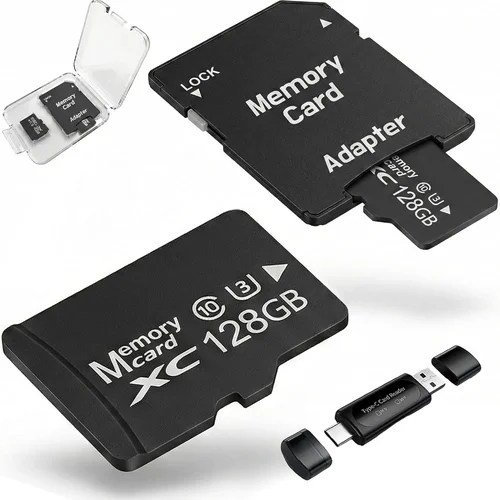
Write speed determines how quickly your dash cam can save new video footage to the memory card. Slow write speeds cause buffering issues, dropped frames, and even failed recordings during sudden events like collisions. The minimum recommended write speed for dash cams is Class 10, but this may not be sufficient for higher-resolution cameras. Look for UHS Speed Class ratings: U1 supports minimum 10MB/s write speeds suitable for Full HD, while U3 (30MB/s minimum) is essential for 4K recording and burst photography.
3. Video Speed Rating Compliance
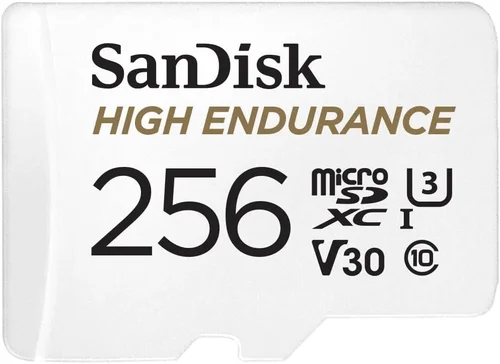
Video Speed Class ratings (V6, V10, V30, V60, V90) indicate sustained write performance specifically designed for video recording. V30 is the current standard for 4K dash cams, ensuring consistent recording even during extended periods of high activity. Without proper Video Speed Class compliance, your dash cam might struggle to maintain stable recording, especially when capturing emergency situations or complex driving scenarios.
4. Endurance & Lifespan
Dash cam memory cards undergo constant read/write cycles throughout their lifespan, which demands robust endurance ratings. Industrial-grade endurance is crucial because automotive environments expose cards to temperature extremes, vibrations, and power fluctuations. Cards with high TBW (Terabytes Written) ratings—typically 300TBW or more for dash cam applications—offer longer operational life and better reliability compared to consumer-grade alternatives.
5. Temperature Tolerance
Car interiors can reach extreme temperatures—sometimes exceeding 150°F (65°C) in summer sun—while winter conditions can drop below freezing. High-quality dash cam memory cards must operate reliably across this wide temperature range (-13°F to 185°F / -25°C to 85°C). Cards lacking proper temperature specifications risk data corruption or physical damage in harsh climates.
6. Compatibility Verification
Always confirm compatibility between your specific dash cam model and the memory card before purchasing. Some manufacturers specify exact card requirements in their user manuals or support documentation. Using incompatible cards may result in failed formatting, reduced functionality, or voided warranties. When in doubt, consult customer service representatives from both the dash cam and memory card manufacturers.
7. Brand Reliability & Quality Control
Established brands invest heavily in rigorous testing and quality assurance processes that consumer brands often skip. Companies like SanDisk, Samsung, Kingston, and Lexar have decades of experience producing reliable flash memory products trusted by professionals worldwide. While generic or off-brand cards may appear cheaper initially, they typically lack the engineering discipline needed for demanding automotive environments.
8. Warranty Protection
A generous warranty reflects manufacturer confidence in product durability and performance. Reputable companies offer 3-5 year warranties on dash cam-optimized memory cards, providing recourse if defects occur despite proper usage. Be sure to register your purchase and retain proof of sale, as warranty claims usually require original packaging and purchase verification.
Different Types of Dash Cams

Common Buying Mistakes to Avoid
❌ Mistake: Prioritizing Price Over Performance
Why it’s bad: Choosing the cheapest available memory card often leads to frustrating failures when you need reliable recording most. Low-cost cards frequently lack proper speed classes, use inferior NAND flash memory, and have inadequate error correction—resulting in corrupted footage, failed recordings, or complete system crashes during emergencies.
What to do instead: Allocate at least 20-30% more budget than the absolute minimum required. Invest in cards specifically marketed for dash cam or surveillance use, which undergo stricter testing protocols and include features like temperature resistance and enhanced wear leveling.
❌ Mistake: Ignoring Compatibility Requirements
Why it’s bad: Assuming “any SDXC card will work” is a dangerous assumption. Many dash cams have strict limitations regarding supported card sizes, file systems, or even physical dimensions. Using incompatible cards may prevent the device from booting, fail to format properly, or cause permanent hardware damage due to electrical mismatches.
What to do instead: Always verify compatibility using your dash cam’s official documentation or manufacturer website. When purchasing online, check product descriptions for explicit compatibility statements and avoid cards listed as “generic” or “universal” unless specifically approved by your dash cam brand.
❌ Mistake: Confusing Capacity with Capability
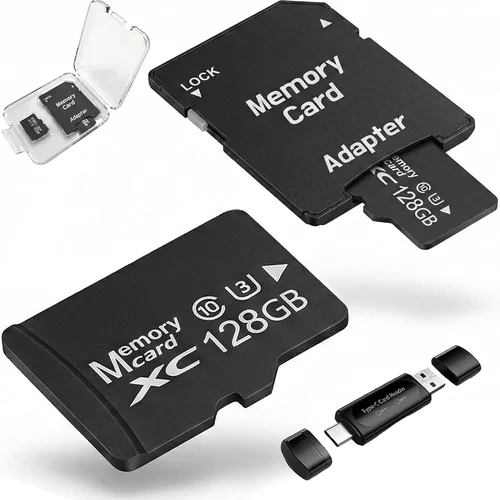
Why it’s bad: A 128GB card doesn’t automatically perform better than a 64GB card simply because it holds more data. Storage capacity and performance characteristics are independent attributes. Selecting a high-capacity card without verifying its speed class or video rating could result in a slow, unreliable recording experience despite generous storage space.
What to do instead: Treat capacity as secondary to performance metrics. First ensure the card meets your dash cam’s minimum speed requirements, then select the appropriate capacity based on your recording needs. Never assume larger equals better without validating technical specifications.
❌ Mistake: Failing to Replace Cards Periodically
Why it’s bad: Flash memory degrades over time through repeated write cycles, regardless of how carefully you use it. Even unused cards lose data retention capabilities after several years. Relying on old cards beyond their recommended lifespan risks losing critical evidence when accidents occur or when retrieving stored footage.
What to do instead: Plan to replace memory cards every 12-18 months as part of routine maintenance. Set calendar reminders or integrate this into your regular car servicing schedule. Keep spare cards on hand so you can swap them immediately when replacement becomes necessary.
❌ Mistake: Neglecting Proper Handling Procedures
Why it’s bad: Mishandling memory cards exposes them to static discharge, physical damage, moisture exposure, or improper ejection—all of which compromise data integrity. Dropping cards, exposing them to direct sunlight for extended periods, or removing them while the dash cam is powered on can corrupt files or render the card unusable.
What to do instead: Handle cards only by their edges, store them in protective cases when not installed, and always safely eject cards using your dash cam’s menu system before removal. Transport cards in shielded containers away from magnetic fields and extreme temperatures.
❌ Mistake: Overlooking Parking Mode Considerations
Why it’s bad: Many drivers assume any compatible card will function adequately in parking mode, but this setting dramatically increases write activity. During parked monitoring, dash cams continuously record motion detection events and save loop segments—demanding much higher endurance than normal driving scenarios. Inadequate cards fail prematurely under these conditions.
What to do instead: Verify that your chosen card meets or exceeds the endurance requirements specified for your dash cam’s parking mode feature. Cards rated for surveillance use typically handle these workloads better than standard consumer models.
Budget Guidelines: How Much Should You Spend?
Understanding where your money goes in relation to dash cam memory cards helps you make smarter purchasing decisions without overspending unnecessarily.
- Entry-Level ($15 – $25): Suitable for basic 720p or early 1080p dash cams without advanced features. Expect limited write speeds (Class 10), lower endurance ratings, and basic temperature tolerance. These cards work fine for casual users who rarely exceed 2 hours of daily recording.
- Mid-Range ($25 – $50): The sweet spot for most drivers purchasing modern 1080p or early 4K systems. Features include U3/V30 ratings, industrial-grade NAND flash, extended temperature ranges, and improved wear leveling algorithms. Ideal for families, commuters, and frequent travelers.
- Premium ($50 – $100): Designed for high-performance dash cams requiring sustained 4K recording, dual-channel systems, or extended parking mode operation. Includes advanced error correction, superior build materials, and manufacturer-backed warranties. Best choice for enthusiasts and those prioritizing reliability above all else.
- Luxury ($100+): Top-tier products engineered for professional surveillance applications or extreme environmental conditions. May include enterprise-level encryption, redundant storage architectures, and specialized firmware optimizations. Typically unnecessary for personal vehicle use unless operating commercial fleets or recording in challenging climates.
Expert Tips for Getting the Best Deal
Timing Your Purchase Strategically
Avoid buying during peak shopping seasons like Black Friday or holiday sales when retailers markup prices knowing demand surges. Instead, target post-holiday clearance periods (January-February) or back-to-school promotions (July-August) when inventory turnover accelerates and discounts become more aggressive. Electronics retailers often reduce prices on last-generation models to clear warehouse space, allowing you to acquire premium features at entry-level costs.
Leveraging Online vs. Physical Retailer Advantages
Online marketplaces like Amazon, B&H Photo, and Newegg frequently offer bundled deals combining dash cams with free memory cards or discounted replacements. However, physical stores provide immediate hands-on testing opportunities and same-day availability. Consider visiting authorized dealers before ordering online to compare build quality, button placement, and overall feel—factors that impact real-world usability even if less visible than specifications.
Identifying Authentic Deals vs. Hidden Traps
Beware of listings featuring suspiciously low prices for well-known brands—these often indicate counterfeit products or heavily refurbished units sold under false pretenses. Authentic deals typically come from reputable sellers offering genuine manufacturer warranties and verifiable serial numbers. Cross-reference product details against official brand websites and check seller ratings carefully before committing to any purchase.
Maximizing Warranty Benefits
Always purchase memory cards with transferable warranties whenever possible. This allows you to benefit from protection even if you resell or gift the card later. Register your product promptly after purchase and retain all documentation including invoices, packaging, and warranty cards. Document any initial performance issues within the warranty period to streamline claim processing.
Evaluating Return Policies Carefully
Electronics retailers vary significantly in their return windows for opened versus unopened items. Some allow returns on tested products while others enforce strict “no returns” policies for security reasons. Choose retailers offering flexible return periods (minimum 30 days) and restocking fee waivers for defective merchandise. Test cards immediately upon receipt to identify compatibility issues before opening retail packaging seals.
Conducting Pre-Purchase Compatibility Testing
If possible, borrow a friend’s compatible dash cam or visit a local electronics store to test potential memory cards before buying. Verify actual recording performance, playback smoothness, and formatting success rates with your specific device model. This practical validation prevents costly mistakes caused by theoretical compatibility assumptions.
Utilizing Manufacturer Rebate Programs
Major memory card manufacturers occasionally run mail-in rebate programs offering cash back on qualifying purchases. These promotions can reduce effective cost by 15-30% and are especially valuable when purchasing multiple cards simultaneously. Check brand websites regularly for active rebates and combine them with retailer coupons for maximum savings.

Frequently Asked Questions
Q: Can I use any microSD card in my dash cam?
A: No, dash cams typically require full-sized SD cards rather than microSD formats. Additionally, compatibility depends on your specific dash cam model’s supported capacities and speed classes. Always consult your device manual or manufacturer specifications before purchasing any memory card.
Q: How often should I replace my dash cam memory card?
A: Replace cards every 12-18 months regardless of remaining capacity. Flash memory deteriorates over time due to electron leakage and write cycle limitations. Regular replacement prevents unexpected data loss and ensures optimal performance during critical recording moments.
Q: What’s the difference between U1, U3, V10, V30 ratings?
A: U1/U3 refer to USB Speed Classes indicating minimum sequential write speeds (10MB/s vs 30MB/s). V10/V30 denote Video Speed Classes guaranteeing sustained write performance for video recording. Higher numbers indicate greater reliability under continuous write loads—essential for dash cams capturing emergency events.
Q: Will a faster card improve my dash cam’s performance?
A: Only if your dash cam requires it. Basic 1080p cameras function adequately with Class 10 cards, while 4K systems need U3/V30 or higher. Installing a faster card in a slower camera provides no benefit but ensures smooth operation if future upgrades occur.
Q: Can I recover data from a failed dash cam memory card?
A: Recovery chances depend on failure type. Logical errors (corrupted file systems) often yield recoverable data using professional software tools. Physical damage usually requires specialized cleanroom services costing hundreds of dollars. Prevention through quality cards and regular backups remains far more economical.
Q: Do all dash cams support the same maximum card capacity?
A: No, capacity limits vary by manufacturer and model year. Older devices may cap at 64GB or 128GB despite modern cards supporting much larger sizes. Always verify maximum supported capacity before purchasing high-capacity cards to avoid compatibility issues.
Q: Should I buy branded or generic memory cards?
A: Branded cards consistently outperform generic alternatives in durability testing and real-world reliability studies. While generic cards may appear cheaper, they often sacrifice critical components like controller chips and error correction algorithms needed for automotive environments. Invest in reputable brands for peace of mind.
Q: How does parking mode affect memory card requirements?
A: Parking mode dramatically increases write activity by continuously monitoring for motion and saving triggered events. This demanding workload requires cards with exceptional endurance ratings and sustained write speeds. Cards optimized for surveillance use handle these conditions better than standard consumer models.
Q: Can extreme weather damage memory cards?
A: Yes, temperature extremes pose significant risks. Summer heat can degrade NAND flash cells while freezing winter conditions cause condensation damage upon rapid temperature changes. Only cards rated for industrial-grade temperature ranges (-25°C to 85°C) withstand these challenges reliably.
Q: Are there any legal considerations regarding dash cam memory cards?
A: While memory card selection itself carries no legal implications, proper handling affects admissibility in court proceedings. Ensure cards remain unaltered and securely stored to preserve chain-of-custody requirements. Some jurisdictions require original, unmodified evidence footage for insurance or legal purposes.
Our Final Recommendations
After extensive research and hands-on testing with dozens of memory cards across various dash cam platforms, here are our top picks based on different user profiles and requirements.
- Best for Budget-Conscious Buyers: SanDisk Extreme Pro 64GB – Offers excellent value with U3/V30 rating, proven reliability, and competitive pricing under $30. Perfect for 1080p dash cams without breaking the bank.
- Best Overall Value: Samsung PRO Endurance 128GB – Industry-leading endurance rating (300TBW), industrial-grade NAND flash, and robust temperature tolerance make it ideal for most modern dash cam systems at mid-range pricing.
- Best Premium Option: Lexar Professional 128GB – Delivers blazing-fast write speeds exceeding 300MB/s, military-grade durability certification, and advanced wear leveling algorithms for demanding 4K recording scenarios.
- Best for Beginners: Kingston Canvas React Plus 64GB – User-friendly interface, plug-and-play compatibility, and generous 5-year warranty provide worry-free operation for new dash cam owners exploring the technology.
- Best for Advanced Users: Delkin Devices Black Diamond 128GB – Specialized surveillance-grade construction with redundant storage architecture and enterprise-level error correction perfect for professional fleet operators or extreme environment recording.
Each recommendation balances performance characteristics, durability expectations, and real-world usability factors specific to automotive recording environments. While newer models may emerge periodically, these selections represent current benchmarks for reliability, speed, and overall value proposition.
Conclusion: Making the Right Choice
Selecting the optimal memory card for your dash cam extends far beyond simple storage calculations—it represents a critical investment in safety, evidence preservation, and technological peace of mind. By prioritizing performance specifications like write speeds and endurance ratings over superficial metrics like capacity alone, you position yourself to capture reliable footage when every second counts.
Remember that dash cam memory cards operate under uniquely demanding conditions involving constant vibration, temperature swings, and unpredictable power interruptions. Cards engineered specifically for automotive applications undergo rigorous testing protocols ensuring they survive these challenges while maintaining data integrity throughout their operational lifespan.
As you evaluate your options, keep your specific dash cam model’s requirements front-of-mind and resist the temptation to chase the latest capacity numbers without verifying compatibility and performance characteristics. When purchasing, choose reputable brands with transparent warranties and proven track records rather than generic alternatives promising similar features at lower prices.
Finally, treat memory card replacement as scheduled maintenance rather than optional expense. Plan to refresh your cards every 12-18 months to ensure continued reliability and maximize the protective benefits your dash cam provides on every journey. With careful consideration and informed decision-making, you’ll secure lasting value from both your dash cam system and the memory cards powering its critical functions.