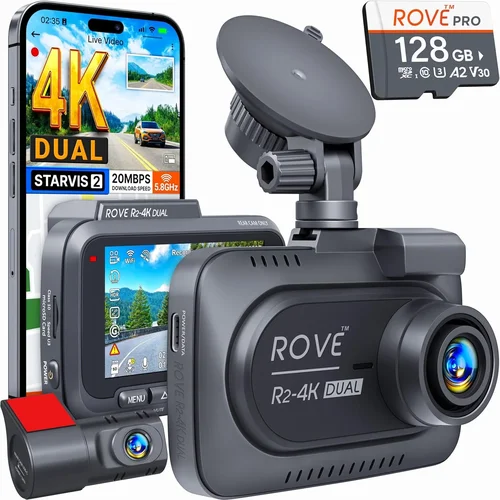
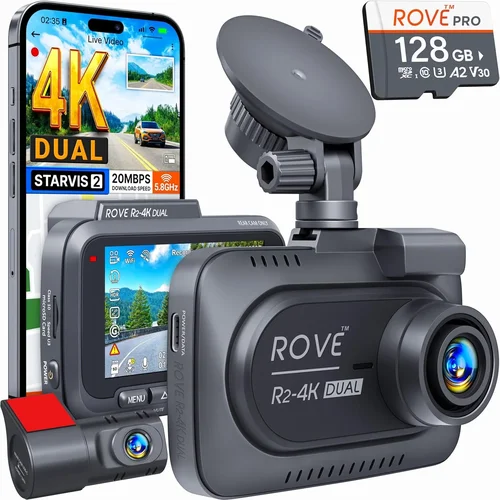
Smart Car Dash Cam Buying Guide
Why This Guide Matters
Choosing the right dash cam for your car can feel overwhelming with so many options available. A quality dash cam isn’t just about recording what happens on the road—it’s about peace of mind, evidence in case of accidents, and the ability to monitor your vehicle when you’re not behind the wheel. With WiFi-enabled dash cams, you get an extra layer of convenience by allowing wireless file transfer, live viewing, and remote access directly to your smartphone.
This comprehensive buying guide will walk you through everything you need to know about selecting the best dash cam with WiFi capabilities for your needs. Whether you’re a first-time buyer or looking to upgrade your current system, we’ll cover all the critical factors including video quality, storage solutions, GPS tracking, parking mode, and how WiFi connectivity enhances your overall experience.
The market has evolved significantly in recent years, with manufacturers incorporating advanced features like cloud storage, AI detection, and seamless smartphone integration. Understanding these technologies and how they work together will help you make an informed decision that balances functionality with value.
What You’ll Learn in This Guide
By the end of this guide, you’ll understand exactly what to look for in a WiFi dash cam, from technical specifications like resolution and field of view to practical considerations like installation and maintenance. We’ll compare different types of dash cams, break down price ranges, and share expert tips for getting the most value from your investment.
We’ll also address common misconceptions, highlight mistakes to avoid, and provide detailed comparisons of top-rated models. The goal is to equip you with the knowledge needed to select a dash cam that not only meets but exceeds your expectations for safety, security, and convenience.
What to Look for When Buying Dash Cams
1. Video Quality and Resolution
Video quality should be your primary consideration when selecting any dash cam. For WiFi-enabled models, higher resolution typically means better data transfer efficiency and clearer remote viewing capabilities. Most modern dash cams offer between 1080p (Full HD) and 4K Ultra HD resolution, with 2.5K and 3K emerging as popular sweet spots.
When evaluating video quality, consider three key aspects: resolution, frame rate, and low-light performance. A minimum of 1920×1080 pixels at 30 frames per second is recommended for clear license plate capture and smooth motion handling. Higher frame rates (60fps) are beneficial for capturing fast-moving vehicles and sudden incidents.
Look for cameras with high dynamic range (HDR) technology, which helps maintain detail in both bright sunlight and dark shadows. Night vision capabilities are equally important—cameras with larger sensors, wider apertures (f/1.8 or lower), and infrared LEDs perform significantly better in low-light conditions.
The sensor type also matters; CMOS sensors with backside illumination (BSI) generally outperform traditional CMOS sensors in night driving scenarios. Additionally, check if the camera supports loop recording and automatic overwrite to ensure continuous operation without manual intervention.
2. Field of View (FOV) and Lens Configuration
The field of view determines how much of the road ahead and surroundings your dash cam captures. A wider FOV provides more comprehensive coverage but may introduce fish-eye distortion at the edges. Most WiFi dash cams offer FOVs between 120° and 170°, with 140° being a common compromise between coverage and image clarity.
Consider your typical driving environment when choosing FOV. Urban drivers might benefit from slightly narrower angles (130-140°) to reduce distortion around buildings and street signs, while highway commuters may prefer wider angles (150-170°) to capture lane changes and merge traffic effectively.
Dual-lens systems are becoming increasingly popular for WiFi dash cams, offering front and rear recording simultaneously. Front cameras typically have 120-140° FOV while rear units often feature 110-130° angles. Some premium models include interior cabin monitoring capabilities for ride-sharing drivers or families with young children.
When evaluating lens configuration, pay attention to the placement and stability of the lens mount. Poorly secured lenses can vibrate during highway speeds or cause image instability, reducing overall video quality. Look for cameras with shock-resistant mounts and vibration-dampening technology.
3. WiFi Connectivity and Smartphone Integration
WiFi capability transforms your dash cam from a standalone recording device into a connected smart system. Modern WiFi dash cams use either dedicated WiFi chips or leverage your phone’s cellular connection for data transfer, depending on the model and manufacturer.
Evaluate the WiFi standards supported by the device—802.11ac offers faster speeds and better range than older 802.11n standards. Look for dual-band support (2.4GHz and 5GHz) for optimal performance in various environments. The connection process should be straightforward, typically involving QR code scanning or direct pairing through a mobile app.
Consider what functions you want to perform remotely: live viewing, instant video sharing, firmware updates, and cloud storage management. Premium models often support simultaneous WiFi and Bluetooth connections for enhanced functionality. Check if the companion app works reliably across both iOS and Android platforms.
Data transfer speeds matter significantly for large video files. High-speed WiFi allows quick upload to cloud services or social media platforms without lengthy wait times. Some cameras offer automatic upload triggers based on events like collision detection or parking mode activation.
4. Storage Solutions and Data Management
Storage capacity and management are critical for reliable dash cam operation. Most WiFi dash cams use microSD cards ranging from 32GB to 256GB, with some premium models supporting up to 512GB. Consider your typical recording duration and video compression format when determining required capacity.
Loop recording automatically overwrites the oldest footage when storage fills up, ensuring continuous operation. However, some dash cams offer event-based retention where critical clips (like collision detection) are saved to protected memory before being overwritten. This “parking mode” feature is especially valuable for WiFi-enabled devices that can alert you to potential incidents.
Cloud storage integration varies by manufacturer but generally requires a subscription service. Evaluate whether cloud storage adds significant value compared to local storage options. Consider data usage costs if using cellular-based WiFi, particularly if uploading large video files frequently.
File organization features are worth considering—some apps automatically categorize footage by date, location, or event type, making retrieval much easier. Search functionality within the app can save time when looking for specific incidents or moments captured by your dash cam.
5. Parking Mode and Motion Detection
Parking mode functionality is essential for WiFi dash cams, providing surveillance when your vehicle is unattended. This feature typically activates when the car is parked and the ignition is turned off, using either battery backup or hardwiring to your vehicle’s electrical system.
Motion detection algorithms vary significantly between manufacturers. Advanced systems can distinguish between relevant motion (vehicles approaching your car) and irrelevant movement (birds flying past or tree branches swaying). False alarms can be frustrating, so look for cameras with adjustable sensitivity settings.
Battery backup systems allow parking mode operation during extended periods away from charging. Most dash cams include built-in supercapacitors that provide 2-4 hours of backup power. For longer protection, consider hardwiring options that draw power directly from your car’s battery through a fuse tap or professional installation.
Some WiFi dash cams offer two-way communication during parking mode—you can receive alerts on your phone when motion is detected and even view live footage remotely. This feature provides valuable peace of mind, especially in areas with higher theft or vandalism risk.
6. Build Quality and Durability
Dash cams operate in harsh automotive environments—extreme temperatures, vibrations, dust, and moisture exposure. High-quality construction ensures reliable performance year after year, regardless of weather conditions or driving conditions.
Look for cameras with IP65 or higher ingress protection ratings, indicating resistance to dust and water jets. Military-grade drop testing (MIL-STD-810G) certification suggests robust construction capable of withstanding accidental drops or impacts. Tempered glass lenses resist scratches better than plastic alternatives.
Heat dissipation is another critical factor—excessive heat buildup can cause thermal throttling, reducing performance or causing shutdowns during hot summer drives. Cameras with efficient heat management systems maintain consistent operation in extreme temperatures ranging from -4°F to 140°F (-20°C to 60°C).
Cable management and routing should also be considered. Neat, secure cable connections prevent damage from vibration and ensure reliable power delivery. Some premium models include magnetic mounts or suction cup designs that make installation and removal easier while maintaining stability at highway speeds.
7. Audio Capabilities and Privacy Features
While primarily visual recording devices, audio capabilities add another dimension to incident documentation. Built-in microphones capture engine noise, traffic sounds, and conversations inside your vehicle, providing context that video alone cannot convey.
Audio quality varies significantly between models. Look for cameras with noise-cancellation technology that filters out wind and road noise while preserving important audio details. Some dash cams allow you to disable audio recording entirely for privacy compliance, especially important for ride-sharing drivers or families concerned about recording private conversations.
Legal considerations regarding audio recording differ by jurisdiction. In some regions, two-party consent laws require all parties to be aware of and consent to recording. Always verify local regulations before enabling audio features, and consider disabling microphone functionality if privacy concerns outweigh documentation benefits.
8. Power Options and Installation
Power sources determine your dash cam’s operational flexibility and installation requirements. Battery-powered models offer the easiest installation but require frequent recharging. Hardwired options provide continuous power but need professional installation or DIY electrical work.
USB-C charging has become standard on newer models, offering faster charging and universal compatibility. Some dash cams include detachable batteries that can be swapped without interrupting recording—ideal for long trips or situations where power access is limited.
Installation complexity varies from simple adhesive mounting to complex wiring harnesses. Consider your comfort level with automotive electronics before choosing a hardwired solution. Professional installation typically costs $50-150 but ensures proper wiring and warranty preservation.
Different Types of Dash Cams
Common Buying Mistakes to Avoid
❌ Mistake: Ignoring Video Quality Requirements
Why it’s bad: Choosing a dash cam based solely on price without considering video quality can leave you with blurry footage that fails to capture crucial details during incidents. Low-resolution cameras struggle to read license plates clearly, making them ineffective for insurance claims or legal proceedings.
What to do instead: Prioritize at least 1080p Full HD resolution with good low-light performance. For serious protection, consider 2.5K or 4K models. Always check real-world reviews for actual video samples rather than relying on marketing claims about theoretical capabilities.
❌ Mistake: Overlooking Storage Management
Why it’s bad: Assuming that more storage equals better protection ignores how quickly high-quality video fills storage space. Without proper loop recording and automatic overwrite management, important footage gets deleted too quickly, defeating the purpose of having a dash cam.
What to do instead: Calculate your storage needs based on typical driving patterns. Factor in video compression formats—H.265 encoding uses less space than H.264 for similar quality. Consider cloud storage options if you need extended retention without physical media management.
❌ Mistake: Skipping Warranty and Support Research
Why it’s bad: Many buyers focus exclusively on features and price while ignoring post-purchase support. Dash cams are electronic devices that can fail unexpectedly, and inadequate warranty coverage or poor customer service can leave you stranded without working equipment when you need it most.
What to do instead: Research brand reputation for reliability and customer service responsiveness. Look for manufacturers offering at least 1-year warranties, preferably with international coverage. Check online forums for common failure points and how well the company addresses them.
❌ Mistake: Neglecting Installation Complexity
Why it’s bad: Assuming all dash cams install the same way leads to frustration and potential damage. Complex wiring requirements, incompatible vehicle systems, or difficult mounting locations can turn a simple purchase into an expensive headache requiring professional help.
What to do instead: Read installation guides carefully before purchasing. Consider whether you need hardwired power or can manage USB charging. For complicated installations, budget for professional help upfront rather than struggling with DIY attempts that could damage your vehicle.
❌ Mistake: Disregarding Legal Compliance
Why it’s bad: Recording audio without understanding local privacy laws can result in serious legal consequences. Many jurisdictions require two-party consent for audio recording, meaning both parties must be aware of and agree to being recorded—something impossible to guarantee with dash cams.
What to do instead: Research your state or country’s recording laws before enabling audio features. Many dash cam manufacturers now include easy-to-find audio disable switches. When in doubt, prioritize video-only recording to avoid legal complications.
❌ Mistake: Choosing Based Solely on WiFi Features
Why it’s bad: While WiFi connectivity offers convenience, it shouldn’t overshadow core recording capabilities. Some budget WiFi dash cams sacrifice video quality and build quality to offer smartphone connectivity, resulting in unreliable performance despite their smart features.
What to do instead: Balance WiFi convenience with essential recording requirements. Ensure your chosen model meets minimum video quality standards before prioritizing wireless features. Test the WiFi functionality thoroughly after purchase to confirm it actually improves your experience.
❌ Mistake: Forgetting About Temperature Extremes
Why it’s bad: Automotive dash cams face extreme temperature fluctuations that affect performance and longevity. Cameras designed for office environments fail catastrophically in hot cars, where interior temperatures can exceed 180°F (82°C) on sunny days.
What to do instead: Verify operating temperature specifications before purchasing. Look for industrial-grade components rated for automotive use. Consider parking mode limitations in extreme climates—some cameras automatically disable recording during very cold or very hot conditions to protect hardware.
Budget Guidelines: How Much Should You Spend?
Entry-Level ($80 – $120)
This price range offers basic dash cam functionality with essential WiFi connectivity features. You’ll find single-lens 1080p cameras with decent night vision and loop recording capabilities. These models typically include smartphone apps for basic file transfer and settings adjustment.
Expect limitations such as smaller storage capacity (32-64GB microSD cards), fewer advanced features like GPS tracking or parking mode, and potentially lower build quality. However, for occasional use or as a secondary vehicle camera, these entry-level WiFi dash cams provide adequate protection at an affordable price point.
Popular choices in this range include compact models from brands like Viofo, Rexing, and BlackVue, which offer reliable performance without breaking the bank. While they may lack some premium features, they deliver solid video quality and dependable WiFi connectivity for everyday driving needs.
Mid-Range ($120 – $250)
The mid-range segment represents the sweet spot for most buyers, offering excellent balance between features, performance, and value. These WiFi dash cams typically deliver 2.5K or 4K video quality with advanced image processing, wider fields of view, and enhanced low-light capabilities.
You’ll find dual-lens systems, sophisticated parking modes with motion detection, GPS tracking, and improved build quality in this price bracket. WiFi functionality becomes more robust, with faster transfer speeds and more reliable smartphone integration. Many models include cloud storage options or enhanced app functionality.
This category includes premium brands like Garmin, Nextbase, and Thinkware, which have established reputations for reliability and customer support. For families, ride-sharers, and daily commuters, mid-range WiFi dash cams provide comprehensive protection without excessive cost.
Premium ($250 – $500)
Premium WiFi dash cams target serious drivers and professionals who demand the highest levels of performance and features. These systems often include 4K recording, advanced driver assistance systems (ADAS), superior night vision, and industrial-grade durability.
Expect cutting-edge WiFi capabilities with faster speeds, simultaneous multi-device connectivity, and enhanced security features. Premium models frequently offer dual-channel recording with interior monitoring, sophisticated parking surveillance, and integration with vehicle telematics systems. Build quality approaches commercial-grade standards with military-spec components.
These systems are ideal for fleet operators, professional drivers, and tech enthusiasts who require maximum reliability and advanced functionality. While the investment is significant, the combination of superior performance, extensive features, and robust build quality justifies the higher price point for demanding users.
Luxury ($500+)
Luxury WiFi dash cams represent the pinnacle of automotive recording technology, combining ultra-high-definition recording with professional-grade features and unmatched build quality. These systems often include multiple camera angles, AI-powered incident detection, and seamless integration with luxury vehicle systems.
Expect features like 4K recording with HDR, advanced thermal imaging, satellite connectivity, and comprehensive vehicle integration. Luxury models frequently include professional installation services, extended warranties, and concierge support. Some offer unique capabilities like 360-degree monitoring or drone-style aerial recording.
These systems are designed for high-end vehicles, professional racing teams, and individuals who demand absolute perfection in recording quality and system reliability. The substantial investment reflects not just hardware quality but also exclusive features, premium materials, and unparalleled customer service.
Expert Tips for Getting the Best Deal
Timing Your Purchase for Maximum Savings
Dash cam prices fluctuate throughout the year due to seasonal demand and new product releases. The best time to buy is typically during major shopping holidays like Black Friday, Cyber Monday, and Prime Day, when retailers offer significant discounts on electronics. Early summer (May-June) also sees reduced demand as people prepare for vacation season, often leading to clearance sales of older models.
Avoid peak shopping seasons like Christmas and back-to-school periods when retailers mark up prices to maximize profits. Consider purchasing during January when retailers clear out holiday inventory and during September when companies announce new models, creating downward pressure on previous generation pricing.
Comparing Retailers and Online Platforms
Multiple retailers offer dash cams at varying price points and with different advantages. Amazon provides convenience and fast shipping but may charge higher prices due to marketplace competition. Specialty electronics stores like Best Buy offer knowledgeable staff and in-person demonstrations but often have less competitive pricing.
Direct manufacturer websites typically offer the best prices and warranty terms, plus exclusive bundles like professional installation services. Independent automotive accessory stores sometimes provide better deals and more personalized service but may have limited selection. Consider price matching policies when shopping at major retailers to ensure you get the best available price.
Identifying Hidden Deals and Promotions
Sign up for email newsletters from major dash cam manufacturers and retailers to receive exclusive discount codes and early access to sales. Follow social media accounts for flash sale announcements and limited-time promotions. Check price history tracking tools to identify genuine discounts versus temporary price increases.
Bundle deals often provide better value than individual purchases—many manufacturers offer discounts when you buy additional accessories like extra batteries, hardwire kits, or premium memory cards. Student, military, and senior discounts are available at some retailers, so always ask about special pricing programs.
Warranty and Return Policy Considerations
Always verify warranty coverage length and what it includes before purchasing. Basic warranties typically cover defects for 1 year, while premium models may offer 2-3 years or even lifetime warranties on certain components. International warranty coverage is crucial if you travel frequently or plan to sell your vehicle abroad.
Return policies vary significantly between retailers—Amazon offers 30-day returns without questions asked, while specialty stores may have stricter requirements. Consider the restocking fees and return shipping costs when comparing retailers. Some manufacturers offer extended warranty programs that can extend coverage beyond standard terms.
Testing Before Committing to Purchase
If possible, visit retail stores to test dash cam interfaces and video quality before buying. Ask to see actual video samples and test the WiFi connectivity with your personal smartphone. Compare how different models handle low-light conditions by examining footage in dimly lit store displays.
Pay attention to app usability—download the manufacturer’s app beforehand and test its interface on your phone. Check compatibility with both iOS and Android if you have multiple devices. Ask about demo units or rental programs that allow you to try the product before committing.
Negotiating Better Prices and Trade-In Options
Don’t hesitate to ask for price matches—most retailers will match or beat competitor prices for identical products. Mention competitor advertisements or online prices when making your purchase request. For existing dash cam owners, inquire about trade-in programs or upgrade discounts offered by manufacturers.
Consider purchasing refurbished models from authorized dealers—these often come with full warranties and significant savings compared to new units. Some manufacturers offer certified pre-owned programs with comprehensive testing and refurbishment processes.
Maximizing Value Through Accessories and Bundles
Essential accessories can enhance your dash cam experience significantly. Invest in high-quality microSD cards from reputable brands like SanDisk Extreme or Samsung EVO Plus—cheap cards often fail prematurely under constant write cycles. Consider additional batteries for extended parking mode operation or hardwire kits for seamless power integration.
Bundle deals often include valuable extras at discounted prices. Premium packages may include professional installation, extended warranties, cloud storage subscriptions, and premium memory cards. Evaluate whether included accessories justify the bundle price compared to purchasing items separately.
Frequently Asked Questions
Q: Do I really need WiFi connectivity in my dash cam?
A: WiFi offers significant convenience benefits that enhance your dash cam experience. It enables instant video transfer to your smartphone, live viewing capabilities, remote firmware updates, and cloud storage integration. For most users, WiFi transforms a simple recording device into a comprehensive security system. However, if you primarily need basic recording functionality and don’t mind manually transferring files via memory card, a non-WiFi dash cam may suffice and typically costs less.
Q: What’s the difference between 1080p, 2.5K, 4K, and 8K dash cams?
A: These designations refer to video resolution measured in pixels horizontally. 1080p (1920×1080) offers good quality for basic needs. 2.5K (2560×1080) provides noticeable improvement in detail and license plate recognition. 4K (3840×2160) delivers exceptional clarity with significant file size increases. 8K models are currently rare in dash cams and offer diminishing returns for automotive use due to extreme file sizes and minimal practical benefits.
For most drivers, 2.5K or 4K provides the best balance of quality and manageable file sizes. Higher resolutions require more storage space and faster processing capabilities, which can impact battery life and overall system reliability.
Q: How long can WiFi dash cams record continuously?
A: Continuous recording duration depends on several factors including video quality, storage capacity, and power source. Most WiFi dash cams can record 1-2 hours of 1080p video on a single 32GB microSD card. Higher resolutions like 4K require significantly more storage and reduce recording time substantially.
Loop recording automatically overwrites old footage when storage fills up, enabling indefinite continuous operation. However, this means you need to regularly review or back up important clips before they’re overwritten. Parking mode recordings are typically shorter since they trigger only when motion is detected.
Q: Is WiFi connectivity safe for my privacy?
A: WiFi dash cams can pose privacy risks if not properly configured. Always review the manufacturer’s data collection policies before purchasing. Look for cameras with local-only storage options and disable cloud features if privacy is a primary concern. Regularly update firmware to patch security vulnerabilities and enable encryption features when available.
Be aware that WiFi-enabled cameras transmit data over networks, which could potentially be intercepted if not properly secured. Choose reputable manufacturers with strong security practices and avoid models that require excessive permissions or data sharing with third parties.
Q: Can I use my existing microSD card with a new WiFi dash cam?
A: Compatibility depends on your card’s specifications and the dash cam’s requirements. Most modern dash cams support UHS-I microSD cards up to 256GB, but check the manufacturer’s specifications before using existing cards. Cards with Class 10 speed rating or higher are recommended for reliable performance.
Cheap or counterfeit memory cards often fail prematurely under constant write cycles typical of dash cam operation. If your current card is inexpensive or shows signs of wear, invest in a high-quality card specifically designed for continuous recording applications.
Q: How does parking mode work with WiFi dash cams?
A: Parking mode activates when your vehicle is turned off and uses either battery backup or hardwired power to continue recording. WiFi dash cams with parking mode typically include motion detection algorithms that trigger recording when suspicious activity is detected near your vehicle.
During parking mode, the camera may enter low-power standby when no motion is detected, then rapidly activate to capture potential threats. Some models send immediate notifications to your smartphone when parking mode detects movement, allowing you to respond quickly to potential incidents.
Q: What’s the best way to install a WiFi dash cam?
A: Simple adhesive mounting works well for basic installations where you can access a power source. For permanent installations, hardwiring through your vehicle’s fuse box provides the most reliable power source and cleanest appearance. Professional installation typically costs $50-150 but ensures proper wiring and warranty preservation.
Consider your comfort level with automotive electronics before attempting DIY installation. Route cables neatly behind trim panels to avoid damage and maintain a clean appearance. Always disconnect the negative battery terminal before working with vehicle electrical systems.
Q: Can multiple people use the same dash cam app simultaneously?
A: This varies by manufacturer and model. Some dash cams allow multiple user accounts with shared access to footage and settings, while others restrict app usage to a single primary account. Family members or business partners may need separate accounts for independent access.
Check the manufacturer’s specifications regarding multi-user support before purchasing. Consider how many family members or employees might need access to footage and whether the app supports role-based permissions for different levels of access control.
Q: How do I choose the right storage capacity for my needs?
A: Calculate based on your typical driving patterns and video quality requirements. For 1080p recording, a 32GB card typically holds 2-3 hours of footage. 64GB cards provide 4-6 hours, while 128GB offers 8-12 hours. Higher resolutions like 4K require significantly more storage—4K footage consumes roughly four times the space of 1080p video.
Consider how frequently you review footage and whether you need extended retention. If you mainly check recent clips, smaller cards suffice. For comprehensive documentation or legal purposes, larger capacities ensure you won’t accidentally overwrite important evidence.
Q: Are there legal restrictions on where I can place a dash cam?
A: Dash cam placement is generally unrestricted since they record public roads and traffic conditions. However, recording inside your vehicle raises privacy considerations. Many jurisdictions have laws regarding recording conversations, and some states require disclosure when recording others in private spaces.
Always comply with local privacy laws and respect others’ reasonable expectation of privacy. Avoid placing cameras in bathrooms, changing areas, or other private spaces where people might expect privacy. When in doubt, prioritize recording only what’s visible from outside your vehicle.
Our Final Recommendations
Best for Budget-Conscious Buyers
The Viofo A119 v3 represents exceptional value in the budget WiFi dash cam category. Priced around $80-$90, this single-lens 1080p camera delivers reliable performance with impressive night vision capabilities and stable WiFi connectivity. Its compact design fits discreetly on most dashboards, and the included suction mount provides secure positioning.
The A119 v3 includes essential features like loop recording, G-sensor for automatic incident detection, and a convenient parking mode function. The companion app offers straightforward file management and remote viewing capabilities. While it lacks some premium features like GPS tracking, it provides solid protection at an unbeatable price point for occasional drivers or those needing a secondary vehicle camera.
Best Overall Value
The Garmin Dash Cam 67W strikes the perfect balance between features, performance, and reliability. Priced around $150, this 1080p dash cam includes advanced driver assistance features like forward collision warning and lane departure warnings. Its WiFi connectivity is exceptionally reliable, with fast file transfer speeds and stable smartphone integration.
Garmin’s cloud storage integration provides automatic backup of important footage, reducing the hassle of manual file management. The device includes voice control capabilities and works seamlessly with Garmin’s ecosystem of navigation and safety products. Premium build quality, intuitive interface, and excellent customer support make this an outstanding choice for drivers seeking comprehensive protection without excessive cost.
Best Premium Option
The Nextbase 622GW represents the pinnacle of consumer dash cam technology. Priced around $200, this 2.5K resolution camera delivers stunning video quality with advanced night vision and intelligent driver assistance features. Its WiFi connectivity is industry-leading, supporting lightning-fast file transfers and reliable remote viewing.
Notable features include emergency SOS button, Alexa voice control, and sophisticated parking mode with instant alerts. The included 32GB high-speed microSD card ensures immediate functionality, while cloud storage provides unlimited backup of important incidents. Premium materials, professional installation options, and comprehensive warranty coverage justify the investment for serious drivers and families prioritizing maximum safety and convenience.
Best for Beginners
The Rexing V1P offers an ideal entry point into WiFi dash cam technology with its user-friendly interface and straightforward setup process. Priced around $90, this 1080p camera includes all essential features with minimal learning curve. The intuitive mobile app makes file management effortless, even for technologically inexperienced users.
Its compact size doesn’t obstruct dashboard visibility, and the included suction mount provides secure positioning without complex installation requirements. The camera automatically adjusts settings based on lighting conditions, reducing the need for manual adjustments. Comprehensive customer support and detailed online tutorials ensure beginners can get started confidently and learn advanced features as they become comfortable with the system.
Best for Advanced Users
The Thinkware F800 Pro caters to experienced users who demand professional-grade performance and extensive customization options. Priced around $180, this 2.5K resolution camera includes advanced features like multiple recording profiles, sophisticated parking mode configurations, and comprehensive data management tools.
Thinkware’s WiFi implementation is among the most reliable in the industry, with stable connections and fast transfer speeds even with large video files. The extensive customization options allow advanced users to fine-tune every aspect of recording behavior, from sensitivity settings to storage management. Dual-channel recording capabilities and superior build quality make this an excellent choice for tech enthusiasts who appreciate granular control over their recording system.
Conclusion: Making the Right Choice
Choosing the best dash cam with WiFi capabilities ultimately comes down to understanding your specific needs, budget constraints, and how you plan to use the device. The market offers incredible variety, from basic 1080p models perfect for casual drivers to sophisticated 4K systems with advanced AI features for tech enthusiasts and professionals.
Focus on the core requirements that matter most to you—whether that’s crystal-clear video quality for legal protection, reliable WiFi connectivity for convenient file management, or comprehensive parking mode surveillance for theft prevention. Don’t get distracted by flashy features that don’t align with your actual usage patterns.
Remember that the most expensive option isn’t always the best fit, and the cheapest model might lack critical features you’ll need. Take time to research thoroughly, read independent reviews, and consider how each feature contributes to your specific situation. A dash cam is an investment in your safety and peace of mind, so choose wisely and use it consistently to maximize its protective benefits.
Whether you’re protecting your family vehicle, securing a rideshare car, or safeguarding a commercial fleet, the right WiFi dash cam will provide valuable documentation and potentially save you from costly disputes or accidents. Make your decision based on careful evaluation of your priorities, and enjoy the confidence that comes with knowing you’re prepared for whatever the road brings.