2026 Subaru Outback Dash Cam Buying Guide
When shopping for a dash cam for your 2026 Subaru Outback, you’re not just looking at any old camera—you’re investing in peace of mind, evidence protection, and enhanced driving safety. The right dash cam can make all the difference in how you experience every mile on the road, whether you’re commuting through busy city streets, navigating mountain passes, or taking long highway drives across varied terrain.
This comprehensive guide is designed to walk you through everything you need to know when choosing the best dash cam specifically suited for your 2026 Subaru Outback. You’ll learn how to match features to your driving habits, understand what technical specifications truly matter, compare top models head-to-head, and avoid common pitfalls that could cost you money or leave you underprotected. We’ll cover everything from budget-friendly options to premium systems with advanced AI detection, explain why certain features are more important than others, and even provide expert tips on installation and maintenance tailored to Subaru’s unique interior layout and electrical system.
The market for automotive cameras has exploded over the past decade, but not every model works equally well in every vehicle—especially not in modern cars like the 2026 Outback, which comes with cutting-edge safety tech, advanced driver assistance systems (ADAS), and carefully engineered interiors. Choosing a dash cam that integrates smoothly with your car’s design, power supply, and connectivity options isn’t just convenient—it’s essential for reliable performance day after day.
In this article, we break down the key factors you must consider before making a purchase, compare the most popular types and brands, analyze real-world user experiences, and give you actionable recommendations based on different needs and budgets. Whether you’re a daily commuter who wants extra security, a weekend adventurer wanting full coverage on remote roads, or someone who simply values having an objective record of incidents, this guide will help you find the perfect dash cam for your 2026 Subaru Outback.

What to Look for When Buying Dash Cams
1. Budget & Price Range
Your budget plays a crucial role in determining which dash cam features are realistic for you. Entry-level models typically start around $50–$80 and offer basic recording capabilities with limited resolution and storage. These are fine if you’re just dipping your toes into dash cam ownership and don’t need advanced features like parking mode or GPS tracking.
Mid-range dash cams—priced between $100 and $250—are where most drivers find their sweet spot. At this level, you’ll get higher-resolution recording (often 1080p or even 4K), better low-light performance, loop recording functionality, and increasingly common extras such as Wi-Fi connectivity, voice control, or built-in microSD cards. Many mid-tier models also include intelligent features like collision detection or emergency file saving.
Premium dash cams range from $250 to $500+ and deliver professional-grade performance. These often feature dual-channel recording (front and rear), superior image stabilization, night vision enhancements, cloud integration, smartphone app control, and robust build quality meant to withstand extreme temperatures and vibrations. Some luxury models even offer AI-powered object recognition or automatic event tagging.
💡 Pro Tip: Don’t automatically assume you need the most expensive model. Assess your actual usage patterns first—how often do you drive at night? Do you frequently park in unlit areas? Are you concerned about liability in accidents? Answering these questions helps align your spending with real benefits.
2. Performance Specifications
The heart of any dash cam lies in its core hardware: sensor size, video resolution, frame rate, and compression technology. Most reputable dash cams use CMOS sensors ranging from 1/2.7″ to 1/1.8″, with larger sensors generally capturing better detail—especially in challenging lighting conditions.
Resolution matters significantly. While 720p was once considered acceptable, today’s standard is 1080p Full HD. This provides clear enough footage to identify license plates and road signs without overwhelming your storage capacity. For serious detail—such as reading dash numbers or catching subtle movements—look for models offering 2K (1440p) or even 4K Ultra HD resolution. Keep in mind, however, that higher resolutions require more storage space and may reduce battery life during extended recording sessions.
Frame rate affects smoothness. Standard is 30 frames per second (fps); 60 fps doubles motion clarity, which can be helpful for fast-moving traffic or sudden braking events. Higher frame rates also improve slow-motion playback quality if your device supports it.
Compression format impacts both file size and reliability. H.265 (HEVC) is newer and more efficient than older H.264, reducing file sizes by up to 50% while maintaining quality. However, not all devices support H.265 playback natively, so verify compatibility before purchasing.
3. Build Quality & Durability
A dash cam must endure heat, cold, humidity, dust, vibration, and accidental bumps. Cheaper plastic housings may crack under prolonged sun exposure or fail during temperature swings common in mountainous regions like those frequented by Outback owners.
Look for models constructed from polycarbonate or reinforced ABS plastics with UV-resistant coatings. Sealed ports and internal components help prevent moisture ingress—a major cause of failure in humid climates. Vibration resistance is especially critical in vehicles like the Outback, known for smooth but sometimes rough handling on gravel roads or steep inclines.
Additionally, consider the lens quality. Sapphire glass lenses resist scratches far better than ordinary acrylic or plastic, ensuring consistent image clarity over time. Anti-reflective coatings minimize glare from headlights or sunlight—improving visibility at night or in bright daylight.
4. Features & Functionality
Modern dash cams come packed with useful tools beyond basic recording. One of the most valuable is parking mode, which uses motion or impact sensors to capture activity while your car is off. Without this feature, you risk missing hit-and-runs or vandalism when parked overnight.
GPS tracking adds another layer of detail by embedding location and speed data into each video file. This proves invaluable for insurance claims or reconstructing accident timelines. Some advanced models even overlay real-time maps directly onto recordings.
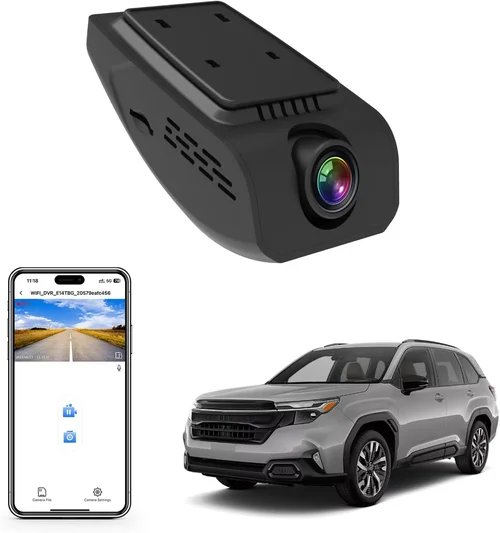
Wi-Fi and Bluetooth connectivity allow wireless transfer of footage to smartphones or tablets via companion apps. This eliminates fumbling with USB cables and makes sharing clips easier during disputes or social media moments.
Loop recording ensures continuous operation by automatically overwriting the oldest files once your storage card fills up. Crucially, most good dash cams protect recent “event” footage from being overwritten unless manually cleared—so critical incidents remain safe.
Wide dynamic range (WDR) balances bright sky backgrounds with dark foregrounds, preventing blown-out highlights or shadowed details in high-contrast scenes—like approaching headlights at night.
5. Brand Reputation
Not all dash cam brands are created equal. Established names like BlackVue, Garmin, Thinkware, Viofo, and Rexing have built strong reputations through years of reliable service, responsive customer support, and regular firmware updates. Newer entrants may offer flashy specs at lower prices, but they often lack long-term software stability or spare part availability.
Research independent reviews, check forums like Reddit’s r/Dashcam, and look for verified purchaser feedback on retailer sites. A brand with a history of addressing bugs quickly and honoring warranties builds trust—and that pays off when you actually need help.
6. Warranty & Support
A solid warranty tells you something about a manufacturer’s confidence in their product. Industry standards hover around one year, though premium brands often extend coverage to two or three years. Make sure the warranty includes parts, labor, and shipping—not just replacement upon return.
Customer service responsiveness matters too. If your dash cam malfunctions during a trip, you want answers fast. Brands with dedicated dash cam support lines or live chat options tend to resolve issues faster than those relying solely on email ticket systems.
7. Size & Portability
While many drivers prioritize performance over aesthetics, size does influence usability. Bulky units can block rearview mirror visibility or protrude awkwardly above the windshield. Compact designs sit flush and blend into the dashboard, reducing distraction while maintaining functionality.
Some users prefer removable cameras for flexibility—mounting one unit front-facing and swapping a smaller rear cam later. Others opt for fixed setups with discreet wiring kits. Consider how much space you’re willing to sacrifice for added convenience.
8. User Reviews & Ratings
Real-world experience trumps marketing claims every time. Pay attention to recurring praises (“excellent night vision”) and complaints (“battery dies too fast”). Be wary of fake five-star reviews—they often cluster around launch dates or promotional periods. Instead, focus on detailed, multi-month user reports that mention durability, ease of use, and integration with specific vehicle models like the 2026 Outback.
Different Types of Dash Cams

Common Buying Mistakes to Avoid
❌ Mistake: Ignoring Storage Requirements
Why it’s bad: Many buyers underestimate how quickly dash cam files consume memory. A single hour of 1080p video can take up 2–3 GB, especially if recorded continuously or with high bitrates. Without adequate storage planning, your dash cam may stop recording abruptly when the card fills up—leaving you vulnerable during critical moments.
What to do instead: Always pair your dash cam with a high-quality Class 10 or U3 microSD card (minimum 64GB recommended). Enable loop recording so old files automatically overwrite. Set your recording interval appropriately—some models allow shorter clips (e.g., 1-minute segments) to maximize usable footage within limited space.
❌ Mistake: Skipping Parking Mode Testing
Why it’s bad: If your dash cam lacks true parking mode functionality, it won’t record while parked—even if you think it does. Some cheaper models claim “motion detection,” but without proper voltage monitoring or capacitor-based backup power, they shut down instantly when the engine turns off.
What to do instead: Verify that your chosen model supports hardwired constant power (via fuse box) or capacitor-only operation. Capacitors last longer than batteries and handle repeated charge cycles better. Test the parking mode feature after installation to confirm it activates reliably.
❌ Mistake: Overlooking Low-Light Performance
Why it’s bad: Driving at dawn, dusk, or through tunnels creates challenging lighting conditions. Poor low-light sensitivity results in grainy, unusable footage—rendering your dash cam ineffective when evidence matters most.
What to do instead: Prioritize models with large aperture lenses (f/1.8 or wider) and enhanced night vision algorithms. Look for WDR (wide dynamic range) and starlight sensor technology. Real-world reviews mentioning “good night vision” are worth heeding.
❌ Mistake: Choosing Based Solely on Resolution
Why it’s bad: A 4K dash cam with poor stabilization or tiny sensors produces blurrier images than a well-designed 1080p model. High resolution alone doesn’t guarantee clarity—especially if the frame rate drops or compression artifacts distort details.
What to do instead: Balance resolution with other specs: sensor size, frame rate, and compression efficiency. Read sample footage comparisons rather than trusting spec sheets. Sometimes, a slightly lower resolution with superior optics outperforms a pixel-chasing gimmick.
❌ Mistake: Neglecting Firmware Updates
Why it’s bad: Manufacturers release firmware fixes for bugs, security patches, and feature enhancements. Ignoring updates risks instability, compatibility issues, or missing out on critical improvements like better GPS accuracy or improved parking mode triggers.
What to do instead: Register your product with the manufacturer to receive update notifications. Periodically check their website or app for new releases. Enable automatic updates if available—but keep backups of important footage first.
❌ Mistake: Failing to Plan for Installation
Why it’s bad: The 2026 Subaru Outback has a sleek interior with minimalist trim and integrated electronics. Improper mounting can damage dash surfaces, void warranties, or create electrical hazards. Cutting wires improperly may trigger fault codes or drain the battery.
What to do instead: Use OEM-style adhesive mounts instead of suction cups that lose grip in heat. Route cables along factory channels using plastic clips to avoid pinching. For hardwiring, consult a professional or follow detailed guides specific to Subaru models. Never splice into airbag circuits or main power lines without expertise.
❌ Mistake: Assuming All Dash Cams Work With Subaru ADAS
Why it’s bad: The 2026 Outback features Subaru’s EyeSight Driver Assist Technology, including adaptive cruise control and lane departure warnings. Some dash cams interfere with these systems through electromagnetic interference (EMI) or physical obstruction—potentially disabling safety features.
What to do instead: Choose dash cams certified for automotive use and tested with Subaru platforms. Avoid placing the device directly over the windshield sensor array. Check manufacturer compatibility lists—some brands explicitly list supported vehicles.
Budget Guidelines: How Much Should You Spend?
Entry-Level ($50 – $100)
This tier suits occasional drivers or those testing dash cam benefits without significant investment. Expect basic 1080p recording, limited night vision, no parking mode, and plastic construction. Brands like Apeman, JOYROOM, or Z-Edge dominate here. While functional for short commutes, these models rarely survive harsh weather or heavy use. Ideal if you’re unsure whether a dash cam fits your lifestyle—but don’t expect longevity.
Mid-Range ($100 – $250)
The sweet spot for most 2026 Outback owners. At this price, you’ll find reliable performance with 1080p or 2K resolution, decent low-light handling, loop recording, and often Wi-Fi connectivity. Many include microSD cards and protective cases. Thinkware U1000, Viofo A119 V3, or BlackVue DR970-2CH are standouts. These strike a balance between cost, features, and durability—perfect for daily drivers who value peace of mind.
Premium ($250 – $500)
For those who demand excellence: dual-lens setups, 4K front recording, advanced parking modes with capacitor power, GPS logging, and robust build quality. BlackVue Cloud Series, Garmin Dash Cam 67W, or Nextbase 522GW fall here. These handle extreme temperatures, offer cloud backup, and integrate seamlessly with smartphones. Worthwhile if you drive frequently, park in risky areas, or need courtroom-ready evidence.
Luxury ($500+)
Top-tier systems with AI recognition, 360-degree views, encrypted storage, and professional-grade audio. Models like the Garmin Speak or certain BlackVue Pro Series fit this category. Rarely necessary for casual users, but justified for commercial fleets, rideshare drivers, or collectors wanting museum-quality gear.
Expert Tips for Getting the Best Deal
1. Time Your Purchase Strategically
Retailers often discount dash cams during holiday weekends (Memorial Day, Labor Day), back-to-school season, or Black Friday/Cyber Monday sales. Subscribe to brand newsletters—they frequently send exclusive promo codes. Avoid buying immediately after new models launch; older versions drop in price within months.
2. Compare Retailers Carefully
Amazon offers convenience and fast shipping but may carry refurbished units marked as “Open Box.” B&H Photo Video guarantees new sealed products with excellent return policies. Local auto parts stores (AutoZone, O’Reilly) sometimes bundle dash cams with installation services. Always check return windows—some brands allow 30 days, others only 14.
3. Spot Fake Deals
Beware of listings priced unrealistically low (e.g., $30 for a 4K dash cam). These are likely counterfeits or heavily used returns. Stick to authorized dealers listed on official websites. Read seller ratings and review history before committing.
4. Leverage Extended Warranties Wisely
Third-party warranties (like SquareTrade) add cost but cover accidental damage. Evaluate whether you’d actually use them. For most, the manufacturer’s standard warranty suffices—especially if paired with careful handling.
5. Test Before Committing (If Possible)
Many Best Buy locations display dash cam demos. Take advantage—check button responsiveness, screen brightness, and menu navigation under different lighting. Nothing beats hands-on evaluation.
6. Negotiate Installation Costs
Some retailers offer free or discounted professional installation. Even if DIY, ask if they’ll show you cable routing techniques or recommend fuse taps compatible with Subarus.
7. Join Owner Communities
Subaru forums like SubaruOutback.org or Facebook groups often host member-exclusive deals. Experienced users share wiring diagrams, mount locations, and compatibility notes specific to your model year.

Frequently Asked Questions
Q: Can I install a dash cam myself in my 2026 Subaru Outback?
A: Absolutely—many owners successfully install dash cams using adhesive mounts and hardwiring kits. However, hardwiring requires connecting to your car’s fuse box, which carries risks if done incorrectly. If you’re uncomfortable working near electrical systems, hire a professional. For soft wiring (plugging into cigarette lighter), installation is straightforward and reversible.
Q: Will a dash cam interfere with Subaru’s EyeSight system?
A: Generally no—most modern dash cams operate on frequencies that don’t conflict with EyeSight sensors. But avoid placing the camera directly over the windshield sensor array (usually near the rearview mirror). Always consult your owner’s manual or contact Subaru support if uncertain.
Q: What size microSD card should I buy?
A: Aim for 64GB minimum, preferably Class 10 or U3 rated. Larger capacities (128GB+) extend recording time but increase cost. Format cards in-camera initially to ensure compatibility. Replace cards every 2–3 years due to write cycle limits.
Q: How long will a dash cam record while parked?
A: Depends on settings. With motion detection and a 32GB card, expect 12–24 hours of coverage. Impact-sensing models trigger only upon collision, preserving battery. Capacitor-powered systems outlast battery-based ones and survive winter cold better.
Q: Do I need a rear camera?
A: Not always. If you rarely reverse or park in tight spaces, a front-only cam suffices. But for families, highway driving, or urban environments, a dual-lens setup eliminates blind spots and captures rear-end collisions effectively.
Q: Is cloud storage worth it?
A: Yes—if you value automatic backup and remote access. Cloud plans cost $3–$10/month but safeguard footage against theft or SD card corruption. Ideal for rideshares or high-risk parking areas. Free tiers usually limit storage or retention periods.
Q: How do I delete old videos safely?
A: Most dash cams auto-overwrite oldest files via loop recording. Manually delete only after confirming important clips are backed up. Avoid formatting the SD card unless necessary—it erases everything at once.
Q: Can I watch dash cam footage while driving?
A: Technically yes, but it’s unsafe. Distracted driving laws vary by state/province. Always pull over or park before reviewing clips. Use playback primarily during idle times.
Q: What happens if my dash cam runs out of battery?
A: It stops recording. That’s why hardwiring to constant power is recommended—not relying on the car battery alone. Capacitor-based parking modes draw minimal current and survive short outages.
Q: Are there legal restrictions on dash cam use?
A: In most places, recording public roads is legal. However, secretly filming inside private property (e.g., neighbors’ yards) may violate privacy laws. Stay focused on your own vehicle and immediate surroundings.
Our Final Recommendations
Best for Budget-Conscious Buyers: Viofo A119 V3
If you want reliable performance without breaking the bank, the Viofo A119 V3 delivers exceptional value. Priced around $120, it offers 1080p recording, excellent night vision, loop recording, and a built-in GPS module. Its compact size fits neatly behind the Outback’s rearview mirror, and the included suction cup mount holds securely even on curved windshields. Users praise its durability and straightforward interface—making it ideal for first-time dash cam owners.
Best Overall Value: Thinkware U1000
The Thinkware U1000 strikes an unbeatable balance between price, features, and reliability. At roughly $180, it records crisp 2K front footage and includes dual-lens capability (with optional rear cam). Key strengths include superior low-light handling, robust parking mode with capacitor power, and seamless smartphone integration via Wi-Fi. Thinkware’s reputation for firmware updates and responsive support further solidify its position as the go-to choice for discerning Subaru drivers.
Best Premium Option: BlackVue DR970-2CH Cloud Series
For those seeking professional-grade performance, the BlackVue DR970-2CH Cloud Series is unmatched. Priced near $350, it delivers 4K front recording, 1080p rear, GPS logging, and optional cloud storage. Its rugged build resists heat and vibration, while advanced features like impact detection and Wi-Fi hotspot connectivity simplify management. The BlackVue app provides real-time alerts and remote viewing—perfect for frequent travelers or users prioritizing data security.
Best for Beginners: Apeman C450
New to dash cams? The Apeman C450 simplifies things with plug-and-play operation, a user-friendly menu, and affordable pricing (around $70). Though lacking advanced features like GPS or parking mode, it excels at delivering stable 1080p footage and includes a generous 32GB microSD card. Its lightweight design won’t overwhelm your Outback’s interior, and positive early-user feedback confirms dependable daily performance.
Best for Advanced Users: Garmin Dash Cam 67W
Garmin combines automotive expertise with dash cam innovation in the 67W. Priced at $200, it offers 1440p resolution, voice control, and automatic incident detection. Unique among competitors, it integrates with Garmin’s ecosystem—including traffic apps and route optimization. The magnetic mount allows quick repositioning, and its compact footprint keeps visibility unobstructed. Ideal for tech-savvy drivers who appreciate smart features without sacrificing simplicity.
Conclusion: Making the Right Choice
Choosing the best dash cam for your 2026 Subaru Outback isn’t about chasing the highest specs or newest gimmicks—it’s about finding a tool that enhances your safety, protects your interests, and fits naturally into your driving routine. By now, you’ve seen how factors like budget, build quality, and real-world usability shape the ideal match for your needs. Whether you prioritize affordability, advanced intelligence, or hassle-free operation, there’s a solution that aligns with your priorities.
Remember, the most expensive dash cam isn’t always the best—and the cheapest might disappoint when you need it most. Focus instead on matching features to your actual habits: Do you drive mostly at night? Park in sketchy neighborhoods? Travel frequently on winding roads? Answering these questions guides you toward models with relevant strengths, like enhanced night vision or robust parking modes.
Installation matters too. Even the finest dash cam fails if mounted poorly or wired incorrectly. Take time to plan cable routes, choose secure mounts, and respect your Outback’s sensitive electronics. When in doubt, consult Subaru-specific guides or seek professional help—your investment deserves care.
Finally, embrace the peace of mind that comes with knowing you’re prepared. Accidents happen in split seconds; having clear, reliable evidence can change outcomes dramatically. As you explore your options, keep this mindset: Your dash cam isn’t just a gadget—it’s a guardian on every journey.