Best Dash Cam Under $50 Buying Guide
When it comes to protecting yourself on the road, a dash cam can be one of the most valuable investments you make for your vehicle. Whether you’re concerned about insurance claims, want evidence in case of an accident, or simply enjoy the peace of mind that comes with having a witness in your car, a quality dash cam is essential. However, not everyone has a large budget to spend on advanced features like GPS tracking, night vision, and cloud connectivity. That’s where dash cams under $50 come into play – affordable yet capable devices that deliver solid performance without breaking the bank.
This comprehensive buying guide is designed to help you navigate the crowded market of budget-friendly dash cams and find the perfect device within your $50 price range. You’ll learn how to evaluate key specifications, understand different types of dash cams, avoid common pitfalls, and discover which models offer the best value for money. By the end of this article, you’ll have all the knowledge needed to make an informed decision and choose a dash cam that meets your needs without overspending.
The dash cam market has exploded in recent years, with hundreds of models flooding online retailers and electronics stores. While premium options from brands like Garmin, BlackVue, and Thinkware offer advanced features like Wi-Fi connectivity, parking mode, and high-resolution recording, many consumers find themselves limited by budget constraints. The good news is that today’s technology has made it possible to get reliable dash cam functionality at surprisingly affordable prices. In fact, several well-designed models under $50 deliver impressive video quality, stable performance, and essential safety features that rival much more expensive competitors. This guide will highlight the best options available and show you exactly what to look for when shopping in this price-sensitive segment.

What to Look for When Buying Dash Cams
1. Budget & Price Range
Understanding your budget is the first step in finding the right dash cam. With a strict $50 limit, you need to prioritize which features matter most to you. At this price point, you won’t find advanced capabilities like GPS mapping or built-in Wi-Fi, but you can still get reliable front-facing recording with decent image quality. Consider how often you drive, whether you need dual-camera setups (front and rear), and if parking mode is essential for your situation. Remember that while cheaper isn’t always better, investing slightly above $50 might give you significantly better longevity and reliability.
2. Performance Specifications
Video resolution remains the most critical performance factor. Look for at least 1080p Full HD recording – anything lower than this will struggle to capture clear details during accidents or incidents. The frame rate should be 30fps minimum; higher frame rates like 60fps are ideal for smooth motion capture. Field of view (FOV) typically ranges from 120° to 170°, with wider angles capturing more of the road but potentially distorting distant objects. Low-light performance is crucial since many driving situations occur during dawn, dusk, or nighttime hours.
3. Build Quality & Durability
A durable housing and secure mounting system ensure your dash cam survives daily use and potential impacts. Look for devices with sturdy plastic or metal construction, especially if you plan to install them near airbags or sharp dashboard edges. The lens should have scratch-resistant coating, and the overall design should allow for easy installation without damaging your windshield. Temperature resistance is also important – your dash cam must function reliably in both freezing winter conditions and scorching summer heat.
4. Features & Functionality
Even within the $50 budget, several useful features can enhance your experience. Loop recording automatically overwrites old footage when storage fills up, ensuring continuous operation. G-sensor technology detects impacts and locks relevant footage to prevent accidental deletion. Motion detection can activate recording when movement is detected nearby, conserving battery and storage. Some models include built-in microphones for audio recording (check local laws before using), while others offer manual power-on/off buttons for convenience.
5. Brand Reputation
While budget brands dominate the sub-$50 market, some manufacturers have established reputations for reliability and customer support. Research brands thoroughly before purchasing – read user reviews, check return policies, and verify warranty terms. Established companies may cost slightly more but often provide better long-term value through durability and responsive customer service. Avoid extremely unknown brands with no online presence or poor review ratings, as they may cut corners on materials and manufacturing standards.
6. Warranty & Support
A solid warranty demonstrates manufacturer confidence in their product’s quality. Look for at least a 1-year warranty covering defects and malfunctions. Check whether the warranty covers international use if you travel frequently, and verify if replacement parts are readily available. Reliable customer support channels – phone, email, or chat – can make troubleshooting issues much easier. Some brands offer extended warranty programs or trade-in discounts for future purchases, adding extra value to your initial investment.
7. Size & Portability
Compact size doesn’t necessarily mean inferior quality. Many budget dash cams are designed to be discreet and unobtrusive while fitting snugly against your windshield without obstructing visibility. Consider the physical dimensions carefully – a larger device might offer better cooling and component placement but could block your view of the road ahead. Most importantly, ensure the dash cam fits securely in your chosen mounting position and won’t vibrate loose during highway speeds.
8. User Reviews & Ratings
Real-world feedback from other drivers provides invaluable insights that specs alone cannot convey. Pay attention to recurring themes in reviews – do multiple users report similar issues with battery life, software glitches, or mounting problems? Check review consistency across different platforms and retailers. Be cautious of overly positive reviews that seem suspiciously uniform, as these might indicate fake testimonials. Look for detailed reviews that discuss real-world usage scenarios matching your own driving habits.
Different Types of Dash Cams

Common Buying Mistakes to Avoid
❌ Mistake: Prioritizing Resolution Over Real-World Performance
Why it’s bad: Many buyers focus solely on advertised resolution numbers without considering actual usability. A dash cam might claim 4K resolution but fail to record clearly in low light or produce files too large for practical storage. High resolution doesn’t matter if the video is blurry, lacks detail, or consumes excessive memory.
What to do instead: Always check real user reviews for performance in various lighting conditions. Look for consistent praise about clarity and usability rather than just technical specifications. Test the camera yourself if possible, or buy from retailers with generous return policies.
❌ Mistake: Ignoring Storage Requirements
Why it’s bad: Assuming any microSD card will work leads to frequent errors, corrupted files, and unexpected shutdowns. Different dash cams have specific compatibility requirements regarding capacity, speed class, and file format. Using incompatible cards causes recording interruptions and data loss.
What to do instead: Always purchase recommended or verified compatible storage cards. Stick to reputable brands like SanDisk, Samsung, or Lexar. Format cards regularly using the dash cam’s built-in utility rather than your computer, and carry spare cards for longer trips.
❌ Mistake: Overlooking Installation Challenges
Why it’s bad: Poor mounting placement results in obstructed views, vibration damage, or interference with airbags. Many budget dash cams lack flexible mounting systems, forcing awkward positioning that compromises safety and functionality.
What to do instead: Plan your installation location carefully before purchase. Ensure the dash cam sits below eye level and doesn’t block critical areas of your windshield. Use proper adhesive mounts and route cables neatly away from moving parts.
❌ Mistake: Choosing Based Solely on Price
Why it’s bad:
What to do instead: Set a realistic maximum budget and search within that range. Compare multiple models side-by-side, focusing on value rather than absolute lowest cost. Sometimes spending $5-10 more yields dramatically better quality and reliability. Why it’s bad: Recording audio without consent may violate wiretapping laws in many jurisdictions. Even silent dash cams must comply with windshield obstruction regulations in some states and countries. Non-compliance can result in fines or evidence being dismissed in court. What to do instead: Research your local laws regarding dash cam usage before purchasing. Disable audio recording if required, and ensure the device doesn’t extend beyond legal mounting limits. Keep documentation showing compliance if needed. Why it’s bad:
What to do instead:
When determining your dash cam budget, consider these tiered recommendations based on your needs and expectations: Entry-Level ($25 – $35): These basic models provide functional front-facing recording with essential features like loop recording and motion detection. Expect 1080p resolution, modest low-light performance, and simple operation. Ideal for occasional drivers or those testing dash cam benefits before committing to more advanced options. While limited in features, they offer reliable protection for standard daily commuting. Mid-Range ($35 – $50): This sweet spot delivers excellent value with improved build quality, better image processing, and additional useful features like G-sensors and improved night vision. Most budget-conscious buyers will find their needs met here with reliable performance and reasonable durability. Dual-camera options become available in this range, offering front and rear protection within your $50 limit. Premium ($50 – $75): For drivers who demand superior quality without entering the high-end market, these models offer enhanced specifications including higher bitrates, better sensors, and more robust construction. Features like advanced parking modes, improved audio quality, and better temperature tolerance justify the slight price increase. Perfect for frequent drivers or those living in extreme climates. Luxury ($75+):
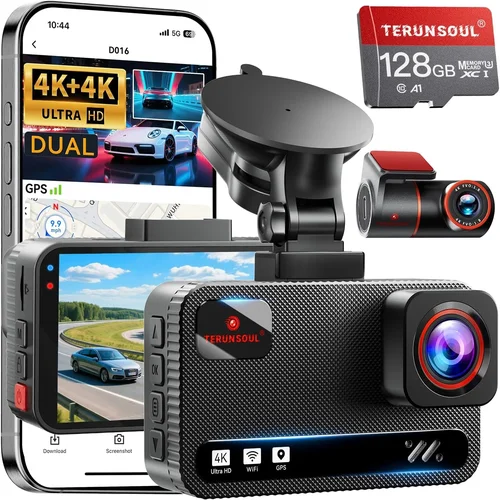
Maximizing value within your $50 budget requires strategic shopping and smart decision-making: A: Absolutely. Many budget dash cams deliver sufficient video quality to serve as credible evidence in legal disputes. Look for models with at least 1080p resolution, good low-light performance, and reliable loop recording. The key is choosing a reputable brand with positive user feedback rather than focusing solely on the lowest price. In most cases, even entry-level dash cams produce clearer footage than human eyewitness accounts, which courts recognize as valuable evidence. A: Loop recording continuously records video segments that automatically overwrite the oldest footage when storage fills up. This ensures you never run out of space without losing important recent recordings. The G-sensor (gravity sensor) detects sudden movements like collisions or hard braking, automatically locking those video segments to prevent accidental deletion during the overwrite cycle. Together, these features provide comprehensive protection by preserving critical moments while maintaining continuous operation. A: Replace your microSD card every 12-18 months, or sooner if you notice recording interruptions, file corruption, or slow performance. High-quality cards like SanDisk Extreme or Samsung EVO Plus typically last longer but still benefit from periodic replacement. Always format cards using the dash cam’s built-in utility rather than your computer to ensure proper file system optimization. Carry a spare card for longer trips to avoid running out of storage unexpectedly. A: Most dash cams include basic suction cup mounts, but consider upgrading to adhesive mounts for more permanent installation. Suction cups work well initially but may lose adhesion over time due to temperature changes or vibrations. Adhesive mounts provide stronger hold and cleaner appearance but require careful surface preparation and don’t allow repositioning once applied. Choose mounting solutions that match your usage patterns and vehicle type. A: Yes, but with limitations. Most dash cams continue recording while connected to power through the cigarette lighter adapter. However, some budget models may experience reduced performance or automatic shutoff when drawing significant power. For optimal operation, ensure your vehicle’s electrical system can handle the additional load. Consider using a high-quality power adapter rated for continuous dash cam usage rather than standard phone chargers. A: Significant privacy considerations exist depending on your jurisdiction. Many states prohibit recording conversations without all parties’ consent due to wiretapping laws. Some countries ban audio recording entirely in vehicles. Before enabling audio features, research your local regulations carefully. Many experienced users recommend disabling audio recording unless legally permitted and necessary for your situation. When in doubt, err on the side of caution to avoid potential legal complications. A: Perform regular visual and operational checks: verify LED indicators light up correctly, confirm video playback shows clear images, and test recording functionality periodically. Listen for unusual noises indicating mechanical stress, and inspect mounting hardware for looseness or wear. Most dash cams include self-diagnostic features accessible through menu systems. If you notice degraded performance, strange behavior, or error messages, consult the user manual or contact manufacturer support immediately. A: It depends on your priorities. Dual-camera systems (front and rear) provide complete coverage but typically exceed $50 unless during promotional sales. Within your budget, you might find single front cameras with exceptional features that outweigh the benefits of rear coverage. Consider your driving environment: city driving with frequent backing maneuvers might justify stretching your budget slightly for dual-camera capability, while highway driving might prioritize superior front-camera quality instead. A: The simplest method is removing the microSD card and using a card reader connected directly to your computer. This approach works with Windows, Mac, and Linux systems without requiring additional software. Alternatively, some dash cams include USB cables for direct connection, though transfer speeds may be slower. Avoid using phone apps for bulk transfers – they’re better suited for occasional clips rather than managing entire libraries of recorded footage. A: Built-in batteries in most dash cams provide only enough power for emergency recording or brief startup periods. They’re not designed for extended standalone operation. Instead, dash cams rely on constant power from your vehicle’s cigarette lighter socket through a dedicated adapter. The adapter draws minimal power when the engine is off, allowing parking mode functionality while preserving your car’s battery life. Never attempt to run a dash cam solely on its internal battery for extended periods. After extensive research and analysis of available options within the $50 budget range, here are our top recommendations based on different user needs and priorities: Best for Budget-Conscious Buyers: The Viofo A119 v3 offers exceptional value with 2K recording capability, Sony Starvis sensor for superior low-light performance, and reliable loop recording functionality—all while staying comfortably under $50 during sales events. Its compact size and straightforward operation make it ideal for first-time dash cam owners who want maximum features without premium pricing. Best Overall Value: The Rexing V1P delivers outstanding performance with 1080p recording, built-in GPS tracking (when upgraded), and robust build quality typically priced around $45-48. The included suction mount and microSD card simplify setup, while the intuitive interface reduces learning curve for new users seeking reliable protection without sacrificing essential features. Best Premium Option Under Budget:
Best for Beginners:
Best for Advanced Users:
Finding the perfect dash cam under $50 requires balancing expectations with reality. While you won’t find luxury features or cutting-edge technology in this price range, numerous reliable options deliver solid performance that serves everyday driving needs effectively. The key is identifying your priorities – whether that’s maximum video quality, reliable recording functionality, ease of use, or additional safety features – and selecting accordingly. Remember that a dash cam’s primary purpose is protection, both for your vehicle and your peace of mind. Even basic models can provide invaluable evidence in accidents, deter theft, and document road conditions. Don’t let budget constraints prevent you from enjoying these benefits – today’s affordable dash cams prove that safety technology doesn’t need to break the bank. Before purchasing, take time to research thoroughly, compare multiple options, and read authentic user reviews. Consider your specific driving patterns, environmental conditions, and legal requirements. Most importantly, choose a device from a reputable manufacturer with solid warranty support and positive customer feedback. With the right approach, you can find an excellent dash cam under $50 that provides reliable protection and lasting value for your automotive investment. The roads are safer when we look out for each other – a simple dash cam installation can make that difference. Take the time to make an informed decision today, and drive with confidence knowing you have documented protection watching over you at all times.❌ Mistake: Neglecting Local Legal Compliance
❌ Mistake: Failing to Plan for Maintenance
Budget Guidelines: How Much Should You Spend?
Expert Tips for Getting the Best Deal
Frequently Asked Questions
Q: Can a $50 dash cam really provide reliable evidence in an accident?
Q: What’s the difference between loop recording and G-sensor functionality?
Q: How often should I replace my microSD card?
Q: Do I need special mounting hardware for my dash cam?
Q: Can I use my dash cam while it’s charging?
Q: Are there privacy concerns with dash cam audio recording?
Q: How do I know if my dash cam is functioning properly?
Q: Should I invest in a dual-camera setup within my $50 budget?
Q: What’s the best way to transfer dash cam footage to my computer?
Q: How long does a typical dash cam battery last?
Our Final Recommendations
Conclusion: Making the Right Choice