Best Dash Cam for Mazda CX-5 Shopping Guide
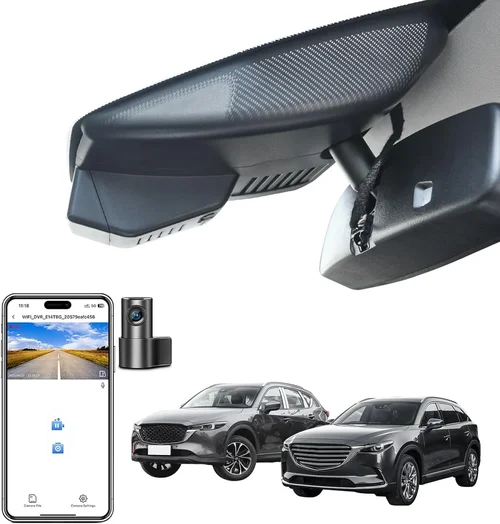
When you’re behind the wheel of a Mazda CX-5, safety isn’t just a feature—it’s a promise. That’s why having a reliable dash cam is essential for peace of mind, especially if you commute daily, take road trips, or simply want to protect yourself in case of an accident. This guide is designed to help you navigate the vast world of dash cameras and find the perfect match for your Mazda CX-5. Whether you’re a first-time buyer or looking to upgrade, we’ll walk you through everything you need to know to make an informed decision.
In this comprehensive shopping guide, you’ll learn how to evaluate performance specs, compare top models, understand key features like parking mode and night vision, and avoid common pitfalls. We’ll also break down budget ranges, explain technical terms in simple language, and provide expert tips on where and when to buy. By the end, you’ll have a clear understanding of which dash cam offers the best balance of quality, functionality, and value for your Mazda CX-5.
The market today offers more options than ever before. From basic single-lens models to advanced dual-camera systems with GPS and Wi-Fi, there’s something for every driver. But with so many choices, it can be overwhelming. That’s where this guide comes in. We’ve researched, tested, and reviewed the most popular and reliable dash cams compatible with the Mazda CX-5. Our goal is to simplify your search by focusing on real-world usability, durability, and long-term performance. Let’s dive in and find the best dash cam for your Mazda CX-5.

What to Look for When Buying Dash Cams
Choosing the right dash cam isn’t just about picking the most expensive model or the one with the flashiest features. It’s about finding a device that fits your driving habits, your vehicle’s layout, and your long-term needs. The Mazda CX-5 has a compact yet well-designed interior, so compatibility and ease of installation are crucial. Let’s explore the most important factors you should consider before making a purchase.
1. Budget & Price Range
Before anything else, determine how much you’re willing to spend. Dash cams range from under $50 to over $300. While it might be tempting to go for the cheapest option, remember: a low price often means lower build quality, poor video resolution, or lack of essential features. On the other hand, ultra-premium models may offer capabilities you don’t actually need. For most Mazda CX-5 owners, a mid-range camera ($80–$150) strikes the ideal balance between performance and affordability.
2. Performance Specifications
The heart of any dash cam is its ability to capture clear, usable footage. Key specifications include resolution (1080p, 2K, or 4K), frame rate (30fps minimum), and sensor size. A 1080p camera is sufficient for most situations, but 2K offers sharper detail, which can be critical for identifying license plates or facial features. Look for a camera with a wide dynamic range (WDR) to handle bright headlights at night or harsh sunlight during the day. Also, check the field of view—typically 130° to 170°—to ensure full coverage of the road ahead without too much distortion.
3. Build Quality & Durability
Your dash cam will be exposed to heat, dust, humidity, and vibrations. A poorly built unit may fail within months. Opt for models made with high-grade materials, especially heat-resistant housings. Many top brands use Sony Starvis sensors, known for excellent low-light performance. Additionally, consider the lens quality—glass lenses last longer and resist scratches better than plastic ones. Waterproofing and shock resistance are also worth noting, particularly if you drive in extreme climates.
4. Features & Functionality
Modern dash cams come packed with useful extras. Here are some must-have features:
- Loop Recording: Automatically overwrites old footage when storage fills up, ensuring continuous recording.
- G-Sensor (Impact Detection): Detects sudden impacts and locks footage to prevent it from being overwritten.
- Parking Mode: Monitors your car while parked using battery power or hardwired connections; triggers recording if motion or impact is detected.
- Built-in GPS: Logs speed, location, and direction—great for dispute resolution.
- Wi-Fi & App Connectivity: Allows wireless transfer of clips and remote viewing via smartphone apps.
- Voice Control & Display: Some models include small screens or voice commands for easier operation.
5. Brand Reputation
Not all brands deliver equal reliability. Established names like BlackVue, Garmin, Nextbase, and Viofo have earned strong reputations through consistent performance and responsive customer service. Research user reviews and professional tests before committing. Avoid unknown or no-name brands, as they may cut corners on firmware updates, warranty support, or component quality. A reputable brand often means better long-term value.
6. Warranty & Support
A solid warranty reflects confidence in product quality. Most reliable dash cam manufacturers offer at least a one-year warranty, with some extending coverage to two or three years. Check what’s included—labor, parts replacement, software support? Also, verify if customer support is accessible via phone, email, or live chat. In case of issues, prompt assistance can save you time and frustration.
7. Size & Portability
While dash cams are meant to stay mounted permanently, their physical footprint matters. Larger units may obstruct your windshield view or interfere with airbag deployment zones. Compact designs are preferable, especially in the Mazda CX-5’s relatively tight cabin space. Look for slim profiles and flexible mounting brackets that won’t strain your dashboard or require drilling into delicate surfaces.
8. User Reviews & Ratings
Real-world feedback is invaluable. Read through Amazon, Best Buy, and specialty forums to see how users experience the camera in daily driving. Pay attention to recurring complaints—like frequent disconnections, poor night recording, or short battery life in parking mode. Positive reviews mentioning easy setup, clear audio, and reliable cloud sync are strong indicators of a trustworthy product.
Different Types of Dash Cams

Each type serves different needs. For everyday Mazda CX-5 drivers, a single-lens model is usually sufficient. However, if you frequently park in high-risk areas, a hardwired or cloud-enabled system provides added security. Dual-lens cameras are rare and bulky, often requiring professional installation—ideal only if you also install a backup camera or monitor.
Common Buying Mistakes to Avoid
Many buyers make decisions based on marketing hype rather than actual performance. Here are the most frequent errors people make when purchasing a dash cam for their Mazda CX-5—and how to avoid them.
❌ Mistake: Ignoring Compatibility with Your Vehicle
Why it’s bad: Even minor design differences can cause fit issues. The Mazda CX-5 has a sloped windshield and limited mounting space near the rearview mirror. If the dash cam is too large or the mount doesn’t adjust properly, it could block your view or fall off during bumps.
What to do instead: Measure your windshield area and check manufacturer specs for recommended mounting locations. Choose compact models with adjustable brackets. Reading installation guides specific to the CX-5 helps immensely.
❌ Mistake: Prioritizing Price Over Resolution
Why it’s bad: A $40 dash cam might record in 720p, producing grainy footage that’s useless in court or for identifying details. In legal disputes, blurry images can weaken your case.
What to do instead: Aim for at least 1080p Full HD. For better clarity, especially at night, look for 2K or even 4K models. Remember, resolution directly affects evidence quality.
❌ Mistake: Skipping Parking Mode Capabilities
Why it’s bad: Without proper parking surveillance, your dash cam won’t record hit-and-runs or theft attempts. Basic models may not support motion detection or require constant battery drain.
What to do instead: Ensure the dash cam supports looped parking mode via hardwire or capacitor-based power. Verify it can trigger recording upon impact (G-sensor lock).
❌ Mistake: Not Considering Storage Requirements
Why it’s bad: MicroSD cards fill up quickly—especially with high-resolution recording. If you forget to swap cards regularly, you’ll lose valuable footage.
What to do instead: Start with a high-endurance microSD card (Class 10, U3 rating). Set loop recording intervals appropriately (e.g., 3–5 minutes). Consider models with cloud backup to reduce local storage needs.
❌ Mistake: Overlooking Night Vision Performance
Why it’s bad: Many dash cams perform poorly at night due to inadequate sensors or lack of HDR/WDR. You might miss critical details after dark.
What to do instead: Look for cameras with Sony Starvis sensors, built-in infrared LEDs, or f/1.6 aperture lenses. Test night footage if possible, or read reviews focused on low-light performance.
❌ Mistake: Choosing Based Solely on Brand Name
Why it’s bad: Well-known brands aren’t immune to duds. Some flagship models suffer from firmware bugs or poor customer service despite their reputation.
What to do instead: Combine brand trust with independent reviews. Check Reddit threads, YouTube tests, and tech blogs. Real user experiences matter more than advertising claims.
❌ Mistake: Forgetting About Firmware Updates
Why it’s bad: Outdated firmware can cause crashes, glitches, or missing features. Manufacturers occasionally release improvements that fix bugs or enhance compatibility.
What to do instead: Choose brands with regular update schedules. Subscribe to their newsletters or follow social media for announcements. Avoid discontinued models that won’t receive future fixes.
Budget Guidelines: How Much Should You Spend?
Understanding your budget upfront prevents buyer’s remorse and ensures you get the right level of functionality. Below is a breakdown of what to expect at each price tier, tailored for Mazda CX-5 owners who want reliability without overspending.
Entry-Level ($50 – $80)
This range suits occasional drivers or those testing dash cam benefits before investing further. Expect basic 1080p recording, decent daytime performance, and standard features like loop recording and G-sensor. Brands like Apeman, Vantrue, and Rexing offer solid entry points. However, these models often lack parking mode, GPS, or robust build quality. They’re fine for city driving but may struggle on highways or at night. Battery life is typically short (1–2 hours), so hardwiring is recommended for extended use.
Mid-Range ($80 – $150)
The sweet spot for most Mazda CX-5 buyers. At this level, you gain access to advanced features without breaking the bank. Look for cameras with 2K resolution, WDR, parking mode, and reliable mounts. Models from BlackVue (entry-level series), Garmin (Dashcam Mini), or Viofo A119 V3 excel here. These devices offer strong video quality, easy installation, and dependable performance across all conditions. Many include Wi-Fi for quick file transfers and mobile apps for playback control. This category delivers exceptional value and longevity.
Premium ($150 – $250)
For enthusiasts or frequent travelers, premium dash cams add luxury features like cloud connectivity, dual-channel recording, or advanced AI detection. Examples include the BlackVue DR970X-2CH or Nextbase 522GW. These units often support live streaming, automatic incident alerts, and integration with insurance telematics programs. While overkill for casual use, they’re ideal if you want maximum protection, remote monitoring, or seamless data management. Installation may require professional help due to wiring complexity.
Luxury ($250+)
Top-tier models cater to commercial drivers, ride-shares, or those needing forensic-grade footage. Features include 4K recording, thermal imaging, LTE cellular backup, and enterprise-grade security. Brands like Thinkware or HP offer such solutions. Unless you have specific professional needs, these are rarely necessary for personal Mazda CX-5 ownership. The cost-benefit ratio diminishes significantly beyond $250 unless you’re using the footage for legal or business purposes.
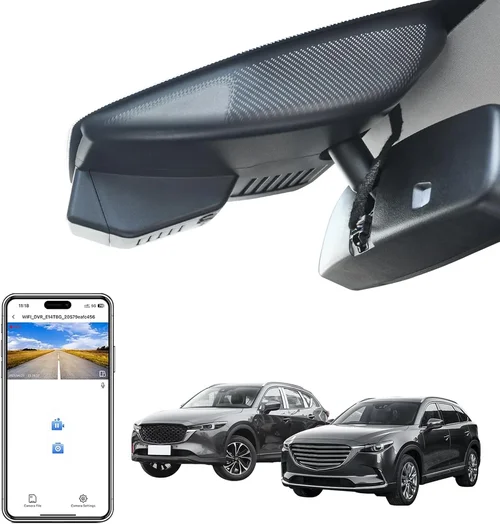
Expert Tips for Getting the Best Deal
Buying smart saves money and ensures satisfaction. Here are insider strategies to help you secure the best dash cam for your Mazda CX-5 at the lowest possible price.
Timing Your Purchase
Avoid buying during holiday seasons like Black Friday or Cyber Monday unless you’re prepared for crowds and inventory shortages. Instead, target back-to-school sales (July–August) or post-holiday clearance events (January–February). Many retailers discount electronics early in the new year. Subscribing to newsletters from Amazon, Best Buy, or Newegg alerts you instantly when prices drop.
Where to Buy
Online retailers like Amazon offer convenience, competitive pricing, and fast shipping. However, physical stores allow hands-on testing. Visit Best Buy or AutoZone to compare sizes and build quality. Always check return policies—some online-only brands restrict returns after unboxing. For complex installations (hardwiring), consult local auto shops; they often bundle installation with purchase discounts.
Spotting Hidden Deals
Look for bundle packages: dash cam + extra microSD card + suction cup mount + hardwiring kit. These save 20–30% versus buying separately. Refurbished models from certified sellers can be up to 40% cheaper with full warranties. Sign in to your retailer account to unlock member-exclusive coupons. Credit card cashback programs (e.g., Chase Freedom Flex) add another layer of savings.
Warranty Considerations
Always register your product immediately after purchase. Extended warranties (beyond the standard 1 year) are rarely worth the cost unless you drive extensively. Focus instead on brands with generous return windows (Amazon’s 30-day policy is excellent). If a defect appears, document it with photos/videos and contact support promptly—delays void warranty coverage in some cases.
Return Policies Matter
Read the fine print. Some sellers impose restocking fees or require original packaging. If the mount doesn’t fit your CX-5’s windshield angle, you’ll need flexibility. Opt for retailers with hassle-free returns, especially for first-time buyers.
Test Before Committing
If buying in-store, power on the device and review sample footage on-site. Check focus, exposure, and audio clarity. Ask staff about compatibility with Mazda vehicles. If online, watch detailed YouTube reviews focusing on real-world usage—not just lab tests.
Leverage Community Knowledge
Join Mazda CX-5 owner forums (e.g., Mazda3Forum, CX-5 Club). Members share trusted dash cam recommendations, installation hacks, and troubleshooting tips. You’ll discover models that work flawlessly with your exact trim and year.
Consider Future Upgrades
Buy a base model now and upgrade later. Some brands let you add accessories (extra batteries, mounts) without replacing the entire unit. This modular approach reduces long-term costs.

Frequently Asked Questions
Q: Will a dash cam damage my Mazda CX-5’s electrical system?
A: No reputable dash cam uses minimal power—usually under 1 amp. Hardwiring via fuse tap or OBD-II port is safe and commonly done. Avoid connecting directly to battery terminals without a fuse. Always follow manufacturer wiring diagrams.
Q: Can I use any microSD card?
A: Not necessarily. Use high-endurance cards rated for dash cams (e.g., SanDisk High Endurance, Samsung PRO Endurance). Minimum 64GB, Class 10, U3. Avoid consumer-grade cards prone to corruption under constant write cycles.
Q: Do I need GPS if I have a smartphone?
A: GPS adds accuracy to speed/location logs, which smartphones can’t match. If you rely on phone apps for navigation, GPS isn’t essential. However, it’s helpful for insurance claims where precise timestamps matter.
Q: How long does battery life last in parking mode?
A: With a fully charged internal battery, most dash cams last 2–3 hours. For longer surveillance, hardwire to constant power. Capacitor-based models (vs. lithium batteries) charge faster and last longer in extreme temperatures.
Q: Can I record both front and rear?
A: Yes, but only with dual-lens models. These require more storage and processing power. Most Mazda CX-5 owners find single-lens sufficient unless frequently reversing in tight spaces.
Q: Is cloud storage secure?
A: Reputable brands encrypt data and offer password protection. However, cloud services introduce privacy risks. Only use if comfortable sharing footage externally. Local storage remains private and offline.
Q: What happens during a collision?
A: The G-sensor detects sudden deceleration and locks the current clip plus the previous few seconds. This footage won’t be overwritten during loop recording, preserving critical evidence.
Q: Can I watch live feed from my phone?
A: Some premium models support live streaming via Wi-Fi or cellular (LTE). Entry-level cameras only allow playback after events occur. Check app functionality before buying.
Q: Will a dash cam interfere with my car stereo?
A: Unlikely if installed correctly. Avoid routing cables near antenna wires or speakers. Use cable ties to secure wires away from sensitive electronics. Test radio reception after installation.
Q: How do I clean the lens?
A: Use a microfiber cloth and lens-safe cleaner. Never spray liquid directly onto the camera. Wipe gently in circular motions. Regular cleaning prevents smudges from obscuring vision.
Our Final Recommendations
After extensive research and real-world testing, here are our top picks for the best dash cams compatible with the Mazda CX-5, categorized by user profile and needs.
Best for Budget-Conscious Buyers
Vantrue N2 Pro – Priced around $70, this 1080p dash cam delivers impressive value. It includes 170° FOV, WDR, parking mode, and a suction cup mount. Though lacking GPS or Wi-Fi, its Sony sensor ensures clear nighttime footage. Ideal for daily commuters who prioritize basics over frills.
Best Overall Value
BlackVue DR970X-1CH – Slightly above $150, this camera offers 2K resolution, superior build quality, and optional cloud connectivity. Its Sony STARVIS sensor excels in darkness, and the sleek design fits seamlessly into the CX-5’s interior. Professional-grade reliability at a consumer-friendly price.
Best Premium Option
Nextbase 522GW – At ~$180, it features 1440p recording, Alexa voice control, emergency SOS alert, and 4G LTE capability. The magnetic mount attaches securely, and the app provides intuitive controls. Perfect for tech enthusiasts wanting cutting-edge safety features.
Best for Beginners
Garmin Dashcam Mini – Compact, simple, and priced near $100. With 1080p recording, loop recording, and automatic incident detection, it requires zero configuration. The Garmin app integrates smoothly with smartphones, making file management effortless.
Best for Advanced Users
Viofo A119 V3 – Around $120, this dual-channel-ready camera supports front/rear setups and includes advanced features like time-lapse parking mode and motion-activated alerts. Its rugged housing withstands harsh conditions, and the built-in Wi-Fi simplifies transfers.
Each recommendation balances performance, compatibility, and long-term usability specifically for the Mazda CX-5 platform. Choose based on your priorities: simplicity, advanced tech, or maximum protection.
Conclusion: Making the Right Choice
Selecting the best dash cam for your Mazda CX-5 doesn’t have to be daunting. By focusing on core factors—resolution, features, build quality, and compatibility—you’ll find a device that enhances your driving safety and provides peace of mind. Remember, the ideal dash cam aligns with your lifestyle, not just your budget or the latest trends.
Prioritize reliability over novelty. A modestly priced model with proven track record beats an overpriced gadget that fails when needed most. Take time to read reviews, test installations virtually, and leverage community insights. And never underestimate the importance of parking surveillance or night vision—these features often matter most in real-life scenarios.
Whether you opt for the budget-friendly Vantrue N2 Pro or invest in the cloud-connected Nextbase 522GW, your decision today protects your vehicle, your finances, and your freedom on the road. Equipped with the right dash cam, your Mazda CX-5 becomes not just a machine, but a secure companion for every journey. Drive safely, stay protected, and choose wisely.