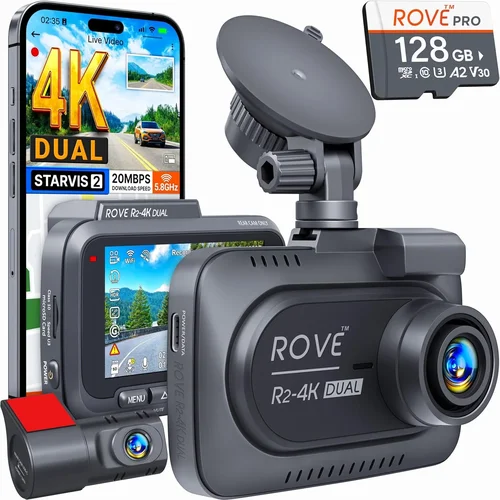
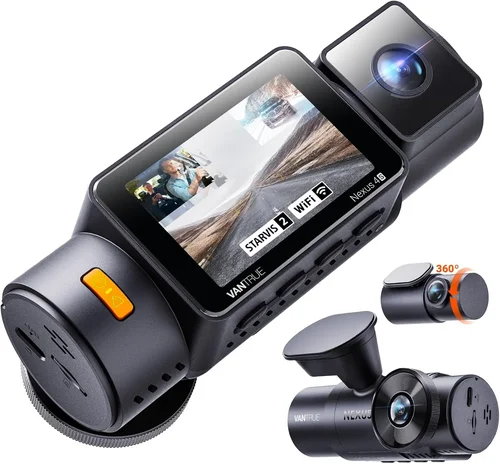
How to Choose the Best Dash Cam for Your Car
Why this guide matters
Choosing the right dash cam isn’t as simple as picking the one with the most stars on Amazon. With hundreds of models available, each boasting different features, resolutions, and price points, it’s easy to get overwhelmed. This comprehensive buying guide cuts through the marketing noise to help you understand exactly what you need based on your specific situation, driving habits, and budget. Whether you’re a first-time buyer looking for basic protection or an experienced driver wanting advanced recording capabilities, this article provides expert insights to ensure you make an informed decision that delivers real value and peace of mind.
What readers will learn
This detailed guide will walk you through every critical factor to consider when selecting a dash cam, from resolution and storage options to advanced features like parking mode and GPS tracking. You’ll discover how to evaluate build quality, understand technical specifications, and identify which features matter most for your needs. We’ll also cover common pitfalls to avoid, provide budget recommendations, and include expert tips for finding the best deals on Amazon. By the end, you’ll have a clear understanding of what makes each type of dash cam suitable for different use cases and be equipped to choose the perfect model for your vehicle.
Brief overview of the market
The dash cam market has exploded in recent years, evolving from simple single-lens cameras to sophisticated multi-camera systems with advanced AI features. Today’s options range from ultra-affordable entry-level models under $50 to premium systems costing over $300 that offer 4K recording, dual-channel setups, built-in WiFi, and professional-grade stabilization. While basic functionality remains consistent across the board—recording your drive to protect against false claims—the differences in image quality, reliability, storage management, and additional features can significantly impact both performance and user experience. Understanding these variations is essential for making a purchase that truly serves your needs rather than just following the latest trends.

What to Look for When Buying Dash Cams
1. Resolution & Video Quality
The foundation of any good dash cam is its ability to capture clear, usable footage. Resolution determines how much detail you’ll be able to see if something happens during your drive. Most modern dash cams offer at least 1080p Full HD resolution, but many now come with higher options like 2K, 4K, or even 5.7K recording capabilities. Higher resolution means more detail in your video, which becomes crucial when trying to identify license plates, faces, or other important information after an incident.
However, resolution isn’t everything—you also need to consider frame rate (measured in fps) and compression technology. A camera might boast 4K resolution but only record at 15fps instead of the standard 30fps, resulting in choppy footage that’s difficult to review. Additionally, H.265 video compression offers better quality than older H.264 at similar file sizes, helping maintain high-quality recordings while keeping storage requirements manageable.
For most drivers, 1080p at 30fps provides excellent balance between quality and file size. If you frequently drive in challenging lighting conditions or want maximum detail for insurance purposes, consider stepping up to 2K or 4K. Just remember that higher resolutions require faster memory cards and may reduce battery life due to increased processing demands.
2. Field of View (FOV)
The field of view refers to the width of the area your dash cam can capture in front of your vehicle. It’s typically measured diagonally and ranges from around 90 degrees to over 180 degrees depending on the model. A wider FOV gives you more coverage of the road ahead but can introduce distortion near the edges of the frame—a phenomenon known as “fisheye” effect.
For city driving where you need to monitor multiple lanes and potential hazards close to your car, a moderate FOV around 120-140 degrees works well. In contrast, highway driving benefits from slightly narrower views (around 110-130 degrees) that focus on the road directly ahead without excessive distortion. Some advanced models offer adjustable FOV settings, allowing you to customize based on your driving environment.
When evaluating FOV, look at actual sample footage rather than just the advertised number. Manufacturers sometimes exaggerate their FOV measurements, so seeing real-world examples helps determine whether the coverage meets your expectations. Also consider that very wide angles can create blind spots between the camera and windshield wipers or mirrors.
3. Storage Capacity & File Management
Dash cams rely on microSD cards for storage, and choosing the right capacity is crucial for reliable operation. Entry-level models often work with 32GB cards, while mid-range and premium units support 64GB, 128GB, or even larger capacities. Larger cards allow longer recording times before needing deletion, which is especially valuable if you forget to manually save important clips.
Most dash cams automatically overwrite old footage once the card fills up, but this creates a risk of losing critical evidence if the cycle happens during or after an event. Loop recording with G-sensor protection helps mitigate this by automatically saving impact-triggered clips to a protected section of storage. The G-sensor detects sudden movements or impacts and marks those files as “locked,” preventing them from being overwritten.
Consider your typical driving patterns when selecting storage size. If you commute daily and rarely exceed 30 minutes per trip, a 64GB card may suffice. However, frequent long-distance travelers or commercial drivers should opt for 128GB or more to accommodate extended recording sessions. Always use high-quality Class 10 or UHS-I/UHS-II cards from reputable brands—cheaper alternatives often fail prematurely or corrupt data.
4. Night Vision & Low-Light Performance
Driving at night presents unique challenges for dash cams, including reduced visibility, glare from headlights, and the need to capture details in poorly lit environments. Effective night vision relies on several factors: large aperture lenses, good low-light sensors, proper exposure control, and noise reduction algorithms.
Look for dash cams with f/1.8 or lower aperture values—the smaller the number, the more light the lens can gather. Combined with wide dynamic range (WDR) technology, this ensures balanced exposure between bright headlights and dark shadows. Advanced models may include infrared LEDs or starlight sensors specifically designed for nighttime recording.
While no dash cam can match human night vision perfectly, modern units have made significant improvements in capturing usable footage after dark. Test reviews and sample videos are invaluable here—they show real-world performance rather than theoretical specs. Pay attention to how well the camera handles common nighttime scenarios like tunnel transitions, parking lots, and rural roads with minimal street lighting.
5. Parking Mode & Motion Detection
Parking mode allows your dash cam to continue monitoring your vehicle even when it’s turned off, providing security against hit-and-runs, vandalism, or theft. This feature typically works by drawing power from your car’s battery through a hardwired connection or USB port, though some models use capacitors instead of batteries for longer standby times.
Motion detection triggers recording when the camera senses movement around your parked car—either approaching vehicles or pedestrians. Impact detection uses the G-sensor to activate recording upon collision. Both features require sufficient battery backup to prevent draining your car’s main battery overnight. Many dash cams offer adjustable sensitivity levels and customizable recording durations (e.g., 30 seconds pre-event + 30 seconds post-event).
Hardwiring your dash cam is highly recommended for reliable parking mode operation. This involves connecting the device directly to your car’s fuse box using an optional wiring kit. While installation requires basic electrical knowledge, it eliminates reliance on internal batteries and ensures continuous power. If hardwiring seems daunting, look for models with robust internal batteries that can last 8+ hours on a single charge.
6. Build Quality & Durability
A dash cam must withstand extreme temperatures, vibrations, humidity, and accidental drops—all while maintaining optical clarity and electronic functionality. Build quality encompasses the housing material (typically ABS plastic or metal), lens coating, circuit board design, and overall construction rigor.
Cheap plastic casings may crack under stress or warp in hot weather, affecting alignment and focus. Metal housings offer better heat dissipation and impact resistance but add weight. Lens coatings prevent fogging and reduce reflections from interior lights. Internal components should be securely mounted to handle constant vehicle motion without dislodging.
Waterproofing ratings (IPX standards) indicate resistance to dust and water ingress, though most dash cams don’t require formal certification since they’re enclosed within your windshield. Still, sealed gaskets around buttons and ports help maintain reliability in rainy climates. Check customer reports about long-term durability—some brands develop issues like lens fogging, button malfunctions, or screen discoloration after months of use.
7. User Interface & Ease of Use
The interface determines how quickly and accurately you can operate your dash cam in various situations. Features like touchscreen controls, voice commands, physical buttons, and companion apps all contribute to usability. A cluttered menu system or unintuitive layout can be frustrating during quick glances while driving.
Touchscreens offer visual feedback and easy navigation but become unresponsive in cold weather or when wearing gloves. Physical buttons provide tactile confirmation but take up space and may feel cramped on compact dashcams. Voice control lets you adjust settings hands-free but requires clear pronunciation and quiet cabin environments.
Companion smartphone apps enable remote viewing, playback, and configuration, which is convenient for reviewing footage at home or adjusting settings without stopping. Ensure the app works smoothly with your phone and supports cloud backup if needed. Read user reviews specifically about interface complaints—many buyers overlook this aspect until encountering problems post-purchase.
8. Additional Features & Connectivity
Beyond core recording functions, modern dash cams include extras that enhance convenience, safety, or data analysis. Common additions include:
- GPS Tracking: Records location, speed, and direction alongside video for accident reconstruction and route analysis.
- Wi-Fi & Bluetooth: Enables wireless file transfer, live preview, and firmware updates via smartphone app.
- Dual Cameras: Front and rear setups provide complete coverage inside and outside the vehicle.
- Built-in Sensors: Lane departure warnings, forward collision alerts, or emergency braking notifications.
- Cloud Storage: Automatic upload of selected clips to secure online servers for remote access.
- Time-Lapse Mode: Compresses long drives into shorter summaries for easy review.
Evaluate which features align with your priorities. For example, GPS adds legal documentation value but increases power consumption. Dual cameras improve situational awareness but double storage needs. Cloud storage offers peace of mind but raises privacy concerns and recurring subscription costs. Balance these trade-offs based on your budget and intended usage.
Different Types of Dash Cams

Common Buying Mistakes to Avoid
❌ Mistake: Choosing Based Solely on Price
Why it’s bad: While affordability matters, focusing exclusively on low cost often leads to disappointment. Cheap dash cams frequently suffer from poor image quality, unreliable recording, short battery life, and lack of essential features like parking mode or G-sensor protection. These devices may seem economical initially but prove ineffective when you actually need them most—during accidents or disputes.
What to do instead: Treat your dash cam as an investment in safety and legal protection rather than a disposable accessory. Allocate at least $80-$120 for reliable performance, and prioritize proven brands with positive reviews. Remember that a $200 professional-grade model could save thousands in insurance claims or legal fees, making it far more cost-effective long-term.
❌ Mistake: Overlooking Storage Requirements
Why it’s bad: Assuming any microSD card will work creates major risks. Using incompatible or low-quality cards leads to frequent crashes, corrupted files, and loss of critical evidence. Many manufacturers void warranties if non-recommended cards cause damage, leaving you without recourse when things go wrong.
What to do instead: Purchase high-endurance microSD cards specifically rated for dash cam use. Brands like SanDisk High Endurance, Samsung PRO Endurance, or Lexar Industrial offer superior write speeds, error correction, and lifespan compared to consumer-grade options. Match card capacity to your recording habits—larger files from 4K cameras demand faster UHS-I/UHS-II speeds.
❌ Mistake: Ignoring Installation Complexity
Why it’s bad: Assuming all dash cams install the same way results in frustration, misalignment, or improper mounting. Some models require careful positioning to avoid blocking airbags, mirrors, or windshield sensors. Others need precise cable routing to prevent interference with wipers or defrosters. Poor installation compromises both functionality and aesthetics.
What to do instead: Read detailed installation guides before purchasing. Look for models with flexible mounts, adhesive-backed bases, or magnetic attachments that adapt to various dashboard shapes. If hardwiring seems intimidating, choose plug-and-play USB-powered units or seek professional installation services for parking mode setup.
❌ Mistake: Skipping Firmware Updates
Why it’s bad: Neglecting firmware updates leaves your dash cam vulnerable to bugs, compatibility issues, and missing new features. Manufacturers regularly release patches to improve stability, fix bugs, and enhance performance—but only if users actively update their devices.
What to do instead: Enable automatic updates in your companion app whenever possible. Periodically check manufacturer websites for manual update instructions, especially after major software releases. Keeping firmware current ensures optimal operation and extends the device’s useful life.
❌ Mistake: Expecting Perfect Footage Every Time
Why it’s bad: Underestimating environmental variables like rain, glare, or poor lighting creates unrealistic expectations. No dash cam captures flawless video in all conditions—especially during harsh weather or extreme angles. Waiting for “perfect” footage leads to missed opportunities for evidence collection.
What to do instead: Accept that dash cams provide valuable supplementary evidence rather than definitive proof. Focus on consistency, not perfection. Adjust settings like exposure compensation or ISO sensitivity to optimize performance for your typical driving environment. Review sample videos from similar lighting/weather before relying solely on manufacturer specs.
❌ Mistake: Forgetting About Legal Considerations
Why it’s bad: Assuming dash cam footage is universally admissible ignores regional laws regarding privacy, consent, and data retention. Some jurisdictions prohibit recording without explicit permission, while others restrict how long footage can be stored or who can access it. Violating these rules undermines your legal position rather than supporting it.
What to do instead: Research local regulations before deploying your dash cam. In many areas, recording public roads is permitted, but private property or conversations with passengers may carry restrictions. Store evidence securely and share only with authorized parties like insurers or law enforcement. Document chain-of-custody procedures to preserve evidentiary integrity.
Budget Guidelines: How Much Should You Spend?
Entry-Level ($30 – $70): The Basics for Occasional Users
This price range suits drivers who want basic protection without breaking the bank. Models here typically offer 1080p recording, loop recording, and minimal extra features. They’re ideal for infrequent drivers, rental cars, or secondary vehicles where full-featured systems seem excessive.
Expect limitations like small screens, limited storage support, and no parking mode. Image quality may struggle in low light, and build materials tend toward lightweight plastics. However, reputable brands like Viofo, Rexing, or BlackVue offer surprisingly capable entry-level options that deliver reliable performance for casual use.
If you primarily drive short distances, park in well-lit areas, and rarely encounter aggressive drivers, an entry-level dash cam provides adequate peace of mind. Just don’t expect professional-grade reliability or advanced functionality. Prioritize models with positive verified purchase reviews highlighting longevity over flashy extras.
Mid-Range ($80 – $150): The Sweet Spot for Most Drivers
Most drivers fall into this category, balancing cost, features, and performance. Mid-range dash cams typically deliver 2K or 4K recording, robust build quality, reliable loop recording, and essential smart features like Wi-Fi connectivity and parking mode support.
This tier includes popular models from brands like Garmin, Thinkware, and Nextbase, which consistently earn high marks for image clarity, ease of use, and durability. You’ll find improved night vision, better motion detection, and more intuitive interfaces compared to budget options.
For daily commuters, rideshare drivers, or families needing dependable protection, mid-range dash cams represent the best value proposition. Allocate roughly $100-$120 to maximize features without overspending. Look for bundles including extra accessories like suction cups, cables, or memory cards to stretch your budget further.
Premium ($150 – $300): For Enthusiasts and Professionals
Premium dash cams target serious drivers who demand top-tier performance, extensive customization, and enterprise-level reliability. These systems often feature dual-camera setups, military-grade durability, advanced stabilization, and integration with vehicle telematics.
Brands like BlackVue, Thinkware, and Garmin dominate this segment with offerings supporting 4K recording, cloud connectivity, AI-driven alerts, and seamless fleet management tools. Some models include built-in cellular modems for real-time monitoring—ideal for commercial operators.
If you operate a delivery vehicle, taxi, or frequently drive in challenging environments (mountain passes, desert highways, etc.), premium dash cams justify their higher cost through enhanced safety, reduced liability, and streamlined administrative workflows. Budget accordingly, factoring in optional hardwiring kits and professional installation fees.
Luxury ($300+): Top-Tier Features for Discerning Buyers
Luxury dash cams represent the pinnacle of automotive recording technology, incorporating cutting-edge innovations like 5.7K resolution, HDR imaging, facial recognition, and comprehensive ecosystem integration. These systems appeal to tech enthusiasts, professional photographers, and fleet managers requiring uncompromising quality.
Notable examples include BlackVue DR970X-2CH with LTE connectivity, Garmin Zumo Cam X50, and next-generation AI-powered platforms offering predictive analytics and automated incident reporting. Subscription services often accompany luxury models, adding monthly fees for cloud storage, advanced alerts, and priority customer support.
Before committing to luxury pricing, evaluate whether every feature aligns with your actual needs. Many users find mid-range models sufficiently capable, making ultra-premium options unnecessarily extravagant. Reserve luxury purchases for specialized applications where every detail matters—such as competitive racing, documentary filmmaking, or high-stakes litigation defense.
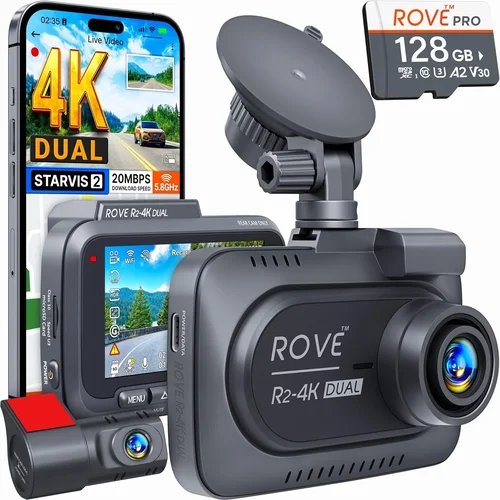
Expert Tips for Getting the Best Deal
Seasonal timing significantly impacts dash cam availability and pricing. Major e-commerce holidays consistently feature deep discounts on electronics, often bundling accessories like extra memory cards, suction mounts, or hardwiring kits at no added cost. Set calendar reminders for these events and compare pre-discount prices across retailers to gauge true savings.
Consider buying refurbished or open-box items from certified sellers. Reputable outlets like Amazon Renewed or manufacturer-certified refurbishers sell tested, functional dash cams at 20-40% below MSRP with full warranty coverage. Inspect return policies carefully—most allow 30-day returns even for opened boxes if the unit doesn’t meet expectations.
Join online communities like Reddit’s r/dashcam or dedicated Facebook groups to track deal alerts and share experiences. Members frequently post real-time coupon codes, flash sales, and bundle opportunities that aren’t widely advertised. Engaging with these networks also provides insider knowledge about upcoming product launches and discontinued models.
Compare shipping costs and delivery timelines between Amazon and direct manufacturer sites. Sometimes ordering directly saves on shipping fees while offering better customer service. Factor in expedited shipping charges if you need the device urgently—some retailers waive fees for Prime members or offer free same-day pickup at local warehouses.
Read the fine print regarding warranties and return policies before finalizing your purchase. Look for at least a one-year manufacturer warranty covering defects and hardware failures. Extended protection plans may seem tempting but rarely justify their cost unless you heavily rely on your dash cam for business purposes.
Test compatibility with your specific vehicle model before buying. Windshield curvature, mirror placement, and airbag deployment zones vary widely between makes and years. Watch unboxing/installation videos for your exact car to identify potential clearance issues or alternative mounting strategies.
Don’t overlook bundled packages that include essential accessories. Many sellers combine dash cams with high-end microSD cards, suction cup mounts, or USB cables for a modest upcharge. These bundles eliminate the hassle of sourcing individual components and often result in greater overall value.

Frequently Asked Questions
Q: Do I really need a dash cam, or will regular insurance suffice?
A: While comprehensive insurance covers physical damage, it doesn’t protect against liability claims or fraudulent accusations like “hit-and-run” allegations when you’re actually innocent. Dash cam footage provides objective evidence that can exonerate you, reduce premiums through safe driver programs, and prevent costly lawsuits. In many cases, the investment pays for itself within months through avoided disputes or lowered rates.
Q: Can dash cams record audio, and is it legal?
A: Most modern dash cams include microphone input for audio recording, but legality varies by jurisdiction. Some states prohibit recording conversations without consent, while others allow it for personal use. Always verify local laws before enabling audio—some manufacturers disable this feature regionally to comply with regulations. Even if permitted, consider privacy implications when recording inside your vehicle.
Q: How long should my dash cam record continuously?
A: Continuous loop recording is standard, overwriting oldest files when storage fills. Set intervals between 1-3 minutes depending on your needs: shorter loops minimize missed events but increase file fragmentation; longer loops reduce write cycles on your memory card. Adjust based on driving frequency—daily commuters benefit from 1-minute clips, while occasional users can safely use 5-minute segments.
Q: What size microSD card should I buy?
A: Match capacity to your recording resolution and usage patterns. For 1080p cameras, 32GB suffices for ~4 hours; 2K/4K models require 64GB+ for equivalent duration. Frequent drivers or those needing extended parking mode should choose 128GB cards. Always select Class 10 or UHS-I/UHS-II cards from trusted brands like SanDisk or Samsung to prevent corruption and ensure stable performance.
Q: Will a dash cam drain my car battery?
A: Standard USB-powered dash cams consume minimal power (~0.5W), posing negligible drainage risk. However, parking mode with motion/impact detection draws more current—potentially depleting your battery overnight if left unattended. Hardwire kits solve this by tapping into ignition-switched circuits, cutting power when the engine isn’t running. Alternatively, use capacitor-based models that don’t rely on internal batteries.
Q: How do I know if my dash cam is working correctly?
A: Perform routine checks: verify LED indicators light up during startup, confirm loop recording activates automatically, and test G-sensor response by gently bumping the mount. Review recent footage through the built-in screen or companion app to assess image quality. If issues arise, consult troubleshooting guides or contact manufacturer support before assuming hardware failure.
Q: Can I use my dash cam while charging my phone?
A: Yes, many dash cams feature dual USB ports—one for power input, another for phone charging. Ensure your vehicle’s USB port provides sufficient amperage (at least 2A) for simultaneous operation. Some models prioritize dash cam power over phone charging during recording, so monitor performance if experiencing lag or disconnections.
Q: Are dash cams worth installing in rental cars?
A: Absolutely. Rental agreements often shift liability to renters for damages or disputes, making dash cam footage invaluable for proving fault or innocence. Since rentals reset each trip, temporary installation poses no inconvenience. Just remove the device before returning the vehicle and securely store evidence separately.
Q: How do I protect my dash cam from theft?
A: Use anti-theft mounts with visible security screws or conceal the device behind your rearview mirror when parked in high-risk areas. Register your serial number with manufacturers for recovery assistance. Some premium models include GPS tracking or remote wipe capabilities if stolen—verify these features before purchasing.
Q: Can I share dash cam footage with authorities?
A: Yes, but follow proper protocols: preserve original timestamps, avoid editing content, and provide complete context. Most law enforcement agencies accept dash cam evidence if metadata proves authenticity. Never fabricate or alter footage—even minor modifications compromise credibility and may constitute criminal tampering.
Our Final Recommendations
Best for Budget-Conscious Buyers: Viofo A119 V3
This compact 1080p dash cam delivers exceptional value with its Sony Starvis sensor, reliable loop recording, and responsive G-sensor protection. Despite its affordable $60 price point, it outperforms many pricier competitors in low-light conditions and includes useful extras like time-lapse parking mode. Verified purchasers praise its durability and straightforward operation, making it ideal for first-time buyers or secondary vehicles.
Best Overall Value: Garmin Dash Cam Mini 2
Offering premium features at a mid-range price, this sleek 1080p camera boasts cloud connectivity, voice control, and automatic incident detection. Its compact design fits discreetly on most windshields while delivering crisp, stabilized footage thanks to built-in GPS and motion compensation. Users appreciate the seamless smartphone integration and generous 1-year warranty, cementing its reputation as the sweet spot for everyday drivers seeking reliability without overspending.
Best Premium Option: BlackVue DR970X-2CH
For professionals and tech-savvy drivers, this dual-lens system sets the gold standard with 4K front recording, LTE connectivity, and cloud management. Military-grade aluminum housing withstands extreme temperatures and impacts, while advanced WDR and HDR ensure clear visuals day or night. Subscription plans unlock remote viewing, real-time alerts, and encrypted storage—making it indispensable for fleet operators, rideshare drivers, or anyone demanding uncompromising performance.
Best for Beginners: Rexing V1P Pro
Newcomers benefit from this user-friendly 2K dash cam featuring a 3-inch touchscreen, intuitive menus, and robust parking mode support. Its Sony CMOS sensor captures vivid details in challenging lighting, and the included suction mount simplifies installation. Positive reviews highlight its plug-and-play setup and responsive customer service, easing the learning curve for those unfamiliar with automotive recording technology.
Best for Advanced Users: Thinkware U1000
Serious drivers seeking maximum flexibility will love this 2K dash cam with built-in GPS, Wi-Fi, and customizable alert systems. Its super capacitor eliminates battery dependency during parking mode, while granular sensitivity adjustments let you fine-tune G-sensor thresholds. Professional-grade build quality and expandable storage options cater to demanding workflows, whether documenting long-haul routes or capturing forensic-grade accident evidence.
Conclusion: Making the Right Choice
Selecting the best dash cam for your car ultimately depends on aligning your priorities with available features and budget constraints. Rather than chasing the highest resolution or flashiest gimmicks, focus on practical elements like reliable recording, durable construction, and intuitive operation. Remember that a modestly priced model from a reputable brand often outperforms expensive units with questionable reliability.
Take time to assess your typical driving scenarios—consider factors like commute length, parking environment, and exposure to aggressive drivers. If you frequently park in unlit areas or drive mountainous terrain, prioritize night vision and impact detection. For city commuters, wider fields of view and lane departure warnings may prove more valuable.
Don’t underestimate the importance of post-purchase support. Choose manufacturers with responsive customer service, clear warranty terms, and active firmware development. Regular updates improve performance, fix bugs, and add new functionalities—keeping your dash cam relevant throughout its lifespan.
Finally, treat your dash cam as both a safety tool and legal asset. Proper installation, secure storage, and ethical use maximize its protective potential while minimizing legal risks. With thoughtful consideration and informed decision-making, you’ll find a dash cam that delivers peace of mind, enhances accountability, and serves as an invaluable witness whenever you need it most.