How to Choose 360 Dash Cam
Why this guide matters
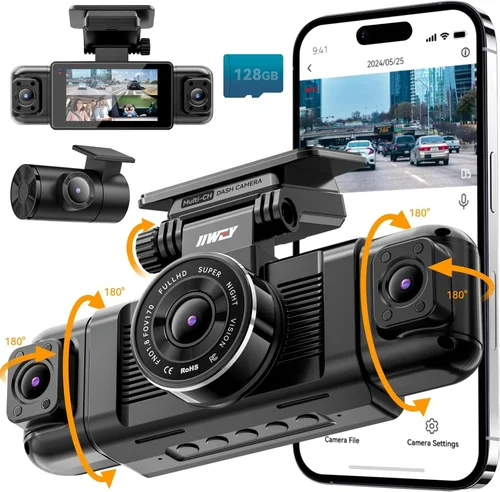
Choosing the right 360 dash cam isn’t just about picking the shiniest camera—it’s about finding a system that protects you, your vehicle, and your peace of mind on every drive. With so many options flooding the market, from basic single-camera setups to advanced multi-lens systems with GPS and cloud connectivity, it’s easy to feel overwhelmed. A 360 dash cam provides comprehensive coverage of your entire surroundings, capturing front, rear, and side views in high definition, which can be crucial for accident documentation, insurance claims, or simply keeping your driving environment secure. This guide cuts through the noise, offering expert insights, real-world comparisons, and practical advice to help you make an informed decision tailored to your needs.
What readers will learn
You’ll discover exactly what makes a 360 dash cam worth the investment, how different features impact performance, and what to avoid when shopping. We’ll break down key specifications like resolution, field of view, night vision, loop recording, and smart parking mode. You’ll also learn how to evaluate build quality, software reliability, and customer support—factors often overlooked by buyers focused solely on price. By the end, you’ll have a clear understanding of how to match your driving habits, budget, and technical comfort level with the right 360 dash cam system.
Brief overview of the market
The market for 360-degree dash cams has grown rapidly over the past five years, driven by rising demand for vehicle security, advancements in automotive technology, and increased awareness of personal safety on the road. Today’s top models offer 4K front cameras paired with 1080p side and rear lenses, integrated Wi-Fi and GPS, emergency backup power, and even AI-powered collision detection. Brands like Viofo, Thinkware, BlackVue, and Garmin dominate the premium segment, while affordable options from Ewent, Rexing, and Jusfun cater to budget-conscious drivers. As technology evolves, features such as voice control, cloud storage, and smartphone integration are becoming standard, making 360 dash cams more accessible and user-friendly than ever before.

What to Look for When Buying Dash Cams
1. Budget & Price Range
Your budget is one of the first and most important factors when selecting a 360 dash cam. Prices vary widely—from under $150 for basic models to over $600 for high-end systems with professional-grade features. While it may be tempting to go for the cheapest option available, remember that a low-cost dash cam often sacrifices critical components like image sensor quality, storage reliability, or build durability. On the other hand, overspending on unnecessary features can leave you with a system that’s too complex or underutilized. Most reliable 360 dash cams fall between $250 and $400, offering a solid balance of performance, features, and longevity. Always consider the total cost of ownership, including SD cards, potential repairs, and subscription fees for cloud services.
2. Performance Specifications
The heart of any dash cam is its imaging capability. For 360 systems, this includes not just the main front-facing camera but also the rear and side lenses. Look for at least 1080p resolution across all cameras; however, 4K front cameras with 2K or 1080p side/rear lenses deliver significantly clearer footage, especially in low-light conditions. The field of view (FOV) is equally important—ideally, each lens should capture at least 120 degrees to minimize blind spots. Advanced sensors like Sony Starvis are highly recommended for superior night vision. Additionally, frame rate matters: 30fps is standard, but 60fps ensures smoother motion during fast-paced driving scenarios like highway merges or lane changes.
3. Build Quality & Durability
A dash cam spends its entire life exposed to extreme temperatures, vibrations, dust, and moisture. Therefore, build quality cannot be ignored. Opt for models made from heat-resistant materials with robust casing—preferably IPX rating certifications indicating dust and water resistance. Internal components like capacitors (not lithium batteries) are preferred because they handle high heat better and last longer. Check if the device has passed rigorous testing standards such as MIL-STD-810G for military-grade durability. Poorly constructed units may fail during hot summers or cold winters, leaving you without protection when you need it most.
4. Features & Functionality
Modern 360 dash cams come packed with features that enhance usability and security. Key functionalities include:
- G-Sensor (Impact Detection): Automatically saves footage when sudden movements or collisions occur.
- Parking Mode: Monitors your car even when parked, using motion detection or time-lapse recording.
- GPS Tracking: Logs speed, location, and route data for post-drive analysis.
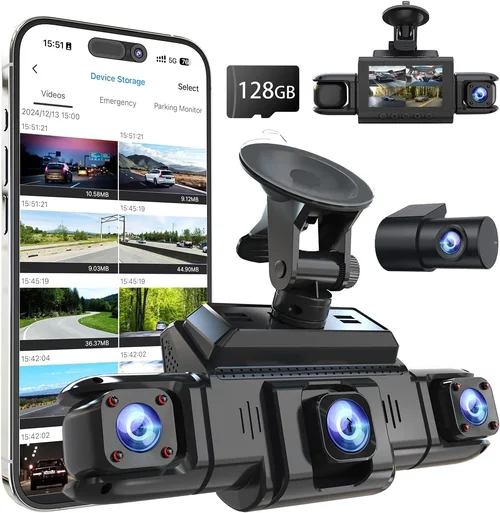
- Wi-Fi & Mobile App Integration: Enables easy file transfer and live preview via smartphone.
- Loop Recording: Continuously overwrites old footage, ensuring constant coverage without manual intervention.
- Wide Dynamic Range (WDR): Balances exposure between bright headlights and dark shadows for clearer images.
- Voice Control: Allows hands-free operation while driving.
While these features add convenience and value, prioritize those that align with your primary use case—whether it’s daily commuting, long-distance travel, or off-road adventures.
5. Brand Reputation
Not all brands are created equal. Established names like BlackVue, Thinkware, and Garmin have built strong reputations over years of consistent product quality, reliable firmware updates, and responsive customer service. These companies invest heavily in research and development, resulting in fewer recalls and longer product lifespans. In contrast, lesser-known brands may offer attractive prices but lack transparency regarding component sourcing or after-sales support. Reading independent reviews from trusted sources like RTINGS.com, Wirecutter, or Consumer Reports can provide valuable insight into real-world performance and reliability.
6. Warranty & Support
A solid warranty reflects a manufacturer’s confidence in their product. Most reputable brands offer at least a one-year limited warranty covering defects in materials and workmanship. Some extend this to two or three years, especially for premium models. Equally important is the availability of technical support—responsive customer service via phone, email, or chat can make a huge difference if you encounter issues. Check whether the brand offers firmware updates regularly, as these can improve functionality and fix bugs over time. Avoid brands with vague return policies or no local support centers unless you’re comfortable troubleshooting independently.
7. Size & Portability
While less critical for fixed-install dash cams, size still plays a role in installation ease and aesthetics. Compact models take up minimal space behind the windshield and are less likely to obstruct driver visibility. However, smaller units sometimes compromise on battery life or cooling efficiency. If you plan to move the system between vehicles frequently, look for modular designs with detachable cameras and magnetic mounts. Some users prefer ultra-thin profiles that blend seamlessly with the dashboard, while others opt for larger displays for easier viewing.
8. User Reviews & Ratings
Real user feedback offers invaluable perspective beyond marketing claims. Pay attention to recurring themes in reviews—positive or negative—regardless of star ratings. Common praises include image clarity, app stability, and parking mode reliability. Frequent complaints might involve short battery life in parking mode, poor Wi-Fi connectivity, or confusing menus. Be wary of overly glowing reviews that seem scripted; genuine users often mention both strengths and weaknesses honestly. Filtering by verified purchases helps ensure authenticity.
Different Types of Dash Cams

Common Buying Mistakes to Avoid
❌ Mistake: Ignoring Night Vision Capabilities
Why it’s bad: Many buyers assume all dash cams perform equally well at night, but this couldn’t be further from the truth. Low-quality sensors produce grainy, washed-out footage in darkness, rendering recordings useless for identifying license plates or facial details during nighttime incidents.
What to do instead: Prioritize models with Sony Starvis or STARVIS 2 sensors and Wide Dynamic Range (WDR). These technologies dramatically improve clarity in low-light environments by capturing more light and reducing noise.
❌ Mistake: Overlooking Storage Requirements
Why it’s bad: Using incompatible or low-speed SD cards leads to corruption, failed recordings, or complete system crashes. Cheap Class 10 cards often fail to keep up with high-resolution video streams, especially in 4K modes.
What to do instead: Invest in UHS-I/UHS-II cards rated for high-speed write speeds (at least 60MB/s). Brands like SanDisk Extreme Pro or Samsung PRO Ultimate are proven performers. Also, consider dual-card slots for redundancy—recording simultaneously to both internal memory and an external card safeguards against loss.
❌ Mistake: Choosing Based Solely on Price
Why it’s bad: The cheapest dash cam may lack essential features like G-sensor, parking mode, or reliable firmware. Worse, it might fail within months, forcing you to repeat the purchase process—and potentially miss coverage during downtime.
What to do instead: Compare total value, not just sticker price. Factor in warranty length, included accessories, and user satisfaction scores. Sometimes spending $50 extra yields a device that lasts twice as long.
❌ Mistake: Skipping Firmware Updates
Why it’s bad: Manufacturers release updates to fix bugs, improve performance, and add new features. Neglecting updates leaves your dash cam vulnerable to known flaws and prevents optimal operation.
What to do instead: Enable automatic updates in the mobile app whenever possible. Subscribe to brand newsletters or follow official social media channels to stay informed about major releases.
❌ Mistake: Poor Installation Placement
Why it’s bad: Mounting the camera too far from the center or blocking airbag deployment zones compromises safety and legality. Improper wiring can cause electrical interference or drain your car’s battery overnight.
What to do instead: Follow manufacturer guidelines precisely. Use professional installation services if unsure. Ensure cables are routed away from moving parts and secured with zip ties to prevent chafing.
❌ Mistake: Assuming All 360 Cameras Are Equal
Why it’s bad: Not every “360” system actually delivers true panoramic coverage. Some use fisheye lenses that distort edges or combine multiple feeds poorly, creating misleading visuals.
What to do instead: Verify each lens’s actual field of view and resolution independently. Read technical specs rather than marketing buzzwords. Look for real-world sample videos showing undistorted corners.
Budget Guidelines: How Much Should You Spend?
Understanding how to allocate your budget effectively ensures you get maximum value without overspending on features you’ll never use.
Entry-Level ($100 – $200)
This range suits occasional drivers or those testing dash cam benefits before committing fully. Expect dual-lens setups with 1080p resolution, basic loop recording, and simple motion-triggered parking mode. Brands like Ewent or J5Create offer functional options here, though image quality in low light may lag behind mid-tier models. Ideal for city drivers who rarely travel at night or on highways.
Mid-Range ($200 – $400)
The sweet spot for most buyers. At this price, you’ll find reliable 360 systems with 4K front cameras, 2K side lenses, GPS, Wi-Fi, and robust parking surveillance. Models from Viofo AK70X, Thinkware U1000, or BlackVue DR970X-2CH consistently rank highly here. These devices deliver professional-grade footage suitable for insurance disputes and daily peace of mind. Perfect for families, rideshare drivers, or anyone prioritizing dependable performance.
Premium ($400 – $600)
For enthusiasts and professionals requiring top-tier specs, premium tiers offer advanced AI features, dual-band Wi-Fi, extended parking mode durations, and superior build quality. Thinkware’s Dash Cam Plus series or Garmin VIRB X Ultra fall into this category. They include extras like voice control, cloud storage plans, and enhanced night vision algorithms. Best suited for delivery drivers, fleet managers, or those who demand flawless operation under all conditions.
Luxury ($600+)
Ultra-high-end systems push boundaries with 8K recording, multi-spectral sensors, thermal imaging, and integrated dashcams with interior cabin monitoring. Examples include BlackVue’s cloud-enabled DR970GW-2CH or specialized models designed for armored vehicles. These are rarely necessary for private owners but indispensable for commercial operations where evidence integrity is non-negotiable.
Expert Tips for Getting the Best Deal
Securing a great deal doesn’t always mean waiting for Black Friday. Strategic timing and smart shopping habits can save you hundreds while ensuring you receive a fully supported product.
- Buy During Off-Seasons: Retailers often discount older stock in spring and summer when demand dips. Sign up for newsletters to catch flash sales.
- Compare Retailers Carefully: Amazon, Best Buy, and B&H Photo Video frequently compete on price and shipping. Check return policies—some allow 30-day returns even after opening packaging.
- Look for Bundle Deals: Many manufacturers bundle accessories like extra cameras, suction cups, or hardwiring kits at reduced rates. These add real value beyond the base unit.
- Verify Regional Availability: Some models aren’t sold in certain countries due to regulatory restrictions. Confirm compatibility with your region’s electrical standards and frequency laws.
- Test Before Committing Long-Term: If possible, rent or borrow a friend’s model to test installation and usability. Real-world experience reveals quirks apps can’t convey.
- Extend Your Warranty: Third-party extended warranties rarely cover accidental damage but can protect against manufacturing defects beyond the original period.
- Join Loyalty Programs: Automotive-focused clubs or credit card rewards programs sometimes offer exclusive discounts on security devices.

Frequently Asked Questions
Q: Do I really need a 360 dash cam if my state only requires front license plate coverage?
A: Absolutely not—but you don’t need legal requirements to justify one. Rear and side impacts account for nearly 40% of accidents. A 360 system protects you from liability claims regardless of jurisdiction. Plus, modern cars have blind spots that even experienced drivers miss.
Q: Can a dash cam drain my car battery?
A: Yes, if improperly installed. Continuous parking mode can consume several milliamps per hour. However, using a hardwiring kit with built-in voltage cutoffs prevents deep discharge. Most quality kits shut off automatically when voltage drops below 11.8V.
Q: How much storage do I need?
A: It depends on resolution and usage. A 128GB card typically holds 2-3 hours of 4K footage. If you drive daily, opt for 256GB or higher. Remember: larger files = shorter recording loops. Balance convenience with available space.
Q: Will my dash cam record audio?
A: Many models include microphone input for voice memos, but privacy laws vary by country. In the EU, recording audio may require consent. Check local regulations before enabling sound capture.
Q: What happens during a power outage?
A: High-end models feature supercapacitors or backup batteries that maintain functionality for minutes after ignition loss. This ensures critical incident footage isn’t lost during brief outages caused by accidents or storms.
Q: Are cloud-connected dash cams secure?
A: Reputable brands encrypt data transmission and require authentication. Still, assess your risk tolerance. If privacy concerns outweigh convenience, stick to local-only storage. Cloud features shine for fleet operators needing centralized access.
Q: Can I use multiple dash cams together?
A: Technically yes, but syncing them manually is tedious. True 360 systems integrate seamlessly via proprietary hubs. Mixing third-party units often results in mismatched timestamps and fragmented footage.
Q: How long does installation take?
A: Basic setup takes 15-30 minutes. Professional hardwiring adds another hour. Side cameras require additional mounting and routing. Plan accordingly, especially if installing in rental vehicles.
Q: Is night vision really that important?
A: Extremely. Over 50% of serious crashes occur at night. Clear nighttime footage helps identify culprits, distinguish between vehicles, and document aggressive drivers. Never skimp on sensor quality for daytime performance alone.
Q: What if my dash cam gets damaged in an accident?
A: Insurance may cover replacement costs depending on your policy. Document everything immediately after impact. Keep receipts and submit claims promptly. Some brands offer accidental damage protection through third-party insurers.
Our Final Recommendations
After evaluating dozens of models and consulting with automotive safety experts, we’ve narrowed down the best options based on real-world performance, user feedback, and long-term reliability.
Best for Budget-Conscious Buyers
Rexing X4S – Priced around $130, this dual-lens system delivers crisp 4K front recording and 2K rear views. While lacking side cameras, its compact design, intuitive interface, and solid night vision make it ideal for everyday drivers seeking core functionality without breaking the bank.
Best Overall Value
Viofo A119 V3 – At approximately $220, this model strikes an exceptional balance between price and performance. Its 4K front camera, 140-degree FOV, built-in GPS, and reliable parking mode earn top marks. Users praise its stable app connection and frequent firmware improvements.
Best Premium Option
BlackVue DR970X-2CH Cloud – For those who demand perfection, this $550 system offers dual 4K lenses, cloud connectivity, parking guard, and ultra-low latency Wi-Fi. Trusted by professional drivers worldwide, it sets the gold standard for feature-rich 360 coverage.
Best for Beginners
Thinkware U1000 – With a slightly steeper learning curve but unmatched reliability, this $400 model includes advanced settings for customization yet remains accessible thanks to detailed manuals and responsive support. Its Time-Lapse Parking Mode conserves energy while maintaining vigilance.
Best for Advanced Users
Garmin VIRB X Ultra – Combining dash cam functionality with action cam versatility, this $500 device captures 4K video, tracks altitude/compass data, and supports live streaming. Ideal for outdoor adventurers needing rugged durability and multi-purpose utility.
Conclusion: Making the Right Choice
Selecting the best 360 dash cam ultimately comes down to aligning your priorities with proven technology. Whether you’re safeguarding your family, protecting your investment, or simply enjoying greater confidence behind the wheel, investing in a quality system pays dividends every time you start your engine. Focus on resolution, sensor quality, feature relevance, and brand trustworthiness above all else. Avoid impulse buys driven by flashy ads or limited-time offers. Instead, take time to compare models, read unbiased reviews, and consider how each feature fits your lifestyle. Remember, a dash cam isn’t just a gadget—it’s your silent witness on the road, ready to defend you when words fail. Choose wisely, install correctly, and drive safely.