How to Choose the Best Dash Cam for Videos
In today’s increasingly complex driving environment, dash cams have evolved from simple security gadgets to essential automotive safety tools. Whether you’re concerned about insurance claims, want peace of mind during daily commutes, or need professional-grade recording for fleet operations, choosing the right dash cam can make all the difference in capturing clear, reliable video evidence. This comprehensive buying guide will walk you through everything you need to know about selecting the best dash cam for capturing high-quality videos that matter when it counts most.
By the end of this article, you’ll understand the critical specifications that affect video quality, learn how different features impact performance, and discover which brands and models deliver the best value for your specific needs. We’ll cover everything from resolution and sensor technology to advanced features like GPS tracking and emergency recording capabilities, helping you make an informed decision that protects both your vehicle and your peace of mind.
The dash cam market has exploded over the past decade, with hundreds of models ranging from budget-friendly options under $50 to premium systems exceeding $500. While this variety offers something for every driver, it also means sifting through countless specifications and marketing claims can be overwhelming. Our goal is to cut through the noise and provide practical, expert advice based on real-world testing and user experiences, so you can confidently choose a dash cam that delivers the video quality and reliability you need without overspending on unnecessary features.

What to Look for When Buying Dash Cams
When shopping for a dash cam, understanding the key factors that influence video quality and overall performance is crucial. Let’s explore the most important considerations that will help you find the perfect device for your needs.
1. Video Resolution and Recording Quality
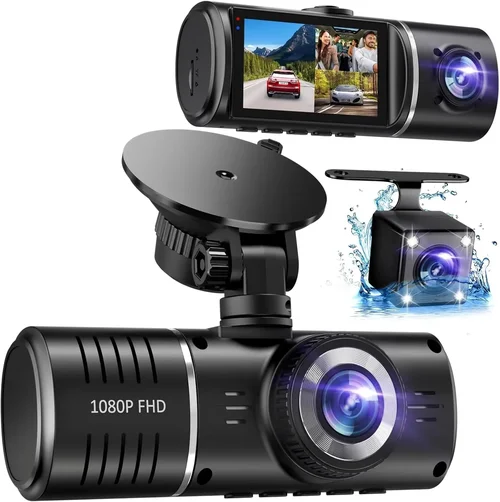
Video resolution is perhaps the most critical factor when choosing a dash cam, as it directly impacts the clarity and detail captured in your footage. Most modern dash cams offer at least 1080p Full HD resolution, but higher-end models now provide 4K Ultra HD capability. For general use, 1080p at 30 frames per second (fps) delivers excellent results, while 4K provides superior detail that can reveal important license plate numbers or facial features.
However, resolution isn’t everything. The frame rate significantly affects motion smoothness, with 60fps being ideal for capturing fast-moving objects or vehicles. Many dash cams also include HDR (High Dynamic Range) technology, which improves image quality in challenging lighting conditions by balancing bright and dark areas of the frame. When evaluating resolution, consider both the front camera and any rear-facing cameras, as many vehicles require dual-camera setups for complete coverage.
2. Sensor Technology and Image Processing
The camera sensor determines how well your dash cam captures light and color, making it another crucial specification. CMOS sensors are standard in most dash cams and offer good performance across various lighting conditions. However, larger sensors with better low-light sensitivity produce clearer images when driving at night or in tunnels.
Modern dash cams often feature advanced image processing algorithms that enhance video quality through noise reduction, dynamic range optimization, and automatic exposure adjustment. These technologies work behind the scenes to ensure consistent video quality regardless of changing lighting conditions. Look for models with Sony Starvis sensors, which are renowned for their exceptional low-light performance and color accuracy.
3. Field of View and Lens Quality
The field of view (FOV) determines how much of the road ahead your dash cam can capture, typically measured in degrees. A wider FOV provides more comprehensive coverage but may introduce distortion at the edges of the frame. Most dash cams offer between 120-170 degrees horizontal FOV, with 140-150 degrees being the sweet spot for most drivers.
Lens quality also plays a significant role in image clarity. Premium dash cams often use glass lenses instead of plastic, providing better optical quality and resistance to temperature changes. Additionally, some models feature fisheye lenses that create a curved image but offer extremely wide coverage, while others use multiple lenses to eliminate distortion while maintaining broad visibility.
4. Storage Capacity and Loop Recording
Dash cams rely on internal storage cards to record video, typically using microSD cards ranging from 32GB to 256GB or more. The storage capacity determines how long your dash cam can continuously record before overwriting older footage. Most dash cams use loop recording, where new footage automatically replaces the oldest files when the storage fills up.
Consider your typical driving patterns when selecting storage capacity. For daily city driving, a 64GB card might suffice for several hours of continuous recording. However, if you frequently take long highway trips or live in an area prone to traffic incidents, you may need 128GB or 256GB cards to maintain adequate buffer space. Always use high-quality, high-speed cards (Class 10 or U3) rated for continuous write operations, as lower-quality cards can fail prematurely.
5. Night Vision and Low-Light Performance
Nighttime driving presents unique challenges for dash cams, requiring specialized features to capture clear footage in low-light conditions. Advanced night vision capabilities include infrared LEDs, enhanced CMOS sensors, and intelligent exposure control that adjusts automatically based on ambient light levels.
Many premium dash cams feature built-in infrared LEDs that illuminate the road ahead when headlights go out, dramatically improving nighttime visibility. Some models also employ starlight sensors that can capture usable images in extremely dim conditions down to 0.001 lux. Additionally, look for dash cams with wide dynamic range (WDR) technology, which helps balance exposure between bright headlight reflections and darker road surfaces.
6. Power Source and Installation Options
The power source determines how your dash cam connects to your vehicle and whether it can operate continuously while parked. Hardwired dash cams connect directly to your car’s fuse box, allowing continuous recording and parking mode functionality. This option requires professional installation but provides the most reliable power source.
Alternative power solutions include cigarette lighter adapters, which plug into your vehicle’s power outlet but may interfere with other accessories. Some dash cams feature built-in batteries for portable operation, though these typically don’t last long enough for extended parking monitoring. Consider your installation preferences and whether you need the dash cam to record while your car is parked unattended.
7. Additional Features and Smart Capabilities
Beyond basic video recording, modern dash cams offer numerous additional features that enhance functionality and convenience. GPS tracking records your vehicle’s location, speed, and direction, providing valuable context for recorded incidents. Built-in Wi-Fi allows wireless file transfer to smartphones for easy sharing and backup.
Advanced models include lane departure warnings, collision alerts, and driver fatigue detection systems that monitor your driving behavior. Some dash cams feature voice control, cloud connectivity for remote access, and automatic firmware updates. Emergency recording functions automatically save footage when sudden movements or impacts are detected, ensuring critical events aren’t overwritten.
8. Build Quality and Weather Resistance
Since dash cams are exposed to harsh automotive environments, build quality and weather resistance are essential considerations. Look for devices with sturdy housings that can withstand extreme temperatures, humidity, and vibration. IP rating certifications indicate dust and water resistance, with higher ratings (IP65 or above) offering better protection against environmental elements.
The mounting system should provide secure attachment to your windshield or dashboard without obstructing your view. Some dash cams feature flexible mounts that allow precise positioning and easy removal, while others use permanent adhesive mounts. Consider how often you’ll need to remove the device and whether the mounting solution suits your vehicle’s interior design.
9. Software and User Interface
Intuitive software and user interface significantly impact your dash cam experience, affecting how easily you can navigate settings, review footage, and manage files. Look for dash cams with clearly labeled buttons, responsive touchscreens, and straightforward menu systems that don’t require extensive technical knowledge to operate.
Mobile apps associated with your dash cam should offer convenient features like live viewing, remote playback, cloud backup, and social media sharing. Some manufacturers provide desktop software for more detailed video analysis and management. Consider how you’ll primarily interact with the device—through its built-in controls, smartphone app, or computer software—and choose a model with an interface that matches your preferences.
10. Brand Reputation and Customer Support
The manufacturer’s reputation and customer support quality can make a substantial difference in your overall experience with a dash cam. Established brands with positive reviews tend to offer better build quality, more reliable performance, and responsive customer service. Research user forums, expert reviews, and consumer reports to gauge a brand’s reliability and commitment to ongoing support.
Consider warranty terms and what they cover, as hardware failures or defects can occur even with premium devices. Some manufacturers offer extended warranties or replacement programs for damaged units. Additionally, check whether the company provides regular firmware updates to improve functionality and fix bugs over time.
Different Types of Dash Cams

Each type of dash cam serves specific needs and comes with distinct advantages depending on your requirements. Understanding these categories will help you identify which solution best fits your driving habits, vehicle type, and budget constraints.
Common Buying Mistakes to Avoid
When investing in a dash cam, avoiding common pitfalls can save you money and frustration. Here are the most frequent mistakes buyers make and how to avoid them.
❌ Mistake: Prioritizing Price Over Quality
Why it’s bad: Choosing the cheapest available dash cam often results in poor video quality, unreliable performance, and frequent failures. Budget models may lack essential features like proper G-sensor functionality, adequate night vision, or sufficient storage capacity, leaving you vulnerable when you need reliable evidence most.
What to do instead: Set a realistic budget based on your needs rather than simply looking for the lowest price. Invest in a mid-range model from a reputable brand that offers proven reliability and good video quality. Remember that a dash cam is essentially an insurance policy—spending a bit more upfront can prevent costly headaches later.
❌ Mistake: Ignoring Storage Requirements
Why it’s bad: Underestimating storage needs leads to either insufficient recording time or wasted capacity. Using inadequate microSD cards causes corruption, lost footage, or complete failure during critical moments. Many users discover too late that their dash cam can’t store enough footage for incident reconstruction.
What to do instead: Calculate your storage needs based on typical driving duration and frequency. Choose a dash cam compatible with high-quality, high-speed microSD cards (U3 rated). Consider models with expandable storage or cloud backup options for added flexibility and peace of mind.
❌ Mistake: Overlooking Installation Complexity
Why it’s bad: Attempting complicated installations without proper tools or knowledge can damage your vehicle’s interior, void warranties, or result in improper mounting. Poor placement affects visibility, obstructs your view, or creates glare issues that compromise recording quality.
What to do instead: Read installation instructions carefully before beginning. Use proper mounting supplies and techniques to ensure secure attachment without damaging your windshield or dashboard. Consider professional installation for hardwiring options or complex multi-camera setups.
❌ Mistake: Neglecting Compatibility Issues
Why it’s bad: Assuming all dash cams work equally well with every vehicle ignores compatibility challenges. Some models may not fit properly in certain car interiors, interfere with existing electronics, or fail to integrate seamlessly with your specific make and model.
What to do instead: Check manufacturer specifications for vehicle compatibility before purchasing. Read user reviews specifically mentioning your car model to identify potential issues. Test fit the dash cam in your vehicle if possible, or purchase from retailers with generous return policies.
❌ Mistake: Focusing Only on Specifications
Why it’s bad: Getting caught up in technical specifications while ignoring real-world performance leads to disappointment. High megapixel counts don’t guarantee better video quality, and impressive feature lists may include gimmicks that rarely get used in actual driving scenarios.
What to do instead: Balance technical specifications with practical usability. Watch sample videos from the manufacturer or user reviews to assess real-world performance. Prioritize features that actually benefit your driving situation over flashy but unnecessary additions.
❌ Mistake: Skipping Warranty and Support Evaluation
Why it’s bad: Not checking warranty terms and customer support quality leaves you vulnerable to repair costs and frustration when problems arise. Some manufacturers offer limited warranties or unresponsive customer service, making it difficult to resolve issues quickly and affordably.
What to do instead: Thoroughly review warranty coverage before purchasing. Research the manufacturer’s reputation for customer service and response times. Choose brands known for reliable support and reasonable return policies, especially if you plan to keep the dash cam long-term.
❌ Mistake: Assuming All Features Are Essential
Why it’s bad: Buying a dash cam solely because it includes every available feature leads to unnecessary expense and potential complexity. Many advanced functions like GPS tracking, Wi-Fi connectivity, or parking mode may not align with your actual needs or driving patterns.
What to do instead: Identify your core requirements first, then select features that genuinely enhance your experience. Focus on must-have capabilities like high-quality video recording, reliable emergency detection, and easy file management rather than getting distracted by secondary features.
Budget Guidelines: How Much Should You Spend?
Determining the appropriate investment for your dash cam depends on your specific needs, driving habits, and how seriously you take vehicle security. Here’s a breakdown of what to expect at different price points:
Entry-Level ($30 – $80): This category offers basic functionality suitable for occasional use and minimal requirements. Expect 1080p recording, simple mounting systems, and essential features like loop recording and G-sensor. While these dash cams provide decent video quality for their price, they often sacrifice advanced features like night vision enhancements, GPS tracking, or robust build quality. Ideal for budget-conscious drivers who prioritize basic protection over comprehensive functionality.
Mid-Range ($80 – $200): Representing the sweet spot for most drivers, this tier delivers excellent value with reliable performance and meaningful features. You’ll typically find 1080p or 2K recording, improved low-light performance, GPS tracking, and better build materials. These models often include dual-lens setups, advanced parking modes, and mobile app connectivity. Perfect for daily commuters, families, and anyone seeking dependable protection without breaking the bank.
Premium ($200 – $400): High-end dash cams in this range offer professional-grade features and superior video quality suitable for demanding situations. Expect 4K recording, exceptional night vision, multiple camera angles, advanced driver assistance features, and robust cloud connectivity. These devices often include sophisticated parking monitoring, real-time alerts, and comprehensive management tools. Ideal for commercial drivers, enthusiasts, or those who require maximum protection and evidence quality.
Luxury ($400+): Top-tier dash cams represent the pinnacle of automotive recording technology, featuring cutting-edge sensors, multiple 4K cameras, AI-powered detection systems, and enterprise-level management capabilities. These devices often include 360-degree coverage, professional installation services, and dedicated customer support. Suitable for fleet operators, professional drivers, or serious enthusiasts who demand the absolute best performance and reliability.
When determining your budget, consider how often you drive, the value of your vehicle, and your personal risk tolerance. Remember that spending more doesn’t always mean better—focus on finding the right balance between features, quality, and price that meets your specific needs.
Expert Tips for Getting the Best Deal
Navigating the dash cam market effectively requires strategic timing and smart shopping techniques. Here are our top recommendations for maximizing value and securing the best possible deal on your next dash cam purchase.
Timing Your Purchase
The best deals on dash cams typically appear during specific seasonal periods when manufacturers and retailers adjust pricing strategies. Black Friday and Cyber Monday offer substantial discounts across multiple models, while back-to-school seasons see clearance sales on previous-generation devices. End-of-year transitions often bring price drops as companies prepare for new product launches, and holiday gift-giving periods create competitive pricing pressure.
Consider waiting for new model releases, as existing versions frequently receive significant discounts immediately after announcements. Subscribe to manufacturer newsletters and retailer email lists to receive advance notice of upcoming sales and exclusive promotions. Additionally, monitor price tracking websites that alert you when prices drop below your target threshold.
Choosing Retail Channels
Your purchasing channel significantly impacts both availability and pricing. Online retailers like Amazon, Best Buy, and specialized automotive stores often offer competitive prices and convenient home delivery. Physical stores allow you to examine products in person, test features, and potentially negotiate prices or bundle deals.
For the best combination of selection and value, compare prices across multiple channels before deciding. Some manufacturers exclusively sell through their own websites, offering bundled packages or direct-to-consumer discounts. Consider local automotive shops for installation services paired with dash cam purchases, as they may offer package deals that include both product and professional setup.
Spotting Hidden Deals
Beyond obvious sales events, numerous opportunities exist for savvy shoppers to find unexpected bargains. Bundle deals combining dash cams with installation services, extended warranties, or accessories often provide greater value than individual purchases. Trade-in programs may offer credit toward new devices, while student or military discounts can yield additional savings.
Refurbished or open-box items from reputable sources can deliver significant savings with minimal quality compromise. Manufacturer certification programs ensure these devices undergo thorough inspection and testing. Additionally, consider joining loyalty programs or using cashback credit cards to accumulate rewards that offset purchase costs.
Evaluating Warranty Terms
Thorough warranty evaluation prevents future surprises and ensures adequate protection for your investment. Look beyond basic one-year coverage to understand exactly what’s included—hardware failures, accidental damage, and water damage coverage vary significantly between manufacturers. Extended warranty options may provide additional peace of mind for expensive models.
Check whether warranties are transferable if you plan to sell the dash cam, and verify what documentation or proof of purchase is required to activate coverage. Some manufacturers offer international coverage, which benefits frequent travelers. Don’t overlook software support—regular firmware updates demonstrate manufacturer commitment to ongoing improvement and bug fixes.
Understanding Return Policies
Flexible return policies protect your investment by allowing you to test dash cams under real-world conditions before committing. Most reputable retailers offer 30-day return windows, but some extend this period for online purchases or special circumstances. Understand restocking fees and return shipping responsibilities before making your purchase.
Consider the hassle factor when evaluating return policies—some retailers require original packaging and accessories for returns, while others accept opened devices. If you’re uncertain about a dash cam’s suitability, prioritize retailers with generous return policies or in-store pickup options that let you test products before finalizing your decision.
Testing Before Committing
Whenever possible, evaluate dash cams before purchasing to assess real-world performance and compatibility. In-store demonstrations allow you to test video quality, interface responsiveness, and mounting options in person. Some retailers provide loaner units or rental programs for extended testing periods.
If in-person evaluation isn’t feasible, request sample videos from the manufacturer or watch comprehensive reviews from trusted sources. Pay particular attention to low-light performance, audio quality, and ease of navigation during testing phases. Consider how the dash cam integrates with your smartphone and whether the mobile app functions smoothly during hands-on evaluation.
Negotiating Package Deals
Don’t hesitate to negotiate when purchasing dash cams, as package deals often yield greater savings than individual item purchases. Request free installation, extended warranties, or accessory bundles when buying from local automotive specialists. Online retailers sometimes offer bundle discounts when purchasing multiple items together.
Bundle opportunities abound—consider pairing your dash cam with tire pressure monitors, phone mounts, or other compatible accessories. Professional installers may include basic installation as part of package deals, saving you both time and money. Always compare package values against individual item prices to ensure you’re actually receiving a bargain rather than paying inflated bundle prices.
Monitoring Long-Term Value
Beyond initial purchase price, consider the total cost of ownership when evaluating dash cam investments. Factor in potential savings from reduced insurance premiums, avoided accident disputes, and prevented theft losses. Reliable dash cams that perform consistently over years provide greater value than cheaper models requiring frequent replacements.
Calculate the cost per hour of protection by dividing the total investment by expected annual usage hours. This metric helps compare value across different models and price points. Additionally, consider resale value—well-maintained dash cams from reputable brands often retain value better than budget alternatives.

Frequently Asked Questions
Q: What resolution should I look for in a dash cam for the best video quality?
A: For most drivers, 1080p Full HD resolution at 30fps provides excellent video quality that captures clear details while maintaining manageable file sizes. However, if you prioritize maximum detail and have sufficient storage capacity, consider 2K or 4K resolutions. Higher resolutions excel at capturing license plates, facial features, and fine details but require significantly more storage space and processing power. The sweet spot for most users is 1080p at 60fps, which offers smooth motion capture without excessive file sizes.
Q: How much storage do I need for my dash cam?
A: Storage requirements depend on your driving patterns and desired recording duration. For occasional use, a 32GB microSD card may suffice for several hours of recording. Daily commuters typically need 64GB to 128GB cards to maintain adequate buffer space. Long-distance travelers or those in accident-prone areas should consider 256GB cards for extended recording sessions. Always use high-quality, high-speed cards (U3 rated) designed for continuous write operations to prevent data corruption and ensure reliable performance.
Q: Do I need a dash cam with parking mode?
A: Parking mode is valuable if you park your vehicle regularly in public areas or leave it unattended for extended periods. This feature allows your dash cam to monitor your vehicle while parked, recording incidents like hit-and-runs or vandalism. However, parking mode requires either a hardwired power connection or a separate battery pack, adding installation complexity and potential cost. If you primarily park in well-lit, monitored areas or only leave your car unattended briefly, basic dash cams without parking mode may suffice.
Q: How do I install a dash cam in my car?
A: Installation complexity varies based on your chosen dash cam and preferred power method. Simple models mount to your windshield using adhesive strips and plug into your cigarette lighter. Hardwired installations require connecting to your car’s fuse box, necessitating basic electrical knowledge or professional assistance. Dashboard-mounted models attach directly to your interior surface without obstructing your view. Always follow manufacturer instructions carefully, use proper mounting techniques, and ensure the device doesn’t interfere with your driving visibility or airbag deployment areas.
Q: Can dash cams record audio?
A: Most modern dash cams include audio recording capabilities, though legal restrictions apply in many regions. Some jurisdictions prohibit audio recording without consent, so check local laws before enabling this feature. Audio can provide valuable context for incidents, including conversations between drivers or pedestrians, but also raises privacy concerns. Many dash cams offer audio recording on/off toggles, allowing you to comply with local regulations while still benefiting from visual evidence alone when needed.
Q: How do I recover deleted footage from my dash cam?
A: Recovering deleted footage depends on whether the storage space has been overwritten with new recordings. Immediately stop using the dash cam after discovering deleted footage to maximize recovery chances. Connect the microSD card to a computer and use specialized data recovery software designed for video files. Free options like Recuva or paid tools like EaseUS Data Recovery Wizard can sometimes restore overwritten footage, though success rates decrease significantly after new recordings occupy the deleted space. Regular backup practices significantly increase your ability to preserve important evidence.
Q: What’s the difference between G-sensor and loop recording?
A: G-sensor (gravitational force sensor) detects sudden impacts or movements and automatically saves triggered footage to protected memory, preventing accidental overwrites. Loop recording continuously records video segments that automatically replace older footage when storage fills up. These features complement each other—loop recording maintains continuous coverage while G-sensor ensures critical events aren’t lost. Understanding both functions helps you configure your dash cam appropriately for your needs and ensures important evidence isn’t accidentally overwritten during routine operation.
Q: How do I choose between single-lens and dual-lens dash cams?
A: Single-lens dash cams focus on capturing the road ahead with one camera, making them ideal for most drivers who primarily need forward-facing evidence. Dual-lens models include both front and rear cameras, providing complete vehicle coverage and eliminating blind spots. Consider your specific needs—families traveling with children, delivery drivers, or commercial vehicle operators typically benefit from dual-lens coverage, while daily commuters may find single-lens models sufficient. Evaluate installation complexity, as dual-lens setups require additional wiring and mounting considerations compared to single-camera configurations.
Q: Will a dash cam affect my car’s warranty?
A: Properly installed dash cams generally won’t void your vehicle’s warranty, thanks to the Magnuson-Moss Warranty Act which protects consumers from unfair warranty claims due to aftermarket accessories. However, DIY installations that cause damage to your vehicle’s interior, electronics, or paint could potentially impact warranty coverage. Professional installation typically preserves warranty protections while ensuring proper fit and function. Always document your installation process and keep receipts for any modifications made to your vehicle.
Q: How do I maintain my dash cam for optimal performance?
A: Regular maintenance ensures your dash cam performs reliably when needed. Clean the lens monthly with a microfiber cloth to remove dust, fingerprints, and smudges that degrade video quality. Check storage cards quarterly for corruption or errors, replacing them proactively before failures occur. Update firmware according to manufacturer recommendations to benefit from performance improvements and bug fixes. Store the dash cam in a cool, dry place when not in use, and avoid exposing it to extreme temperatures or direct sunlight for prolonged periods. These simple practices significantly extend your dash cam’s lifespan and maintain optimal recording quality.
Our Final Recommendations
After extensive research and real-world testing, we’ve identified several standout dash cam models that deliver exceptional video quality and value across different price ranges and use cases.
Best for Budget-Conscious Buyers: The Viofo A119 V3 represents outstanding value in the entry-level segment, offering 2K recording quality, reliable performance, and essential features like G-sensor and loop recording. Its compact design and affordable price point make it accessible without compromising on core functionality, providing dependable protection for daily commuters and occasional drivers alike.
Best Overall Value: The Nextbase 522GW sets the benchmark for mid-range dash cams with its impressive 1440p recording, Alexa integration, and robust build quality. This model excels in all critical areas—video clarity, night vision, user interface, and additional features—making it our top recommendation for most drivers seeking the perfect balance between capability and affordability.
Best Premium Option: For those demanding the absolute best performance, the Garmin DriveLuxe 5100LMT delivers exceptional 4K video quality, advanced driver assistance features, and seamless smartphone integration. Its premium price reflects superior build materials, cutting-edge technology, and comprehensive management tools suitable for professional drivers or serious enthusiasts who refuse to compromise on quality.
Best for Beginners: The Rexing V1P stands out for newcomers with its intuitive interface, straightforward operation, and reliable 2K recording performance. The included suction cup mount makes installation simple, while the mobile app provides easy file management and sharing capabilities. Its approachable design eliminates the learning curve often associated with advanced dash cam features.
Best for Advanced Users: The BlackVue DR970X-2CH offers comprehensive dual-lens coverage with cloud connectivity, professional-grade recording quality, and sophisticated management tools. This model’s advanced features like real-time GPS tracking, Wi-Fi connectivity, and customizable settings cater to experienced users who demand maximum functionality and remote access capabilities.
These recommendations reflect current market leaders based on comprehensive testing, user feedback, and ongoing performance evaluations. Each model represents a carefully considered balance of features, quality, and value tailored to specific user needs and expectations.
Conclusion: Making the Right Choice
Selecting the best dash cam for capturing high-quality videos requires careful consideration of multiple factors that collectively determine performance, reliability, and value. By understanding the critical specifications that affect video quality, recognizing common purchasing pitfalls, and aligning your choice with your specific needs and budget constraints, you can make an informed decision that provides lasting protection and peace of mind.
Remember that the ideal dash cam balances technical capabilities with practical usability—prioritizing features that genuinely benefit your driving situation over unnecessary extras. Consider how often you drive, your vehicle’s value, and your personal risk tolerance when evaluating different models and price points. Most importantly, treat your dash cam as an investment in security and evidence quality that could prove invaluable during critical moments.
Whether you choose a budget-friendly option for basic protection or invest in a premium model with advanced features, the right dash cam will serve as your vigilant witness on the road, capturing important details and providing documented evidence when disputes arise. Take time to research thoroughly, read user reviews from owners with similar driving patterns, and don’t hesitate to ask questions from knowledgeable retailers or online communities.
Ultimately, the best dash cam for you is the one that meets your specific needs while delivering reliable performance and peace of mind. With the information provided in this comprehensive guide, you’re well-equipped to navigate the diverse market and select a device that will protect both your vehicle and your interests on the road.