Expert Civic Dash Cam Buying Guide
As a Civic owner, you understand the importance of safety and reliability in both your vehicle’s performance and your personal peace of mind. With millions of Honda Civics on the road today—from compact 2016 models to the latest 2024 iterations—dash cameras have become an essential accessory for drivers who want protection against false claims, insurance disputes, or simply want to document their journeys. This comprehensive buying guide is designed specifically for Civic owners who are evaluating dash cam options that fit seamlessly into their vehicle’s design while delivering professional-grade recording quality. Whether you’re driving a sedan, coupe, hatchback, or hybrid variant, finding the right dash cam means considering factors like windshield compatibility, power draw, and mounting stability—all tailored to the unique interior dimensions and electrical systems of Honda Civic models.
In this expert-level article, you’ll learn how to navigate the crowded dash cam market with confidence. We’ll break down critical features such as resolution, field of view, night vision, parking mode, and loop recording; explain how these specifications impact real-world usability in everyday driving scenarios; compare top-performing models across different price tiers; and provide practical advice on installation, maintenance, and troubleshooting common issues. By the end, you’ll have a clear understanding of which dash cam best suits your driving habits, budget, and long-term needs—whether you prioritize discreet aesthetics, advanced driver assistance integration, or maximum evidence capture capability. Let’s dive into what makes a dash cam ideal for your Civic and how to choose one that enhances both your safety and your driving experience.

What to Look for When Buying Dash Cams
1. Compatibility with Civic Models
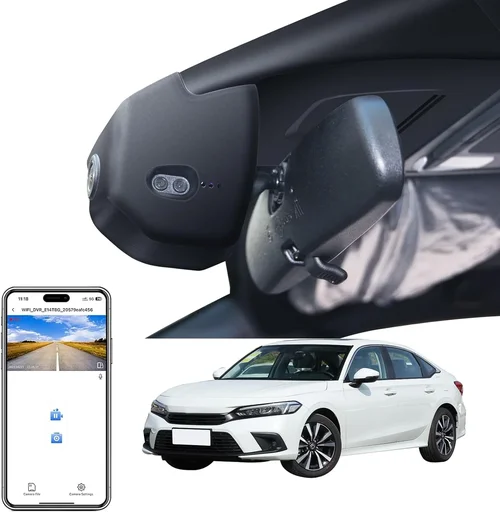
Not all dash cams fit every car equally well—and the Honda Civic presents unique challenges due to its sloped windshield, tight dashboard space, and specific sun visor placement. Before purchasing, verify that your chosen model supports universal mounts or includes Civic-specific accessories. Many modern dash cams come with flexible suction cups or adhesive mounts designed to handle curved windshields without wobbling or detaching during sudden stops or pothole impacts. Additionally, consider whether the camera’s size (length and height) will obstruct your view of the instrument cluster or mirror. A compact form factor between 2–3 inches tall is ideal for most Civic interiors, especially in newer generations where the dashboard slopes sharply toward the windshield.
2. Video Resolution & Image Quality
Resolution remains the single most important technical specification when evaluating dash cam performance. For Civic drivers, we strongly recommend starting at 1080p Full HD resolution—this provides sufficient detail to clearly identify license plates, facial expressions, and road signs even at highway speeds. However, many premium models now offer 2K or 4K recording, which delivers noticeably sharper footage and better zoom capabilities for reviewing incidents. Keep in mind that higher resolutions require more storage space and can reduce battery life or overheat if not properly cooled. Most experts agree that 1920×1080 at 30fps strikes the perfect balance between clarity and file size for typical daily driving in urban and suburban environments.
3. Field of View (FOV)
The field of view determines how much of the road ahead (and sometimes sides) your dash cam captures. A wider FOV—typically ranging from 110° to 150°—offers greater situational awareness but may introduce fisheye distortion near the edges. For Civic owners, a horizontal FOV between 130° and 140° is generally optimal: wide enough to catch vehicles entering intersections or changing lanes nearby, yet narrow enough to maintain image fidelity across the center lane. Some advanced models use multiple lenses to create dual-channel setups (front + rear), though this requires additional wiring and storage capacity. Always test the live preview on your phone app before finalizing your purchase to ensure coverage aligns with your expectations.
4. Night Vision & Low-Light Performance
Civic commuters often face challenging lighting conditions—especially during early morning commutes or late-night drives—making low-light performance crucial. Look for dash cams equipped with WDR (Wide Dynamic Range) technology, which balances exposure between bright headlights and dark shadows to prevent washed-out or overly grainy footage. Infrared (IR) LEDs enhance visibility after dark, but they’re usually only effective within about 15 feet and don’t illuminate distant objects. CMOS sensors with larger pixel sizes (like Sony STARVIS) deliver superior sensitivity compared to older CCD chips. Real-world tests show that even mid-range models with proper HDR processing can record clear license plates and pedestrian movements under streetlight illumination, giving you reliable evidence regardless of time of day.
5. Storage Capacity & Loop Recording
Dash cams rely on microSD cards (typically Class 10 or UHS-I/UHS-II rated) for storing video files. Most models support up to 128GB, allowing several hours of continuous recording at moderate compression levels. Loop recording automatically overwrites the oldest clips once storage fills up, ensuring uninterrupted operation without manual intervention. Be aware that higher resolutions generate larger files faster—a 1080p clip might last 5 minutes per GB, while 4K could consume it in under 2. Opt for cards with A1 or A2 speed ratings if your cam uses GPS or motion detection frequently, as these workloads demand faster random write performance. Always format your card through the dash cam itself (not your computer) to avoid corruption issues.
6. Parking Mode & Motion Detection
This feature turns your dash cam into a security device when parked. When connected via hardwire kit (recommended over cigarette lighter adapters), parking mode activates upon detecting motion or impact using G-sensor alerts. It records short bursts before and after events, preserving critical incident data even when unattended. Some Civic-compatible models include time-lapse recording during extended park sessions to conserve space while monitoring surroundings. Ensure your selected dash cam offers adjustable sensitivity settings—too high and false triggers occur; too low and real threats go unnoticed. Hardwiring prevents battery drain issues common with plug-in models, making it the preferred method for daily drivers who park overnight regularly.
7. Build Quality & Weather Resistance
The Civic’s exterior faces constant exposure to temperature swings, UV rays, and moisture—factors that degrade electronics over time. Choose dash cams with IPX rating certifications (even basic splash resistance helps), anti-glare coatings, and robust housing materials like polycarbonate instead of flimsy plastics. Heat buildup inside the cabin can cause thermal shutdowns during summer months, so look for models with passive cooling vents or heat-dissipating designs. Mounting hardware should securely clamp onto your windshield without slipping, even under heavy rain or high-speed winds. Brands like BlackVue, Garmin, and Nextbase consistently score well in durability tests due to rigorous engineering standards.
8. Ease of Use & Mobile Integration
A user-friendly interface saves frustration during setup and playback. Touchscreen dash cams simplify menu navigation, but many Civic owners prefer button-based controls for quick access while driving. Cloud connectivity allows remote viewing via smartphone apps (iOS/Android), firmware updates, and emergency SOS features—though cellular plans add monthly costs. Wi-Fi pairing enables instant clip transfer without removing the SD card, ideal for sharing evidence quickly. Voice control compatibility (with Apple CarPlay/Android Auto) adds convenience, though not all Civic trims support full integration. Prioritize intuitiveness over flashy extras: you’ll use basic functions far more than advanced ones.
Different Types of Dash Cams

Common Buying Mistakes to Avoid
❌ Mistake: Ignoring Windshield Angle and Obstruction Risks
Why it’s bad: The Honda Civic’s steeply raked windshield creates unique mounting challenges. Many buyers select dash cams solely based on aesthetics or brand reputation without testing fitment. A poorly positioned camera can block your speedometer, mirror, or rearview visibility—creating a safety hazard. Additionally, suction cups lose grip faster on slanted surfaces due to uneven pressure distribution, leading to sudden detachment at high speeds.
What to do instead: Measure your dashboard-to-windshield angle before ordering. Purchase from retailers offering generous return windows (Amazon, Best Buy, etc.). Test the mount physically if possible, or watch unboxing videos showing actual Civic installations. Opt for models with extendable arms or swivel heads that allow fine-tuning post-installation.
❌ Mistake: Overlooking Power Source Limitations
Why it’s bad: Relying solely on the 12V cigarette lighter outlet limits functionality. Most Civic models have limited auxiliary power ports, and shared circuits can trigger fuse trips or drain your battery overnight. Plug-in dash cams also protrude awkwardly, increasing theft risk and creating tripping hazards near the gear shifter.
What to do instead: Invest in a dedicated hardwire kit compatible with your Civic’s year/model. These tap directly into the fuse box using pigtail connectors, drawing power only when the ignition is on (for parking mode). Brands like Viofo, Thinkware, and BlackVue offer Civic-specific harnesses that integrate cleanly behind the glove compartment.
❌ Mistake: Choosing Resolution Without Considering File Size Impact
Why it’s bad: Jumping straight to 4K without assessing storage needs leads to rapid SD card depletion. A single 4K dash cam recording continuously may fill a 128GB card in under 8 hours—forcing frequent manual deletion or expensive upgrades. Higher bitrates further accelerate consumption, especially during stop-and-go traffic.
What to do instead: Calculate expected recording duration using online dash cam calculators. Factor in compression ratios (H.265 vs H.264), frame rates (30fps vs 60fps), and event-triggered buffering. Most daily commuters find 1080p at 30fps sufficient, reserving 4K for premium models with advanced stabilization or night vision.
❌ Mistake: Neglecting Firmware Updates and Software Support
Why it’s bad: Outdated firmware causes compatibility issues with new OS versions, introduces bugs, and voids manufacturer warranties. Some brands discontinue driver support after 1–2 years, leaving users stranded with non-functional features like cloud sync or mobile alerts.
What to do instead: Research brand longevity before purchasing. Companies with established track records (BlackVue, Garmin, Nextbase) typically provide 3–5 years of firmware updates. Subscribe to product forums or Reddit communities to gauge ongoing community support.
❌ Mistake: Assuming All Dash Cams Have Equal Build Quality
Why it’s bad: Budget models use thin plastic housings that crack under thermal stress or impact. Cheap sensors produce blurry footage in low light, defeating the purpose of having a camera. Inferior capacitors shorten lifespan, causing premature failure during hot summers.
What to do instead: Read independent lab tests (CNET, Wirecutter, RTINGS.com) focusing on drop tests, heat tolerance, and sensor performance. Prioritize brands offering 1–3 year warranties backed by responsive customer service—critical for roadside emergencies.
❌ Mistake: Forgetting About Data Privacy Concerns
Why it’s bad: Cloud-connected dash cams store sensitive location data on third-party servers. If hacked or subpoenaed, this exposes your home address, workplace, and travel patterns—posing serious privacy risks. Some jurisdictions legally compel companies to hand over footage without warrants.
What to do instead: Disable cloud features unless absolutely necessary. Use local-only storage with encrypted microSD cards. Review privacy policies carefully; avoid brands headquartered in countries with weak data protection laws.
Budget Guidelines: How Much Should You Spend?
Entry-Level ($60 – $120): Reliable Basics for Daily Drivers
This range covers solid performers like the VIOFO AK700S or Rexing V1P Pro, offering 1080p recording, decent night vision, and straightforward operation. Ideal for Civic owners who want foundational protection without overspending. Expect basic loop recording, G-sensor auto-save, and simple mobile apps. While lacking advanced features like GPS or Wi-Fi, these models deliver trustworthy evidence for minor incidents. Avoid sub-$50 options—they often use outdated sensors and flimsy mounts prone to failure.
Mid-Range ($120 – $250): Sweet Spot for Most Buyers
Here’s where value peaks with features like dual-lens setups, built-in GPS, parking mode, and improved audio recording. The Thinkware F800 Pro or BlackVue DR970-2CH offer 2K resolution, cloud connectivity, and robust build quality. Perfect for commuters who drive frequently and want comprehensive coverage. This tier includes Civic-compatible hardwire kits and reliable firmware support. Spending here future-proofs your investment against evolving needs.
Premium ($250 – $400): Enthusiast-Grade Performance
Top-tier models like the Garmin DriveLuxe 51 or next-gen BlackVue X series deliver 4K recording, HDR imaging, AI collision warnings, and seamless smartphone integration. Designed for drivers prioritizing forensic-quality footage and advanced driver aids. Often include extras like voice control, emergency SOS buttons, and enhanced weather sealing. Justify the cost only if you drive long distances weekly or operate in high-risk areas.
Luxury ($400+): Professional-Grade Systems
These ultra-premium units target commercial fleets or extreme hobbyists. Features include multi-camera arrays, thermal imaging, satellite connectivity, and military-grade durability. Rarely necessary for personal Civic use unless you tow trailers regularly or commute through remote regions. Consider alternatives like OEM Honda Sensing packages if your Civic trim already includes integrated camera suites.
Expert Tips for Getting the Best Deal
Time Your Purchase Strategically: Major sales events like Black Friday, Prime Day, or back-to-school seasons offer significant discounts. Dash cam manufacturers often announce new models in spring, triggering clearance sales on previous generations. Sign up for brand newsletters to receive exclusive promo codes.
Compare Retailers Carefully: Online platforms (Amazon, B&H Photo, Newegg) frequently bundle free shipping and extended returns. Physical stores (Best Buy, AutoZone) may provide same-day pickup but rarely match online prices. Check price-matching guarantees before committing.
Spot Hidden Deals: Watch for refurbished units from certified sellers—they carry full warranties and undergo rigorous testing. Join Facebook groups or subreddits focused on Honda Civics; members often trade used accessories at steep discounts.
Prioritize Warranty Terms: Avoid products with “limited lifetime” warranties that lack clear coverage details. Opt for explicit 1–3 year terms covering parts and labor. Verify if international shipping is included for overseas repairs.
Test Before Committing: Request sample footage via email or video call if possible. Ask sellers to demonstrate live preview, menu navigation, and audio recording. Confirm compatibility with your exact Civic year/mileage before ordering.
Understand Return Policies: Most reputable sellers offer 30-day hassle-free returns. Keep original packaging and receipt until satisfied. Some brands require unopened seals for refunds, so test immediately upon arrival.
Consider Bundle Packages: Kits including mounts, cables, and SD cards often save 10–15% versus buying separately. Ensure all components are Civic-specific—generic kits may misalign or fail prematurely.

Frequently Asked Questions
Q: Will a dash cam drain my Civic’s battery overnight?
A: Only if improperly installed or using a plug-in model without a voltage cutoff. Hardwired dash cams with smart parking modes automatically shut off when the car powers down, preventing parasitic drain. Always use a fuse tap rated for your Civic’s electrical load.
Q: Can I install a dash cam myself in my Civic?
A: Yes, but hardwiring requires basic knowledge of automotive electrical systems. Follow YouTube tutorials specific to your Civic generation. If uncomfortable, visit an auto electronics shop—most charge under $50 for professional installation.
Q: Do I need GPS tracking on my dash cam?
A: Not essential for daily driving. GPS adds speed/direction data useful for insurance claims but increases cost and file complexity. Omit it unless you frequently drive in unfamiliar areas or dispute liability claims.
Q: How often should I replace my microSD card?
A: Every 2–3 years or after 10,000 write cycles. Monitor health via tools like H2testw or CrystalDiskInfo. Replace immediately if errors appear—corrupted files compromise legal admissibility.
Q: Are dash cam recordings admissible in court?
A: Generally yes, provided they’re unaltered and timestamped. Courts accept dash cam footage as objective evidence, though chain-of-custody protocols apply. Store clips securely and never edit timestamps or delete key segments.
Q: Can I use my dash cam while parked?
A: Yes, with parking mode enabled via hardwiring. Set motion/impact sensitivity appropriately. Avoid overly aggressive settings that trigger on passing cyclists or debris. Time-lapse mode conserves space during long park sessions.
Q: What’s the difference between H.264 and H.265 compression?
A: H.265 reduces file sizes by ~50% compared to H.264 while maintaining quality. Ideal for 4K recording but requires newer hardware decoding. Most Civic-compatible dash cams use H.264 for broader compatibility.
Q: Should I buy a single or dual-channel system?
A: Start with single-channel unless you reverse frequently or tow trailers. Dual systems double storage needs and complexity. Add a rear cam later if needed—many Civic trunks accommodate second units cleanly.
Our Final Recommendations
Best for Budget-Conscious Buyers: VIOFO AK700S – Delivers crisp 1080p footage, reliable parking mode, and Civic-friendly compact design. Includes everything needed except hardwire kit (sold separately).
Best Overall Value: Thinkware F800 Pro – Combines 2K resolution, GPS logging, and robust build quality at a reasonable price point. Trusted by professionals and everyday drivers alike.
Best Premium Option: Garmin DriveLuxe 51 – Stunning 4K HDR video, intuitive interface, and seamless smartphone pairing. Justified for frequent travelers or high-mileage Civic owners.
Best for Beginners: Rexing V1P Pro – Simple menus, excellent night vision, and affordable price. Includes basic parking mode and works out-of-the-box with minimal setup.
Best for Advanced Users: BlackVue DR970-2CH Cloud – Dual-lens 2K recording, real-time cloud streaming, and AI-powered alerts. Ideal for tech enthusiasts wanting maximum functionality.
Conclusion: Making the Right Choice
Selecting the best dash cam for your Civic isn’t just about specs—it’s about aligning technology with your lifestyle. Whether you’re navigating busy city streets, commuting long distances, or simply want documented peace of mind, prioritize features that match your driving patterns over flashy gimmicks. Remember that compatibility, build quality, and ease of use outweigh raw horsepower every time. Take advantage of generous return policies, educate yourself on installation nuances, and don’t hesitate to invest in professional help if needed. With the right dash cam, your Civic becomes not only safer but smarter—turning every journey into protected territory.