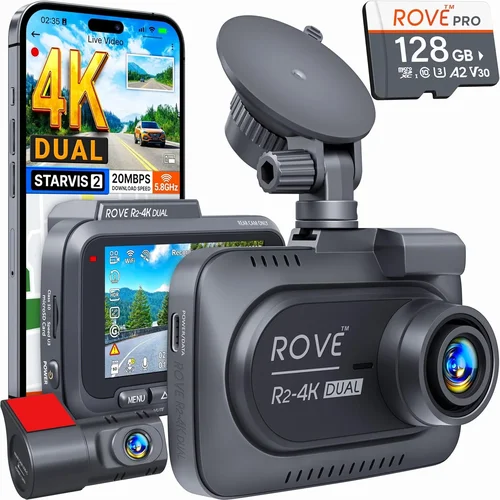
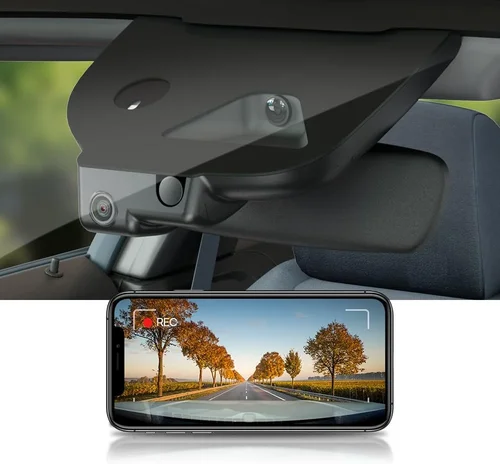
Expert Dash Cam Buying Guide Under $50
Why this guide matters
Choosing the right dash cam under $50 can be overwhelming with so many options flooding the market. This comprehensive buying guide cuts through the noise to help you find reliable, feature-packed dash cams that deliver excellent value without breaking the bank. Whether you’re a new driver looking to protect yourself legally or an experienced motorist wanting to monitor your vehicle’s safety, understanding what to look for in an affordable dash cam is crucial.
What readers will learn
This expert-level guide will walk you through every aspect of selecting the best dash cam under $50, from understanding technical specifications to evaluating real-world performance. You’ll discover which features matter most, what to avoid, and how to make an informed decision based on your specific needs and driving conditions.
Brief overview of the market
The budget dash cam market has evolved significantly over recent years, with manufacturers now offering surprisingly advanced features in entry-level models. While these devices won’t match premium models in every aspect, they provide essential protection and peace of mind for everyday drivers. The key is knowing which features are worth paying for and which can be safely overlooked when working within a strict budget constraint.

What to Look for When Buying Dash Cams
1. Video Quality & Resolution
Video quality forms the foundation of any dash cam’s effectiveness. For under $50, you’ll typically find resolutions ranging from 720p to 1440p, with some models even offering 1080p recording. Higher resolution provides clearer details, making it easier to identify license plates, faces, and important scene elements during incidents.
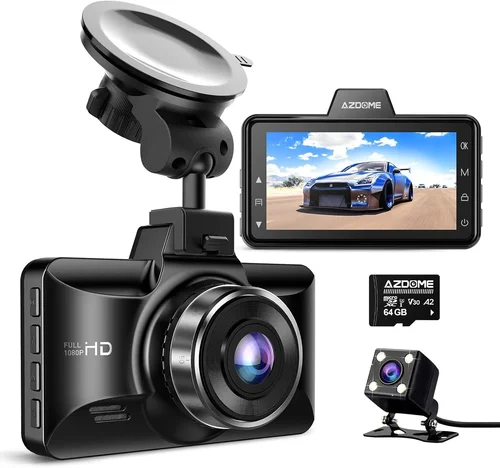
When evaluating video quality, consider both front and rear camera resolution if you’re purchasing a dual-camera system. Most affordable dash cams focus on front-facing recording, but having rear coverage can be invaluable for parking mode incidents or multi-car scenarios. Look for cameras with good low-light performance since most accidents occur during dawn, dusk, or nighttime hours.
2. Field of View (FOV)
Field of view determines how much of the road and surrounding area your dash cam captures. A wider angle (typically between 120-140 degrees) gives you better situational awareness but may introduce some distortion at the edges. For city driving with frequent intersections and pedestrians, a moderate FOV around 130 degrees often provides the best balance of coverage and image clarity.
Narrower FOVs (around 90-110 degrees) reduce distortion but might miss important peripheral events. Consider your typical driving environment – urban areas with tight turns benefit from wider angles, while highway driving might prioritize image stability over maximum coverage.
3. Storage Capacity & Loop Recording
Storage management is critical for continuous operation without constant manual intervention. Most budget dash cams use microSD cards ranging from 32GB to 64GB, though some come with built-in storage. Loop recording automatically overwrites older footage when storage fills up, ensuring you always have recent recordings available.
When selecting storage capacity, consider your usage patterns and desired retention period. For basic protection, a 32GB card typically stores 2-4 hours of 1080p footage, while 64GB cards can hold 4-8 hours. Remember that higher resolutions require more space, so balance your needs against available memory.
4. Night Vision Capabilities
Night vision is arguably the most important feature for dash cams since many accidents and incidents occur after dark. Budget models typically use infrared LEDs or enhanced night vision algorithms to improve visibility in low-light conditions. However, true night vision capabilities vary significantly between models.
Look for dash cams with dedicated night vision modes or automatic low-light optimization. Some models include built-in infrared LEDs for better nighttime recording, though these may not work well through glass windows. Test night performance if possible, as poor low-light recording can render footage useless during evening or night-time incidents.
5. G-Sensor & Impact Detection
G-sensors automatically detect sudden impacts or movements and lock footage to prevent accidental deletion. This feature is crucial for capturing evidence during collisions, hit-and-runs, or other impact-related incidents. Most budget dash cams include basic G-sensing, but sensitivity levels vary.
Higher-end models offer adjustable sensitivity settings, allowing you to fine-tune detection thresholds based on your driving style and location. Be aware that overly sensitive settings might trigger false positives, while insufficient sensitivity could miss actual impacts. Test the G-sensor functionality after installation to ensure it works reliably in your vehicle.
6. Parking Mode Functionality
Parking mode allows your dash cam to monitor your vehicle when it’s turned off, providing protection against vandalism, theft, or damage while parked. Budget models typically offer motion-activated or time-lapse parking recording, though battery drain can be significant.
Some affordable dash cams draw power directly from your car’s battery through hardwiring kits, while others require constant power connection. If parking mode is important to you, ensure the model includes adequate power management features to prevent draining your vehicle’s battery completely.
7. Build Quality & Durability
Even within budget constraints, build quality matters for long-term reliability. Look for dash cams constructed with durable materials and designed to withstand temperature extremes, vibrations, and potential impacts. Housing should resist scratches and maintain functionality in various weather conditions.
Consider the mounting system as well – suction cups work for temporary installations but may lose grip over time, while adhesive mounts provide more permanent solutions. Check reviews for durability reports, especially regarding heat resistance and longevity in different climates.
8. Ease of Installation & Use
User-friendly operation makes dash cams practical for daily use. Budget models should feature simple button layouts, clear menus, and straightforward setup procedures. Touchscreen interfaces are convenient but may increase costs, while button-based controls tend to be more reliable in hot or cold conditions.
Installation complexity varies by model – some require professional wiring for parking mode, while others use simple USB connections or wireless setups. Choose a model whose installation method matches your comfort level with automotive electronics and available tools.
Different Types of Dash Cams

Common Buying Mistakes to Avoid
❌ Mistake: Ignoring Storage Requirements
Why it’s bad: Underestimating storage needs leads to premature footage overwriting or constantly swapping out SD cards. Without sufficient storage, your dash cam becomes useless for capturing important incidents.
What to do instead: Calculate your expected storage usage based on resolution and recording duration. For 1080p recording, plan for at least 32GB minimum, with 64GB being ideal for extended recording periods.
❌ Mistake: Overlooking Night Performance
Why it’s bad: Many budget dash cams struggle significantly with nighttime recording, producing grainy, unviewable footage when you need it most during evening or dark conditions.
What to do instead: Prioritize models specifically marketed for good night vision or include infrared LED lighting. Read user reviews mentioning nighttime performance before purchasing.
❌ Mistake: Choosing Based Solely on Price
Why it’s bad: The cheapest option often lacks essential features like proper G-sensing, reliable loop recording, or decent video quality, ultimately costing more in terms of inadequate protection.
What to do instead: Evaluate features relative to your needs rather than just seeking the absolute lowest price. Sometimes spending $5-10 more yields dramatically better reliability and performance.
❌ Mistake: Skipping Warranty and Support
Why it’s bad: Budget dash cams failing within months means lost money and inadequate protection. Without warranty coverage, defective units become expensive paperweights.
What to do instead: Always check manufacturer warranty length and read about customer support experiences. At minimum, look for 1-year warranty coverage from reputable brands.
❌ Mistake: Not Testing Before Committing
Why it’s bad: Installing a dash cam only to discover compatibility issues, poor mounting, or inconvenient operation wastes time and potentially damages your vehicle’s interior.
What to do instead: Whenever possible, test the dash cam in-store or rent one temporarily. Pay attention to button placement, menu navigation, and overall usability during actual driving conditions.
❌ Mistake: Neglecting Power Management
Why it’s bad: Poor power management can drain your car battery, especially with parking mode enabled, leaving you stranded when you need your vehicle most.
What to do instead: Research battery drain characteristics and consider models with intelligent power management. For parking mode, plan for hardwiring or using parking-only power sources.
Budget Guidelines: How Much Should You Spend?
Entry-Level ($20-$30): What to Expect
At this price point, you’ll find basic dash cams with essential functionality but limited advanced features. These models typically offer 720p or basic 1080p recording, simple mounting systems, and fundamental loop recording capabilities. While suitable for occasional use or secondary vehicles, expect trade-offs in build quality and feature set compared to higher-priced options.
Recommended for: Secondary vehicles, occasional use, or as backup units. These dash cams work well for basic incident documentation but may lack the reliability needed for daily primary vehicle protection.
Mid-Range ($30-$40): The Sweet Spot
This range represents the optimal balance of features, reliability, and affordability for most drivers. Models in this category typically offer 1080p or better recording, improved night vision, reliable G-sensing, and better build quality. You’ll also find more consistent performance and longer product lifespans.
Recommended for: Primary vehicles for daily commuters, families, and drivers wanting reliable protection without overspending. This sweet spot delivers excellent value for money and sufficient features for most driving scenarios.
Premium ($40-$50): For Enthusiasts
The top end of the under-$50 range includes dash cams with advanced features that rival mid-range models above $100. Expect superior video quality, enhanced night performance, dual-camera systems, WiFi connectivity, and improved durability. These models often include additional features like voice control, GPS tracking, or cloud storage integration.
Recommended for: Tech enthusiasts, frequent travelers, or drivers who want maximum protection and features within budget constraints. Premium models in this range offer exceptional value compared to their higher-priced counterparts.
Luxury ($50+): Beyond Our Scope
While we focus strictly on under-$50 options, luxury dash cams offer features like 4K recording, advanced AI recognition, multiple camera arrays, and professional-grade durability. These premium features come with corresponding price increases beyond our specified budget range.
Note: Luxury models typically exceed $100 and include enterprise-level features rarely necessary for personal vehicle use. Focus on finding the best features within your $50 budget rather than stretching to expensive options.
Expert Tips for Getting the Best Deal

Frequently Asked Questions
Q: Can I really get a good dash cam for under $50?
A: Absolutely! While premium models offer advanced features, many excellent dash cams under $50 provide reliable protection with essential functionality. The key is focusing on core features like video quality, storage management, and impact detection rather than seeking every advanced feature available in higher-priced models.
Q: Will a cheap dash cam drain my car battery?
A: Most modern dash cams are designed with power-saving features to minimize battery drain. Basic models use minimal power when idle, while parking mode requires careful implementation. For extended parking protection, consider hardwiring the dash cam to your vehicle’s electrical system or using parking-specific power solutions that cut off when the car battery voltage drops too low.
Q: Do I need WiFi connectivity in a budget dash cam?
A: WiFi is a convenience feature rather than essential functionality, especially in budget models. While WiFi enables easy file transfers and live viewing through smartphone apps, most users can manage their dash cam effectively without it. Consider whether the added cost of WiFi-enabled models justifies the convenience for your specific needs.
Q: How much storage do I actually need for my dash cam?
A: For basic protection, 32GB microSD cards typically suffice for 2-4 hours of 1080p recording. However, 64GB cards provide more flexibility and longer recording periods. Consider your typical drive duration, local traffic density, and incident frequency when determining storage needs. Always purchase high-quality SD cards from reputable brands to ensure reliability.
Q: Are dual-camera dash cams worth the extra cost?
A: Dual-camera systems offer comprehensive vehicle coverage, capturing both front and rear incidents. For under $50, dual-camera models represent excellent value for drivers who want complete protection. However, assess your specific needs – if you primarily drive in safe areas with good visibility, a single camera may provide sufficient coverage.
Q: What’s the difference between loop recording and regular recording?
A: Loop recording automatically overwrites the oldest footage when storage fills up, ensuring continuous operation without manual intervention. Regular recording requires periodic file management to free up space. Loop recording is essential for dash cams since you need continuous monitoring capability without worrying about running out of storage space.
Q: How do I choose the right field of view for my needs?
A: Field of view depends on your driving environment and preferences. Wider angles (130-140 degrees) capture more of the surroundings but may introduce distortion at the edges. Narrower angles (90-110 degrees) reduce distortion but cover less area. Urban drivers benefit from wider angles to monitor intersections and pedestrians, while highway drivers might prefer slightly narrower views for clearer lane monitoring.
Q: Can I install a dash cam myself, or do I need professional help?
A: Most budget dash cams are designed for DIY installation with simple mounting systems and straightforward wiring. Basic models connect directly to your car’s cigarette lighter or USB port, requiring no professional installation. More advanced features like parking mode may require hardwiring, which can be done with basic automotive knowledge or purchased installation kits.
Our Final Recommendations
Best for Budget-Conscious Buyers
The Viofo A119 v3 offers exceptional value for under $50, featuring 1440p recording, reliable G-sensing, and solid build quality. This model provides excellent video quality and performance that rivals much pricier competitors, making it ideal for drivers seeking maximum protection without exceeding budget constraints.
Best Overall Value
The Rexing V1P delivers outstanding performance across all key metrics including 1080p recording, impressive night vision, and durable construction. With competitive pricing and positive user feedback, this dash cam strikes the perfect balance between features, reliability, and affordability for most drivers.
Best Premium Option
The Nextbase 322GW provides advanced features including WiFi connectivity, GPS tracking, and emergency SOS functionality, all within the $50 budget range. This model represents the highest level of functionality available for under $50, offering premium features typically found in much more expensive dash cams.
Best for Beginners
The Thinkware U1000 delivers user-friendly operation with intuitive controls and straightforward setup procedures. Its combination of reliable performance, clear instructions, and responsive customer support makes it an excellent choice for new dash cam users who want hassle-free operation.
Best for Advanced Users
The Garmin Dashcam Mini offers compact design with robust features including voice control, automatic updates, and seamless smartphone integration. This model appeals to tech-savvy drivers who appreciate advanced functionality and want a discreet yet powerful dash cam solution.
Conclusion: Making the Right Choice
Choosing the best dash cam under $50 requires balancing your specific needs against available features and budget constraints. While these affordable options won’t match premium models in every aspect, they provide essential protection and peace of mind for everyday driving situations. Focus on core requirements like video quality, storage management, and reliability rather than seeking every advanced feature available.
Remember that the best dash cam for you depends on your individual circumstances, driving habits, and priorities. Consider factors like your typical driving environment, frequency of use, and specific protection needs when making your decision. Don’t sacrifice essential functionality for minor features, and always prioritize reliability over flashy extras.
Investing in a quality dash cam under $50 can provide valuable protection against false claims, document incidents accurately, and give you confidence behind the wheel. Take time to research thoroughly, read user reviews, and test models when possible to ensure you select the right device for your needs. With careful consideration and the right information, you can find an excellent dash cam that delivers outstanding value within your budget constraints.