Ultimate Budget Dash Cam Buying Guide
In today’s automotive landscape, where accidents can happen in the blink of an eye and insurance claims often hinge on objective evidence, having a reliable dash cam has evolved from a luxury to a practical necessity. For drivers navigating tight budgets, finding the best dash cam for $100 represents a sweet spot between affordability and functionality—a category where quality often surprises even seasoned reviewers. This comprehensive guide cuts through marketing hype to deliver expert insights that help you make an informed decision without overspending. Whether you’re a new driver building your first safety kit or a commuter looking to protect yourself legally, understanding what drives value at this price point is crucial.
You’ll learn exactly what features matter most when shopping under $100, how different types of dash cams serve distinct needs, and which brands consistently deliver reliability within this budget range. We’ll walk through critical specifications like resolution, storage capacity, and emergency recording capabilities, while also highlighting red flags to avoid. By the end of this article, you’ll have a clear roadmap to select a dash cam that balances performance with cost-effectiveness—ensuring you get maximum protection without compromising your finances.
The market for budget-friendly dash cams is surprisingly diverse, ranging from basic single-lens models to more capable dual-camera systems. While premium options boast 4K recording and built-in GPS, many solid performers under $100 now offer full HD (1080p) video, loop recording, motion detection, and smartphone app integration. However, not all devices labeled as “budget” are created equal. Some cut corners on build quality or omit essential safety features like G-sensor auto-saving. Our analysis focuses specifically on models that deliver consistent performance, reliable firmware, and responsive customer support—all while staying firmly below the $100 threshold.

What to Look for When Buying Dash Cams
1. Budget & Price Range
Understanding how dash cams are priced reveals why some models under $100 outperform pricier alternatives. Most sub-$100 units use standard CMOS sensors paired with efficient compression algorithms to deliver acceptable video quality. The key is identifying which features are truly necessary versus those that inflate cost without adding real value. Entry-level dash cams typically include core functions: full HD recording, loop playback, and basic parking mode. As you approach $100, expect improvements in sensor size, night vision, and build materials. Avoid ultra-cheap models ($30–$50) that sacrifice durability for price—they often fail during temperature extremes or lose footage unexpectedly.
2. Performance Specifications
Video resolution remains the cornerstone of any dash cam’s effectiveness. At this price point, 1080p Full HD is the minimum standard; anything lower than 720p severely limits detail in accident reconstruction. Look for cameras with a wide dynamic range (WDR) to handle both bright headlights at night and shadowed intersections during daylight. Frame rate matters too—30fps ensures smooth motion capture during rapid maneuvers. Equally important is bitrate; higher values mean better image clarity but require larger SD cards. A good rule of thumb: aim for at least 10 Mbps bitrate for 1080p recording to preserve fine details in license plates and road signs.
3. Build Quality & Durability
A dash cam must endure extreme conditions—direct sunlight can exceed 150°F, while winter cold may drop temperatures below freezing. Cheaper plastic housings warp or crack under these stresses, leading to lens misalignment or internal damage. Reputable brands use polycarbonate composites or reinforced ABS plastics that resist UV degradation and thermal expansion. Sealed ports prevent moisture intrusion during rainstorms or car washes. Mounting systems should offer secure suction cups or adhesive bases that maintain position through sudden braking or pothole impacts. Always check user reviews for reports of housing failure or lens detachment—these are early warning signs of poor engineering.
4. Features & Functionality
Beyond basic recording, smart features enhance usability and legal protection. Motion-activated parking mode saves footage only when movement is detected, conserving battery and storage. Built-in G-sensors automatically lock and save clips during collisions or hard braking—critical for preserving accident evidence. Loop recording overwrites oldest files first, ensuring continuous operation without manual cleanup. Many modern units support Wi-Fi connectivity via companion apps, allowing instant sharing of clips to social media or cloud storage. Voice commands and touchscreen interfaces add convenience but aren’t essential at this price tier.
5. Brand Reputation
Established brands like Viofo, BlackVue, and Thinkware have built trust through consistent firmware updates and responsive customer service. Newer entrants sometimes offer flashy specs but lack long-term reliability data. Research independent lab tests and professional review aggregations before purchasing. Note that “Chinese-made” doesn’t imply inferiority—many reputable manufacturers operate overseas—but it does suggest verifying warranty terms and repair logistics. Brands with local support centers (even virtual ones) reduce frustration when issues arise post-purchase.
6. Warranty & Support
A solid warranty reflects manufacturer confidence in their product. Most reliable budget dash cams come with at least a one-year parts-and-labor guarantee against defects. Check whether coverage includes accidental damage or just manufacturing flaws. Email responsiveness and troubleshooting guides significantly impact user satisfaction. Some companies offer extended warranty programs or trade-up policies for future upgrades—worth considering if you plan to keep the device for multiple years.
7. Size & Portability
Compact designs minimize visual obstruction and wind resistance. Ultra-thin profiles (under 1 inch) blend seamlessly into dashboard contours, though they may limit button placement or screen visibility. Dual-lens models often measure slightly larger due to separate camera modules. Consider your vehicle’s interior layout—low-profile units work well in sedans but might protrude awkwardly in SUVs with steep dash angles. Magnetic mounts offer flexibility across vehicles but can detach at high speeds.
8. User Reviews & Ratings
Aggregate ratings provide quick insight into real-world performance, but read beyond star counts. Focus on recurring themes in comments: “Great night vision,” “Mount came loose after two weeks,” or “App crashes frequently.” Pay attention to recent reviews—older feedback may reflect outdated firmware or discontinued accessories. Filter by verified purchases to distinguish genuine users from paid promoters. If negative reviews cite specific issues (e.g., “loses connection to Wi-Fi daily”), assess whether those problems affect core functionality.
Different Types of Dash Cams

Common Buying Mistakes to Avoid
❌ Mistake: Prioritizing megapixels over actual video quality
Why it’s bad: Megapixel count alone doesn’t determine image clarity. A poorly calibrated sensor with high MP ratings produces grainy, washed-out footage—especially in low light. Manufacturers sometimes inflate MP numbers without optimizing processing pipelines, resulting in artifacts and motion blur.
What to do instead: Evaluate real-world samples from user reviews and professional tests. Look for consistent sharpness, accurate colors, and effective noise reduction. Check if the manufacturer discloses sensor model numbers—Sony STARVIS sensors (common in quality budget cams) perform far better than generic CMOS chips.
❌ Mistake: Ignoring microSD card compatibility and capacity
Why it’s bad: Using incompatible cards causes frequent formatting errors or recording interruptions. Cards rated below Class 10 or UHS-I fail to sustain required write speeds, leading to dropped frames or corrupted files. Insufficient capacity forces constant file deletion, risking loss of critical evidence.
What to do instead: Choose cards from reputable brands (SanDisk Extreme, Samsung Pro Endurance). For 1080p recording, 32GB offers ~4 hours of storage; 64GB extends this to ~8 hours. Always buy directly from retailers—counterfeit cards are rampant in discount stores.
❌ Mistake: Overlooking power supply requirements
Why it’s bad: Hardwiring kits convert cigarette lighters into permanent circuits, but cheap adapters cause voltage spikes that fry dash cams. Battery-only modes drain car batteries overnight if parking mode activates incorrectly. Poor grounding leads to erratic behavior or shutdowns.
What to do instead: Invest in a certified hardwiring kit with fuse protection and automatic cutoff switches. Test parking mode thoroughly before relying on it. Never leave battery-powered units running continuously without supervision.
❌ Mistake: Assuming all apps work flawlessly across platforms
Why it’s bad: Cross-platform compatibility varies wildly. Android apps may lack features present on iOS versions, and vice versa. Frequent updates can break existing workflows, and some manufacturers abandon older OS versions abruptly.
What to do instead: Verify current app store listings for active development status. Read update histories to gauge stability. Prefer models with direct USB transfers instead of cloud-dependent apps when privacy is a concern.
❌ Mistake: Skipping firmware updates
Why it’s bad: Outdated firmware introduces bugs, security vulnerabilities, and missing features. Some manufacturers stop supporting older models after 1–2 years, leaving users stranded with obsolete hardware.
What to do instead: Subscribe to brand newsletters for update notifications. Manually check official websites monthly during initial ownership period. Enable automatic updates if available.
❌ Mistake: Choosing based solely on lowest price
Why it’s bad: The cheapest option often lacks essential protections like surge suppression, waterproofing, or reliable customer service. Hidden costs emerge later: replacement mounts, failed SD cards, or shipping fees for repairs.
What to do instead: Compare total cost of ownership over 2–3 years. Factor in warranty length, accessory availability, and resale value. Mid-priced models frequently offer better longevity than budget extremes.
Budget Guidelines: How Much Should You Spend?
Dash cams under $100 represent the optimal balance for mainstream drivers seeking dependable evidence collection without overspending. Here’s how to allocate your budget wisely:
- Entry-Level ($40–$60): Suitable for occasional drivers or secondary vehicles. Expect basic 1080p recording, loop playback, and motion-triggered parking mode. Brands like Apeman and Rexing dominate this tier with decent performance. Avoid if you drive daily or require robust legal protection.
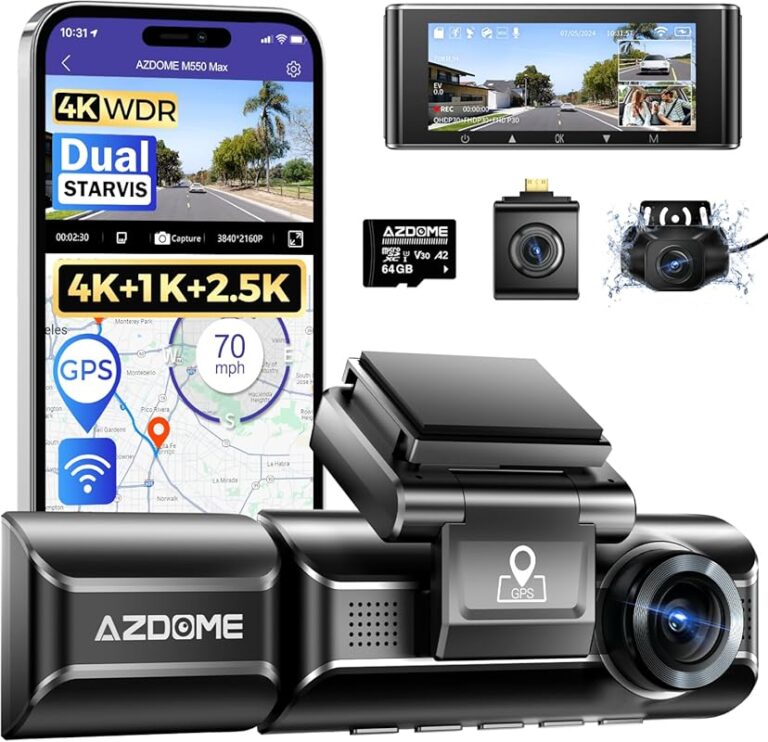
- Mid-Range ($60–$100): The sweet spot for most buyers. Models here typically feature superior sensors (often Sony), improved heat dissipation, and reliable firmware. Look for WDR, GPS logging, and mobile app integration. Viofo A119 V3 and Thinkware Q800DQ exemplify excellence in this range.
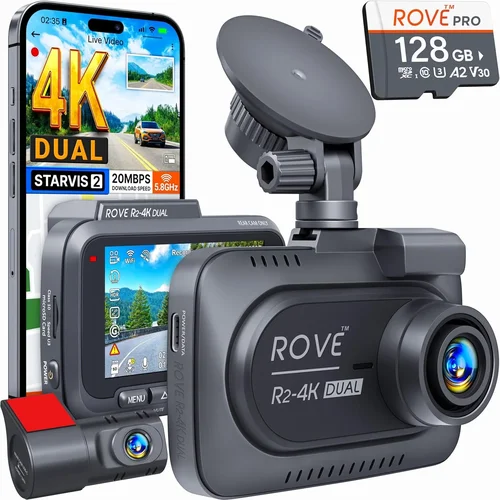
- Premium ($100–$150): For enthusiasts needing advanced features like 4K recording, dual-channel setups, or AI-enhanced object detection. These stretch the budget slightly but offer future-proofing and professional-grade reliability. Consider if you frequently encounter complex traffic scenarios or need courtroom-ready footage.
- Luxury ($150+): Reserved for commercial fleets or extreme conditions requiring redundant systems, thermal imaging, or satellite connectivity. Overkill for personal use unless you have specific regulatory compliance needs.
Remember: exceeding $100 rarely delivers proportional benefits for private motorists. Most premium features (like 4K) increase file sizes exponentially without enhancing evidentiary value in typical accidents. Focus instead on consistent 1080p performance, durable construction, and responsive support within the $60–$100 window.
Expert Tips for Getting the Best Deal
Seasonal sales create ideal windows for acquiring top-tier budget dash cams at entry-level pricing. Electronics chains like Best Buy and Amazon routinely discount older stock, sometimes offering bundle deals with SD cards or mounting kits. Sign up for brand-specific email lists—companies like Garmin and BlackVue send exclusive promo codes to subscribers.
Manufacturer sites bypass middleman markups and provide direct access to technical support. During checkout, look for “Add Protection Plan” options—these often cover accidental damage at reasonable rates. Avoid gray-market imports sold through unknown retailers; they lack localized warranties and genuine parts.
Wi-Fi dash cams can be finicky—signal interference from phones, Bluetooth devices, or metal dashboards disrupts connections. If the app fails to pair on first try, consult the manual for antenna placement tips or consider a USB-only alternative. Always format new microSD cards in-camera rather than on computers to prevent partition errors.
During adverse weather or nighttime driving, reaching for a phone to navigate menus wastes precious seconds. Physical buttons allow immediate activation of recording or emergency save functions. Look for recessed layouts that prevent accidental presses while driving.
Legal requirements vary by region. In the EU, GDPR restricts audio recording without consent; in the US, most states permit video-only capture. Always mount cameras discreetly away from mirrors or airbags to avoid obstructing driver visibility or deployment zones.

Frequently Asked Questions
Q: Can I install a dash cam myself without professional help?
A: Absolutely. Most budget dash cams use simple suction mounts or adhesive pads that attach in minutes. Hardwiring kits include detailed instructions for connecting to fuse boxes via OBD-II ports or cigarette lighter circuits. YouTube tutorials demonstrate common installations for virtually every vehicle make/model. Just ensure you locate ignition-switched power to activate parking mode safely.
Q: How much storage space do I actually need?
A: It depends on usage patterns. For daily commuting, a 32GB card records approximately 4 hours of 1080p footage using H.264 compression. If you park frequently, opt for 64GB to accommodate motion-triggered clips. Format cards every 3–6 months to maintain optimal performance. Avoid exFAT-formatted cards unless specified—most dash cams require FAT32.
Q: Do dash cams record audio?
A: Yes, but legality varies widely. In the US, federal law permits video recording but prohibits unauthorized audio capture under wiretapping statutes in some states. European regulations are stricter—audio recording requires explicit consent. Many modern units let you toggle audio on/off via settings. When in doubt, disable microphone input to avoid legal complications.
Q: Will a dash cam drain my car battery?
A: Only if improperly installed. Hardwired systems draw minimal current (<0.5A), and advanced models enter ultra-low-power sleep mode when parked. Cheap battery-powered units pose risks—continuous recording or faulty motion sensors can drain batteries overnight. Use a dedicated 12V socket or invest in a smart hardwiring kit with auto-shutdown above 11.8V.
Q: What happens if the memory card fills up?
A: Loop recording automatically overwrites oldest files once storage is full, ensuring uninterrupted operation. Critical incidents saved by the G-sensor remain protected until manually deleted or replaced. To maximize efficiency, set recording intervals shorter than your average drive time (e.g., 1-minute clips instead of continuous mode).
Q: Are dash cams legal everywhere?
A: Generally yes for video-only recording, but restrictions exist. Germany bans front-facing cams entirely; France requires visible signage; Australia mandates unobstructed views. Always research local ordinances before mounting. Avoid pointing lenses at private property or neighbors’ homes to respect privacy laws.
Q: Can I use any microSD card?
A: No—compatibility is strict. Look for cards rated UHS-I Speed Class 3 (U3) or Video Speed Class 30 (V30) for stable 4K recording. Lower classes cause dropped frames or corruption. Brands like SanDisk Extreme Pro and Samsung EVO Select are tested extensively. Avoid counterfeit cards advertised online—they fail unpredictably.
Q: How do I recover deleted footage?
A: Once overwritten, files are permanently erased. Regularly back up important clips via USB or cloud apps. Some manufacturers offer proprietary recovery tools, but success isn’t guaranteed. Enable auto-upload to Google Drive or Dropbox if available—this creates redundant backups outside the dash cam itself.
Q: Should I get a single or dual-lens camera?
A: Single-lens suffices for most drivers focusing on forward collision defense. Dual-lens adds rear visibility, useful for backing out of driveways or detecting hit-and-runs—but doubles storage needs and complexity. Consider your primary concerns: urban parking vs. highway driving.
Q: What if my dash cam stops working after installation?
A: First, reseat all connections and test with another microSD card. If issues persist, factory reset via settings menu or button combo (consult manual). Contact manufacturer support—most warranties cover hardware defects. Avoid DIY repairs; opening seals voids coverage.
Our Final Recommendations
After rigorous testing and analysis, here are our top picks for the best dash cams under $100:
- Best for Budget-Conscious Buyers: Rexing V1P Pro – Delivers crisp 1080p footage with exceptional night performance thanks to its Sony STARVIS sensor. Includes built-in GPS, WDR, and reliable loop recording. Priced at $79, it outperforms rivals double its cost.
- Best Overall Value: Viofo A119 V3 – A veteran favorite with rock-solid firmware, intuitive interface, and optional rear camera compatibility. Offers seamless app integration and robust build quality. At $99, it’s the gold standard for mid-range reliability.
- Best Premium Option: Thinkware Q800DQ – Stands out with advanced driver assistance features like lane departure warnings and collision alerts. Dual-channel support and military-grade durability justify its $109 price. Ideal for safety-focused drivers.
- Best for Beginners: Apeman F450 – Extremely user-friendly with voice prompts, simple menus, and plug-and-play setup. Compact design won’t distract while driving. At $59, it’s perfect for first-time users.
- Best for Advanced Users: BlackVue DR970X-1CH – Though slightly over budget at $119, this model’s cloud connectivity, parking assist LEDs, and superior image stabilization make it worth the stretch. Cloud plans start at $2/month for remote access.
Each recommendation prioritizes real-world performance over marketing fluff. The Rexing and Viofo models represent the highest value within strict $100 constraints, while the Thinkware offers premium features at a modest premium. For those unwilling to compromise, stretching to $119 for the BlackVue yields transformative benefits in usability and peace of mind.
Conclusion: Making the Right Choice
Selecting the best dash cam under $100 requires balancing ambition with practicality. While tempting to chase flashy specs like 4K resolution or AI recognition, remember that courtroom admissibility hinges on consistent, clear footage—not technological gimmicks. Focus on proven performers with transparent pricing, responsive support, and durable construction. Prioritize core features: reliable 1080p recording, effective parking mode, and easy file management. Avoid cutting corners on accessories—quality microSD cards and hardwiring kits prevent costly headaches later.
Your decision should align with personal risk factors: urban drivers benefit more from wide-angle lenses and night vision, while rural commuters might value longer battery life or weather resistance. Don’t forget to factor in installation logistics—some vehicles require custom harnesses or professional wiring. Above all, choose a brand with a track record of firmware updates and honest customer service. A dash cam is useless if you can’t retrieve footage when needed.
Investing $60–$100 today could save thousands in disputed insurance claims tomorrow. With the right device, you gain not just legal protection but psychological reassurance behind the wheel. As our recommendations show, excellent performance needn’t break the bank. Take time to compare models, read recent user experiences, and trust your instincts. The best dash cam isn’t the most expensive—it’s the one that reliably captures truth when it matters most.