Best Dash Cam Buyer’s Guide
Why investing in a dash cam isn’t just about recording your drive—it’s about peace of mind, legal protection, and capturing life’s unexpected moments on the road. In an era where automotive technology continues to evolve at breakneck speed, dash cameras have transformed from luxury accessories into essential safety tools for drivers across all experience levels. Whether you’re commuting through city traffic, navigating winding mountain roads, or simply want documentation for insurance claims, understanding how to choose the right dash cam can save you money, frustration, and potentially thousands in legal fees.
This comprehensive buyer’s guide will walk you through every aspect of selecting the best dash cam for your vehicle, from fundamental features like video resolution and storage capacity to advanced capabilities such as GPS tracking and parking surveillance. You’ll learn about different mounting styles, night vision performance, loop recording systems, and how weather conditions affect camera functionality. More importantly, we’ll help you navigate the overwhelming marketplace by breaking down technical specifications into practical insights that match your specific driving needs and budget constraints.
The dash cam market has become increasingly sophisticated over recent years, with manufacturers competing not just on price but on innovative features like artificial intelligence collision detection, cloud connectivity, and smartphone integration. While this technological advancement is exciting, it also means buyers must carefully evaluate which features actually matter versus those that are marketing gimmicks. Our expert analysis considers real-world usage scenarios, durability testing results, customer service quality, and long-term reliability to ensure you make an informed decision that serves your needs today and tomorrow.
What to Look for When Buying Dash Cams

What to Look for When Buying Dash Cams
Budget & Price Range
Before diving into specifications, establish your budget range as this will significantly narrow your options. Entry-level dash cams typically cost between $50-$100 and offer basic 720p or 1080p recording with simple loop recording and motion detection. Mid-range models ($100-$250) provide improved image quality, wider viewing angles, built-in GPS, and sometimes dual-channel recording (front and rear). Premium dash cams ($250+) feature 4K resolution, advanced driver assistance systems, superior night vision, cloud connectivity, and robust build quality. Consider not just the initial purchase price but also ongoing costs like SD card replacements, software subscriptions, and potential professional installation fees.
Performance Specifications
The heart of any dash cam lies in its imaging capabilities. Resolution is measured in pixels—1080p Full HD offers sufficient detail for most situations, while 2K and 4K provide enhanced clarity for license plate recognition and facial details. Frame rate matters too; 30fps is standard, but 60fps captures smoother motion during rapid acceleration or emergency braking. The sensor size affects low-light performance, with larger sensors generally performing better in dim conditions. Look for cameras with high dynamic range (HDR) or WDR (Wide Dynamic Range) technology to balance bright headlights with dark shadows. Additionally, consider the field of view—a 130-150 degree angle provides comprehensive coverage without significant distortion at the edges.
Build Quality & Durability
A dash cam faces extreme environmental conditions: direct sunlight can reach temperatures exceeding 170°F inside parked vehicles, while sudden temperature drops in winter can cause condensation issues. Quality materials matter—metal housings resist heat better than plastic, and reinforced lenses withstand impacts from debris or minor collisions. Shock resistance ratings indicate how well the device handles vibrations during rough driving conditions. Waterproofing is crucial if you frequently park outdoors, and anti-glare coatings improve visibility during daytime sun exposure. Always check independent lab test results for thermal endurance and impact resistance rather than relying solely on manufacturer claims.
Features & Functionality
Modern dash cams offer numerous features beyond basic recording. Loop recording automatically overwrites old footage when storage fills up, ensuring continuous operation without manual intervention. G-sensor detects sudden impacts and locks relevant video files to prevent accidental deletion. Parking mode uses motion detection to record incidents while your car is unattended, though this requires a hardwiring kit for constant power supply. WiFi connectivity allows wireless file transfer to smartphones via companion apps, making sharing evidence quick and convenient. Some models include voice control, driver fatigue alerts, lane departure warnings, or even automatic emergency braking integration. Evaluate which features align with your primary use cases before prioritizing them.
Brand Reputation
Established brands often deliver more reliable products and better customer support compared to unknown manufacturers. Companies like BlackVue, Garmin, Thinkware, Viofo, and Nextbase have built strong reputations through consistent product quality, responsive customer service, and regular firmware updates. Research user forums, consumer reports, and professional reviews to gauge long-term reliability. Be wary of extremely cheap imports that may lack proper certifications or warranty support. A reputable brand typically offers at least a one-year warranty and provides replacement parts readily available in case of failure. Check whether customer service is accessible locally or requires international shipping for repairs.
Warranty & Support
Comprehensive warranty coverage provides peace of mind against manufacturing defects and premature failures. Most quality dash cams come with 1-3 year warranties covering both parts and labor. Some manufacturers offer extended warranty options for additional protection. Verify what’s included—does the warranty cover accidental damage? Is there a dedicated customer support hotline or online chat? Quick response times for technical issues significantly impact your experience, especially when dealing with critical evidence preservation. Also consider software update policies; manufacturers committed to regular improvements demonstrate ongoing investment in their products’ longevity and security.
Size & Portability
Compact dash cams (typically under 3 inches wide) mount discreetly behind the rearview mirror without obstructing your view. Larger units offer better cooling systems and larger sensors but may create blind spots or look bulky. Consider the mounting location carefully—some prefer dashboard mounts for easier access to ports, while others opt for windshield mounts for optimal front-facing angles. Portability matters if you plan to transfer the device between vehicles frequently. Weight distribution affects stability during vibration-heavy drives, so heavier models might require reinforced mounting solutions. Always measure your windshield space and compare dimensions against your expectations before purchasing.
User Reviews & Ratings
Genuine customer experiences reveal real-world performance beyond marketing claims. Pay attention to recurring complaints about battery life, image artifacts, or poor customer service rather than focusing solely on five-star ratings. Filter reviews by verified purchases to ensure authenticity, and read both positive and negative feedback to understand common pain points. Technical forums and YouTube review channels often provide deeper insights into specific model performance, especially regarding night vision quality and GPS accuracy. Cross-reference multiple sources to form a balanced opinion rather than relying on a single review platform.
Different Types of Dash Cams

Common Buying Mistakes to Avoid
❌ Mistake: Choosing Based Solely on Lowest Price
Why it’s bad: Extremely inexpensive dash cams often compromise on critical components like sensor quality, lens coatings, and build materials. These devices may fail within weeks due to overheating, poor image quality, or complete malfunction after minimal use. Some budget models lack basic safety features like G-sensor protection, meaning important evidence could be lost during accidents.
What to do instead: Set a realistic budget based on your needs rather than seeking the absolute cheapest option. Invest in reputable brands offering proven reliability. Remember that a dash cam is essentially an insurance policy—its value far exceeds its purchase price when protecting you legally and financially.
❌ Mistake: Ignoring Storage Requirements
Why it’s bad: Many users underestimate how quickly dash cam footage consumes storage space. A 128GB card might seem generous until you realize it only holds 4-6 hours of 1080p video at medium quality settings. Without proper loop recording configuration or automatic file management, you risk losing critical evidence due to full storage capacity.
What to do instead: Calculate your required storage based on average driving time per day and desired retention period. Consider higher-capacity cards (256GB+) or cloud-based storage solutions if you need extended recording periods. Always format cards regularly using the dash cam itself rather than computer formatting, which ensures proper partition alignment for optimal performance.
❌ Mistake: Overlooking Night Vision Capabilities
Why it’s bad: Poor low-light performance renders nighttime recordings useless for identifying license plates or recognizing faces. Many entry-level models struggle with glare from headlights or produce grainy, washed-out images after sunset. This limitation becomes particularly problematic during evening commutes or rural driving where lighting conditions are challenging.
What to do instead: Prioritize cameras with superior low-light sensors, infrared cut filters, or dedicated night vision modes. Read independent test comparisons focusing specifically on nighttime performance rather than overall ratings. Consider models with adjustable exposure settings or HDR/WDR technology designed to handle mixed lighting scenarios effectively.
❌ Mistake: Neglecting Installation Complexity
Why it’s bad: Complex installations involving permanent wiring, dashboard modifications, or professional tools can deter DIY enthusiasts and increase costs unnecessarily. Some users attempt difficult cable routing through door panels or under carpets, leading to improper sealing, electrical interference, or voiding vehicle warranties. Improper mounting also creates blind spots or obstructs airbag deployment zones.
What to do instead: Choose models with straightforward adhesive mounts or magnetic bases that don’t require drilling or extensive modification. For hardwiring, select kits compatible with your vehicle’s fuse box layout and consider professional installation if unfamiliar with automotive electrical systems. Always verify clearances around airbags and ensure cables won’t interfere with window mechanisms or door seals.
❌ Mistake: Focusing Only on Video Quality
Why it’s bad: While high-resolution video captures visual details, audio recording capabilities, GPS data logging, and incident alert systems provide equally valuable context during disputes or investigations. Cameras lacking microphone input miss crucial witness statements or ambient sounds indicating dangerous driving behavior. Missing GPS coordinates leave gaps in timeline reconstruction during multi-vehicle incidents.
What to do instead: Evaluate integrated features holistically rather than optimizing solely for megapixels. Ensure your chosen model includes essential safety functions like collision detection, parking mode activation, and timestamp accuracy. Consider expandable accessories such as external microphones or backup cameras that enhance overall system functionality beyond basic video capture.
❌ Mistake: Assuming All Brands Are Equal
Why it’s bad: Generic “dash cam” labels mask significant variations in firmware reliability, customer support responsiveness, and software update frequency among manufacturers. Some brands prioritize flashy features over core stability, resulting in frequent crashes, corrupted files, or compatibility issues with newer operating systems. Limited warranty terms or nonexistent repair networks leave consumers stranded when failures occur outside return windows.
What to do instead: Research brand-specific reputation through trusted review platforms, consumer advocacy sites, and professional testing organizations. Check for third-party certifications like CE, FCC, or RoHS compliance indicating adherence to safety standards. Contact customer service directly with technical questions before purchasing to assess support quality and knowledge level.
Budget Guidelines: How Much Should You Spend?
Entry-Level ($50 – $100)
This category suits occasional drivers, budget-conscious buyers, or those testing dash cam benefits before committing to higher-end features. Expect basic 1080p recording, 120-140 degree viewing angles, simple loop recording, and minimal extra functionality. Models in this range typically lack GPS tracking, WiFi connectivity, or advanced driver assistance systems. Build quality varies significantly, so prioritize brands with proven reliability over flashy extras. Ideal for urban commuters with short daily routes who primarily need frontal accident documentation without complex installation requirements.
Mid-Range ($100 – $250)
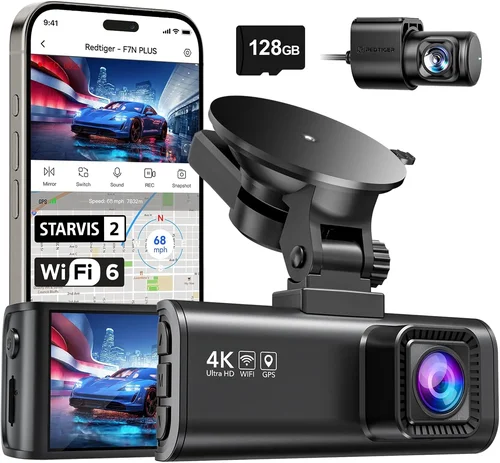
The sweet spot for most drivers offering excellent value proposition balancing performance, features, and durability. This tier includes 2K/4K resolution options, built-in GPS, WiFi app connectivity, dual-channel recording capabilities, and robust build quality suitable for everyday use. Advanced safety features like lane departure warnings, forward collision alerts, and emergency SOS buttons appear here alongside improved night vision and shock-resistant designs. Professional-grade materials and comprehensive warranties justify the higher investment while maintaining affordability for mainstream consumers.
Premium ($250 – $400)
Designed for serious drivers, frequent travelers, or those requiring maximum protection against liability claims. Premium models deliver exceptional image clarity with superior sensors, advanced HDR processing, and specialized night vision algorithms. Additional capabilities include cloud storage integration, real-time traffic updates, driver fatigue monitoring, and seamless smartphone synchronization. Enhanced build quality withstands extreme temperatures and physical impacts better than mid-range alternatives. Professional installation packages and extended warranty options further justify the premium pricing for users demanding uncompromising reliability.
Luxury ($400+)
Top-tier dash cams targeting commercial operators, security professionals, or automotive enthusiasts requiring cutting-edge technology. These systems incorporate AI-powered object detection, 360-degree panoramic views, multi-vehicle fleet management interfaces, and military-grade encryption for secure data transmission. Advanced telematics integrate with vehicle diagnostic systems providing comprehensive driving analytics beyond video recording. Luxury models often feature modular designs allowing component upgrades, redundant power supplies for continuous operation, and specialized mounting solutions for challenging environments like construction sites or delivery operations.
Expert Tips for Getting the Best Deal
Seasonal shopping patterns significantly impact availability and pricing throughout the year. Major holidays like Memorial Day, Independence Day, and Labor Day frequently trigger clearance events at electronics retailers. Online marketplaces like Amazon Prime Day and Best Buy’s Anniversary Sale present additional opportunities to acquire high-value dash cams at reduced prices. Always compare prices across multiple authorized dealers rather than accepting first-quoted rates, as some retailers offer price-matching guarantees for competitors’ lower offers.
Local electronics stores often provide immediate hands-on testing opportunities unavailable through online shopping. Visit showrooms to examine device ergonomics, button placement, screen readability, and mounting flexibility firsthand. Staff expertise varies widely, so ask detailed technical questions about specific models and request demonstrations of features like voice commands or mobile app integration. Some retailers offer bundled packages including installation services or extended warranties at discounted rates not available individually.
Cloud-connected dash cams offer convenience but introduce recurring costs and privacy considerations. Evaluate whether local storage suffices for your needs before committing to paid subscription tiers. Some manufacturers limit free cloud storage to compressed versions of footage, reducing video quality below what’s needed for evidentiary purposes. Always confirm data encryption standards and ownership rights during disputes—terms of service frequently grant manufacturers broad access to recorded content regardless of user preferences.
Hands-on evaluation prevents disappointment from marketing promises that don’t translate to real-world performance. Pay particular attention to lens flare handling during sunny drives, microphone sensitivity to interior conversations, and touchscreen responsiveness in various lighting conditions. If possible, borrow friends’ dash cams or rent demonstration units from local dealerships to compare multiple brands side-by-side before deciding.
Accessory costs can substantially increase total ownership expenses if acquired post-purchase from third-party vendors. Authorized dealers frequently bundle necessary items at manufacturer-recommended prices, avoiding compatibility issues common with generic alternatives. Ask about trade-in programs for older dash cams or credit toward future purchases when upgrading existing systems—some manufacturers incentivize brand loyalty through these initiatives.

Frequently Asked Questions
Q: Do I really need a dash cam, or is it just another gadget?
A: While not mandatory everywhere, dash cams provide tangible benefits beyond entertainment value. They serve as objective witnesses during traffic disputes, protect against false insurance claims, document hit-and-run incidents, and preserve memories of scenic drives or travel adventures. Studies show drivers equipped with dash cams experience fewer fraudulent injury claims and receive more favorable outcomes in accident settlements due to unbiased video evidence.
Q: What’s the difference between 1080p and 4K resolution, and why does it matter?
A: Resolution determines how much detail captured footage retains during zoom-ins or forensic analysis. 1080p Full HD provides adequate clarity for most situations including license plate recognition and basic accident reconstruction. 4K Ultra HD quadruples pixel count, enabling sharper images ideal for identifying fine details like road signs, clothing patterns, or distant vehicle behaviors during complex multi-vehicle incidents. Higher resolutions demand more storage space and processing power but offer diminishing returns below certain thresholds depending on typical driving conditions.
Q: Can dash cams record while my car is parked?
A: Yes, through parking mode functionality requiring either internal batteries or hardwiring to vehicle power. Motion-activated recording captures events while unattended, preventing theft, vandalism, or hit-and-run incidents. However, parking mode significantly reduces internal battery life unless connected to constant power via professional installation. Always verify compatibility with your vehicle’s electrical system and consider surge protection devices to prevent damage during power fluctuations.
Q: How much storage do I need, and how often should I replace my SD card?
A: Storage requirements depend on recording duration, resolution, and compression settings. As rule thumb, allocate 1GB per hour of 1080p footage at medium quality. A 128GB card typically holds 4-6 hours, while 256GB extends this to 8-12 hours. Format cards monthly using the dash cam itself rather than computers to maintain optimal performance. Replace worn cards showing read/write errors or corruption incidents promptly to avoid data loss during critical moments.
Q: Will a dash cam interfere with my cell phone signal or GPS navigation?
A: Modern dash cams operate on isolated circuits designed to minimize electromagnetic interference. Reputable manufacturers conduct rigorous testing ensuring compatibility with onboard electronics including infotainment systems, Bluetooth connections, and cellular antennas. However, poorly shielded cables or improper installation near sensitive components may cause temporary signal degradation. Follow manufacturer guidelines for cable routing and grounding to prevent any potential disruptions.
Q: What happens if my dash cam runs out of power during recording?
A: Most quality models feature built-in capacitors providing brief buffer time during power interruptions, preserving the final seconds of footage before shutdown. This ensures critical pre-collision sequences aren’t lost during sudden power cuts. However, prolonged outages exceeding capacitor capacity result in complete data loss. Hardwired installations eliminate this risk entirely by connecting directly to the vehicle’s ignition-switched circuit, ensuring uninterrupted operation during engine start/stop cycles.
Q: Are dash cams legal to install and use in my state/country?
A: Regulations vary globally but generally permit dash cam usage provided they don’t obstruct driver visibility or record private areas outside the vehicle perimeter. Some jurisdictions prohibit audio recording without consent due to wiretapping laws, while others restrict data retention periods. Research local statutes carefully—for example, California permits unrestricted recording within the vehicle, whereas Germany bans rear-facing cameras capturing other motorists. Always prioritize safety over convenience when operating recording devices.
Q: How do I choose between built-in memory versus cloud storage options?
A: Built-in storage offers complete control over data ownership, unlimited retention potential, and no recurring costs. Cloud storage provides automatic backups, remote accessibility, and theft protection but introduces monthly fees, bandwidth consumption, and potential privacy concerns. Choose cloud solutions only if you require real-time evidence sharing or have limited local storage capacity. For most personal users, high-capacity SD cards combined with periodic manual transfers strike optimal balance between convenience and control.
Q: Can I use my dash cam while simultaneously charging my phone?
A: Yes, many modern dash cams feature USB output ports capable of powering smartphones during drives. However, verify current output ratings before relying on this feature—some models provide insufficient amperage for fast charging or simultaneous device operation. Dedicated phone mounts with wireless charging pads often prove more efficient than direct dash cam connections, eliminating cable clutter while maintaining reliable power delivery throughout journeys.
Q: What maintenance tasks should I perform regularly on my dash cam?
A: Monthly cleaning of lenses and sensors removes dust accumulation affecting image clarity. Quarterly verification of mounting adhesion prevents accidental dislodgement during rough driving. Biannual inspection of cable connections ensures secure electrical contact and prevents corrosion buildup. Annual firmware updates enhance performance, fix bugs, and add new features according to manufacturer release schedules. Never clean screens with abrasive materials or chemical solvents that damage protective coatings over time.
Our Final Recommendations
For budget-conscious buyers seeking reliable frontal protection without unnecessary complexity, the Viofo A119 V3 delivers exceptional value with 1440p recording, superior night vision, and robust build quality at competitive pricing. Its intuitive interface, stable firmware, and generous 128GB microSD support make it ideal for new dash cam owners wanting hassle-free operation from day one.
The Thinkware U1000 represents the gold standard for premium dash cams, combining breathtaking 4K resolution with dual-channel recording, advanced driver assistance systems, and military-grade durability. Though priced above average, its unmatched image quality, comprehensive feature set, and outstanding customer support justify the investment for frequent drivers, commercial operators, or anyone demanding maximum protection against liability claims.
Newcomers to dash cam technology benefit most from user-friendly designs like the Nextbase 522GW, featuring Alexa voice control, emergency SOS button, and flawless app integration at reasonable mid-range pricing. Its compact form factor, crystal-clear display, and reliable performance establish it as perfect introduction to modern vehicle safety technology without overwhelming complexity.
Advanced users requiring omnidirectional monitoring or specialized applications find unparalleled flexibility in the Garmin Dashcam Mini, delivering seamless smartphone pairing, automatic incident detection, and cloud backup capabilities in ultra-compact package. Though lacking rear camera options, its intelligent features, smooth operation, and trusted brand reputation make it indispensable for tech-savvy drivers prioritizing convenience alongside security.
Ultimately, selecting the right dash cam involves matching technological capabilities with personal priorities rather than chasing specifications for their own sake. Consider your typical driving patterns, environmental challenges, legal requirements, and willingness to invest time learning new interfaces before making decisions. Remember that the best dash cam isn’t necessarily the most expensive—it’s the one that reliably captures critical moments when they matter most, providing confidence behind every wheel regardless of circumstances.
Conclusion: Making the Right Choice
Choosing the best dash cam ultimately comes down to understanding your unique driving environment and protection needs rather than following trends or marketing hype. Whether you’re navigating congested urban streets, exploring remote backcountry roads, or simply want documented proof of your travels, the right dash cam becomes an invisible guardian watching over every journey. By carefully evaluating resolution requirements, feature priorities, build quality expectations, and long-term value propositions outlined throughout this guide, you’ll make confident decisions aligning with both immediate needs and future aspirations behind the wheel.
Remember that dash cameras represent investments in peace of mind—not just legal protection but emotional reassurance knowing your experiences are preserved objectively during unpredictable moments. As automotive technology continues evolving rapidly, staying informed about emerging capabilities like AI-enhanced collision prediction, vehicle-to-everything communication integration, and autonomous driving compatibility ensures your chosen system remains relevant through changing transportation landscapes. Regular software updates from reputable manufacturers extend hardware lifespans while adding new functionalities keeping pace with industry developments.
Take time researching thoroughly, comparing specifications realistically, and testing hands-on whenever possible before committing to purchases. Consult owner forums, professional review publications, and trusted recommendation sources to uncover hidden strengths or weaknesses not apparent during superficial examinations. Above all, prioritize reliability over novelty—the most advanced features mean nothing if your device fails precisely when you need it most. With thoughtful consideration applied to each decision point covered herein, you’ll equip yourself with trustworthy companionship on every mile traveled, transforming ordinary drives into protected adventures safeguarded by intelligent technology working silently in the background.