Expert Dash Cam Buying Guide for Overnight Driving
Introduction
Night driving presents unique challenges that demand reliable technology to ensure safety and peace of mind. Whether you’re commuting during late hours, working night shifts, or simply prefer traveling after dark, having a dependable dash cam can make all the difference in protecting yourself and your vehicle from accidents, disputes, or insurance claims. The market for dash cams has exploded over the past decade, offering everything from basic recording devices to advanced AI-powered systems with dual cameras, GPS tracking, and cloud storage. However, not all dash cams are created equal—especially when it comes to nighttime performance.
In this comprehensive buying guide, we’ll walk you through every critical factor to consider when selecting the best dash cam for overnight driving. You’ll learn how to evaluate image quality, low-light sensitivity, storage options, power management, and additional features like parking mode and emergency recording. We’ll also compare top-rated models across different price ranges so you can find one that fits both your needs and budget. By the end of this article, you’ll be equipped with expert knowledge to confidently choose a dash cam that captures crystal-clear footage even in pitch-black conditions.
Key Factors to Consider

What to Look for When Buying Dash Cams
1. Low-Light Performance & Night Vision Capability
The single most important feature for any dash cam intended for overnight use is its ability to capture clear, usable video in near-total darkness. Unlike daytime scenes illuminated by streetlights, headlights, or sunlight, nighttime footage requires superior sensor technology and image processing algorithms. Look for cameras equipped with Sony Starvis or Exmor R sensors—these are industry leaders in low-light sensitivity. These sensors dramatically improve light capture compared to older CMOS chips, allowing your dash cam to record detailed video even when the only available light comes from distant car taillights or street lamps.
Additionally, check whether the camera supports WDR (Wide Dynamic Range), which balances exposure between bright headlights and darker road surfaces. Without WDR, nighttime footage often appears overexposed (blown-out whites) or underexposed (too dark). Some premium models even include IR (infrared) illumination for true black-and-white night vision, though this is more common in security cameras than automotive units.
2. Resolution & Video Quality
While resolution alone doesn’t guarantee good footage, higher resolutions do provide better detail retention—especially useful if you need to zoom into license plates or facial features during an incident. Most modern dash cams offer between 1080p Full HD and 4K Ultra HD. For overnight driving, we recommend at least 1080p; however, if your primary concern is nighttime clarity rather than extreme detail, some 2K models actually outperform 4K in low-light scenarios due to larger pixel sizes capturing more light.
Also consider the camera’s frame rate. Standard is 30fps, but some models support 60fps at lower resolutions—this smoother motion helps reduce blur during sudden movements like swerving or hard braking. Keep in mind that higher frame rates consume more storage space, so balance quality with practicality based on your usage frequency.
3. Field of View (FOV)
The angle captured by your dash cam directly impacts how much of the road and surrounding vehicles appear on screen. Too narrow an FOV misses critical context; too wide distorts edges and reduces central clarity. The sweet spot for most drivers is between 110° and 150°. A wider angle helps catch lane departures or blind-spot incidents but may introduce fish-eye distortion unless corrected via software.
For overnight highway driving especially, a moderate-to-wide FOV ensures you capture guardrails, signs, and other vehicles without sacrificing image fidelity. Some dual-camera systems offer front and rear coverage simultaneously—ideal for long-distance commutes where backing up at gas stations or parking lots becomes necessary after dark.
4. Storage Capacity & Loop Recording
Dash cams rely on microSD cards (typically Class 10 or UHS-I rated) for continuous loop recording—overwriting old footage automatically once the card fills up. Choose a card size based on your recording habits: 32GB works well for occasional users (about 4–6 hours of 1080p footage), while frequent drivers should opt for 64GB or 128GB. Larger capacities mean longer uninterrupted recording before manual intervention is needed.
Always format your SD card inside the dash cam itself before first use—this ensures optimal file system compatibility and prevents corruption. Also verify whether your model supports UHS Speed Class; slower cards cause dropped frames during high-bitrate recording.
5. Power Management & Parking Mode
This is arguably the most crucial feature for overnight functionality. Many dash cams enter standby mode when the engine shuts off, but advanced models offer hardwire kits or battery-backed parking modes that continue recording while parked. This protects against hit-and-runs, vandalism, or unauthorized towing attempts—common concerns for unattended vehicles overnight.
Look for cameras with intelligent motion detection or impact sensors that trigger event-only recording instead of constant looping during parking mode. This conserves battery life and storage space. Ensure the unit includes a built-in capacitor (not just a battery) for stable shutdowns and surge protection during voltage fluctuations.
6. Build Quality & Weather Resistance
Dash cams endure harsh environments: direct sunlight baking plastic components, sudden temperature swings from cold nights to hot days, and potential drops during installation or removal. Opt for models constructed with fire-retardant PC+ABS materials and tested for operating temperatures ranging from -4°F to 140°F (-20°C to 60°C). Sealed ports and anti-glare lenses further enhance durability and usability in rain or fog.
Mounting hardware should be secure yet adjustable—preferably with suction cups reinforced with metal bases or adhesive pads rated for automotive glass. Loose mounts vibrate loose over time, causing misalignment or complete detachment during bumpy drives.
7. Additional Features Worth Considering
- GPS Tracking: Logs speed, location, and direction—helpful for verifying route discrepancies or proving you weren’t speeding.
- Wi-Fi & App Connectivity: Allows wireless playback, firmware updates, and cloud uploads (with subscription fees).
- Voice Commands: Hands-free control during night drives when reaching for buttons is inconvenient.
- Emergency Lock (G-sensor): Automatically saves footage during sudden impacts or hard stops.
- Time-Lapse Mode: Records slow-motion events efficiently using less storage.
Types/Categories Comparison

Common Mistakes to Avoid
Common Buying Mistakes to Avoid
❌ Mistake: Prioritizing Megapixels Over Sensor Quality
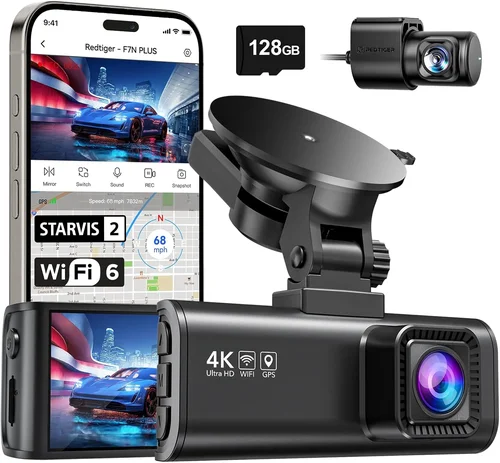
Why it’s bad: Many buyers assume higher megapixels equal better night vision, but resolution alone doesn’t improve low-light performance. A 12MP camera with a poor sensor will still produce grainy, unusable footage at night, whereas a 1080p Sony Starvis sensor delivers far superior results despite fewer pixels.
What to do instead: Focus on sensor type (Sony Starvis > SONY Exmor > OmniVision > generic CMOS), dynamic range, and noise reduction algorithms. Read technical reviews comparing real-world low-light output.
❌ Mistake: Ignoring Parking Mode Limitations
Why it’s bad: Some dash cams claim “parking surveillance” but lack proper voltage regulation or motion detection. They may drain your car battery overnight or fail to detect impacts accurately, leading to false alarms or missed evidence.
What to do instead: Verify compatibility with hardwiring kits and confirm whether the parking mode uses capacitors (safer) or rechargeable batteries (prone to failure). Test the G-sensor sensitivity settings.
❌ Mistake: Using Cheap MicroSD Cards
Why it’s bad: Budget SD cards (Class 4 or U1) can’t handle high bitrates required for smooth 1080p+ recording. This causes dropped frames, audio sync issues, and corrupted files—especially problematic during night drives with complex lighting.
What to do instead: Invest in reputable brands like SanDisk Extreme, Samsung EVO Select, or Lexar 633x—all rated U3 or V30. Always format within the device first.
❌ Mistake: Overlooking Heat Dissipation
Why it’s bad: Placing a dash cam behind the windshield without ventilation traps heat from sunlight exposure. Overheating triggers automatic shutdowns or permanent damage to internal circuitry—common in summer months even during nighttime use.
What to do instead: Choose models with passive cooling fins or active fans (rare). Mount vertically if possible to allow airflow. Avoid direct sun exposure during daylight hours.
❌ Mistake: Skipping Firmware Updates
Why it’s bad: Manufacturers frequently release firmware fixes for bugs, improve compression efficiency, or enhance night vision algorithms. Neglecting updates leaves your device vulnerable to known issues or suboptimal performance.
What to do instead: Check the manufacturer’s website monthly. Enable auto-update notifications if supported. Document your firmware version for troubleshooting.
❌ Mistake: Assuming All Brands Are Equal
Why it’s bad: Generic Chinese-made clones flood Amazon with identical-looking devices but vary wildly in build quality, customer service, and software stability. Cheaper doesn’t always mean better value.
What to do instead: Stick to established brands like BlackVue, Garmin, Viofo, Nextbase, or Thinkware. Research their return policies and community forums before purchasing.
Budget Breakdown
Budget Guidelines: How Much Should You Spend?
Entry-Level ($50–$100): What to Expect
If you drive occasionally at night or want basic protection without spending much, entry-level models deliver acceptable performance for the price. These typically feature 1080p recording, modest FOVs (~120°), and minimal extras. Look for units with decent low-light handling—avoid anything below 720p or lacking WDR. Examples include certain models from TaoTronics or Rexing. While they won’t match premium optics, they suffice for city driving with streetlights.
Mid-Range ($100–$200): The Sweet Spot for Most Buyers
This bracket offers the best balance of features, reliability, and nighttime capability. You’ll find Sony Starvis sensors, 140–150° FOVs, dual-channel options, and robust parking modes. Brands like Viofo A119 v3, Nextbase 522GW, or Thinkware Q800 Pro dominate here. They handle highways, rural roads, and even poorly lit parking garages effectively. Most importantly, they include warranties and responsive support.
Premium ($200–$400): For Enthusiasts and Professionals
Top-tier dash cams target serious drivers needing flawless performance under all conditions. Expect 4K recording, superior image stabilization, cloud connectivity, AI alerts, and military-grade durability. Models like BlackVue DR970X-2CH or Garmin Dashcam Mini offer enterprise-level reliability. These justify their cost through exceptional build quality, advanced analytics, and seamless integration with mobile apps.
Luxury ($400+): Top-Tier Features Only
Ultra-premium units cater to commercial fleets or those requiring forensic-level detail. Features include thermal imaging, satellite-linked GPS, encrypted storage, and multi-camera ecosystems. While rarely necessary for personal use, they represent the pinnacle of automotive recording technology. Cost reflects R&D, certification, and exclusive partnerships.
Expert Tips & Pro Advice
Expert Tips for Getting the Best Deal
1. Time Your Purchase Strategically
Avoid buying immediately after major holidays (Black Friday, Cyber Monday), as retailers inflate prices beforehand. Instead, wait for post-holiday sales (late December) or mid-year refreshes (June). Tech review sites often leak upcoming model changes, signaling clearance opportunities for current-gen units.
2. Leverage Online vs. In-Store Advantages
Online retailers (Amazon, B&H Photo, Best Buy) usually offer bundled deals (e.g., free SD card + hardwire kit). In-store purchases let you physically inspect build quality but rarely include accessories. Compare total package values—sometimes a $50 discount plus free shipping beats a $30 in-store deal.
3. Watch for Hidden Bundles
Many brands sell standalone dash cams cheaply but charge extra for essential add-ons like memory cards or wiring kits. Calculate the full cost before deciding. Alternatively, buy the base unit separately and source accessories from third-party sellers.
4. Verify Warranty Coverage Thoroughly
Standard warranties range from 1–3 years. Premium models may include accidental damage protection. Read fine print: does it cover lens scratches? Software failures? International shipping? Register your product promptly to activate coverage.
5. Test Return Policies Aggressively
Even with perfect specs, real-world performance varies. Use the full return window (usually 30 days) to test nighttime recording under actual driving conditions. Transfer files to your computer and scrutinize edge details, noise levels, and color accuracy.
6. Join Community Forums Before Buying
Platforms like Reddit (r/dashcam), specialized dash cam blogs, or Facebook groups host thousands of user experiences. Search “[Brand] [Model] night vision review” to uncover hidden flaws or upgrades others discovered.
7. Consider Future-Proofing
Choose models supporting expandable storage, OTA updates, and multi-camera expansion. This extends usability as your needs evolve—especially valuable if you plan to add rear cameras later.
8. Prioritize Brand Reputation Over Flashy Ads
Independent lab tests (like those from RTINGS.com or AVInsights) provide unbiased comparisons. Cross-reference multiple sources before committing. Avoid brands with recurring complaints about firmware bugs or poor customer service.
FAQs Section

Frequently Asked Questions
Q: Do dash cams really work well at night?
A: Yes—but only if equipped with advanced sensors like Sony Starvis. Basic CMOS chips produce noisy, blurry footage after dark. High-end models with WDR and IR cut filters deliver usable evidence even in pitch-black conditions.
Q: Can I leave my dash cam plugged in all night?
A: Only if it has a proper hardwire kit connected to the fuse box. Direct cigarette lighter charging drains your battery overnight. Hardwiring routes power through ignition-switched circuits, preventing drain while parked.
Q: What’s the difference between a capacitor and a battery in dash cams?
A: Capacitors store energy briefly and survive extreme temperatures better than lithium-ion batteries. They’re safer for automotive environments. Rechargeable batteries degrade faster and may fail in cold weather.
Q: How long does a dash cam battery last in parking mode?
A: Depends on settings, but typically 2–4 hours on a standard 12V battery. Motion-activated recording extends this significantly. Always pair with a hardwire kit for overnight surveillance.
Q: Will my dash cam record if my car is stolen?
A: Only if it remains powered. Thieves often disconnect the battery or remove the fuse. Hardwired systems with backup capacitors may survive brief power loss, but prolonged theft risks total data loss.
Q: Can I use any microSD card with my dash cam?
A: No. Use Class 10, U3, or V30 cards from trusted brands. Format them inside the device first. Cheap cards cause dropped frames and file corruption, especially during high-bitrate night recording.
Q: Are dual-camera systems worth the extra cost?
A: Absolutely if you drive long distances or park in high-risk areas. Rear cameras prevent blame in backing-up incidents and protect against hit-and-runs from behind—common concerns during night parking.
Q: How do I clean my dash cam lens properly?
A: Use compressed air to blow away dust, then wipe gently with a microfiber cloth. Never spray liquids directly onto the lens. Smudges impair low-light clarity more than dirt buildup.
Final Recommendations
Our Final Recommendations
Best for Budget-Conscious Buyers
Viofo A119 v3: Priced around $130, this single-lens model offers 1440p recording, Sony STARVIS sensor, and reliable night vision. Its compact design fits discreetly, and the included GPS adds route logging without breaking the bank.
Best Overall Value
Nextbase 522GW: At roughly $180, it combines 1440p quality, Alexa integration, and impressive low-light performance. The magnetic mount simplifies installation, and the emergency SOS button enhances safety awareness.
Best Premium Option
BlackVue DR970X-2CH: Priced near $400, this dual-camera system boasts 4K front and 2K rear recording, cloud connectivity, and superior image stabilization. Ideal for demanding drivers who refuse compromise.
Best for Beginners
Thinkware Q800 Pro: With intuitive menus, automatic updates, and solid night performance, it’s user-friendly without sacrificing features. Includes a free 128GB card and easy-to-follow setup guide.
Best for Advanced Users
Garmin Dashcam Mini: Compact yet powerful, it integrates seamlessly with Garmin navigation systems. Offers excellent audio recording, voice commands, and rugged construction for tech-savvy travelers.
Conclusion
Conclusion: Making the Right Choice
Selecting the best dash cam for overnight driving hinges on balancing technological sophistication with practical daily use. While flashy features like 4K resolution or Wi-Fi streaming sound appealing, prioritize core capabilities: clear nighttime imaging, reliable parking surveillance, and durable construction. Remember that no single model excels in every category—your ideal choice depends on your driving patterns, environment, and risk tolerance.
Invest time researching real user feedback, testing return policies, and comparing sensor technologies rather than chasing megapixel numbers. Pair your decision with proper installation techniques—mounting position, lens alignment, and secure wiring—to maximize effectiveness. And never forget: the best dash cam is useless if it fails when you need it most.
Whether you’re navigating city streets under neon lights or traversing empty highways under starlight, the right dash cam provides invaluable peace of mind. Armed with this guide, you’re now ready to make an informed, confident purchase that safeguards your journeys—day or night.