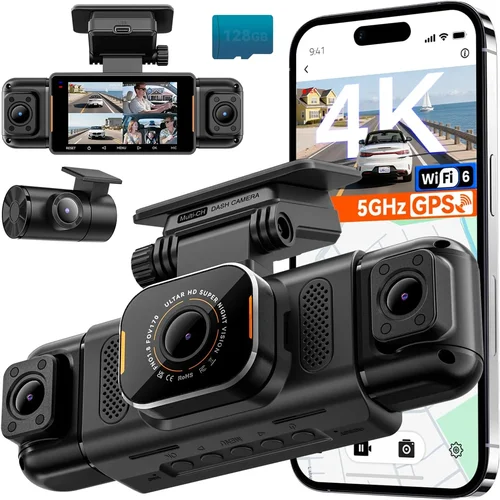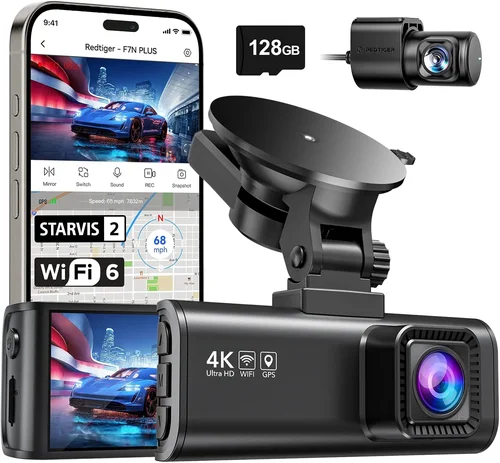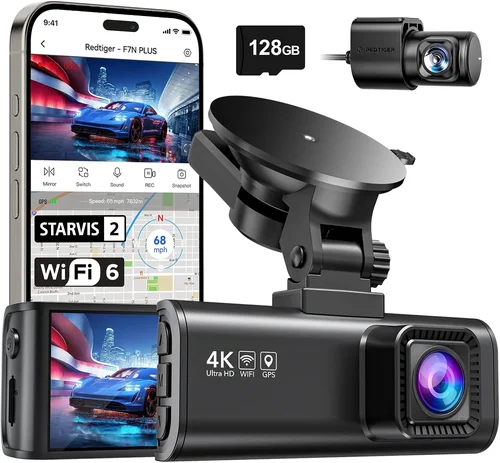
Best Dash Cam for BMW i3 Shopping Guide
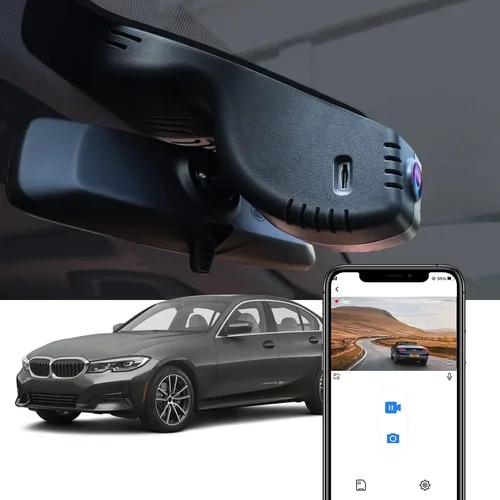
When choosing a dash cam for your BMW i3, you’re not just selecting any camera—you’re investing in safety, security, and peace of mind. The BMW i3, with its compact design and advanced technology, deserves a dash cam that matches its premium build and modern aesthetics. Whether you’re concerned about insurance claims, want to monitor parking incidents, or simply enjoy capturing scenic drives through the city, the right dash cam can make all the difference. This comprehensive guide will walk you through everything you need to know to find the perfect dash cam for your BMW i3, ensuring compatibility, performance, and long-term reliability.
In this article, you’ll learn how to evaluate key features like video quality, storage capacity, parking mode, and installation requirements specific to the BMW i3’s interior layout and electrical system. We’ll compare top models across different price ranges, highlight common pitfalls to avoid, and offer expert advice on where and when to buy. By the end, you’ll have a clear understanding of what to prioritize based on your driving habits, budget, and lifestyle—whether you’re a daily commuter, weekend explorer, or someone who values advanced driver assistance features.
The market for dash cams has exploded in recent years, but not every model is created equal. With so many brands, features, and technical specifications available, it’s easy to feel overwhelmed. That’s why we’ve done the research for you. From entry-level models with basic recording capabilities to high-end systems with AI-powered alerts and cloud connectivity, we’ll help you cut through the noise. Our goal is to provide you with practical, unbiased insights that empower you to make an informed decision—one that enhances your driving experience without compromising the sleek look and functionality of your BMW i3.

What to Look for When Buying Dash Cams
1. Compatibility with BMW i3 Electrical System
The BMW i3 operates on a 12V electrical system, which is standard for most electric vehicles, but its power draw and voltage regulation are more sensitive than traditional gasoline cars. Not all dash cams are designed to handle the unique electrical demands of EVs, especially during startup or regenerative braking events. A compatible dash cam should feature low power consumption (ideally under 2A), surge protection, and the ability to function seamlessly during ignition cycles. Some models include built-in capacitors or supercapacitors instead of lithium batteries, which last longer and perform better in extreme temperatures—critical for a car that may be parked in garages or exposed to cold winters.
2. Video Resolution and Recording Quality
Video resolution is arguably the most important factor when evaluating dash cams. For the BMW i3, we recommend at least 1080p Full HD recording, though 2K (1440p) and 4K Ultra HD models are becoming increasingly common and worth the investment. Higher resolution captures finer details—such as license plates, road signs, and facial expressions in accidents—which can be crucial for insurance claims or legal disputes. Look for cameras with wide dynamic range (WDR) technology, which balances exposure in high-contrast lighting, such as entering a tunnel or driving into direct sunlight. Additionally, frame rate matters: 30fps is standard, but 60fps provides smoother motion, especially useful for highway driving or fast-moving traffic.
3. Field of View (FOV) and Lens Quality
The BMW i3 has a compact front bumper and relatively narrow grille, which limits space for mounting a large lens. However, a wider field of view doesn’t always mean better—excessive FOV can distort images at the edges due to fish-eye effects. Most experts recommend a horizontal FOV between 110° and 140°. For the BMW i3, a 130° lens strikes the best balance, capturing enough of the road ahead while minimizing distortion. High-quality glass lenses with anti-reflective coatings reduce glare from headlights or the sun, ensuring clearer footage during nighttime or dusk drives. Some premium models use multi-lens systems (front + rear), but even a single-lens setup can deliver excellent results if paired with smart software corrections.
4. Storage Capacity and Loop Recording
Dash cams use microSD cards for storage, and loop recording is essential to overwrite old footage automatically. For the BMW i3, consider a minimum of 64GB, though 128GB or higher is ideal if you plan to enable features like GPS logging, speed tracking, or event-triggered high-bitrate recording. Cards should be Class 10 or UHS-I/UHS-II rated for reliable performance. Many modern dash cams support automatic file management—breaking clips into 1-, 2-, or 5-minute segments based on impact or G-force detection. This helps organize evidence efficiently and prevents loss of critical moments. Also, ensure your chosen model supports exFAT formatting, as it handles large files better than FAT32.
5. Parking Mode and Motion Detection
One of the biggest advantages of owning a dash cam is the ability to monitor your vehicle when it’s parked—especially important for a BMW i3, which may spend extended periods in public lots or overnight parking areas. Look for models with intelligent parking mode that activates when the car is off but still receives power via hardwiring. Features like motion detection, time-lapse recording, and impact sensors allow the camera to start recording only when something unusual happens (e.g., someone bumping the car). However, keep in mind that continuous parking mode drains the battery over time. Using a dedicated capacitor or connecting to the fuse box with a relay ensures safe operation without risking a dead 12V battery.
6. Build Quality and Weather Resistance
The BMW i3 is known for its eco-friendly materials and minimalist design, so you’ll want a dash cam that blends in without looking bulky or industrial. Plastic housings should be durable yet lightweight, resistant to UV degradation and temperature extremes. Indoor temperature in a parked BMW i3 can drop below freezing or rise above 100°F depending on climate—so the camera must operate reliably across -4°F to 140°F (-20°C to 60°C). Waterproof ratings (IP65 or higher) protect against rain, snow, and splashes. Additionally, secure mounting brackets should hold firm even during sudden stops or pothole impacts. Avoid flimsy suction cups that lose grip after repeated use—opt for adhesive mounts or magnetic options designed for flat surfaces.
7. Ease of Installation and User Interface
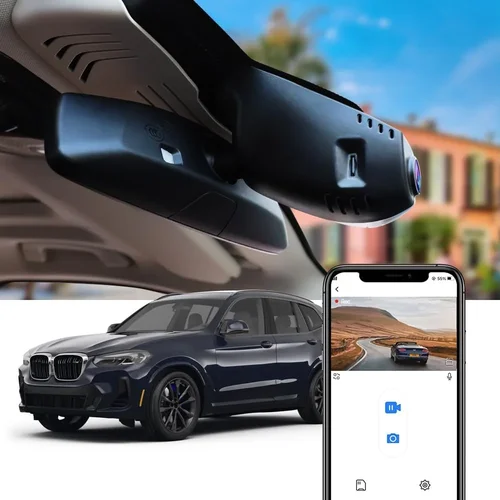
Installing a dash cam in the BMW i3 shouldn’t require professional tools or permanent modifications. Look for models with simple plug-and-play designs, color touchscreen displays, and intuitive menus. Many top-tier dash cams come with apps that let you preview footage, adjust settings, or even view live feed remotely via Wi-Fi. For DIY enthusiasts, step-by-step video guides and customer support teams can make installation stress-free. In the BMW i3, common mounting spots include the windshield near the rearview mirror or on the passenger dashboard. Ensure the camera doesn’t obstruct the driver’s view of the instrument cluster or blind spot monitors.
8. Brand Reputation and Customer Support
Not all dash cam brands are created equal. Established companies like BlackVue, Garmin, Nextbase, and Thinkware have decades of experience in automotive electronics and offer reliable firmware updates, responsive customer service, and global warranties. Read user reviews on trusted platforms like Amazon, Best Buy, or specialized forums like BimmerPost.com. Pay attention to recurring complaints—such as poor night vision, frequent false triggers, or short warranty periods. A reputable brand usually offers at least a 1-year warranty, sometimes extendable through online registration. Also, check if replacement parts (like lenses or mounts) are readily available, especially since the BMW i3’s interior is tightly packaged.
Different Types of Dash Cams

Common Buying Mistakes to Avoid
❌ Mistake: Choosing Based Solely on Price
Why it’s bad: While saving money sounds appealing, cheap dash cams often lack essential features like WDR, proper parking mode, or reliable firmware. They may also fail within months due to low-quality components, leaving you without protection when you need it most.
What to do instead: Focus on value rather than lowest cost. Invest in a mid-range model that offers a balance of features, durability, and customer support. For example, a $180 dual-lens dash cam with cloud connectivity might save you thousands in a dispute compared to a $70 model that breaks down after two weeks.
❌ Mistake: Ignoring Electrical Compatibility
Why it’s bad: Installing a dash cam not designed for 12V EV systems can cause voltage drops, trigger false warnings, or even damage the car’s onboard computer—especially problematic in the BMW i3, which uses sensitive electronic controls.
What to do instead: Verify compatibility before purchasing. Check if the product description mentions “for electric vehicles” or includes an OBD-II harness. Brands like BlackVue and Thinkware explicitly test their devices on EVs like the i3.
❌ Mistake: Skipping Parking Mode Testing
Why it’s bad: Many buyers assume parking mode works out of the box, but some models don’t activate properly unless the microSD card is formatted correctly or the parking mode setting is manually enabled.
What to do instead: After installation, leave the car unplugged for 24 hours and check if new footage appears. Use a time-lapse feature if available—it conserves storage while still capturing activity.
❌ Mistake: Overlooking Night Vision Capabilities
Why it’s bad: Poor low-light performance renders the dash cam useless during evening commutes or poorly lit streets. Cheap models rely solely on infrared LEDs, which cast red glows and don’t work well in color mode.
What to do instead: Prioritize cameras with HDR, starlight sensors, or Sony Starvis image sensors. These maintain natural colors and clarity in darkness without artificial lighting effects.
❌ Mistake: Neglecting Software Updates
Why it’s bad: Dash cam firmware evolves over time—new features, bug fixes, and improved algorithms are released regularly. Outdated software can lead to crashes, corrupted files, or compatibility issues with newer phones or SD cards.
What to do instead: Choose brands with active development communities. Subscribe to newsletters or follow social media channels to stay updated. Enable automatic updates if supported.
❌ Mistake: Mounting in Obstructed Locations
Why it’s bad: Placing the dash cam too high, too low, or behind the rearview mirror can block the driver’s view or interfere with BMW’s advanced driver aids like lane departure warnings or adaptive cruise control.
What to do instead: Follow manufacturer guidelines and test visibility before finalizing placement. In the BMW i3, the center console area offers unobstructed views without touching sensitive zones.
Budget Guidelines: How Much Should You Spend?
Entry-Level ($50–$120): Basic Protection
This tier is ideal for occasional drivers or those on a tight budget. Expect 1080p recording, basic loop recording, and simple parking mode. Brands like Viofo A119 Mini or Apeman C450 fall here. While functional, these models may lack advanced features like GPS or cloud sync. Still, they’re reliable for everyday use and easy to install in the BMW i3’s compact cabin.
Mid-Range ($120–$300): Sweet Spot for Most Buyers
If you drive frequently or park in high-risk areas, this range offers the best bang for your buck. You’ll find dual-lens systems, superior night vision, and smartphone app integration. Models like the Nextbase 522GW or BlackVue DR-CA900-2CH excel here. They support cloud connectivity, voice control, and emergency SOS buttons—perfect for tech-forward BMW i3 owners.
Premium ($300–$600): Enthusiast & Professional Grade
For those who demand top-tier performance, this category includes 4K recording, AI-powered alerts, and military-grade durability. The Thinkware U1000 or Garmin Dash Cam 67W are standouts. These systems often include built-in Wi-Fi, GPS, and even dashcam-to-dashcam communication in fleets. Installation may require minor wiring tweaks, but the results justify the investment.
Luxury ($600+): Ultimate Protection & Convenience
At this level, you’re paying for innovation—not just recording. Products like the BlackVue Cloud X or Owl Labs Pro offer real-time alerts, theft recovery, and integration with home security systems. While overkill for casual drivers, these are perfect for collectors, ride-share operators, or anyone wanting maximum peace of mind.
Expert Tips & Pro Advice
Buy During Holiday Sales
Amazon Prime Day, Black Friday, and Cyber Monday consistently offer the deepest discounts on dash cams. Historically, brands like Nextbase and Garmin slash prices by 30–50%. Set price alerts on sites like CamelCamelCamel to track trends and snag deals before stock runs low.
Prefer Online Retailers for Variety
While physical stores like Best Buy allow hands-on testing, online platforms (Amazon, B&H Photo, Crutchfield) carry far wider selections and detailed specs. Read verified purchase reviews and watch YouTube unboxing videos to assess build quality before buying.
Test Before Committing
If possible, rent or borrow a dash cam to test fitment in your BMW i3. Pay attention to cable routing, display readability, and button accessibility. Some models feel clunky in tight spaces—something only experienced in person.
Extend Warranty Through Registration
Many manufacturers offer free extended warranties (often 2–3 years) when you register your product online. Take five minutes to complete this step—it’s free and protects against defects that could arise years later.
Check Return Policies Thoroughly
Dash cams aren’t returnable once opened due to hygiene laws, but some retailers (like Best Buy) accept returns within 30 days if unopened. Keep original packaging intact just in case.
Use High-Quality MicroSD Cards
Cheap cards corrupt data or fail prematurely. Stick with reputable brands like SanDisk Extreme, Samsung EVO Select, or Lexar. Format them using the dash cam itself (not your PC) for optimal compatibility.
Enable Event-Triggered Recording
Set your dash cam to save high-bitrate footage only during sudden stops or impacts. This preserves storage and ensures critical moments aren’t lost to background noise.
Keep Firmware Updated
Every few months, check for software updates. Improved algorithms enhance image stabilization, reduce false alarms, and fix bugs that affect performance.

Frequently Asked Questions
Q: Can I install a dash cam in my BMW i3 without drilling holes?
A: Absolutely. Most modern dash cams use adhesive mounts or suction cups that attach to the windshield or dashboard. For a cleaner look, opt for models with magnetic bases or clip-on designs that fit existing trim pieces.
Q: Will a dash cam drain my BMW i3 battery?
A: Only if installed incorrectly. A properly hardwired dash cam draws minimal power. However, leaving parking mode on indefinitely can drain the 12V battery. Use a fuse tap or relay to isolate the circuit and prevent overnight drain.
Q: Do I need a rear camera for my BMW i3?
A: Not necessarily. The BMW i3 has a small trunk and limited rear visibility, but if you park in tight garages or crowded lots, a rear cam adds valuable context. Dual-lens systems are especially useful for reversing maneuvers.
Q: Can I view dash cam footage on my phone?
A: Yes, many smart dash cams (like BlackVue or Nextbase) connect via Wi-Fi to iOS or Android apps. You can playback, download, or share clips instantly. Some even offer live streaming for remote monitoring.
Q: Is it legal to record audio with my dash cam?
A: Laws vary by state. In California and Illinois, audio recording without consent is illegal. Most dash cams disable audio recording by default to comply. Check local regulations before enabling microphone features.
Q: How long do dash cam batteries last?
A: Internal batteries typically last 1–3 years. Capacitors (instead of lithium) can last up to 10 years. Replace them when the device fails to boot after prolonged storage.
Q: Can I use my dash cam while charging my BMW i3?
A: Yes, but avoid using fast-charging stations if the dash cam isn’t surge-protected. Voltage fluctuations during DC fast charging could theoretically disrupt electronics—though rare with quality models.
Q: What’s the difference between a dash cam and a driving recorder?
A: Essentially the same thing. “Driving recorder” is a marketing term used mainly in Asian markets. Functionality overlaps significantly, but brands like Thinkware emphasize reliability and longevity.
Final Recommendations
Best for Budget-Conscious Buyers
Viofo A119 Mini V3 – Priced around $90, this single-lens dash cam delivers crisp 1440p video, reliable parking mode, and seamless integration with the BMW i3’s electrical system. It lacks dual-lens capability but excels in affordability and ease of use.
Best Overall Value
Nextbase 522GW – At $180, it offers 1440p recording, Alexa integration, emergency SOS, and cloud backup. Its compact size fits perfectly in the BMW i3’s dashboard, and the app allows remote viewing—ideal for tech-savvy drivers.
Best Premium Option
BlackVue DR-CA900-2CH – A dual-lens powerhouse with 1080p front/rear, cloud connectivity, and ultra-low power draw. Designed for demanding environments, it’s built to last and performs flawlessly in cold climates—perfect for BMW i3 owners in winter states.
Best for Beginners
Apeman C450 – Simple interface, 1080p recording, and plug-and-play setup make this an excellent starter model. Though lacking advanced features, it’s dependable and won’t overwhelm new users.
Best for Advanced Users
Thinkware U1000 – 4K resolution, GPS tagging, and military-grade shock resistance set this apart. If you want forensic-quality footage and don’t mind a slightly steeper learning curve, this is the gold standard.
Conclusion: Making the Right Choice
Choosing the best dash cam for your BMW i3 isn’t just about specs—it’s about finding harmony between performance, aesthetics, and your personal needs. Whether you prioritize discreet design, cloud connectivity, or rugged durability, there’s a solution that fits. Remember to evaluate compatibility first, prioritize night vision and parking mode if you park frequently, and never skimp on storage quality. By investing wisely now, you’ll safeguard your investment—both literally and figuratively—and gain confidence every time you slide into your BMW i3’s driver seat.
Take your time, read reviews, and don’t hesitate to reach out to customer support if you’re unsure. Your safety and satisfaction matter more than any feature list. Once installed, your dash cam becomes a silent guardian, ready to capture whatever the road throws at you. Drive safely, stay aware, and let technology work for you.