Best HD Dash Cam Buying Guide

Introduction: Your Road Trip Guardian
Road trips are about freedom, adventure, and creating memories behind the wheel. But what happens when an unexpected event occurs? A sudden collision, a hit-and-run incident, or even a dispute with another driver can leave you vulnerable without proper documentation. This is where a high-definition dash cam becomes more than just a gadget—it transforms into your personal witness on wheels. For travelers seeking peace of mind during extended journeys, an HD dash cam offers invaluable protection and evidence collection capabilities.
In today’s market, dash cams range from basic single-lens models to sophisticated multi-camera systems with advanced recording features. With so many options available, choosing the right one for your road trip needs can feel overwhelming. This comprehensive guide will walk you through everything you need to know about selecting the best HD dash cam for your adventures, helping you make an informed decision that balances performance, reliability, and value.
The dash cam industry has evolved dramatically over recent years. Modern devices now offer crystal-clear video quality, GPS tracking, night vision capabilities, emergency recording modes, and seamless smartphone integration. Whether you’re planning a cross-country journey, weekend getaway, or daily commute that occasionally turns into an extended trip, understanding these features and their real-world applications will ensure you select equipment that truly serves your needs. We’ll examine current market leaders, analyze critical technical specifications, explore budget considerations, and provide expert recommendations based on actual usage scenarios.
What to Look for When Buying Dash Cams
1. Video Resolution & Recording Quality
Video resolution remains the most fundamental specification affecting your dash cam’s effectiveness as a witness. For HD road trips, look for at least 1080p Full HD resolution—this provides sufficient detail to identify license plates, vehicle details, and road conditions clearly. However, premium models now offer 2K (1440p) or even 4K Ultra HD capabilities that capture significantly more detail along both axes of the frame.
Beyond mere resolution numbers, pay attention to bitrate settings—the amount of data recorded per second. Higher bitrates preserve more detail during fast-moving scenes or low-light conditions. Most quality dash cams use H.264 or H.265 compression algorithms; while H.265 reduces file sizes by up to 50% without sacrificing quality, not all playback devices support this newer standard.
Frame rate matters too—standard 30fps works well for general driving, but 60fps captures smoother motion during rapid maneuvers or emergency braking situations. Some advanced models even offer variable frame rates that automatically adjust based on scene complexity. Remember that higher resolutions and frame rates increase storage requirements exponentially, so balance visual fidelity against practical considerations like memory card capacity and battery life.
2. Field of View & Lens Specifications
The field of view (FOV) determines how much of the road ahead your dash cam can record simultaneously. Standard dash cams typically offer 130-150 degree horizontal FOV, which covers three traffic lanes comfortably in most scenarios. Wider angles (up to 170 degrees) provide extra peripheral coverage but may cause barrel distortion—the characteristic “fisheye” effect where straight lines appear curved near screen edges.
Modern processing algorithms mitigate much of this distortion digitally, but it still affects object recognition accuracy at frame boundaries. For optimal results, choose models specifically engineered with wide-angle optics and built-in correction software. Some manufacturers advertise exaggerated FOV numbers without accounting for distortion—always check independent reviews for real-world performance rather than marketing claims alone.
Consider your typical driving environment when evaluating lens specifications. Urban commuters benefit from wider FOVs to monitor intersections and pedestrian crossings, while highway drivers might prioritize longer focal lengths for clearer license plate recognition at distance. Multi-camera systems address these varying needs by combining forward-facing primary cameras with rear or interior monitoring units for complete vehicle coverage.
3. Night Vision & Low-Light Performance
Night driving presents unique challenges for dash cam operation due to reduced ambient light and increased glare from headlights. Effective night vision requires specialized sensors capable of capturing usable footage in extremely dim conditions. Look for CMOS image sensors with backside illumination (BSI) technology—these perform significantly better in low light than conventional frontside illuminated sensors.
Exposure control algorithms also play a crucial role in nighttime performance. Advanced dash cams automatically adjust gain, shutter speed, and white balance to maintain visibility without introducing excessive noise or motion blur. Some models employ infrared LEDs or night vision modes that illuminate dark areas just enough to capture details without distracting other drivers.
Real-world testing reveals dramatic differences between entry-level and premium night vision capabilities. Budget models often produce grainy, washed-out footage after sunset, while professional-grade units maintain clear contrast and color accuracy well into darkness. If you frequently drive at night or travel through poorly lit areas, invest accordingly—the ability to document accidents or suspicious behavior after dark could prove invaluable later.
4. Storage Capacity & Loop Recording
Storage management forms the backbone of continuous dash cam operation. Most modern devices use microSD cards ranging from 32GB to 256GB capacities, though some premium models support larger cards up to 512GB. The choice depends on several factors: recording duration, video quality settings, loop recording behavior, and whether you enable additional features like GPS logging or audio recording.
Loop recording automatically overwrites oldest footage when storage fills—ensuring uninterrupted operation during long trips. However, this means older events aren’t preserved unless manually saved or triggered by motion detection. Most dash cams allow configuration of overwrite intervals (typically 1-3 minutes), giving users control over how frequently new footage replaces old content.
Calculate your required storage needs based on average recording length and desired retention period. A 128GB card typically holds 2-4 hours of 1080p footage at standard settings, increasing significantly with lower resolutions or compressed formats. Many users prefer dual-card slots for redundancy—recording simultaneously to two different cards ensures important events won’t be lost due to accidental deletion or card failure.
5. Power Supply Options
Dash cam power sources determine installation flexibility and operational reliability. Traditional cigarette lighter adapters provide universal compatibility but create visible wiring that may obstruct dashboard aesthetics or pose tripping hazards. Hardwiring kits route power directly to your vehicle’s electrical system via fuse taps or direct connections—ideal for permanent installations but requiring professional installation skills.
Battery-powered models offer portability and easy removal but suffer from limited runtime (typically 1-3 hours depending on model and usage). Solar charging accessories extend battery life during stationary periods but add bulk and potential points of failure. USB-C powered units connect conveniently to modern vehicles’ infotainment systems but may drain auxiliary ports if drawing significant current.
For road trips, consider hybrid solutions: hardwire kits with backup battery packs provide uninterrupted operation during power outages while maintaining clean installations. Some premium dash cams include intelligent power management that automatically enters parking mode during extended stops, conserving energy until motion resumes.
6. Parking Mode & Event Detection
Parking mode represents one of the most valuable features for travelers who park overnight or leave vehicles unattended for extended periods. When enabled, dash cams continue recording briefly after ignition shutdown using vehicle battery power (via hardwired connection). Motion detection algorithms trigger full-resolution recording when detecting movement near your parked car—preserving evidence of break-ins, vandalism, or hit-and-run incidents.
G-sensor technology complements motion detection by identifying sudden impacts or drops that might indicate collisions while parked. Combined with timed recording intervals, these systems ensure critical events aren’t missed even during long absences from your vehicle. However, parking mode consumes additional battery power—requiring careful configuration of sensitivity levels and recording durations to avoid draining your car’s battery overnight.
Advanced parking modes now include features like impact detection with automatic cloud backup, thermal imaging for wildlife monitoring, and cellular connectivity for remote status checks. While these add functionality, they also increase cost and complexity—balance your specific needs against budget constraints when evaluating parking capabilities.
7. Audio Recording Capabilities
Built-in microphones allow dash cams to capture cabin conversations, traffic sounds, and emergency alerts alongside video footage. This audio evidence can prove crucial during disputes or accidents when visual details alone aren’t sufficient. However, privacy concerns have led many jurisdictions to restrict recording capabilities—some require audible warnings before activation, others prohibit recording entirely in certain locations.
Audio quality varies significantly between models—budget units often produce muffled or heavily compressed sound, while premium devices include directional microphones and noise reduction algorithms for clearer voice capture. Consider disabling audio recording if privacy laws apply to your region or if you primarily drive alone without conversations needing documentation.
Different Types of Dash Cams

Common Buying Mistakes to Avoid
❌ Mistake: Prioritizing Price Over Performance
Why it’s bad: Choosing the cheapest option often leads to disappointment. Budget dash cams frequently compromise on essential features like sensor quality, build materials, and reliability. You might save $30 upfront but end up with footage that’s useless in court or during insurance claims.
What to do instead: Allocate at least 70% of your budget to core components—video quality, sensor technology, and build integrity. Read independent reviews focusing on real-world performance rather than marketing hype. Sometimes spending $20 more yields dramatically better results.
❌ Mistake: Ignoring Storage Requirements
Why it’s bad: Underestimating storage needs causes immediate frustration. Most dash cams automatically overwrite footage when storage fills, meaning critical events get deleted before you notice. Without proper planning, you’ll constantly manage microSD cards or pay for cloud subscriptions.
What to do instead: Calculate required storage based on trip duration, recording quality, and desired retention period. For weekly road trips, a 128GB card suffices; for daily commuting, consider 256GB+. Always carry spare cards and format regularly to prevent corruption.
❌ Mistake: Overlooking Installation Complexity
Why it’s bad: Assuming simple plug-and-play installation leads to improper mounting, cable management issues, or electrical problems. Poor installations create blind spots, obstruct controls, or drain vehicle batteries overnight.
What to do instead: Study installation guides thoroughly before purchase. Consider hiring professional installation for hardwiring kits or complex multi-camera setups. Test placement during daylight hours to verify visibility and accessibility.
❌ Mistake: Neglecting Software Compatibility
Why it’s bad: Many dash cams require proprietary software for playback, editing, or firmware updates. If your computer lacks compatible drivers or operating systems, accessing footage becomes impossible—rendering the device nearly worthless during emergencies.
What to do instead: Verify software requirements match your existing devices. Choose models with universal compatibility (Windows/macOS/Android/iOS) or free downloadable apps. Check user forums for known compatibility issues before committing.
❌ Mistake: Disabling Essential Safety Features
Why it’s bad: Turning off features like G-sensor alerts, emergency recording, or collision notifications removes protective benefits. During accidents, these automated systems ensure critical moments aren’t missed while you’re distracted or injured.
What to do instead: Keep safety features enabled at all times. Configure sensitivity appropriately for your driving style—too high triggers false positives, too low misses real incidents. Regularly test emergency functions to confirm proper operation.
❌ Mistake: Forgetting About Legal Compliance
Why it’s bad: Recording audio without consent violates privacy laws in many regions. In some countries, dash cams aren’t permitted for commercial vehicles, while others require visible warning stickers. Using non-compliant devices could result in fines or evidence being dismissed in legal proceedings.
What to do instead: Research local regulations before purchase. Disable audio recording where prohibited, obtain necessary permits for commercial use, and display appropriate signage if required. When in doubt, consult legal professionals familiar with automotive recording laws.
Budget Guidelines: How Much Should You Spend?
Entry-Level ($50 – $100): Getting Started Safely
This price range delivers functional basic protection suitable for occasional drivers or those testing dash cam benefits. Expect 1080p recording, moderate night vision, single-lens coverage, and essential features like loop recording and G-sensors. Build quality may use plastic housings prone to cracking under stress.
Recommended uses include daily commutes under 30 minutes, short road trips, or secondary vehicles where maximum protection isn’t critical. While capable of documenting minor incidents, these models struggle with complex scenes requiring detailed evidence. Battery life typically lasts 1-2 hours, making them unsuitable for extended unattended parking.
Notable examples include brands like Viofo A119 Mini, Rexing V1P, and Koomus DASH. These establish the foundation for understanding dash cam benefits without significant financial commitment.
Mid-Range ($100 – $250): The Sweet Spot for Most Drivers
This category represents the optimal balance between capability and affordability. You’ll find superior sensors delivering clearer images in challenging lighting, improved build quality with metal or reinforced plastics, enhanced GPS tracking, and better app integration. Many include dual-lens systems for comprehensive coverage.
Features expand significantly: higher resolution options (2K), superior night vision, parking mode with motion detection, cloud connectivity, and improved audio quality. Installation becomes more flexible with optional hardwiring kits included. Battery life extends to 2-4 hours, enabling reasonable unattended monitoring.
Perfect for regular travelers, families, and those wanting reliable protection without enterprise-level costs. Brands like BlackVue DR900X, Garmin Dash Cam 67W, and Thinkware U1000 dominate this segment with proven reliability and strong customer support.
Premium ($250 – $500): Enthusiast & Professional Grade
High-end models deliver laboratory-tested performance with military-grade durability, cutting-edge imaging technology, and extensive customization options. Expect 4K recording, exceptional low-light sensitivity, multi-camera 360-degree coverage, advanced parking features, and robust cloud synchronization.
Additional capabilities include HDR imaging for balanced exposure, superior heat dissipation for continuous operation, encrypted storage for privacy, and professional-grade firmware with granular control over every parameter. Installation often includes professional-grade accessories and mounting hardware.
Ideal for frequent road trippers, commercial drivers, automotive enthusiasts, and those requiring courtroom-ready evidence. Brands like Nextbase 522GW, Garmin DriveLuxe, and Vantrue X770W represent the current pinnacle of consumer dash cam technology.
Luxury ($500+): Top-Tier Performance & Features
Ultra-premium dash cams merge consumer electronics with industrial engineering standards. These devices feature custom-designed sensors, proprietary image processing algorithms, and integration with broader smart vehicle ecosystems. Some incorporate AI-powered object recognition, predictive analytics, and seamless integration with navigation and entertainment systems.
Advanced features include thermal imaging for wildlife detection, LiDAR-based distance measurement, satellite connectivity for remote monitoring, and blockchain-secured evidence storage. Installation requires professional expertise and may involve vehicle modifications.
Primarily targeted at fleet operators, ride-sharing companies, law enforcement, and ultra-high-net-worth individuals seeking uncompromising protection and evidence quality. Brands like Garmin Zumo series and specialized commercial units occupy this exclusive category.
Expert Tips for Getting the Best Deal
1. Time Your Purchase Strategically
Major shopping events offer substantial savings on quality dash cams. Black Friday, Cyber Monday, Prime Day, and back-to-school seasons consistently feature 20-40% discounts on reputable models. New Year’s Eve and Father’s Day also see promotional activity. Set price alerts on major retailers to notify you when your target model drops below threshold prices.
Avoid peak summer months (June-August) when demand spikes for road trip gear. Instead, shop in late fall or early spring when manufacturers introduce new models and discount previous generations. Quarterly sales cycles mean older inventory gets cleared regularly—perfect opportunities for finding gently used premium units at entry-level prices.
2. Compare Retailer Pricing & Policies
Don’t assume online stores always have the lowest prices. Major retailers including Best Buy, Walmart, Target, and Costco frequently match or beat competitor pricing. Physical stores allow hands-on testing and immediate pickup, reducing shipping delays. Online-only retailers like Amazon and B&H Photo often bundle accessories or offer free shipping thresholds.
Pay special attention to return policies—some sellers impose restocking fees or time limits for returns. Electronics retailers typically offer 30-day return windows with original packaging requirements. Extended warranties rarely justify their cost; focus instead on manufacturer reliability and existing product warranties.
3. Leverage Loyalty Programs & Cashback
Credit card rewards programs often include bonus categories for electronics purchases. Chase Freedom Flex offers 5% cash back on quarterly rotating categories including department stores (where electronics are sometimes classified). American Express Gold earns 4x points at restaurants and supermarkets—sometimes including electronics purchases. Capital One Quicksilver provides unlimited 1.5% cash back on all purchases.
Cashback websites like Rakuten, Honey, and TopCashback offer 2-10% rebates on electronics through partner retailers. Stack these with manufacturer coupons and seasonal sales for maximum savings. Always compare total cost including taxes and shipping versus bundled deals claiming “free” accessories.
4. Evaluate Total Ownership Costs
Avoid focusing solely on upfront purchase price. Factor in ongoing expenses like microSD cards (recommended 128GB minimum), cloud subscription fees (if applicable), replacement parts, and potential professional installation charges. Some dash cams require specific card brands or capacities for optimal performance—verify compatibility before buying.
Consider warranty terms carefully. Most manufacturers offer 1-3 year coverage; beyond that, repair costs may exceed replacement value. Premium brands often include international warranties useful for travelers. Read fine print regarding what’s covered—water damage, accidental drops, and normal wear may be excluded from standard warranties.
5. Test Before Committing Long-Term
If possible, borrow or rent a dash cam before purchasing. Many auto shops and camera stores offer demo units for hands-on evaluation. Test recording quality in various lighting conditions, assess ease of use, evaluate app functionality, and verify compatibility with your vehicle’s electrical system. Real-world testing reveals issues not apparent in product photos or videos.
Join online communities like Reddit’s r/Dashcam or dedicated forums to ask experienced users about specific models. Manufacturer support responsiveness, firmware update frequency, and community-reported reliability patterns often predict long-term satisfaction better than marketing materials alone.
6. Bundle Smart Accessories
Many retailers sell dash cam bundles including essential accessories at discounted rates. Common packages feature hardwiring kits, premium microSD cards, suction cup mounts, and carrying cases. While individual items rarely cost more than $30-$50 separately, bundled pricing often saves 15-30%. Ensure bundled accessories meet your specific requirements—not all suction cups work equally well on different windshields.
Consider future-proofing with higher-capacity storage than currently needed. A 256GB card costs only marginally more than 128GB but provides double the recording time—valuable if you forget to swap cards during long trips. Similarly, include a backup power bank for portable use away from vehicles.
7. Monitor Refurbished & Open-Box Options
Certified refurbished units from manufacturer outlets or authorized resellers offer significant savings on premium models. These undergo rigorous inspection, cleaning, and testing to meet original specifications. Reputable refurbishers provide full factory warranties comparable to new products. Amazon Renewed, Best Buy Outlet, and manufacturer websites like Garmin Refurbished offer verified quality assurance.
Open-box items represent slightly used products returned within return windows. Retailers like Costco, Sam’s Club, and BJ’s Wholesale Club regularly stock these at 10-25% discounts. Inspect thoroughly for cosmetic flaws and verify all accessories included before purchasing.

Frequently Asked Questions
Q: Do I really need a dash cam for road trips?
A: While not legally required anywhere, dash cams provide invaluable protection during road trips. They document unexpected events, clarify liability in accidents, deter theft or vandalism, and simply give you peace of mind knowing every moment is recorded. For travelers covering hundreds or thousands of miles, the investment pays dividends through enhanced security and potential insurance benefits.
Q: What’s the difference between 1080p and 4K dash cams?
A: Resolution determines how much detail your footage captures. 1080p (Full HD) records crisp, clear video suitable for most situations including license plate identification and basic accident documentation. 4K Ultra HD quadruples pixel count, capturing finer details like facial expressions, road signs, and distant objects. However, 4K files consume significantly more storage and processing power—consider your specific needs versus practical limitations.
Q: Can dash cams record while parked?
A: Yes, but capabilities vary greatly between models. Basic dash cams only record while the engine runs. Mid-range units offer parking mode with motion detection that activates recording when movement is detected nearby. Premium systems include impact sensors that trigger recording during collisions while parked, plus timed recording intervals for extended unattended periods. All require either hardwiring to your vehicle’s electrical system or sufficient battery life.
Q: Will a dash cam drain my car battery?
A: Modern dash cams consume minimal power—typically 1-3 watts during active recording. When properly hardwired, they draw power only when needed and enter ultra-low power states when idle. However, parking mode with motion detection can drain batteries over several days if improperly configured. Use smart parking modes with adjustable sensitivity and duration limits to prevent overnight depletion. Most manufacturers recommend professional installation to ensure safe, efficient power routing.
Q: Are dash cam recordings admissible in court?
A: Generally yes, when properly maintained and authenticated. Courts accept dash cam footage as documentary evidence provided chain-of-custody protocols are followed. Key requirements include timestamp accuracy, unaltered metadata preservation, and verification that footage wasn’t edited or manipulated. Always store original files securely and avoid transferring to incompatible devices that might corrupt data. Consult legal professionals about specific jurisdictional requirements for your area.
Q: How do I choose the right microSD card?
A: Select cards meeting Class 10 or UHS-I/UHS-II speed ratings for reliable performance. Minimum recommended capacity is 64GB for basic use, though 128GB-256GB provides more flexibility. High-resolution models (2K+) benefit from faster cards (U3/V30) to handle large file sizes without dropped frames. Reliable brands include SanDisk Extreme, Samsung EVO Plus, and Lexar Professional. Format cards exclusively in your dash cam before first use to optimize filesystem structure.
Q: Can I use a dash cam in extreme weather?
A: Most consumer dash cams operate reliably within typical temperature ranges (-4°F to 140°F / -20°C to 60°C). Extreme cold reduces battery efficiency and may cause temporary malfunctions, while excessive heat can trigger thermal shutdowns to protect internal components. Professional-grade units designed for commercial use often feature wider operating temperatures and better heat dissipation. For desert or arctic environments, research weather-rated specifications before purchase.
Q: Do dash cams work with all car types?
A: Virtually all dash cams work with any vehicle featuring a 12V power outlet or compatible USB port. Installation methods adapt to different car models: suction mounts suit most sedans and SUVs, adhesive pads work well on curved surfaces, and hardwiring kits accommodate various electrical layouts. Specialized mounts exist for motorcycles, RVs, and commercial vehicles. Check manufacturer compatibility lists for unusual installations.
Q: How often should I replace my dash cam?
A: Most dash cams last 3-5 years with normal use before performance degrades or components fail. Signs indicating replacement time include declining video quality, unresponsive buttons, corrupted files, or outdated firmware unable to receive security patches. Technology advances rapidly—new models emerge annually with improved features. If your current unit struggles with basic tasks like recording or playback, upgrading provides tangible benefits regardless of age.
Q: Should I buy from Amazon or manufacturer directly?
A: Both channels offer advantages depending on your priorities. Amazon provides convenience, fast shipping, competitive pricing, and robust return policies. Direct manufacturer purchases often include exclusive bundles, extended warranties, and guaranteed authenticity. Third-party sellers on Amazon risk selling counterfeit products—verify seller ratings and stick to official accounts. For critical purchases, buying direct ensures access to genuine parts and manufacturer support.
Our Final Recommendations
Best for Budget-Conscious Buyers
The Viofo A119 Mini delivers exceptional value with its compact design, reliable 1080p recording, and impressive night vision capabilities. At around $80, it outperforms many similarly priced competitors with its Sony Starvis sensor providing clear footage in low-light conditions. The built-in GPS tracks location data and speed, while the G-sensor automatically locks critical files during impacts. Its small size minimizes visual obstruction, and the included suction mount secures firmly to most windshields. While lacking advanced features like dual-lensing or parking mode, it excels at its core function—documenting everyday driving scenarios with professional-quality results. Perfect for first-time buyers wanting proven performance without overspending.
Best Overall Value
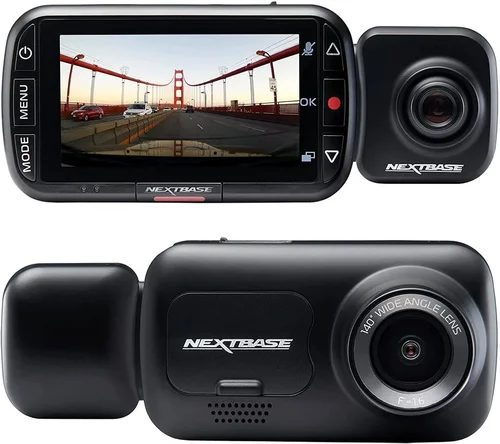
The Nextbase 522GW represents the gold standard in mid-range dash cams, offering premium features typically reserved for higher-priced models. Priced around $180, it includes 1080p recording with superior dynamic range, built-in Alexa voice control, emergency SOS button, and cloud connectivity via the Nextbase App+. Its impressive 130-degree FOV captures three traffic lanes comfortably while minimizing distortion through advanced image correction algorithms. The inclusion of parking mode with motion detection and impact sensing ensures protection even when unattended. Users praise its intuitive interface, reliable performance, and responsive customer support. As a British brand with decades of automotive electronics experience, Nextbase combines innovation with dependable build quality—making this the ideal choice for travelers wanting professional-grade protection at consumer-friendly pricing.
Best Premium Option
The Garmin Dash Cam 67W stands out with its sleek European design, exceptional image stabilization, and seamless integration with Garmin navigation systems. Priced at approximately $220, it utilizes Garmin’s renowned imaging technology to deliver crisp, stable footage even during rapid acceleration or braking. The built-in GPS provides accurate location tagging and speed logging, while the microphone captures clear cabin audio without background noise. Unlike many competitors, Garmin includes lifetime map updates and free access to the QuikGPS app for convenient video management. Its compact form factor and discreet appearance make it ideal for luxury vehicles where aesthetics matter. Additional features include lane departure warnings, forward collision alerts, and automatic recording activation. While lacking dual-lens capability, its forward-facing excellence makes it perfect for drivers prioritizing smooth, reliable recording above all else.
Best for Beginners
The Rexing V1P simplifies dash cam ownership with its straightforward operation and generous feature set. Available for around $90, it offers 1080p recording with impressive low-light performance thanks to its Sony IMX323 sensor. The built-in Wi-Fi enables quick smartphone pairing for instant video sharing and easy firmware updates. Its loop recording system automatically manages storage, while the G-sensor safeguards important clips during incidents. The included suction mount installs quickly without tools, and the device powers down safely when the ignition turns off. Rexing’s mobile app provides simple playback and settings adjustment, making it accessible to tech novices. While lacking advanced features like cloud backup or voice commands, its reliability, ease of use, and reasonable price point make it exceptionally welcoming for newcomers entering the dash cam world.
Best for Advanced Users
The BlackVue DR900S-2CH represents the pinnacle of consumer dash cam technology, designed for enthusiasts demanding uncompromising performance. Priced around $300 for the dual-lens version, it features 2K recording on the front camera and 1080p on the rear, capturing extraordinary detail in every direction. Its super-capacitor design withstands extreme temperatures better than lithium-ion batteries, and the built-in GPS provides precise location data with street-level accuracy. The BlackVue Cloud service enables remote viewing, parking monitoring, and automatic uploads to secure servers—ideal for travelers needing constant access to footage. Advanced users appreciate customizable settings, granular control over recording parameters, and reliable performance in challenging conditions. While its complexity requires some technical aptitude, the payoff comes in professional-grade evidence quality and comprehensive vehicle monitoring capabilities unmatched by simpler models.
Conclusion: Making the Right Choice
Selecting the best HD dash cam for road trips ultimately depends on balancing your specific needs against practical constraints like budget, technical comfort level, and intended usage scenarios. No single device fits every traveler perfectly, but understanding the key decision factors empowers you to identify the ideal match for your lifestyle. Remember that the most expensive option isn’t always the best—and conversely, overly cheap models rarely deliver reliable protection when it matters most.
Focus first on core capabilities: video quality sets the foundation for effective evidence collection, while build quality ensures durability through countless miles of travel. Secondary considerations like parking features, connectivity options, and user interface refinements enhance convenience but shouldn’t overshadow fundamental performance requirements. Always research real-world experiences from other owners rather than relying solely on marketing claims or professional reviews.
For most travelers, mid-range dash cams strike the optimal balance between capability and affordability. Models like the Nextbase 522GW or Garmin Dash Cam 67W provide professional-grade protection with user-friendly operation, making them excellent choices regardless of trip length or destination. Reserve ultra-premium systems for specialized needs requiring maximum coverage or advanced features beyond typical requirements.
Regardless of your selection, remember that proper installation, regular maintenance, and responsible usage maximize dash cam effectiveness. Keep firmware updated, rotate storage cards periodically, and familiarize yourself with local regulations regarding recording practices. With thoughtful consideration and informed decision-making, your chosen dash cam will serve as a vigilant guardian throughout countless adventures, providing peace of mind and valuable protection whenever you hit the open road.