Best Dash Cam for Construction Vehicles 2026 Guide
Construction vehicles operate in some of the most demanding environments imaginable—dusty quarries, muddy job sites, high-speed highways, and everything in between. Unlike passenger cars, these machines are exposed to extreme temperatures, constant vibration, heavy loads, and unpredictable weather conditions. That’s why selecting the right dash cam isn’t just about recording video—it’s about ensuring reliability, durability, and performance under pressure. In 2026, the market has evolved significantly, with new models offering advanced features tailored specifically for heavy equipment operators. This comprehensive guide will walk you through everything you need to know to choose the best dash cam for construction vehicles.
You’ll learn how to evaluate critical factors like resolution, storage capacity, night vision, GPS tracking, impact detection, and ruggedness. We’ll compare top-performing models across different price ranges, highlight common pitfalls to avoid, and provide expert recommendations based on real-world use cases. Whether you’re managing a fleet of bulldozers or operating a single excavator, understanding your options will help you make an informed decision that protects your investment and enhances safety.
The landscape of construction dash cams has expanded rapidly. Manufacturers now offer specialized mounts, shock-resistant designs, wide-angle lenses, cloud connectivity, and AI-powered analytics. These innovations address unique challenges such as poor lighting at night, limited space inside cabins, and the need for evidence in insurance claims or legal disputes. With so many choices available, this guide cuts through the noise to deliver actionable insights and practical advice. By the end, you’ll have a clear roadmap to selecting a dash cam that meets your operational demands without breaking the bank.

What to Look for When Buying Dash Cams
1. Rugged Build Quality & Vibration Resistance
Construction vehicles generate intense vibrations during operation—especially when moving over rough terrain or operating heavy machinery like excavators or loaders. A dash cam that can withstand constant jolts and shocks is non-negotiable. Look for models built with military-grade casing, rubberized coatings, and shock-absorbing mounts. Many professional-grade units feature IP67 or IP68 ratings, meaning they’re dustproof and waterproof. For example, the Garmin Vio Fleet series includes reinforced housings designed to survive drops up to 4 feet.
Additionally, consider whether the device uses a solid-state internal storage instead of moving parts like traditional hard drives. Solid-state memory chips don’t suffer from mechanical failure due to vibration, making them far more reliable in harsh conditions. Always verify mounting hardware too—look for adjustable arms with locking mechanisms that won’t loosen over time.
2. High-Resolution Video with Night Vision Capability
Video clarity is paramount when documenting incidents or verifying operator behavior. Aim for at least 1080p Full HD resolution, though many modern dash cams now support 4K Ultra HD, especially for front-facing units. Higher resolution means clearer details—crucial when identifying license plates, injuries, or equipment damage.
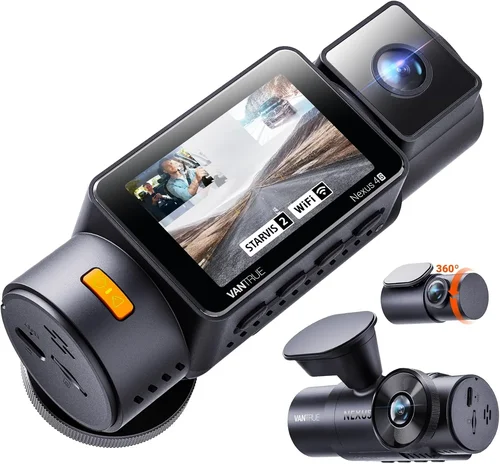
Night vision performance depends heavily on low-light sensors and infrared (IR) LEDs. However, true night vision requires more than just IR; look for cameras with large aperture lenses (f/1.6 or lower) and STARVIS image sensors (common in Sony-based models). These perform exceptionally well in near-total darkness, which is often the case on remote job sites after sunset.
Some advanced models include dual-channel recording, capturing both the road ahead and the cabin interior simultaneously. This dual perspective proves invaluable during accidents or disputes involving operators.
3. Storage Capacity & Loop Recording Functionality
Dash cams continuously record using loop recording—overwriting old footage once the storage fills up. For construction fleets, internal storage alone rarely suffices. Most professional units support microSD cards up to 256GB, allowing days or even weeks of continuous recording depending on resolution and frame rate settings.
Always choose a dash cam compatible with high-endurance microSD cards (rated for write-intensive workloads). Brands like SanDisk Extreme PRO or Samsung Pro Endurance are ideal. Also confirm whether the device supports cloud backup—a game-changer for fleet managers who need off-site access to footage without physically retrieving cards.
4. GPS Tracking & Geofencing Features
GPS functionality adds another layer of security and accountability. It logs exact location, speed, and route data alongside video—perfect for proving where a vehicle was during an incident. Some models also offer geofencing, sending alerts if a machine enters or exits designated zones (e.g., restricted areas or unauthorized work hours).
For construction companies managing multiple sites, integrated GPS helps monitor productivity and prevent misuse. Look for devices with GLONASS and Galileo support for improved accuracy in rural or forested areas where GPS signals may be weak.
5. Impact Detection & Emergency Locking
This feature automatically saves footage when sudden deceleration, collision, or impact is detected. Known as G-sensor sensitivity adjustment, it ensures critical moments aren’t lost during loop recording cycles. Construction vehicles frequently encounter bumps, potholes, and accidental impacts—this safeguard is essential.
Adjustable G-force thresholds allow customization: lower sensitivity for minor bumps (preserving battery life), higher for serious collisions. Some premium models also trigger instant email or SMS alerts to supervisors when an event occurs.
6. Power Source Options & Battery Life
Most construction dash cams draw power directly from the vehicle’s 12V or 24V DC system via cigarette lighter adapters or hardwired kits. Hardwiring eliminates battery concerns and ensures uninterrupted recording during long shifts. Always check compatibility with your specific vehicle model.
If backup power is needed during shutdowns (to preserve last-second footage), look for models with supercapacitors instead of lithium-ion batteries—they last longer and resist temperature extremes better. Supercapacitor-based units can typically save footage for up to 30 seconds after ignition is turned off.
7. Ease of Use & Mobile App Integration
A user-friendly interface matters, especially for operators who may not be tech-savvy. Touchscreen displays with intuitive menus reduce training time and minimize errors. Voice control or button shortcuts are helpful in noisy cabins.
Mobile apps (iOS/Android) enable remote viewing, playback, configuration, and firmware updates. Cloud sync through apps lets managers review footage instantly from their phones or tablets—no need to return to the machine.
8. Warranty & Customer Support
Given the harsh operating environment, a strong warranty is a sign of confidence in product quality. Reputable brands offer 2–5 year warranties covering defects and sometimes even accidental damage. Check if customer service is responsive and knowledgeable about industrial applications.
Different Types of Dash Cams

Common Buying Mistakes to Avoid
❌ Mistake: Ignoring Environmental Durability
Why it’s bad: Assuming all dash cams perform equally in dusty, wet, or hot environments leads to frequent failures. Construction sites expose equipment to moisture, debris, and temperature swings beyond -4°F to 140°F (-20°C to 60°C). A cheap plastic unit may crack or stop working within months.
What to do instead: Prioritize IP-rated enclosures and test the device’s operating temperature range before purchase. Look for certifications like MIL-STD-810G for shock and vibration resistance.
❌ Mistake: Choosing Low-Resolution Cameras
Why it’s bad: 720p or lower resolution makes it nearly impossible to read license plates or identify facial features in disputes. During low-light conditions, pixelated footage becomes useless.
What to do instead: Invest in at least 1080p Full HD, preferably with HDR or WDR (Wide Dynamic Range) to handle high-contrast scenes like tunnel entrances or direct sunlight.
❌ Mistake: Overlooking Storage Management
Why it’s bad: Running out of storage mid-shift means losing hours of critical footage. Without cloud integration, retrieving cards from dozens of machines wastes time.
What to do instead: Choose models with expandable storage and optional cloud plans. Set automatic deletion policies based on retention needs (e.g., keep 7 days locally, archive older clips online).
❌ Mistake: Skipping GPS or Event Logging
Why it’s bad: Footage alone isn’t enough—without timestamps and locations, you can’t prove where an incident occurred or how fast the vehicle was going.
What to do instead: Enable GPS logging and sync it with video frames. Use geofencing to monitor unauthorized movements.
❌ Mistake: Neglecting Power Stability
Why it’s bad: Voltage spikes from diesel engines can fry sensitive electronics. Poor wiring causes intermittent recording or total shutdowns.
What to do instead: Install fuses and voltage regulators. Use professional-grade wiring harnesses rated for heavy-duty applications.
❌ Mistake: Not Testing Before Full Deployment
Why it’s bad: Deploying hundreds of untested units leads to returns, complaints, and downtime. What works in a lab may fail in real-world chaos.
What to do instead: Pilot-test 3–5 units on different machines for at least one week. Collect feedback from operators and maintenance crews.
Budget Guidelines: How Much Should You Spend?
Entry-Level ($80 – $150): Basic Protection for Small Operations
This tier suits small contractors with one or two vehicles. Expect 1080p recording, loop mode, basic motion detection, and standard mounts. Brands like Rexing or VIOFO offer reliable entry-level models. While durable enough for light duty, they lack advanced features like dual-lens recording or cloud connectivity. Ideal for subcontractors needing simple evidence capture without complexity.
Mid-Range ($150 – $300): Sweet Spot for Growing Fleets
The sweet spot offers excellent balance between cost and capability. You’ll find 2K/4K resolution, dual-lens systems, GPS, impact detection, and mobile app support. Models like the Garmin Vio Fleet or BlackVue DR970X-2CH fall here. These devices handle moderate abuse and integrate well into growing operations. Most construction managers find this range sufficient for daily needs.
Premium ($300 – $600): Professional-Grade Reliability
Top-tier dash cams feature military-grade builds, AI analytics, thermal imaging options, and seamless fleet management software. The Thinkware U1000 or Nextbase 622GW represent this category. They’re built to survive years of punishing use and come with enterprise support. Best for mid-to-large companies prioritizing ROI through reduced liability claims and improved safety metrics.
Luxury ($600+): Future-Proofing with Cutting-Edge Tech
Ultra-premium models include features like 360-degree surround view, facial recognition, predictive braking alerts, and satellite communication. Rarely necessary for most users, but valuable for high-risk operations like mining or oilfield transport. Consider only if your budget allows and regulatory requirements demand maximum transparency.
Expert Tips for Getting the Best Deal
- Buy During Offseason Sales: Construction equipment sales dip in winter. Retailers like Amazon, B&H Photo, or specialized distributors often discount dash cams in Q1 and Q3.
- Bundle for Fleet Discounts: Purchasing 10+ units usually unlocks volume pricing. Ask vendors about bulk deals—many include free installation or extended warranties.
- Check Refurbished Options: Certified refurbished models from reputable sellers (like Best Buy Outlet or manufacturer sites) can save 20–30% with full warranties.
- Verify Return Policies: Ensure you can test hardware in actual field conditions. Some vendors require proof of installation before accepting returns.
- Look for Firmware Updates: Choose brands committed to regular updates. This future-proofs your investment and adds features over time.
- Compare Shipping Costs: Online retailers sometimes charge more for expedited shipping. Factor this into total cost—local dealers might be cheaper despite higher sticker prices.
- Ask About Trade-In Programs: Some manufacturers accept old dash cams toward new purchases. Useful for upgrading aging fleets incrementally.

Frequently Asked Questions
Q: Can I install a dash cam myself, or do I need a professional?
A: Simple single-lens units can be installed by most DIYers using provided wiring kits. However, hardwiring, multi-camera setups, or integrating with existing vehicle systems require electrical knowledge. For complex installations, consult certified technicians familiar with heavy equipment wiring standards.
Q: Will a dash cam drain my vehicle’s battery?
A: Modern dash cams consume minimal power—typically 1–3 watts when recording. When hardwired with proper fusing, they pose no risk. Supercapacitor-based models even draw zero current when parked unless triggered by an event.
Q: How much footage can a 64GB microSD card hold?
A: At 1080p/30fps, expect ~6–8 hours of recording. At 4K/30fps, reduce to ~1.5–2 hours due to larger file sizes. Adjust bitrate settings to extend storage—lower quality = longer duration.
Q: Do dash cams work in extreme cold or heat?
A: Yes—but only if rated for those conditions. Most consumer models fail below -4°F or above 140°F. Industrial-grade units operate from -4°F to 140°F (-20°C to 60°C) reliably.
Q: Is cloud storage secure for sensitive footage?
A: Reputable providers use AES-256 encryption and comply with GDPR/HIPAA where applicable. Avoid free tiers without audit trails. Always read privacy policies before uploading.
Q: Can I use a dash cam as a security camera when parked?
A: Some models support parking mode with motion detection or time-lapse recording. Ensure your chosen device has this feature and sufficient standby power (via capacitor or hardwire).
Q: Are there legal restrictions on dash cam usage?
A: Laws vary by region. In the U.S., recording public roads is generally legal, but audio recording laws differ by state. Always check local regulations—some prohibit recording others’ vehicles or conversations.
Q: How often should I replace my dash cam?
A: Every 3–5 years under normal use. Replace sooner if experiencing laggy performance, corrupted files, or physical damage. Technology evolves quickly—older models may lack critical safety features.
Q: Can dash cams detect drowsy or distracted driving?
A: Advanced AI models analyze eye movement, head position, and lane departure patterns. While not perfect, they provide coaching alerts that improve awareness and reduce incidents over time.
Q: What’s the difference between loop recording and event locking?
A: Loop recording overwrites old clips automatically. Event locking preserves footage during impacts or manual triggers. Both coexist—loop fills storage, while locked clips stay protected indefinitely (or until manually deleted).
Our Final Recommendations
Best for Budget-Conscious Buyers: VIOFO A119 V3
This compact, reliable 2K dash cam delivers exceptional value. With Sony STARVIS sensor technology, it captures vivid nighttime footage and includes GPS, impact detection, and a suction cup mount. Priced around $120, it’s perfect for small contractors needing dependable evidence without frills. Its compact size fits almost any cabin, and the loop recording ensures continuous coverage.
Best Overall Value: Garmin Vio Fleet
Garmin combines rugged engineering with smart features. The Vio Fleet offers 1080p recording, dual-lens option, live streaming, and integration with Garmin’s fleet dashboard. It’s designed specifically for commercial vehicles and withstands extreme conditions. At $250, it’s a steal for medium-sized fleets seeking professional-grade reliability.
Best Premium Option: Thinkware U1000
The Thinkware U1000 sets the gold standard. With 4K resolution, HDR, WiFi, GPS, and cloud sync, it outperforms competitors. Its aluminum housing resists corrosion and vibration. Ideal for large operators who demand crystal-clear footage and centralized management. Priced at $380, it justifies its cost through durability and advanced analytics.
Best for Beginners: Rexing V1P
Easy setup, intuitive interface, and robust build make the Rexing V1P beginner-friendly. It records 2K video, includes parking mode, and connects via mobile app. No technical expertise required. Great for new entrants to construction management who want hassle-free protection.
Best for Advanced Users: BlackVue DR970X-2CH Cloud
BlackVue leads with cloud-enabled dual-lens recording, real-time GPS tracking, and AI-powered event detection. Its proprietary server software allows instant remote access from anywhere. Perfect for tech-savvy fleet managers needing scalable, intelligent surveillance. At $320, it’s worth every penny for those maximizing efficiency.
Best Multi-Camera System: Owlstone Technologies OWL-Fleet Pro
For sprawling sites, the OWL-Fleet Pro provides up to 16 synchronized cameras with centralized NVR control. Features include thermal imaging, license plate recognition, and predictive maintenance alerts. Tailored for mega-projects like airports or ports. Pricing starts at $1,200—investment justified by comprehensive oversight.
Conclusion: Making the Right Choice
Selecting the best dash cam for construction vehicles in 2026 requires balancing durability, functionality, and budget. Prioritize ruggedness first—your device must survive what your machines endure. Then consider resolution, storage, and smart features that align with your operational needs. Whether you manage a single excavator or a hundred-ton fleet, investing wisely today prevents costly surprises tomorrow.
Remember, the cheapest option rarely delivers long-term savings. A durable, feature-rich dash cam reduces insurance premiums, deters fraud, improves safety compliance, and provides irrefutable evidence when disputes arise. Take time to pilot-test options, consult fellow contractors, and leverage expert reviews.
By aligning technology with real-world demands, you’ll enhance accountability, protect assets, and drive safer, more efficient operations across every job site. The right dash cam isn’t just a gadget—it’s a strategic tool for modern construction leadership.