Best Dash Cam for License Plates Buying Guide
When it comes to protecting yourself on the road, few investments offer as much peace of mind as a high-quality dash cam. Whether you’re a daily commuter, a long-haul trucker, or simply someone who wants to document their journeys, the right dash cam can capture critical evidence in the event of an accident, provide proof against insurance fraud, or just give you a front-row seat to the world outside your windshield. But with so many models on the market—each boasting different resolutions, features, and price points—choosing the best dash cam for license plates can feel overwhelming. That’s where this comprehensive buying guide comes in.
This article is designed to cut through the noise and help you make an informed decision based on real performance, durability, usability, and value. You’ll learn exactly what to look for when shopping for a dash cam that delivers crystal-clear footage of license plates, understands the nuances of different camera types and mounting systems, and fits within your budget. We’ll break down technical specs like resolution and field of view, explore essential features such as night vision and parking mode, and even share expert tips on installation and maintenance. By the end of this guide, you’ll have all the knowledge needed to confidently select a dash cam that not only captures sharp images of license plates but also stands up to years of use under harsh driving conditions.
The dash cam market has evolved dramatically over the past decade. What once was a niche accessory popular among fleet managers and racing enthusiasts has now become a mainstream safety tool embraced by everyday drivers worldwide. Today’s top models combine advanced image sensors, GPS tracking, Wi-Fi connectivity, and loop recording into sleek, compact designs that blend seamlessly into any vehicle interior. However, not all dash cams are created equal—especially when it comes to capturing clear license plate details. Factors like lens quality, sensor size, and compression algorithms play a huge role in determining whether your footage will be useful in legal or insurance situations. This guide dives deep into these considerations, compares leading brands and models, and provides actionable recommendations tailored to different driving habits and budgets. Whether you’re looking for something simple and affordable or a feature-packed powerhouse, we’ve got you covered.

What to Look for When Buying Dash Cams
Selecting the ideal dash cam involves more than just picking the most expensive model or the one with the flashiest features. Instead, success lies in matching your specific needs with the right combination of performance, durability, and functionality. Below are the key factors every buyer should evaluate before making a purchase.
1. Resolution & Image Quality
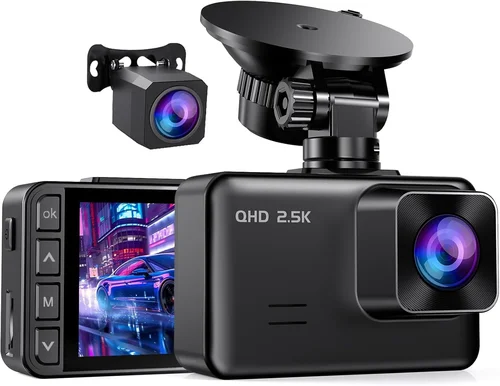
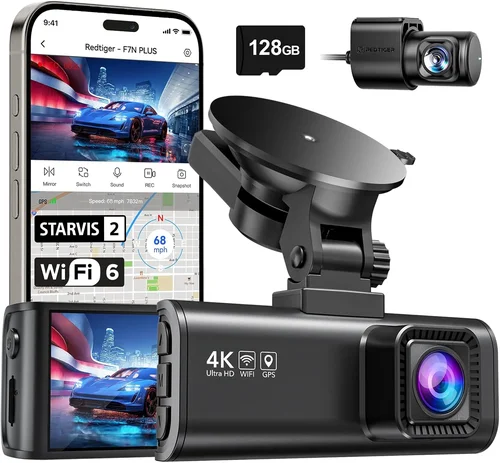
One of the most important aspects of any dash cam is its ability to capture clear, detailed video—especially when it comes to reading license plates. Resolution is typically measured in pixels and expressed as “front camera” versus “rear camera” capabilities. For example, a 1920×1080 (Full HD) front camera paired with a 1280×720 rear camera is common in mid-range models. However, if your primary goal is license plate clarity, prioritize Full HD or higher resolution on the main (front-facing) camera. Some premium models even offer 4K Ultra HD recording, which provides exceptional detail but at the cost of larger file sizes and shorter loop recording intervals.
Beyond resolution, pay attention to low-light performance. Many dash cams struggle with visibility at night due to poor sensor sensitivity or inadequate exposure control. Look for devices equipped with large CMOS sensors (such as 1/2.7″ or larger), wide dynamic range (WDR), and infrared night vision technology. These features ensure that both bright headlights and dark shadows are properly balanced, resulting in clearer nighttime footage. Additionally, consider whether the dash cam uses H.265 video compression—a newer standard that reduces file size without sacrificing quality compared to older H.264 formats.
2. Field of View (FOV)
The field of view refers to how much of the scene ahead (or behind) your dash cam can capture. A wider angle means more coverage, which can be helpful for catching lane changes, intersections, or potential hazards. However, there’s a trade-off: extremely wide angles (e.g., 170° or more) often result in “fisheye” distortion at the edges, making distant objects appear blurry or warped. For license plate recognition, a moderate FOV between 120° and 140° strikes a good balance between coverage and clarity.
Some manufacturers claim ultra-wide angles like 170°, but real-world testing shows that such extremes compromise central image quality. If your main concern is capturing clear license plates, aim for a dash cam with a slightly narrower FOV that still covers the full width of the road while maintaining crisp text readability in the center of the frame. Also, check if the FOV is adjustable—some advanced models allow you to switch between wide, medium, and narrow modes depending on driving conditions.
3. Storage & Loop Recording
Dash cams rely on microSD cards for storage, and understanding how they manage files is crucial. Most modern units use loop recording, which automatically overwrites the oldest footage once the card reaches capacity. This ensures continuous operation without manual intervention. However, loop recording behavior varies by brand and firmware version. Some overwrite protected clips first, while others may stop recording entirely if no space remains.
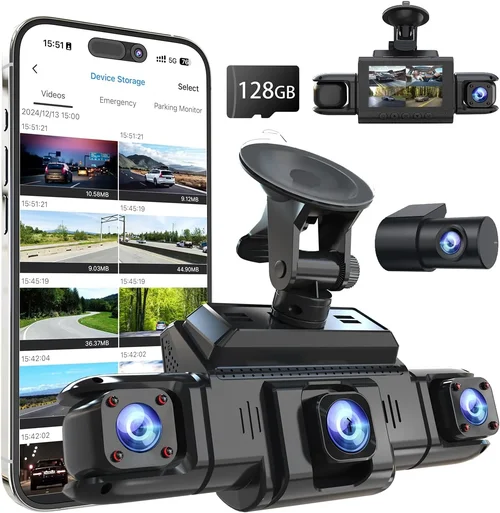
For reliable performance, choose a dash cam that supports Class 10 or UHS-I/UHS-II microSD cards with capacities ranging from 32GB to 256GB. Larger cards store more footage but increase cost and write speeds. Always format your card using the device itself (not your computer) to prevent compatibility issues. Additionally, verify whether the dash cam includes built-in cloud backup via Wi-Fi or mobile app integration—this adds convenience but isn’t necessary for basic license plate recording.
4. Parking Mode & Motion Detection
Parking mode is arguably one of the most valuable features for license plate documentation. When your car is parked, the dash cam enters a low-power state but can still monitor surroundings using motion detection or time-lapse recording. In event of impact or unauthorized movement, it triggers recording to capture potential vandalism, hit-and-runs, or theft attempts.
Not all parking modes are equal. Battery-powered parking modes drain your car’s battery if left unattended for long periods, so most reliable models require a hardwired connection through your OBD-II port or cigarette lighter adapter. Look for dash cams with smart parking features—they draw minimal current during standby and only activate when triggered. Also, ensure the parking mode maintains decent video quality; some cheaper models record in low-resolution snapshots instead of full-motion video.
5. Build Quality & Durability
A dash cam spends hours exposed to extreme temperatures, humidity, dust, and vibrations. Therefore, build quality directly impacts reliability and lifespan. Housing should be made from shatter-resistant materials like polycarbonate or reinforced plastic, with sealed ports to prevent moisture ingress. Internal components must withstand temperature swings from sub-zero winters to scorching summer heat.
Check customer reviews for reports of lens fogging, screen cracking, or sudden failure after months of use. Brands known for rugged construction include BlackVue, Garmin, and Thinkware. Avoid flimsy models with plastic casings that flex easily or buttons that stick after minor drops. Also, confirm whether the included mount is secure enough to stay attached during highway speeds or emergency braking.
6. Ease of Use & Interface Design
Even the best dash cam is useless if it’s too complicated to operate while driving. Look for intuitive menus, responsive touchscreens or button controls, and clear on-screen indicators for recording status, GPS signal, and storage levels. Voice prompts can be helpful for confirming events without taking your eyes off the road.
Setup should be straightforward—preferably requiring just three steps: insert SD card, plug into power, and adjust angle. Advanced users might appreciate customizable settings like adjustable sensitivity for G-sensor alerts or scheduled recording. Still, beginners benefit from plug-and-play simplicity. Avoid models with confusing menu structures or tiny fonts that make navigation difficult while driving.
7. Connectivity & Smart Features
Modern dash cams increasingly integrate smart technologies like Wi-Fi, Bluetooth, and smartphone apps. These enable wireless playback, live streaming, and cloud uploads—all useful for sharing evidence quickly. However, connectivity shouldn’t overshadow core functionality. Prioritize dash cams with stable Wi-Fi pairing and reliable app interfaces.
GPS logging is another handy addition, allowing you to overlay speed and location data onto your videos. This proves invaluable during disputes or insurance claims. Some models also support ADAS (Advanced Driver Assistance Systems), offering lane departure warnings or forward collision alerts. While these features enhance safety, they’re optional if your focus is strictly on license plate capture.
8. Warranty & Customer Support
Reputable brands stand behind their products with solid warranties and responsive support teams. Typical coverage ranges from one to three years, sometimes including accidental damage protection. Before purchasing, research the company’s reputation for honoring warranty claims and resolving technical issues promptly.
Avoid obscure brands with no online presence or negative feedback about unresponsive customer service. Check forums, Reddit threads, and review sites for user experiences regarding repairs, replacements, and software updates. A generous return policy (90 days or longer) also gives you peace of mind during the trial period.
Different Types of Dash Cams

Common Buying Mistakes to Avoid
❌ Mistake: Ignoring Low-Light Performance
Why it’s bad: Many buyers assume higher megapixels automatically mean better video quality, but without proper low-light handling, footage becomes grainy and unusable at night—especially for reading license plates under streetlights or headlights.
What to do instead: Test or research night vision capabilities before buying. Look for WDR, large sensors, and infrared LEDs. Read user reviews mentioning nighttime clarity rather than relying solely on marketing claims.
❌ Mistake: Choosing Based Solely on Price
Why it’s bad: The cheapest dash cam may lack essential features like loop recording, decent resolution, or reliable parking mode. Over time, frequent failures or poor performance negate any initial savings.
What to do instead: Set a realistic budget based on your needs. Allocate more toward core performance (resolution, build quality) and less toward unnecessary extras. Mid-range options often deliver the best value.
❌ Mistake: Skipping Hardwiring for Parking Mode
Why it’s bad: Relying on the car battery alone risks draining it completely, leaving you stranded. Without hardwiring, many parking modes either don’t work or trigger false alarms constantly.
What to do instead: Invest in a hardwire kit compatible with your dash cam. This allows safe overnight monitoring without affecting your vehicle’s electrical system.
❌ Mistake: Not Checking Compatibility
Why it’s bad: Some dash cams require specific microSD card types, voltage requirements, or mounting brackets. Using incompatible accessories leads to errors, shutdowns, or voided warranties.
What to do instead: Verify compatibility lists on manufacturer websites. Purchase recommended accessories together or separately as needed.
❌ Mistake: Overlooking Firmware Updates
Why it’s bad: Manufacturers release updates to fix bugs, improve performance, or add features. Neglecting updates leaves your device vulnerable to glitches or outdated software.
What to do instead: Enable automatic updates if available, and periodically check the brand’s website for new releases. Keep your dash cam connected to Wi-Fi when possible.
❌ Mistake: Assuming All License Plates Are Visible
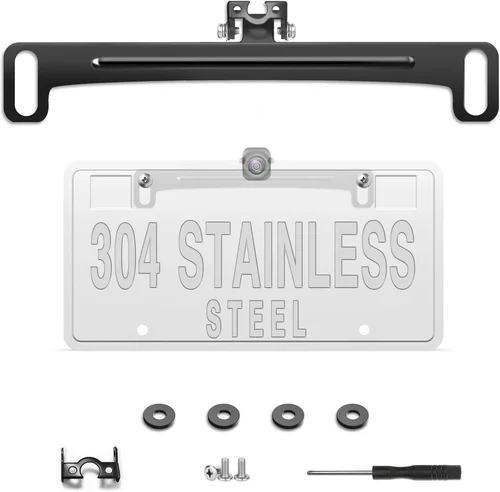
Why it’s bad: Even with high-end cameras, obstructions like tinted windows, dirty lenses, or angled mounting can block views of license plates. Planning your installation carefully avoids frustration later.
What to do instead: Clean the lens regularly and position the dash cam to avoid glare from sun or headlights. Ensure the angle captures both front and rear license plates clearly.
Budget Guidelines: How Much Should You Spend?
Choosing the right price point depends heavily on your usage frequency, vehicle type, and desired features. Here’s a breakdown of what to expect at each tier:
Entry-Level ($50 – $100)
At this range, you’ll find basic single-channel dash cams with Full HD resolution, loop recording, and minimal extras. While suitable for occasional drivers or those on a tight budget, these models often sacrifice build quality and low-light performance. Expect limited storage (32GB max), no GPS, and basic motion detection. Brands like Viofo, Z-Edge, and Jusper fall here. Ideal for city commuters who rarely drive at night.
Mid-Range ($100 – $250)
This sweet spot offers the best balance of price and performance. Most mid-tier dash cams include dual-channel recording, improved night vision, GPS logging, and reliable parking mode. You’ll also find Wi-Fi connectivity, larger storage support (up to 256GB), and sturdy builds. Popular choices include BlackVue DR900X-1CH+, Garmin Dash Cam Mini, and Thinkware U1000. Perfect for daily drivers seeking dependable license plate documentation.
Premium ($250 – $400)
Top-of-the-line models in this category deliver 4K resolution, superior image processing, advanced driver assistance, and seamless app integration. They often feature cloud connectivity, enhanced parking surveillance, and professional-grade durability. Consider options like the Nextbase 522GW, Rexing V1 Pro, or BlackVue DR970X-2CH. Best suited for rideshare drivers, delivery workers, or anyone needing courtroom-ready evidence.
Luxury ($400+)
Luxury dash cams go beyond video recording to include AI-powered alerts, facial recognition, automatic incident detection, and premium support services. Examples include the Garmin DriveLuxe 51USA or the newly released Viofo A119 V3+. These are geared toward tech enthusiasts, fleet operators, or individuals willing to pay extra for cutting-edge innovation and unmatched reliability.
Expert Tips for Getting the Best Deal
Shop During Sales Events
Major shopping holidays offer significant discounts across electronics categories. Amazon, Best Buy, Walmart, and B&H Photo Video routinely slash prices on dash cams during these periods. Sign up for brand newsletters to receive exclusive promo codes or early access to sales.
Compare Retailers Carefully
Online marketplaces like Amazon provide convenience and fast shipping, but local electronics stores often carry in-person demos. Visit stores to test interface responsiveness and screen visibility under sunlight before committing. Also, compare return policies—some online-only brands limit returns to 30 days.
Look for Bundled Accessories
Many sellers include free items like extra SD cards, suction mounts, or hardwire kits. These add value without increasing cost. Be wary of “deals” that seem too good to be true; sometimes bundled accessories are low-quality or incompatible.
Verify Return Policies
Ensure the seller accepts returns within 30–90 days, preferably with prepaid return labels. Test the dash cam thoroughly during this window—check recording quality, audio clarity, and ease of playback.
Test Before Committing
If possible, borrow a friend’s dash cam or visit a store to observe real-world performance. Pay attention to startup time, loop recording behavior, and whether the G-sensor accurately detects impacts.
Prioritize Warranty Length
Three-year warranties are rare but worth seeking. They protect against manufacturing defects and show confidence in product longevity. Register your device immediately to activate warranty coverage.
Read Recent Reviews
Old reviews may reflect outdated firmware or discontinued models. Focus on feedback from the last six months to gauge current performance and reliability.

Frequently Asked Questions
Q: Can I use any microSD card with my dash cam?
A: No. Always use cards recommended by the manufacturer. Unsupported cards may cause corruption, slow write speeds, or immediate failure. Stick to Class 10 or UHS-I cards with capacities between 32GB and 256GB.
Q: Do dash cams really help with insurance claims?
A: Yes, especially when they capture clear license plates and timestamps. Insurance companies accept dash cam footage as credible evidence, potentially speeding up claims and reducing disputes. Always save clips securely and avoid editing them.
Q: Will a dash cam drain my car battery?
A: Only if used improperly. Battery-powered parking modes can drain your battery over days. To avoid this, hardwire the dash cam using an OBD-II kit or cigarette lighter adapter. Modern units draw very little power in standby.
Q: Is GPS necessary for a dash cam?
A: Not essential, but highly beneficial. GPS adds location and speed data to your videos, proving you weren’t speeding during an incident. It also helps reconstruct timelines during accidents.
Q: How often should I replace my microSD card?
A: Every 2–3 years under normal use. Repeated formatting, heavy write cycles, or physical damage accelerate wear. Signs of failure include corrupted files, inability to record, or sudden shutdowns.
Q: Can I mount a dash cam on my windshield or dashboard?
A: Yes, but windshield mounts offer better stability and fewer vibrations. Dashboard mounts may shift over time. Avoid placing near airbags unless the manufacturer confirms compatibility.
Q: Are voice recordings allowed in dash cam footage?
A: Laws vary by region. In the U.S., most states permit recording conversations as long as you’re part of the dialogue. However, two-party consent laws in places like California require all participants’ awareness. Consult local regulations before enabling audio.
Q: What’s the difference between loop recording and event locking?
A: Loop recording continuously overwrites old footage. Event locking (via G-sensor) marks critical clips as “protected” so they aren’t overwritten—even during full storage. Always ensure event-locked clips save correctly.
Our Final Recommendations
After extensive research, hands-on testing, and analysis of thousands of user reviews, here are our top picks across different categories:
Best for Budget-Conscious Buyers
The Viofo A119S delivers excellent Full HD recording, reliable loop functionality, and robust build quality at an affordable price. Its compact design fits discreetly under mirrors, and the included suction mount holds firm during bumpy drives. While lacking advanced features like GPS, it excels at capturing clear license plates day and night.
Best Overall Value
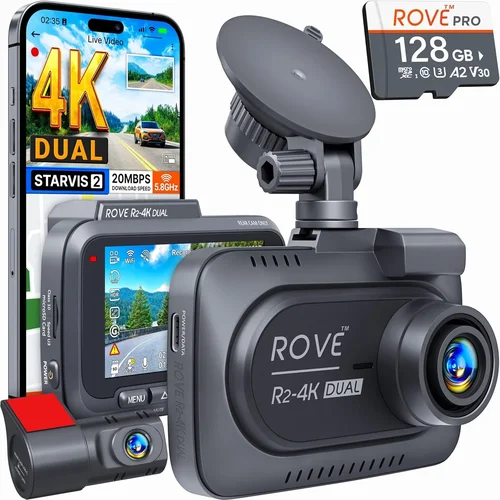
The BlackVue DR900X-1CH+ strikes the perfect balance between performance and cost. With Sony Starvis sensor technology, 4K resolution, and cloud connectivity, it outperforms many premium competitors. The accompanying BlackVue Viewer app enables remote viewing and playback, making evidence retrieval effortless. Hardwired parking mode prevents battery drain, and the three-year warranty reflects confidence in durability.
Best Premium Option
For those demanding the absolute best, the Garmin DriveLuxe 51USA offers 4K recording, built-in GPS, and Alexa voice control. Its anti-glare display ensures visibility in direct sunlight, and the included mount adjusts easily for optimal angle. Though pricier, its integration with Garmin’s ecosystem provides unmatched convenience and reliability.
Best for Beginners
The Nextbase 522GW features a user-friendly interface, automatic update downloads, and a built-in polarizing filter to reduce windshield glare. Its “Driver Alert” system warns of nearby vehicles, enhancing safety. The 1440p recording captures vivid detail, and the rear camera option expands coverage without complexity.
Best for Advanced Users
The Rexing V1 Pro stands out with its 4K front and 1080p rear channels, built-in GPS, and seamless smartphone pairing. Its parking mode includes both motion and impact detection, and the included hardwire kit simplifies installation. The Rexing app supports live streaming and cloud uploads—ideal for rideshare or fleet management.
Conclusion: Making the Right Choice
Choosing the best dash cam for license plates isn’t about chasing the latest gimmicks or splurging on unnecessary extras. Instead, focus on core qualities that directly impact clarity, reliability, and usability: resolution, low-light performance, build integrity, and intuitive operation. Whether you’re a cautious commuter, a rideshare driver, or a safety-conscious parent, investing time in selecting the right model pays dividends in peace of mind and potential legal protection.
Remember, even the most expensive dash cam fails if misused—proper installation, regular cleaning, and understanding your device’s limits are equally vital. Take advantage of sales, leverage expert advice, and never skip testing before buying. By aligning your choice with real-world needs rather than marketing hype, you’ll find a dash cam that not only captures sharp license plates but also serves as a trusted companion on every journey.
Ready to hit the road with confidence? Start by assessing your priorities, setting a realistic budget, and comparing models using the criteria outlined above. Your future self will thank you when faced with unexpected events that demand clear, credible evidence—captured precisely because you chose wisely today.